Customer Ratings & Reviews
- Model:
- GA03178-US
- SKU:
- 11081093
Rating by feature
- Value
Rating 4.4 out of 5 stars
- Quality
Rating 4.6 out of 5 stars
- Ease of Use
Rating 4.5 out of 5 stars
- Cons mentioned:App compatibility
Odd design decisions
||Posted .This reviewer received promo considerations or sweepstakes entry for writing a review.Hmm. Has a few issues: Doesn’t seem to work in the Nest app, only Google Home. However, in Google Home on an iPhone, you can’t fully mute the audio when viewing the feed. So, can’t view in a meeting! Very strange. Also, tough to get the right angle since the camera only rotates certain directions. Just feels poorly designed compared to their other products.
No, I would not recommend this to a friendBrand response from Nest Support
Posted .Hi aceharding, we’re grateful to have your feedback about the Nest Cam (Wired). We’re sorry to learn about your issues with the audio settings, and with getting the right camera angle.
Audio settings let you turn the microphone off, or disable audio recording so sound won’t be saved in video history and won’t receive any sound alerts, but you will still hear sound on the live video stream.
Your camera has a wide-angle lens, so you have a lot of options for placing it in a good spot to catch activity. Your camera gets a better view of people when it’s placed at head level or a little higher. Adjust the angle so your camera’s looking slightly downward and it can easily view people’s faces, even if they’re wearing a hat. Use the app to check that you can clearly view people’s faces before you permanently mount it. The included stand is ideal for simply placing your camera indoors on a shelf, desk or counter. Just plug in the power cord and adjust the camera so it points where you want. You can also mount it with the screws to a wall or other surface.
Your feedback means a lot to us and we’ll share it with our respective team to work on improving our products and services. For any concerns, or anything we can help you with, please feel free to visit us anytime here: https://support.google.com/googlenest/gethelp
- Cons mentioned:App compatibility
Does not allow you to set a schedule
||Posted . Owned for 1 week when reviewed.This reviewer received promo considerations or sweepstakes entry for writing a review.Don't get this if you want to be able to set a schedule. With this camera you are forced to use Google home vs. nest app. Google home has no way to set a schedule to receive alerts for example between 9am - 5pm. Its either all or nothing.
No, I would not recommend this to a friendBrand response from Nest Support
Posted .Hi there, Lamboking. We appreciate your feedback on Nest Cam (indoor, wired). The camera schedule feature is currently only available for cameras controlled by the Nest app. Alternatively, you can use Home & Away Routines (Home app) to turn your camera on and off automatically. This is especially useful if your camera has 24/7 video history, so that it doesn't constantly upload video to the Nest service.
Our team is working on bringing full functionality to the Google Home app so all of your cameras can be set up and controlled in one place. If help is needed, don’t hesitate to let us know here: https://support.google.com/googlenest/gethelp
- Cons mentioned:Connectivity
Nest indoor cam
||Posted . Owned for 2 weeks when reviewed.This reviewer received promo considerations or sweepstakes entry for writing a review.Good Camera but, first gen had a better response and connectivity
I would recommend this to a friendBrand response from Nest Support
Posted .Hi JuanCa, thanks for writing us feedback about the Nest Cam (Indoor, Wired), and we appreciate that you find it good. We hear your concerns about its performance and connectivity.
A range issue or wireless interference can affect the performance of your camera. Sometimes it may pass the connection test during setup, but will struggle to stay connected if it’s just a bit too far away. If you're experiencing a spotty connection or weak signal, we recommend checking your Wi-Fi network to see if your bandwidth is congested. This may happen if you have too many devices connected on the same bandwidth or if your network package is not enough to handle the data traffic on the network. Removing other connected devices to your Wi-Fi may relieve network congestion. If your camera is mounted too far from your Wi-Fi router, you may need to extend your Wi-Fi network’s range using an extender, boosters or additional Wi-Fi access points.
Here are some steps that may also help:
- Plug your Nest camera into a different power outlet to rule out power issues.
- Turn off other devices connected to your WiFi to see if this is about network traffic.
- You can also try restarting your router to reset your internet connection. You should also restart any Wi-Fi range extenders or repeaters that you have.
If the issue persists, we’d be happy to provide further troubleshooting guidance here: https://support.google.com/googlenest/gethelp
- Pros mentioned:Video quality
Nice camera
||Posted . Owned for 1 month when reviewed.This reviewer received promo considerations or sweepstakes entry for writing a review.Nice and easy product. The quality of the product is good plus the quality of the video is even better.
I would recommend this to a friend Frustrating Setup Process
||Posted . Owned for less than 1 week when reviewed.This reviewer received promo considerations or sweepstakes entry for writing a review.Like everything Nest these days, these cameras have a frustrating setup process that causes confusion - which App do I need, the Nest app or the Google Home App? Why does it say it needs an "assisting device"? How can I access the video feeds? Google has royally screwed up their acquisition of Nest, and these cameras (and all other Nest products) should be avoided until they figure out what the heck they're trying to do.
No, I would not recommend this to a friendBrand response from Nest Support
Posted .Hi clhenige, we value your feedback about the Nest Cam (indoor, wired). We’re sorry to learn of your frustrating experience with the setup process.
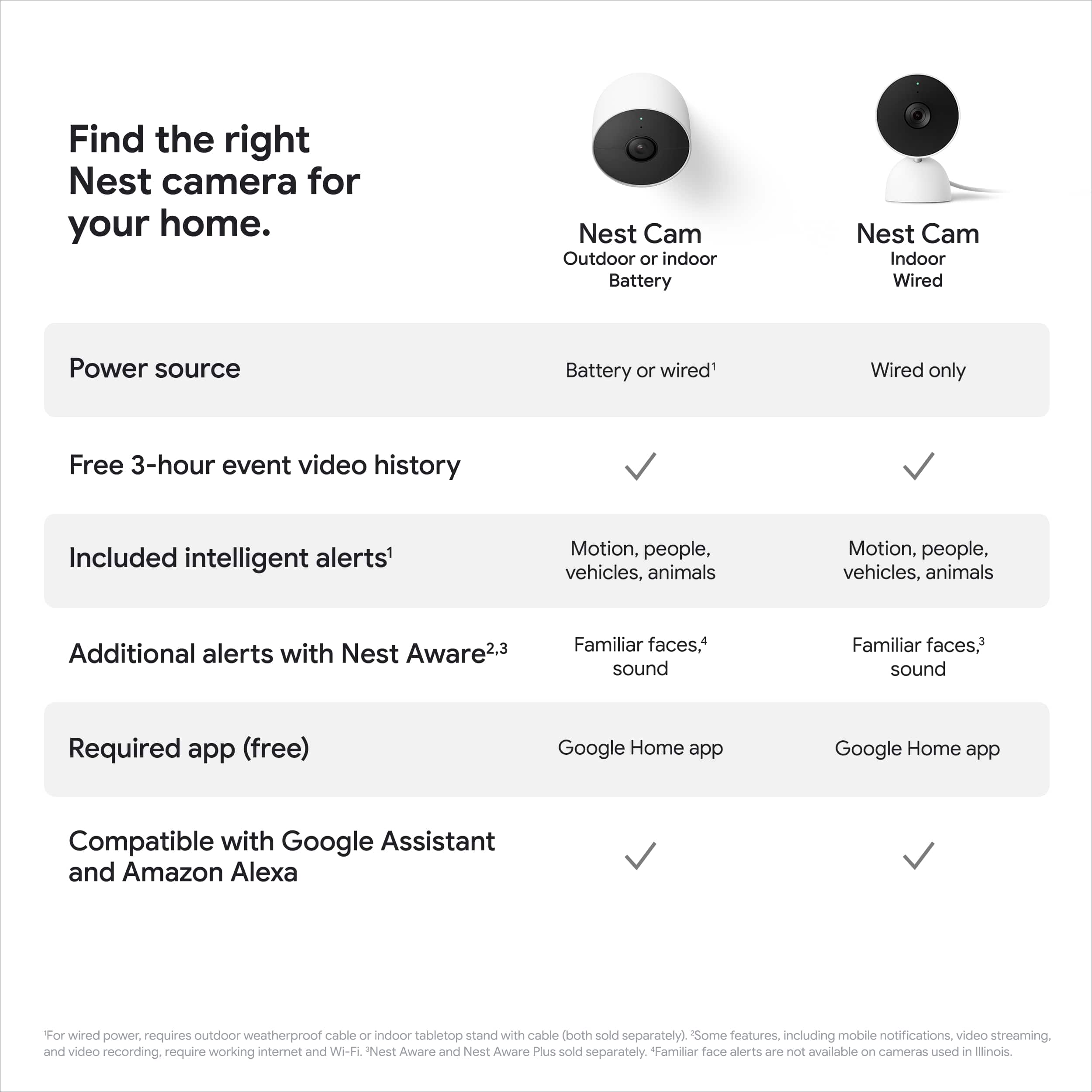
The Nest Cam (indoor, wired) is exclusive to the Google Home app. To set up, the app takes you through the steps. You need the Home app to connect your camera to Wi-Fi and get recorded video, so you should always use the app to guide you through setup and installation. Once connected to Wi-Fi and paired to your Google Home app, you can use the app to stream the live view without significant delay, look back on what happened (free 3 hour event-based video history), get activity alerts sent to your phone when something happens, save video clips, and more. You may visit this support article to learn more: https://support.google.com/googlenest/answer/9232352
We’re hoping to know more why your camera says it needs an assisting device, so we can guide you with the setup process. Please get in touch with us anytime here and we’ll help you the way we can: https://support.google.com/googlenest/gethelp
- Pros mentioned:Design
Looks good but…..
||Posted . Owned for 2 weeks when reviewed.This reviewer received promo considerations or sweepstakes entry for writing a review.Good looking product, but really don’t like the design that the cable is not detachable.
No, I would not recommend this to a friendBrand response from Google Team
Posted .Hi Steven, thanks for sharing your experience. We’re sorry to learn that Nest Cam (indoor, wired) didn’t meet your expectations. We value your feedback as it will greatly help us to improve our products and services. Our support team is always here to help. If you have any questions, feel free to contact our support team here: https://support.google.com/googlenest/gethelp

- Pros mentioned:Video quality
Good idoor camera
||Posted . Owned for 2 weeks when reviewed.This reviewer received promo considerations or sweepstakes entry for writing a review.Good quality video for live stream. I can watch live on phone what's happening in kids room.
I would recommend this to a friend Nest sux
||Posted .This reviewer received promo considerations or sweepstakes entry for writing a review.I like it woth original app now it’s trash don’t like it don’t recommend
No, I would not recommend this to a friendWould not recommend
||Posted . Owned for 5 months when reviewed.This reviewer received promo considerations or sweepstakes entry for writing a review.I would not recommend this camera as it only detects motion. It does not require 24 seven like the other ones they have.
No, I would not recommend this to a friendBrand response from Google Nest Support
Posted .Hi Alleycat,
Thanks for sharing your thoughts! Nest cameras do work with a Nest Aware subscription. Here's what you get with a Nest Aware subscription for your Nest cameras:
1. More accurate alerts about motion and sound: Get notified only when something important happens.
2. Fewer false alerts: Reduce alerts triggered by things like light changes, shadows, or branches waving in the wind.
3. Activity Zones: Customize which areas trigger notifications. Get alerts only when there's motion in specific areas, like your doorway or driveway.
4. Smoke and carbon monoxide alarm sound detection (for Nest Cam Indoor and Nest Cam IQ Indoor in the US only): Receive alerts if your Nest Cam detects the sound of your smoke or carbon monoxide alarm.
5. 24/7 video history (for Nest Wired cameras only): Review footage continuously captured by your Nest Wired camera.
If you have any further questions, feel free to contact us here: https://support.google.com/googlenest/gethelp
GOOGLE NEST CAM WIRED -SNOW
||Posted . Owned for 2 weeks when reviewed.This reviewer received promo considerations or sweepstakes entry for writing a review.Easy install. Clear recordings. Price is right and the all in one GOOGLE HOME is great.
I would recommend this to a friend- Pros mentioned:Overall performance
Great for home security
||Posted . Owned for 1 month when reviewed.This reviewer received promo considerations or sweepstakes entry for writing a review.These cameras are great. They show me when there is any activity around my home
I would recommend this to a friendBrand response from Nest Support
Posted .Hi there, thank you for sending in your feedback. We're glad to hear that you're enjoying your experience with the Nest Cam when it comes to showing activities around your home. If you need assistance with your Nest Cam or have additional questions, please don't hesitate to contact us on our Google Help page here: https://support.google.com/googlenest/gethelp
Stopped working just after 2 months
||Posted . Owned for 2 months when reviewed.This reviewer received promo considerations or sweepstakes entry for writing a review.Every Google Nest Product I've purchased has stopped working after a few months with no explanation. I bought a Nest Protect from Best Buy, a Nest Outdoor Cam from Amazon, and this Nest Wired Cam from Best Buy. I bought this 10/12 and it stopped working today, 12/31. I've reset it, gone through all the tech troubleshooting and it still won't work. I'm going to try to bring this to my local store to see if they'll exchange it for a working one... fingers crossed because it says my return window closed at the end of 10/2023.
No, I would not recommend this to a friendBrand response from Nest Support
Posted .Hi there! Thanks for bringing your concerns to our attention. We sincerely apologize for the inconvenience you've experienced with your Nest Cam (indoor, wired) and the other Nest products you've purchased. We understand the frustration of having devices cease functioning unexpectedly. We appreciate you taking the time to troubleshoot the wired camera and your initiative in seeking a solution. Given the repeated device failures, we recommend reaching out to our dedicated team of specialists on the Google Help Center here: https://support.google.com/googlenest/gethelp
Like 1st Gen over 2nd Gen
||Posted . Owned for 3 weeks when reviewed.This reviewer received promo considerations or sweepstakes entry for writing a review.I don't like it as well as the 1st generation. Can't adjust how to level the picture.
No, I would not recommend this to a friendBrand response from Nest Support
Posted .Hi HazTaz, it's unfortunate that you didn't like Nest Cam (Indoor, Wired) as well as the 1st generation Nest cameras. You can adjust the angle so you can level your Nest camera. We understand your views, and we'd like to have a closer look at what may be happening with your Nest Cam (Indoor, Wired). This will give us a chance to understand what may be causing the issue and see how we can help you best. Please consider contacting our support team here for further help: https://support.google.com/googlenest/gethelp
- Pros mentioned:Overall performance
nice little cam
||Posted . Owned for 3 weeks when reviewed.This reviewer received promo considerations or sweepstakes entry for writing a review.it works and after some hoops to jump through it integrates into smartthings too.
I would recommend this to a friend Do not buy.
||Posted . Owned for 3 weeks when reviewed.This reviewer received promo considerations or sweepstakes entry for writing a review.This is second generation. First generation was easy to install. I bought this as an additional camera. Now if you have an Apple product you have to download bluestacks and then Google Home. They do this so they can track everything you do, see or hear. Do not buy this piece of junk.
No, I would not recommend this to a friendBrand response from Nest Support
Posted .Hi Frank, thanks for sharing your insights on Nest Cam (indoor, wired), and we’re sorry to hear that your experience with the installation, and with using the Google Home app, has been less than ideal for you.
Using Google Home app provides you with a lot of benefits including access to Google's trusted security platform and access to other Google tools. This means you get a simpler interface and a simpler way to connect all your devices into a single environment. Google is committed to keeping your data private and safe. The Google Privacy Policy applies to all Google services, including the Google Home app and Google Nest, Google Home, and Chromecast devices. The Google Nest Privacy Help Center article provides more details about how Google Nest connected home devices and services work, and how we collect and use data when you use these devices and services.
Your feedback and experience are important to us. Feel free to let us know if there's anything we can help you with, here: https://support.google.com/googlenest/gethelp
- Pros mentioned:Overall performance
A piece of mind
||Posted . Owned for 4 months when reviewed.This reviewer received promo considerations or sweepstakes entry for writing a review.I have a toddler and this is the best ever what a good way to keep i eye on her
I would recommend this to a friend - Cons mentioned:Compatibility
ONLY WORKS WITH GOOGLE HOME APP NOT NEST APP
||Posted . Owned for 2 months when reviewed.This reviewer received promo considerations or sweepstakes entry for writing a review.Sad that this DOES NOT work with the Nest app. If you are loving the Nest app for your doorbells or thermostats or whatever else you have DO NOT get this cam cause it will not show up on the Nest app. It is a Google Home exclusive
No, I would not recommend this to a friendBrand response from Nest Support
Posted .Hi Kristyn, we appreciate you sharing your review on your Nest Cam (indoor, wired). We're sorry to hear that your experience didn't meet your expectations when it comes to using the Nest App. Our priority with this launch was to create an integrated experience with other Google Nest products and to make the Google Home app as the one place you can control all your Nest and other smart home devices with the Google Assistant. We appreciate your feedback and know that we'll relay this to the right team for improvements on the products and services we provide in the future.
If you have additional questions or need further assistance with your Nest Cam, please don't hesitate to contact us on our Google Help page here: https://support.google.com/googlenest/gethelp
- Pros mentioned:Overall performance
Nest Camera
||Posted . Owned for 1 month when reviewed.This reviewer received promo considerations or sweepstakes entry for writing a review.This is the best indoor camera out there. Works great and definitely recommend
I would recommend this to a friend Bad quality video compared to previous Nest cam ve
||Posted . Owned for 1 month when reviewed.This reviewer received promo considerations or sweepstakes entry for writing a review.I had hoped to replace my Nest cam with a newer model. Quality of the video is worse. And this cam is not supported by the Nest app. It must be connected to Google Home. Now I’ve got cams on both apps. Annoying!
No, I would not recommend this to a friendBrand response from Nest Support
Posted .Hello there, PinF. Thanks for giving us feedback about the Nest Cam (indoor, wired). We’re sorry to hear that your experience didn’t meet your expectations.
We understand that longtime Nest users enjoy viewing their camera feeds from the Nest app. However, our priority with this launch was building a complete experience for our new cameras and doorbell in the Google Home app. We’re working on bringing full functionality to the Home app as we want to create an integrated experience with other Nest and smart home devices. And while the new Nest cameras and doorbells are exclusive to the Google Home app, users with previous versions of Nest cameras can view their camera feeds in the Google Home app alongside the new Nest Doorbell and Nest Cams.
You can adjust your camera's video quality that may improve the resolution. The higher the video quality setting you choose, the sharper and more detailed your footage can be, but it also uses more of your internet bandwidth. This setting lets you choose the maximum video quality for your camera. But whichever level you pick, your camera will automatically adjust its resolution and compression according to how much bandwidth is available. Check this link to learn more: https://support.google.com/googlenest/answer/9218596
We’d be happy to share your feedback with the right team for future improvements. In the meantime, please feel free to let us know if you need further assistance by visiting us here: https://support.google.com/googlenest/gethelp
Buyer Beware - does not work with Nest App
||Posted . Owned for less than 1 week when reviewed.This reviewer received promo considerations or sweepstakes entry for writing a review.Google forces you into their inferior Google Home app and will not allow you to use the Nest app for a Nest camera. Ridiculous - will be returning this item.
No, I would not recommend this to a friendBrand response from Nest Support
Posted .Hi there, Rich. We're sorry to learn that your experience with Nest Cam (indoor, wired) and the performance of the Google Home app has been frustrating and that you're planning to return the device. We appreciate you sharing your concerns and have taken note of your feedback. We aim to deliver a great user-experience for the Google Home app, and your feedback inspires us to do more. If you need any help in the future, our team of dedicated specialists are standing by to assist you with exploring what else the Google Home app can do for you and improve on your overall experience. Please let us know and reach us on our Google Nest Help page here: https://support.google.com/googlenest/gethelp