Customer Ratings & Reviews
- Model:
- GA01998-US
- SKU:
- 10947893
Rating by feature
- Value
Rating 4.4 out of 5 stars
- Quality
Rating 4.6 out of 5 stars
- Ease of Use
Rating 4.5 out of 5 stars
Screw best buy
||Posted . Owned for more than 2 years when reviewed.This reviewer received promo considerations or sweepstakes entry for writing a review.Picked it up off the shelf, where it was priced at $69.99. Rang up as $99.99. Went back to the shelf and the tag had changed to $99.99. Salesperson just shrugged. I left empty handed. My web pages at home still showed the $69.99 price so I'm not insane. No wonder they're a dying store... prices change from the shelf to the register and not for the better!
No, I would not recommend this to a friendDuarte
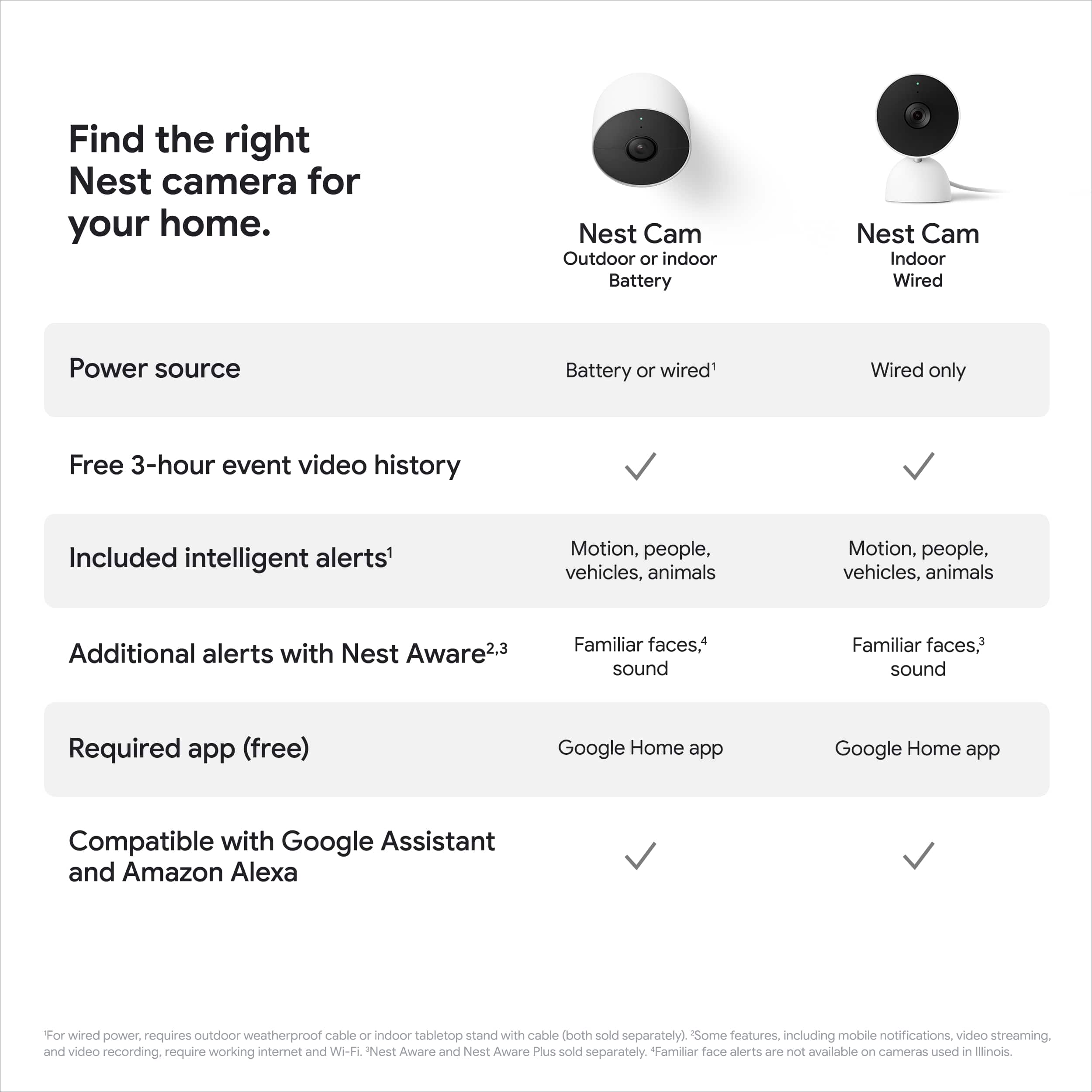
||Posted . Owned for 1 month when reviewed.This reviewer received promo considerations or sweepstakes entry for writing a review.Thought it had more memory, it only allows for 3 hours of saved footage, very disappointing. Had I known that I would have selected another camera, bummer.
No, I would not recommend this to a friendBrand response from Nest Support
Posted .Hi there, thanks for sharing your views on Nest Cam (Indoor, Wired) and the Nest Aware service. We apologize for any disappointment you may be having. An active subscription with Nest Aware provides more value for your money with features that include 30 days of Video History, 24/7 continuous recording, access to clips and time lapses and even customizing your own activity zones. You won't ever have to worry about missing any events as these videos and clips are all saved onto the Nest Cloud. All these features can be viewed and controlled at the tip of your fingertips using the Google Home App. We're hoping you will give the Nest Aware subscription service a try, and see the benefits of using it with your Nest Cam (Indoor, Wired). We'd love to answer any questions or support concerns you may have, please reach out to our support team here: https://support.google.com/googlenest/gethelp

- Pros mentioned:Video quality
Quick/Easy setup
||Posted . Owned for 1 week when reviewed.This reviewer received promo considerations or sweepstakes entry for writing a review.We replaced one of the first indoor cameras Nest had with this one. Quick and easy setup! Also, the quality of the video has improved tremendously.
I would recommend this to a friend Home monitor
||Posted . Owned for 1.5 years when reviewed.This reviewer received promo considerations or sweepstakes entry for writing a review.I was really happy with system until I needed to subscribe & pay for extended hours.
No, I would not recommend this to a friendBrand response from Nest Support
Posted .Hi there, Irma. Thanks for sharing your feedback about the Nest Cam (indoor, wired). We hear your concern about having a subscription to access event history for more than three hours.
Google Nest has long been focused on delivering quality products and giving value for the price to our customers, including three hours of event history right out of the box for the first time ever. On-device processing also gives our customers smart alerts and Activity Zones, which historically have required a subscription. While there's no fee to stream live video along with the event history up to three hours in the past as well as to receive basic notifications, you’ll need a Nest Aware subscription to receive advanced features. Find out more what you can get with the Nest Aware subscription here: https://support.google.com/googlenest/answer/9233159
If you need help with using the camera features effectively, you’re more than welcome to contact us here: https://support.google.com/googlenest/gethelp
- Cons mentioned:App compatibility
User experiance horrible under google app
||Posted . Owned for 1 month when reviewed.This reviewer received promo considerations or sweepstakes entry for writing a review.I bought this nes thinking i can still use best app and have the same user experiance but one i get it i found they change the app and now it only work with google home ap which i don't like it at all . I didn't use it since i got it and i am thinking to return it and i will no more use nest under the new google app experiance
No, I would not recommend this to a friendBrand response from Nest Support
Posted .Hi Hany, thanks for sharing your feedback with our support team. We´re sorry to hear about your disappointment with the Google Home app for Nest Cam (Indoor, WIred).
The new Nest Cameras and doorbells are exclusive to the Google Home app because we wanted to create an integrated experience with other Google Nest speakers and displays. We wanted to make the Google Home app as the one place you can control all your favorite Nest and other smart home devices with the Google Assistant. If you already have some Nest cameras installed in your home, you may transfer them to the Google Home app. Here´s a guide that you can follow: https://support.google.com/googlenest/answer/9893532
Our support team would be happy to answer any questions you may have about Nest Cam (Indoor, Wired). You may reach out to our support team here: https://support.google.com/googlenest/gethelp
Slow to Review video footage
||Posted . Owned for 5 months when reviewed.This reviewer received promo considerations or sweepstakes entry for writing a review.its fine. does the job, but the google service cost $$ and it's slow to review video.
No, I would not recommend this to a friendBrand response from Nest Support
Posted .Hey there, KashifZ. Thank you for sharing your review on Nest Cam (indoor, wired). We appreciate your feedback on the Nest Aware subscription and have taken note of it. We'd like to know more details on the issues you're having with reviewing your videos and help find a better resolution for you. Please reach out to our support team by visiting our Google help page here: https://support.google.com/googlenest/gethelp
Love it.
||Posted . Owned for 3 months when reviewed.This reviewer received promo considerations or sweepstakes entry for writing a review.Easy to install, place, and pair with Google home. Going through the history could be a little annoying but they will figure it out.
I would recommend this to a friendPoor physical design
||Posted . Owned for 1 month when reviewed.This reviewer received promo considerations or sweepstakes entry for writing a review.Video itself is okay. But when wall mounted, the camera base prevents the camera from having a more horizontal view - the back of the camera housing hits the base.
No, I would not recommend this to a friendBrand response from Nest Support
Posted .Hi there QFron, thanks for reaching out to our support team. We're sorry to hear you encountered this wall mount issue with Nest Cam (Indoor, Wired).
You may have the option to rotate the view of your Nest camera by using the Google Home app. It's quite easy by simply following the steps below:
- Open the Home app.
- On the home screen, tap your camera.
- Tap Settings.
- Select Video.
- Go to Rotate image 180 and tap the switch to turn it on or off.
If you need further guidance, our support team would be happy to assist you. Our support channels our always open for your support needs here: https://support.google.com/googlenest/gethelp
- Cons mentioned:Compatibility
Nest Cam not compatible with Nest app anymore
||Posted . Owned for less than 1 week when reviewed.This reviewer received promo considerations or sweepstakes entry for writing a review.After using Nest app with all my 12 nest cams , I but a few of these new Nest Wired cameras only to find out Nest app not compatible with the Nest cameras . I now have to go into Google home browse through all my google devices in order to find the nest cam i want to open and see the live feed . Too much of a hassle . Why ruin something great . By Nest Cam , have to look somewhere else for security cameras now.
No, I would not recommend this to a friendBrand response from Nest Support
Posted .Hi blitzonu, we appreciate you for sharing your experience with using the Nest Cam (Wired), and thanks for investing high with Nest cameras. We’re sorry to learn that using the Google Home app is too much of a hassle for you.
We’re aware that longtime Nest users enjoy viewing their Nest camera feeds from the Nest app and web app, however, our priority with this launch was building a complete experience for our new cameras and doorbell in the Google Home app. We chose to transition to the Home app because this app is designed for the future of the smart home, a single place to set up, manage, automate, and control your home. Today, most home devices are controlled across multiple apps, but we’re working on making the Google Home app the central controller across all your home devices, including Google devices and devices from other brands. And while the new Nest cameras and doorbells are exclusive to the Google Home app, users with previous versions of Nest cameras can view their camera feeds in the Google Home app alongside the new Nest Doorbell and Nest Cams.
We’re taking your feedback seriously and we’ll share it with the right team to work on improving our products and services. For any questions, suggestions you wish to share, or for any concerns about the performance and features of the Nest Cam (wired), please let us know and we’d be happy to help: https://support.google.com/googlenest/gethelp
Easy to setup, good video and sound
||Posted . Owned for 3 weeks when reviewed.This reviewer received promo considerations or sweepstakes entry for writing a review.Really easy to setup with my Google Home account. Able to monitor my living room and talk with my kids if they're in the room.
I would recommend this to a friend- Pros mentioned:Video quality
Great Camera
||Posted . Owned for 2 weeks when reviewed.This reviewer received promo considerations or sweepstakes entry for writing a review.The picture on this camera is perfect, much better than the others in the market. It picks up on just about every motion too.
I would recommend this to a friend Google camrea
||Posted . Owned for 2 months when reviewed.This reviewer received promo considerations or sweepstakes entry for writing a review.I am not as happy with the new google nest camera as I was with the older nest camera. Everything was much better before google took over.
No, I would not recommend this to a friendBrand response from Nest Support
Posted .Hi Ffff, thanks for sharing some details of your feedback, and we're sorry to learn that the Nest Cam (indoor, wired) is below your preference and needs. We'd be happy to help improve your experience if you can tell us more about your concern. You can visit us whenever you have time through phone or chat using this link: https://support.google.com/googlenest/gethelp
disappointment
||Posted .This reviewer received promo considerations or sweepstakes entry for writing a review.tried to use them for outdoor recording out a bedroom window and they did not work...tried to find the indoor/outdoor wired nest camera, but all you had was the one with the battery, which i do not want...Kinda disappointed with Nest, since being bought by google..not as good reception on their app.
No, I would not recommend this to a friendBrand response from Google Team
Posted .Hey there, HealthyTimePiece. We’re sorry the Nest Cam (indoor, wired) didn’t work out for you. We’d be happy to see what may have happened and get you a solution — when you get a second, reach out to us here: https://support.google.com/googlenest/gethelp?

Not as good as original nest cams
||Posted . Owned for 4 months when reviewed.This reviewer received promo considerations or sweepstakes entry for writing a review.I feel like the the video quality was better in the original nest cams.
I would recommend this to a friendBrand response from Nest Support
Posted .Hello there, Jdouglas. Thanks for sharing your review about the Nest Cam (indoor, wired). We hear your concern about its video quality in comparison to the previous Nest cameras, and we’ve taken note of your feedback. Meanwhile, if help with the features of performance of the camera is required, our dedicated team is always ready to lend a helping hand here: https://support.google.com/googlenest/gethelp
Added Security at a Good Price.
||Posted . Owned for 3 weeks when reviewed.This reviewer received promo considerations or sweepstakes entry for writing a review.These little Nest Cams are perfect for making your own little security blanket - easy to install and easy to set up.
I would recommend this to a friend- Pros mentioned:Overall performance
A good upgrade from the previous generation
||Posted . Owned for 1 month when reviewed.This reviewer received promo considerations or sweepstakes entry for writing a review.This is good upgrade from the last version of this camera the picture is way more crisp with no delay and hang ups
I would recommend this to a friend - Pros mentioned:Night vision
Best wired indoor camera
||Posted . Owned for 2 weeks when reviewed.This reviewer received promo considerations or sweepstakes entry for writing a review.This camera’s mic and speaker system are far superio than the Ring’s and Arlo’s and the night vision is super clear
I would recommend this to a friend It's good.
||Posted . Owned for 3 months when reviewed.This reviewer received promo considerations or sweepstakes entry for writing a review.Use this on my apartment window. Haven't used other cameras, but it sometimes doesn't record the entire event. Someone will still be in view but it'll decide to stop recording before they leave. The camera also as a tendency to turn purple for some reason. Not sure why but this only happened a couple of times and during the day. Turning the camera on and off will fix it.
I would recommend this to a friendBrand response from Nest Support
Posted .Hello there KibaC, thanks for choosing the Nest Cam (Indoor, Wired), and for sharing feedback to let us know of experience with using it. We’re sorry to hear that it sometimes doesn’t record the entire events, and that it turns purple for some reason.
You may find it helpful to adjust the length of time for which events are recorded. The maximum event length defines how long your camera or doorbell will record each individual event. Here’s how to adjust the maximum event length:
- Open the Home app.
- On the home screen, select your camera.
- Tap Settings > Video.
- Tap Maximum event length and choose a longer event length.
Also, if your camera or doorbell’s video looks bad, but it has a good Wi-Fi connection, this can happen if your camera gets too hot or too cold, and can be avoided by these:
- Make sure that your camera is not exposed to direct sunlight.
- Avoid placing your camera near objects that can cause overheating like light bulbs, lamps, large equipment/appliances, air vents, etc.
- Your doorbell/camera's video might also have a pink, blue or purple hue if there's a problem with the Night vision. You can check this link to learn more about the night vision video quality: https://support.google.com/googlenest/answer/9259738
We’re always here to help improve your experience. Please contact us anytime here if additional assistance is required: https://support.google.com/googlenest/gethelp
Nice cam
||Posted . Owned for 2 weeks when reviewed.This reviewer received promo considerations or sweepstakes entry for writing a review.Thought is came with a bark notification. Bought it to watch my dogs when gone. Overall it is a nice camera. But no bark notification 2
I would recommend this to a friendBrand response from Nest Support
Posted .Hi Happycamper, we appreciate you for sharing some details of your feedback about the Nest Cam (indoor, wired), and we’re sorry to hear of your issue with camera notifications.
You can customize the notification settings based on what you want to get alerts on. Use the Home app to control your camera for steps on how to enable notifications for your camera, or change which kinds of alerts you get. The notification options you get depend on the type of camera you have and whether you’re subscribed to Nest Aware. You can choose to receive notifications for everything your camera detects, or choose notifications for only certain types of activity.
If you need help with the notification features, or for any concerns about the Nest camera, you can always reach out to us at Google Nest Help page here: https://support.google.com/googlenest/gethelp
- Cons mentioned:App compatibility
Disappointing
||Posted . Owned for 1 week when reviewed.This reviewer received promo considerations or sweepstakes entry for writing a review.Horrible compared to the old nest app they are substandard, How can that be are programmers not as good as ? You own the nest name why not work off of its basics. The new app for your cameras is not near as years old nests.
No, I would not recommend this to a friendBrand response from Nest Support
Posted .Hey there, AlanP. Thank you for sharing your concern about the Nest Cam (indoor, wired). We're sorry to hear that your experience with the device has been less than ideal. We appreciate your feedback and have taken note. We'd like to know more about the difficulties you had with the device so we can help find a better resolution for you. Please reach out to our support team by visiting our Google help page here: https://support.google.com/googlenest/gethelp