Customer Ratings & Reviews
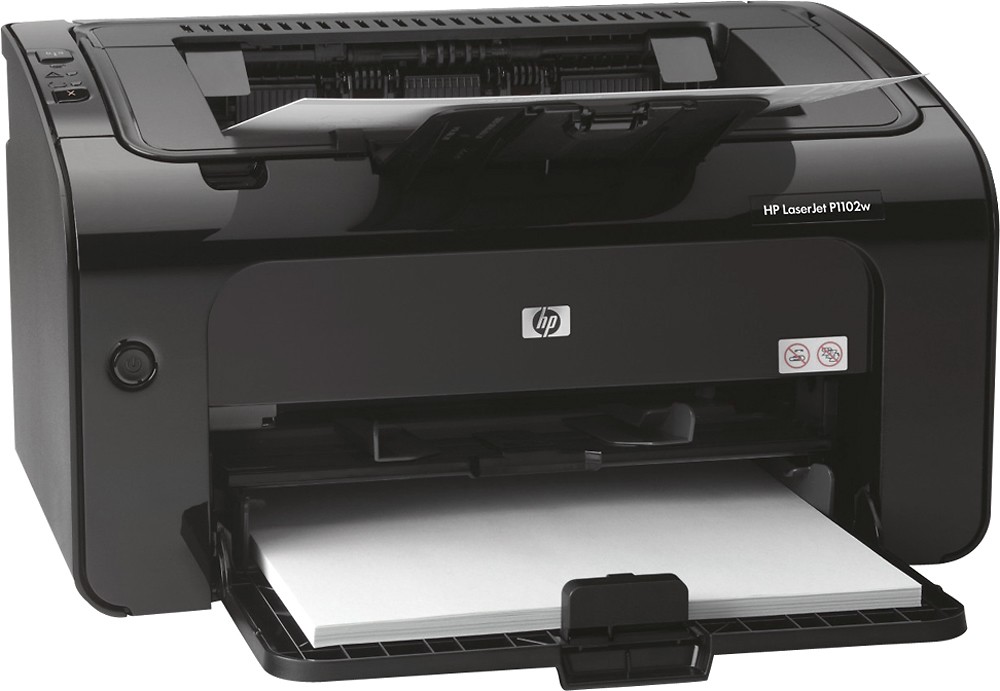
- Model:
- CE658A#BGJ
- |
- SKU:
- 5471522
Customer reviews
Rating 4.4 out of 5 stars with 816 reviews
(816 customer reviews)to a friend
Customers are saying
Customers find value in the LaserJet Pro P1102w's excellent print quality, ease of use, and compact size. Many appreciate its wireless capabilities and affordable price point, finding it reliable and easy to set up. The printer is also praised for its relatively quiet operation. While some users experienced challenges with the printer software, the positive feedback on other features outweighs these concerns.
This summary was generated by AI based on customer reviews.
Rated 2 out of 5 stars
Not as expected
||Posted .This reviewer received promo considerations or sweepstakes entry for writing a review.Prints in small font - some things will not print even though the download app is installed for the individual site and it is slow in receiving the print. There is no instructions - only a CD and the apple computer doesn't have a CD slot - wow.
No, I would not recommend this to a friendRated 2 out of 5 stars
Can't connect to wifi
||Posted .This reviewer received promo considerations or sweepstakes entry for writing a review.We tried three computers to get connected but had no luck. The old printer connected without a problem. Both are HP. We can only use it when it's plugged in directly. Kind of a pain but we'll deal with it.
No, I would not recommend this to a friendRated 2 out of 5 stars
No good do not purchase
||Posted .This reviewer received promo considerations or sweepstakes entry for writing a review.Got this printer cord was missing so I went and found a cord got it plugged in and guess what the ink was dried up. Went and got new ink and it was just not a good printer printer slow the color was no good.
No, I would not recommend this to a friendRated 2 out of 5 stars
can't get to sink with lenovo laptop
||Posted .This reviewer received promo considerations or sweepstakes entry for writing a review.followed the instructions but it wont sink. My wife's Dell connected with her cannon with on problem so I just use hers
No, I would not recommend this to a friendRated 2 out of 5 stars
NOT WHAT WAS EXPECTED .
||Posted .This reviewer received promo considerations or sweepstakes entry for writing a review.WANTED A BLUETOOTH PRINTER NOT ONE THAT HAS TO GO TO HP AND BE SENT BACK TO THE PRINTER . HP SUPPORT COULD BE BETTER .
No, I would not recommend this to a friend- Pros mentioned:Price, Wireless
Rated 4 out of 5 stars
Great printer, Great Price.
Posted .This reviewer received promo considerations or sweepstakes entry for writing a review.After reading the reviews I was leery of buying it but the price was great and I have always owned HP printers. It was difficult to get it connected at first and that is why it only gets 4 stars because I had to call support. HOWEVER, the technician took remote access control and had my new printer working perfectly, and WIRELESS within 4 minutes. I have read people saying they spent 2 or more hours on more than one occasion and ended up returning it. Well, I would like to say "Have a little patience and call for assistance if you need it because this is a great little printer and it cannot be beat at this price." Merry Christmas everyone!!
I would recommend this to a friend - Pros mentioned:Price, Size
Rated 5 out of 5 stars
I have two of these printers!
Posted .This reviewer received promo considerations or sweepstakes entry for writing a review.I've had one at home for about 3 years, and I've had the one in my office for 2 years. Never had any problems with either one of them. It's a little work horse! For the size of the printer and price, you can't go wrong.
I would recommend this to a friend Rated 1 out of 5 stars
Unreliable
||Posted .This reviewer received promo considerations or sweepstakes entry for writing a review.The printer's wireless function works only occasionally. I have spent close to 3 hours on the phone with tech support and no fix lasts. This printer doesn't even have a menu on it. About the only thing it's good for is if you happen to like a little blinking blue light (as it does when there's no wireless connection.)
No, I would not recommend this to a friend- Pros mentioned:Ease of use, Print quality
Rated 5 out of 5 stars
Solid winner
Posted .This reviewer received promo considerations or sweepstakes entry for writing a review.Was tired of using my photo printer for mundane printing tasks where color photo quality printing - and exhaustion of expensive ink-jet cartridges - was not necessary. Was looking for simple, basic, reliable black/monochrome printer. The P1102w fits that bill for me. It was easy to set up and it works fine with Windows 10 and my IOS devices (do not use the enclosed setup disk ... go to HP's support page and download the latest software and firmware updates for this printer, just published in December). Replacement laser cartridges are reasonable, considering price/1600 page expected yield. Printer is well built, takes up small footprint, prints fast and just works.
I would recommend this to a friend Rated 1 out of 5 stars
Wireless printer works well with usb cable
||Posted .This reviewer received promo considerations or sweepstakes entry for writing a review.Always struggled to print through google chrome. Finally switched to cable and it works great. I wish it performed through google chrome. I could not find any help that worked. I could find nothing to change to make it better.
No, I would not recommend this to a friend- Pros mentioned:Ease of use, Price, Print quality
Rated 5 out of 5 stars
Why wouldn't you get this printer?
Posted .This reviewer received promo considerations or sweepstakes entry for writing a review.This is the best Laserjet Printer you'll ever purchase....it's easy to use, has fantastic print quality and it is CHEAP. If you get it for the sale price, it's even CHEAPER! Why in the world would you get an inkjet printer? Here's a scam: inkjet scam - you buy the printer at a nice/affordable price.....but then you get brought into the world of $80 to refill your inkjet cartridges (that get you 300 pages....if even). Welcome to the world of Laserjet Printers: Buy the printer for a little more upfront but then enjoy the benefit of not having to purchase toner all the time.
I would recommend this to a friend Rated 2 out of 5 stars
good if you hate quality
||Posted .This reviewer received promo considerations or sweepstakes entry for writing a review.Drops off network a lot. Takes forever to wake up.
No, I would not recommend this to a friend- Pros mentioned:Ease of use, Print quality, Wireless
Rated 5 out of 5 stars
Nice printer and easy setup
Posted .This reviewer received promo considerations or sweepstakes entry for writing a review.I really like this little printer. Easy setup and wifi connect (only needs a power cable and can go anywhere. Quality is good and had 8mb ram for larger graphics and photos. It only does black and white but the quality is great! I have a windows 8.1 pro laptop and I didn't even need the CD. Just used the usb cord that came with it for setup then pulled it out once it connected via wifi. Great job HP! Also like the web printing!
I would recommend this to a friend Rated 1 out of 5 stars
Not User Friendly
||Posted .This reviewer received promo considerations or sweepstakes entry for writing a review.The eprint setup is complicated and very unfriendly to users
No, I would not recommend this to a friend- Pros mentioned:Print quality, Wireless
Rated 5 out of 5 stars
Perfect printer at the price
Posted .This reviewer received promo considerations or sweepstakes entry for writing a review.I bought this printer on sale for $99 because I was tired of my inkjet always drying up because of infrequent use. Printer is great quality. Toner is reasonable and lasts. and the price is right. Starts up quickly, and I can put it whereever I want in my house since it's wireless. Great little workhorse with toner - not ink - that doesn't dry up when I'm away!
I would recommend this to a friend - Pros mentioned:Print quality
Rated 5 out of 5 stars
Amazing price/quality.
Posted .This reviewer received promo considerations or sweepstakes entry for writing a review.You can't beat the price. Printspeed is amazing. Print quality @1200 DPI is amazing. Minor disappointment: The stats listed on Best Buy's website state that this device has an ethernet | USB ports. It does not have an ethernet port. It does have a USB port and WiFi. However, I'm not so disappointed that I returned the printer.
I would recommend this to a friend Rated 4 out of 5 stars
A pain to set up on Linux, but ultimately worth it
Posted .This reviewer received promo considerations or sweepstakes entry for writing a review.First of all, I'm a professional software developer so I've set up lots of equipment before. Linux is my primary system at home, but the setup software on the CD-ROM that comes with this printer provides absolutely support for setting it up on Linux. However, HPLIP (HP Linux Imaging and Printing project) does support this printer (http : // goo.gl/vtDDR) and hplip is open source and provided through one of the Ubuntu channels (and other Linux distros). If it's not, that just means you have to download it and compile it yourself. I had never set up a USB printer before, so I had no idea what URI to type into the usual CUPS (Common Unix Printing System) "New Printer" dialog. However, HPLIP has a utility called hp-setup that should make it a snap. You run "sudo hp-setup" from a terminal emulator and a window pops up that is pretty self-explanatory for getting a new printer set up. (I don't know if I had to be superuser, but I trust HP and didn't want to make it any harder than I had to.) However, the utility could not find the printer, even when the USB driver clearly recognized it as seen by watching the kernel log. The problem is that HP supplied the the printer firmware with a "Smart Install" feature that makes the printer look like a CD-ROM device when you connect it to your computer. The idea is that Windows will think it sees a newly inserted CD and look for the autorun.ini file and automatically load the install software for you for a super-smooth setup experience. Unfortunately, the people who maintain HPLIP didn't know about this or make have time to make hp-setup look for CDs in addition to printers, so hp-setup won't find it. The workaround is that you have to connect it to a Windows computer first, pop in the install CD-ROM, find the SIsetup.exe utility ("SI" for Smart Install") in the UTILS directory, and run that. A window will pop up that allows you to turn off the Smart Install feature either on this machine only or on any machine that you plug the printer into (know idea how it will remember which machine if you reset the printer, but there must be some flash memory allocated for this). So click the button to turn off Smart Install for the printer connected to _any_ machine. Then you can connect USB back onto your Linux computer and hp-setup will recognize it. I believe it asked for permission to download and install a plugin that the driver needs. After that, hp-setup created a printer queue and it was good to go over USB. Getting the printer connected through Wifi is another story. You can't just connect to it out of the box because it has no IP address. Instead, you have to connect it to a Windows or Mac and run the installer (either Smart Install or from the CD-ROM). Then, select the "setup Wifi" option. This took forever because the Windows installer would not recognize the printer on the USB, even though it was visible in the "usbview" utility I downloaded from another site. This may have had something to do with me turning off the Smart Setup feature as I described before, so I tried turning it back on but the installer still would not recognize the printer on the USB port. After searching on the HP support site, I followed a suggestion to unplug the printer, wait 10 sec, then power it back up. Finally, the setup utility recognized it. After that, the setup completed, but I was still surprised by how long I had to wait for it to finish. It seemed like it took the installer a good 5-10 minutes to copy everything over and install all the Windows registry keys. But now it had Wifi! You can tell because the blue light will stay solid instead of blink when you turn it on. Then I unplugged the USB cable and checked that the Windows computer could print a page over Wifi. To get Wifi working on any other machine, you need to know the actual IP address. To get that, hold down the red "X" button for five seconds until it prints a couple "Status" pages that shows that it was assigned an IP address in the 192.168.1.x range. My Linux desktop is connected to the internet through a Comcast-supplied combined cable-modem/router that lacks built-in wireless. Instead, a Netgear router with wireless is connected as a separate device. Netgear assigns IP addresses from 192,168.1.x for the local network while Comcast assigns them as 10.1.10.x. I tried configuring the Static Routing feature in my Comcast router to get it to tunnel to the 192.168.1.x printer address, but I still couldn't ping it. I suspect that's because my Netgear router has its own firewall that's preventing outside equipment from accessing connected devices and I just don't want to waste any more time on this. Despite all that trouble, I'm still keeping this printer. I wanted to stick with an inexpensive, small-footprint black-and-white laser (not ink!-jet) printer. Most of the new printers are all-in-ones (print-copy-scan-fax) with color. The color makes them much more expensive to operate (you have to replace four toner cartridges instead of one) and I suspect that all those features make the device much bulkier and less reliable. HP just doesn't have any other offerings of a B&W single function laser printer in that price-range. Of course, there are lots of other manufacturers, but the Linux support can get spotty. Meanwhile, I still rely on an ancient Umax 300 dpi scanner with a SCSI interface I bought for $5 at a garage scale. Meanwhile, I can still connect my desktop to this printer with the supplied 3 foot USB cable and it's much snappier and crisper than the "old-iron" workhorse HP Laserjet 4 Plus that was constantly paper-jamming and now it started flashing "MIO Error" on its panel. Time for that one to go to the printer junkyard! Fortunately, my printer stand is right next to my computer case, so the little 3 foot USB cable is long enough to connect the two. But I would still prefer not to have to depend on that little USB cable. I could get a longer cable, but I read somewhere that HP does not recommend a cable longer than 5 feet, so it would still be an issue if I ever had to rearrange the placement of equipment in my office. So I went online and ordered a cheap USB wifi stick (they seem to range in price from $25 to $70 or so, but I bought a refurbished stick for $12 which probably just means it was opened and returned, but it still has a 30 day return policy so I don't care.) When it arrives, I'll have to plug it in to an available USB port, set up a second IP interface for the stick and see if I can get it to find the printer with its assigned IP address. So that's my story with this printer. I've finally made friends with it and now its going to be a member of the family.
I would recommend this to a friend- Pros mentioned:Print quality
Rated 5 out of 5 stars
Best printer I've ever purchased
Posted .This reviewer received promo considerations or sweepstakes entry for writing a review.I was hesitant about the price at first but it's been worth the money. I'm not sure what the other reviews with Mac issues are about. I configured this the first time using a mac book. I was very surprised at how easy it was to configure (especially since I was using a mac) and I started printing right away. The latest driver update has Air Print support so you can print from your iDevices. It has a power saving mode that turns it off when not in use. I brought my work laptop and was able to instantly print without any additional driver installations or configuration. I got a laser printer because i print something maybe once a month. I forget the printer is in the house most of the time so it's really cool that when I do need to print something it's always available.
I would recommend this to a friend - Pros mentioned:Print quality
Rated 5 out of 5 stars
Excellent low cost laser printer!
Posted .This reviewer received promo considerations or sweepstakes entry for writing a review.I'm not lying when I say I can't think of a single negative thing to say about this printer. It's low cost. The price is just right. Wireless printing is a breeze to set up and use. I use and print from iOS devices, Macs and Windows computers in my home all on this printer. The speed is just fine. The print quality is excellent. Keep in mind that it's only a black and white printer. Great for documents, school papers, etc. If you intend to print a lot of photos, graphs/charts that require color, then obviously this printer is not for you. Overall, a great buy. Very happy.
I would recommend this to a friend Rated 5 out of 5 stars
Dependable, gets the job done
Posted .This reviewer received promo considerations or sweepstakes entry for writing a review.I've had issues with other printers losing connection to my computers and needed to constantly be rebooted. Not this one, hasn't given me any issues, can always rely on it to just print when I need it to.
I would recommend this to a friend