Customer Ratings & Reviews
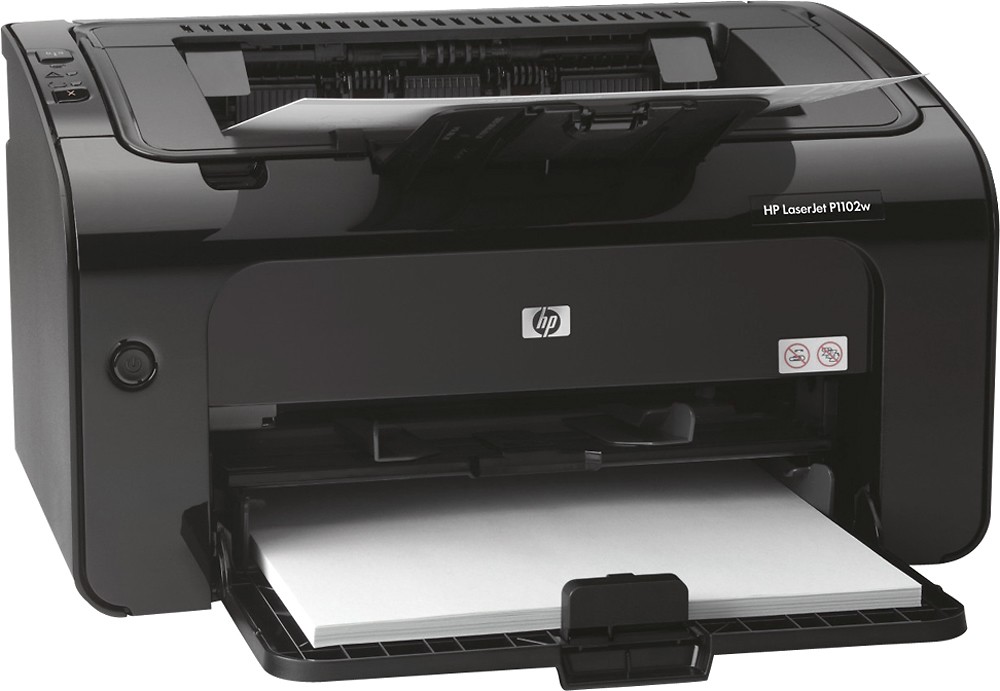
- Model:
- CE658A#BGJ
- |
- SKU:
- 5471522
Customer reviews
Rating 4.4 out of 5 stars with 816 reviews
(816 customer reviews)to a friend
Customers are saying
Customers find value in the LaserJet Pro P1102w's excellent print quality, ease of use, and compact size. Many appreciate its wireless capabilities and affordable price point, finding it reliable and easy to set up. The printer is also praised for its relatively quiet operation. While some users experienced challenges with the printer software, the positive feedback on other features outweighs these concerns.
This summary was generated by AI based on customer reviews.
Rated 4 out of 5 stars
Prints good
Posted .This reviewer received promo considerations or sweepstakes entry for writing a review.This is my second one. My original one, bought a few years ago doesn't work with Windows 10. This isn't something they mention when upgrading. And the new one was still a pain. I had to download the driver from the HP website. It definitely wasn't plug and play for me. But after downloading the correct driver it seems to work as well as the original one I bought and used with XP and Windows 7. Any beef I may have is with HP and not this printer, although they manufacture it. My laptop which is Windows 10 is an HP product too. So, go figure. Windows 10 hasn't been something that I consider an upgrade. Check compatibility before you buy. I can't recommend this printer.
No, I would not recommend this to a friendRated 4 out of 5 stars
Great printer for B &W Printing
Posted .This reviewer received promo considerations or sweepstakes entry for writing a review.I really like this printer. It is compact and very portable. I will be putting it in a rolling tote. It has toner which will not dry out like ink and hopefully be able to make a lot more copies. The copies so far on economy, are crisp and clean. The only thing I am having a problem with is the wireless, so I am using the USB which will be fine since this is a dedicated laptop and printer for work. I will be looking for a color laser jet suitable for digital Scrapbooking. I don't know if toner is archival.
I would recommend this to a friend- Pros mentioned:Print quality
Rated 5 out of 5 stars
Awesome Printer
Posted .This reviewer received promo considerations or sweepstakes entry for writing a review.This printer is amazing! The one I had before went through ink so quickly and took forever to print. This printer is so efficient with ink and prints so quickly. I could not be more satisfied.
I would recommend this to a friend - Pros mentioned:Print quality, Wireless
Rated 5 out of 5 stars
recommended
Posted .This reviewer received promo considerations or sweepstakes entry for writing a review.We needed a low cost reliable printer. This is it. As a bonus the printer is fast and has wireless connectivity.
I would recommend this to a friend - Pros mentioned:PriceCons mentioned:Software
Rated 1 out of 5 stars
Good idea for a printer - bad implementation
Posted .This reviewer received promo considerations or sweepstakes entry for writing a review.I bought this printer for light-duty use almost exclusively with an iPad. My entire computing system consists of a MacBook Air, an iPad, a simple power-line network, and a DSL modem with wireless networking built-in that also manages DHCP. I bought this printer because according to HP's documentation and forums, I should have been able to configure it without installing any software. The printer had a reasonable set of features, a good price, wireless configuration, and it appeared to be a good match for my simple needs. Unpacking the printer was more complicated than I expected. The number of small tabs, protectors, clips and caps that had to be carefully removed was a big surprise. Less experienced people could find this task daunting, and I could imagine they might break one of these smaller parts inadvertently. Configuring the printer started out as simple as possible: attach the USB cable to the MacBook Air, it detects the printer is new, downloads the drivers and installs them all with a couple of mouse clicks. But then things went downhill from there. First , the "Utility" tab didn't appear in the printer's new Print Queue accessible from System Preferences > Print & Scan. So I spent an hour on HP's forums trying to figure out what was wrong. It seems that you are supposed to download a new set of drivers and software that clearly is labeled not to be compatible with Mountain Lion (OS X 10.8, which is what my Mac is running). That lead to finding instructions like the following that sounded like they would accomplish the wireless configuration that the printer was supposed to support: 1. Turn the printer Off. 2. Press and hold both the wireless and the cancel button, and then turn the product on. 3. Hold the buttons until all the lights blink in unison, and then release the buttons. 4. From the Mac, click the Wi-Fi icon and select Join Other network. 5. Click Show network and select the printer's SSID, it should include HP, P1102, Laserjet, etc. 6. If you're not sure which network name belongs to the printer, print a network configuration page by holding the Cancel button, it will be listed on the right side within the network information. The SSID never appeared, so this was a dead end. Turning back to that "Utility" tab I mentioned previously, I managed to get to the configuration interface through my Mac by connecting it via USB, but the interface never worked. Whenever I would attempt to make a change, after clicking the submit button, the entire page would go blank and it wasn't possible to do anything further. The back button wouldn't work nor could I bring up the configuration interface again from its the Print Queue. I had to power it off, disconnect the USB cable, and then try to repeat again. Ultimately I returned the printer. If this is supposed to be an AirPrint printer, HP missed the mark with its configuration interface. I felt the documentation was hard to follow, poorly organized, poorly illustrated, and far too complicated. It is too bad that HP's bad software ruined an otherwise promising looking printer. Other peripheral manufacturers are able to handle these configuration situations in a much simpler manner that leads to a successful configuration the first time. Because HP wasn't able to provide this, I wasted a half-day and ended up back at square one looking for another printer.
No, I would not recommend this to a friend - Pros mentioned:Print quality
Rated 4 out of 5 stars
Effiecient for the price
Posted .This reviewer received promo considerations or sweepstakes entry for writing a review.Does a good job at a fast speed for a home office environment. Would be nice if it held more paper.
I would recommend this to a friend - Pros mentioned:Ease of use, Print quality, Size
Rated 5 out of 5 stars
just super efficient
Posted .This reviewer received promo considerations or sweepstakes entry for writing a review.fast, easy, low maintainance. Great efficiency for such compact size
I would recommend this to a friend - Pros mentioned:Print quality
Rated 5 out of 5 stars
Nice printer
Posted .This reviewer received promo considerations or sweepstakes entry for writing a review.Great quality printer. Prints well and fast. Easy set up. Toner is just a little expensive but worth it.
I would recommend this to a friend - Pros mentioned:Print quality
Rated 5 out of 5 stars
GREAT printer for the price
Posted .This reviewer received promo considerations or sweepstakes entry for writing a review.I hesitated to buy this printer because of the mediocre reviews, most particularly relating to wireless printing. Decided to give it a go and could not be happier. I have not had ANY wireless issues, during set-up or subsequent printing. Connection has never been dropped. Print quality is perfection. Like I said in the cons, it is a little noisy, but I can live with that. If you have modern (7 or later) Windows computers, even without any computer knowledge you will not have ANY issues configuring for wireless printing. Definitely recommend.
I would recommend this to a friend Rated 5 out of 5 stars
Simple to install
Posted .This reviewer received promo considerations or sweepstakes entry for writing a review.This is a great little laser that lasts and lasts.
I would recommend this to a friend- Pros mentioned:Wireless
Rated 5 out of 5 stars
Love my 1st one so much - buying a 2nd one!
Posted .This reviewer received promo considerations or sweepstakes entry for writing a review.I have had a HP 1020 LaserJet for several years and dearly love it but needed a wireless printer - decided to stay with HP and looked at reviews for a HP LaserJets and picked the 1102w. Bought one a few months ago, and now I need a second one. Love the fact it syncs with my iPhone and iPad (with no issues at all getting them to sync) and I recommend the 1102 just as much as I recommend my old 1020. I haven't tried the ePrint yet, but am looking for opportunities to use it.
I would recommend this to a friend - Pros mentioned:Price, Print quality
Rated 5 out of 5 stars
Great printer for business
Posted .This reviewer received promo considerations or sweepstakes entry for writing a review.Its wonderful prints clear and does everything I wanted it to do. For the price I could not have bought a better printer.
I would recommend this to a friend - Pros mentioned:Wireless
Rated 5 out of 5 stars
Great Value printer
Posted .This reviewer received promo considerations or sweepstakes entry for writing a review.My setup is wireless. We use it on our windows based computers and our android smarphones. Setup took a while, but after I got it going, all was good. Heck, I even utilized hp eprint-great feature by the way. No problems yet so far. Better than purchasing ink frequently when I hardly use the printer. My friend who recommended me to this printer, has a mac and has this set up wirelessly. She is not tech savvy and it was easy for her to install. I just wish they kept the feeder tray for the top paper feeder like the previous model.
I would recommend this to a friend - Pros mentioned:Wireless
Rated 1 out of 5 stars
Wish I had read the reviews carefully!!!
Posted .This reviewer received promo considerations or sweepstakes entry for writing a review.As with all the 1 star rated reviews. I was able to connect to new mac mini, but not windows 8 desktop or laptop. I just purchased this 7/16. After installing via the supplied CD and attempt to configure for wireless printing, it gets to the page where it's says, "waiting for me to connect printer". When I ran trouble shooting program, message appears that USB 2.0 not compatible with 3.0. That's when I removed the supplied USB cable and saw that it's 2.0 version and I was trying to install on my Win 8.1 laptop and desktop, which I'm not sure if they are USB 3.0 ports. Find it strange both of which are HP, are giving the most trouble with wired/wireless connection! The mac mini I just purchased from BB few weeks ago has 3.0 ports and after going to HP support online, and found HP LaserJet Pro P1102w - Wireless Printer Setup page where it has instructions for different OS, I was able to get the wireless feature working. However, still not having any success with installing HP printer on either of my HP PCs.
No, I would not recommend this to a friend - Pros mentioned:Ease of use, Price
Rated 5 out of 5 stars
great printer
Posted .This reviewer received promo considerations or sweepstakes entry for writing a review.i works with my iphone easy to setup good price dont have to have one computer on all the time to print to it
I would recommend this to a friend - Pros mentioned:Print quality
Rated 2 out of 5 stars
HP LaserJet P1102W
Posted .This reviewer received promo considerations or sweepstakes entry for writing a review.I purchased this printer to replace a similar HP LaserJet printer I had for years. The previous printer and this printer have the same problem—they both print crooked on the page! I have wasted so much paper and found this item only had a 10 day or so return policy so am unable to return it. I should have tried it earlier so I could have exchanged it for another printer. The print quality is great otherwise.
No, I would not recommend this to a friend Rated 5 out of 5 stars
Good printer for the price
Posted .This reviewer received promo considerations or sweepstakes entry for writing a review.We have had this printer for several months now, and it works great for what we need. I like having the laser printer to print black and white. We really don't need the color. For the price, I would highly recommend it.
I would recommend this to a friendRated 4 out of 5 stars
Good basic wifi printer
Posted .This reviewer received promo considerations or sweepstakes entry for writing a review.I buy these for work all the time - great workhorse printer. Download the driver or use the embedded HP driver and USB installation is straightforward. If you want the wifi print capability, it does work, but be prepared to work your way through some pretty sloppy documentation and completely non-helpful setup screens, especially if you want to do something like set up USB for your primary computer and share it with other devices via wifi. For example, most wifi products pick up SSID broadcasts and show you what hotspots are available. Not this bad boy. It makes you type in the SSID, so you'll have to look it up on your laptop, phone, or some other device that was designed better. This part of the setup is also buried pretty deep in the documentation, so it's not for the faint of heart. The good news, if you do get it all working, is that the airprint support is good and you can print from your iPhone or iPad. Don't bother with HP's semi-orphaned wireless printing protocol unless you've got some oddball device and you can't print any other way.
I would recommend this to a friend- Pros mentioned:Ease of use, Print quality
Rated 5 out of 5 stars
It so much better than what i had
Posted .This reviewer received promo considerations or sweepstakes entry for writing a review.just love this printer, fast and easy to work with.
I would recommend this to a friend - Pros mentioned:Print quality
Rated 4 out of 5 stars
Good entry level laser printer
Posted .This reviewer received promo considerations or sweepstakes entry for writing a review.I do a large amount of printing, so inkjet isn't for me. Documents come out looking great and the occasional picture looks good (in black and white, of course). I've printed about 200 pages so far and not a problem yet.
I would recommend this to a friend