Customer Ratings & Reviews




- Model:
- OfficeJet Pro 8034e
- SKU:
- 6509709
Rating by feature
- Value
Rating 4.5 out of 5 stars
- Quality
Rating 4.5 out of 5 stars
- Ease of Use
Rating 4.5 out of 5 stars
Customers are saying
Customers are delighted by the OfficeJet Pro 8034e's excellent print quality and ease of use, frequently praising its straightforward setup and reliable performance. While some users found the paper tray slightly challenging, the overall consensus highlights the printer's value and convenient wireless functionality. Many appreciate its compact size and ability to scan, copy, and print efficiently.
This summary was generated by AI based on customer reviews.
Scammed website!!!!!
||Posted . Owned for 1 month when reviewed.This reviewer received promo considerations or sweepstakes entry for writing a review.I was very disappointed with the setup required to use this printer!!!! Their website had been hacked and when tI tried to setup theprinter I was instructed to call an HP associate who was a scammer and tried to get me to apply for an Apple Pay card so he could steal my money!!!!!!!
No, I would not recommend this to a friendPrinter
||Posted . Owned for more than 2 years when reviewed.This reviewer received promo considerations or sweepstakes entry for writing a review.Not good that Hp made us download they're Info. So that we must only buy Hp ink
No, I would not recommend this to a friendVery disappointed in this HP printer.
||Posted . Owned for 1 month when reviewed.This reviewer received promo considerations or sweepstakes entry for writing a review.This printer was a nightmare. It is large and bulky. Six Geek Squad agents attempted to install it remotely after I had tried many times with no success. Finally, a home visit was successful. Then, I couldn't print any colored images. Rather, the printer produced a yellow blob. RETURNED.
No, I would not recommend this to a friendPrinter review
||Posted . Owned for 1 month when reviewed.This reviewer received promo considerations or sweepstakes entry for writing a review.I do not have any complaints. This HP printer does the job. I am glad I chose this printer.
I would recommend this to a friendDefective
||Posted . Owned for 1 month when reviewed.This reviewer received promo considerations or sweepstakes entry for writing a review.I am very disappointed. Shortly after it was installed I had to call the Geek Squad. The printer squeaked whenever it printed. The squeaking became worse. The Geek Squad will be coming next week. The last paper I tried to print out was all streaked and blurry.
No, I would not recommend this to a friendBrand response from HP Team
Posted .Hi, Maddy.
I’m sorry that your printer has performed poorly for you. I can certainly understand why hearing unexpected noise during printing and eventually streaked and blurry prints would be an unnerving surprise with a new device. I want to help you resolve this situation, so I’ll suggest some resources aimed at making that happen.
I can’t tell from your review what’s causing the issues you describe. I recommend that you contact us directly at +1 800-474-6836 so we can help you assess what’s happening and find the best course of action. To expedite the process, I recommend gathering the following information before the call:
- Model number
- Serial number
- Your location
- Case number (from any previous contact with HP support)
I'll also mention that HP printers have a one-year warranty from their purchase date that covers hardware as well as ink supplies – and that warranty extends to two years with an HP+ account – so if it comes to that, you might consider making use of it. You can verify the warranty using the following link:
- support.hp.com/us-en/checkwarranty
Keith
HP Care
hp.com/support
Printer hp
||Posted . Owned for 3 weeks when reviewed.This reviewer received promo considerations or sweepstakes entry for writing a review.Still having problems getting the download to finish setting up the printer. To be truthful I wish I hadn’t bought it from you and will never buy anything again from your company.
No, I would not recommend this to a friendBrand response from HP Team
Posted .Hi there.
I’m sorry that your printer hasn’t completed the setup and installation process. Your review is brief, but your frustration is clear – and totally understandable. I want to help you out of this dilemma, so I'll suggest a resource that I hope will do just that.
I recommend that you contact us directly so we can help you assess what’s happening and find the proper course of action. HP+ printers such as yours come with exclusive concierge support. To call and reach live HP+ experts, visit the following URL and enter your HP+ serial number:
- hp.com/plus-help
Keith
HP Care
hp.com/support
Trasaun Brown
||Posted . Owned for 3 months when reviewed.This reviewer received promo considerations or sweepstakes entry for writing a review.I have never been able to use the printer not hppy
No, I would not recommend this to a friendHad high hopes
||Posted . Owned for 1 week when reviewed.This reviewer received promo considerations or sweepstakes entry for writing a review.Disappointed that the printer couldn’t connect wirelessly. Love the concept and free ink for a year was one of the reasons I purchased this unit. Had to return and had to choose another unit. HP is a great brand.
I would recommend this to a friendGEORGE
||Posted . Owned for 3 months when reviewed.This reviewer received promo considerations or sweepstakes entry for writing a review.The mechanics and features are OK. The paper feed is terrible. It is very skimpy and prone to frequent jamming. I returned it after a few days. My 6 year HP is better.
No, I would not recommend this to a friendGood printer
||Posted . Owned for less than 1 week when reviewed.This reviewer received promo considerations or sweepstakes entry for writing a review.very nice and fast printer.......................................
I would recommend this to a friendPrinter
||Posted .This reviewer received promo considerations or sweepstakes entry for writing a review.Good machine CXxxxxxxxxxxxxxxx Xxx X X Xxxxxxx X X
I would recommend this to a friend- Pros mentioned:Print qualityCons mentioned:Paper tray

Reasonable Performance – Novel Ink System
|Posted .This reviewer received promo considerations or sweepstakes entry for writing a review.Pros: - Nice design and easy to use touch screen. - Reasonably quick. I observed 12 ppm for black text. - Text and business graphics look good. - Includes a color scanner and automatic document feeder. - Built-in automatic two sided printing. - Easy setup and wireless printing with strong network printing support. - Instant Ink program is convenient and could save you money depending on the type of printing you do. - One year Instant Ink plan up to 700 pages per month is priced into the initial purchase cost. Cons: - Photos are serviceable but not great - Only one paper tray - Automatic document feeder cannot automatically scan two sided documents - The device actively works to reject non-HP ink cartridges I’ve been using this Officejet all-in-one in a home office environment for about a week now. The device supporting printing by USB or over a network (either Ethernet or wireless) and faxing via a standard phone line. Setup is easy via a mobile app that will locate the device and connect it to your wireless network. Print speed has been reasonable for text documents (In my use, single spaced black text documents print at about 12 ppm once it gets going), and both text and business graphics generally look clean and crisp. Images and large areas of solid color or graduated backgrounds show some light striping when printing in normal mode, but printing the same images in high quality mode eliminates this issue. Most inkjets I’ve used have this issue to at least some degree and this printer is a little better than average in this regard. The device supports printing borderless photos on inkjet photo paper, and while the results are serviceable, they are not as good as more capable photo printers and I wouldn’t use this device for printing family albums. Paper handling is fine, with the tray supporting sizes up to US Legal and down to 4x6 photos and #10 envelopes. The printer will also automatically print on both sides of the paper if requested, a nice feature for saving paper and creating business documents. The main issue with the paper handling is that there is only one tray and paper path, so if you want to print letters and envelopes, you need to load and reset the size guides in the tray for each paper type. A smaller issue is that the output tray needs to be pulled out from the printer in order to catch the output pages and prevent them falling on the floor. This must be done manually, but leaving the tray out risks breakage if somebody brushes against it as they walk by, so the device needs some babysitting and/or careful placement in your workspace to deal to ensure the output tray is pulled out when needed. The device also features a color scanner which can be used either by placing a document or photo on the scanner glass or by using the automatic document feeder. An ADF is a nice feature in a home office printer and this one works fine, but you should note that you cannot use the ADF to scan two sided documents. Some other home office printers do allow you to do duplex scanning from the ADF. In my testing, scan quality has been fine – better for documents than for photos. Copies are clean, but color copies do tend to darken colors a little. One of the key differentiators for these Officejet printers is the HP Instant Ink program. The device comes with a 12 month trial subscription which allows you to print up to 700 pages per month without extra cost. The printer monitors ink levels and automatically orders new cartridges as needed so that they theoretically arrive before you need them based on your usage. After the trial period, the subscription is $5.99 for 100 pages per month up to $49.99 for 1500 pages. Depending on the mix of photos and documents you print, these costs are on the lower side of standard when using manufacturer cartridges. If you print a lot of full color documents, the plan could save a lot vs. buying the cartridges separately. Note however: if you like to save money with third party ink suppliers, this printer is designed to detect and reject such cartridges and HP promises to update firmware to continue to get better at limiting use to HP cartridges. If you’re not using the Instant Ink program, the official HP cartridges could become quite expensive, so keep this in mind when deciding if this device is for you. Overall, this is a reasonably quick and capable device for home office use and light small office use. The Instant Ink program allows businesses to understand and budget ink costs on a per page basis. But merely adequate photos, no two sided scanning, and ink cartridge DRM measures mean this device isn’t for everyone.
I would recommend this to a friend - Pros mentioned:Print quality, Setup
Awesome printer with 1yr free ink
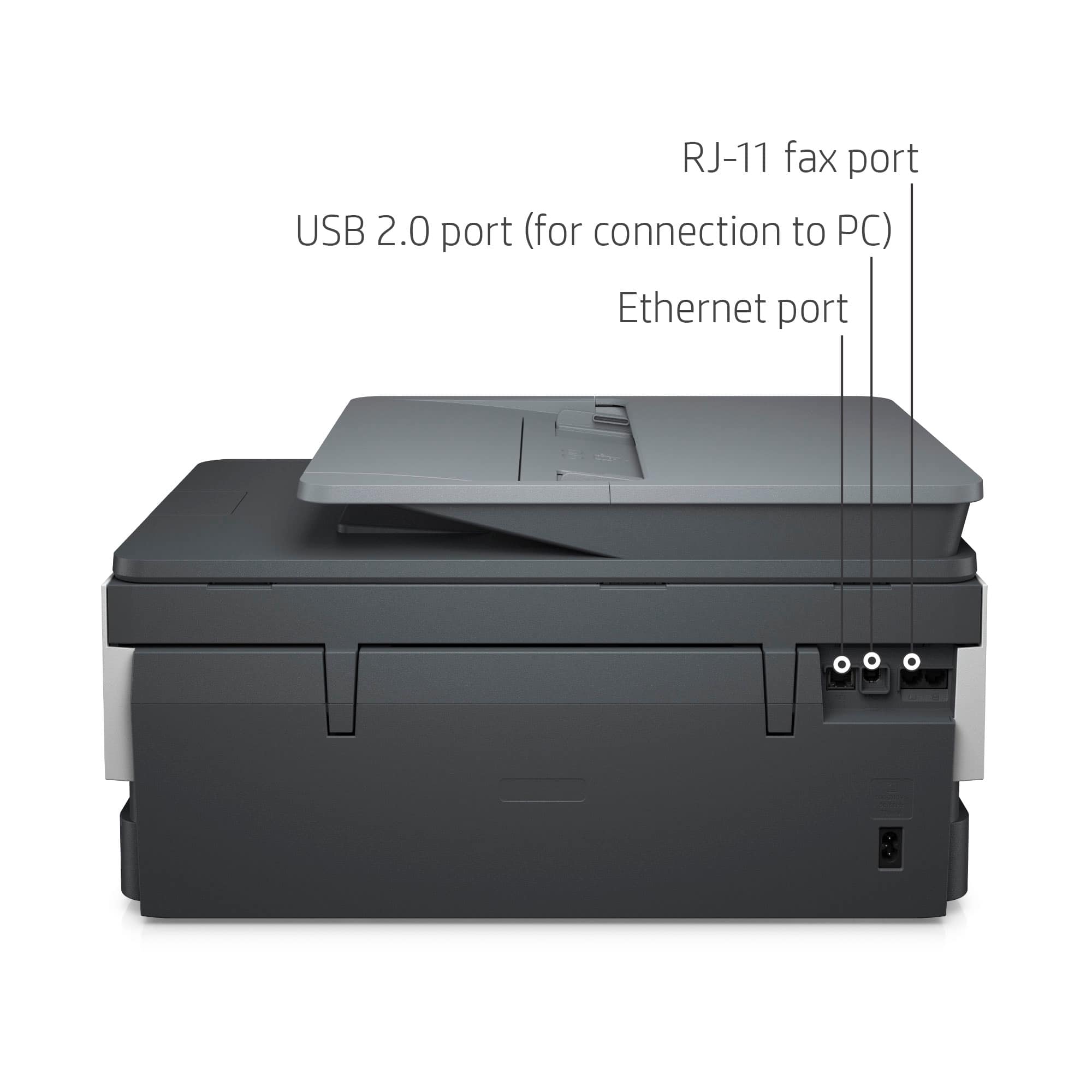
|Posted .This reviewer received promo considerations or sweepstakes entry for writing a review.I loved how the setup was easy since I already had the HP app downloaded. A simple removal of some blue tape, install ink and paper. Then the app finds the printer and all set. I did elect to sign up for the $24.99 plan which includes 700/ pages per month. Since the free ink is for the year you get that for 12 months so why not maximize. Then just need to align the correct plan for the 13th month. The app is really good. You can program the scan functions, print documents, scan and copy from the app. Also it has a ton of templates from greeting cards to coloring pages. The print speed and quality are about normal for inkjet. It is clear and clean but still not the shiny look of laser. The speed is pretty quick. The scan quality is really good and the text document I scanned was really legible. I liked how it was really light to move and it has all the connection options: usb, lan and wireless. It even has a fax jack if that is needed. I would as HP to offer a $3.99 plan that included 400 pages per month or an annual plan so you can print more during school time and less during summer months.
I would recommend this to a friend Hp printer
||Posted . Owned for 1.5 years when reviewed.This reviewer received promo considerations or sweepstakes entry for writing a review.Terrible printer, and now with the ink monthly subscription is worst
No, I would not recommend this to a friendPrinter
||Posted . Owned for less than 1 week when reviewed.This reviewer received promo considerations or sweepstakes entry for writing a review.Slow work, no good connection problems issues I do not recommend that you buy it
No, I would not recommend this to a friendBrand response from HP Team
Posted .Hi, Elvin.
I’m sorry to hear that your printer has rendered prints so slowly and experienced connectivity problems. It’s easy to understand why this would be an unwelcome combination. I want to help you resolve these problems. I hope the resources I’ve listed below guide you to that end.
First, I recommend that you follow a guide on our support site that covers improving print speed; among its suggestions are instructions on updating firmware, which can help improve print speed and other performance. Find that guide here:
- support.hp.com/us-en/document/ish_2817150-2408088-16
Next, you can visit a page on our support site that has diagnostic tools for various issues, including wireless connectivity. You can find that page here:
- support.hp.com/us-en/help/printer
If any problem persists, I suggest that you contact us directly at +1 800-474-6836 so we can help you assess what’s happening and find the best course of action. To expedite the process, I recommend gathering the following information before the call:
- Model number
- Serial number
- Your location
- Case number (from any previous contact with HP support)
Keith
HP Care
hp.com/support
Dishonest
||Posted . Owned for 1 year when reviewed.This reviewer received promo considerations or sweepstakes entry for writing a review.Very dishonest business on the part of HP and Best Buy.
No, I would not recommend this to a friendWorst printer
||Posted . Owned for 5 months when reviewed.This reviewer received promo considerations or sweepstakes entry for writing a review.Ink is constantly malfunctioning. Paper is constantly getting jammed.
No, I would not recommend this to a friendLame
||Posted . Owned for 1 month when reviewed.This reviewer received promo considerations or sweepstakes entry for writing a review.Scanner came already broken couldn't even finish the initial set up.
No, I would not recommend this to a friendfubar
||Posted . Owned for 1 month when reviewed.This reviewer received promo considerations or sweepstakes entry for writing a review.was never able to get the printer to print with any decent speed.
No, I would not recommend this to a friend- Pros mentioned:Print qualityCons mentioned:Paper tray
Automatic duplex - what luxury
|Posted .This reviewer received promo considerations or sweepstakes entry for writing a review.Now that it is up and running, I'm liking it so far. Getting it up and running was an issue. Actually, it wasn't getting the printer up, it was getting the "Smart" part to work properly. Because this will be used by a number of people but will be used from one computer, I wanted the app on our computer rather than on one person's mobile phone. The app seemed to have difficulty with this. It seems it wanted to do a bunch of stuff at one time which would stop other things from happening. Overall, it took a bit over three hours to get this set-up. Since I'm used to HP Printers being more in the "turn it on and go" category, this through me. Then again, this has more features than my previous printers so that is probably what it seems so strange to me. The first issue I encountered was the paper tray. It confused me. There are lines that indicate where different size paper goes but, even though it talks about the size guide, it doesn't appear that you should move the length. I've only used 8 1/2 x 11 paper and it works so I guess that is okay. I like the paper is front loading as it makes it much easier to change and load paper. It was easy to connect it to WIFI once I switched to manual instead of allowing it to hook up to wifi from the computer. Where issues started was in signing up for the instant ink and the "Smart HP" printing and I'm not sure I have it all set yet but figured I'd learn as I needed the application. What I think is brilliant is the printing. It is quite crisp and clear, doesn't take long to print and, to my complete delight, will print duplex automatically. No more having to print one side and manually turn the paper over to print on the second side. This is huge for the work we do and a main reason for getting this printer. It is definitely living up to my expectations. The packaging was great. There wasn't an over abundance of it and the plastic the printer came in had a handle so it the printer was easily taken out of the box. There wasn't a ton of extra tape keeping everything in place and yet, nothing moved. I had no worries that anything happened during shipping. So far, I'd definitely recommend this printer, figuring smarter folks than me will figure out HP Smart a lot easier that I did.
I would recommend this to a friend