Customer Ratings & Reviews



- Model:
- 5LJ23A#B1H
- SKU:
- 6335313
Rating by feature
- Value
Rating 4.4 out of 5 stars
- Quality
Rating 4.4 out of 5 stars
- Ease of Use
Rating 4.4 out of 5 stars
Customers are saying
Customers praise the OfficeJet Pro 8035e for its excellent print quality, ease of use, and compact size, finding it to be a convenient and efficient printer for home use. Positive feedback also highlights the printer's wireless capabilities and straightforward setup process. However, some users experienced challenges with the paper tray.
This summary was generated by AI based on customer reviews.
- Pros mentioned:Print quality
AWESOME
Posted .This reviewer received promo considerations or sweepstakes entry for writing a review.One the best printer I have ever used for now. I love it.
I would recommend this to a friend - Pros mentioned:Ease of use
Mr
Posted .This reviewer received promo considerations or sweepstakes entry for writing a review.It’s Very Good product and easy to use......
I would recommend this to a friend - Pros mentioned:Wireless
HP-OfficeJet Pro 8036e.
Posted .This reviewer received promo considerations or sweepstakes entry for writing a review.Great printer! It has many features, including a wireless All-in-One Inkjet Printer with up to 12 months of instant ink included.
I would recommend this to a friend What?
Posted .This reviewer received promo considerations or sweepstakes entry for writing a review.Outstanding product and service. Very satisfied. One problem is the print smuges on envelopes
I would recommend this to a friendGood Printer
Posted .This reviewer received promo considerations or sweepstakes entry for writing a review.Excellent printer. I have always gotten an HP printer for years.
I would recommend this to a friend- Cons mentioned:Reliability
HP Office Jet Pro 8035 is a junk product
Posted .This reviewer received promo considerations or sweepstakes entry for writing a review.HP Office Jet Pro 8035 started producing lines in colors copies that I printed, wrong colors, green was printed as blue, even after print heads were cleaned and aligned. I had this product for less than a year. The ink cartridges were full, not low or empty, so this was not the issue cause. Eighteen days before warranty expired they sent me a cheaper refurbished model 6970 model (black) as the replacement printer. It was $50 cheaper and not a one to one exchange, and the wrong product. If u want to pay a premium on cheap, Chinese-made junk, then feel free to buy this product, but my recommendation is to buy a Brother printer next time and don't waste your money on HP printers. I paid $250 + tax for this item on my best buy credit card and it was basically a $250 rental fee for the year, which was a not a good value for my money.
No, I would not recommend this to a friend Hp office jet pro 8035e
Posted .This reviewer received promo considerations or sweepstakes entry for writing a review.U can fax over WiFi by using hp smart app on ur smart phone wish all printers include canon would do this
I would recommend this to a friendnot worth it
Posted .This reviewer received promo considerations or sweepstakes entry for writing a review.ink is expensive and printer is cheaply made and destroys your ink cartidge levels
No, I would not recommend this to a friendHP 8035, Bad experience.
Posted .This reviewer received promo considerations or sweepstakes entry for writing a review.This is my third HP printer. This 8035 cost the most and is the worst of three. It is hard to use, switch from printing to scan. Does not announce "low ink" correctly. I can't believe the reviews and ratings. This machine constantly wastes paper and ink.
No, I would not recommend this to a friend- Pros mentioned:Print quality
Only lasted 1 year
Posted .This reviewer received promo considerations or sweepstakes entry for writing a review.This printer worked great - when it worked. HP support chat was helpful in resolving issues; until 1 week after the 1 year warranty when there was a hardware problem and I was out of a printer.
No, I would not recommend this to a friend - Cons mentioned:Paper tray
Don't Buy It
Posted .This reviewer received promo considerations or sweepstakes entry for writing a review.The paper is always coming out in clumps and then it prints on multiple pieces and the paper tray and attachment are super flimsy and poorly made.
No, I would not recommend this to a friendBrand response from HP Team
Posted .Hi, Barbaria.
I’m sorry that your printer’s document feeder has performed so poorly. Your reaction comes as no surprise, considering you’ve seen the device collect several sheets at once, resulting in prints cast on multiple sheets of paper. I want to help you remedy this problem. I hope the resources below reach that goal.
First, I recommend you follow the steps in this guide to document feeders that pull through too many pages at once or fail to pick up paper at all:
- support.hp.com/us-en/document/c01728503
If the problem persists, I suggest that you contact us directly so we can help you assess what’s going on and determine the best course of action. HP+ printers such as yours come with exclusive concierge support. To call and reach live HP+ experts, visit the following URL and enter your HP+ serial number:
- hp.com/plus-help
I'll also mention that HP printers have a one-year warranty from their purchase date that covers hardware as well as ink supplies – and that warranty extends to two years with an HP+ account – so if it comes to that, you might consider making use of it. You can verify the warranty using the following link:
- support.hp.com/us-en/checkwarranty
Keith
HP Care
hp.com/support
Don't do it
Posted .This reviewer received promo considerations or sweepstakes entry for writing a review.This is not a good printer at all. It runs out of ink extremely quick and then you have to specifically buy their ink which is extremely pricey and you cannot scan from your actual printer, you have to use your smart phone to be able to scan from your printer! That leaves a lot of people stuck because there are folks who don't have access to a smart phone. I really don't like this printer and will probably get another one that is more accessible, with longer lasting ink and just better overall quality.
No, I would not recommend this to a friendBrand response from HP Team
Posted .Hi, Lara.
I’m sorry that you’re unhappy with your printer’s scan function and that the device has used ink more rapidly than you’d anticipated. I can certainly understand why those would add up to a frustrating start to ownership. I want to help you remedy these problems, so I’ll direct you to some resources I believe will help.
First, there is a way that you can scan from your printer rather than using the HP Smart App. I recommend that you follow the steps in this support document that covers downloading and installing the software and drivers that enable scanning directly from the printer control panel:
- support.hp.com/us-en/document/c06987321
Regarding ink use, here are some facts that might help you get more prints without too much extra effort:
- A high-density print (such as an image or graph) uses ink more quickly than a text-only document, particularly if the paper is highly absorbent and the environment is dry.
- Using the draft and black only settings on your printer can help save on ink, particularly the colors.
- Shutting the printer down between uses can result in some savings. However, always use the power button on the printer itself to turn it off. That will let the printer “park” so that the nozzles that spray the ink onto the paper are protected from excess drying.
If any problem persists, I suggest you contact us directly so we can help you assess the situation and find a solution. HP+ printers such as yours come with exclusive concierge support. To call and reach live HP+ experts, visit the following URL and enter your HP+ serial number:
- hp.com/plus-help
Keith
HP Care
hp.com/support
- Cons mentioned:Paper tray
Horrible Printer
Posted .This reviewer received promo considerations or sweepstakes entry for writing a review.Terrible, do not buy this printer. Even when the paper tray is full, it still says it needs paper.
No, I would not recommend this to a friend - Cons mentioned:Reliability
Do Not Buy HP Printers - HP8035
Posted .This reviewer received promo considerations or sweepstakes entry for writing a review.Garbage! Do not purchase this printer. Slow, obnoxiously loud and does not work half the time. Again, complete Garbage!
No, I would not recommend this to a friendBrand response from HP Team
Posted .Hello there,
This is so upsetting to learn that you are not entirely satisfied with this printer. We are always grateful for our customers' feedback, as we can continuously care for their experience. This also allows us to adjust our Products' design to suit our customers' needs the best.
Also, I would recommend contacting us for support to resolve any issue that you may be experiencing with this device. We'd be more than happy to help you. You can find our official support site at: support.hp.com/us-en
Kacper
HP Care
hp.com/support
Very, very difficult to setup wireless printing
Posted .This reviewer received promo considerations or sweepstakes entry for writing a review.After many (~18) hours and all the internet help I could muster the computer(s) could not communicate with this device. Both indicated that they were recognized by the modem but the printer remained offline. I have been "computerized" since 1972 so I am aware of the "tricks of the trade." Returned to Best Buy and was given a great, polite and satisfactory in store experience.
No, I would not recommend this to a friendWaste of money does NOT work well at all
Posted .This reviewer received promo considerations or sweepstakes entry for writing a review.Worst printer ever! Do NOT BUY!!! HP should he paying people to use their printers, will never buy their product again. Absolute garbage. I have the same problems as the above bad reviews so I won’t waste time re-writing the absurd issues. Completely regret the purchase
No, I would not recommend this to a friendWhydouneedatitle
Posted .This reviewer received promo considerations or sweepstakes entry for writing a review.Recently purchased Envy 6000 series printer/copier. Most certainly not H-P fault my internet is poor but why can’t this thing even COPY? Internet has nothing to do with copying. Time to look at Canon; this thing is going in the next trash trip. It’s that bad.
No, I would not recommend this to a friendNot worth the frustration.
Posted .This reviewer received promo considerations or sweepstakes entry for writing a review.I am not Happy with this printer. HP does not provide a manual. HP doesn't make it easy to Trouble shoot.
No, I would not recommend this to a friendBrand response from HP Team
Posted .Hi, Brad.
I’m sorry you’ve encountered difficulty with your printer. It’s easy to understand why the lack of instructional and troubleshooting materials would make for a confusing and eventually frustrating experience with a new device. I want you to get the most from the device and get through any issues you face, so I’ll suggest some resources I hope will make that happen.
For help solving problems or to learn more about your printer and all its features, you can access troubleshooting guides, how-to documents, user manuals and software updates specific to your printer on our support site here:
- support.hp.com/us-en/product/model/37934580
You can also visit a page on our support site that has diagnostic tools for various issues, including setup, cartridge installation, print quality, system compatibility and wireless connectivity. On that page you’ll find a general-purpose tool called the HP Print and Scan Doctor. If you use Windows, the tool will help identify and guide you through solutions to a wide range of common printing and scanning difficulties. Visit that page here:
- support.hp.com/us-en/topic/diagnostics
If difficulty persists, I’ll point out that HP+ printers come with exclusive concierge support. To call and reach live HP+ experts who can help you assess the situation and find a solution, visit the following URL and enter your HP+ serial number:
- hp.com/plus-help
Keith
HP Care
hp.com/support
No Power Cord
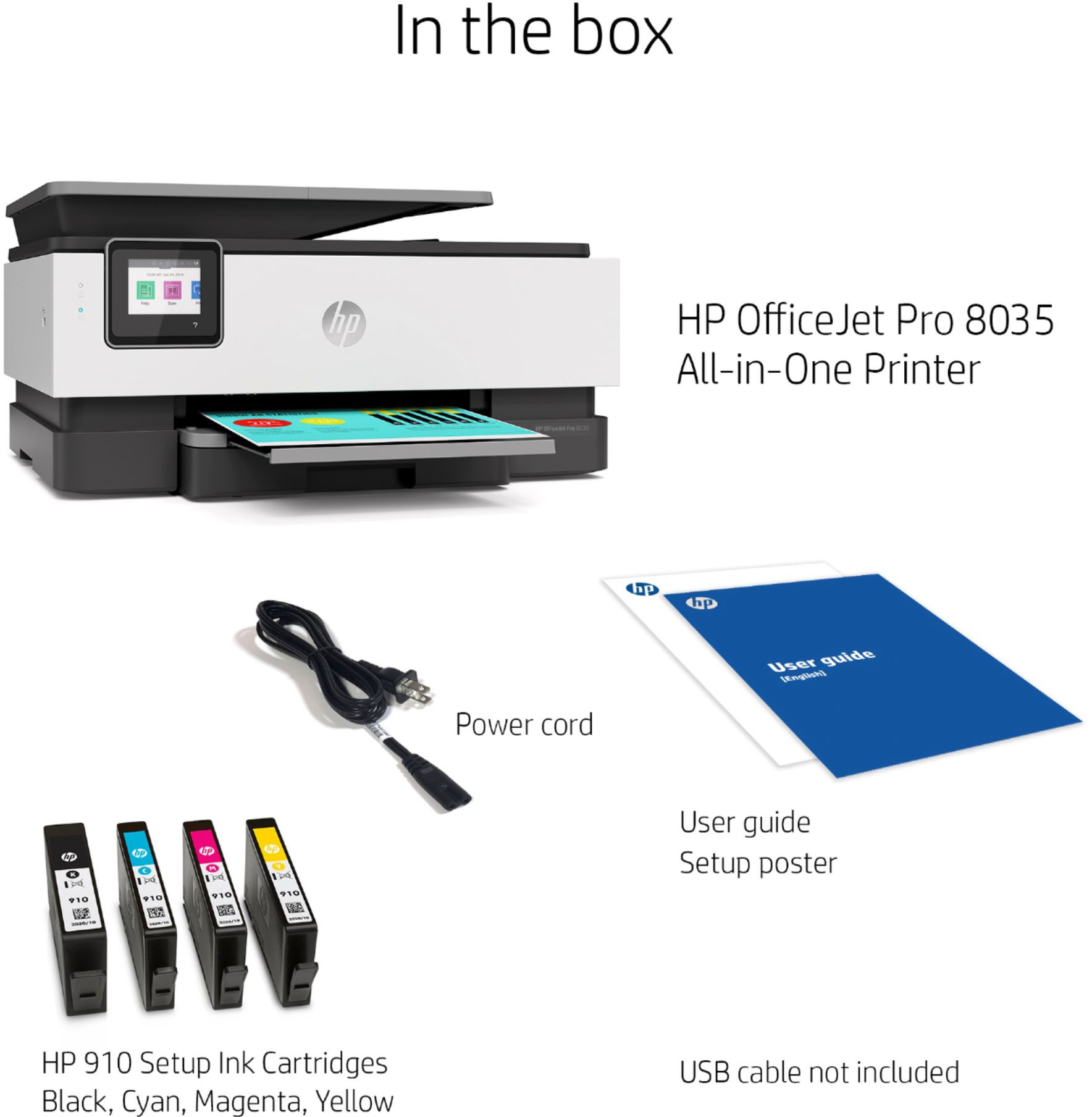
Posted .This reviewer received promo considerations or sweepstakes entry for writing a review.Returned home from the store and opened brand new box. No power cord. Very frustrating.
No, I would not recommend this to a friend