Customer Ratings & Reviews

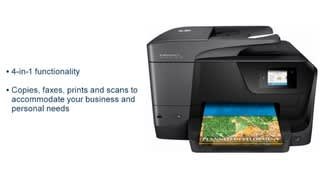
- Model:
- M9L66A#B1H
- SKU:
- 4973102
Rating by feature
- Value
Rating 4.4 out of 5 stars
- Quality
Rating 4.5 out of 5 stars
- Ease of Use
Rating 4.5 out of 5 stars
Customers are saying
Customers are impressed with the OfficeJet Pro 8710's print quality and ease of use, frequently praising its performance and user-friendliness. Many also appreciate the wireless functionality and the reasonable price point for the features offered. While some find the printer's size to be a minor drawback, the positive feedback on its reliability and overall functionality outweighs this concern.
This summary was generated by AI based on customer reviews.
USB issue and Fax won't work
Posted .This reviewer received promo considerations or sweepstakes entry for writing a review.Happy user of HP printers for 25 years - until now. Hooked up usb port to printer and won't print. After hour of diagnostics Windows (!) found issue - this printer will not work with a USB 3.0 port. USB 2.0 worked. My HP 6700 faxes fine but 8710 will not fax due to "fax line noise issue". Searching the web I found no way to get around this.
No, I would not recommend this to a friendOnly a 3star because its not MAC compatible
Posted .This reviewer received promo considerations or sweepstakes entry for writing a review.Not all that compatible with a MAC. You will need to purchase a series higher than a 8710
No, I would not recommend this to a friendCould not get it to print
Posted .This reviewer received promo considerations or sweepstakes entry for writing a review.As soon as we got the printer home to set up, we had issues (7 months ago). We were able to print wirelessly with our old printer and this one was supposedly better. We were not able to wireless print unless we did a restart of the printer each time and tried several times to reinstall the printer. We then got a USB cable to connect it to the printer and the printer will not accept it's connection. Incredibly disappointed in this product considering it has not worked well for even one month. We didn't want to pay a service charge to Geek Squad for a product that didn't work, so we didn't take it in. Of course, the return policy is obsolete now that we've tried every other course of action to troubleshoot. Now I know why Best Buy had the product on sale for such a cheap price. You get what you pay for. We're buying another non-HP printer now and not at Best Buy.
No, I would not recommend this to a friendI hate this machine more than i can say
Posted .This reviewer received promo considerations or sweepstakes entry for writing a review.EVERY time there is an update to ANYTHING (printer, computer, whatever) this loser has to get totally set up again. I can NEVER just fax, and rarely can just scan, or just print. Faxing is The Worst of them. the so-called "convenience" of automatic ink supply sounds OK but actually is beyond annoying. I haven't tried it on photos. but the print quality seems ok on documents.
No, I would not recommend this to a friendMoney Pit
Posted .This reviewer received promo considerations or sweepstakes entry for writing a review.I bought this printer few months ago. It has been working fine / as expectingly till one cartridge ran out of ink. I went to the store to get the appropriate cartridge (Cyan) and installed it. The printer indicated that I was still out of ink. I had to get the black one. So I bought the black one, got home and installed it, still could not print as my yellow was also out. I elected to print only black since all I needed was to print a form, well no I had to get the yellow one for the printer to work. So here is the reason got my 1 star, it worked well initially, but when you select to buy a inkjet printer you are bound to pay later, HP has their fingers in your pocket as they voluntarily inhibit the printer to work with black only so they can sell you the ink at extreme price. The original cartridges are not of large capacity so they get your money sooner ratter than later. If you wish to buy this printer, you may want to consider buying into their ink jet program, it's like a money drain that guaranty an income to HP. Very poor ethic from their part.
No, I would not recommend this to a friendFailed in 8 months
Posted .This reviewer received promo considerations or sweepstakes entry for writing a review.I purchased the HP inkjet 8 months ago. I had issues with paper jams since day one. I used the program that was offered on the downloaded install from online. I had worked on a project for the last two months and ready to print it for the last time for the presentation. No luck the inkjet jammed again. I cleaned it turned it off and still it ate a group of paper. I called in the person told me to do the same thing clean turn off clean again turn off again about another 30 minutes of frustration and now they say the sensor is out and I don't have a warranty on it any longer after the 60 days. Not even a year old and its trashed. I can buy a new one for less than getting this one fixed which I spent almost $200 on this is not good for a company I trusted in the past.
No, I would not recommend this to a friendCable Missing
Posted .This reviewer received promo considerations or sweepstakes entry for writing a review.Just bought the printer from Bestbuy store, brought it home, set it up and found the basic cable printer to Computer is missing. First I thought this is wireless connectivity printer so may be it does not include the cable. Then I browse through the product specification that clearly mentioned USB connectivity cable. I called bestbuy and first they asked me to goto the store and buy the cable, I told them it's missing from the box, either somebody took it or it was never packed. Then rep told me to goto store and replace the printer. This is horrible experience, I spent a lot of time setting up the printer and now I have to do it again because of one simple cable.... Should I just buy the cable or ditch the printer..... Here is the product specification mentioned that it has the cable..... which I did not find it in the box. ------------------------ USB 2.0 port for simple connectivity High-speed USB 2.0 port offers a standard connection to your PC or a simple way to plug in and print with a USB drive, camera or other device.
No, I would not recommend this to a friendBrand response from HP Team
Posted .Hey Zeeshan,
Thanks for taking the time to write a review. I understand you do not have the cable for USB connectivity. Please reach out to our HP Support Forums: http://h30434.www3.hp.com/psg/ @HPSupport or hp.com/contacthp so that we can help you to work towards a solution.
Thanks,
Lisa.
I work on behalf of HP.
Do Not Recommend
Posted .This reviewer received promo considerations or sweepstakes entry for writing a review.Nothing on this printer works like it should. It was brand new and printed nothing but lines or it printed blotchy. It disconnects from the computer all the time. Now it won’t print at all. I had to disable it and reinstall. It worked for about two weeks then stopped working again. The printer is connected to the internet but it can’t find the printer because it states it’s not connected. The HP troubleshooting is useless. It doesn’t have solution to this problem and everything on the HP website just gives you the same steps over and over again that don’t work. When it was connected, it wouldn’t scan from the printer. I had to put the paper in the printer then go to my computer and scan it. Extreme inconvenience. I should have returned it when I had all the problems with it when I bought it. I haven’t owned it that long and only used it about 5 times because it never wanted to work. Complete waste of money.
No, I would not recommend this to a friendBrand response from HP Team
Posted .Hi there,
It's so disappointing to hear that the printer hasn't been working as it should've from the start. I'm very sorry to hear about those inconsistencies with wireless connectivity and scanning. Reliability and ease is something we always strive to provide with our printers, so I can certainly imagine how upsetting this must be. That said, I would love to help get your printer running optimally, so let's see what I can do.
First, for the issue of the printer not being found, I'd recommend referencing any steps you've not already taken in this troubleshooter:
- Windows: support.hp.com/us-en/document/c04249080
- Mac: support.hp.com/us-en/document/c04249334
Then, the following link will help guide you through solutions for a wide range of wireless issues: hp.dezide.com/ts/start.jsp?guide=Printer_Does_Not_Maintain_Wireless_Connection.net
As for the lines and blotches you saw the beginning, this document should help: support.hp.com/us-en/document/c04955437
Lastly, as I'm not quite certain what may have caused the troubles with scanning, I'd highly recommend reaching out to us for direct support. We're always here and would be happy to work through some troubleshooting with you. You can get in touch with us via your preferred method at this link: hp.com/contactHP
I'd also like to mention that HP printers have a 1-year warranty from their purchase date, so you might consider making use of that if you need to. To verify the warranty, you can use the following link: support.hp.com/us-en/checkwarranty
Chelsea
HP Care
hp.com/support
Good Printer but likes to sleep. :)
Posted .This reviewer received promo considerations or sweepstakes entry for writing a review.When when a printer goes into sleep mode, usually you can touch the screen or even push the on and off button and it will wake up. Not this printer. The only way to get it to wake up is to unplug it from the wall. When it works, it works good. The copier works great. I never used the fax option.
No, I would not recommend this to a friendI usually LOVE HP printers,,,
Posted .This reviewer received promo considerations or sweepstakes entry for writing a review.However, am not liking this one. First of all, it's offline,,more than 90% of the time,,for no apparent reason. It will even go offline between pages while printing! Another annoyance, I didn't think to check this out, but my last HP printer had a nice feature that you could lift the copy door up just enough with one hand to grab or place paper on the glass, and the door would stay up, which makes one hand use, easy! Not this printer,,you either have to open it ALL the way,,90 degree angle,,or not at all. it won't stay propped up. Last feature the display screen is WAAY to small for my aging 60 year old eyes. My older version had bigger screen and bigger fonts, easily read from a few feet away. All in all,,really unhappy with this printer.
No, I would not recommend this to a friend- Pros mentioned:Print quality
Doesn’t work
Posted .This reviewer received promo considerations or sweepstakes entry for writing a review.Print very little, have had it for about 18 months and used it maybe 15 times. Went to print yesterday and there’s an error code on the screen and it can’t be fixed. Out of the blue just doesn’t work, nice product.
No, I would not recommend this to a friend Not reliable
Posted .This reviewer received promo considerations or sweepstakes entry for writing a review.This printer's performance has continued to be disappointing. I like HP product, but this printer has me shopping for other brands. It jams, poor quality printing, scanning software lacks features.
No, I would not recommend this to a friendpoor product
Posted .This reviewer received promo considerations or sweepstakes entry for writing a review.I purchased this printer on recommendation of Best Buy employee. I have had nothing but problems with it not printing and being "offline" all the time. I had to reinstall it so many times and it would print one item and then be "offline" and not work again. I went through the trouble shooting guide from HP and it said for printer to work, it had to be turned on. It was turned on and connected to my wireless router, but it couldn't be found. Since I had purchased the protection plan I took it back and purchased an Epson 3640 which loaded on all 3 of my computer without a problem and prints wonderfully.
No, I would not recommend this to a friendDoesn't work well with a Mac
Posted .This reviewer received promo considerations or sweepstakes entry for writing a review.HP used to be the best. Now they only want to sell you ink and the basic functions don't work. Scanning to a flash drive, sometimes. Color printing doesn't work with the new OS.
No, I would not recommend this to a friendIssues with most features
Posted .This reviewer received promo considerations or sweepstakes entry for writing a review.This is the 3rd HP 8700 model I have purchased for home office use. I reserached the prior versions and they were awesome, so I saw now harm in picking up the latest version. I have had issues with the scanner feeder, the menu freezing up, and I have yet to be able to scan documents to email. In addition, in order to scan to my HP laptop, I was prompted to purchase a $40 driver service, that I should not have needed, and believe it is now creating issues with my new laptop, also purchased from Best Buy and also an HP product!
No, I would not recommend this to a friendBuggy printer never worked
Posted .This reviewer received promo considerations or sweepstakes entry for writing a review.Could never get this printer to work even after 2 hours with hP support. Good luck getting through to support to start. Printer's wifi is very temperamental. I read other reviews to this effect but ignored them; figured reviewers just so weren't tech savvy. Turns out their comments were prophetic. Do yourself a favor and avoid this printer, unless you like rebooting your printer before every print job.
No, I would not recommend this to a friendBrand response from HP Team
Posted .Hey there.
Sorry to hear that your experience with HP printer is not great.
You can find the printer offline support document at
http://support.hp.com/us-en/product/hp-officejet-pro-8710-all-in-one-printer-series/7902014/document/c05083107
If you have not enabled automatic update. You can download latest improved driver at
http://support.hp.com/us-en/product/HP-OfficeJet-Pro-8710-All-in-One-Printer-series/7902014
If the problem persists, please contact HP support via, HP Support Forums: http://h30434.www3.hp.com You can also reach out to us @HPSupport or hp.com/contacthp so that we can assist you better.
Keith
- I work on behalf of HP
HP Printers are a big scam (Ink)
Posted .This reviewer received promo considerations or sweepstakes entry for writing a review.This sucks up the color ink and there are no EASY ways to say "Print black in white only". Be sure to price out ink BEFORE you buy this printer, because its almost the same price as the printer (sale price, I've never seen this printer full price , first clue it was a poor printer) Im gong to use up the rest of the ink, and get rid of this printer and buy a epson (not perfect, but better than HP (no great accomplishment).
No, I would not recommend this to a friendBrand response from HP Team
Posted .Hey there,
I'm so sorry to hear that the printer isn't quite what you expected with regards to ink consumption. We're certainly committed to providing an efficient experience with our printers, so I can imagine how disappointing this must be. With that said, let's see what I can do to help.
I have a few suggestions for lowering ink consumption that you might try. First, I recommend using the printer's draft mode, as this can often improve ink usage. Following that, you could also set the printer to print black and white only via HP Easy Start app. If you find you're still using quite a bit, Instant Ink might just be worth a try. Many customers like our available plans, as they're based on how many pages you print monthly. If your printer usage is minimal, Instant Ink also offers a subscription plan that allows you to print 15 pages a month for free! For more details, you can visit this link: HPinstantink.com
Despite this experience, I hope you'll consider reaching out to us for support if you need. We're always happy to help. You can contact us directly via your preferred method at this link: hp.com/contactHP
Chelsea
HP Care
hp.com/support
Error
Posted .This reviewer received promo considerations or sweepstakes entry for writing a review.Only had printer for 14 months and used very little. It was printing a 6 page document and then stopped with Error Code c9c70000. Further review is that this is a known hardware problem of a defective product. Haven't even used up the 1st set of cartridges for this printer. Also cannot handle card stock paper. It has been a piece of junk for me.
No, I would not recommend this to a friendDon't waste ur time & money
Posted .This reviewer received promo considerations or sweepstakes entry for writing a review.A loyal HP owner: VERY DISAPPOINTED, POOR PRINT QUALITY, returned. This has to be the worst I've ever owned since HP started making inkjet printers in 1984. I paid over 2X more money for an HP Color Laserjet Pro MFP M281fdw printer from the same Best Buy = VERY SATISFIED WITH THE HP LASER.
No, I would not recommend this to a friendCan't print from mobile devices
Posted .This reviewer received promo considerations or sweepstakes entry for writing a review.After 5 hours of battling setup I've given up. Will go buy a cheap one. Bought hp for ease of setup. All I get is "no air printer". Went to we sent for setup and it tells me there is a problem and click on "this" but my printer doesn't have "this". I've had hp for years but this is it. Never again!
No, I would not recommend this to a friendBrand response from HP Team
Posted .Hi Cindy,
I would like to help you with your 8710. I understand you are having some trouble printing from your mobile devices. Not being able to connect any mobile devices could be a result of the AirPrint and WiFi direct functions being disabled, either during the setup process and/or setting in printer embedded web server, EWS. In the future, you can enable these functions through below steps.
Step 1: Connecting printer through Embedded Web Server, EWS
1 - Connect printer to network either through WiFi infrastructure or Ethernet cable
2 - Print a network configuration report from the printer and look at the information for IPv4.
3 - On a personal computer connecting to the same infrastructure, open web browser and type the IP address into the User Request Line (URL).
4 - Hit Enter
Step 2 through Embedded Web Server
1 - Settings tab
2 - Security menu >> Administrator Settings
3 – Check/Enable Airprint or WiFi direct under Network Settings
4 – Click Apply
Hope this helps. If the issue persists, please take a look at the following documents that soeak to the available HP print apps:
http://support.hp.com/us-en/document/c01923321
http://support.hp.com/us-en/document/c03561640
Cheers,
Lisa.
I work on behalf of HP.