Customer Ratings & Reviews
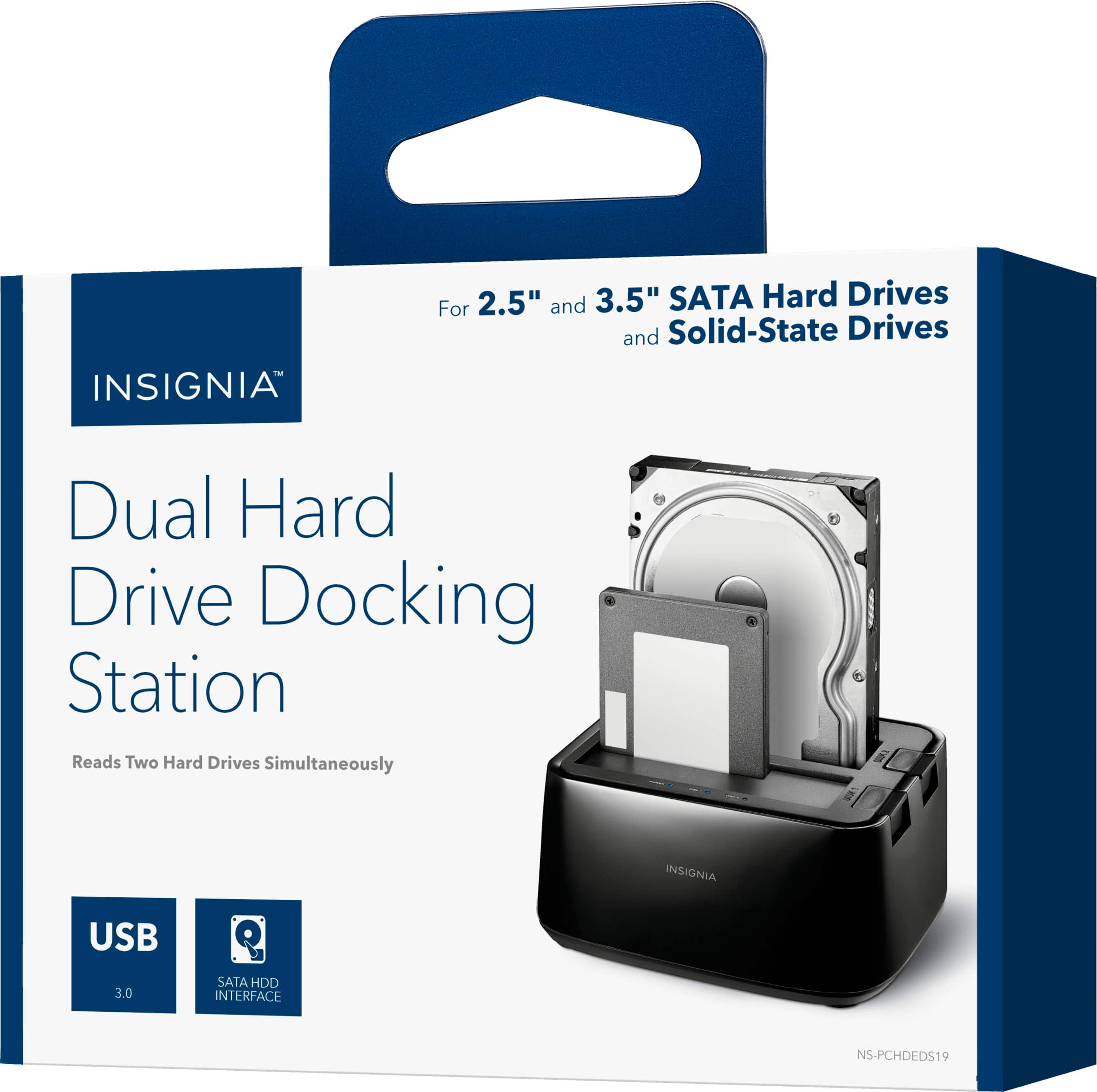
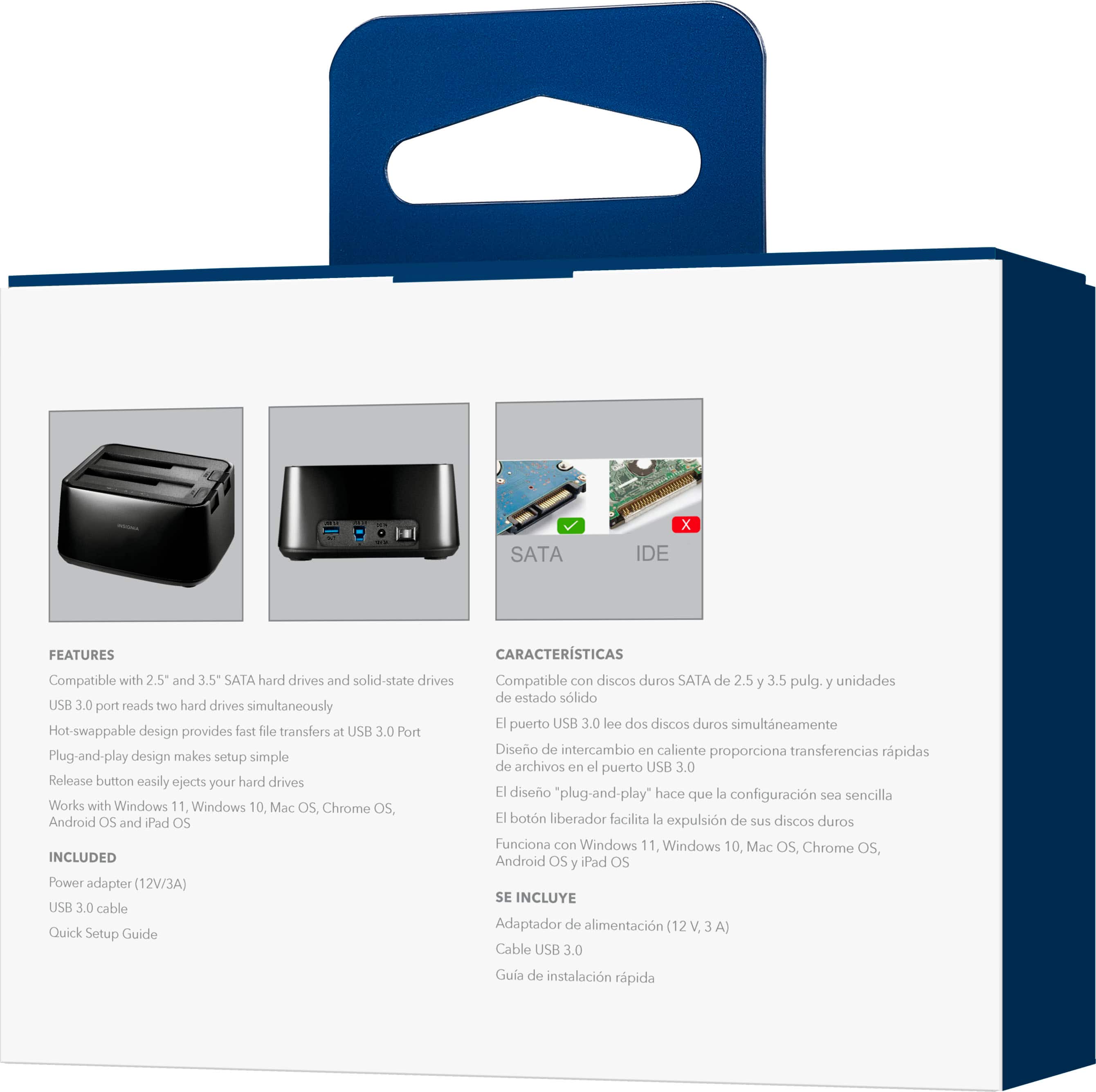

- Model:
- NS-PCHDEDS19
- SKU:
- 6153102
Rating by feature
- Value
Rating 4.5 out of 5 stars
- Quality
Rating 4.5 out of 5 stars
- Ease of Use
Rating 4.6 out of 5 stars
Customers are saying
Customers admire the 2-Bay HDD docking station for its ease of use, fast data transfer speeds, and overall performance. The device's compatibility is also impressive, effortlessly accommodating various hard drives. However, some customers have noted concerns about the size, power issues, and loose connections.
This summary was generated by AI based on customer reviews.
Worked great
||Posted . Owned for 3 weeks when reviewed.This reviewer received promo considerations or sweepstakes entry for writing a review.Used it for 2 hard disk drives that were used as data drives. I now use them as external storage drives and it works very well.
I would recommend this to a friendBrand response from InsigniaCustomerSupport
Posted .Hi Roger, Thank you for sharing your experience with the Insignia 2 Bay HDD Docking Station. We are pleased to hear it worked well for repurposing your hard drives as external storage and has provided reliable performance for your data storage needs. Thank you for being a valued Insignia customer. Faisal | Insignia

- Pros mentioned:Ease of use
A must have
||Posted . Owned for 2 weeks when reviewed.This reviewer received promo considerations or sweepstakes entry for writing a review.Simple plug and play. Real easy to use and takes the hassle right out of switching between drives if you have more than one, definitely a must have!
I would recommend this to a friendBrand response from InsigniaCustomerSupport
Posted .Hello Rafael! Thank you for sharing your feedback with us. We’re glad to hear that the Insignia 2 Bay HDD Docking Station has been simple to set up and easy to use. It's great to know that it takes the hassle out of switching between drives and has become such a valuable addition to your workflow. We appreciate you taking the time to share your experience and recommendation. Sohrab | Insignia
- Pros mentioned:Data transfer, Ease of use
Always good to have
||Posted . Owned for less than 1 week when reviewed.This reviewer received promo considerations or sweepstakes entry for writing a review.Wow this insignia docker is cool. I had about 10 Sata old hard drives lying around. I reformatted them all checked for errors now I have extra hard drives to use. When your hard drive in your computer goes bad you can always take it out and put it in this dock and get back all your files. Nice product and its easy to use. You can use this to tranfer data from diiffrent devices. This is always good to have.
I would recommend this to a friend - Pros mentioned:Data transfer, Usb
Insignia HDD And SSD Docking Station
||Posted . Owned for less than 1 week when reviewed.This reviewer received promo considerations or sweepstakes entry for writing a review.Great products are used for saving and transferring data in your computer. if you worry about opening up your PC this is a product you may consider having. You also need another USB-to-USB cable. You can use both SSD and HDD on it.
I would recommend this to a friend Good device
||Posted . Owned for 3 weeks when reviewed.This reviewer received promo considerations or sweepstakes entry for writing a review.Had to get this due to my old PC dying suddenly! This device worked perfectly for me to move my files to different locations. I have bene using this frequesnlty with no issues. I was able to reformat drives, transfer files.
I would recommend this to a friendBrand response from InsigniaCustomerSupport
Posted .Hi Insignia customer, Thank you for sharing your review. We’re glad to hear the Insignia 2‑Bay HDD Docking Station helped you recover files after your PC failure and that it’s been working reliably for transfers and drive formatting. It’s great to know it’s holding up with frequent use. Thank you for choosing Insignia. Faisal | Insignia.
- Pros mentioned:Overall performance
Ecstatic with Insignia - 2-Bay HDD Docking Station
||Posted . Owned for 1 month when reviewed.This reviewer received promo considerations or sweepstakes entry for writing a review.Love this item, it did everything I needed which was reading linux to download files from WD My Cloud to my Windows 11. Great job! I'm ecstatic.
I would recommend this to a friend - Pros mentioned:Ease of use, Usb
Solid docking station
||Posted .This reviewer received promo considerations or sweepstakes entry for writing a review.This docking station was extremely easy to plug into the USB port, and then hot-swap any 2 drives (SSD or HDD). They show up immediately in Explorer and are accessible as if they had been installed inside your computer itself. It's great for file transfer from old systems or drives. Highly recommended.
I would recommend this to a friend Solid, dependable docking station.
||Posted . Owned for 1 year when reviewed.This reviewer received promo considerations or sweepstakes entry for writing a review.Zero setup. Reliable data transfer rates, no unexpected disconnects. Works out of the box with my Ubuntu server. 10/10.
I would recommend this to a friendBrand response from InsigniaCustomerSupport
Posted .Hello Insignia Customer, thank you for your feedback! We're thrilled to hear the Insignia 2-Bay HDD Docking Station worked right out of the box and is delivering reliable performance with your Ubuntu server. It's wonderful to know you're experiencing dependable data transfers and a hassle-free setup. Thank you for choosing Insignia!
Sudeep | Insignia
- Pros mentioned:Overall performance
Works well
||Posted . Owned for 3 weeks when reviewed.This reviewer received promo considerations or sweepstakes entry for writing a review.Chunky and wiggles a little other than that it works perfectly as intended i was able to use a drive i had to play some Nintendo games from wii and ds and switch
I would recommend this to a friend Very good for its purpose!
||Posted . Owned for 2 months when reviewed.This reviewer received promo considerations or sweepstakes entry for writing a review.Very good for its purpose! It works very well from what I can tell. I use this with the hard drives that I have collected from older computers I had, and from when I upgraded to SSDs. It's for use with SATA drives but uses USB 3.0/3.1 speeds. Despite this, being able to hot swap drives makes it very convenient to read/write to/from the hard drives for cold storage.
I would recommend this to a friendBrand response from InsigniaCustomerSupport
Posted .Thank you for your detailed feedback! We're pleased to hear that our product is serving its purpose well and that you find it convenient for reading and writing to your hard drives. Your satisfaction is important to us, and we're glad to know that the hot swap feature adds to the convenience of your cold storage needs.
- Carl | Insignia Products
- Pros mentioned:Data transfer
This Insignia 2 Bay HDD docking station saved us
||Posted . Owned for 3 months when reviewed.This reviewer received promo considerations or sweepstakes entry for writing a review.In the past, we did not know what to do when one of our computers went bad; we took for granted that all the information we had stored in the hard drive was lost or very difficult to retrieve (we are not too savvy with computers). We would normally copy the files into a USB and transfer the files that way. That was very tedious until we came across this handy 2-Bay HDD docking station. All we did was, we took the hard drive out of the old computer and placed it on this docking station, and we were able to retrieve all our stored information in a matter of minutes. Works great. Our old computer was damaged by a lightning strike. We lost the computer but, were able to save all of our information.
I would recommend this to a friend - Pros mentioned:Overall performance
HD Copier
||Posted . Owned for 3 weeks when reviewed.This reviewer received promo considerations or sweepstakes entry for writing a review.Even though it worked perfectly i had to return because it was the wrong model from which i needed.
I would recommend this to a friendBrand response from InsigniaCustomerSupport
Posted .Hello John, thank you for sharing your feedback. We're glad to hear the docking station worked perfectly, even though it ended up being the wrong model for your needs. We appreciate your honest review and are glad you were able to determine what worked best for your setup.
Sidhartha | Insignia
- Pros mentioned:Compatibility
Awesome reader
||Posted . Owned for 8 months when reviewed.This reviewer received promo considerations or sweepstakes entry for writing a review.Love it. Ensures i can access HDD devices and SSD devices if they have pertinent data that needs removed but i dont want to swap pc parts.
I would recommend this to a friend - Pros mentioned:Data transfer
Decent spare drive port with USB 3 - 5Gbs speeds
||Posted .This reviewer received promo considerations or sweepstakes entry for writing a review.If you want a cheap, fast USB3 docking station for fast transfers to or from cold storage, this is your toaster. First of all, it is indeed fast if you use fast drives on fast USB. I get a full 400-500 GBs over USB3 5Gb ports with my spare Samsung EVO850s popped in the slots. If you're not getting those speeds your USB port is the bottleneck, not the device. Keep in mind, you get what you pay for. If you unmount the drives with the "remove drive" function, Windows does not unmount the drive, it unmounts that SLOT. You will not be able to re-use that slot unless you reboot your computer. So you won't be using more than two drives between boots. And this is a "Toaster". If you leave hard disk drives in it for any length of time, they will get ungodly hot, which is not good for your drive. Do what you need to do, then turn it off. It is still an incredible value for the money, and a highly useful tool for handling cold-storage files. I would definitely buy again.
I would recommend this to a friendBrand response from InsigniaCustomerSupport
Posted .Thank you for your detailed feedback. We’re glad to hear that the docking station is delivering fast performance and meeting your expectations for cold storage transfers. It’s great to know you’re getting the most out of it with high-speed drives and USB3 ports. We appreciate your insights on how to best use the device, including the importance of managing drive heat and the slot behavior in Windows. Your experience and recommendation are valuable for others looking for a reliable and affordable solution.
Keith | Insignia Support
- Pros mentioned:Overall performance
Insignia™ - 2-Bay HDD docking station
||Posted . Owned for 1 year when reviewed.This reviewer received promo considerations or sweepstakes entry for writing a review.this Insignia™ - 2-Bay HDD docking station works great it a good way to back up your hard disk drive
I would recommend this to a friendBrand response from InsigniaCustomerSupport
Posted .Hello Eric, thank you for your review; we’re pleased to know your Insignia 2-Bay HDD Docking Station has provided a dependable solution for managing and backing up hard drives, and we sincerely appreciate you choosing Insignia. Mueez | Insignia
- Pros mentioned:Compatibility, Ease of use
Excellent tool for accessing old internal HDDs!
||Posted . Owned for 2 months when reviewed.This reviewer received promo considerations or sweepstakes entry for writing a review.I had some old hard drives from the early 2000's in storage and needed an easy way to hook them up as "external" drives to my iMac. This thing works like a charm. You can put 2 drives in at once, and they can be either 2.5 or 3.5'' disks. I found pictures from 20 years ago. All my old music. This is also a must-have for people that regularly do data recovery work.
No, I would not recommend this to a friend What a stellar surprise!
||Posted .This reviewer received promo considerations or sweepstakes entry for writing a review.I was truly surprised after hooking up this HDD docking station. It was only this version and another smaller HDD enclosure available in the store. I took this one (the other was for 2.5 HDD's) I needed it for my 5TB HDD. I was skeptical because I just purchased something liek this from amazon and it was horrible. This Insignia version is PERFECT! Pros: No firmware to download (Plug & Play) Open so it stays cool Dual HDD slots 2.5 or 3.5 HDDs USB 3.0 Power Switch! Price (You can catch this item for 30% off regularly) Cons: The HDD slot doors do not cover the entire slot when no HDD is inserted. I just lay a index card over it when not in use to keep dust out. (Dust is a top electronic device killer!)
I would recommend this to a friend- Pros mentioned:Compatibility, Overall performance
Works great for cloning hard drives
||Posted . Owned for 1 month when reviewed.This reviewer received promo considerations or sweepstakes entry for writing a review.Works great. No issues with use to clone drives. Will do 3.5 and 2.5 inch Sata drives.
I would recommend this to a friendBrand response from InsigniaCustomerSupport
Posted .Hi Mike,
Thank you for your great review of the Insignia™ 2-Bay HDD Docking Station! We're pleased to hear that it's working well for you and that you've had no issues using it to clone drives. It's great to know that it supports both 3.5 and 2.5 inch SATA drives.
If you have any questions or need further assistance, please feel free to reach out. Patricia | Insignia Support
Reliable Dual-Bay Docking Station
||Posted . Owned for 1 month when reviewed.This reviewer received promo considerations or sweepstakes entry for writing a review.The Insignia 2-Bay HDD Docking Station is a fantastic tool for anyone who works with multiple hard drives. I’ve used it to access old data, clone drives, and run backups—and it’s been smooth sailing every time. Just plug in your 2.5" or 3.5" SATA drives, connect via USB, and you’re good to go. No drivers, no fuss. The dual-bay setup is especially useful for managing multiple drives or transferring data between them. Build quality is solid, and the interface is intuitive. It’s a great solution for tech enthusiasts, IT pros, or anyone with a stack of drives to manage. If you need fast, reliable access to your HDDs or SSDs without cracking open a case, this docking station delivers.
I would recommend this to a friend- Pros mentioned:Data transfer, Ease of use
Easy Way to Connect HDD's
||Posted .This reviewer received promo considerations or sweepstakes entry for writing a review.I needed a quick way to connect a drive and a desktop together. I messed up installing the OS and the drive became slow. Attached it to my other computer so I could quickly force a format and try again. Lost an external drive due to a bad daughter board and this guy made it simple to reconnect it and recover the data. Both cases this guy performed and now I have this powerful tool for the next use case.
I would recommend this to a friend