Customer Ratings & Reviews
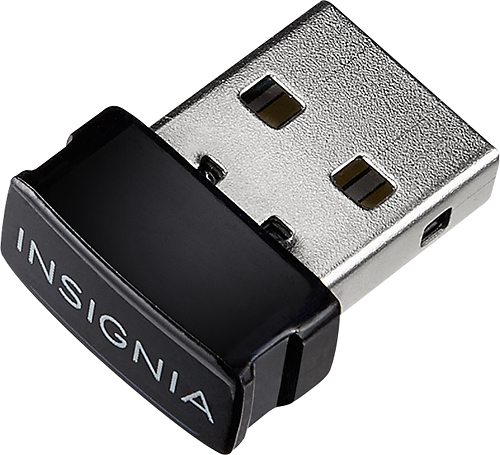
- Model:
- NS-PCY5BMA
- SKU:
- 5655065
to a friend
Customers are saying
Customers regard the Bluetooth 4.0 USB Adapter very favorably, frequently praising its ease of use, Bluetooth functionality, and compatibility with various devices. Many appreciate its affordable price and reliable connections, while some experienced minor issues with software or signal strength. Positive feedback also highlights the adapter's compact size, simple installation, and good performance. A few users suggested improvements to the instructions and software.
This summary was generated by AI based on customer reviews.
Would not buy again
||Posted .This reviewer received promo considerations or sweepstakes entry for writing a review.I bought it to use with my lg tone ultra. The volume it delivered was just ok at first. Then for some reason it delivered only enough volume to let me know it was connected. I then tried it with my Jam head phones and the volume is good. Dissapointed since i bought it to use mainly with my Tone.
No, I would not recommend this to a friend- Pros mentioned:Ease of use
Perfect Bluetooth connector
||Posted .This reviewer received promo considerations or sweepstakes entry for writing a review.It is easy to pair devices using this connector. Works with Bluetooth speakers and other Bluetooth devices. Nice addition to the portability of our laptop.
I would recommend this to a friend Love it!
||Posted .This reviewer received promo considerations or sweepstakes entry for writing a review.I bought one off amazon for the same price a week before and it kept dropping connections, but this one has worked perfectly without issue for months now.
I would recommend this to a friendBlue tooth for the non-blue tooth laptop
||Posted .This reviewer received promo considerations or sweepstakes entry for writing a review.Great price, good product. Only thing that is a little tricky is getting it installed and working properly. I had it working for a month then it stopped working after a update. Had to re-install to get it to work again.
I would recommend this to a friendIam sure it works just not that good with Win 10
||Posted .This reviewer received promo considerations or sweepstakes entry for writing a review.Iam sure it works just not that good with Windows 10. Every time you want to use any bluetooth device it make a reboot in order for it to do it and has an error of Kernal Auto Boost ARQL Overload. Otherwise it works, just a pain in the .... I do not recommend this for Windows 10 users
No, I would not recommend this to a friendsolid product
||Posted .This reviewer received promo considerations or sweepstakes entry for writing a review.This is a Good product . Yes i would recommend this to a friend
I would recommend this to a friend- Pros mentioned:Compatibility
great Bluetooth adapter. works really well
||Posted .This reviewer received promo considerations or sweepstakes entry for writing a review.This Bluetooth adapter is good and works well with my phone or any other Bluetooth enabled devices. I recommend it for anybody wanting to make their PC bluetooth
I would recommend this to a friend Does not work with Arduino Mega ADK
||Posted .This reviewer received promo considerations or sweepstakes entry for writing a review.Could not get it to work with an Arduino Mega ADK so returned it.
I would recommend this to a friend- Pros mentioned:Bluetooth
Absolutely did what I needed
||Posted .This reviewer received promo considerations or sweepstakes entry for writing a review.I needed an up-to-date Bluetooth dongle for printing from my laptop and this both definitely did the job for both my printers. Very happy with it.
I would recommend this to a friend Bluetooth
||Posted .This reviewer received promo considerations or sweepstakes entry for writing a review.I searched for one of these in the stores a couple times. They were always sold out. Works as advertised. The only drawback is every once in a while it stops connecting to my Bluetooth mouse. Sometimes I have to restart the computer to get it to recognize the mouse, it's kind of annoying.
I would recommend this to a friendHigh latency, no range
||Posted .This reviewer received promo considerations or sweepstakes entry for writing a review.I bought this so that I can pair it with my PS4 controller, should have trusted my gut and went with a different brand. My setup: Windows 10 x64, i7 5820k, 64gb ddr4 2400mhz, GeForce 970 gtx x2 (SLI), 500gb Ssd, 3tb HDD. Cons: ** Range - this is advertised as 20' range, which is a pretty blatant lie. Just to give you an idea of my setup: My PC is about 3 feet away from me and I have nothing between the port that this dongle is plugged into and me, and I would constantly lose signal... Sure it'll connect 5-6 ft away, but you'll constantly lose singal. ** Latency - I ran ds4windows to do some tests, and when your device is more than half a foot from the dongle, the latency constantly spikes above 10MS, and with gaming having 1ms being the difference between landing a shot or being shot, this dongle becomes useless. I had to plug it into a usb extension cord and attach the dongle the armrest of my chair in order to get decent latency (below 5ms, which is still horrible). ** Annoying bright light - The light is built into the dongle and there is no way to turn it off, it is super bright and blinks every time anything happens on the device that is plugged in. With having my game pad plugged in, this thing constantly flashed, and it's so bright that your eyes automatically switch to it while your gaming, you have to hide the light or your brain will force your eyes to constantly glance at it since you're hyper aware of any changes to the environment while your gaming. Honestly insignia, why do we need to be notified of every single bit of data exchange that happens between our devices and this dongle with an annoying bright blue flash? Pros: ** Setup - setting up for Windows 10 was simple as can be, plugged it in and it was immoderately recognized. Honestly it was the only good thing about this dongle. Final words: I wouldn't recommend this thing to anybody that doesn't want to be closer than 6 inches to the dongle at all times to be able to use it without constant connection drops.
No, I would not recommend this to a friendBrand response from InsigniaCustomerSupport
Posted .You may want to try using the driver specifically intended for the adapter that is available on the website. For assistance in setting that up, you can contact us at www.InsigniaProducts.com/support/contact.html. - Jon, Insignia Support

Does NOT work
||Posted .This reviewer received promo considerations or sweepstakes entry for writing a review.I needed this adapter for my HP desktop. I have a set of bluetooth earphones and wanted to utilize this adapter for this purpose. After reading the reviews for this, I ordered it (and wasted my Best Buy certificate on it btw). I plugged it in, and Windows 7 could not find a driver for it. So plug and play -- no way. Based off the (shoddy) instructions and online forums, I followed all instructions but still could not get this adapter's driver to recognize the device. If you go to Insignia's online support sites, you'll find I'm not the only one with this problem -- and Insignia isn't helpful at all.
No, I would not recommend this to a friendOK purchase.
||Posted .This reviewer received promo considerations or sweepstakes entry for writing a review.Connecting to Bluetooth device requires time for each use.
I would recommend this to a friendNot for MAC
||Posted .This reviewer received promo considerations or sweepstakes entry for writing a review.That not works with Apple Mouse to used in a Windows PC
No, I would not recommend this to a friend- Pros mentioned:Ease of use
Nice little do hicky
||Posted .This reviewer received promo considerations or sweepstakes entry for writing a review.I am new to bluetooth technology it was easy to install and use. How can you increase the range/distance from the device? Are there boosters?
I would recommend this to a friend - Pros mentioned:Range
Great Bluetooth Adapter
||Posted .This reviewer received promo considerations or sweepstakes entry for writing a review.I like that I can use this bluetooth adapter so I can play music from my laptop through my bose.
I would recommend this to a friend - Pros mentioned:Ease of use
Works Great
||Posted .This reviewer received promo considerations or sweepstakes entry for writing a review.I got this to work with my Apple keyboard for my computer. Plugged in and installed quickly. turns on automaically when power goes to the computer.
I would recommend this to a friend Not compatible
||Posted .This reviewer received promo considerations or sweepstakes entry for writing a review.This dongle does not work with Microsoft Windows 7.
No, I would not recommend this to a friendBrand response from InsigniaCustomerSupport
Posted .This device is certified to work with Windows 7, 8.1, and 10. If you are having issues with installation, please contact us at www.InsigniaProducts.com/support/contact.html for Setup and Troubleshooting assistance. - Jon, Insignia Support
- Pros mentioned:Price
Great
||Posted .This reviewer received promo considerations or sweepstakes entry for writing a review.Works perfectly how it should. No complaints here. If you need a simple way to connect Bleutooth to your computer for cheap here you go.
I would recommend this to a friend very small
||Posted .This reviewer received promo considerations or sweepstakes entry for writing a review.a good product, however doesn't work with Mac items.
I would recommend this to a friend