Customer Ratings & Reviews
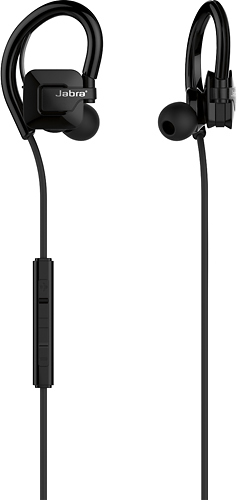
- Model:
- 100-97000000-02
- SKU:
- 8955062
Rating by feature
- Value
Rating 3.4 out of 5 stars
- Quality
Rating 3.7 out of 5 stars
- Ease of Use
Rating 3.9 out of 5 stars
Customers are saying
Customers consistently note the Step Wireless Earbud Headphones' sound quality, comfort, and affordability. Many reviewers describe the sound quality as good, while others appreciate the comfort and fit of the earbuds. The price point is also seen as a positive aspect, with several customers mentioning that they are a great value for the price.However, some customers have concerns about the fit, battery life, and volume. Some find the earbuds to be uncomfortable, while others wish the battery life was longer. Additionally, a few customers have mentioned that the volume could be louder.
This summary was generated by AI based on customer reviews.
Great
Posted .This reviewer received promo considerations or sweepstakes entry for writing a review.Got these for my girlfriend, says she loves them. Used them working out they never fell out.
I would recommend this to a friendGreat earbuds
Posted .This reviewer received promo considerations or sweepstakes entry for writing a review.I bought these as a gift, but my friend adores them and says he loves using them in the gym!
I would recommend this to a friendGood product
Posted .This reviewer received promo considerations or sweepstakes entry for writing a review.Work great for me not to big great size . I like the idea it used for phone and music !
I would recommend this to a friendUnacceptable Audio Quality
Posted .This reviewer received promo considerations or sweepstakes entry for writing a review.Very tinny sound...maybe OK for telephone calls, but awful for music.
No, I would not recommend this to a friendWorst product ever
Posted .This reviewer received promo considerations or sweepstakes entry for writing a review.Terrible product. I am on my 6th pair within a year... the power and volume buttons break within 2 months. Does not stand up to sweat or something.... this last pair only lasted a week and a half... absolutely the worst product I have ever purchased from Best Buy
No, I would not recommend this to a friendWeak bluetooth range
Posted .This reviewer received promo considerations or sweepstakes entry for writing a review.Bought these to work with my Samsung Gearfit 2. The bluetooth signal is so weak that music cut out according to my stride. I had to put my Gearfit 2 on my right hand in order to maintain consistent sound. Otherwise, not a bad product.
No, I would not recommend this to a friend**Absolute garbage**
Posted .This reviewer received promo considerations or sweepstakes entry for writing a review.Do not buy these, they are TRASH I have had them for about a month and they no longer turn on. The Bluetooth connectivity is awful. The sound cuts out if you phone is in your pocket.
No, I would not recommend this to a friendStopped Working
Posted .This reviewer received promo considerations or sweepstakes entry for writing a review.After a month the buttons stopped working, couldn't turn on or off.
No, I would not recommend this to a friendDoes not connect to Apple
Posted .This reviewer received promo considerations or sweepstakes entry for writing a review.Earphones would not pair with my Apple Phone 8 plus
No, I would not recommend this to a friendBrand response from Jabra
Posted .Hello Jasmine,
Our headset connects to devices via Bluetooth. Put the Jabra Step in BT Mode, go to BT settings on your Apple device and you will see the Jabra Step appear in your options to connect to. If it doesn't show up then you can refresh your BT devices to pick from by turning your BT setting on your phone off and then back on. Once the Jabra Step shows up in your list click on it to connect.
If you have any additional issues connecting, feel free to contact our customer support group and they can walk you through it. Here is a link to start the dialog.
http://www.jabra.com/ServiceMenu/contact/ContactJabraSupport/ContactJabraSupportConsumer
Thanks for reaching out to us!
Jabra