Customer Ratings & Reviews
- Model:
- MGOCHRGMSRBLK124
- SKU:
- 6588507
Rating by feature
- Value
Rating 4.8 out of 5 stars
- Quality
Rating 4.7 out of 5 stars
- Ease of Use
Rating 4.8 out of 5 stars
Customers are saying
Customers recognize the product's excellent portability, with many finding it a great portable mouse. Its overall performance is generally good, and connectivity is intuitive and straightforward. Users also appreciate the reliable battery life, quiet operation with soft clicks, and lightweight design.
This summary was generated by AI based on customer reviews.
- Pros mentioned:Battery life
Nice alternative to logitech
||Posted . Owned for 2 weeks when reviewed.This reviewer received promo considerations or sweepstakes entry for writing a review.I like that I have an alternative to logitech that isn't going to break the bank. Speed and size are good. I like the grip and that I don't have to replace the batteries.
I would recommend this to a friend - Pros mentioned:Overall performance
Wireless Mouse
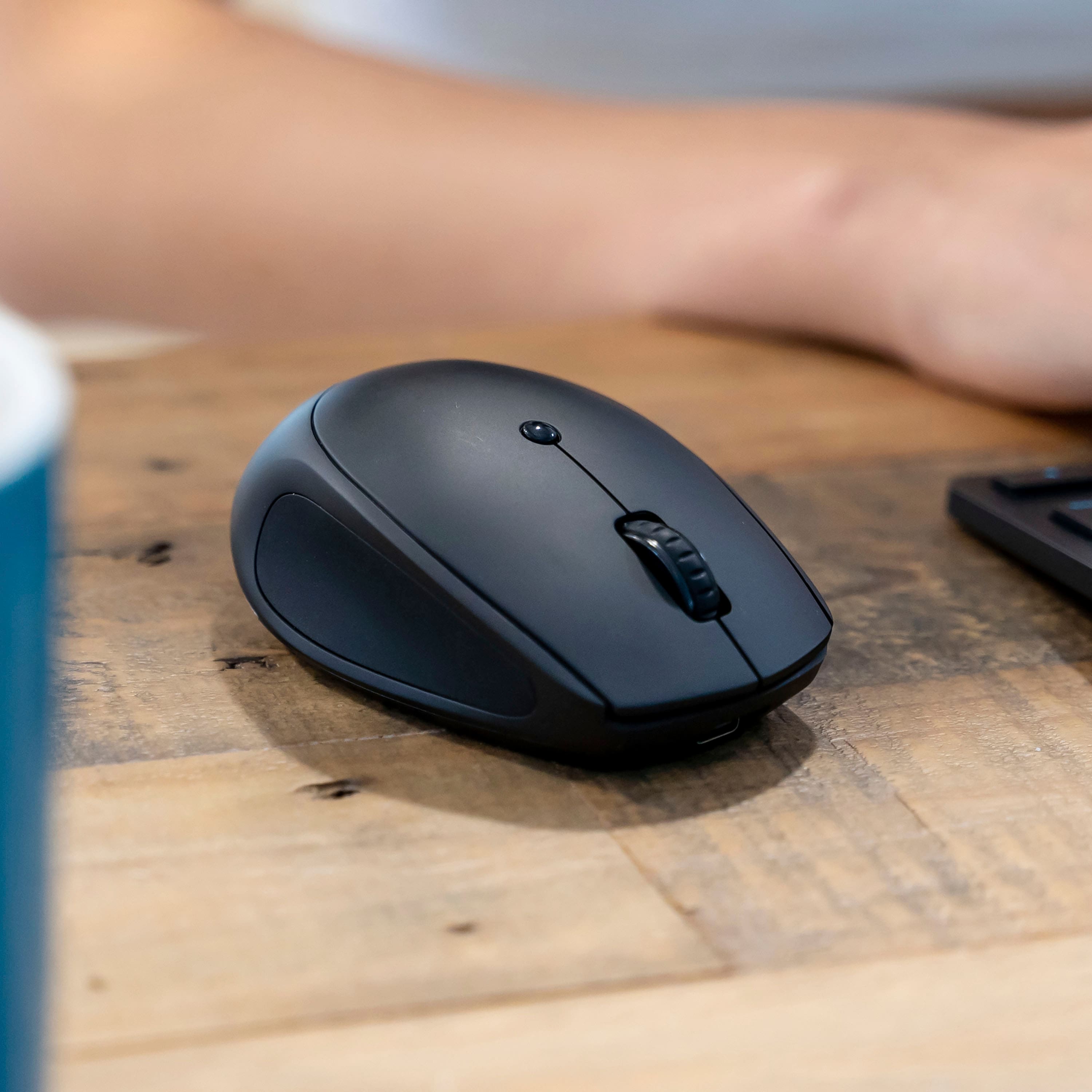
||Posted .This reviewer received promo considerations or sweepstakes entry for writing a review.This item looks exactly as shown and works really well.
I would recommend this to a friend Lots of great features
||Posted . Owned for 4 months when reviewed.This reviewer received promo considerations or sweepstakes entry for writing a review.Lots of great features, no loud clicking sounds so that is a big perk for using in a classroom.
I would recommend this to a friendGood mouse
||Posted . Owned for 3 weeks when reviewed.This reviewer received promo considerations or sweepstakes entry for writing a review.Honestly, I did not expect anything impressive from a mouse, but I am impressed. It does not come with a charging cord. However, I am pleased with the feel of it, and the simplicity of the design with the light showing if it is fully charged, among other things. All around a pretty good mouse for a reasonable price.
I would recommend this to a friendReview for mouse its good 20yo
||Posted .This reviewer received promo considerations or sweepstakes entry for writing a review.Reviwing for the gift card but this mouse is actually really good for its price, and its quiet and pleasing to use, i dont know how i didnt use it before Its got great tacking too
I would recommend this to a friendGood buy
||Posted . Owned for 2 weeks when reviewed.This reviewer received promo considerations or sweepstakes entry for writing a review.Very convenient and comfortable to use and the best thing I don’t have to buy batteries
I would recommend this to a friend- Pros mentioned:Battery life, Click sound, Connectivity

Quiet and responsive
|Posted .This reviewer received promo considerations or sweepstakes entry for writing a review.I recently switched to the JLab - Go Charge Wireless Scroll Mouse from my old Logitech, and I have to say, it’s been a game changer. One of the first things I noticed is how quiet the clicks are. If you work in a shared space, this feature is a blessing. The responsiveness is on par with my Logitech, so I didn’t sacrifice performance for quietness. Another big plus is that it is wireless, which means no more tangled cords. The connection with the included dongle is seamless and so far I have not experienced any connection issues with my computer. Another plus, it charges quickly with a USB-C charger which is super convenient since most of our devices use this type of cable. I love that I can get a good amount of use - several days - from just a short recharge. What really stands out is how much lighter the JLab mouse feels in my hand compared to the Logitech. It makes long hours of work much more comfortable. Overall, I’m impressed with the JLab Go Charge mouse. It combines quiet operation, great responsiveness, and lightweight design, making it a fantastic upgrade.
I would recommend this to a friend - Pros mentioned:Battery life
Mighty Go Charge Mouse!
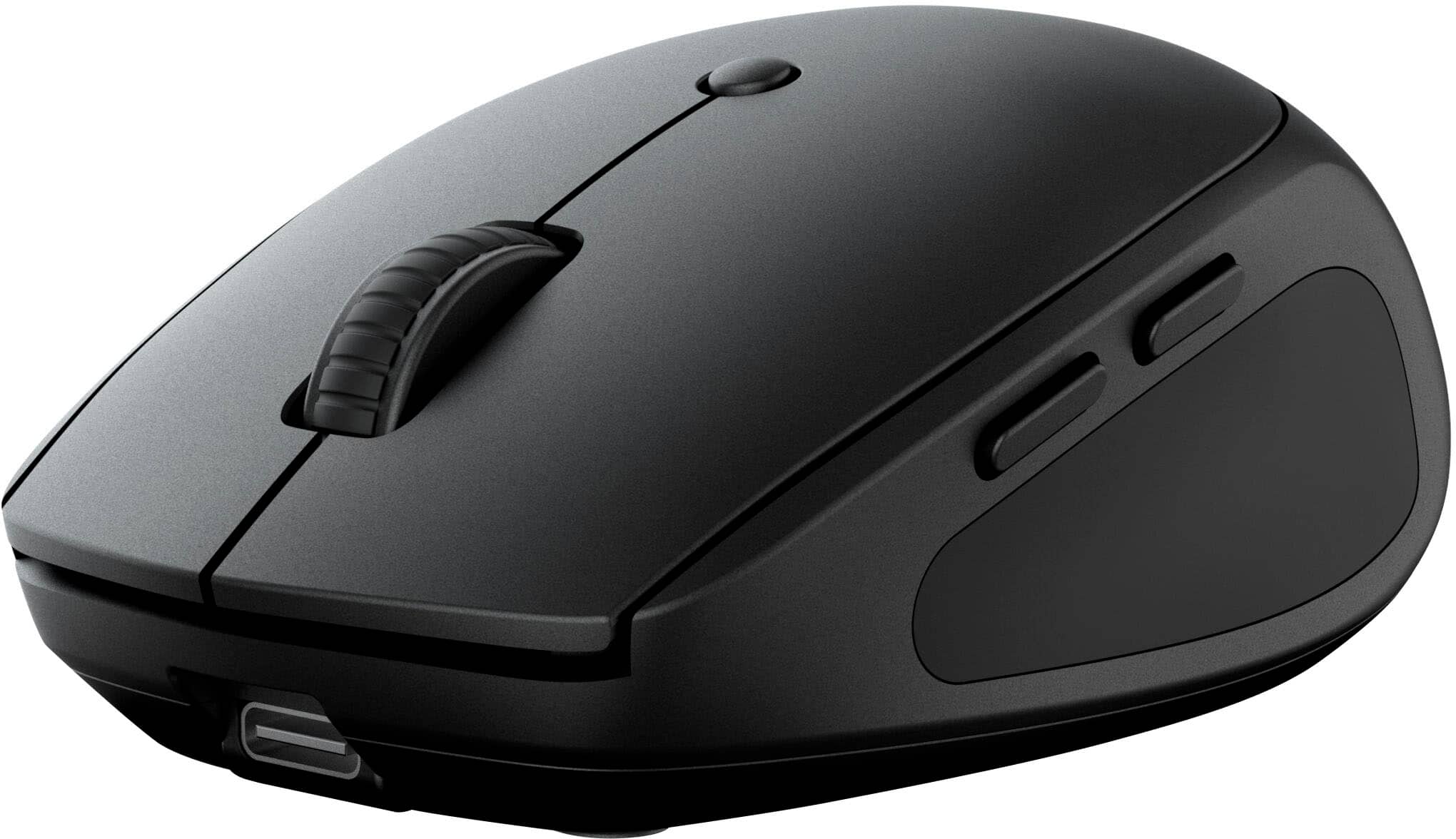
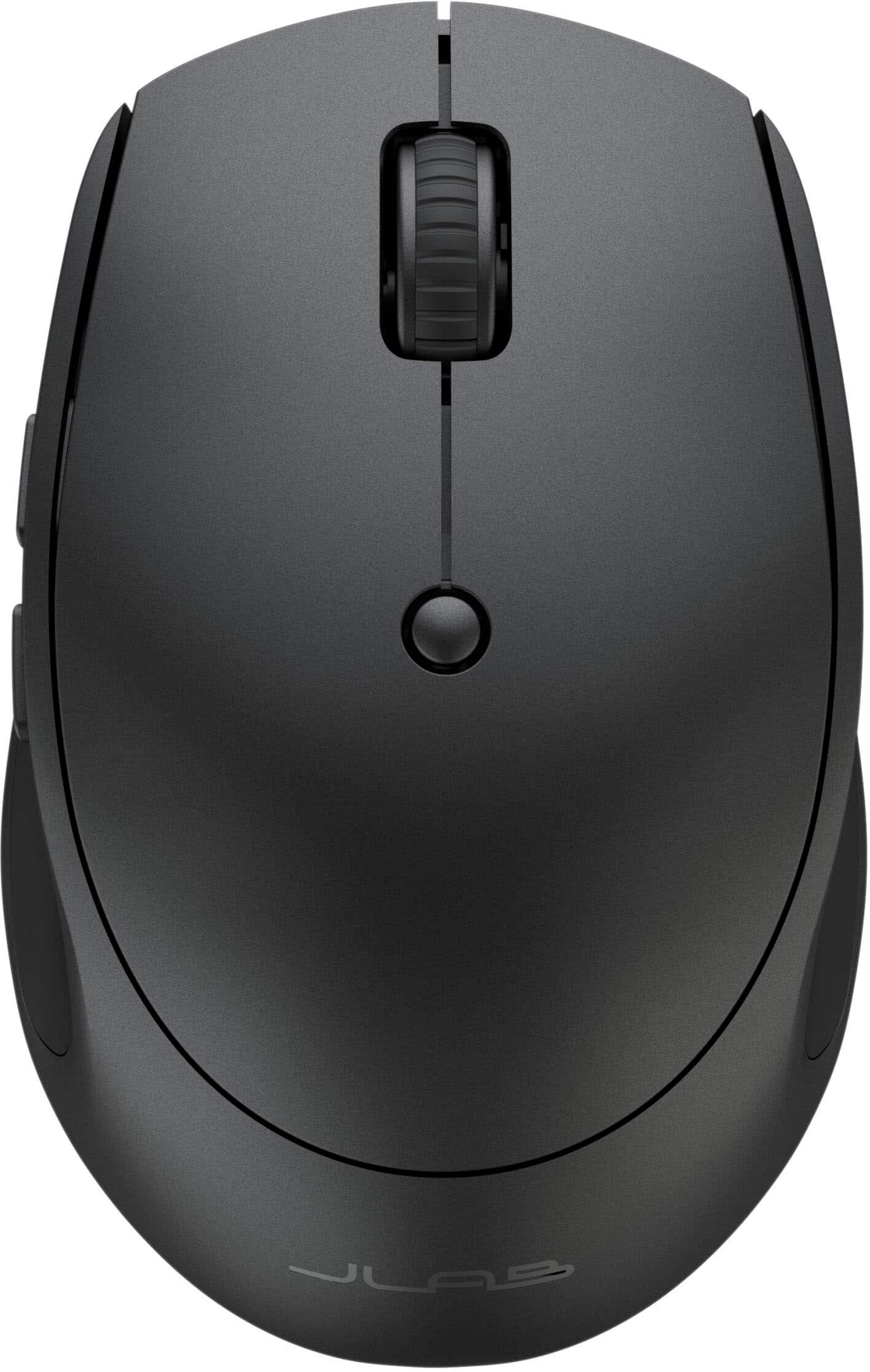
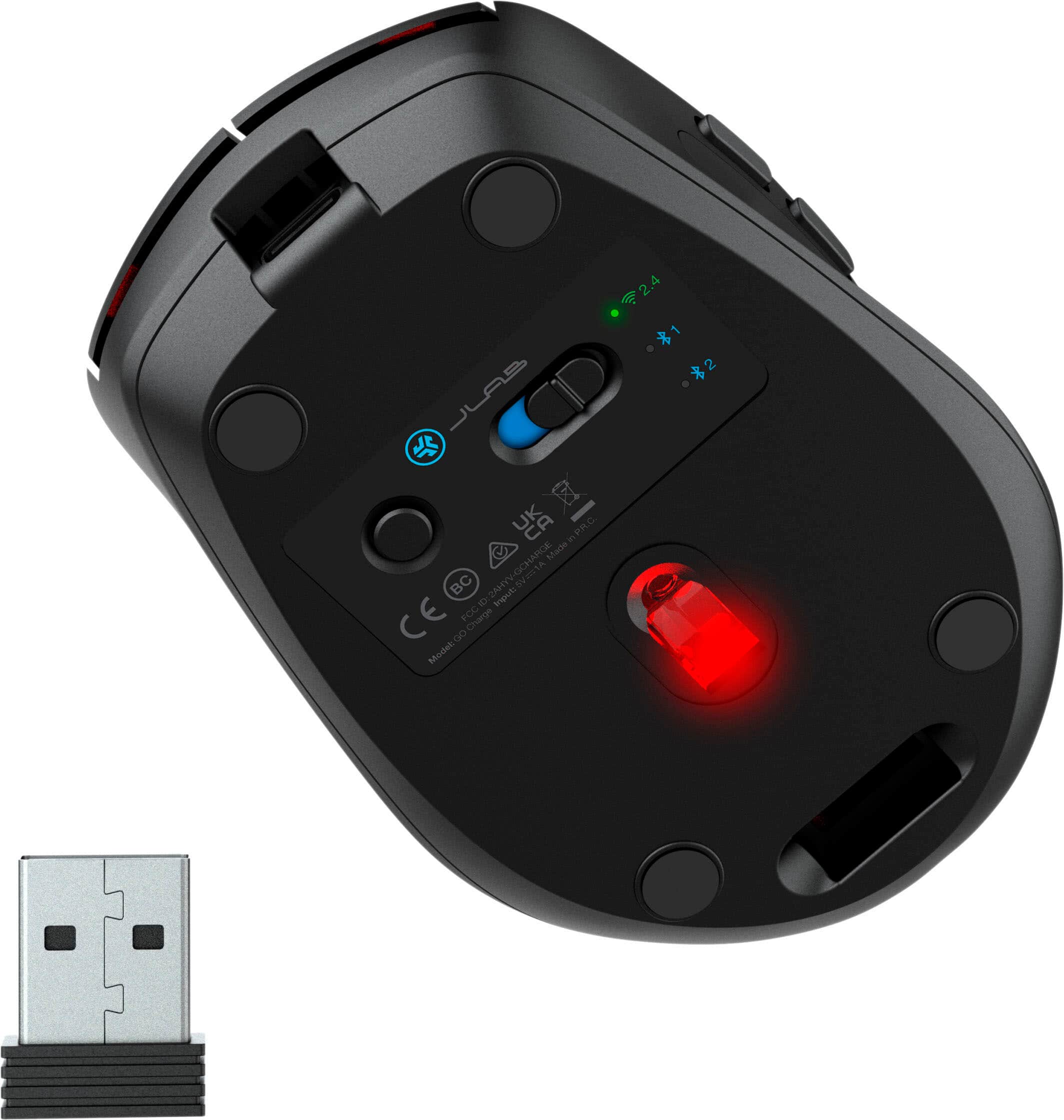
|Posted .This reviewer received promo considerations or sweepstakes entry for writing a review.JLAB’s Go Charge mouse is very quiet, ergonomic, compact and very comfortable to use. At about 73g, it is also very light and easily carried around. As packaged: • JLAB Go Charge Mouse • USB-A to USB-C cable • USB-A Dongle (2.4GHz connection) • Quick Start Guide The JLAB Go Charge mouse is an optical mouse with six available buttons for operation, including the scroll wheel and the DPI button for alternating between the three available mouse sensitivity options (800, 1200 and 1600). Underneath the mouse is located the connection button (for pairing), a storage compartment for the USB-A dongle when not needed, three LED indicators, the optical sensor and the power switch. Behind the mouse is another wide LED indicator that illuminates when the Go Charge is plugged in for charging via the USB-C port located in front of the mouse. The built-in rechargeable battery is rated to last over four months; this could be impacted by usage patterns. A convenient feature of this mouse is its ability to be used while charging. Connection is either via Bluetooth with the included USB-A dongle. Using the dongle only requires insertion into a USB-A port on either a PC or Mac and ensuring the Go Charge is set to connect via the dongle (Wi-Fi symbol with 2.4 in text alongside underneath the mouse); the connection is automatically established afterwards. The three LED indicators underneath the mouse illuminate to help identify the current connection in use. Bluetooth 5 is the standard at play with the Go Charge. To pair via Bluetooth, simply toggle the connection button underneath the mouse to either one of the two available profiles. Once the desired profile is illuminated, press and hold the connection button for about three seconds after which the LED for the profile in question will start blinking. Your PC or Mac will see “JLAB Go Charge” during the pairing process for selection. The side buttons are convenient for browser navigation while the scroll wheel offers precision manual scrolling or automatic with depression/click of the scroll wheel. The near silent operation is probably one of the best features of the JLAB Go Charge in my opinion, with the ergonomics and smoothness a close second. Not having batteries to replace and a generous two-year warranty also provide some peace of mind for daily use. If I had to propose some improvements, it would be to add a side-toggle option for the scroll wheel and an option to keep the rear LED illuminated during use to help distinguish the connected device profile. JLAB’s Go Charge mouse is a solid performer in its currently delivered state. The sheer comfort and joy experienced with use cannot be overstated. It appears well-built and should last for a while making it a good investment for a compact mouse. I recommend.
I would recommend this to a friend - Pros mentioned:Click sound
Comfortable, Quiet & Handy Wireless Mouse
|Posted .This reviewer received promo considerations or sweepstakes entry for writing a review.A mouse is a mouse is a mouse - Not! Some mice, like this new JLab - Go Charge Wireless Scroll Mouse are better than most. This one is better for a number of reasons: First, is the relatively fast and long-lasting charge through its USB-C charging. While the charging cable that came with the mouse is USB-C on one side to charge the mouse, the other side has a USB-A connection to your power source. If your laptop only has USB-C ports, then it is possible to use a USB-C to USB-C cable for charging. This cable is only used for charging. Next, is the really comfortable fit and feel of this mouse. It fits my hand well and has soft rubber side grips that make it nice to hold. Third, is how quiet this mouse is when using. It has no loud, cheap-sounding clicks and it has smooth, silent scrolling letting you know that it is a well-designed mouse. Fourth, is how nicely and accurately the pointing, selecting and scrolling functions perform. And last, but not least, is how you can easily and intuitively set up a 2.4 Wireless dongle and two separate Bluetooth connections of this JLab Go Charge mouse to three different devices of different Operating Systems and have it perform well on each with the simple flick of a switch on the bottom of the mouse. Awesome! This JLab - Go Charge Wireless Scroll Mouse is a definite keeper! So glad I got it.
I would recommend this to a friend - Pros mentioned:Battery life, Portability
Good rechargeable mouse
|Posted .This reviewer received promo considerations or sweepstakes entry for writing a review.I got this new mouse to replace the one that came with my desktop. The old one stopped scrolling smoothly, getting stucked while scrolling, and I frequently had to replace its batteries. This JLab wireless rechargeable mouse is compact, easy to connect, and easy to use. It comes with a USB-A to USB-C charging cable. Someone can use the mouse while charging using the charging cable connected to the computer. I mostly use this mouse with my desktop, but it has the function of a multi-device connection, a 2.4 connection, and two BlueTooth connections. This feature works with multiple devices like laptops, desktops, or tables. Under the mouse is the On/Off switch and the quick press to switch connection type. What I like the most is not needing to look for replacement batteries or your mouse battery dying during an important task. Note that you can use the mouse while it is charging. I have the charging cable connected to my desktop. Overall, I am delighted with this rechargeable wireless mouse. It is lightweight, responsive, has smooth scrolling, connects fast, and is easy to use.
I would recommend this to a friend - Pros mentioned:Connectivity, Portability
Mice, can’t live with 'em can’t live without them.
|Posted .This reviewer received promo considerations or sweepstakes entry for writing a review.Before the arrival of this mouse, I was, as they say, one mouse shy of mischief. It’s not that I only had one mouse, but at least one of them had to be shifted from one computer to another to pull double duty. Starting with the unboxing, packaging is minimal and straightforward. There is a USB-C port on the front of the mouse allowing for the Go Charge Mouse to be aptly named while charging with the included, surprisingly long, USB-A to USB-C charge cable. During charging, you get a big red or green slim surrounding lit reminder as to how things are progressing. When the battery is getting low during use, it will flash the light near the lower edge and will take several hours to charge, but will give you up to four months of use depending upon rate of usage according to the manufacturer’s website. The mouse itself is very attractive in its matte coat, while it’s four feet float effortlessly over smooth surfaces. Although it’s a compact size and ready, willing and able to travel, it is still comfortable in a larger-sized hand. Following a growing trend, this mouse uses not only the 2.4 GHz-dongled connection, but can also store two Bluetooth connections via a handy, bottom-mounted switch, that doubles as the Bluetooth pairing button as well. So why buy this one? Well, it’s handily cordless, it can be recharged when it needs a little pick-me-up and it’s inexpensive. Another upside is that the included USB-A dongle is not from the usual suspect’s brands that all look alike and make for a positively maddening experience when trying to sort out which dongle goes with which mouse or mouse and keyboard. Unfortunately, the dongle is only the traditional USB-A, necessitating an adapter for your dongle to port into the growing cadre of laptops supplied only with USB-C ports. Fortunately, with the two Bluetooth positions available, using the dongle is not mandatory on Bluetooth-enabled devices. Other positive aspects of this mouse are the mechanically quiet clicking and scrolling actions and the ability to toggle the sensitivity among the three presets of 800/1200/1600 DPI. However, trying to figure out which DPI setting you are on and trying to select a particular one is still a bit of a mystery to me as no instructions or indicators are provided for that. Also, the two programmable side buttons’ instructions might also be located on that same, not included, set of instructions that got lost on the cutting room floor. Is it adept at gaming? It wasn’t necessarily designed to be a gaming mouse, so, expect cordless performance that is theoretically slightly faster on the dongle connection as opposed to the Bluetooth (although I haven’t measured that myself). In typical office-type use, it seemed perfectly fine for all the usual tasks. So overall, I like this mouse. It works well, it looks great and it’s not from the usual suspects. With its two-year warranty, you have some extra assurance it will be hanging around for a while.
I would recommend this to a friend - Pros mentioned:Connectivity, Portability
Very buggy operation only downfall
|Posted .This reviewer received promo considerations or sweepstakes entry for writing a review.I got this mouse as I wanted a small compact mouse that would work with multiple devices and is easily portable. The mouse my company gave me for work is not cutting it. I work from home as well as my office so I wanted one mouse to rule them all. I also have a macbook at home, and as luck would have it this is compatible with Windows, Mac OS, and Chrome OS. Switches between 3 devices easily and can be connected via 2.4 ghz dongle, or Bluetooth. Charges via a USB-C chargibg cable. Out of the box it only took 15-20 minutes to charge up completely. Mouse light is red underneath when not charged, and lights up green when complete. (see photos). There is a typical scroll wheel in the middle of the mouse and a dpi button in the center to easily change speeds. The side grip could be better, I prefer a knurled texture but it still serves it’s purpose well. I like that the buttons are all silent-click. Very pleasing operation of this mouse. No extra skates for the bottom but that’s ok. It’s not a gaming mouse so I don’t see a problem. My hands are average size I would say and I was hesitant about buying a “compact mouse”. I don’t like ultra-compact mice as they are hard to use for me. This one is the perfect size in my opinion for a compact mouse. My hand pretty much completely encompasses the mouse during operation(see photo). Any smaller I would not be too excited. As always, I saved the worst for last. I wanted to like everything about this mouse, and everything was going good until I started using it for work. It started dragging items/dropping items on me in Outlook. I’m in my email all day long, I can’t have faulty operation of my mouse. Moving emails to folders, the email or attachment would literally drop into a different folder or just drop completely, before I even let go of the left mouse button I clicked to drag it. Sometimes even clicking on an email or attachment wouldn’t even grab the item. I’d click and start to drag and the item would still be sitting where it was when I clicked on it. I figured it might be a Bluetooth issue, so I switched to the dongle for a better connection and no improvement. I tried it at the office and at home with both Bluetooth, and 2.4ghz dongle, with no change for the better. From my work laptop, to macbook, to home PC, no change. Arghh, and it was going so good. Maybe I got a lemon, idk, alas my search will continue for a good travel one mouse to rule them all.
No, I would not recommend this to a friend - Pros mentioned:Battery life, Connectivity, Portability
Does the job for the price
||Posted . Owned for 7 months when reviewed.This reviewer received promo considerations or sweepstakes entry for writing a review.The biggest selling point is the Bluetooth connection and the alternative USB. You have the option of selecting 2 different Bluetooth channels for two computers. Use this to throw in my travel bag. Easy to use and setup, Battery life is top notch. JLab products tent to hold up and have good battery life. - ergonomics is not their strong side in majority of the products and focus on affordability more
I would recommend this to a friend - Pros mentioned:Battery life, Portability
Great budget mouse
|Posted .This reviewer received promo considerations or sweepstakes entry for writing a review.The overall design of this JLab mouse is seemingly nothing special. However, now that I have been using it exclusively for a week, I am actually pleased with the overall functionality. This mouse is super compact and light weight. Ergonomically, it fits comfortably in my medium-sized hands and allows claw or palm rest grips. The side buttons are in a good position, and the sides have a rubberized finish for extra grip. The wheel feels OK albeit a little bit thin, has nice friction, and clicks. The buttons are very quiet, which I appreciate at the office. There is a button selector for 800/1200/1600 DPI options. I tested the multiple connection with a Windows laptop, Mac Mini, and a Galaxy Ultra S10 at the same time and switched back and forth with no issues at all. I tried the dongle and Bluetooth options. I don’t know how long the battery will last (the claim is “long”) but it’s been a few days and the battery still going strong. The only small nitpick is that the matte finish picks up a lot of smudges. This may be a budget mouse, but the features are anything but. I am quite impressed with the functionality as well as the value.
I would recommend this to a friend - Pros mentioned:Battery life, Portability
Nice Easy To Use Mouse
|Posted .This reviewer received promo considerations or sweepstakes entry for writing a review.I received my JLab Go Charge Wireless Scroll Mouse nicely packaged and it included a paper instruction sheet which is always an added bonus. I plugged in the USB-A end of the charging cable into a charger and the other C end into the mouse. It didn't take long to charge and I then connected it via Bluetooth with 2 options of 1 or 2. You can also use the included Dongle adapter which can connect via 2.4 wireless if so desired. There is a scroll wheel on top, 2 side buttons on the left and a DPI button on top which toggles the mouse sensitivity from 800 Low, 1200 Medium or 1600 High. I found the 1200 Medium worked best for my needs. This mouse size is more compact and since my hands are on the small size it was perfect for me to utilize. There is a QR code on the instruction sheet that states to scan for the latest version of the manual. The curved indentations on each side also makes it comfy to use. I like the fact there is no alkaline battery needing to be replaced and I just have to plug in and charge via the cable. Nice quality, price, comfortable in your hand and easy to set up and use. I definitely recommend its purchase!
I would recommend this to a friend - Pros mentioned:Connectivity
Pretty Good!
|Posted .This reviewer received promo considerations or sweepstakes entry for writing a review.I wanted a mouse to keep at my office that would easily connect to multiple devices via Bluetooth. I’ve got a pretty solid, more expensive mouse at home designed for better ergonomics that has easy switching, and I knew that was the one feature I didn’t want to sacrifice when looking for something considerably less expensive and capable of basic mouse functionality. In many ways, I think the JLab exceeds my expectations. For starters, it’s cheap! The fact that 20 bucks will buy you a solid mouse that can connect to multiple devices should really make anyone question why they would buy something more expensive that can’t do that. (Though I know those mice are out there…) I’ve had great experiences with other JLab products and expect this one will last me many years, especially since it’s not something that is getting heavy daily use 7 days a week. Throw in the fact that the mouse has no batteries to swap out and charges via USB-C, and I’m just not sure what else anybody could want from a $20 mouse. It even came charged! There’s a USB receiver if you need to connect that way, or you can pair with two devices via Bluetooth and change connections with the press of a button on the bottom of the mouse. I’ve got it paired with a MacBook Pro and iPad Pro and it all just works exactly as expected. I had one small hiccup where when pairing to the iPad after a few days the direction of the cursor seemed to be moving opposite to the direction my hand was moving the mouse. This was easily resolved just by turning the mouse off and on again, but it’s something I’ll keep an eye out for. All in all, it’s a mouse, it’s cheap, it’s easy to pair, it’s easy to charge, and it’s easy to use. This is all a win. No need to read further if that’s all you need. I feel a tad guilty nitpicking a device this cheap, but here’s what I wish: strangely, I’d like it to be a little bigger. I know it’s built to be highly portable and I appreciate that, but I have small hands and even I feel like the size isn’t quite perfect. Maybe if it could keep the same footprint but slightly taller it would feel more comfortable in the hand? Or maybe it’s the fact that even with small hands my fingers easily hang over the tip of the mouse, forcing you to sort of make a pseudo-claw with your hand more than I’d like. Secondly, I had to dig a little to realize that you have to download an app to your computer in order to map the side buttons. I guess this is more of an issue with the OS of Mac than it is with JLab, but then it tells you that you can only use the app if the mouse is connected via USB. Annoying, but fine. Worse though… once I plugged the mouse into my computer the app didn’t even show the Go Charge as one of the options. So, at the moment at least, I have no way of remapping those side buttons and currently they aren’t mapped to anything. They do nothing, which is a bummer. Maybe there will be an update to the app soon that fixes this since it’s a new product. Hope so. Also strange, on the site/manual it lists the small round button on top of the mouse as a button to change the DPI settings of a monitor (I presume). That feels like a really odd choice to default to. Are that many people changing that setting? Maybe it’s above my pay grade technically and means something else entirely. Just seemed weird given the likely customer for this. Those quibbles aside I’m quite happy with this mouse and it’s easy to recommend. Just don’t expect it to be something it’s not.
I would recommend this to a friend - Pros mentioned:Portability
Best wireless mouse I've ever owned
|Posted .This reviewer received promo considerations or sweepstakes entry for writing a review.I am constantly on the go for my job and it's incredibly helpful for me to have a wireless mouse from a production standpoint. I've used different brands in the past that I was happy with, but this mouse is better in every way. The mouse itself feels very high quality and feels better in my hand than other small wireless mice I've tried in the past. The button clicks truly are silent and allow me to work anywhere without creating a lot of additional noise. The scroll wheel feels good and has good tactile feedback. The USB-C port is on the front of the mouse giving you a traditional setup when you need to charge on the go. The included charging cable is the perfect length, long enough to plug in on either side of your device but also short enough to not have excessive cable cluttering your workspace. The "forward/backward" webpage buttons are useful though I don't use those features as much as probably others do. The DPI button cycles through different noticeable settings which is nice if you need to slow down mouse speed for more precise work. Setup is incredibly easy especially with the included USB receiver; it's literally plug and play. Overall, this is an excellent product for the money. In addition, it doesn't feel like a compromise in either features or quality.
I would recommend this to a friend - Pros mentioned:Connectivity
Good portable mouse but not for me
|Posted .This reviewer received promo considerations or sweepstakes entry for writing a review.The JLab Go Charge Wireless Mouse is a rechargeable compact mouse. The package comes with the mouse, a USB dongle, a USB A to USB C charging cable and some instructions for use. The mouse has 2 ways to connect - the included USB dongle or Bluetooth (BT). It supports two BT connections and one via the dongle for a total of 3 devices it can connect to. The battery is internal and not easily accessible or replaceable. Once it can no longer be charged, the mouse will need to be replaced. While charging, the lower back section of the mouse illuminates. Red indicates charging. Green indicates fully charged. I really like this very obvious charging status light. Connecting to a PC with an available USB slot is as easy as plugging the dongle in and turning on the mouse. Connecting via Bluetooth takes more steps but is easy enough if you are tech savvy. If you’re not, the directions only tell you how to put the mouse into pairing mode. They don’t tell you how to initiate the connection in Windows or Mac OS. You need to figure this out before you start a BT connection. Once connected, the clicking buttons are quiet. There is a very soft click that is noticeable but a little mushy. I prefer a mouse with a more positive click, but this mouse is advertised as having a quiet click that is good for use in a library… which it would be. The size/shape is comfortable for a compact mouse. Similar to other compact mice I’ve used. It is designed to be ambidextrous, so it isn’t contoured for the right hand. Good for me since I use my left hand. There are additional action buttons on the left side that are designed for a right-handed person’s thumb to click. They are not easily accessible for a lefty. I also found myself accidentally hitting the button nearest the back of the mouse more often than I expected. So far, this has only been an issue when visiting web pages. Again, they are quiet but feel mushy to me. They could use a little more resistance to prevent the accidental clicks I experienced. Unfortunately, these buttons are not programable. There is no software to fine tune the mouse with. There is also a round button behind the scroll wheel that controls mouse speed. There are 4 levels from slow to fast. This is convenient. All in all, this is a good mouse. It lives up to its advertisements. It’s just not for me. If you are right-handed, looking for a quiet compact mouse, this could be for you.
I would recommend this to a friend - Pros mentioned:Portability
Ready, set, Go!
|Posted .This reviewer received promo considerations or sweepstakes entry for writing a review.The name of this practical travel mouse tells you as much as you need to know. It is light, small, and can be kept on your desktop or tossed in your travel bag when you get ready to hit the road. You can use the supplied 2.4Gz dongle to connect to your computer’s USB port, or you can mate the mouse to two other devices using Bluetooth. I did not try the dongle as I don’t like to fool with them or worry about losing or misplacing the tiny things. But, if you need a connection alternative, the dongle is there and ready, and you can leave it stowed in a slide in caddy on the underside of the mouse. I mated the mouse with my computer in seconds. The mouse had a charge on it out of the box, and I selected one of the bluetooth connections on the underside, holding the button down until the LED blinked appropriately, and then paired the mouse with my computer. Quick and easy. The controls are simple as you would expect. Left click, right click, and scroll. There is a DPI button to adjust the sensitivity. You will never have to worry about replacing a battery in this mouse as it conveniently charges via the supplied USB cable. I cannot conceive of a more practical travel mouse. Get one and go!
I would recommend this to a friend - Pros mentioned:Battery life, Click sound
Trustable product
||Posted .This reviewer received promo considerations or sweepstakes entry for writing a review.Excellent. Using from past 8 months. The charge lasts long. Clicks silent and satisfying
I would recommend this to a friend