Customer Ratings & Reviews












- Model:
- 83E1001YUS
- SKU:
- 6559604
Rating by feature
- Performance
Rating 4.6 out of 5 stars
- Storage Capacity
Rating 4.7 out of 5 stars
- Controller
Rating 4.5 out of 5 stars
Customers are saying
Customers love the Legion Go for its overall performance and beautiful screen quality. Many appreciate its portability and aesthetically pleasing controller design. However, some customers have expressed concerns about the battery life and weight. A few customers mentioned the device can get hot and the fan can be loud, and others feel the size is a little big.
This summary was generated by AI based on customer reviews.
- Pros mentioned:Overall performance, PortabilityCons mentioned:Battery life
Portable Power with a Battery limitation
||Posted . Owned for 2 weeks when reviewed.This reviewer received promo considerations or sweepstakes entry for writing a review.The Lenovo Legion Go impresses with its powerful performance, delivering around 70fps in Fortnite and showcasing versatility as a drone pilot's choice for FPV simulation. However, the drawback lies in its limited battery life, making it less ideal for extended usage without a power source. Nonetheless, its compact design retains the appeal of a portable gaming solution with the capabilities of a PC.
I would recommend this to a friend - Pros mentioned:Overall performanceCons mentioned:Battery life
I enjoy this
||Posted .This reviewer received promo considerations or sweepstakes entry for writing a review.Once again, Best Buy had the best deal I could find on a brand new Legion Go. I'm a sucker for handhelds and have owned several over the years. Have not done any mods or tried different OS's like Bazzite. Running the legion go as a stock machine has been enjoyable in my experience. Does extremely well as an emulation machine and the display is very nice. Battery life is as expected with something like this, very short. The USB C port supports an eGPU and the machine does extremely well with the additional power. With all the positives about this machine, I would not recommend it as a standalone PC like some people seem to do.
I would recommend this to a friendBrand response from Lenovo Product Expert
Posted .Hey RyanP,
Thank you for choosing Lenovo and for sharing your feedback with us!
We are glad to hear that you are enjoying your Legion Go.
Please feel free to reach out to us should you have any questions.
Best,
Lenovo
- Pros mentioned:Overall performance, PortabilityCons mentioned:Heat dissipation
Legion lit
||Posted . Owned for 9 months when reviewed.This reviewer received promo considerations or sweepstakes entry for writing a review.Great graphics. Convenience in handheld format. Sign into Xbox game pass on the go. Overheats too quickly though
I would recommend this to a friendBrand response from Lenovo Product Expert
Posted .Hi Jj7ro,
Thank you for sharing your feedback with us. We are sorry to hear that you are experiencing excessive heat internally with the Legion Go. We'd like to work with you to try to resolve this issue.
To start, we recommend ensuring that the system's air intake and exhaust vent areas are clear of obstruction, including any materials that the device may be resting on. Also, please check that the system's drivers, BIOS, and other firmware is up to date via the Legion Space app, as there have been recent performance improvements brought by these updates.
If this do not address the issue, just a reminder that each Legion comes with 1 year of free Legion Ultimate Support, which can be contacted at the following number: 1-888-278-9707, Press 1 for Gaming. They are the best equipped to handle questions, concerns, and requests regarding your Legion and should be able to help you quickly resolve any issues you may have.
Best regards,
Lenovo
- Pros mentioned:Overall performance, Portability
Amazing Device
||Posted .This reviewer received promo considerations or sweepstakes entry for writing a review.The Legion Go is a fun and amazing portable Handheld, It has good battery life, amazing performance on most games, Super high resolution screen for what it is, It's great for on the "Go" gaming or when you just want a Portable windows device, The controllers are also amazing being they are hall effect joysticks that have pretty much no deadzone and will never get drift, all the buttons are clicky and satisfying, the triggers are smooth.
I would recommend this to a friendBrand response from Lenovo Product Expert
Posted .Hi Susan,
Thanks for choosing Lenovo and for sharing your feedback with us!
We are pleased to read that your experience with the Legion Go has been amazing.
Please feel free to reach out to us via the Q& A section of this product page should you have any questions or need assistance.
Best,
Lenovo
- Pros mentioned:Controller design, Overall performance, Screen quality
Would've been perfect if not for the sound issues.
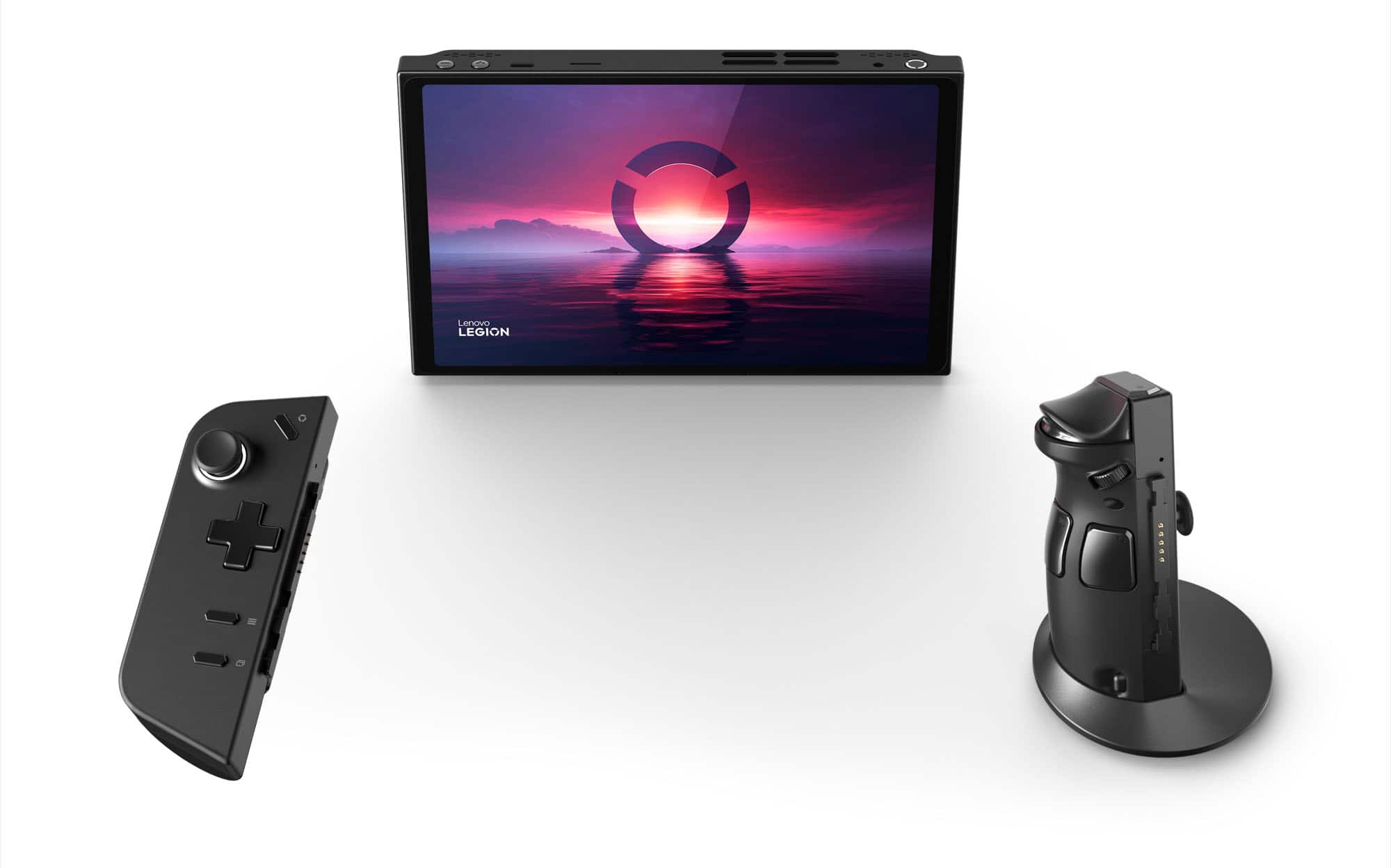
||Posted . Owned for 1 month when reviewed.This reviewer received promo considerations or sweepstakes entry for writing a review.Lenovo really did a great job with this handheld. The premise was almost perfect. You get detachable controllers that doubles as a mouse so you can play mouse-intensive games, you have a built-in sturdy kickstand so you don't really need to get a separate dock for it, gorgeous big display that makes every other handheld look mediocre, and it runs Windows so you can play almost all your games. My problem with this that made me return the unit was the sounds. I can tolerate it if it was just low in volume due to the top firing speakers (vs the Ally and Steam Deck which is front-facing), but the sound is like your ears have water in it. Yes it can be remedied with a headphone, but most of the time you just want to fire up a game and play without anything in your ear. Other than that, it would have been a perfect handheld even with its premium price.
No, I would not recommend this to a friend - Pros mentioned:Overall performanceCons mentioned:Battery life
Gaming computer on the Go
||Posted .This reviewer received promo considerations or sweepstakes entry for writing a review.This thing is a monster. You can push it to play some crazy mods. Of course it is limited but the fact that I can play Skyrim with 600GBs of mods, or games like Final Fantasy 7 remake on the go speaks for itself. The only downside is how quickly the battery dies the more demanding the game is, you’ll get an hour for sure on demanding games. Nothing a portable battery can’t fix.
I would recommend this to a friendBrand response from Lenovo Product Expert
Posted .Hey HarleyE,
Thanks for choosing Lenovo and for sharing your feedback with us!
We are glad to read that the Legion Go lets you play the games you want on the go.
Please feel free to reach out to us via the Q& A section of this product page should you have any questions or need assistance.
Best,
Lenovo
- Pros mentioned:Overall performance, Screen qualityCons mentioned:Battery life, Heat dissipation
Not worth it
||Posted . Owned for 1 month when reviewed.This reviewer received promo considerations or sweepstakes entry for writing a review.Once I opened this up and played it, it was amazing game was smooth screen was big and had a lot of color, but I couldn’t be blinded by the good parts of this because the bad side is worse, very bad battery (1 hour play til 0%) sound was coming from the top which made it impossible to hear anything, and the device got wayy too hot for comfort.
No, I would not recommend this to a friendBrand response from Lenovo Product Expert
Posted .Hey HovikC,
Thank you for sharing your feedback with us. We are sorry to hear that you had trouble with your Legion Go, leading to you returning it. We apologize for the inconvenience that this may have caused you.
Your comments will be considered for future improvements. We hope that you choose our products again in the future and that you feel free to reach out us with any questions or request for assistance so that we can improve your experience.
Best regards,
Lenovo
- Pros mentioned:Overall performance, Screen quality
Handheld gaming just got more better
||Posted . Owned for 2 weeks when reviewed.This reviewer received promo considerations or sweepstakes entry for writing a review.Running this on Windows 11 isn't as bad as everyone says. That said, I am looking forward to the SteamOS open beta as 99%+ of my PC gaming is done through Steam. The hardware is great on the Legion Go. I like that the screen is a bit larger than the Steam Deck, but it's not so large that it becomes uncomfortable for me. In fact I had a Steam Deck OLED a while back, and I prefer the larger scale of the Go. I already game with it tethered to power usually, so I can't really speak to battery life, but overall I've been very impressed with the performance of the Go.
I would recommend this to a friendBrand response from Lenovo Product Expert
Posted .Hey Feeble123456789, thanks for choosing Lenovo! We are thrilled to hear that you are very impressed with your Legion Go, and we appreciate you sharing your feedback with us.
- Pros mentioned:Overall performance, Portability, Screen quality
Its an amazing device that handles a lot
||Posted . Owned for 1 week when reviewed.This reviewer received promo considerations or sweepstakes entry for writing a review.I am a casual tech user whose main gaming is done in PS5. However i would like to praise the Legion Go for being an all in one device thats is portable. The screen is amazing and it runs my steam games very well. Im not well versed in FPS and all that but i enjoy using it to olay games watch anime or browse the web. It will be my intro into a gaming PC.
I would recommend this to a friend - Pros mentioned:Overall performance, Portability, Screen quality
Pretty good with rough (software) edges
||Posted . Owned for 2 weeks when reviewed.This reviewer received promo considerations or sweepstakes entry for writing a review.This is a pretty good portable gaming device. You can disconnect the controllers and use as a tablet with built in stand. Very nice feature. The screen is nice if not amazing. LegionSpace software needs some work but Lenovo is working on it. It's running windows so they usual pros and cons apply here as well. Games run as well as you would expect from z1 extreme chip. Overall I like it,
I would recommend this to a friend - Pros mentioned:Screen qualityCons mentioned:Weight
Wonderful Experience So Far!
||Posted . Owned for 2 months when reviewed.This reviewer received promo considerations or sweepstakes entry for writing a review.I cant give it a full five as things can always be improved, but this has been such a grwat purchase. Before getting the Legion Go, I did a lot of research on the pros and cons of handheld gaming devices. I knew I needed a windows device, so although I was sacrificing battery life by not a steam deck, I knew was gaining so much more with something else. So that left me with the ROG Ally or the Legion Go. Although, the ally has had updates and is way more stable now then at launch, I understood there would be bumps along the way getting a Legion Go now vs later. I truly felt that Lenovo would do the same and not leave this behind so took the investment and its paying back tenfold. I love the screen and button feel. Using it as a tablet has been fun. The weight, heavy for some, isnt an issue in my opinion. Havent used FPS mode much, but its fun. Use them more as joy-cons more often then i thought i would. Yes there are some hurdles to jump over with tweaking a few settings before starting, but simple video guides helped me get that done quickly. After a few updates to get things up to speed, this has been used practically everyday since ive purchased. Absolutely love this device and hope more people give it a shot.
I would recommend this to a friend - Pros mentioned:Controller design, Portability, Screen quality
Great device
||Posted . Owned for 2 weeks when reviewed.This reviewer received promo considerations or sweepstakes entry for writing a review.As a gaming dad, I needed portability and this thing has come in clutch. I love the screen size. Although big its comortable to hold and I like how you can detach the controllers. Because its a Windows device its not perfect but I havent had many issues with it. Im not a PC gamer so its been taking a little bit to learn but I love it!
I would recommend this to a friend - Pros mentioned:Controller design, Screen qualityCons mentioned:Battery life
Beta product rushed to market
||Posted . Owned for less than 1 week when reviewed.This reviewer received promo considerations or sweepstakes entry for writing a review.Identify any inappropriate language in the following text: It's obvious the Lenovo Legion Go was not ready for release, but they likely wanted to rush to market in time for the holidays. Issues are numerous. I'm most likely going to return it soon. Definitely do not recommend. Maybe they'll fix the issues in the coming weeks and months, but as it is now, the experience is mostly bad. I've owned a Steam Deck for over a year which is what I'm mostly comparing to. I haven't had much chance to test the Ally. I'll start with a positive, the large vibrant display, MUCH nicer than the Steam Deck display. Maybe comparable to the Ally display except larger. This, for me, is the strongest selling point of the Legion. My biggest complaint about the Steam Deck is the display, small, low res, undersaturated. Valve can brag about their uber fast refresh times all they want, I don't like the display on the Deck. The built in hinge is actually nice to have, to put the device down during a cutscene and just watch. One more positive, it works well with a USBC dock. Just plug it in and everything works, feels like using any other Windows PC. The display is large enough that you can use it as an extra monitor. It almost feels like docking a small Windows tablet. Being Windows, when you first power on the device, it will force you to login with a Microsoft account. If you don't want to do this, DO NOT CONNECT TO WIFI!!! Google "setup windows without Microsoft account" to learn how to bypass this. Windows runs just fine without a Microsoft account. This being a gaming device that I may want to share with family and friends, I surely don't want to be logged into any of my personal accounts. The Steam Deck overall has much better design, superior quality, stability, and ergonomics, both in hardware and software. The Steam Deck overall just has a much nicer and sturdier build, feels better in the hands, and the software pretty much just works. The Legion Go feels cheaper, the buttons and joysticks don't feel as nice, cheaper parts, cheaper plastic/materials, the buttons are very clickly, much less ergonomic (yes, the sharp edges do get uncomfortable after a while), and less sturdy (doesn't feel safe to hold in one hand, like something may snap). Too many darn buttons! It's near impossible to wrangle the Legion in your hands without accidentally clicking a dozen buttons. The problem is exacerbated by the weight of the device. The Steam Deck has a lot of buttons and controls too, but the design is well thought out that I can easily hold the Deck with one hand without accidentally pressing any buttons. Speaking of ergonomics, the Legion Go is not well designed, difficult to find its buttons in a dark room. The Steam Deck has a very ergonomic and intuitive design so I have no problem finding its buttons in the dark. Detachable controllers? Feels much more like a gimmick. I tried for a little while with the controllers detached, it doesn't feel great. The Switch controllers are well designed for the purpose, whereas for the Legion Go it feels like an afterthought, and most definitely not well designed for two players. The Legion Go would have been better WITHOUT detachable controllers, and could have made the whole device lighter and sturdier and more ergonomic. Battery life of the Legion Go is not good. Even for simple 2D platformers, I may only get 2-3 hours of battery life. Just staring at the Windows desktop with nothing running, you can hear the fan whirring away. Yes, I've tried reducing the resolution, refresh rate, TDP, and brightness. Touchpad isn't great, but nice to have. Steam Deck touchpads are vastly superior. Good enough for controlling the mouse on the desktop, but worthless for any kind of gaming. Even then, I still find myself using the touchscreen much of the time. 2k 144hz display is total overkill. Even simple 2D platformers can be taxing on the GPU, and anything 3D is just hopeless. I've been playing everything at 60hz 1920x1200 or 1280x800. Speakers are mediocre at best. Not very loud and just don't sound great. The Steam Deck has better speakers, and the Ally has great speakers. I ended up using headphones with the Legion Go. Let's talk about some of the numerous issues. The case has a small flap which allows you to plug in the charger while its in the case. Cool. Except, plugging in the charger causes the device to wake up... while it's in the case... I've been having an issue where I turn on the device and just get a blank black screen. The device is still on and running, the display is on (I can see the backlight), but just a black screen. Funny enough, I plug it into my USBC dock, and the display comes to life, everything working fine. But unplug the USBC dock and the display goes black again. At this point, all I can do is restart the device. It happens often too, maybe every third time I turn on the device, just blank screen. Surely they knew the "three clicks" to open the R-MENU (right side menu) was going to be a major complaint. You can use the controller buttons to navigate these menus, BUT the game simultaneously receives the inputs! Try using the touchscreen and the game will lose focus, some games minimize, other games crash when they lose focus. The left side menu is mostly worthless, I don't use it for anything. The full screen menu is just a store front for Lenovo to push ads and sponsored products. It also adds several seconds to startup, forcing you to wait while it checks for updates and play the dumb animation, before you can hide it and get to the desktop. As I'm writing this, the WiFi keeps turning off? Yeah, this thing likes to change the settings on you for no reason. It will randomly change the fan profile and resolution. The fan profile is very annoying, midgame the fan profile will change causing the game I'm playing to tank in performance, as in running at 60fps down to 10-15fps because I think the fan turns off and thermal throttling kicks in. While on battery, I can increase the refresh rate to 144hz, but then I need to plug it in to reduce it to 60hz? What? What possible reason could there be for this? Charging! Even with a 65 watt charger, the Legion Go barely charges while turned on. If you want to fully charge the battery, you're best turning off the device and then it might charge in a reasonable amount of time. Not good! The Steam Deck has no problem charging while turned on, and it's only 45 watts! I have gigabit internet, but Steam only downloads at up to 40mbps. I don't know why, but frustrating when I'm attempting to download some larger games to trial the device. I have to leave it downloading overnight. Yes, the fan makes a whirring noise. It's not loud, but somehow I can hear it from across the room, so it gets annoying quick. And the fan is constantly whirring away, even when on the desktop not running any games. The initial setup was rough. I installed all of the latest updates and drivers, rebooted several times, but the performance wasn't up to spec. Many games were running much worse compared to the Steam Deck. The next morning, everything was magically running better, games were performing as expected. No idea, didn't reboot, didn't update or install anything, just turned it on the next morning and everything was just running better. I could go on, there's more I'm not saying, and even more that I may be forgetting. Many other reviewers are making similar comments about stability and reliability, or reporting ever more issues with the Lenovo Legion Go. It's a beta product at best. Too many issues. Too many rough edges. Too many poor design choices. I do not recommend the Lenovo Legion Go.
No, I would not recommend this to a friend - Pros mentioned:Overall performance, Portability
Legion Pro is a gigantic portable powerhouse
||Posted . Owned for 3 months when reviewed.This reviewer received promo considerations or sweepstakes entry for writing a review.The Legion Pro gaming laptop has completely transformed my gaming experience, offering unparalleled performance, sleek design, and portability that fits my on-the-go lifestyle. Its top-of-the-line processors and graphics cards deliver seamless gameplay, handling even the most demanding titles with ease. I particularly love the responsive keyboard and customizable RGB lighting, allowing me to personalize my gaming setup to match my style. Despite its powerhouse performance, the Legion Pro remains surprisingly lightweight and slim, making it easy to carry wherever I go. The advanced cooling system keeps temperatures in check during marathon gaming sessions, ensuring optimal performance and longevity. Plus, with a range of connectivity options including USB-C, HDMI, and Thunderbolt, along with Wi-Fi 6 support, I can stay connected and ready to game wherever I am. Overall, the Legion Pro has set a new standard for gaming laptops, combining performance, design, and portability in a way that's truly impressive. Whether I'm at home or on the road, the Legion Pro never fails to deliver an exceptional gaming experience that keeps me coming back for more.
I would recommend this to a friend - Pros mentioned:Controller design, Overall performance
Gaming on the go
||Posted . Owned for 1 year when reviewed.This reviewer received promo considerations or sweepstakes entry for writing a review.Was waiting for something like this and Lenovo definitely delivered. Having the controllers be removable is great and lets you run it like a tablet. The Bluetooth and full windows lets you run just about anything and use your preferred controller. Would have loved to have a oled 1080p display instead but it's got a high res for older games to run smooth and the 144hz is great for that. Won't hit that on newer titles but with some settings on medium to low at 1080p I manage to get a solid 60fps in performance mode. Highly recommend to anyone that doesn't want to carry around a gaming laptop or has limited time for play and wants to clear out old games or new. I also recommend going with the 512gb storage and upgrading to a 2tb for all your games. You can use a micro SD for media.
I would recommend this to a friendBrand response from Lenovo Product Expert
Posted .Hi DK64, thanks for choosing Lenovo! We're thrilled to hear that your Legion Go has delivered on your gaming wants and needs, and we appreciate you sharing your experience and feedback with us.
- Pros mentioned:Controller design, Overall performance
great system
||Posted .This reviewer received promo considerations or sweepstakes entry for writing a review.great system! love that the controllers disconnect allowing for a nintendo switch style experience while still packing incredible power for all day gaming
I would recommend this to a friend - Pros mentioned:Controller design, Overall performance
Even with a bumpy launch, Lenovo has a winner here
||Posted . Owned for 1 week when reviewed.This reviewer received promo considerations or sweepstakes entry for writing a review.The Legion go is exactly what I was looking for in an handheld gaming PC. At first, I had bought the ROG Ally, due to its performance and windows capabilities that the steam deck lacked. When the Legion was announced, however, I decided to return the ROG Ally, and wait for the Legion Go’s release. For me, this was worth the weight. The 8.8 inch display is extremely vibrant and makes playing on the go so much more of a pleasure. Having the ability to use the switchlike controllers also adds a nice bit of variety to play in its tablet form. Even though it is a larger console, it is still fairly comfortable to hold, even for longer gaming sessions. The only real gripes I have with it at this point come down to the Legion software. It definitely has had its points with some minor glitches here and there. It definitely hasn’t been as bad as some people may have pointed out in their experiences, however, for me personally. at its current price point, I definitely feel it’s a very strong option for someone to choose for their gaming experience.
I would recommend this to a friend - Pros mentioned:Overall performanceCons mentioned:Size, Weight
Lenovo Legion Go
||Posted . Owned for 1 month when reviewed.This reviewer received promo considerations or sweepstakes entry for writing a review.Lenovo really did a great job with this handheld machine. It has the power you need to play AAA games paired with AMD's Radeon Super Resolution. Few things to point out is if you're looking for something comfortable for a couple of hours of gameplay, this one just wouldnt cut it. Its too bulky and a bit hefty to lie down in bed in comfort.
I would recommend this to a friend - Pros mentioned:Screen qualityCons mentioned:Battery life
Perfect screen for a handheld
||Posted .This reviewer received promo considerations or sweepstakes entry for writing a review.Perfect screen size for gaming, I did not trust handhelds previously because I am more into action games which have a lot of shooting, and I want to be able to see every detail and shoot from a far, but this 8" display addresses that concerns. I am able to play all my AAA games of this, like Call of Duty, MEA, Spiderman, etc with good resolution. The battery is a challenge, since you get an hr or 2 at the max, but I just game at home, so I just plug it in while gaming
I would recommend this to a friendBrand response from Lenovo Product Expert
Posted .Hey TimirP,
Thanks for choosing Lenovo and for sharing your feedback with us!
We are glad to read that the Legion Go is working perfectly for you.
Please feel free to reach out to us via the Q& A section of this product page should you have any questions or need assistance.
Best,
Lenovo
- Pros mentioned:Overall performanceCons mentioned:Battery life
Very Solid!
||Posted . Owned for 3 weeks when reviewed.This reviewer received promo considerations or sweepstakes entry for writing a review.I’ve only been using it for a short while, so my review may change eventually, but so far I am really enjoying it! If I had to pick anything that I don’t like about this handheld PC, is that the battery life is not amazing. I have been getting 2-3 hours of continuous gameplay, depending on the game. For the price of this product, I would expect at least 4-6 hours of gameplay. Besides the battery, I am loving everything else! I will say, if you’re looking to use this for playing games from Steam, I would recommend just buying the Steam Deck instead. I’m seeing some issues with trying to play Steam Deck games on the Lenovo, where the controls don’t work the same, but you’d think they should work the same?? Not the end of the world, but is a bit frustrating!
I would recommend this to a friendBrand response from Lenovo Product Expert
Posted .Hi AlecHobbs, thanks for choosing Lenovo! We're thrilled to hear that your Legion Go has been quite solid for you, and we really appreciate you sharing your experience and feedback with us. We recommend checking out the Lenovo Legion forum to see what others do for the best experience playing Steam games.