Customer Ratings & Reviews

- Model:
- 80XM00GRUS
- SKU:
- 6112001
Rating by feature
- Value
Rating 4.2 out of 5 stars
- Quality
Rating 4.2 out of 5 stars
- Ease of Use
Rating 4.5 out of 5 stars
Customers are saying
Customers are positive about the large screen, fast performance, affordable price, and sufficient storage. They appreciate that the laptop is lightweight and performs as expected. However, customers are negative about the keyboard sensitivity, short battery life, and weight of the laptop. Some customers also dislike Windows 10 as the operating system.
This summary was generated by AI based on customer reviews.
a faulty product from the start
||Posted .This reviewer received promo considerations or sweepstakes entry for writing a review.so I purchased this computer for my wife, who is currently living out of state, and our computers are the only life line we have to each other at the moment, though true I bought the 'open box' product, it was suppose to be geek squad certified, but after less then a week of having the product, it fails to even boot up properly, and now is a hunk of metal, and plastic until she can either get it fixed or replaced.
No, I would not recommend this to a friendBrand response from Lenovo Product Expert
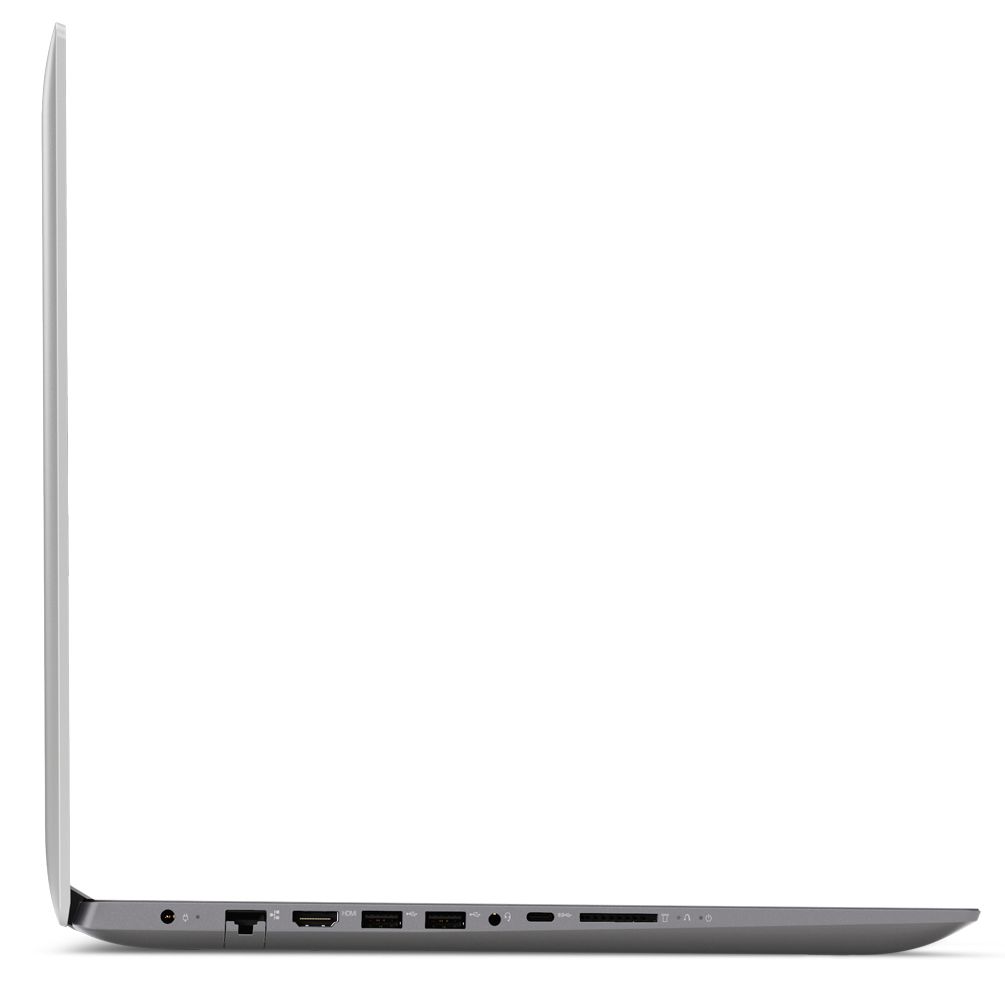
Posted .We are sorry to hear that your wife is having issues with her Lenovo IdeaPad 320-17 laptop. This system is equipped with OneKey Recovery System. There is a very small pin hole on the left side of the device, right near the SD card slot on the device. You will need a pin to push this reset button. Plug the device in. Let the battery charge for about 15 minutes. Push the reset button. The system should boot to a choice screen where you can choose "Restore To Factory Default". Select this. It will delete everything from the hard drive except the original factory install of the operating system. You will need to reinstall all programs and files after the reset. If you don't have copies of the files, try to make one before you restore by selecting "Boot to desktop" and trying to back up your files. If the problem persists, we recommend you have your wife call Lenovo Tech Support at: 877-453-6686.

Not worth it
||Posted . Owned for more than 2 years when reviewed.This reviewer received promo considerations or sweepstakes entry for writing a review.This laptop was not worth the money I spent on it. I wouldn’t purchase this again.
No, I would not recommend this to a friendGood deal
||Posted .This reviewer received promo considerations or sweepstakes entry for writing a review.Lenovo is always a good value laptop, not the latest tech but ok for daily work use
I would recommend this to a friendPick another laptop
||Posted . Owned for 1.5 years when reviewed.This reviewer received promo considerations or sweepstakes entry for writing a review.Don’t waste your money, spend an extra 100 and get something better. Had this for about a year and a half. Problems started popping up after 5 or 6 months. Yes it has a bigger screen. But it’s not worth it. Randomly shuts down several times a day. Extra Slow processing speed.
No, I would not recommend this to a friendnot so good
||Posted .This reviewer received promo considerations or sweepstakes entry for writing a review.would never recommend this brand to any family member or friends.
No, I would not recommend this to a friendGreat for Ubuntu
Posted .This reviewer received promo considerations or sweepstakes entry for writing a review.Came with Windows 10 Home. I purchased it specifically for an Ubuntu 16.04 LTS install because it looked like it was compatible and would be quite simple. It was both, and I'm a novice with Ubuntu. I planned to swap out the drive and do a clean install on a fresh HDD, but first thought I'd update the Windows drive. After 2-1/2 hours, I gave up on the update. I pulled the drive, put the new one in, and booted from an Ubuntu CD. Everything was seamless and smooth. And fast. Copied all my data and photos over, transferred my Thunderbird files, added some apps and I'm off to the races. I am extremely happy with the speed and performance with Ubuntu. Hats off to Lenovo for making a laptop that will actually accept a *nix OS without having to jump through hoops. Oh, and when I was checking some BIOS (actually UEFI) settings at BB, one of the salespeople looked over my shoulder and asked me if I needed help. When I asked him if I could install Ubuntu on the laptop, he looked at me like I was from another planet and walked away. The only downside to this whole process was having to separate the top and bottom halves of the laptop to swap out the drive. I know this is fairly common these days, but that doesn't make it suck any less. I wish the manufacturers would give us the old 'trap doors' for HDD and RAM access. 14 screws in this one. I'm pretty sure I voided the warranty by doing this, but I can live with that.
I would recommend this to a friendTERRIBLE
||Posted .This reviewer received promo considerations or sweepstakes entry for writing a review.This laptop has been terrible! VERY SLOW! If you are looking for something to check email on or slowly surf the web, this might be okay. Anything else, NO. You can’t save any apps on it or photos because it slows it down more.
No, I would not recommend this to a friendDifficult to work on
||Posted .This reviewer received promo considerations or sweepstakes entry for writing a review.The computer shuts down with no warning causing the loss of work. Can't find anything when I'm looking for it. Very difficult to work on. Perhaps it's more Window 10 then the computer, but I really do not like it.
No, I would not recommend this to a friendBrand response from Lenovo Product Expert
Posted .We are sorry to hear that you are having difficulty with your Lenovo IdeaPad 320-17 laptop. With regard to learning your way around Windows 10, you may want to try YouTube.com (just type that address in your browser address window). There are hundreds for free instructional videos there about Windows 10. Just type Windows 10 Introduction in to the YouTube search window. You can watch free videos there that will show you the basics all the way up to tips and tricks videos and they're all free.
What a joke
||Posted .This reviewer received promo considerations or sweepstakes entry for writing a review.It is completely ridiculous to purchase a new computer and the first thirsting it tells you when you open the screen is there’s a problem this may take a while.
No, I would not recommend this to a friendBrand response from Lenovo Product Expert
Posted .We are sorry to hear that you are having difficulty activating your Lenovo 320-17 laptop. We recommend you call Lenovo Tech Support at: 877-453-6686.
Power supply crashed in 2 weeks
||Posted .This reviewer received promo considerations or sweepstakes entry for writing a review.Power supply crashed into weeks Best Buy gave me my money back but had nothing to replace it. I came back in a couple weeks and children different product
No, I would not recommend this to a friendThis computer was junk
||Posted .This reviewer received promo considerations or sweepstakes entry for writing a review.This computer would not down load anything. Took it back bought a dell and had no problems with the dell.
I would recommend this to a friendBrand response from Lenovo Product Expert
Posted .We are sorry to hear that you had issues with your Lenovo IdeaPad 320-17 laptop. Check to be sure any programs you try to download are compatible with Windows 10 operating system.
- Pros mentioned:Large screen
Simple, clean, easy
Posted .This reviewer received promo considerations or sweepstakes entry for writing a review.You can’t beat this laptop for the price. The 17” screen is beautiful and easy to read. When you first turn it on there’s a lot of Windows updates that take hours to finish; after they’re done you are good to go. Surfing the web is snappy and quick.
I would recommend this to a friendBrand response from Lenovo Product Expert
Posted .Thank you for choosing the Lenovo IdeaPad 320-17 laptop. We are pleased to hear that the performance of the Ideapad 320-17 meets your computing needs so well.
- Pros mentioned:Performance, Price
Very Happy!
Posted .This reviewer received promo considerations or sweepstakes entry for writing a review.Of all the computers in this price range, I'm so glad I picked this one! It performs beautifully and I'm very, very happy with it. FAST! Beautiful picture, big, easy to hit keys, Just..everything about it is awesome including the price. I've never been one for expensive computers and this Lenovo proves you can get a great computer under $500. Very Happy, Thank You Best Buy.
I would recommend this to a friendBrand response from Lenovo Product Expert
Posted .Thank you for choosing the Lenovo IdeaPad 320-17 laptop. We are pleased to hear that the value and performance of the Ideapad 320-17 meets your computing needs so well.
- Cons mentioned:Battery life
Not Quite What I Hoped For
Posted .This reviewer received promo considerations or sweepstakes entry for writing a review.I was so wanting this computer to be everything I was looking for...and it is, for the most part. However, now with five days of use, it's just not as fast as they would like you to think. Onboard applications (programs) are slow to open and battery life is very poor. I charged this laptop overnight - 6 hours - and when I just turned it on to write this note, the battery was charged to 90%. Shouldn't it be completely charged to 100%? I have to take a cross-country business trip next week and I dread the battery drain. The computer is lovely to look at; the screen has decent resolution and there seems to be enough RAM to handle multiple open apps. Hard drive storage looks spectacular (1T). But for a power user, this machine just doesn't live up to expectations. Perhaps the price tag $529 should've been the clue. Thanks, anyway, Lenovo, but if the performance doesn't improve during my trip, I'm returning this machine to you.
No, I would not recommend this to a friendBrand response from Lenovo Product Expert
Posted .We are sorry to hear that you are having issues with your Lenovo IdeaPad 320-17. This system should charge to 100%. We recommend you contact Lenovo Tech Support for more specific help. The number is: 877-453-6686.
Fast and easy to set up
Posted .This reviewer received promo considerations or sweepstakes entry for writing a review.I had no idea that this laptop would be so fast. Loads up all pages from the internet lightning fast and the 17 inch screen is bright and crisp. I think I'm sold on Lenovo products.
I would recommend this to a friendBrand response from Lenovo Product Expert
Posted .Thank you for choosing the Lenovo IdeaPad 320-17 laptop. We are pleased to hear that the ease of setup and performance of the IdeaPad 320-17 meets your computing needs so well. We appreciate your support of the Lenovo Brand.
- Cons mentioned:Battery life
1-2 hr battery life
Posted .This reviewer received promo considerations or sweepstakes entry for writing a review.Love the computer, but the battery sucks. I don't need it to go places - it is just for my craft room.... but it has to stay plugged in at all times. I have only had it for 2 months.
I would recommend this to a friendBrand response from Lenovo Product Expert
Posted .This system has a battery life of up to 5 hours, depending on the work that the device is performing. Be sure there are no unwanted programs running in the background on your device, draining the battery. Here is a link to instructions to check for background programs within the Task Manager:
https://www.windowscentral.com/how-identify-and-terminate-high-resource-processes-using-task-manager-windows-10
Question
Posted .This reviewer received promo considerations or sweepstakes entry for writing a review.Since Lenovo Product Experts are adding remarks to these posts, can you tell me if the Lenovo 320-17IKB Laptop can easily handle a program that required: Multi-Core Processor 2 Gb (32 bit) or 4 Gb (64 Bit) memory Video Card: Dedicated with 512 Mb memory e.g. NVIDIA, ATI, or Integrated e.g. Intel HD Graphics (driver 2014 or newer)
I would recommend this to a friendBrand response from Lenovo Product Expert
Posted .Yes, from the criteria you list, the Lenovo IdeaPad 320-17 surpasses the requirements.
taking it back
Posted .This reviewer received promo considerations or sweepstakes entry for writing a review.bought it for the price. used it for less than an hour, crashed, needed to re-boot. webpages stating website not responding about 25% of the time. I use it on my lap, it has 4 gouging protrusions on the bottom of the laptop that make using it on your lap impossible. I had to put a pillow between my legs and the computer to use for the short duration I did. You can't look at the bottom of them at the store, as they are attached to the shelving. now I know you need to figure out what is on the bottom of your new laptop. I have never had any issue with a laptop having sharp protruding areas (they are the feet of the computer) that doesn't allow use on your lap. terrible design, terrible computer. taking it back.
No, I would not recommend this to a friendAwful self scrolling issue
Posted .This reviewer received promo considerations or sweepstakes entry for writing a review.This laptop has an issue which I have not been able to find a solution for. It self scrolls to the bottom of the page and will not let me page up or if in Office it will self scroll to the right deleting that cells content. Even as I type this review it keeps scrolling to the right making it difficult to type. All Lenovo and Win 10 updates are current. I am using Logitech wireless mouse & keyboard also with up to date software. I have never experienced a problem such as this in any other PC that I have used. Extremely frustrating!
No, I would not recommend this to a friendAmazing!
Posted .This reviewer received promo considerations or sweepstakes entry for writing a review.I simply love the laptop. It works really nice and it is great for college work!
I would recommend this to a friendBrand response from Lenovo Product Expert
Posted .Thank you for choosing the Lenovo IdeaPad 320-17 laptop. We are pleased to hear that the IdeaPad 320-17 meets your computing need so well.