Customer Ratings & Reviews

- Model:
- 80V50009US
- SKU:
- 5579132
to a friend
Customers are saying
Customers often highlight the superb screen quality, lightweight design, and impressive battery life of this 2-in-1 laptop. The fast SSD is also frequently praised, along with the laptop's ease of use. However, some users have noted concerns regarding the keyboard layout and fan noise. These issues, while mentioned, don't appear to overshadow the positive experiences reported by many customers.
This summary was generated by AI based on customer reviews.
Defective product from first day
||Posted .This reviewer received promo considerations or sweepstakes entry for writing a review.Before, I give my review of this product, I would like to say that Best Buy has given superior customer service in relation to our computer situation. We purchased two of these computers and were frustrated from the start. The computers had delays in getting into programs and moving between screens. The cursor kept "jumping" back to letters that were already typed. It was a constant need to keep restarting the computers to get them to stop freezing. We took them both back on the last possible day, one actually a day later and best buy Geek Squad confirmed our issues and we went shopping again for different computers and ended up getting a dell and a Asus for replacement. The most frustrating thing was the amount of time you spend getting your computers set up (which was actually doubled due to these issues), only to find yourself setting up more computers. My family member had also bought a Lenovo in March 2016 and had problems with it being super slow from the beginning and they took that one in and although its still slow, seems to be working better now. Both times in March and December Lenovo was the "top of the line". Probably will never buy one again.
No, I would not recommend this to a friendDud, known monitor issue
||Posted .This reviewer received promo considerations or sweepstakes entry for writing a review.I wanted to love this laptop, but then for no reason, while it was on the second time I used it, the monitor went black, and would not turn back on. I checked various sources online, and sure enough it's a known recurring issue with this model, and can't be fixed by updating drivers, etc. Thankfully with Best Buy's great service I was able to return it and eventually bought another model laptop.
No, I would not recommend this to a friendBrand response from Lenovo Product Expert
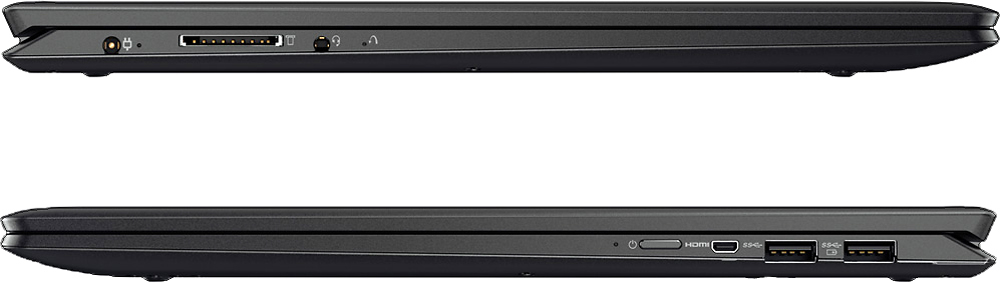
Posted .This sounds like a software issue rather than hardware. This system is equipped with OneKey Recovery System. There is a very small pin hole on the left side of the device, right near the headphone jack on the device. You will need a pin to push this reset button. Plug the device in. Let the battery charge for about 15 minutes. Push the reset button. The system should boot to a choice screen where you can choose "Restore To Factory Default". Select this. It will delete everything from the hard drive except the original factory install of the operating system. You will need to reinstall all programs and files after the reset. If you don't have copies of the files, try to make one before you restore by selecting "Boot to desktop" and trying to back up your files.

Disappointed Buyer
||Posted .This reviewer received promo considerations or sweepstakes entry for writing a review.I was so looking forward to my new PC and writing a positive review about it. However, out of the box (brand new), it couldn't connect to my home Wi-Fi. I have never before encountered a device that couldn't connect. I went ahead and enabled my cell phone as a hotspot and was able to set up the PC and connect to the intranet through the phone, thinking I could troubleshoot whatever fault was causing my home Wi-Fi connection failure. Tried the troubleshooting tips found online and nothing worked. PC seems fine by everything I tried, it's just incompatible with my Wi-Fi for some unknown reason. BTW, I have Verizon FIOS and a router issued by Verizon. I spoke with Lenovo customer service (Ryan) and he said to do a factory reset. I did that and then tried to set up PC again and still got the same result (can't connect at home). I then called Lenovo again and the rep (Jeremy) recommended getting a new router from Verizon and if that doesn't work then return the PC to Best Buy. The experience is a major disappointment because the PC worked so well on display at the store - it did and had everything I needed for the most part. Now I'm back to square one.
No, I would not recommend this to a friendBrand response from Lenovo Product Expert
Posted .We are sorry to hear about the WiFi connection problems you are experiencing with your new Lenovo Yoga 710-15. There may be Wireless LAN driver updates for your specific system that may help. Follow the link below to look for new driver updates for your specific system. You can also run diagnostics from the Lenovo site as well. As always, be sure to create a restore point on your system before you make any changes. Here is the link:
http://support.lenovo.com/us/en/products/Laptops-and-netbooks/Yoga-Series/yoga-710-15ikb/80V5/0009US?linkTrack=Caps%253ABody_SearchProduct&tabName=downloads&beta=false
Manufacturer defects
||Posted .This reviewer received promo considerations or sweepstakes entry for writing a review.Purchased computer because of a need for screen resolution and RAM. 4 days after having it and doing some research, ended up having to send it to Lenovo. I bought this brand new, mind you. Strange buzzing/scratching noises when running programs and unusually high use of RAM. Lenovo ended up having to replace the hard drive. Should've been a recall on this model.
No, I would not recommend this to a friendGOOD LAPTOP
||Posted .This reviewer received promo considerations or sweepstakes entry for writing a review.GLOBALLY SATISFY BY THE PRODUCT. I KEEP LOOSING THE SOUND , AND THE LAPTOP START TO BE NOISY WEN ON.
No, I would not recommend this to a friendBrand response from Lenovo Product Expert
Posted .It sounds like there may be drivers on your system that need to be updated. With regard to the sound issues you mention with your device, there may be audio driver updates for your specific system. Follow the link below to look for new driver updates for your specific system. You can also run diagnostics from the Lenovo site as well. As always, be sure to create a restore point on your system before you make any changes. You can do this by just typing "restore point" in the search window within Cortana and follow the link to create a restore point. Here is the link:
http://pcsupport.lenovo.com/us/en/products/laptops-and-netbooks/yoga-series/yoga-710-15ikb/80v5/80v50009us/downloads?linkTrack=Caps%3ABody_SerialNumber
Difficulty setting up and limited ports.
||Posted .This reviewer received promo considerations or sweepstakes entry for writing a review.Disappointed with the difficulties getting it to operate properly and the very few output connections.
No, I would not recommend this to a friendBrand response from Lenovo Product Expert
Posted .Make sure you are not loading any programs that are not compatible with Windows 10. There may be driver updates for your specific system. Follow the link below to look for new driver updates for your specific system. You can also run diagnostics from the Lenovo site as well. As always, be sure to create a restore point on your system before you make any changes. You can do this by just typing "restore point" in the search window within Cortana and follow the link to create a restore point. Here is the link:
http://support.lenovo.com/us/en/products/Laptops-and-netbooks/Yoga-Series/yoga-710-15ikb/80V5/0009US?tabName=Downloads&linkTrack=Mast:SubNav:Support:Drivers and Software|Drivers and Software&beta=false
- Cons mentioned:Fan noise
Too loud fan noise
||Posted .This reviewer received promo considerations or sweepstakes entry for writing a review.Thin, cheap, nice spec But fan noise is too loud .
No, I would not recommend this to a friendBrand response from Lenovo Product Expert
Posted .Here is the latest driver update from Lenovo addressing the fan noise issue: http://pcsupport.lenovo.com/us/en/products/LAPTOPS-AND-NETBOOKS/YOGA-SERIES/YOGA-710-15IKB/80V5/80V50009US/downloads/DS118587
- Pros mentioned:Battery life, Screen quality, WeightCons mentioned:Fan noise
Great Value for money Purchase
Posted .This reviewer received promo considerations or sweepstakes entry for writing a review.I spent a lot of time on research comparing different models from different brands. Finally, as soon as I saw the specs of this laptop in combination with the price I decided to purchase it. Everything is great. Especially the 4K display makes a huge difference. Additionally, I like the 2 in 1 concept, it is really convenient. Battery life is good so far - I would say 6 hrs with regular use. Finally, it really elegant, thin and light for a 15 inch model. The reason why I rate it with 4 and not 5 stars, it would be the fan. It is somehow more noisy than I expected, but still not too noisy. I have updated the drivers that are recommended and checked also the passive- active cooling options. Anyway, it might be also my idea that it is a bit noisier, as I had already read the reviews about the fan and somehow tried to notice it. In any case, I have decided that for me it is not a deal-breaker. I would definitely recommend this lap top for everyone that is interested in buying a 2 in 1 laptop with powerful characteristics and good display. I think it is the best option at the moment in the market at this price!
I would recommend this to a friendBrand response from Lenovo Product Expert
Posted .Thank you for choosing the Lenovo Yoga 710-15. We are pleased to hear that the features and performance of the Yoga 710-15 meets your computing needs so well.
Mediocre build quality
||Posted .This reviewer received promo considerations or sweepstakes entry for writing a review.This is a good mid-end laptop, you get a lot of performance for the price.
No, I would not recommend this to a friendScreen flashed
||Posted .This reviewer received promo considerations or sweepstakes entry for writing a review.Great laptop but the screen flashed so I ended up returning it.
No, I would not recommend this to a friendSalesman was helpful
||Posted .This reviewer received promo considerations or sweepstakes entry for writing a review.I previously owned a lenovo prior and enjoyed it.!
I would recommend this to a friend- Cons mentioned:Keyboard quality
Poor quality of screen
||Posted . Owned for more than 2 years when reviewed.This reviewer received promo considerations or sweepstakes entry for writing a review.The screen of the laptop is not good quality. While carrying in laptop baggage its pull out from the side of the corner
No, I would not recommend this to a friend Should have listened to Keyboard related reviews
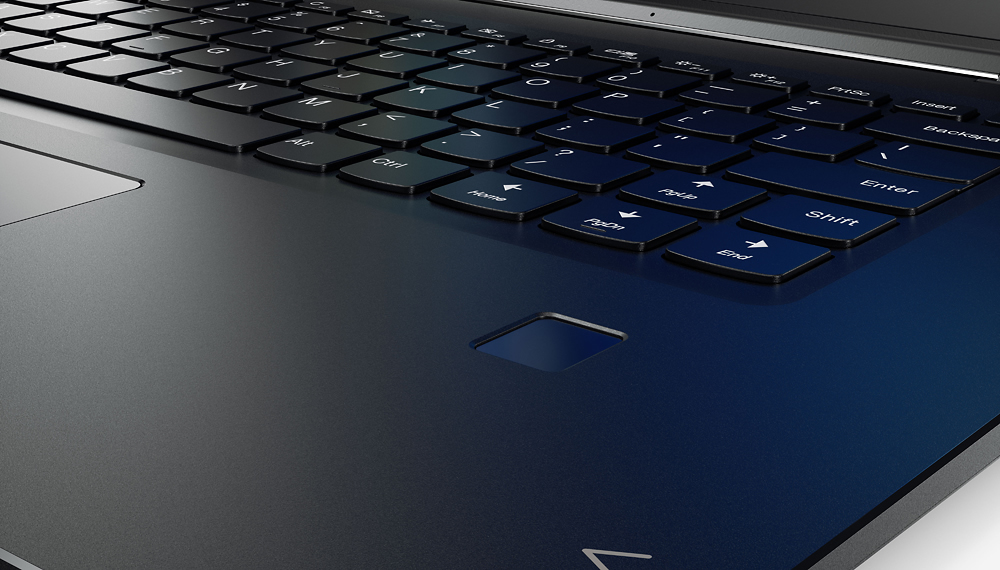
||Posted .This reviewer received promo considerations or sweepstakes entry for writing a review.Everything is great about this machine but the keyboard. The reviews did tell about it but I could not understand the frustration until I bought one and tried it for two days. The side keys are frustrating, instead of Backspace, you hit Home (same issue on HP Spectre as well). Enter key is smaller than we are used to. So is Right Shift key. So if you type fluently, then you will experience frustration like nothing else. For slow typing, you will get used to it quickly.
No, I would not recommend this to a friendBrand response from Lenovo Product Expert
Posted .With regard to the right shift key issue you mention, there is a free software APP called KeyTweak that may help you. You can switch the key functions of specific keys on your keyboard with this software, so you could change the right shift key with the key you hit in its place. Just Google search "KeyTweak" and you will find articles about what the software does and you will find the download location for this free APP.
Fast but no range
||Posted .This reviewer received promo considerations or sweepstakes entry for writing a review.My home office is downstairs and i can not connect from that location. First computer I have had this problem with. My cheap HP had great range
No, I would not recommend this to a friendBrand response from Lenovo Product Expert
Posted .With regard to the issues WiFi you mention with your device, there may be Wireless LAN driver updates for your specific system. Follow the link below to look for new driver updates for your specific system. You can also run diagnostics from the Lenovo site as well. As always, be sure to create a restore point on your system before you make any changes. You can do this by just typing "restore point" in the search window within Cortana and follow the link to create a restore point. Here is the link:
http://pcsupport.lenovo.com/us/en/products/laptops-and-netbooks/yoga-series/yoga-710-15ikb/80v5/80v50009us/downloads?linkTrack=Caps%253ABody_SerialNumber
Fair, until crash and wifi speed issues
||Posted .This reviewer received promo considerations or sweepstakes entry for writing a review.Within the last few months (approximately 10 months old) a windows update caused a critical error that required a clean-reinstall. Then, a month or so later the wifi card began having issues, with super slow (0.25mbps) download speeds. Tried troubleshooting, updating the driver, etc. Updating the driver would make it work correctly for an hour or so, then it would revert. Lenovo technical support is below average.
No, I would not recommend this to a friendNot working at all
||Posted .This reviewer received promo considerations or sweepstakes entry for writing a review.Laptop has not worked right since I got it. Kicks off the Internet. Won't respond to any programs. It is so so so slow..brand new
No, I would not recommend this to a friendBrand response from Lenovo Product Expert
Posted .With regard to the issues you mention with your device, First, be sure any software you have loaded on the device is compatible with Windows 10. Additionally, there may be driver updates for your specific system. Follow the link below to look for new driver updates for your specific system. You can also run diagnostics from the Lenovo site as well. As always, be sure to create a restore point on your system before you make any changes. You can do this by just typing "restore point" in the search window within Cortana and follow the link to create a restore point. Here is the link:
http://support.lenovo.com/us/en/products/Laptops-and-netbooks/Yoga-Series/yoga-710-15ikb/80V5/0009US?linkTrack=Caps%253ABody_SearchProduct&tabName=downloads&beta=false
Disappointed
||Posted .This reviewer received promo considerations or sweepstakes entry for writing a review.I thought this laptop was the right purchase. It got really hot and the fan was loud. Returned.
No, I would not recommend this to a friendQuit working after three months of use
||Posted .This reviewer received promo considerations or sweepstakes entry for writing a review.Don't buy this laptop--get a Mac instead. I bought this model on April 1, and it quit working three months later, on Aug. 1st. It would not longer turn on. I contacted the manufacturer and troubleshooted the issue, but no luck. This is the third PC I've purchased within the past year that I've had to return for performance issues (the others were HPs). Save yourself the frustration and get a Macbook.
No, I would not recommend this to a friendBrand response from Lenovo Product Expert
Posted .We are sorry to hear about the issues you are having with the Lenovo Yoga 710-15. This system is equipped with OneKey Recovery System. There is a very small pin hole on the left side of the device, right near the headphone jack on the device. You will need a pin to push this reset button. Plug the device in. Let the battery charge for about 15 minutes. Push the reset button. The system should boot to a choice screen where you can choose "Restore To Factory Default". Select this. It will delete everything from the hard drive except the original factory install of the operating system. You will need to reinstall all programs and files after the reset. If you don't have copies of the files, try to make one before you restore by selecting "Boot to desktop" and trying to back up your files.
- Pros mentioned:SpeedCons mentioned:Fan noise, Keyboard quality
2nd time is the charm
Posted .This reviewer received promo considerations or sweepstakes entry for writing a review.*Ignore my 1-star review or delete it* Earlier today I posted a review about this laptop and how it performed poorly compared to another older laptop with an i5. I returned it and decided to give it a second chance, so I purchased a new one. This laptop performs very well. It is right where an i7 with 16gb of memory should be in my opinion. With that said the shift key is still bothersome and the fan is fairly loud. Now, on the open boxed one I purchased I did not notice the fan at all. On the new one, it was obvious right away. I installed the drivers, as recommended to other people, to fix the fan issue. It did go away; HOWEVER, the speed of the computer slowed after the driver update, back to the speed of the open box one I purchased. My friend is a software engineer, and we hypothesized that Lenovo slowed the speed of the CPU (throttled it), so the fan didn't have to run as heavy. After I did a factory reset, the issue went away and the super high speed came back. If what we hypothesize is true, we think it was a poor decision on lenovo's part to do this. I will be keeping this laptop. It is a great price for the features I received. To anyone thinking of purchasing this, if the fan and shift key aren't a big deal to you I recommend you get this quickly because it is a steal at this price. Just don't update the drivers.
I would recommend this to a friend Bad screen
||Posted .This reviewer received promo considerations or sweepstakes entry for writing a review.I bought this laptop for the amazing specs and the 4k screen, but after 3 days of use the creen started to have problems at the point I wasn't able to use it, I returned and pick another one hoping it was a random problem and 10 days later the new one started doing the same, this time it will be a return.
No, I would not recommend this to a friendBrand response from Lenovo Product Expert
Posted .Since the device did work properly initially, it sounds like there was an automatic Windows 10 update that is conflicting with an older video driver. Follow the link below to look for new video driver updates for your specific system. You can also run diagnostics from the Lenovo site as well. As always, be sure to create a restore point on your system before you make any changes. You can do this by just typing "restore point" in the search window within Cortana and follow the link to create a restore point. Here is the link:
http://pcsupport.lenovo.com/us/en/products/laptops-and-netbooks/yoga-series/yoga-710-15ikb/80v5/80v50009us/downloads