Customer Ratings & Reviews

- Model:
- 80V50009US
- SKU:
- 5579132
to a friend
Customers are saying
Customers often highlight the superb screen quality, lightweight design, and impressive battery life of this 2-in-1 laptop. The fast SSD is also frequently praised, along with the laptop's ease of use. However, some users have noted concerns regarding the keyboard layout and fan noise. These issues, while mentioned, don't appear to overshadow the positive experiences reported by many customers.
This summary was generated by AI based on customer reviews.
- Pros mentioned:Screen quality, Weight
a Great Computer for my new Graphic Arts career
Posted .This reviewer received promo considerations or sweepstakes entry for writing a review.First of all I want to say how all the technicians and salespeople were really helpful and supportive (Best Buy #176). I have being buying home computers since 1980....But this is the most beautiful and smoothly operating computer I have ever owned.. I found the intuitive quality of the software very commendable. I am sure I will have a long and good relationship with my Lenova Yoga!. But the thing that really stands out in my mind are all the care your people took to make this a good end product from me and my family. They even loaded on my data from my Windows 7 computer and made attempts to install some of my older Adobe products ( some succeeded and some did not- if the software is too old it will not always work- but the stuff I purchased after 2009 did work). Also delighted with the light weight and size and resolution of the screen. BUT just so you know had to do some "work arounds" with the Adobe Creative Cloud with the Adobe Photoshop interface ( under EDIT menu, Preferences and Interface and also hadto adjust the computers resolution) to make the text clearly visible for my older eyes.Microsoft Office and Webroot the wonderful Geeks installed, works great too- no adjustments needed.. If you have questions feel free to ask the Geek People or Computer Sales Person!!!! They will put you at ease @ store #176!!!
I would recommend this to a friendBrand response from Lenovo Product Expert
Posted .Thank you for choosing the Lenovo Yoga 710-15. We are pleased to hear that the features and performance of the Yoga 710-15 meets your computing needs so well.

- Pros mentioned:Speed, Ssd
My New Ferrari
Posted .This reviewer received promo considerations or sweepstakes entry for writing a review.•••Disclaimer: 1st time product reviewer but felt this product deserved my accolades (after just initial unboxing & spec check)••• I feel like I just put a tarp over a Ferrari in my garage after I shut her down for the 1st night. I gently tucked her in the original wrappings for travel since I didn't want to scuff the sleek/sexy exterior on road trip. Shes got everything I ever dreamed about under her hood.... • SSD (256 w new faster pistons/connectors) • i7 engine (newest 7th Gen edition) • 16GB Ram (no need to upgrade as it has only 1 slot so she's maxed out) • 4K screen • sexy sleek metallic exterior •• Cons • the right shift key shoulda been a bigger "gas pedal" # Trade in your _____ for a Ferrari I almost bought the i5 8gb edition on sale...so glad I decided on this model. Price out the upgrades and realize the value here for the form vs function vs cost aspect. You get it here in this machine. I paid current full price of $1099 and I felt like I was stealing. Will you ever own your dream machine?...this maybe an opportunity.
I would recommend this to a friendBrand response from Lenovo Product Expert
Posted .Thank you for choosing the Lenovo Yoga 710-15. With regard to the right shift key issue you mention, there is a free software APP called KeyTweak that may help you. You can switch the key functions of specific keys on your keyboard with this software, so you could change the right shift key with the key you hit in its place. Just Google search "KeyTweak" and you will find articles about what the software does and you will find the download location for this free APP.
Impressive Performance and a Pleasure to Use!
Posted .This reviewer received promo considerations or sweepstakes entry for writing a review.NOTE Before the Review: Several reviewers have complained about Fan Noise. This can be an issue, but is entirely solvable with no special technical tricks needed. I address how to do it at the end of my review. First off some background: I am a professional 3D animator and video editor, and generally of my work happens a full tower-sized custom PC, built on a Xeon platform and with a graphics card that costs about what this entire laptop does. I say this not in any sense of bragging but only put into perspective how I'd be evaluating any computer. NOTE: I also purchased a USB 3 Hub that added extra ports as well as a Gigabit Ethernet port. Attached to one of the USB 3 ports I had a 1TB external hard drive to add to the system drive. I got the hub from Best Buy as well: j5 create - USB 3.0 Gigabit Ethernet and 3-Port Hub: I highly recommend it for anyone who has real LAN available. That said, the wireless speeds on the laptop have also been very good (for wireless anyway). Setup and Installation: Both were a breeze and I LOVE the fingerprint reader for Windows Hello. Little to no bloatware; everything is ready to roll as soon as you log in. You should expect expect a day or so of Windows 10 updates since obviously there have been plenty since this went into final production. Make SURE to apply these, as well as any Lenovo updates as well! Some of the Lenovo apps, while not completely worthless, are really of limited usefulness, so that will be up to you. Boot times: super fast even from a "cold" start. Logins from Sleep: insanely short. All my PCs utilize SSDs so I am used to quick boot times but this machine seems especially speedy in that regards. Professional Performance: In the past I basically wouldn't even consider using a laptop for real "work" at all, but a family emergency meant that I needed to work remotely for a week or so in the middle of a very busy project. So-so performance was just NOT an option, though I was skeptical this machine could keep up. Happily it it more than did its duty, and I was able to push it to the limit for a whole week and it worked like a champ! The one area that performance did take a hit was that the processor only has 4 cores, but let's be realistic: it's a mobile computing device, not a big workstation with a huge power supply, nor the space for cooling a larger CPU. Really, it worked much better that I'd have imagined! I should also mention I this laptop connected to a 24" HD monitor for the whole time I was working on it. Especially with 3D animation, I was amazed that I could be working with fairly complex scenes and NOT have significant lag or any screen glitches. Rotating around the 3D space was smooth and natural and the graphics card had no problem using both monitors simultaneously. I did set the laptop screen down to 1920 x 1080 HD (half its native resolution) so that all of the OS interface matched up correctly. In fact, I have mostly kept it at this resolution even on its own just because a lot of the screen text will get too small to see easily. Aside from the animation work, I also loaded in the entire Adobe CC Suite and I am happy to say it performs just as well with any/all of these applications as well. Whether Photoshop, Premiere Pro or After Effects, playback is much better than one would expect on a laptop and a real pleasure to use. It's in these types of programs that the 16 GB of RAM really helps, and of course the 2GB of graphics memory + the GPU itself. Final Thoughts: Obviously the screen is beautiful, and it's great for watching HD movies on it. I definitely like having the touch screen for day-to-day usage, and now that it's back home and in a shared space, the whole family loves getting to use it. It's my son's new video game AND video editing machine, so everyone's happy. I was watching him play "No Man's Sky" the other day and the quality and game play was great, so for the game crowd, you may find machines more powerful, but I doubt it for the price. The Fan Noise Issue: Yes, no doubt when I first was setting it up I also was thinking: "Really!? Man that thing is always going!" So I did a bunch of online research but honestly most fixes were overly complicated and and often getting into sketchy Registry territory (not that I'm 100% against registry tweaks, but these seemed less than perfect solutions). So here's what I figured out: This CPU is designed with a "built-in" graphics chip, even though in a machine like this one you don't actually need it. So that's what tipped me off in the end: the fans would be going full blast even when the CPU was reading at 15%. It didn't make sense until I realized that with a graphics chip embedded you might have the general "processing" portion practically idle but still could have the on-chip GPU firing away! So I just went into the Intel Graphics Menu (not the Nvidia Control Panel) and set everything down to the most extreme Low Power Battery Saver settings. This will instantly have the effect of reducing 75% of the heavy fan noise right there. Now granted, if the CPU itself is actually doing heavy work, of course the heat goes up and so does the fan. But all your simple day-to-day stuff, it will make a gigantic difference, and trust me, there will be NO 3D or GPU-related performance hit: that Nvidia GPU not only performs much better than the Intel chip, it's much quieter too. So there you have it...
I would recommend this to a friendBrand response from Lenovo Product Expert
Posted .Thank you for choosing the Lenovo Yoga 710-15. We are pleased to hear that the Yoga 710-15 meets your computing needs so well.
- Pros mentioned:Battery life, Screen quality, Ssd
Great buy for 4K screen and DDR4 Ram
Posted .This reviewer received promo considerations or sweepstakes entry for writing a review.This laptop is an amazing deal. The screen is fantastic, the SSD is super fast, and the battery life is great for a laptop with such high specs. We took it on vacation and loved it.
I would recommend this to a friendBrand response from Lenovo Product Expert
Posted .Thank you for choosing the Lenovo Yoga 710-15. We are pleased to hear that the features and performance of the Yoga 710-15 meets your computing needs so well.
- Pros mentioned:Screen quality, Speed, Weight
Great laptop
Posted .This reviewer received promo considerations or sweepstakes entry for writing a review.Fast, light and beautiful screen i have only a few small negatives they are not show stoppers.
I would recommend this to a friendBrand response from Lenovo Product Expert
Posted .Thank you for choosing the Lenovo Yoga 710-15. We are pleased to hear that the Yoga 710-15 is working out so well for you.
- Pros mentioned:Weight
Gets the job done
Posted .This reviewer received promo considerations or sweepstakes entry for writing a review.For what it is, this is a very, VERY good laptop for the price. I am a video producer and I also enjoy a bit of gaming. I was looking for a lightweight laptop that could do some editing and motion graphics on when I'm traveling. I've got an editing workstation at home, so this wouldn't be my primary editor, just something I could use to stay productive on the road. So far, this laptop has not let me down. The day I got it home I installed adobe premiere pro and loaded up several HD clips. I cut together a quick 2 minute video with color correction and transitions. Nothing too complicated, but premiere functioned flawlessly. The same for after effects. There is a little slow down in AE when previewing at full resolution, but that's to be expected. I also didn't do any 4K editing, so I can't comment on the performance there. It's possible longer or much more complex projects could slow thinges down, but I can't say for sure yet. As for gaming, first I gotta say I am not a hardcore gamer. I don't get bent out of shape when a game drops below 60fps or anything. As long as it remains playable and doesn't jitter I'm good. That said, this laptop worked perfectly for the games I tried. Minecraft, civilization 5, mass effect 2, Sims 4 and COD modern war all worked. Again, I didn't monitor frame rates. Just saying, the game ran without any freezes. Considering this is not a gaming laptop by any stretch, I was impressed. Only gripe I have is the hard drive space. Out the box you only have about 230 gig. The rest of that 256 is taken up by windows. It fills up quick. I knew it was a small drive, so I can't be upset. Knew what I was getting into there. You can upgrade the hard drive, but opening the case voids the warranty, so I'll deal with carrying around an external drive until my warranty is up, then I'll certainly upgrade for more storage. As for things others have said.... the fan hasn't been an issue for me. It's not too loud or obnoxious. I read somewhere that lenovo updated the bios to fix the fan problem, so there's that.
I would recommend this to a friendBrand response from Lenovo Product Expert
Posted .Thank you for choosing the Lenovo Yoga 710-15. We are pleased to hear that the performance of the Yoga 710-15 meets your computing needs so well.
- Cons mentioned:Fan noise
Great value for your money
Posted .This reviewer received promo considerations or sweepstakes entry for writing a review.This Lenovo yoga 710-15 inch with 7th gen i7 16GB ram and 4k is a great value for your money. it is not too heavy for a 15.6-inch laptop and the actual size of the laptop is close to a 14-inch laptop thanks to its thin bezels in the screen. It performs fast with all the high-end specs and can handle multiple work without a hassle. I gave it 4 stars because I had to check two devices. The first one had a loud buzzing noise under the keyboard and I read online that it's something to do with the processor going into C-states (power savings mode) and it was annoying. Also, there is a slight light bleeding to the display and you can notice it if you are in a dark room with dark wallpapers (Lenovo, please don't say that there is a driver update for this because it is nothing to do with drivers). The fan does kick in and if you are working in a completely silent room then it might bug you. Overall this is a great laptop for the money and especially with the sale prices. Great computer for light gaming, multimedia, and day-to-day office work.
I would recommend this to a friend - Pros mentioned:Battery life
Great laptop, top of the line specs.
Posted .This reviewer received promo considerations or sweepstakes entry for writing a review.I was looking for an all in one laptop, this thing does it all. People who complain about the fan noise, just download the updates, that fixed it for me. Battery life is pretty good, I have the display on 100% most of the time, just using everyday programs like Youtube, Netflix, Excel , Photoshop ect., I get between 7-8 hours of use. This thing can game as well. Yes it has a 4k screen but you'll need to play at 720p with low settings on all the newer games. Gears of War 4 runs between 30-40 fps on those settings. If you are planning on gaming on this, your battery life will be significantly shorter. All in all a great laptop. Only downflaw I've encountered is the size of the SSD, 256gb isn't enough for 2017. Some of the newer games are 80gb each, should of put in a 1TB and charged more imo.
I would recommend this to a friendBrand response from Lenovo Product Expert
Posted .Thank you for choosing the Lenovo Yoga 710-15. We are pleased to hear that the features and performance of the Yoga 710-15. With regard to a larger hard drive, we will look in to this for future improvements.
I challenge you to find something better for the $
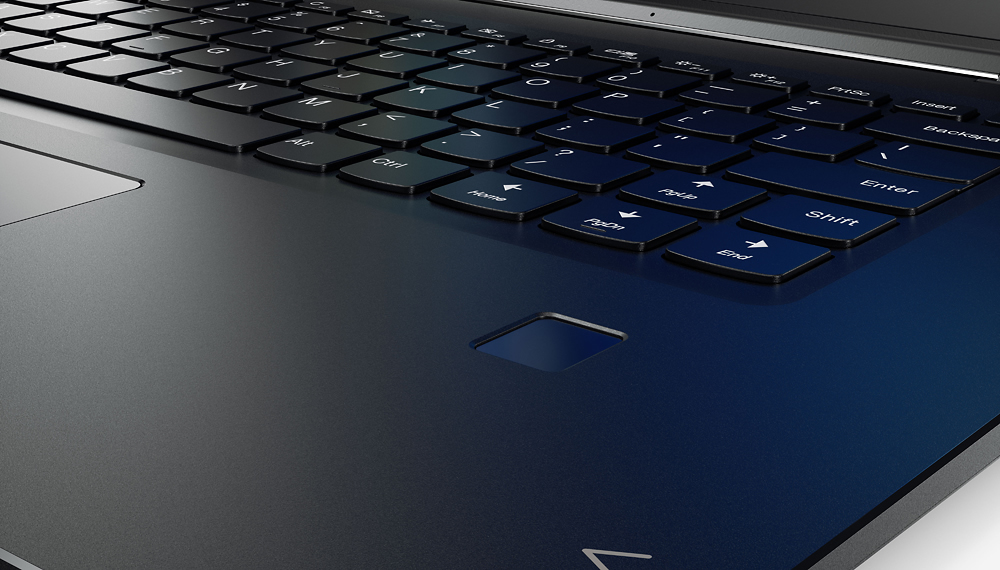
Posted .This reviewer received promo considerations or sweepstakes entry for writing a review.Pros: 1. Lightning fast 2. Amazing 4K display 3. i7 processor paired with the 256gb ssd and 16gb ddr4 makes this thing a rocket ship 4. Touch screen is super responsive and very useful 5. Speakers are in the "ok"range....better than my 2015 macbook pro, not as good as other laptops I have but not bad. If they were on the top surface they would be amazing, as when I pick up the laptop and listen they sound amazing, but they are muffled when its on the table. 6. This thing just looks great, and it is still light enough that when flipped to tablet mode, it is a decent tablet. Cons: 1. The keyboard and trackpad might be the worst on any laptop I have ever owned. Like everyone else is saying, the shift key placement is insane, in what world did they not catch that in testing? No one can reach the darn thing and we all hit the up arrow, and I do not want to reprogram my up arrow to be a shift key, I should not have to, when I pay a $1000 dollars for a product, do anything to it out of the box to maintain functionality. Also, the left click on the trackpad is not responsive 50% of the time, even after changing settings to stop it from delaying after typing, it still sometimes takes 2-4 clicks before it responds on screen. 2. Lack of ports hurts the functionality of this laptop for daily use. However, if you are going to use it for what I use it for, mostly work and business, with occasional personal use, then it is fine. I am purchasing a usb 3.0 dock so it should not be a problem, and I use an external keyboard at work so it is not a big deal. 3. Fan noise is not as bad as others have said, as long as you do not get going using 100% cpu usage, you should only hear minimal fan noise, and this is the same for every windows laptop I have ever used. Macs generally do not have huge fan noises as the chassis is made of metal and can absorb and dissipate some of the heat whereas this seems to have a plastic bottom and cannot do that. Overall: I gave this machine a 4/5 stars simply due to the keyboard. in 2017, with all of the feedback you have and all the time you have had as a company, an oversight as large as this, putting a very cheap, not well thought out keyboard and trackpad into a high end machine is not acceptable. Before I bought it, I did not even think to do any typing on this thing, which is my oversight, and had I done that I would not have bought this one as it is very annoying if I bring this thing home and try to type on my lap without my external keyboard and mouse. I give it 4 starts despite this huge flaw as for $1000 dollars from BestBuy, you cannot get this much power in a laptop from anywhere else paired with a wonderful 4K touch screen. So despite these few flaws, I would say if you want something that is capable of gaming on medium settings on most games, and you do not plan on using the keyboard for the majority of your work, then this thing cannot be beat. I am still glad with my purchase as I have never had a computer this fast.
I would recommend this to a friendBrand response from Lenovo Product Expert
Posted .With regard to the right shift key issue you mention, there is a free software APP called KeyTweak that may help you. You can switch the key functions of specific keys on your keyboard with this software, so you could change the right shift key with the key you hit in its place. Just Google search "KeyTweak" and you will find articles about what the software does and you will find the download location for this free APP.
Portable 4K is useful
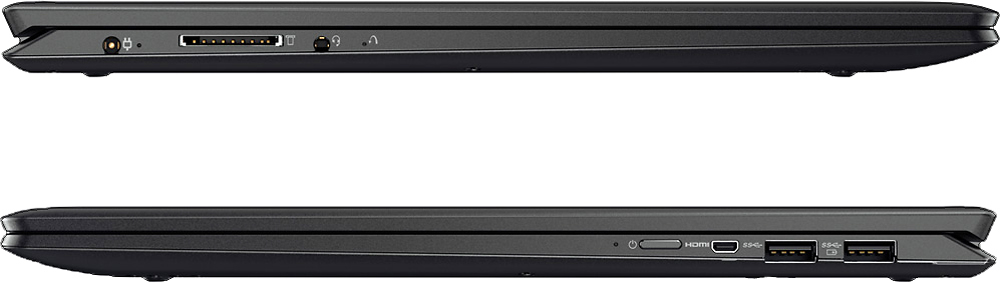
Posted .This reviewer received promo considerations or sweepstakes entry for writing a review.This is a great laptop, with a few niceties and shortcomings. The GOOD: 4K is for real. Although, your best living room 4K experience will be on a screen larger than 60"... A 15" screen gives you incredible clarity on-the-go. You sit closer to a PC, so those details do impress. Looking at photos and 4K videos from my phone, are amazing, compared to my aging desktop PC monitor that can barely do 1080P. The refresh rate is 60Hz, so don't expect mind-blowing cinema experiences here. 4K is for screen real estate as well. I use the laptop more for my business, and reviewing technical papers and CAD drawings is a snap. Touchscreen is responsive and yes, it's a very good feature. Fingerprints can be wiped, though I don't seem to need to for a week or so, in between. Screen is bright and a joy to look at. 16GB of RAM is great. More RAM than most laptops in it's price range. I wouldn't expect you need more than this on a similarly-powered laptop for 5 years to come. 7th gen i7 is a dual-core CPU with four threads. It's a very good laptop CPU for 2017. It won't replace any gaming rig or desktop i7, but it's enough for most stuff on the road, including 4K streams. The 2GB nVidia GeForce 940MX chipset is a nice bonus. It's a mid-tier laptop GPU that is enough for 1080P games, but it certainly won't do for 4K gaming, and you can't expect it to. You can stream 4K video nicely, which provides a very solid boost over the embedded Intel graphics. SD card reader is included. If you get a BaseQI 103A or similar, you can use the SD for 256GB of 'slow SSD' storage. (see below) It's THIN and LIGHT! Aluminum construction feels smooth. not sure if the casing can scratch easy though. Battery Life is pretty good. I left mine in a car for 3 days in sub freezing temperatures, and it held a charge perfectly fine. Expect 4-5 hours of use with screen at 50% brightness. You can use a battery saving mode for more time (6-8 hours tops) if needed on a long flight. One of the USB ports will charge your mobile device, even if the laptop is powered OFF! A very handy thing to have, I've already had to utilize it! Of course, your laptop battery needs a sufficient charge if you are not on AC power. Fan: It's not that annoying for me. Remember, this is a mid-level power laptop, it needs cooling. Price: it's a solid laptop for the price. I got an open-box to save a bit more. THE BAD: While the laptop sports a Solid State 'hard' Drive, it's 256GB size might not be enough for a power user. Furthermore, current BIOS limitations only allow for an out-of-warranty upgrade to 512GB. It's best to ride out the limitation for now, and wait for a 1TB BIOS limit increase. Use a microSD with half-size BaseQI (or similar brand) SD adapter to boost your storage for now, or plug in an external USB 3.0 HDD Ports: Only 2x USB 3.0 ports makes having a USB hub a worthwhile idea. I'm fine with only two ports, I don't think this is terrible, but three would have been sweeter. Ports: MicroHDMI. I don't know what to say. Now you have to carry a special adapter/cable to plug into a TV... the laptop is so portable, but you need dongles and hubs... kinda defeats the purpose. Ports: No 10/100/1000 Ethernet. This isn't a deal-breaker, most modern laptops do not have wired Ethernet anymore. Purchase a USB 3.0 hub/Ethernet dongle, it will solve two problems, if you need wired Ethernet from time to time. Ports: No USB-C/Thunderbolt. This actually is a little bit disappointing for a 7th gen cpu laptop. Expect these ports to be the norm in 2017, this laptop was released in September 2016. Thunderbolt adds a bevy of features, including display redirection (HDMI out). Screen has a tendency to wobble if you are near vibrations, not sure if this is the hinge, or the weight of the screen, and casing being so thin. Update application (software, drivers, etc.) is much weaker than coming from my HP. HP had this nailed, even better than Dell in my opinion. Lenovo produces a sophomore effort here. OVERALL: I love mine. It's easy to handle, it's responsive, the screen is gorgeous, I'm never going back to HD!
I would recommend this to a friend- Pros mentioned:Speed, Ssd
Great laptop
Posted .This reviewer received promo considerations or sweepstakes entry for writing a review.This is a great laptop. The Nvidia Geforce Gtx 940mx with the 4k display was the main reason I bought this laptop. Its fast, display is great. I like the keyboard and overall look. I plan to use for VMs, database technical work and to watch movies in my free time.
I would recommend this to a friendBrand response from Lenovo Product Expert
Posted .Thank you for choosing the Lenovo Yoga 710-15. We are pleased to hear that the performance of the Yoga 710-15 meets your computing needs so well.
Fully loaded at a great price...
Posted .This reviewer received promo considerations or sweepstakes entry for writing a review.Got this laptop over a week ago, just a day before it went up from $1199 to $1299. At $1299 also, this is a steal. It's a loaded machine and performs like one. I was a tad skeptical to purchase this online without looking at it in person in a store, but I'm glad I didn't wait any longer than I did and ordered it online. Out of the box, it didn't turn on as battery had no juice at all. So had to plug it in to get going. The 4K screen is bold and and beautiful, text is crisp and colors are bright and vivid. Touch response is super quick and scrolling and navigating is buttery smooth. Backlit keyboard is well lit with 2 settings--bright and brighter. Keys have a nice solid clicky feel to it. Speakers are not the best ones I've heard on a laptop, but not the worst either, decent sound. The fan runs quite a bit and in a silent room it definitely makes it's self heard. A nice loaded machine with a solid aluminium built, can't go wrong here.
I would recommend this to a friendBrand response from Lenovo Product Expert
Posted .Thank you for choosing the Lenovo Yoga 710-15. We are pleased to hear that the features and performance of the Yoga 710-15 meets your expectation and computing needs so well.
Great laptop
Posted .This reviewer received promo considerations or sweepstakes entry for writing a review.I have macbook pro retina and wanted to have a windows counterpart with comparable high quality display, which I am very picky on. This one is what I found to be the most affordable among its competitors. I also checked samsung notebook 9 pro and hp spectre 15. The samsung which uses a pentile pixel display and last gen CPU, is at about the price. HP spectre 15, while looked more polished in design, is equipped with same CPU/RAM/GPU costs about 400$ more. So I decided to buy this one when it was on sale today at $999. I installed windows updates after booting up, it took some time and the fan sounded a little bit loud, but it was totally acceptable because installing tons of updates would use a lot of CPU and resources. What I don't like about this laptop is the what's could've made this laptop a perfect buy - the display. Don't get me wrong - the display is true 4k resolution, the text is sharp and crisp, color of image is also good, but the only thing is that comparing it the my macbook pro retina, the backlit light is not as bright as the macbook when both are set to the brightest. This is annoying because when you have are in a not-so-dark environment, any level of background ground light could make the display glossy. it is not a problem when you are indoors and you don't have a overhanging light bulb at home. However, if you choose to sit outdoor of a starbucks shop. the light could easily make the display barely usable. You would wish to turn up the brightness by 50% but unfortunately you cannot. I should update my review in a few days after using it a bit more.
I would recommend this to a friend- Cons mentioned:Fan noise
Great PC
Posted .This reviewer received promo considerations or sweepstakes entry for writing a review.I like how this PC is fast at booting up. Crystal clear image. Great for normal gaming and video/image processing. I will say that after putting a load on the PC fans tend to get a bit noisy or when PC starts to multitask. They don't actually bother me. By the way, web states it has graphics card Nvidia GeForce GTX 940MX but also comes with Intel Graphics HD 620 wich is great because u can actually manage with card you would like to use or just have the PC auto choose according to PC needs.
I would recommend this to a friend - Cons mentioned:Fan noise
Fantastic product with a few catches
Posted .This reviewer received promo considerations or sweepstakes entry for writing a review.This is an amazing laptop, it does everything I need and some. I've had it for a little under a week and I have no issues with it at all. There are a few things to watch out for though; if you want a completely silent laptop this one may not be for you. The fan does kick on quiet frequently and makes a little bit of noise. Other than that if you didn't look at all the specs the weight might take you off guard. But if you dont care about weight too much(like me), and some fan noise doesn't bother you (like me) then this product will be perfect for you!
I would recommend this to a friendBrand response from Lenovo Product Expert
Posted .Thank you for choosing the Lenovo Yoga 710-15. We are pleased to hear that the features and performance of the Yoga 710-15 meets your computing needs so well. By the way, this system only weighs 4.19 lbs.
best laptop ever
Posted .This reviewer received promo considerations or sweepstakes entry for writing a review.7 years old still working ,m i'm happy with my purchase
I would recommend this to a friend- Cons mentioned:Fan noise
Great laptop if it wasnt for the fan
Posted .This reviewer received promo considerations or sweepstakes entry for writing a review.This was the laptop of my dreams if it wasn't for the super loud fan. Right out of the box the fan is loud doing the simplest task like browsing the internet or even watching a short 2 minute youtube video. I've looked online how to fix with no answer. very disappointing especially since its an i7 16 gb . dont know if im going to return it or not still deciding.
No, I would not recommend this to a friendBrand response from Lenovo Product Expert
Posted .Thank you for choosing the Lenovo Yoga 710-15. With regard to the fan issues you mention with your device, there may be power management driver updates for your specific system. Follow the link below to look for new driver updates for your specific system. You can also run diagnostics from the Lenovo site as well. As always, be sure to create a restore point on your system before you make any changes. Here is the link:
http://support.lenovo.com/us/en/products/Laptops-and-netbooks/Yoga-Series/yoga-710-15ikb/80V5/0009US?linkTrack=Caps%253ABody_SearchProduct&tabName=downloads&beta=false
- Pros mentioned:Screen qualityCons mentioned:Keyboard quality
Nice on paper bad in performance
Posted .This reviewer received promo considerations or sweepstakes entry for writing a review.I bought this open box certified on clearance. Let me just say that aesthetically, this laptop is incredible looking. The finish, keyboard, touchpad, and 360 degree 2 in 1 option all work excellent and look phenomenal. The 4k screen is very sharp. Now on to all the bad things. The right shift key is poorly designed. I'll leave it at that. The performance looks great on paper, but is actually quite horrible. When I first opened this laptop it was fast and turning it on takes about 3 seconds to get to the homescreen. Web pages load slowly on this computer. My girlfriend's i5 that has a HHD and 8gb of memory AND is 1 year old loads webpages faster and doesn't lag when scrolling like this computer does. I compared this by pressing the enter key on each laptop for the same website over the same wifi. This laptop loaded every page (5 of 5) slower than her i5 HDD. That is not acceptable for a $1,200 laptop. Her's was only $600 and is also a 2 in 1. The bluetooth is spotty and cuts in and out. I then opened youtube and watched a video while then trying to download spotify. The computer literally froze for a second and the video stopped playing. This was not due to wifi either as the video was already loaded. The CPU was being utilitzed at 86%! For downloading one application and watching a low resolution youtube video! That is not okay. When I play Skyrim on my desktop that has an i7 and dedicated graphics cards that are 4 years old, the CPU only runs at about 20%. Maybe I got a dud, but I can assure you that the computer I have is not fast at all. It performs like an i3 (maybe even worse no joke). I am going to go back to the store and return it today. If I can exchange it and the other one is much better, I will update my review.
No, I would not recommend this to a friendBrand response from Lenovo Product Expert
Posted .With regard to the right shift key issue you mention, there is a free software APP called KeyTweak that may help you. You can switch the key functions of specific keys on your keyboard with this software, so you could change the right shift key with the key you hit in its place. Just Google search "KeyTweak" and you will find articles about what the software does and you will find the download location for this free APP. Obviously, this system should be a fast system with its Core I-7 processor and 16GB of RAM and its Nvidia GeForce GTX 940M GPU. Be sure any software you installed is compatible with Windows 10. There is no need to install Microsoft Office software. The software is already part of the operating system, you just need to activate the software with a purchased product key. If you have installed a copy of Microsoft Office, this is conflicting with the existing copy on the system and this will slow your system down. If you have installed a 3rd party anti-virus program, be sure that Windows Defender is turned off and that the trial version of McAfee Anti-Virus software is uninstalled. There can only be one anti-virus program on the system. You may need to restore your system to original factory default settings if any of the programing errors have occurred. You can do that by typing "restore" in the Cortana search window. Just click on the magnifying glass icon at the bottom left of your Windows 10 Desktop. Click on "Reset This PC" Then click on "Get Started" and follow the on screen directions to restore to factory defaults. Finally, there may be driver updates for your specific system. Follow the link below to look for new driver updates for your specific system. You can also run diagnostics from the Lenovo site as well. As always, be sure to create a restore point on your system before you make any changes. You can do this by just typing "restore point" in the search window within Cortana and follow the link to create a restore point. Here is the link:
http://pcsupport.lenovo.com/us/en/products/laptops-and-netbooks/yoga-series/yoga-710-15ikb/80v5/80v50009us/downloads?linkTrack=Caps%253ABody_SerialNumber
Happy Customer
Posted .This reviewer received promo considerations or sweepstakes entry for writing a review.I am very happy with my purchase. At first when I saw all the features it had (7th Gen i7, NVIDIA Graphics Card, and 4k Screen) I thought for sure it would be over $2,000 dollars. But I was shocked for $1,200?? What an awesome deal. The computer is fast and responsive and the screen is just plain gorgeous! It is a definite buy in my opinion!
I would recommend this to a friendBrand response from Lenovo Product Expert
Posted .Thank you for choosing the Lenovo Yoga 710-15. We are pleased to hear that the features and performance of the Yoga 710-15 meets your computing needs so well.
Love Lenovo/Great brand but I am having an issue!
Posted .This reviewer received promo considerations or sweepstakes entry for writing a review.So I bought this laptop about 2 weeks ago and when I first started using the laptop I noticed a yellowish tinted screen. Compared to all the other laptops I have seen this laptops screen/display is more yellowish than white. I ended up exchanging the laptop (thinking it might have been a display problem with that laptop only) for the same one but am still experiencing this issue. Can it be I'm getting unlucky with faulty laptops or is this how Lenovo creates their 4K displays?
No, I would not recommend this to a friendBrand response from Lenovo Product Expert
Posted .We have not heard of this yellowish tint on this model. There may be video driver updates for your specific system. Follow the link below to look for new driver updates for your specific system. You can also run diagnostics from the Lenovo site as well. As always, be sure to create a restore point on your system before you make any changes. Here is the link:
http://support.lenovo.com/us/en/products/Laptops-and-netbooks/Yoga-Series/yoga-710-15ikb/80V5/0009US?tabName=Downloads&linkTrack=Mast:SubNav:Support:Drivers and Software|Drivers and Software&beta=false