Customer Ratings & Reviews

- Model:
- 80V50009US
- SKU:
- 5579132
to a friend
Customers are saying
Customers often highlight the superb screen quality, lightweight design, and impressive battery life of this 2-in-1 laptop. The fast SSD is also frequently praised, along with the laptop's ease of use. However, some users have noted concerns regarding the keyboard layout and fan noise. These issues, while mentioned, don't appear to overshadow the positive experiences reported by many customers.
This summary was generated by AI based on customer reviews.
Great Laptop..one Big problem
Posted .This reviewer received promo considerations or sweepstakes entry for writing a review.I got the Lenovo 710 i7 15" from Best buy . This was my first Laptop purchase since i am mostly a desktop guy. the computer itself was very nice and worked totally fine and i loved but then i noticed the that top screen or top part of the lid when closed was not aligning properly with the bottom part. It was slight off to the right so i went ahead to return and exchange it and then did again the 3rd time... seemed like all the 3 i got from best buy had same proble,m. The third one i got i opened it even without going out of the store. I showed it to 3 different employees all 3 times and no one was aware of it and had any idea of it. I just talked to a lenovo specialist and she had no idea of it and wanted to me to send her so they can look at it since it was under warranty. I do not want my new laptop which btw i dont have it since i already returned to go to their service center and get it opened and then they try to fix that hinges or what ever that issue, I dont want my brand new laptop to be opened when i even havent set it up yet. Overall disappointed no one knows any thing about it . Finny thing is that the hinges are in correct place and not stick out ackwardly or anything and yet when it closes it is crooked to the right and the edes of the top and bottom dont meet up if anyone has encountered this please do help. Lenovo rep cant help.
No, I would not recommend this to a friend- Cons mentioned:Keyboard quality
Would be fantastic except...
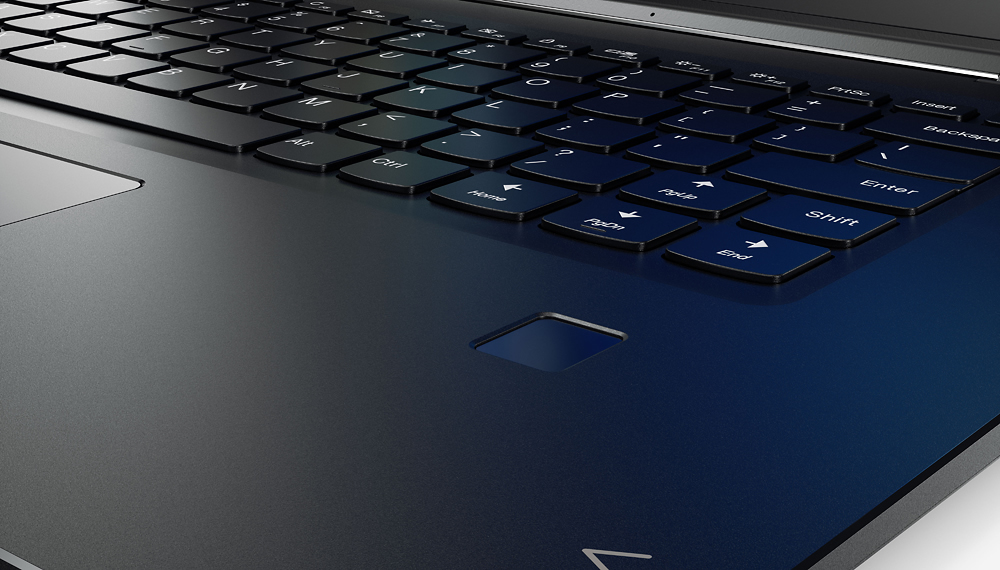
Posted .This reviewer received promo considerations or sweepstakes entry for writing a review.As others have mentioned, that right shift key is just in engineering nightmare. Whoever designed that keyboard should be fired. What a mess. The computer is also a little bit heavier and blockish than I prefer. But that's just me. I wanted to buy it so badly but I couldn't. The right shift key was a dealbreaker.
No, I would not recommend this to a friendBrand response from Lenovo Product Expert
Posted .This system weighs 4.19 lbs. With regard to the right shift key issue you mention, there is a free software APP called KeyTweak that may help you. You can switch the key functions of specific keys on your keyboard with this software, so you could change the right shift key with the key you hit in its place. Just Google search "KeyTweak" and you will find articles about what the software does and you will find the download location for this free APP.

Best laptop
Posted .This reviewer received promo considerations or sweepstakes entry for writing a review.My criteria for a laptop were 1. i7 latest processor 2. 16gb ram 3. 128 ssd - got 256gb 4. external graphics card this laptop checked all the boxes and also has a 4k display for 900$. surface pro for same config will charge you 1800$, hp envy 17 inch comes close but it is bulky and big. For the price and dimensions I couldn't find a better configuration on any laptop. The fan is little loud but it doesnt bother me too much. Key board is not the best one for typing for long hours but i use a wireless keyboard and it doesnt bother me. I have it over a week and its the best laptop i have owned.
I would recommend this to a friendHopeful. Sad. Too Many Compromises.
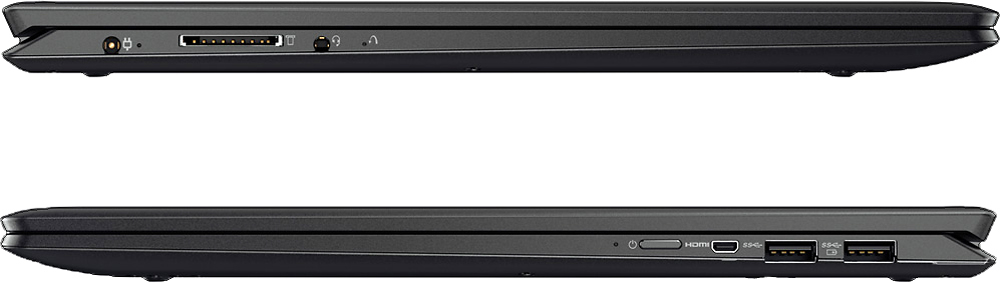
Posted .This reviewer received promo considerations or sweepstakes entry for writing a review.If you’re like me, you started seriously looking at this Yoga because of the technical specs that make it an “on paper” winner: UHD touchscreen 7th gen Intel i7 processor 16GB RAM Dedicated NVIDIA graphics Fingerprint scanner So…I’m not going to waste time with positives. Those are all positives to consider… My emphasis is on the reasons why this Yoga is terribly designed for a real user. For the record, I’ve purchased and used a LOT of PC laptops in my professional lifetime. All types: HP, ASUS, Dell, Toshiba, and now Lenova. I purchased this Yoga 710 to replace a 2015 HP Spectre. When I bought this, I tried really hard to like it. I wanted it to be a winner. I returned it four days later. These are the reasons why I decided it wasn’t worth it: The right ‘Shift’ key: Please trust me. If you can type without looking at a keyboard, and are used to the right shift key being in a place where your pinky naturally drops to hold it down, you will eventually realize that Lenovo is trying to bring you to insanity. Every time you click the up arrow instead of the shift, you will regret your decision to buy this. It isn’t worth it. You will soon realize how often you use the right shift key. You will then find yourself hesitating every time you think you’ve made the proper pinky leap to the actual shift key, just to confirm that your hand can stretch that far past a HUGE up arrow to deliver a capitalized letter or shift-enabled symbol. Micro-HDMI: I make presentations all the time. I have an HDMI to VGA adapter for the places that haven’t switched out their ancient VGA cables to HDMI. (It’s slightly annoying, but I want their business so I don’t ridicule them.) But I have no idea why I’d put myself through an additional hassle of having to have a micro-HDMI to HDMI adapter. And/or a micro-HDMI to VGA adapter. At first, I let it go (because, again, I really wanted this to be a winner). I tried. I bought an adapter. I laughed out loud when I realized that the two USB ports (which are the only ones and both on the same side as the Micro-HDMI) were completely blocked from use when the Rockfish Micro to HDMI adapter was in. Ie. No mouse, no presentation stick, nothing could be used if using this adapter. Yes, I bought another type that gave me the room I needed…but another (bulky) compromise and waste of energy to keep the extra adapters together. 256 GB SSD: Really? In 2017? I didn’t get a Chromebook for a reason. 512GB or a 2TB drive (or both) should be the choices for this machine. I tried. It’s too small. Power Adapter: It’s a giant brick that plugs directly in the wall. READ: BULKY. It seems like it’s 4 feet long (I didn’t measure it)…it barely makes it from the wall to up and over a desk. Its unusual specs make hard to buy after-market (ie. Longer) replacements. One week into buying this, you’ll realize that you’re making another compromise. The business trip you take without the adapter will remind you that you made a costly choice…especially when you consider: Battery Life: I don’t know what the specs are on this (how long it’s suppose to run during a normal day of work), but when I looked down after one hour of work and it said I had 1hr 45 min remaining…It was the last straw. When you consider how ridiculous the power adapter is, you will regret buying this. Laptops are designed for mobility. Battery life directly impacts this. Minor Issues: USB-C: Doesn’t have one. It should…especially with all that space it’s saving by using a micro HD (haha). SD Card slot: If you’re hoping to put an SD Card in to expand the puny 256GB hard drive (my bright idea), you’ll have to compromise again because of the way it sticks out from the base. The SD card will snag. It will bend. It will likely break. You will likely lose your SD card and data. TLDR: The Yoga is appropriately named because of the ways you will have to bend to adjust to it’s poor design. It has great specs. It’s poorly designed for daily/mobile use.
No, I would not recommend this to a friendBittersweet
Posted .This reviewer received promo considerations or sweepstakes entry for writing a review.I am a dedicated Chromebook user and photographer. As you might have guessed those two things don't really mix. Chromebooks cannot use Ps or Lr thus resulting in my purchase of this computer. I have only had a few hours use on this computer and in that time I discovers that the default photo viewer cannot support RAW files. This left me frustrated because RAW files are an age old file type and the computer is a 2016 model.... Something doesn't add up. On the other hand the display is razor sharp and the processing speed is lightning fast which I did like. I contacted Microsoft support about the file type problem and they suggested I download the app Picasa. I did quite a bit of research before buying this computer and it seem to be the fastest and sharpest computer for the money.
I would recommend this to a friendBrand response from Lenovo Product Expert
Posted .Can you view the RAW photo files in the photo viewer that comes with your photo editing software?
- Cons mentioned:Keyboard quality
Could be much better if mine wasn't defected.
Posted .This reviewer received promo considerations or sweepstakes entry for writing a review.I recently received this laptop as a gift, Unfortunetly Expected a little more but right out of the box whenever I adjusted the screen, Colored bars would appear on the display. I still have this problem but its more occasional than when I fist got it. The performance is great and the display is beautiful but the exterior build quality doesn't fit my standards so I most like will probably return this and trade it in for an identical 2-in-1 with better build quality. I am quite disappointed but I think this laptop is defected. Overall I think mine came defected and I may recommend this product if the display didn't have those issues.
No, I would not recommend this to a friend Touchpad is glitchy
Posted .This reviewer received promo considerations or sweepstakes entry for writing a review.I brought this Laptop, since it meets my minimum requirements - 16GB, SSD and i7 Processor. However, I am very disappointed with the touchpad - the touchpad is very glitchy when I use the laptop on my lap. It works perfectly fine when placed on a flat surface. I finally nailed the source of the problem to the PALM REJECTION TECHNOLOGY. If I disable it, the touchpad movement is very glitchy, further more - disabling palm rejection - means, its disabled even in TABLET MODE - which means the touchpad is now enabled causing all kind of weird behaviour. Overall, very disappointed with the TOUCHPAD.
No, I would not recommend this to a friendGreat and Superb Laptop
Posted .This reviewer received promo considerations or sweepstakes entry for writing a review.I actually was not planning to buy laptop but i saw Lenovo 710 deals, and the best buy guy his name is Andy from Emeryville location. he helped me and gave me good deals and i was impress and bought it, but my wish was the HD 1TB instead of 256GB only this problem but its fine.I love it. probably the best laptop I've ever owned
I would recommend this to a friendBrand response from Lenovo Product Expert
Posted .Thank you for choosing the Lenovo Yoga 710-15. We are pleased to hear that the features and performance of the of the Yoga 710-15 meets your computing needs so well.
- Cons mentioned:Fan noise
Wish I Could Undo My Purchase
Posted .This reviewer received promo considerations or sweepstakes entry for writing a review.I read some reviews about the fan. I didn't think it was going to bother me but OMG it's driving me insane! I'm writing this review online and nothing else is running and the fan is full throttle. I'm waiting to hear a voice that says "we've been cleared for takeoff". I was debating between this laptop and an Asus. I chose poorly and I'm outside my window to return.
No, I would not recommend this to a friendBrand response from Lenovo Product Expert
Posted .Here is a BIOS update that may help with the fan noise: http://pcsupport.lenovo.com/us/en/products/LAPTOPS-AND-NETBOOKS/YOGA-SERIES/YOGA-710-15IKB/80V5/80V50009US/downloads/DS118587
That shift key...
Posted .This reviewer received promo considerations or sweepstakes entry for writing a review.I'll just cut to the chase: The initial case design looks pretty appealing and modern (4 stars), and the features that come with the price are flat-out awesome; the 4K resolution, JBL sound, thumbprint recognition, and even the fact that they don't load your start menu with bloatware, is amazing (5 stars). However... If you are the type of person who uses their computer extensively for Word documents, Powerpoints, etc. that right shift key placement is ridiculous, making the keyboard design horrible (1 star). It seemed trivial at first, but then I realized just how big of a deal it actually is, especially when I constantly need to back-track and correct mistakes while I'm taking notes or writing documents (which every student knows isn't a slow-paced process) because I accidentally hit the 'up' key. Now you might eventually get used to it while typing, but even then you're subconsciously bound to hit it a few times and make an error. Personally, if I'm willing to spend over a grand for a laptop, my standards are going to be high, and I feel that having to re-teach how I type for the price I pay is a deal breaker.
No, I would not recommend this to a friendBrand response from Lenovo Product Expert
Posted .With regard to the right shift key issue you mention, there is a free software APP called KeyTweak that may help you. You can switch the key functions of specific keys on your keyboard with this software, so you could change the right shift key with the key you hit in its place. Just Google search "KeyTweak" and you will find articles about what the software does and you will find the download location for this free APP.
- Cons mentioned:Fan noise
Loud Fan Noise
Posted .This reviewer received promo considerations or sweepstakes entry for writing a review.I bought this model laptop last week and it's fan makes very big noise constantly. I tried updating all the drivers that Lenovo has recommended in other's reviews/comments. Any suggestion or ideas to fix this??
No, I would not recommend this to a friend random screen flashing
Posted .This reviewer received promo considerations or sweepstakes entry for writing a review.I bought it 2 weeks ago but I gave it back because of screen flashing. The new product has the same problem, what's wrong with it!? it happens both on battery and plugged in, with random frequency (every 40 min or every 2 h). Could you please provide me a solution in a few days or I will change brand.
No, I would not recommend this to a friendBrand response from Lenovo Product Expert
Posted .Thank you for choosing the Lenovo Yoga 710-15. The problem you describe is not a common one. First check that the programs you are installing are compatible with Windows 10. There may be drivers that need to be updated. Follow the link below to look for new driver updates for your specific system. You can also run diagnostics from the Lenovo site as well. As always, be sure to create a restore point on your system before you make any changes. You can do this by just typing "restore point" in the search window within Cortana and follow the link to create a restore point. Here is the link:
http://pcsupport.lenovo.com/us/en/products/Laptops-and-netbooks/Yoga-Series/yoga-710-15ikb/80V5/0009US/downloads
- Cons mentioned:Fan noise
Insanely bad product.
Posted .This reviewer received promo considerations or sweepstakes entry for writing a review.Where to begin. Ok, for some reason that makes sense only to the engineers at Lenovo, the fan on this laptop blows at full speed constantly. And it's not a quiet fan. It's one of those loud grindy fans. The only way to avoid this is to hack together an aftermarket fan control. I honestly do not understand how they sell these. Secondly, the screen has terrible light bleed. Also, whites are not white, they have a dull yellowish cast. I have a 6th Gen i7 with no dedicated graphics and a 4k screen and it is faster than this. Just bad engineering at every turn. Don't waste your time. HP Spectre x360 is dramatically better product.
No, I would not recommend this to a friendBrand response from Lenovo Product Expert
Posted .There is a new BIOS update to better control fan operation:
http://support.lenovo.com/us/en/products/Laptops-and-netbooks/Yoga-Series/yoga-910-13ikb-glass/80VG/S00300/downloads/DS119202
Great value
Posted .This reviewer received promo considerations or sweepstakes entry for writing a review.This laptop boots up incredibly fast. It's pretty light weight for a 15 inch computer. The 4K picture is amazing
I would recommend this to a friendPoor performance, All hype for the configuration!!
Posted .This reviewer received promo considerations or sweepstakes entry for writing a review.I purchased this laptop after thanks giving. I was looking for some laptop which can handle moderate graphics, ease of managing media over DLNA server, as well as multitasking. I use my laptop as central device to use all the electronic devices in my house through DLNA server over wi-fi. I stream movies to multiple TV's and other devices. I am currently using 4 year old Dell 2nd generation Core I5 with solid state drive and 4 GB DDR2 RAM and integrated graphics card with 1 GB shared video memory. this one was doing great till it fell from my hand (which lead to only 2 cores performing, and 2 GB RAM crashed) however if I limit to 1-2 devices in good wi-fi network and keep cooling fan on it still does good job. while testing the streaming from this laptop I played a 4K movie simultaneously in my laptop and streamed the same movie to the Sony 4K TV. Both my laptop and TV could not play the video smoothly. Then I stopped the TV and played only on the laptop it would still not play smoothly, then I changed to multiple videos even from you tube. it could not handle any thing at 4K quality with out slowing the movie. The 4K screen is hyped up Full HD sceen the picture quality is worse than MacBook pro retina display. The NVIDIA GPU just would not start working, I was on phone and chatting with the online support for entire day with out any success. Basic daily routine work like surfing on internet checking emails etc functions were also not feeling smooth, and it was hanging up with out even adding single file to the computer. all in all very high configuration but performance is not even near my 4 year old partially broken laptop. thus had to return it with in first 10 days. I kept it 10 days as I wanted to make sure I tried every way to make it work because this configuration is so high. I am not sure if its problem with the new 7th gen Core I7 or Lenovo did not have proper configuration or just poor luck on my end. I would spend money on much cheaper laptop with lower configuration than this one. I would have given no stars, but have to give one star to write the review.
No, I would not recommend this to a friendHorrible Experience
Posted .This reviewer received promo considerations or sweepstakes entry for writing a review.Recently I purchased a Lenovo - 2-in-1 15.6" 4K Ultra HD Touch-Screen Laptop from BestBuy and I was in love with it. Then suddenly while I was working on a paper part of my screen turned a light blue color. This happened about a month and half after buying it. I called Lenovo support and he remotely took control of my computer trying to figure out what happen. He was unable to find anything so he told me I could take it back to Best Buy and they would send it to the service center, so I did. About two weeks later I was contacted by Best Buy telling me they had decided to “junk it out” and that I could go to the store and pick up a new laptop. I decided to get the same one because that is what I wanted and I thought the issue with the first one wouldn’t happen again. I was working on a project and had the laptop in tablet mode, when I went to turn it again to work on the laptop, I don’t know if the hinge was loose or what happen but it started to split my screen open. This happen less than a month after getting it. I immediately took it back to Best Buy and they said I could just pick a new laptop. At that point I was furious, I really liked this laptop but it wasn’t reliable at all. This whole experience has been so frustrating, I’m not able to afford other laptops that are similar to the Lenovo I had purchased and I feel like I’m having to settle for something I don’t want. I really wanted a Lenovo laptop because I’ve heard good things about the brand. I had purchased a Lenovo Flex laptop last year for less than $200 and for the price it’s a decent machine so I decided to invest in another Lenovo but now I’ve gone through two laptops within months of purchasing.
No, I would not recommend this to a friendgood value
Posted .This reviewer received promo considerations or sweepstakes entry for writing a review.Good quality computer. Maybe a bit expensive though
I would recommend this to a friendFailed broken down AGAIN.!
Posted .This reviewer received promo considerations or sweepstakes entry for writing a review.THIS laptop can't stay out of the shop. Hardware fails and software fails. I can't trust working on a project without keeping it constantly saved to a thumb drive. I hate it.
No, I would not recommend this to a friendReturning tomorrow
Posted .This reviewer received promo considerations or sweepstakes entry for writing a review.What a piece. Hardware is bowing in the middle, mousepad is on unbalanced, and a cracked screen. No sound drivers, and the user is set up in a way where it cannot do any administrative tasks.
No, I would not recommend this to a friend