Customer Ratings & Reviews

- Model:
- 90MV0001US
- SKU:
- 6398133
Rating by feature
- Value
Rating 3.9 out of 5 stars
- Quality
Rating 3.8 out of 5 stars
- Ease of Use
Rating 4.0 out of 5 stars
Customers are saying
Customers are impressed with the Lenovo IdeaCentre 3's ease of use, performance, and compact size, frequently citing its value for the price. Many appreciate the straightforward setup and sufficient storage, although some users found the RAM to be limiting and suggested an upgrade. A few customers experienced issues with the hard drive's speed and software compatibility. Overall, the positive feedback on ease of use and performance outweighs the negative comments regarding limited RAM and hard drive performance.
This summary was generated by AI based on customer reviews.
Desktop
||Posted . Owned for 1 month when reviewed.This reviewer received promo considerations or sweepstakes entry for writing a review.Enjoy having it in my house board games emails xcetera
I would recommend this to a friendBrand response from Lenovo Product Expert
Posted .Thank you for choosing the Lenovo IdeaCentre 3 Desktop Computer. We are pleased to hear that the IdeaCentre 3 meets your computing needs so well.

Tower
||Posted . Owned for 1 month when reviewed.This reviewer received promo considerations or sweepstakes entry for writing a review.Product is just what I needed to replace one that wore out.
I would recommend this to a friendBrand response from Lenovo Product Expert
Posted .Thank you for choosing the Lenovo IdeaCentre 3 Desktop, model number 90MV0001US. We are pleased to hear that the IdeaCentre 3 meets your needs so well.
nice
||Posted .This reviewer received promo considerations or sweepstakes entry for writing a review.this is the fastest my computer has ever started up.
I would recommend this to a friendBrand response from Lenovo Product Expert
Posted .Thank you for choosing the Lenovo IdeaCentre 3 Desktop computer. We are pleased to hear that the performance of the IdeaCentre 3 meets your computing needs so well.
love them
||Posted . Owned for 2 weeks when reviewed.This reviewer received promo considerations or sweepstakes entry for writing a review.they work well for the things you need to do !!!!!
I would recommend this to a friendMy Lenovo
||Posted . Owned for 3 weeks when reviewed.This reviewer received promo considerations or sweepstakes entry for writing a review.Awesome speed! Lovely price! I definitely recommend
I would recommend this to a friendBrand response from Lenovo Product Expert
Posted .Thank you for choosing the Lenovo IdeaCentre 3 Desktop Computer. We are pleased to hear that the value and performance of the IdeaCentre 3 meets your computing needs so well.
- Cons mentioned:Speed
Do not recommend wasting your money
||Posted . Owned for 1 month when reviewed.This reviewer received promo considerations or sweepstakes entry for writing a review.Worst computer I've ever bought. Right out of the box it acts like a low end Chromebook with a bunch of viruses.
No, I would not recommend this to a friendBrand response from Lenovo Product Expert
Posted .This Lenovo IdeaCentre 3 Desktop Computer is an entry-level configuration. We always recommend you check the requirements and compatibility of any software you will be installing on your new computer, before you invest in any computer. Be sure your new computer can support the software you will need to use.
- Cons mentioned:Speed
Not very happy
||Posted . Owned for 1 month when reviewed.This reviewer received promo considerations or sweepstakes entry for writing a review.Not very impressed much slower than my old computer It was also a lenovo hard to transfer files not very happy with this machine
No, I would not recommend this to a friendBrand response from Lenovo Product Expert
Posted .The Lenovo IdeaCentre 3 Desktop Computer, model number 90MV0001US, is a light to moderate workload configuration, with its 2-Core AMD Athlon 3050U processor, with a base speed of 2.3GHz and a boost speed of up to 3.2GHz. This processor is supported by 4GB DDR4-2666MHz RAM. This system is good for light work with Productivity Software like Microsoft Office, browsing the internet. This configuration is not suitable for multi-tasking. If you are getting less than expected performance, be sure any software you installed is compatible with Windows 10. There is no need to install Microsoft Office software. The software is already part of the operating system, you just need to activate the software with a purchased product key. If you have installed a copy of Microsoft Office, this is conflicting with the existing copy on the system and this will slow your system down. If you have installed a 3rd party anti-virus program, be sure that Windows Defender is turned off and that the trial version of McAfee Anti-Virus software is uninstalled. There can only be one anti-virus program on the system. You may need to restore your system to original factory default settings if any of the programming errors have occurred. You can do that by typing "restore" in the Cortana search window. Just click on the magnifying glass icon at the bottom left of your Windows 10 Desktop. Click on "Reset This PC" Then click on "Get Started" and follow the on screen directions to restore to factory defaults. If the problem persists, we recommend you contact Lenovo Tech Support at: 877-453-6686.
- Cons mentioned:Speed
Super Slow
||Posted . Owned for 3 weeks when reviewed.This reviewer received promo considerations or sweepstakes entry for writing a review.This thing is as slow as my 10 year old computer. Not sure if I bought a lemon or what, but this machine is trash
No, I would not recommend this to a friendBrand response from Lenovo Product Expert
Posted .The Lenovo IdeaCentre 3 Desktop Computer, model number 90MV0001US, is an entry-level configuration with its 2-Core AMD Athlon Silver 3050U Processor and 4GB DDR4-2400MHz RAM. This configuration is best with basic, low workload software like Microsoft Office, using basic files. The IdeaCentre 3 is good for general internet browsing. It is not meant for video streaming, heavy workloads or multi-tasking. We always recommend you check the requirements and compatibility of any software you will be installing on your new computer, before you invest in any computer. Be sure your new computer can support the software you will need to use.
Good device
||Posted . Owned for 1 month when reviewed.This reviewer received promo considerations or sweepstakes entry for writing a review.It is a good device. No issues so far. I would recommend
I would recommend this to a friendvery happy, no problems
||Posted . Owned for 1 month when reviewed.This reviewer received promo considerations or sweepstakes entry for writing a review.I am very satisfied with purchase choice of desk top.
I would recommend this to a friendBrand response from Lenovo Product Expert
Posted .Thank you for choosing the Lenovo IdeaCentre 3 Desktop, model number 90MV0001US. The Lenovo IdeaCentre 3 desktop, model number 90MV0001US, is a mid-level, moderate use configuration, with its AMD Athlon 3050U processor. This Dual-Core processor has a base speed of 2.3GHz and a boost speed of up to 3.2GHz. This configuration has 4GB of DDR4-2666MHz RAM. It is good with Microsoft Office type programs, internet browsing and other moderate work. If this describes your computing needs, the IdeaCentre 3 desktop would be a good choice for you.
- Cons mentioned:Speed
Poor performance
||Posted . Owned for 1 month when reviewed.This reviewer received promo considerations or sweepstakes entry for writing a review.I am very sorry that I purchased this computer. It is very slow and freezes a lot.
No, I would not recommend this to a friendBrand response from Lenovo Product Expert
Posted .The Lenovo IdeaCentre 3 Desktop computer model number 90MV0001US, will boot from off to the Windows 10 Desktop Screen in less than 40-seconds. If you are getting slower boot times and/or generally slower than expected performance, first, be sure any software you installed is compatible with Windows 10. There is no need to install Microsoft Office software. The software is already part of the operating system, you just need to activate the software with a purchased product key. If you have installed a copy of Microsoft Office, this is conflicting with the existing copy on the system and this will slow your system down. If you have installed a 3rd party anti-virus program, be sure that Windows Defender is turned off and that the trial version of McAfee Anti-Virus software is uninstalled. There can only be one anti-virus program on the system. You may need to restore your system to original factory default settings if any of the programming errors have occurred. You can do that by typing "restore" in the Cortana search window. Just click on the magnifying glass icon at the bottom left of your Windows 10 Desktop. Click on "Reset This PC" Then click on "Get Started" and follow the on screen directions to restore to factory defaults. If the problem persists, we recommend you contact Lenovo Tech Support at: 877-453-6686.
Awesome
||Posted . Owned for 1 month when reviewed.This reviewer received promo considerations or sweepstakes entry for writing a review.Needed new computer for a time and lenova is awesome
I would recommend this to a friendBrand response from Lenovo Product Expert
Posted .Thank you for choosing the Lenovo IdeaCentre 3 Desktop. We are pleased to hear that the IdeaCentre 3 is working out so well for you. The Lenovo IdeaCentre 3 desktop, model number 90MV0001US, is a mid-level, moderate use configuration, with its AMD Athlon 3050U processor. This Dual-Core processor has a base speed of 2.3GHz and a boost speed of up to 3.2GHz. This configuration has 4GB of DDR4-2666MHz RAM. It is good with Microsoft Office type programs, internet browsing and other moderate work. If this describes your computing needs, the IdeaCentre 3 desktop would be a good choice for you.
Very good
||Posted . Owned for 3 weeks when reviewed.This reviewer received promo considerations or sweepstakes entry for writing a review.One month and running smooth and fast. Works great.
I would recommend this to a friendBrand response from Lenovo Product Expert
Posted .Thank you for choosing the Lenovo IdeaCentre 3 Desktop, model number 90MV0001US. The Lenovo IdeaCentre 3 desktop, model number 90MV0001US, is a mid-level, moderate use configuration, with its AMD Athlon 3050U processor. This Dual-Core processor has a base speed of 2.3GHz and a boost speed of up to 3.2GHz. This configuration has 4GB of DDR4-2666MHz RAM. It is good with Microsoft Office type programs, internet browsing and other moderate work. If this describes your computing needs, the IdeaCentre 3 desktop would be a good choice for you.
- Cons mentioned:Ram
Poor
||Posted . Owned for 3 weeks when reviewed.This reviewer received promo considerations or sweepstakes entry for writing a review.This was not an idea modem. very slow and very poor. I would highly reccommend a better modem with more ram.
No, I would not recommend this to a friend Who knows?
||Posted . Owned for 3 weeks when reviewed.This reviewer received promo considerations or sweepstakes entry for writing a review.Well, can't review what isn't installed. Looks like the pc and monitor will be a big upgrade from my old Dell system, but Best Buy/Geek Squad has cancelled my home installation twice now. My appointment to install went from April 17th, then April 24th, to now being May 13th. A month for a simple service that's been paid for. So, hopefully within the next 2 months my new computer will actually be up an running and I can leave a review on it.
I would recommend this to a friendHighly disappointed
||Posted . Owned for 1 month when reviewed.This reviewer received promo considerations or sweepstakes entry for writing a review.I am not a fan. It was not fully capable of handling dual monitors so I now have an adapter in the front USB slot. The wifi was acting crazy and would only connect with a wifi adapter. My second monitor blinks out and the drivers are up to date. I wish I would’ve kept my older tower and saved my money. After doing all of that it wasn’t even worth the hassle for me to send back but I will never purchase this brand again.
No, I would not recommend this to a friendBrand response from Lenovo Product Expert
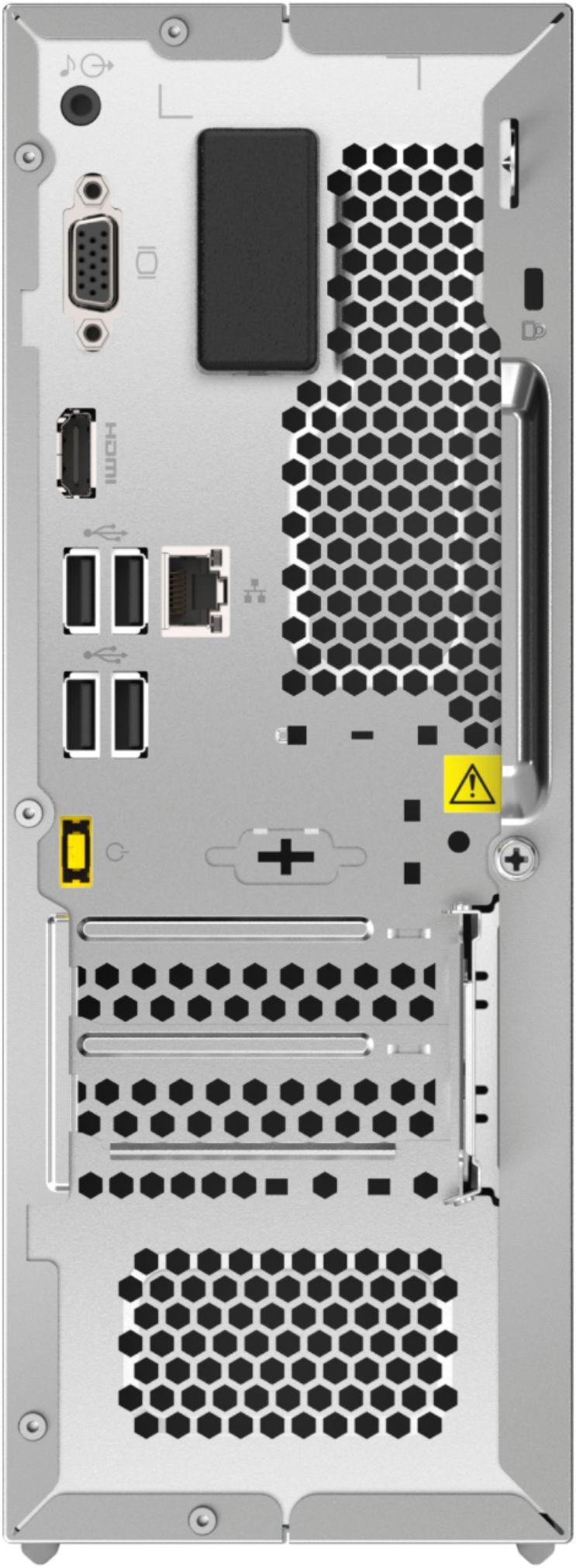
Posted .The Lenovo IdeaCentre 3 Desktop computer, model number 90MV0001US, can support two monitors through an HDMI-Out port and a VGA port on the back of this configuration. If both of your monitors are HDMI, you can connect to the VGA port by using a VGA to HDMI adapter like this one: https://www.bestbuy.com/site/insignia-hdmi-to-vga-adapter-white/6418348.p?skuId=6418348. If the issue continues, we recommend you contact Lenovo Tech Support for additional help at: 866-426-0911.
for light use only
||Posted . Owned for 1 month when reviewed.This reviewer received promo considerations or sweepstakes entry for writing a review.good for the money. Very limited use. good for browsing the internet, social media and works for youtube also.
No, I would not recommend this to a friendBrand response from Lenovo Product Expert
Posted .We always recommend you check the requirements and compatibility of any software you will be installing on your new computer, before you invest in any computer. Be sure your new computer can support the software you will need to use.
Decent desktop
||Posted . Owned for less than 1 week when reviewed.This reviewer received promo considerations or sweepstakes entry for writing a review.Decent computer not a lot of space would make a good person or school computer but can’t really beat the price!
I would recommend this to a friendBrand response from Lenovo Product Expert
Posted .The Lenovo IdeaCentre 3 Desktop Computer, model number 90MV0001US, ships with a 1TB 3.5 inch 7200RPM mechanical hard drive for storage space.
- Cons mentioned:Speed
Do not get
||Posted . Owned for 1 week when reviewed.This reviewer received promo considerations or sweepstakes entry for writing a review.The tower is really slow and doesn’t load anything up for awhile
No, I would not recommend this to a friendBrand response from Lenovo Product Expert
Posted .The Lenovo IdeaCentre 3 Desktop Computer, model number 90MV0001US, will boot from off to the Windows 10 Desktop Screen in less than 40-seconds. The IdeaCentre 3 is an entry-level, light to moderate workload capable configuration. It is good with productivity software like Microsoft Office, browsing the internet and light to moderate resource requirement software programs. This configuration is not meant for multi-tasking or heavy resource demand software programs. We always recommend you check the requirements and compatibility of any software you will be installing on your new computer, before you invest in any computer. Be sure your new computer can support the software you will need to use.
Don’t buy
||Posted . Owned for 1 month when reviewed.This reviewer received promo considerations or sweepstakes entry for writing a review.Not very good. To slow, not able to put in sleep mode and start up without shutting down and restarting.
No, I would not recommend this to a friendBrand response from Lenovo Product Expert
Posted .We are sorry to hear that you are having issues with your Lenovo IdeaCentre 3 Desktop. Be sure any software you installed is compatible with Windows 10. There is no need to install Microsoft Office software. The software is already part of the operating system, you just need to activate the software with a purchased product key. If you have installed a copy of Microsoft Office, this is conflicting with the existing copy on the system and this will slow your system down. If you have installed a 3rd party anti-virus program, be sure that Windows Defender is turned off and that the trial version of McAfee Anti-Virus software is uninstalled. There can only be one anti-virus program on the system. You may need to restore your system to original factory default settings if any of the programming errors have occurred. You can do that by typing "restore" in the Cortana search window. Just click on the magnifying glass icon at the bottom left of your Windows 10 Desktop. Click on "Reset This PC" Then click on "Get Started" and follow the on screen directions to restore to factory defaults. If the problem persists, we recommend you contact Lenovo Tech Support at: 877-453-6686.