Customer Ratings & Reviews



- Model:
- 81A40025US
- SKU:
- 6061800
Rating by feature
- Battery Life
Rating 4.7 out of 5 stars
- Speed
Rating 3.8 out of 5 stars
- Value
Rating 3.6 out of 5 stars
Customers are saying
Customers love the IdeaPad 11.6" Laptop for its budget-friendly price, portability, and lightweight design. Many reviewers mentioned that it is a great laptop for basic tasks and everyday use. However, some customers expressed concerns about its limited storage space, slow performance, and low memory, which may not be suitable for more demanding tasks or multitasking.
This summary was generated by AI based on customer reviews.
Piece of junk
Posted .This reviewer received promo considerations or sweepstakes entry for writing a review.I had problems from the moment I powered it up. Needed it to update my garmin and it couldn't handle it. Not enough memory available even though the only thing I loaded was the Garmin app. Frustrating piece of Junk--waste of money!! Thanks Best Buy...I will be going elsewhere in the future. It's now laying in numerous pieces... at least that was satisfying :)
No, I would not recommend this to a friendGARBAGE
Posted .This reviewer received promo considerations or sweepstakes entry for writing a review.I bought this July 2017. Paid for two warranties. The power will not come on and the power cord has been replaced. Lenovo said it is the mother board. I cannot get it repaired by either Lenovo or BB without spending a lot more. I will buy from other than Best Buy
No, I would not recommend this to a friendNot enough storage on hard drive
Posted .This reviewer received promo considerations or sweepstakes entry for writing a review.Bought this computer works great, if all you want to do is surf the web. Windows will update it to death, used all 32 gb and says to delete things so it can have 8 gb more for updating. This thing is completely useless shouldn't even be allowed to sell.
No, I would not recommend this to a friendBrand response from Lenovo Product Expert
Posted .According to Microsoft Support, you can use an external hard drive when downloading Windows 10 updates for the needed temporary files. Here is a link to an explanation:
https://support.microsoft.com/en-us/help/4013876/windows-10-freeing-up-space-to-install-latest-update
Unable to download windows update out of the box
Posted .This reviewer received promo considerations or sweepstakes entry for writing a review.Was not able to download the Windows update due to insufficient hard drive space, even before any software was downloaded.
No, I would not recommend this to a friendCheap product in price and quality
Posted .This reviewer received promo considerations or sweepstakes entry for writing a review.Out of 2 laptops purchased; one won't turn on after 30 days. I trusted the product would turn out great and didn't buy protection program. Very unhappy customer.
No, I would not recommend this to a friendBrand response from Lenovo Product Expert
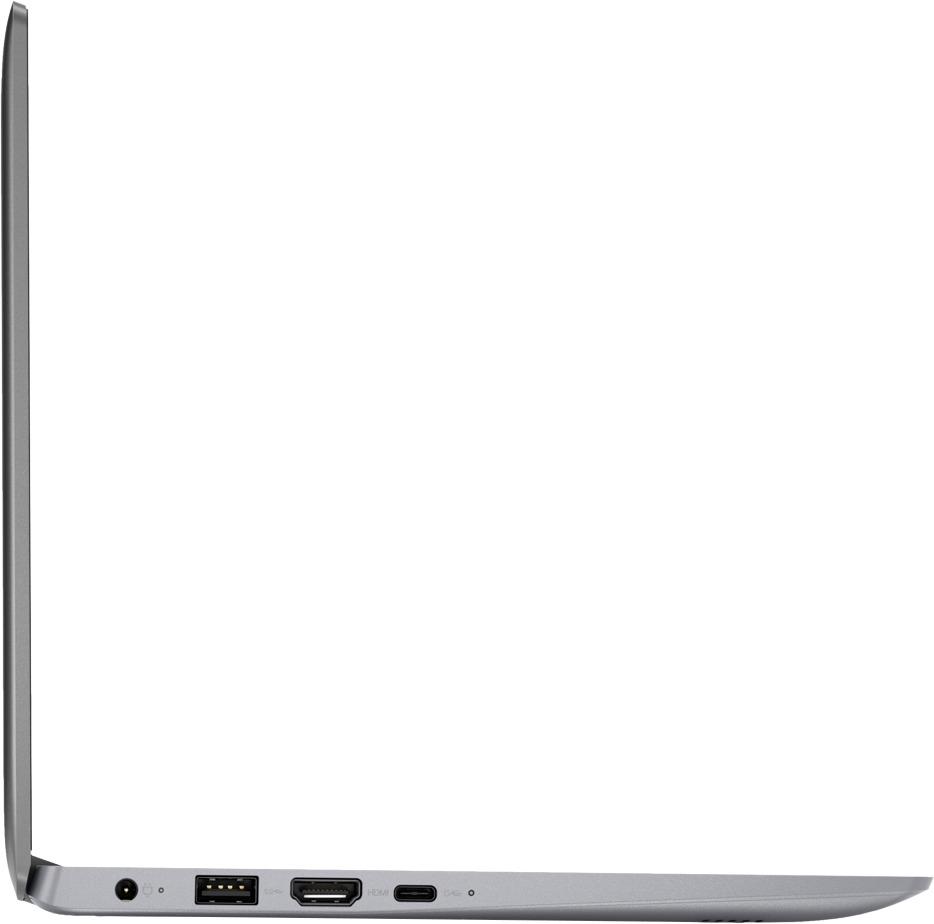
Posted .We are sorry to hear you are having issues with your Lenovo IdeaPad 120s-11 laptop. This system is equipped with OneKey Recovery System. There is a very small pin hole on the right side of the device, right near the Micro-SD card slot on the device. You will need a pin to push this reset button. Plug the device in. Let the battery charge for about 15 minutes. Push the reset button. The system should boot to a choice screen where you can choose "Restore To Factory Default". Select this. It will delete everything from the hard drive except the original factory install of the operating system. You will need to reinstall all programs and files after the reset. If you don't have copies of the files, try to make one before you restore by selecting "Boot to desktop" and trying to back up your files. If the problem persists after the factory reset, we recommend you contact Lenovo Tech Support at: 877-453-6686.
Do NOT buy!!!!
Posted .This reviewer received promo considerations or sweepstakes entry for writing a review.Waste of money, do not buy. Does not connect to my wifi network. Guessing because I have the wifi 6
No, I would not recommend this to a friendDo Not Buy
Posted .This reviewer received promo considerations or sweepstakes entry for writing a review.This Computer crashed as soon as I logged on. Geek squad kept it for 3 weeks for a part. Did not replace my brand new computer.
No, I would not recommend this to a friendBrand response from Lenovo Product Expert
Posted .We are sorry you had issues with the initial activation of Windows 10 on your Lenovo IdeaPad 120s-11 laptop. Be sure any software you installed is compatible with Windows 10. There is no need to install Microsoft Office software. The software is already part of the operating system, you just need to activate the software with a purchased product key. If you have installed a copy of Microsoft Office, this is conflicting with the existing copy on the system and this will slow your system down. If you have installed a 3rd party anti-virus program, be sure that Windows Defender is turned off and that the trial version of McAfee Anti-Virus software is uninstalled. There can only be one anti-virus program on the system. You may need to restore your system to original factory default settings if any of the programing errors have occurred. You can do that by typing "restore" in the Cortana search window. Just click on the magnifying glass icon at the bottom left of your Windows 10 Desktop. Click on "Reset This PC" Then click on "Get Started" and follow the on screen directions to restore to factory defaults. If the problem persists, we recommend you contact Lenovo Tech Support at: 877-453-6686.
Do Not Buy
Posted .This reviewer received promo considerations or sweepstakes entry for writing a review.The 1st Windows 10 update required more hard drive space than 32GB hard drive. Had use of the machine less than 1 year.
No, I would not recommend this to a friendWorked for a week
Posted .This reviewer received promo considerations or sweepstakes entry for writing a review.Used twice and now won’t turn on. Screen is totally black even though it’s plugged in and the power light is on.
No, I would not recommend this to a friendBrand response from Lenovo Product Expert
Posted .Be sure any software you have installed on the device is compatible with Windows 10. This system is equipped with OneKey Recovery System. There is a very small pin hole on the right side of the device, right near the Micro-SD card on the device. You will need a pin to push this reset button. Plug the device in. Let the battery charge for about 15 minutes. Push the reset button. The system should boot to a choice screen where you can choose "Restore To Factory Default". Select this. It will delete everything from the hard drive except the original factory install of the operating system. You will need to reinstall all programs and files after the reset. If you don't have copies of the files, try to make one before you restore by selecting "Boot to desktop" and trying to back up your files. If the problem persists after the factory reset, we recommend you contact Lenovo Tech Support at: 877-453-6686.
Piece of JUNK!!
Posted .This reviewer received promo considerations or sweepstakes entry for writing a review.Never worked right since new. Best Buy is worthless.
No, I would not recommend this to a friendBrand response from Lenovo Product Expert
Posted .We are sorry to hear that you are having issues with your Lenovo IdeaPad 120s-11 laptop. Be sure any software you installed is compatible with Windows 10. This system is equipped with OneKey Recovery System. There is a very small pin hole on the right side of the device, right near the Micro SD card slot on the device. You will need a pin to push this reset button. Plug the device in. Let the battery charge for about 15 minutes. Push the reset button. The system should boot to a choice screen where you can choose "Restore To Factory Default". Select this. It will delete everything from the hard drive except the original factory install of the operating system. You will need to reinstall all programs and files after the reset. If you don't have copies of the files, try to make one before you restore by selecting "Boot to desktop" and trying to back up your files. If the problem persists after the factory reset, we recommend you contact Lenovo Tech Support at: 877-453-6686.