Customer Ratings & Reviews
- Model:
- ZA740005US
- SKU:
- 6429528
Rating by feature
- Value
Rating 4.6 out of 5 stars
- Quality
Rating 4.5 out of 5 stars
- Ease of Use
Rating 4.4 out of 5 stars
Customers are saying
Customers enjoy the sound quality, ease of use, and display of the Smart Clock Essential. Many appreciate the included night light and the convenient size, finding it ideal for bedside tables. Positive feedback also highlights the Google Assistant integration and the alarm clock functionality. While some users experienced challenges with WiFi connectivity and initial setup, the overall sentiment is positive.
This summary was generated by AI based on customer reviews.
Good but not for the tech challenged
||Posted . Owned for 1 month when reviewed.This reviewer received promo considerations or sweepstakes entry for writing a review.My hubby was looking for something simple. He thought this was it. However, the product is not simple. You need a smart phone and must download the app to even get it set to correct time!
No, I would not recommend this to a friendBrand response from Lenovo Product Expert
Posted .Hi! Thanks for choosing the Lenovo Smart Clock Essential. We are sorry to hear you are experiencing issues with your Lenovo Smart Clock Essential. Since this is an always on, wifi enabled, smart device with Google Assistant, you will need to download the Google Home App to setup the device, Once it is setup it is good to go. For some useful tips and trick to help you get the most out of your assistant please check out the following website which has a list of useful commands. https://www.androidauthority.com/google-assistant-commands-727911/
If you need further assistance please don't hesitate to reach out to Lenovo Tech Support at 866-426-0911
Ok but .......
||Posted . Owned for 3 weeks when reviewed.This reviewer received promo considerations or sweepstakes entry for writing a review.Nice clock with weather but speaker quality isn’t the best. It’s also a bit wonky when trying to set the nighttime use. Seems to be stuck with an 11-6 time frame which I cannot change.
No, I would not recommend this to a friendBrand response from Lenovo Product Expert
Posted .Hello, we are sorry to hear you are experiencing this issue with The Lenovo Smart Clock Essential. please power cycle the device by unplugging it for 1-2 minutes. Plugging it back in and allowing it to power on. If the issue remains please perform a factory reset by holding down the “Volume + and – ” buttons on top of your device for 8 Seconds. If the issue persists, please contact our customer support team at 866-426-0911
Alarm clock
||Posted . Owned for less than 1 week when reviewed.This reviewer received promo considerations or sweepstakes entry for writing a review.I like the setup, but I don't like lenovo they don't help when there products break down. The clock keeps shutting down after 2 months and they will not fix it unless it does it again
I would recommend this to a friendBrand response from Lenovo Product Expert
Posted .Hello, we are sorry to hear you are experiencing this issue with the Lenovo Smart Clock Essential. Please power cycle the device by unplugging it for 1-2 minutes. Plugging it back in and allowing it to power on. If the issue remains please perform a factory reset by holding down the “Volume + and – ” buttons on top of your device for 8 Seconds. If the issue persists, please contact our customer support team at 866-426-0911
- Cons mentioned:Wifi connectivity
Don’t Even Bother
||Posted . Owned for 1 month when reviewed.This reviewer received promo considerations or sweepstakes entry for writing a review.I was never able to set this thing up. I returned it because I thought it was possibly defective. I got a new one. This one I was actually able to set it to but it wouldn’t keep its connection to WiFi so it never displayed the time. It constantly showed dashes on the screen. I returned that one as well. I picked up the Echo Show 5 and the set up was a breeze. It’s been great ever since.
No, I would not recommend this to a friendBrand response from Lenovo Product Expert
Posted .We are sorry to hear that you had difficulty setting up your Lenovo Smart Clock Essential. Here is a link to a YouTube video that demonstrates the initial setup of the Lenovo Smart Clock Essential: https://www.youtube.com/watch?v=oebcueXBCeU&t=71s. If you have questions about your Lenovo Smart Clock Essential, we recommend you contact Lenovo Tech Support for Smart Devices at: 866-426-0911.
This is worth for the price
||Posted . Owned for 3 weeks when reviewed.This reviewer received promo considerations or sweepstakes entry for writing a review.This is worth for the price. It has a lot of features like showing weather report, time, alarm and etc. The microphone quality/sensitivity can be improved because I need to speak loader.
I would recommend this to a friendBrand response from Lenovo Product Expert
Posted .Hi there, Thanks for choosing the Lenovo Smart Clock Essential. We are sorry to hear you are experiencing this issue with the mic/assistant. It is possible setting up voice match and raising the "okay google" sensitivity will help with this. to setup voice match please open the Google Home app.
At the top right, tap your account.
Verify that the Google Account shown is the one linked to your speaker or display. To switch accounts, tap another account or Add another account.
Tap Assistant settings Voice Match Add devices.
Make sure any devices you want to link your voice to are checked.
Tap Next I agree.
Follow the in-app steps.
To adjust the sensitivity of the mic please open the Google Home app .
At the bottom, tap Home .
Select your speaker or Smart Display.
At the top right, tap Device settings. ...
Choose how sensitive you want Google Assistant to be when it responds to you.
An Average Google Smart Controller w/ Spotty WiFi
||Posted .This reviewer received promo considerations or sweepstakes entry for writing a review.An Average Google Smart Controller. My LED display is starting to fail and wireless connectivity has been inconsistent.
No, I would not recommend this to a friendGood product if you like Google
||Posted . Owned for 1 year when reviewed.This reviewer received promo considerations or sweepstakes entry for writing a review.I bought so I could have a clock for nightstand. I don’t care for the “hey Google….” part so I returned it. Aside from that, functioned ok.
No, I would not recommend this to a friendNot for me
||Posted . Owned for 10 months when reviewed.This reviewer received promo considerations or sweepstakes entry for writing a review.This was to complicated to set up . I returned it after reading the instructions. I did not open or take it out the box.
No, I would not recommend this to a friendEither not very smart or just deaf
||Posted . Owned for 3 weeks when reviewed.This reviewer received promo considerations or sweepstakes entry for writing a review.Works as a clock. As far as a smart device it's kind of deaf I needed to be less than three feet from this thing for it to hear me. Even then sometimes the puck from thirty feet away down a hall and across a room would answer instead, I wasn't even facing the hallway. So for me this is just a clock and not really useful as a smart device as I still needed a smart speaker in the same room to control anything.
No, I would not recommend this to a friendBrand response from Lenovo Product Expert
Posted .Hi there, Thanks for choosing the Lenovo Smart Clock Essential. We are sorry to hear you are experiencing this issue with the mic/assistant. Please ensure you have removed the plastic film that is on the screen to protect the unit during shipping. If the issue persists, it is possible setting up voice match and raising the "okay google" sensitivity will help with this. to setup voice match please open the Google Home app.
At the top right, tap your account.
Verify that the Google Account shown is the one linked to your speaker or display. To switch accounts, tap another account or Add another account.
Tap Assistant settings Voice Match Add devices.
Make sure any devices you want to link your voice to are checked.
Tap Next I agree.
Follow the in-app steps.
To adjust the sensitivity of the mic please open the Google Home app .
At the bottom, tap Home .
Select your speaker or Smart Display.
At the top right, tap Device settings. ...
Choose how sensitive you want Google Assistant to be when it responds to you. If you need further assistance please don't hesitate to reach out to Lenovo Tech Support at 866-426-0911
Could be better
||Posted . Owned for 1 month when reviewed.This reviewer received promo considerations or sweepstakes entry for writing a review.Sound quality is sub par, night light function not as customizable as I wanted, went to a small home device instead and much happier
No, I would not recommend this to a friendBday
||Posted . Owned for 3 weeks when reviewed.This reviewer received promo considerations or sweepstakes entry for writing a review.Bought this for daughter’s birthday. However her phone will not load the google home app so haven’t been able to check it out yet. Hoping to figure out her phone issue soon.
I would recommend this to a friendBrand response from Lenovo Product Expert
Posted .Hi there, we are sorry to hear you are experiencing this issue. Please ensure you are adding the Google home App from the Apple store. https://apps.apple.com/us/app/google-home/id680819774
If you have and still are having trouble loading the Google Home App on that specific I-Phone we recommend installing the Google Home App on a different smart phone or tablet connected to your home network and setting up the Smart Clock Essential with the Google Home App on that device.
Good but LCD is not the best
||Posted . Owned for 1 year when reviewed.This reviewer received promo considerations or sweepstakes entry for writing a review.Originally I bought 2 and after about a year, 1 started to have LCD issues around the weather section. Besides I liked them and ended up being more
I would recommend this to a friendBrand response from Lenovo Product Expert
Posted .We are sorry to hear that you are having issues with your Lenovo Smart Clock Essential. Resetting the Smart Clock Essential may clear the issue you are having. Press and hold the alarm setup button and the volume down button at the same time for 12 seconds. If the issue continues, we recommend you contact Lenovo Tech Support for Smart Devices at: 866-426-0911.
Terrible Microphone
||Posted . Owned for 3 weeks when reviewed.This reviewer received promo considerations or sweepstakes entry for writing a review.The microphone on these are very poor compared to the nest mini and the nest hub. So much so that my minis and hubs in other rooms would frequently pick up my voice instead of this, even though I was just a few feet away. I tried adjusting the sensitivity of both this unit and my nest products and it did not help in the slightest. I purchased two of these for different rooms and they both had the same issues.
No, I would not recommend this to a friendBrand response from Lenovo Product Expert
Posted .Hello, we are sorry to hear you are experiencing an issue with the microphone in your Lenovo Smart Clock Essential. Your device shouldn't be functioning in this manner. Please power cycle the device by unplugging it for 1-2 minutes. Plugging it back in, and allowing it to power on. If the issue remains please perform a factory reset by holding down the “Volume + and – ” buttons on top of your device for 8 Seconds. Then please re-adjust the "okay Google sensitivity of the device in the Google Home App. If the issue persists, please contact our customer support team at 866-426-0911
Complex alarm
||Posted . Owned for 1 month when reviewed.This reviewer received promo considerations or sweepstakes entry for writing a review.The alarm clock could be simple, but the made the design overly complicated. Now I have a hard time setting the alarm and turning it off.
No, I would not recommend this to a friendI don’t recommend but I bought it with a good deal
||Posted . Owned for more than 2 years when reviewed.This reviewer received promo considerations or sweepstakes entry for writing a review.The display messes up on own, it’ll show 6 or 5 instead of an 8, the switch to turn mic off is a great bonus
No, I would not recommend this to a friendAverage
||Posted . Owned for 3 weeks when reviewed.This reviewer received promo considerations or sweepstakes entry for writing a review.Good enough. Its bigger brother (non-essential) has a screen and lot more capabilities, which are in my opinion worth the extra 25 bucks.
I would recommend this to a friendBrand response from Lenovo Product Expert
Posted .We are sorry to hear that the Lenovo Smart Clock Essential does not meet your needs. Here is a link to a YouTube video that demonstrates the features and functions of this Lenovo Smart Clock Essential: https://www.youtube.com/watch?v=Fo0yA5mWgFQ&t=333s
Husband didn't like it
||Posted . Owned for 9 months when reviewed.This reviewer received promo considerations or sweepstakes entry for writing a review.My husband didn't like this smart clock. He is very old fashion. He wanted a clock that connects to outlet and he sets up alarm and shuts off manually. He gave it to me and I love new smart stuff but this one I don't like at all. I had a very hard connecting it to my Google home app. Google always has a hard time understanding what I am saying. Setting and Deleting alarms were a headache. I would definitely not buy this item again or recommend it.
No, I would not recommend this to a friendBrand response from Lenovo Product Expert
Posted .We are sorry to hear that you are having issues setting up your Lenovo Smart Clock Essential. Here is a link to a YouTube video, demonstrating the setup process of the Lenovo Smart Clock Essential: https://www.youtube.com/watch?v=oebcueXBCeU&t=2s. If you continue to have issues, we recommend you contact lenovo Tech Support for Smart Devices at: 866-426-0911.
- Pros mentioned:Display
Display gave out
||Posted . Owned for 1 year when reviewed.This reviewer received promo considerations or sweepstakes entry for writing a review.So I bought this about a year ago, and now I cannot read the display at night. During the day, no problem, nice and bright, but at night (when I really need it), the display is unreadable. Tried customer service, but after an hour of trying....no help. Tried unplugging.....no help. What a shame since while it worked, I loved it.
No, I would not recommend this to a friend Not Excited.
||Posted . Owned for 2 weeks when reviewed.This reviewer received promo considerations or sweepstakes entry for writing a review.I would suggest this clock can be bit more. Just a simple alarm clock doesn't add much value. Also if the color can be changed it would have been better.
No, I would not recommend this to a friendBrand response from Lenovo Product Expert
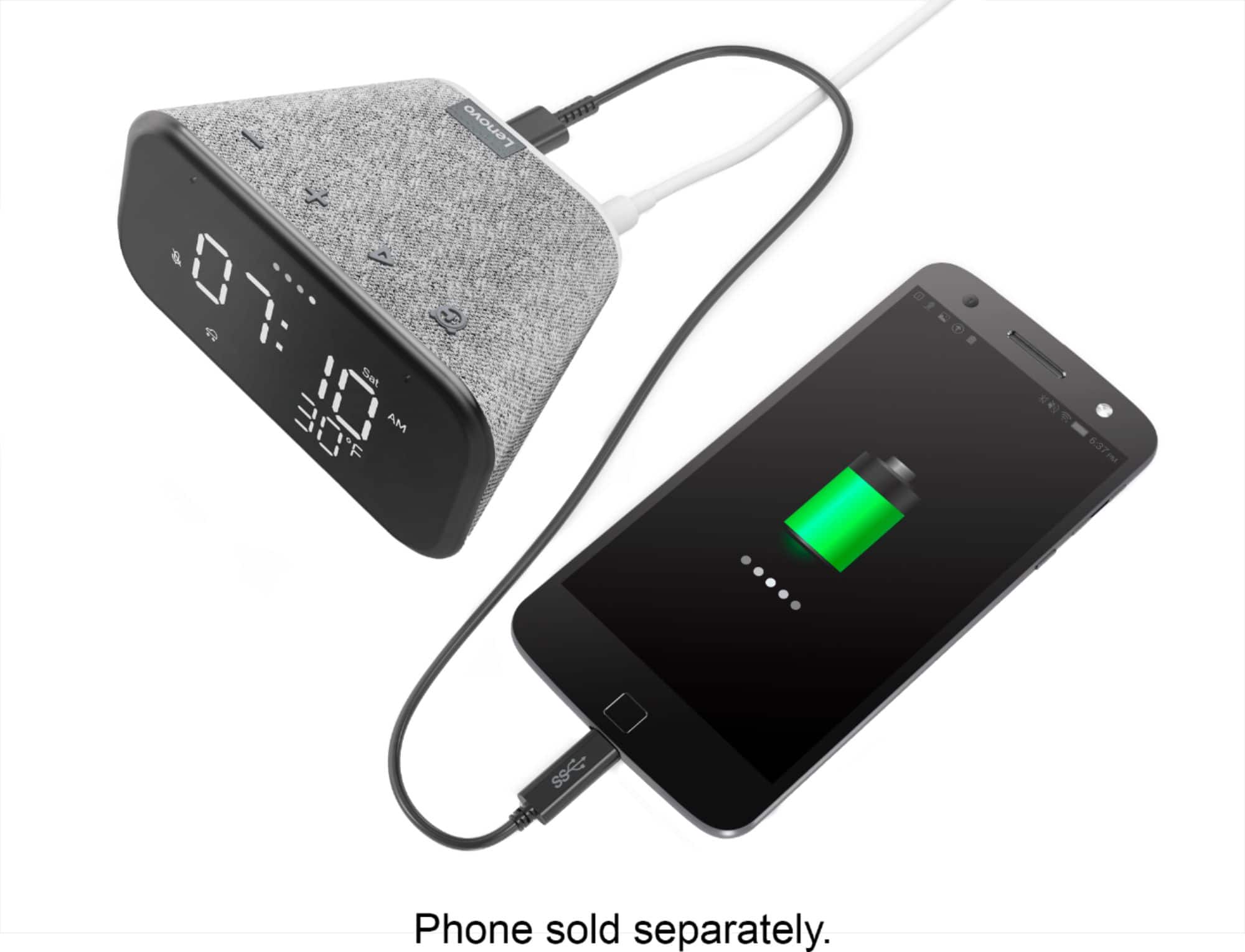
Posted .Hello thank you for choosing the Lenovo Smart Clock Essential. With the Smart Clock Essential you can control over 40,000 compatible smart devices from 5,000 brands. Ask Google to set the temperature, dim the lights, and more. Just start with “Hey Google.” Plus, the handy USB port behind the Smart Clock lets you charge devices such as your smart watch or phone. If you need some suggestions with helpful Google commands to help you explore the full functionality of your device we found a great list from the following website . https://www.androidauthority.com/google-assistant-commands-727911/ . If you need further assistance please don't hesitate to reach out to Lenovo Tech Support at 866-426-0911
It’s a clock!
||Posted . Owned for 1 month when reviewed.This reviewer received promo considerations or sweepstakes entry for writing a review.It is a great clock. All that wifi stuff is a little difficult though. Thankfully, we only bought it to know what time it is! So for us, it is great.
No, I would not recommend this to a friendBrand response from Lenovo Product Expert
Posted .Hi! Thanks for choosing the Lenovo Smart Clock Essential. For some useful tips and tricks to help you get the most out of your assistant please check out this short video https://www.youtube.com/watch?v=mCnHBXn5aEw
Alternatively the following website has a list of useful commands. https://www.androidauthority.com/google-assistant-commands-727911/