Customer Ratings & Reviews
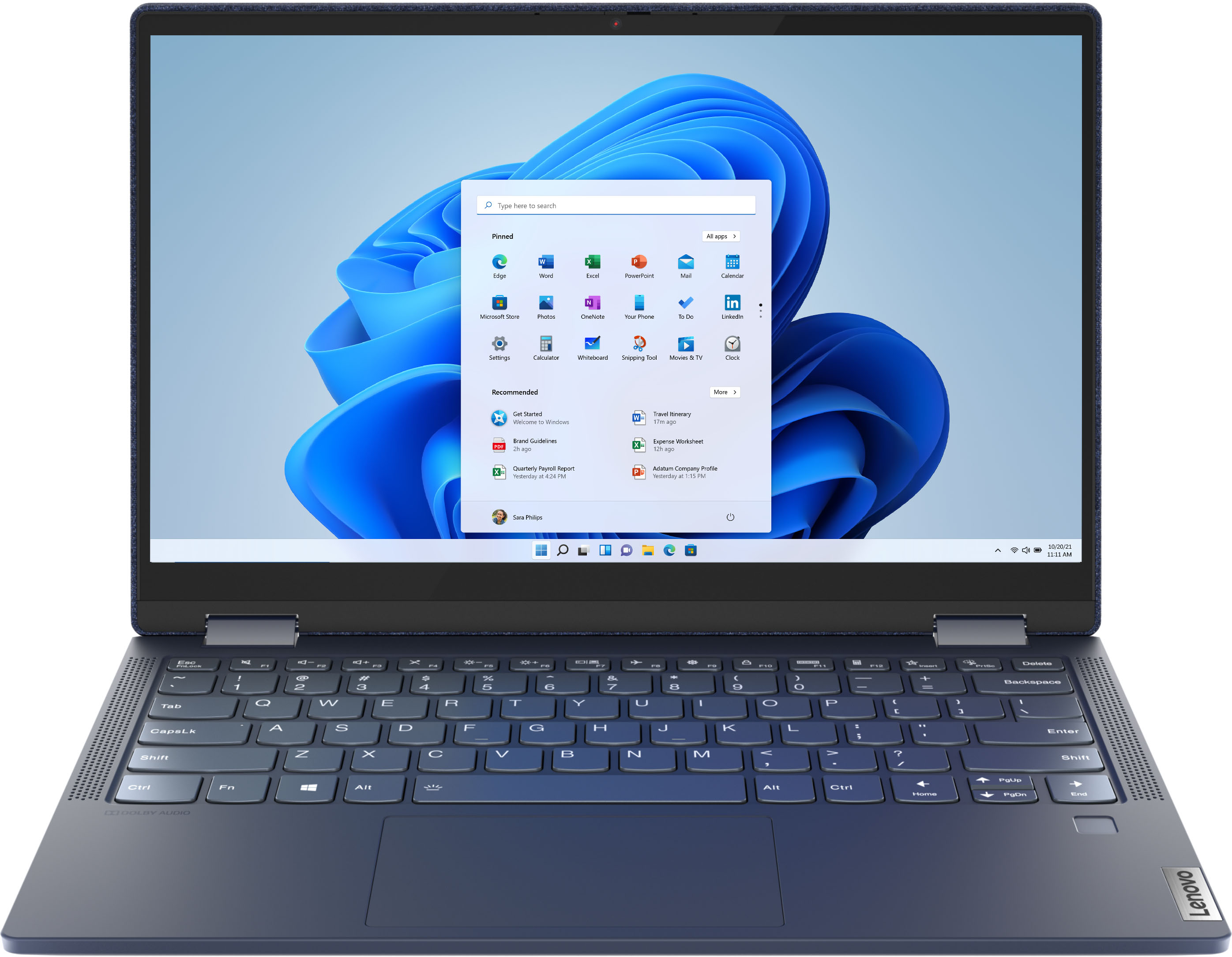


- Model:
- 82FN003TUS
- SKU:
- 6427161
Rating by feature
- Battery Life
Rating 4.4 out of 5 stars
- Speed
Rating 4.6 out of 5 stars
- Display
Rating 4.5 out of 5 stars
Customers are saying
Customers are impressed with the Yoga 6 13 2-in-1 laptop's portability, touch screen, price, and battery life. They appreciate its sleek design, light weight, and user-friendly interface. However, some customers have concerns about the limited RAM, storage, and occasional speaker or webcam issues.
This summary was generated by AI based on customer reviews.
Yoga 13"
||Posted . Owned for 2 months when reviewed.This reviewer received promo considerations or sweepstakes entry for writing a review.i had a 11" Lenovo before this one I loved. This one I'm having a problem with. Upon opening a new tab when I start typing the first letter doesn't work. I am trying to get some kind of cover for the cover since its fabric and can't seem to find one.
I would recommend this to a friendBrand response from Lenovo Product Expert
Posted .We are sorry to hear that you are having issues with your Lenovo Yoga 6 13. First, Be sure any software you installed is compatible with Windows 10. There is no need to install Microsoft Office software. The software is already part of the operating system, you just need to activate the software with a purchased product key. If you have installed a copy of Microsoft Office, this is conflicting with the existing copy on the system and this will slow your system down. If you have installed a 3rd party anti-virus program, be sure that Windows Defender is turned off and that the trial version of McAfee Anti-Virus software is uninstalled. There can only be one anti-virus program on the system. You may need to restore your system to original factory default settings if any of the programming errors have occurred. You can do that by typing "restore" in the Cortana search window. Just click on the magnifying glass icon at the bottom left of your Windows 10 Desktop. Click on "Reset This PC" Then click on "Get Started" and follow the on screen directions to restore to factory defaults. If there is no incompatible software installed but the issues persist, check to be sure you have the latest version of Windows 10 on the computer. Then update all BIOS files and drivers up to that latest version of Windows 10. You can easily accomplish this by scanning the computer with the Lenovo Utility software available on this computer. This system has Lenovo utilities installed to help maintain the health of the device and keep the operating system software up to date. Type "Lenovo Vantage" in the Cortana Search window (if Lenovo Vantage is not installed on your device, you can download the APP and install it now). Select Lenovo Vantage from the list. In the window that opens, click on "Health and Support". In the expanded menu, select "Hardware Scan" In the window that opens, select "Run Quick Tests". This will scan your entire system for errors. Follow any directions that may pop up. If the problem continues after this scan, now click on "System Update". First select Windows update from the menu. Scan your system to be sure you have the latest version of Windows 10. Once that scan is complete, select "Additional Updates". This will scan your device to be sure there are no new BIOS/Driver updates needed. Follow any instructions that may pop up. If the issue still continues after these updates, we recommend you call Lenovo Tech Support at: 877-453-6686 for additional help.

Bad shipping
||Posted . Owned for 1 week when reviewed.This reviewer received promo considerations or sweepstakes entry for writing a review.It's a new laptop so it's not easy to give a review on the product. However my shipping experience with your fulfillment center from whatever country it's in was absolutely terrible. And I would never buy anything again from best buy that requires shipping.
I would recommend this to a friend- Cons mentioned:Defective
Defective laptop and Best Buy is terrible!
||Posted . Owned for less than 1 week when reviewed.This reviewer received promo considerations or sweepstakes entry for writing a review.Laptop worked good for about an hour then it started getting the blue screen of death everytime I was online with it. After updating the software, it still did it. I'm not buying anything else from Best Buy anyways because they never fulfill their promises on delivery everytime I order from them and this laptop I got was defective. I'm uninstalling this app and I'll do my business elsewhere.
No, I would not recommend this to a friendBrand response from Lenovo Product Expert
Posted .We are sorry to hear that you are having issues with your Lenovo Yoga 6 13 model number 82FN003TUS. It is possible that resetting your computer back to original factory settings will correct the issue you are having. If you can no longer properly boot the computer, this system is equipped with OneKey Recovery System. There is a very small pin hole on the bottom right side of the device, right near the bottom right corner of the cooling vent on the bottom of the device. You will need a pin to push this reset button. Plug the device in. Let the battery charge for about 15 minutes. Push the reset button. The system should boot to a choice screen where you can choose "Restore To Factory Default". Select this. It will delete everything from the hard drive except the original factory install of the operating system. You will need to reinstall all programs and files after the reset. If you don't have copies of the files, try to make one before you restore by selecting "Boot to desktop" and trying to back up your files. Once you have the computer reset, be sure any software you installed is compatible with Windows 10. There is no need to install Microsoft Office software. The software is already part of the operating system, you just need to activate the software with a purchased product key. If you have installed a copy of Microsoft Office, this is conflicting with the existing copy on the system and this will slow your system down. If you have installed a 3rd party anti-virus program, be sure that Windows Defender is turned off and that the trial version of McAfee Anti-Virus software is uninstalled. There can only be one anti-virus program on the system. You may need to restore your system to original factory default settings if any of the programming errors have occurred. You can do that by typing "restore" in the Cortana search window. Just click on the magnifying glass icon at the bottom left of your Windows 10 Desktop. Click on "Reset This PC" Then click on "Get Started" and follow the on screen directions to restore to factory defaults. If the problem persists, we recommend you contact Lenovo Tech Support at: 877-453-6686.
Sucks
||Posted . Owned for 1.5 years when reviewed.This reviewer received promo considerations or sweepstakes entry for writing a review.Lousy webcam only 2 yea old and keeps going out getting a dell Doesn’t have a very good screen either I liked about it was it was a lid keyboard
No, I would not recommend this to a friendphysicall weak, the rest fantastic.
||Posted . Owned for 1 month when reviewed.This reviewer received promo considerations or sweepstakes entry for writing a review.Great computer, Lenovo never fails me (software-wise).. I bumped into a wall with it and half of my screen went black, which sucks. Had to return less than a month later.
I would recommend this to a friend- Pros mentioned:Touch screen
Between laptops
||Posted .This reviewer received promo considerations or sweepstakes entry for writing a review.I love the touchscreen feature. I also like the ability to use multiple desktops though the keypad is very sensitive.
No, I would not recommend this to a friend Lenovo 2 in 1
||Posted . Owned for 2 weeks when reviewed.This reviewer received promo considerations or sweepstakes entry for writing a review.I bought this product hoping to replace my laptop and tablet when I travel. I was very disappointed to find that it did not have wireless capability
No, I would not recommend this to a friendBrand response from Lenovo Product Expert
Posted .The Lenovo Yoga 6 13 ships with WiFi-6, 2x2 802.11AX frequency WiFi capability built in. You can also create a WiFi Hotspot with a compatible cellular phone and cellular data plan, that this Yoga 6 13 can connect to when there is no public WiFi available. We recommend you check with your cellular provider for details.
Nice laptop
||Posted . Owned for 2 months when reviewed.This reviewer received promo considerations or sweepstakes entry for writing a review.Nice laptop but did not like the cloth exterior. We wanted to be able to wipe down the outside easily and the cloth made this difficult.
No, I would not recommend this to a friendCompact laptop
||Posted . Owned for 1 month when reviewed.This reviewer received promo considerations or sweepstakes entry for writing a review.The power on/power off button gets stuck once in a while. A bit pricey for a starter laptop. Wish it had a number pad.
I would recommend this to a friendtotal lemon of a laptop.issues galore.
||Posted . Owned for 1 year when reviewed.This reviewer received promo considerations or sweepstakes entry for writing a review.I am writing this review as I have had nothing but issues with this computer since purchasing it. I have had this Yoga 6 since Feb 1,2021. It was great for the first 6 months i had it. Then.. the screen started to flicker and went black then back to normal. the touchscreen wouldnt work sometimes.. then the computer would freeze and restart constantly. Using it as a tablet..useless. the keyboard wont work.. touchscreen wont work. but the worst is that The computer gets incredibly hot when in use.. too hot to keep on lap or even a table..when charging it gets abnormally hot i have to turn it upside down to charge it. this laptop is a lemon if there ever was one,. a total waste of my hard earned money.
No, I would not recommend this to a friendBrand response from Lenovo Product Expert
Posted .We are sorry to hear that you are having issues with your Lenovo Yoga 6 13, model number 82FN003TUS. Resetting your Yoga 6 13 back to original factory settings may correct the issues you are having. This system is equipped with OneKey Recovery System. There is a very small pin hole on the bottom right side of the device, right near the bottom right corner of the cooling vent on the bottom of the device. You will need a pin to push this reset button. Plug the device in. Let the battery charge for about 15 minutes. Push the reset button. The system should boot to a choice screen where you can choose "Restore To Factory Default". Select this. It will delete everything from the hard drive except the original factory install of the operating system. You will need to reinstall all programs and files after the reset. If you don't have copies of the files, try to make one before you restore by selecting "Boot to desktop" and trying to back up your files. If the problem persists after the factory reset, we recommend you contact Lenovo Tech Support for information about paid support at: 877-453-6686.
Lenovo
||Posted . Owned for 3 weeks when reviewed.This reviewer received promo considerations or sweepstakes entry for writing a review.I am quite happy with my purchase. There are a few issues with the new computer.
No, I would not recommend this to a friendThe AMD processor needs lots of work
||Posted .This reviewer received promo considerations or sweepstakes entry for writing a review.Ok, so I've has this laptop for 4 months. And I've used about once a week, and I have to say, I am very very disappointed with this product. It can hardly even run in general. I tried downloading the lowest grade video editing software I could find and it was slow as cold tar in wintertime. The software would crash if I tried to add more than 2, 30 second videos. And when I transfer my photos and videos it takes an hour or longer to just do around 50-100 photos, and a couple short 30 second videos. The AMD processor is just too new. It needs the bugs to be worked out of it for a year or 2. I am really upset that I spent upwards of $700 on this thing when it's only worth about $100. But that being said my moms $100 laptop runs better than this thing. And since I can no longer return it, I will be selling it, because this machine sucks.
No, I would not recommend this to a friendBrand response from Lenovo Product Expert
Posted .The Lenovo Yoga 6 13 model number 82FN003TUS, ships with the 6-Core/12-Thread AMD Ryzen 5 Pro 4650U processor, with a base speed of 2.1GHz and a boost speed of up to 4.0GHz. This laptop configuration uses the integrated AMD Radeon Graphics on this processor for graphics processing. This processor is supported by 8GB DDR4-3200MHz RAM and a 256GB NVMe-2242 TLC solid state hard drive. If you are getting slower than expected performance, we always recommend you check the requirements and compatibility of any software you will be installing on your new computer, before you invest in any computer. Be sure your new computer can support the software you will need to use.
Returned within an hour
||Posted .This reviewer received promo considerations or sweepstakes entry for writing a review.BB shipped out this product and got delivered on 12/18. Powered the laptop after opening the package and after sometime tried to setup. To my surprise the screen was black , not able to read but Cortana was guiding to setup. Tried to connect to extended monitor and did not display over there as well. Went to BB nearby and the associate tried as I did. Still no display in laptop. Associate gave me an option to check the same model laptop in store and checked over there for replacement, but another surprise , there is a screen problem over there as well. Finally took a decision to return.
No, I would not recommend this to a friendBrand response from Lenovo Product Expert
Posted .We are sorry to hear that you had issues with the initial activation of Windows 10 on your Lenovo Yoga 6 13. It is possible that resetting the computer will refresh the Windows 10 Operating System and allow it to activate properly. Since the screen will not display an image, this system is equipped with OneKey Recovery System. There is a very small pin hole on the bottom of the device, right near the cooling vent on the bottom of the device. You will need a pin to push this reset button. Plug the device in. Let the battery charge for about 15 minutes. Push the reset button. The system should boot to a choice screen where you can choose "Restore To Factory Default". Select this. It will delete everything from the hard drive except the original factory install of the operating system. You will need to reinstall all programs and files after the reset. If you don't have copies of the files, try to make one before you restore by selecting "Boot to desktop" and trying to back up your files. If the problem persists after the factory reset, we recommend you contact Lenovo Tech Support at: 877-453-6686.
Yellowish Screen Resolution
||Posted . Owned for less than 1 week when reviewed.This reviewer received promo considerations or sweepstakes entry for writing a review.I read all the reviews here on BestBuy and I was so super excited about this computer that I bought two for my son and daughter. Ladies and gentlemen, it is with great sorrow that I report to you that this computer disappointed me. Its display is so dim and yellowish, I started to literarily strain. At 100% brightness, it seemed like a phone with the blue filter turned on and its brightness reduced to the lowest. I am very disappointed. I am returning it tomorrow:(
No, I would not recommend this to a friendBrand response from Lenovo Product Expert
Posted .We are sorry to hear that you are having issues with the screen image on your Lenovo Yoga 6 13 model number 82FN003TUS. This configuration ships with a: 13.3-Inch (screen size measured diagonally) IPS - FHD (1920x1080) screen, with a brightness level of 300 nits, a Glossy finish. This screen provides 100-Percent of the sRGB (72-Percent NTSC) color gamut for excellent color accuracy. If you are seeing a yellow tint to the screen, be sure Auto-Brightness is turned off. Here is a link to instructions for turning Auto-Brightness off within Windows 10: https://www.tenforums.com/tutorials/70157-enable-disable-adaptive-brightness-windows-10-a.html. If the issue continues, we recommend you contact Lenovo Tech Support for additional help at: 877-453-6686.
- Cons mentioned:Defective
Not good
||Posted . Owned for 3 weeks when reviewed.This reviewer received promo considerations or sweepstakes entry for writing a review.It’s terrible works only 15 days and after stop ... please avoid it and now I cannot return it ??? Thank you best bye for your help but it was the last time I bye anything from your stores
No, I would not recommend this to a friendBrand response from Lenovo Product Expert
Posted .We are sorry to hear that you are having issues with your Lenovo Yoga 6 13 model number 82FN003TUS. Try resetting your computer back to original factory settings. This system is equipped with OneKey Recovery System. There is a very small pin hole on the bottom right side of the device, right near the bottom right corner of the cooling vent on the bottom of the device. You will need a pin to push this reset button. Plug the device in. Let the battery charge for about 15 minutes. Push the reset button. The system should boot to a choice screen where you can choose "Restore To Factory Default". Select this. It will delete everything from the hard drive except the original factory install of the operating system. You will need to reinstall all programs and files after the reset. If you don't have copies of the files, try to make one before you restore by selecting "Boot to desktop" and trying to back up your files. Once you have the computer reset, be sure any software you installed is compatible with Windows 10. There is no need to install Microsoft Office software. The software is already part of the operating system, you just need to activate the software with a purchased product key. If you have installed a copy of Microsoft Office, this is conflicting with the existing copy on the system and this will slow your system down. If you have installed a 3rd party anti-virus program, be sure that Windows Defender is turned off and that the trial version of McAfee Anti-Virus software is uninstalled. There can only be one anti-virus program on the system. You may need to restore your system to original factory default settings if any of the programming errors have occurred. You can do that by typing "restore" in the Cortana search window. Just click on the magnifying glass icon at the bottom left of your Windows 10 Desktop. Click on "Reset This PC" Then click on "Get Started" and follow the on screen directions to restore to factory defaults. If the problem persists, we recommend you contact Lenovo Tech Support at: 877-453-6686.
Still the same terrible Lenovo product and service
||Posted . Owned for 1 month when reviewed.This reviewer received promo considerations or sweepstakes entry for writing a review.Trash. This is my first Lenovo after I stopped buying them 9 years ago when they took over IBMs line. They were terrible then and theyre terrible now. The computer stopped charging less than a month after purchase. I sent in the computer Jan 8th. They didnt log receipt until Jan 16th (despite 2 day express mail shipping which I had to purchase a $20 box to send it), its now the 25th and Im told it will take 8 more business days "on average". So at best Im without a computer for an entire month. When I finally get this paperweight back I will have been without the computer longer than I had it. Shouldnt have been cheap and just gone for the Microsoft Surface Go or HP Envy x360.
No, I would not recommend this to a friend- Cons mentioned:Defective
Defective
||Posted .This reviewer received promo considerations or sweepstakes entry for writing a review.I bought this to my brother in his birthday, He just used it for two months, and it is not working now. I am really disappointed. He is not in the US to return it.
No, I would not recommend this to a friendBrand response from Lenovo Product Expert
Posted .We are sorry to hear that your brother is having issues with his Lenovo Yoga 6 13. Have him try to reset the computer back to original factory settings. This system is equipped with OneKey Recovery System. There is a very small pin hole on the bottom right side of the device, right near the bottom right corner of the cooling vent on the bottom of the device device. You will need a pin to push this reset button. Plug the device in. Let the battery charge for about 15 minutes. Push the reset button. The system should boot to a choice screen where you can choose "Restore To Factory Default". Select this. It will delete everything from the hard drive except the original factory install of the operating system. You will need to reinstall all programs and files after the reset. If you don't have copies of the files, try to make one before you restore by selecting "Boot to desktop" and trying to back up your files. Once the computer is reset, be sure any software that has been installed is compatible with Windows 10. There is no need to install Microsoft Office software. The software is already part of the operating system, you just need to activate the software with a purchased product key. If you have installed a copy of Microsoft Office, this is conflicting with the existing copy on the system and this will slow your system down. If you have installed a 3rd party anti-virus program, be sure that Windows Defender is turned off and that the trial version of McAfee Anti-Virus software is uninstalled. There can only be one anti-virus program on the system. You may need to restore your system to original factory default settings if any of the programming errors have occurred. You can do that by typing "restore" in the Cortana search window. Just click on the magnifying glass icon at the bottom left of your Windows 10 Desktop. Click on "Reset This PC" Then click on "Get Started" and follow the on screen directions to restore to factory defaults.
Linovo yoga 6
||Posted .This reviewer received promo considerations or sweepstakes entry for writing a review.It's ok. It wasn't what i came into the store to buy. But nothing i wanted was in stock. The salesmen wasn't very helpful. In the end i left with something other then what i came in for. That was the biggest disappointment.
I would recommend this to a friend- Pros mentioned:Battery life, Touch screenCons mentioned:Ram
AMAZING! In Dept Review
Posted .This reviewer received promo considerations or sweepstakes entry for writing a review.I got it on a holiday deal, an amazing price for the quality of a comparable $1000 laptop. Pros: -Lenovo's keyboard (Top of the line next to macbooks) -Screen Bright and vibrant (~300 nits) -speakers loud and clear (Lacks bass, if you're into that) -Battery amazing 4-15 hours depending on use (Games-browsing) -Ports are abundant for modern usage (2 type C, 2 Type A) -Finger Print login fast and snappy -Touch Screen/360 Degree tablet mode Cons: -Fan can get noisy on load, silent when idle -Fabric top, need to be taken care of -Hinge hard to open up, there is no dent for fingers to lift up -Ram not upgradeable (8GB is Dual Slot) For casual users (Student/business) who want a simply well-rounded laptop, it's great. For gamers/power user video editors, power is sufficient but it does not compare to a dedicated rig. Games like LOL/WOW/Fortnite runs at 60+ FPS on Medium/Medium+High. Fans do rack up but not as loud, since speakers can overcome it. Great on full price, simply amazing if on sale.
I would recommend this to a friendBrand response from Lenovo Product Expert
Posted .Thank you for choosing the Lenovo Yoga 6 13, model number 82FN003TUS. You can use Lenovo Q-Control to manually control fan and system performance: ( Fn + Q ) option to change the fan by undervolting the processor. You can easily open by sliding a finger upward along the side edge of the screen. Once the lid is open approximately 2-inches, lift the screen to the desired position. The high grade 360-degree hinges on the screen of the Yoga 6 13, allow positioning of the screen anywhere along the 360-degree arc. For work or entertainment purposes.
- Pros mentioned:Portable, Speed, Touch screen
The best laptop ever
Posted .This reviewer received promo considerations or sweepstakes entry for writing a review.I have had this 2 years now and it is the best laptop ever. It is super fast, portable, nice design, lighted keyboard, stays charged all day, touchscreen, connects to all my Wi-Fi printers, and does everything I need.
I would recommend this to a friend