Customer Ratings & Reviews
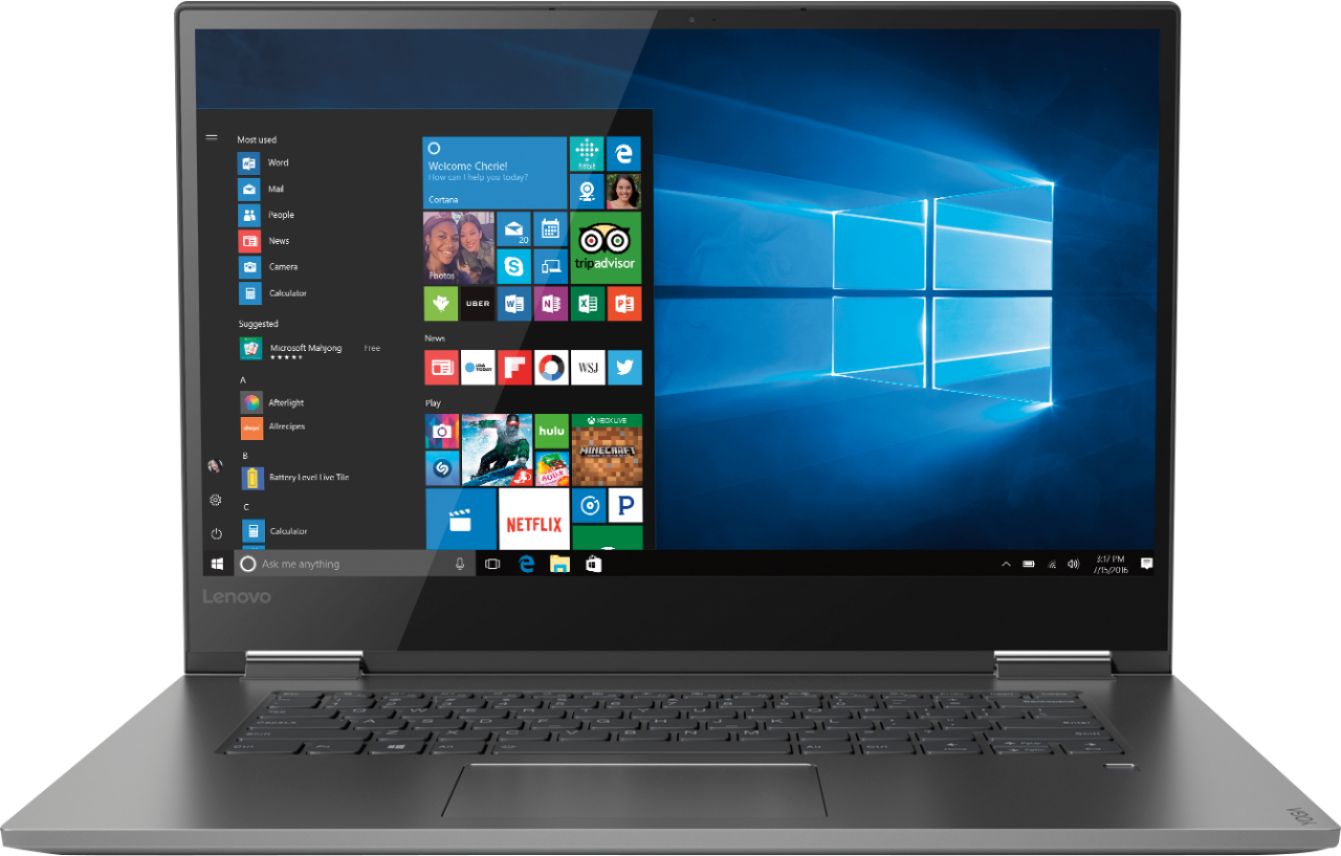
- Model:
- 81CU0009US
- SKU:
- 6201037
Rating by feature
- Value
Rating 4.2 out of 5 stars
- Quality
Rating 4.2 out of 5 stars
- Ease of Use
Rating 4.4 out of 5 stars
Customers are saying
Customers recognize the Yoga 730 2-in-1 laptop for its touchscreen capabilities, lightweight design, and affordable price. Many users appreciate the laptop's user-friendly interface and solid-state drive, which offers improved performance and speed. However, some customers have experienced issues with the laptop's Wi-Fi connectivity and weight.
This summary was generated by AI based on customer reviews.
Great laptop for editors
||Posted .This reviewer received promo considerations or sweepstakes entry for writing a review.My daughter wanted this laptop, we got it in July, had issues in about a month with screen flickering and charging system started not working so took it back, they offered new laptop but my kid wanted this one fixed so sent to manufacturer, got problems fixed, no charge as expected, kid says works perfectly now. My only issue was paying for an expensive computer and having issues right away. I am mixed about recommending to friends going to best buy since not our first issue with computers there.
No, I would not recommend this to a friendBrand response from Lenovo Product Expert
Posted .We are sorry to hear that you experienced issues with your daughter's Lenovo Yoga 730-15. You can maintain the health of the hardware and operating software on this device by using the Lenovo Utility software installed. This system has Lenovo utilities installed to help maintain the health of the device and keep the operating system software up to date. Type "Lenovo Vantage" in the Cortana Search window (if Lenovo Vantage is not installed on your device, you can download the APP and install it now). Select Lenovo Vantage from the list. In the window that opens, click on "Health and Support". In the expanded menu, select "Hardware Scan" In the window that opens, select "Run Quick Tests". This will scan your entire system for errors. Follow any directions that may pop up. If the problem continues after this scan, now click on "System Update". First select Windows update from the menu. Scan your system to be sure you have the latest version of Windows 10. Once that scan is complete, select "Additional Updates". This will scan your device to be sure there are no new BIOS/Driver updates needed. Follow any instructions that may pop up. If the issue still continues after these updates, we recommend you call Lenovo Tech Support at: 877-453-6686 for additional help.

- Pros mentioned:Touch screen
Great step up
||Posted .This reviewer received promo considerations or sweepstakes entry for writing a review.World of difference from my 8yo 17-inch laptop. Solid state is lightning-fast, touch screen is great, and looking forward to have fun with stylus and 3D Powerpoint. This is as good as it gets in 2018.
I would recommend this to a friendBrand response from Lenovo Product Expert
Posted .Thank you for choosing the Lenovo Yoga 730-13. We are pleased to hear that the features and performance of the Yoga 730-13 meets your computing needs so well.
- Pros mentioned:Speed
features
||Posted .This reviewer received promo considerations or sweepstakes entry for writing a review.this has many new features I've never had before. Great speed. Will be learning the ins and outs of this notebook for a while
I would recommend this to a friendBrand response from Lenovo Product Expert
Posted .Thank you for choosing the Lenovo Yoga 730-15. With regard to learning your way around Windows 10, you may want to try YouTube.com (just type that address in your browser address window). There are hundreds for free instructional videos there about Windows 10. Just type Windows 10 Introduction in to the YouTube search window. You can watch free videos there that will show you the basics all the way up to tips and tricks videos and they're all free.
- Pros mentioned:Speed
Great for what I need
||Posted .This reviewer received promo considerations or sweepstakes entry for writing a review.I purchased this laptop for business use. It has surpassed my expectations. The unit is fast, responsive, the screen is very bright and high definition. I would definitely purchase this again.
I would recommend this to a friendBrand response from Lenovo Product Expert
Posted .Thank you for choosing the Lenovo Yoga 730-15 for your business. We are pleased to hear that the performance of the meets your computing needs so well.

- Pros mentioned:Touch screen
Great!
||Posted . Owned for 10 months when reviewed.This reviewer received promo considerations or sweepstakes entry for writing a review.I love this computer. It is the second lenova yoga I have purchased. I have no complaints, it does exactly what I need it to do and I love the touch screen. Great purchase.
I would recommend this to a friend - Pros mentioned:Touch screen
Love It. So far so good.
||Posted . Owned for 3 weeks when reviewed.This reviewer received promo considerations or sweepstakes entry for writing a review.(Open Box Buy) Great for the price. I really love this item with the touch screen feature works like a tablet.
I would recommend this to a friend - Pros mentioned:Price
Great for the price!
||Posted .This reviewer received promo considerations or sweepstakes entry for writing a review.Wanted a laptop that wasn't too expensive & this fit the bill. It's still powerful enough to do what I want, mainly Microsoft Office & Quicken. I do miss having a numeric keypad though!
I would recommend this to a friendBrand response from Lenovo Product Expert
Posted .Thank you for choosing the Lenovo Yoga 730-15. We are pleased to hear that the value, features and performance of the Yoga 730-15 meets your computing needs so well. This ultra portable device does not include a 10-key numeric pad. For 2018, Lenovo retained its place for a second year as the best laptop vendor:
https://www.laptopmag.com/articles/laptop-brand-ratings
Good computer
||Posted .This reviewer received promo considerations or sweepstakes entry for writing a review.So far I have only used it for school and movie watching. It feels great to use, good battery. My only complaint is that the screen cannot get too bright so it takes some time to get used to.
I would recommend this to a friendBrand response from Lenovo Product Expert
Posted .Thank you for choosing the Lenovo Yoga 730-15. This model ships with a glossy IPS LCD w/LED Backlight screen, with a resolution of 1920 x 1080 (FHD) and a brightness level of 300 nits. For maximum brightness, be sure auto-brightness is turned off. Here is a link to instructions for turning off auto-brightness within Windows 10: https://www.itsupportguides.com/knowledge-base/windows-10/windows-10-how-to-disable-automatic-brightness-adjustments/
- Pros mentioned:Easy to use
Great 2 in 1
||Posted .This reviewer received promo considerations or sweepstakes entry for writing a review.the Lenovo Yoga 730 has been top-notch so far. Easy to use and configure, no worries about hardware. Only knock is the glare/reflection off the screen but that's to be expected with this product.
I would recommend this to a friendBrand response from Lenovo Product Expert
Posted .Thank you for choosing the Lenovo Yoga 730-15. With regard to screen glare, we will look into this for future improvements.
- Pros mentioned:Speed
A great machine.
||Posted .This reviewer received promo considerations or sweepstakes entry for writing a review.I've loved it every since I got it about a month ago. Super fast, great graphics and enough of the basics that is more than enough for me. This is my first Lenovo and I am impressed.
I would recommend this to a friendBrand response from Lenovo Product Expert
Posted .Thank you for choosing the Lenovo Yoga 730-15. We are pleased to hear that the features and performance of the Yoga 730-15 meets your computing needs so well. For 2018, Lenovo retained its place for a second year as the best laptop vendor:
https://www.laptopmag.com/articles/laptop-brand-ratings
- Pros mentioned:Lightweight
Lenovo Yoga 730
||Posted .This reviewer received promo considerations or sweepstakes entry for writing a review.I bought this a couple weeks ago to replace my old Lenovo laptop. I'm still learning some of the new applications, but love it as Ioved my old Lenovo. It's easy to travel with.
I would recommend this to a friendBrand response from Lenovo Product Expert
Posted .Thank you for choosing the Lenovo Yoga 730-15. The heart of the Yoga 730-15 is the Windows 10 Operating System. With regard to learning your way around Windows 10, you may want to try YouTube.com (just type that address in your browser address window). There are hundreds for free instructional videos there about Windows 10. Just type Windows 10 Introduction in to the YouTube search window. You can watch free videos there that will show you the basics all the way up to tips and tricks videos and they're all free. For 2018, Lenovo retained its place for a second year as the best laptop vendor:
https://www.laptopmag.com/articles/laptop-brand-ratings
- Pros mentioned:Price
Great deal
||Posted .This reviewer received promo considerations or sweepstakes entry for writing a review.Found a open box for 580... great computer for work and school.. i7 and ssd are really quick. Nice beautiful design.. sleek fabrication... thin and light weight... lenovo is best
I would recommend this to a friendBrand response from Lenovo Product Expert
Posted .Thank you for choosing the lenovo Yoga 730-15. We are pleased to hear that the features and performance of the Yoga 730-15 meets your computing needs so well.
- Pros mentioned:Lightweight
Excellent laptop
||Posted .This reviewer received promo considerations or sweepstakes entry for writing a review.I bought may laptop last week and it's great. I like the fact it converts into a table to allow me to work in different positions and places. It's easy to carry and use.
I would recommend this to a friend Best laptop I ever owned!!!
||Posted . Owned for 3 months when reviewed.This reviewer received promo considerations or sweepstakes entry for writing a review.This laptop replaced a microsoft surface that crapped out just shy of 2 years after we bought it. This computer is head and shoulders over the surface in every respect.
I would recommend this to a friend- Pros mentioned:Speed
Great way to upgrade
||Posted .This reviewer received promo considerations or sweepstakes entry for writing a review.This laptop upgrades a system that was using a HDD. SSD are so much nicer, quicker, less heat build up etc..
I would recommend this to a friendBrand response from Lenovo Product Expert
Posted .Thank you for choosing the lenovo Yoga 730-15. We are pleased to hear that the features and performance of the Yoga 730-15 meets your computing needs so well.
Good computer. I mostly use it for school
||Posted .This reviewer received promo considerations or sweepstakes entry for writing a review.I really love it. It’s wide and light and i7 core just perfect. I use it for school and I’m a junior. I actually accidentally hit it with my bike lock and it has a bent but omg the screen didn’t break or damage works perfect. I’m going to get it fixed but it’s a great laptop. I don’t like using it in tablet because of the finger prints. Also you need to update it always so you can use it in tablet more for rotation and the brightness. The camera is okay. The finger print works sometimes but not all the times.
I would recommend this to a friendBrand response from Lenovo Product Expert
Posted .Thank you for choosing the Lenovo Yoga 730-15. With regard to keeping the operating software - Windows 10, BIOS and Drivers up to date, you can easily do this by using Lenovo Utility Software. This system has Lenovo utilities installed to help maintain the health of the device and keep the operating system software up to date. Type "Lenovo Vantage" in the Cortana Search window (if Lenovo Vantage is not installed on your device, you can download the APP and install it now). Select Lenovo Vantage from the list. In the window that opens, click on "Health and Support". In the expanded menu, select "Hardware Scan" In the window that opens, select "Run Quick Tests". This will scan your entire system for errors. Follow any directions that may pop up. If the problem continues after this scan, now click on "System Update". First select Windows update from the menu. Scan your system to be sure you have the latest version of Windows 10. Once that scan is complete, select "Additional Updates". This will scan your device to be sure there are no new BIOS/Driver updates needed. Follow any instructions that may pop up. If the issue still continues after these updates, we recommend you call Lenovo Tech Support at: 877-453-6686 for additional help. This model comes with an HD 720p web cam built in. If you are having problems signing in with your fingerprint reader, be sure you have setup your account properly. Here is a link to instructions for setting up fingerprint reader within Windows 10: https://www.laptopmag.com/articles/set-windows-hello-fingerprint-login
Great laptop, but Wi-fi issues
||Posted .This reviewer received promo considerations or sweepstakes entry for writing a review.Did not give 5 stars because Wi-fi connection kept dropping. After calling Tech support at Lenovo, they suggested sending in for repair. Turns out that the NEWER driver for the network card was the problem. Downloaded the previous version and is working great (after googling the issue) Did not need repair after all. Lenovo has no clue about the driver.
I would recommend this to a friendBrand response from Lenovo Product Expert
Posted .Thank you for choosing the Lenovo Yoga 730-15. To be sure you have the right operating software on your computer at all times, including the latest version of Windows 10, the latest BIOS files and drivers files, scan your computer regularly with the Lenovo Utility software installed on the computer. This system has Lenovo utilities installed to help maintain the health of the device and keep the operating system software up to date. Type "Lenovo Vantage" in the Cortana Search window (if Lenovo Vantage is not installed on your device, you can download the APP and install it now). Select Lenovo Vantage from the list. In the window that opens, click on "Health and Support". In the expanded menu, select "Hardware Scan" In the window that opens, select "Run Quick Tests". This will scan your entire system for errors. Follow any directions that may pop up. If the problem continues after this scan, now click on "System Update". First select Windows update from the menu. Scan your system to be sure you have the latest version of Windows 10. Once that scan is complete, select "Additional Updates". This will scan your device to be sure there are no new BIOS/Driver updates needed. Follow any instructions that may pop up. If the issue still continues after these updates, we recommend you call Lenovo Tech Support at: 877-453-6686 for additional help.
- Cons mentioned:Wifi connectivity
Great tool, wifi disables constantly
||Posted . Owned for 1 month when reviewed.This reviewer received promo considerations or sweepstakes entry for writing a review.The only problem is that the wifi setting always disables quite quickly and constantly. Bummer!
I would recommend this to a friendBrand response from Lenovo Product Expert
Posted .We are sorry to hear that you are having issues with WiFi connectivity. Be sure you have the latest version of Windows 10 on the computer, and that all of the supporting BIOS files and drivers are also up to date. You can easily accomplish this by scanning the computer with the Lenovo Utility software installed on the computer. This system has Lenovo utilities installed to help maintain the health of the device and keep the operating system software up to date. Type "Lenovo Vantage" in the Cortana Search window (if Lenovo Vantage is not installed on your device, you can download the APP and install it now). Select Lenovo Vantage from the list. In the window that opens, click on "Health and Support". In the expanded menu, select "Hardware Scan" In the window that opens, select "Run Quick Tests". This will scan your entire system for errors. Follow any directions that may pop up. If the problem continues after this scan, now click on "System Update". First select Windows update from the menu. Scan your system to be sure you have the latest version of Windows 10. Once that scan is complete, select "Additional Updates". This will scan your device to be sure there are no new BIOS/Driver updates needed. Follow any instructions that may pop up. If the issue still continues after these updates, we recommend you call Lenovo Tech Support at: 877-453-6686 for additional help. For 2018, Lenovo retained its place for a second year as the best laptop vendor:
https://www.laptopmag.com/articles/laptop-brand-ratings
GREAT LAPTOP FOR ONCE
||Posted .This reviewer received promo considerations or sweepstakes entry for writing a review.Bought this for my son for college and this thing is a workhorse beast. Going from laptop to tablet is a breeze..Amazing built in tools. Graphics and resources to spare.
I would recommend this to a friendBrand response from Lenovo Product Expert
Posted .Thank you for choosing the Lenovo Yoga 730-15 for your son. We are pleased to hear that the performance of the Yoga 730-15 meets your computing needs so well.
- Pros mentioned:Touch screen
Like it a lot.
||Posted .This reviewer received promo considerations or sweepstakes entry for writing a review.I am very pleased with the computer and am really surprised with how much I like the touchscreen. The computer is light and compact , but also feels substantial.
I would recommend this to a friendBrand response from Lenovo Product Expert
Posted .Thank you for choosing the Lenovo Yoga 730-15. We are pleased to hear that the features and performance of the Yoga 730-15 meets your computing needs so well. For 2018, Lenovo retained its place for a second year as the best laptop vendor:
https://www.laptopmag.com/articles/laptop-brand-ratings