Customer Ratings & Reviews
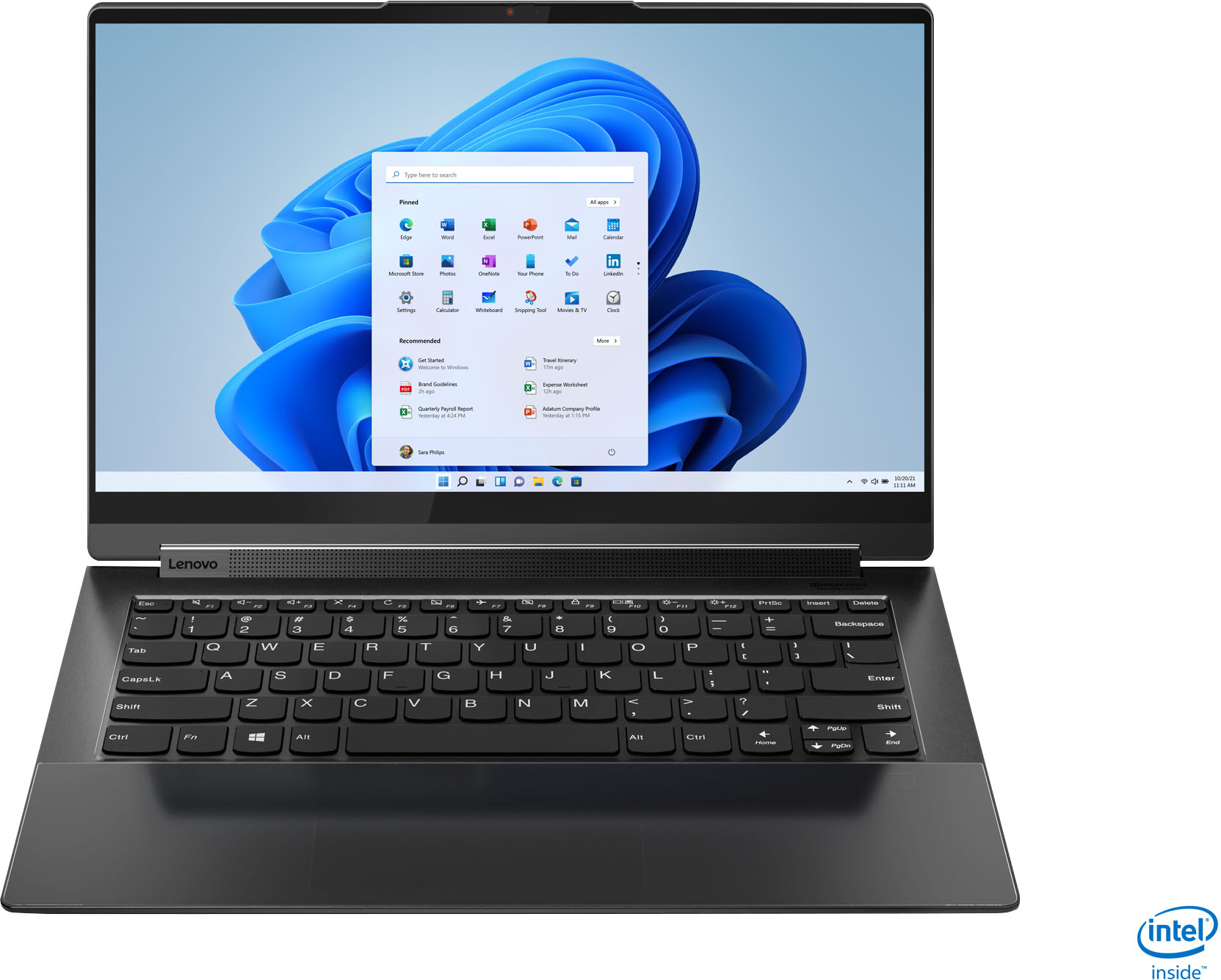



- Model:
- 82BG0001US
- SKU:
- 6426702
Rating by feature
- Battery Life
Rating 4.2 out of 5 stars
- Speed
Rating 4.5 out of 5 stars
- Display
Rating 4.7 out of 5 stars
Customers are saying
Customers value the Yoga 9i 14's stunning screen quality, impressive performance, and long battery life. Many appreciate its lightweight design and ease of use, making it ideal for portability. However, some users experienced issues with the trackpad and fingerprint reader, while others noted concerns about heat generation and the limited port selection. A few also mentioned challenges related to RAM capacity.
This summary was generated by AI based on customer reviews.
Lenovo yogi 9
||Posted . Owned for 1 month when reviewed.This reviewer received promo considerations or sweepstakes entry for writing a review.Best purchase that I have made! It is compact and sleek!
I would recommend this to a friendBrand response from Lenovo Product Expert
Posted .Thank you for choosing the Intel Evo-Certified, Lenovo Yoga 9i 14. We are pleased to hear that the Yoga 9i 14 is working out so well for you.

Wow
||Posted . Owned for 1 week when reviewed.This reviewer received promo considerations or sweepstakes entry for writing a review.Awesome laptop , very sleek. Cannot wait to get it set up
I would recommend this to a friendBrand response from Lenovo Product Expert
Posted .Thank you for choosing the Intel Evo-Certified, lenovo Yoga 9i 14. We are pleased to hear that the Yoga 9i 14 meets your computing needs so well.
Lenovo purchase
||Posted . Owned for 3 weeks when reviewed.This reviewer received promo considerations or sweepstakes entry for writing a review.4K is great. Getting used to it but user friendly. Happy with my purchase
I would recommend this to a friendBrand response from Lenovo Product Expert
Posted .Thank you for choosing the Intel Evo-Certified, Lenovo Yoga 9i-14 model number 82BG0001US. We are pleased to hear that the features and performance of the Yoga 9i-14 meets your computing needs so well.
Battery life is disappointing
||Posted . Owned for 1 week when reviewed.This reviewer received promo considerations or sweepstakes entry for writing a review.I was shocked that 2 hours zoom meeting consumed 50% if battery life!! Otherwise it was fine laptop.
No, I would not recommend this to a friendBrand response from Lenovo Product Expert
Posted .We are very sorry to hear that you are experiencing issues with the Lenovo Yoga 9i 14 2-in-1 14in. 4K HDR Touch Screen Laptop with Intel Evo Core i7. If you are getting substantially less battery life, first, set your screen brightness at less than 100-percent - try 80-percent to start with. Then, be sure Battery conservation Mode is turned off. This power management setting should only be used when the laptop is plugged in all the time. It will prolong overall battery life by only charging the battery to 60-percent of capacity. Here is a link to instructions for turning off Battery Conservation Mode: https://support.lenovo.com/us/en/solutions/ht103159. Also check what programs are running in the background on the computer. Be sure only the programs you want running in the background are. These programs will drain the battery. Here is a link to information about how to find out what programs are running in the background on your Windows computer and how to manage them for better system performance: https://www.windowscentral.com/how-prevent-apps-running-background-windows-10. Then, finally, be sure any software you installed is compatible with Windows. Incompatible software will drain the battery at a faster rate. There is no need to install Microsoft Office software. The software is already part of the operating system, you just need to activate the software with a purchased product key. If you have installed a copy of Microsoft Office, this is conflicting with the existing copy on the system and this will slow your system down. If you have installed a 3rd party anti-virus program, be sure that Windows Defender is turned off and that the trial version of McAfee Anti-Virus software is uninstalled. There can only be one anti-virus program on the system. You may need to restore your system to original factory default settings if any of the programming errors have occurred. You can do that by typing "restore" in the Cortana search window. Just click on the magnifying glass icon at the bottom left of your Windows Desktop. Click on "Reset This PC" Then click on "Get Started" and follow the on-screen directions to restore to factory defaults. If the problem persists, we recommend you contact Lenovo Tech Support at: 877-453-6686.
Loving the Yoga 9i
||Posted . Owned for 2 weeks when reviewed.This reviewer received promo considerations or sweepstakes entry for writing a review.Very nice for a multipurpose multi fold and use product.
I would recommend this to a friendBrand response from Lenovo Product Expert
Posted .Thank you for choosing the Intel Evo-Certified, Lenovo Yoga 9i 14. We are pleased to hear that the features and performance of the Yoga 9i 14 meets your computing needs so well.
great price
||Posted . Owned for 3 months when reviewed.This reviewer received promo considerations or sweepstakes entry for writing a review.best value for its price.. a must have for students
I would recommend this to a friendBrand response from Lenovo Product Expert
Posted .Thank you for choosing the Lenovo Yoga 9i 14 2-in-1 14 4K HDR Touch-Screen Laptop with Intel Evo Core i7. We are very pleased to hear that the specifications and features of the Lenovo Yoga 9i 14 2-in-1 14 4K Touch Screen Laptop with Intel Evo Core i7 meet your computing needs so well.
Excellent
||Posted . Owned for less than 1 week when reviewed.This reviewer received promo considerations or sweepstakes entry for writing a review.Excellent product.Love it. Would buy it again and again
I would recommend this to a friendBrand response from Lenovo Product Expert
Posted .Thank you for choosing the Intel Evo-Certified, Lenovo Yoga 9i 14. We are pleased to hear that the Yoga 9i 14 meets your computing needs so well.
Decent
||Posted . Owned for 6 months when reviewed.This reviewer received promo considerations or sweepstakes entry for writing a review.Overall, this PC is good. The downside is the screen; it is flickering and goes black.
I would recommend this to a friendBrand response from Lenovo Product Expert
Posted .We are sorry to hear that you are having issues with the screen image on your Intel Evo-Certified, Lenovo Yoga 9i 14, model number 82BG0001US. First, check to be sure you have the latest version of Windows 11 on the computer. Then update all BIOS files and drivers up to that latest version of Windows 11. You can easily accomplish this by scanning the computer with the Lenovo Utility software available on this computer. This system has Lenovo utilities installed to help maintain the health of the device and keep the operating system software up to date. Type "Lenovo Vantage" in the Cortana Search window (if Lenovo Vantage is not installed on your device, you can download the APP and install it now). Select Lenovo Vantage from the list. In the window that opens, click on "Health and Support". In the expanded menu, select "Hardware Scan" In the window that opens, select "Run Quick Tests". This will scan your entire system for errors. Follow any directions that may pop up. If the problem continues after this scan, now click on "System Update". First select Windows update from the menu. Scan your system to be sure you have the latest version of Windows 11. Once that scan is complete, select "Additional Updates". This will scan your device to be sure there are no new BIOS/Driver updates needed. Follow any instructions that may pop up. If the issue continues after these updates, we recommend you call Lenovo Premium Care for additional help at: 888-278-9707.
Excellent laptop
||Posted . Owned for 3 weeks when reviewed.This reviewer received promo considerations or sweepstakes entry for writing a review.Replaced older Lenevo with this one. Excellent laptop
I would recommend this to a friendBrand response from Lenovo Product Expert
Posted .Thank you for choosing the Intel Evo-Certified, Lenovo Yoga 9i 14. We appreciate your loyalty to the Lenovo Brand and we are pleased to hear that the Yoga 9i 14 meets your computing needs so well.
The best buy
||Posted . Owned for 3 weeks when reviewed.This reviewer received promo considerations or sweepstakes entry for writing a review.Great. It’s was a great purchase and I love it!!!
I would recommend this to a friendBrand response from Lenovo Product Expert
Posted .Thank you for choosing the Intel Evo-Certified, lenovo Yoga 9i 14. We are pleased to hear that the Yoga 9i 14 is working out so well for you.
Great Convertible
||Posted . Owned for 1 month when reviewed.This reviewer received promo considerations or sweepstakes entry for writing a review.Great laptop with great screen! It a great ultra book for the money.
I would recommend this to a friendBrand response from Lenovo Product Expert
Posted .Hi there! Thank you for choosing the Lenovo Yoga 9i. We are so happy to hear the amazing performance, features, premium look, and feel of the Yoga 9i is meeting your computing needs so well.
Outstanding
||Posted . Owned for 4 months when reviewed.This reviewer received promo considerations or sweepstakes entry for writing a review.One of the best laptops I have ever purchased. Blown away
I would recommend this to a friendBrand response from Lenovo Product Expert
Posted .Thank you for choosing the Intel Evo-Certified, Lenovo Yoga 9i 14. We are pleased to hear that the Yoga 9i 14 meets your computing needs so well.
Lenovo Review
||Posted . Owned for 1 month when reviewed.This reviewer received promo considerations or sweepstakes entry for writing a review.Works as expected. Was easy to order an to pick up
I would recommend this to a friendBrand response from Lenovo Product Expert
Posted .Thank you for choosing the Intel Evo-Certified, Lenovo Yoga 9i 14. We are pleased to hear that the Yoga 9i 14 meets your computing needs so well.
Laptop repairs
||Posted .This reviewer received promo considerations or sweepstakes entry for writing a review.Good repair service and kept me informed of progress.
I would recommend this to a friendRotating speakers will make it worth it
||Posted . Owned for 1 month when reviewed.This reviewer received promo considerations or sweepstakes entry for writing a review.I hate the leather top. Wish the aluminum top came in black. Not worth the money
No, I would not recommend this to a friendGreat laptop
||Posted . Owned for 1 month when reviewed.This reviewer received promo considerations or sweepstakes entry for writing a review.Fast computer, and nice build quality. Would recommend.
I would recommend this to a friendBrand response from Lenovo Product Expert
Posted .Thank you for choosing the Intel Evo-Certified, Lenovo Yoga 9i 14. We are pleased to hear that the features and performance of the Yoga 9i 14 meets your computing needs so well.
Yoga
||Posted . Owned for 2 weeks when reviewed.This reviewer received promo considerations or sweepstakes entry for writing a review.Love it. Great product and I'm extremely happy with it.
I would recommend this to a friendBrand response from Lenovo Product Expert
Posted .Thank you for choosing the Intel Evo-Certified, Lenovo Yoga 9i-14. We are pleased to hear that the Yoga 9i-14 is working out so well for you.
Not A Good Experience
||Posted . Owned for 1 week when reviewed.This reviewer received promo considerations or sweepstakes entry for writing a review.This was a huge disappointment. After three days the computer ran updates. I left it on my desk at the end of the day to run updates. The next morning the computer wouldn't display log in options - just the home screen. After turning it on and off it finally let me log in but continued to be unresponsive and freeze up. Eventually I decided to try to do a hard reset, but couldn't get through the reset without it freezing. I ultimately returned this laptop.
No, I would not recommend this to a friendBrand response from Lenovo Product Expert
Posted .We are sorry to hear that you are having issues with your Intel Evo-Certified, Lenovo Yoga 9i 14 after a recent Windows 10 update. You can rollback any update that fails. Here is a link to instructions for rolling back an update: https://www.howtogeek.com/235474/how-to-roll-back-builds-and-uninstall-updates-on-windows-10/. If rolling back the update does not work, resetting the computer back to original factory settings may correct the problem. Here is a link to Windows 10 Recovery options: https://support.microsoft.com/en-us/windows/recovery-options-in-windows-31ce2444-7de3-818c-d626-e3b5a3024da5#ID0EDD=Windows_10. If for some reason you can not reach the Windows 10 reset screen, this system is equipped with OneKey Recovery System. There is a very small pin hole on the bottom right side of the device, right near the top right corner of the cooling vent on the bottom of the device. You will need a pin to push this reset button. Plug the device in. Let the battery charge for about 15 minutes. Push the reset button. The system should boot to a choice screen where you can choose "Restore To Factory Default". Select this. It will delete everything from the hard drive except the original factory install of the operating system. You will need to reinstall all programs and files after the reset. If you don't have copies of the files, try to make one before you restore by selecting "Boot to desktop" and trying to back up your files. If the problem persists after the factory reset, we recommend you contact Lenovo Tech Support at: 877-453-6686.
Great Laptop
||Posted .This reviewer received promo considerations or sweepstakes entry for writing a review.No complaints so far. Good price. Super fast shipping!
I would recommend this to a friendBrand response from Lenovo Product Expert
Posted .Thank you for choosing the Intel Evo-Certified, Lenovo Yoga 9i-14. We are pleased to hear that the value and performance of the Yoga 9i-14 meets your computing needs so well.
Bad wi-fi
||Posted .This reviewer received promo considerations or sweepstakes entry for writing a review.This laptop has terrible wi-fi connectivity. Its built-in wi-fi receiver has trouble picking up a strong signal even when right near the router. I couldn't even use the laptop upstairs in my house as there is only a faint signal at ~15 Mbps, but all my other laptops easily exceed 200 from anywhere in the house. I exchanged the laptop, hoping it was just bad hardware, but the replacement did the very same thing. The radios in these devices are just not nearly powerful enough. It's a shame because it is an excellent laptop otherwise, but what good is it without a reliable connection?
No, I would not recommend this to a friendBrand response from Lenovo Product Expert
Posted .The Intel Evo-Certified, Lenovo Yoga 9i-14 ships with the latest, Intel 6G, Wide-Range/High Speed 2x2 802.11AX frequency WiFi, which is also backward compatible to older, b/g/n (2.4GHz and 5.0Ghz)/ac frequency WiFi. Try using your Yoga 9i with a different WiFi source, say at a WiFi coffee shop or the Public Library. If the laptop connects without dropping, then contact your internet provider about service updates. If the issue continues at other WiFi services, then be sure you have the latest version of Windows 10 on the computer. Then update all of the BIOS files and drivers up to that latest version of Windows 10. You can easily accomplish this by scanning the computer with the Lenovo Utility software available on this computer. This system has Lenovo utilities installed to help maintain the health of the device and keep the operating system software up to date. Type "Lenovo Vantage" in the Cortana Search window (if Lenovo Vantage is not installed on your device, you can download the APP and install it now). Select Lenovo Vantage from the list. In the window that opens, click on "Health and Support". In the expanded menu, select "Hardware Scan" In the window that opens, select "Run Quick Tests". This will scan your entire system for errors. Follow any directions that may pop up. If the problem continues after this scan, now click on "System Update". First select Windows update from the menu. Scan your system to be sure you have the latest version of Windows 10. Once that scan is complete, select "Additional Updates". This will scan your device to be sure there are no new BIOS/Driver updates needed. Follow any instructions that may pop up. If the issue still continues after these updates, we recommend you call Lenovo Tech Support at: 877-453-6686 for additional help.