Customer Ratings & Reviews



- Model:
- 82BG0001US
- SKU:
- 6426702
Rating by feature
- Battery Life
Rating 4.2 out of 5 stars
- Speed
Rating 4.5 out of 5 stars
- Display
Rating 4.7 out of 5 stars
Customers are saying
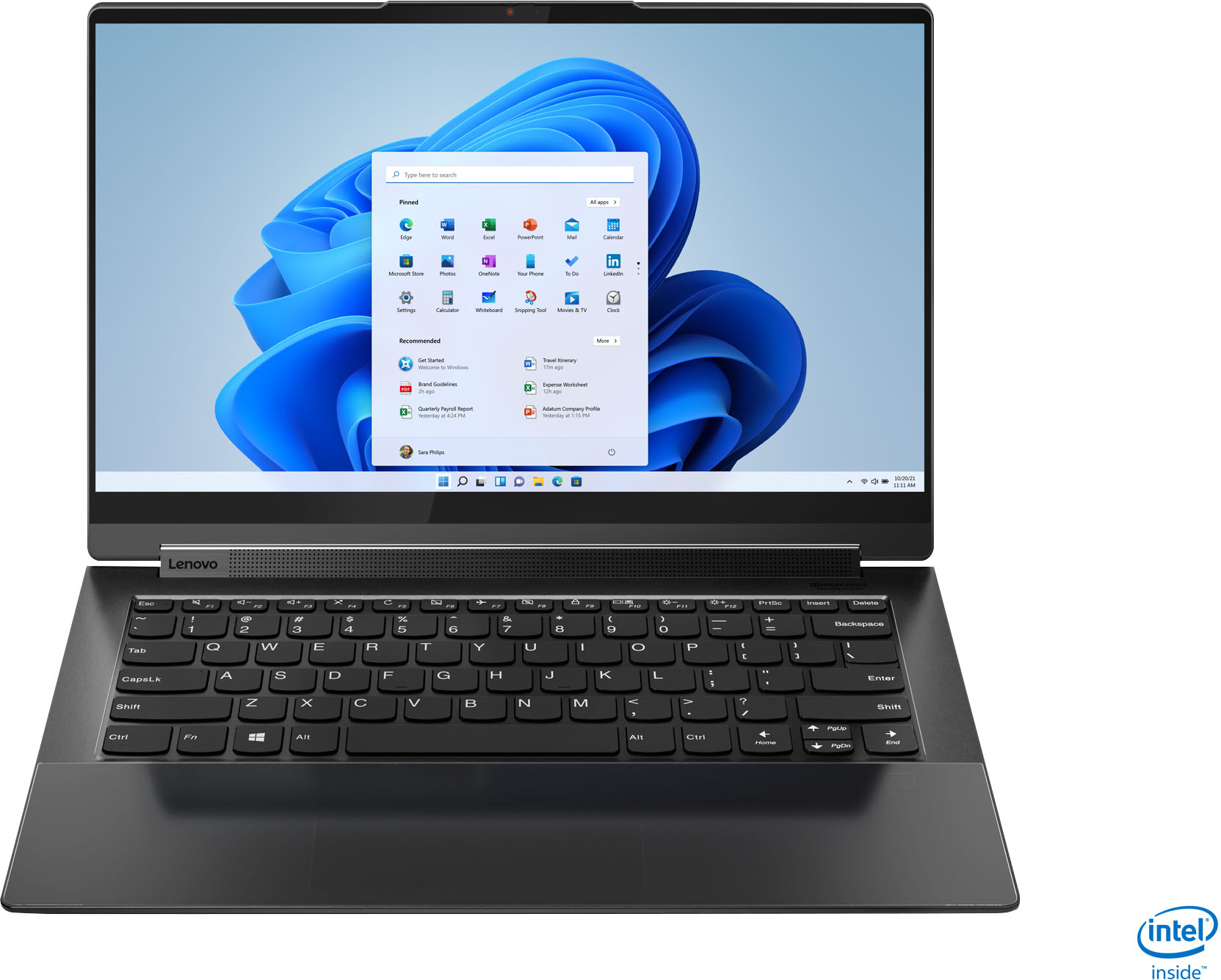
Customers value the Yoga 9i 14's stunning screen quality, impressive performance, and long battery life. Many appreciate its lightweight design and ease of use, making it ideal for portability. However, some users experienced issues with the trackpad and fingerprint reader, while others noted concerns about heat generation and the limited port selection. A few also mentioned challenges related to RAM capacity.
This summary was generated by AI based on customer reviews.
Totally stopped charging.
||Posted . Owned for 2 months when reviewed.This reviewer received promo considerations or sweepstakes entry for writing a review.Loved the sleek design & functionality. I was able to run two major design programs seamlessly and enjoyed the tablet feature while illustrating. Two months & a few days later, the device completely stopped charging in either port. I was still within the extended holiday return window and was able to get an exchange for a brand new one, thankfully. I lost some work that was saved on my local device, but thankfully had backed up the majority of my files to an external drive. Proceed with caution, back up your work, and get yourself the Geek Squad protection if you can. The computer itself is great but initially lasted less than 3 months. Hoping this second one isn’t a dud too.
No, I would not recommend this to a friendBrand response from Lenovo Product Expert
Posted .We are sorry to hear that you had issues charging your Lenovo Yoga 9i 15. You can always contact Lenovo Premium Care for support with issues you may encounter at: 888-278-9707.

- Pros mentioned:Processor speed, Weight
Impressive feature but subpar quality
||Posted . Owned for 1 month when reviewed.This reviewer received promo considerations or sweepstakes entry for writing a review.I have always been a fan of Lenovo laptops. My household only had Lenovo personal computing products, from Desktops to laptops. While this laptop has impressive features such as the fast processor, ssd hard disk and tons of RAM, and on top of that its light weight, i have been pretty disappointed at couple of items: the monitor keeps flickering and sometimes it just goes dark dead and only way to revive it is reboot the laptop. Could not find driver upgrade to fix it and even upgrading to Win 11 did not help. The other challenge i have is the lack of a physical distinctive feature between left mouse click and right mouse click. This is particularly important when you try to click, hold and drag.
No, I would not recommend this to a friendBrand response from Lenovo Product Expert
Posted .We are sorry to hear that you are having issues with your Intel Evo-Certified, Lenovo Yoga 9i 14. If you have already upgraded the laptop to Windows 11, check to be sure you have the latest version of Windows 11 on the computer. Then update all BIOS files and drivers up to that latest version of Windows 11. You can easily accomplish this by scanning the computer with the Lenovo Utility software available on this computer. This system has Lenovo utilities installed to help maintain the health of the device and keep the operating system software up to date. Type Lenovo Vantage in the Cortana Search window (if Lenovo Vantage is not installed on your device, you can download the APP and install it now). Select Lenovo Vantage from the list. In the window that opens, click on Health and Support. In the expanded menu, select Hardware Scan In the window that opens, select Run Quick Tests. This will scan your entire system for errors. Follow any directions that may pop up. If the problem continues after this scan, now click on System Update. First select Windows update from the menu. Scan your system to be sure you have the latest version of Windows 11. Once that scan is complete, select Additional Updates. This will scan your device to be sure there are no new BIOS/Driver updates needed. Follow any instructions that may pop up. If the issue still continues after these updates, we recommend you call Lenovo Premium Care for additional help at: 888-278-9707.
- Pros mentioned:Screen quality
Great laptop but not for gaming
||Posted . Owned for 3 weeks when reviewed.This reviewer received promo considerations or sweepstakes entry for writing a review.This is a great laptop that I got as a gift from my wife. It has an awesome screen and the sound is amazing. It says it can handle games but when I download games from the Microsoft store it has a hard time playing some of them. IF you have an Xbox though you can stream them to the laptop with no problem.
I would recommend this to a friendBrand response from Lenovo Product Expert
Posted .Thank you for choosing the Intel Evo-Certified, Lenovo Yoga 9i 14 model number 82BG0001US, for your wife. We always recommend you check the requirements and compatibility of any software/games you will be installing on your new computer, before you invest in any computer. Be sure your new computer can support the software/games you will need to use.
- Pros mentioned:Processor speedCons mentioned:Fingerprint reader
Excellent Laptop
||Posted . Owned for 1 week when reviewed.This reviewer received promo considerations or sweepstakes entry for writing a review.Tiger lake doesn't disappoint. The computer feels very snappy. My only complaint is that the fingerprint reader blends in and is hard to find unless the lighting in the room is right. I'll get used to it though.
I would recommend this to a friendBrand response from Lenovo Product Expert
Posted .Thank you for choosing the Intel Evo-Certified, Lenovo Yoga 9i 14. We are pleased to hear that the performance of the Yoga 9i 14 meets your computing needs so well.
- Pros mentioned:Screen quality
What I had hoped for,...
||Posted . Owned for 3 weeks when reviewed.This reviewer received promo considerations or sweepstakes entry for writing a review.So far, so good. This is my second Yoga system, and this latest version is working as solidly and reliably as my first. The reason it falls short of five stars is Lenovo not putting [at least] one lightning port on the right side. But, I am entirely satisfied with the system response and very impressed by the screen image quality.
I would recommend this to a friendBrand response from Lenovo Product Expert
Posted .Thank you for choosing the Intel Evo Certified Yoga 9i-14 model number 82BG0001US. The reason there are no ports on the right side of the Yoga 9i-14 is the internal space needed for the Lenovo Yoga Active Pen Garage on the right side on the device. This model does ship with the onboard Active Pen and these ports: 1x USB 3.2 Gen 2, 2x USB-C 3.2 Gen 2 / Thunderbolt 4 (support data transfer, Power Delivery 3.0, DisplayPort 1.4 and Always On), 1x headphone / microphone combo jack (3.5mm).
- Pros mentioned:Processor speed, Weight
Lenovo Yoga 9i rocks
||Posted . Owned for 1 week when reviewed.This reviewer received promo considerations or sweepstakes entry for writing a review.Lenovo Yoga 9i is super cool & leather finish makes it supreme. It is very compact, super light & sturdy. 11th Gen Core i7 proc is super fast & runs all the applications very smooth.
I would recommend this to a friendBrand response from Lenovo Product Expert
Posted .Thank you for choosing the Intel Evo-Certified, Lenovo Yoga 9i 14. We are pleased to hear that the features and performance of the Yoga 9i 14 meets your computing needs so well.
- Cons mentioned:Trackpad
Great purchase I got on Sale
||Posted . Owned for 1 week when reviewed.This reviewer received promo considerations or sweepstakes entry for writing a review.Its a fantastic machine. Precise and sleek, I love it, but 2 things that keep it from being a straight 5 start purchase is that when you flip it to tablet mode, the keyboard is exposed when you place it down, not sure how they would fix that but that's a minor downside, and the other downside is the trackpad isn't great, but it is decent.
I would recommend this to a friendBrand response from Lenovo Product Expert
Posted .Thank you for choosing the Intel Evo-Certified, Lenovo Yoga 9i 14. We are pleased to hear that the Yoga 9i 14 is working out so well for you. When you place the Yoga 9i 14 into tablet mode, the keyboard and touchpad automatically turn off so there is no chance of inadvertent entries being made as you hold the device in your hands. With regard to the touchpad, you can make adjustments to the touchpad in your system settings. You can get there by clicking on the magnifying glass at the bottom left of your Windows 10 screen. Type "touchpad" in the search window. Select "Mouse & touchpad settings" from the list of choices. You can make general adjustments to the touchpad there. You can also select "Additional mouse options" for more detailed adjustments to the touchpad sensitivity by increasing the delay of the touchpad.
- Cons mentioned:Fingerprint reader, Trackpad
Poorly integrated "high end" design features
||Posted . Owned for 1 month when reviewed.This reviewer received promo considerations or sweepstakes entry for writing a review.Loaded with high end hardware wrapped in a bad/unusable design the all glass surface is a terrible idea because there is no tactile feedback to locate the edge of the touchpad or fingerprint reader by feel as you slide your hand or finger on the surface. You have to visually try to see where it is, and that is hard in the dark too because the boundaries of these regions are very lightly marked. In an attempt to design in a high end feel they really rendered the device unusuable and sacrificed actual functionality in my opinion. Also, the fingerprint reader didn't work most of the time, even though the ultrasound tech is supposed to make it more robust. Returned to store. Very unimpressed.
No, I would not recommend this to a friendBrand response from Lenovo Product Expert
Posted .The Yoga 9i 14 model number 82BG0001US, Introduces the Intel Evo platform for the perfect combination of performance, responsiveness, battery life and stunning visuals in a new class of sleek, stylish laptops. Co-engineered by Lenovo and Intel to provide the ultimate experience for life and work anywhere, the Yoga 9i 14 offers remarkable responsiveness, lightning-fast Gigabit speeds with Intel WiFi 6, and two Thunderbolt 4 ports connecting to power and accessories with a single cable. There is a Smart Sensor Touchpad Embedded under Edge-to-Edge Glass, an Ultrasonic FPR Embedded under Edge-to-Edge Glass and a genuine leather cover.
- Pros mentioned:Processor speedCons mentioned:Heat
Smart and Fast
||Posted . Owned for 1 month when reviewed.This reviewer received promo considerations or sweepstakes entry for writing a review.This computer is smart and fast. Made me wonder why I waited so long to purchase it. The packaging is beautiful. It does get hot, though. That's my only negative comment.
I would recommend this to a friendBrand response from Lenovo Product Expert
Posted .Thank you for choosing the Intel Evo-Certified, Lenovo Yoga 9i 14, model number 82BG0001US. It is normal for the Yoga 9i 14 to feel warm to the touch when under heavy workloads and when the computer is plugged in and charging. You can use Lenovo Q-Control to manually control fan and system performance: ( Fn + Q ) option to change the fan by undervolting the processor. If the issue continues, we recommend you call Lenovo Premium Care at: 888-278-9707.
Lenovo Yoga 9i
||Posted . Owned for 1.5 years when reviewed.This reviewer received promo considerations or sweepstakes entry for writing a review.Excellent Laptop for professional use. Nice handling for office and personal use. I am using since 1 year back. Till now it works as a new one. You will definitely love this product.
I would recommend this to a friend- Cons mentioned:Trackpad
Track pad is a deal-breaker.
||Posted . Owned for 1 month when reviewed.This reviewer received promo considerations or sweepstakes entry for writing a review.The track pad is insufferable. I'm not getting used to it. If I hadn't missed the return deadline by a few days, I would've sent it back. I will never guess what these folks were thinking with this pad design. I have it on lowest sensitivity and it's still WAY to reactive. It has no visual or tactile separation for the pad edges. The end result is selecting a ton of stuff you don't want to and lots of wrong r-clicks. Anger. (in the space of writing this review, I've selected 6 blocks of stuff I didn't intend to) The hardware and perf are solid. Love the leather top. The vertical screen space feels a little cramped. The battery is not great -- need to charge it often. The machine runs hot on basic tasks like browsing and youtube. I bought this to replace an old Surface Notebook 2. Man, I miss that thing.
No, I would not recommend this to a friendBrand response from Lenovo Product Expert
Posted .The Intel Evo-Certified, Lenovo Yoga 9i 14 model number 82BG0001US, ships with the Buttonless glass surface multi-touch touchpad, which supports Precision TouchPad (PTP). Here is a link to a video explaining the features and function of a Precision Touchpad: https://support.lenovo.com/us/en/solutions/vid500008-precision-touchpad-settings-in-windows-10-thinkpad-ideapad. The Evo-Certified Yoga 9i 14 ships with All-Day-Battery-Life, thanks to its Integrated 60Wh, Lithium-Polymer Battery, which within this configuration, has a battery life of up to 10 hours, depending on the work the device is performing. If you are getting substantially less battery life, first, set your screen brightness at less than 100-percent - try 80-percent to start with. Then, be sure Battery conservation Mode is turned off. This power management setting should only be used when the laptop is plugged in all the time. It will prolong overall battery life by only charging the battery to 60-percent of capacity. Here is a link to instructions for turning off Battery Conservation Mode: https://support.lenovo.com/us/en/solutions/ht103159. Also check what programs are running in the background on the computer. Be sure only the programs you want running in the background are. These programs will drain the battery. Here is a link to information about how to find out what programs are running in the background on your Windows 10 computer and how to manage them for better system performance: https://www.windowscentral.com/how-prevent-apps-running-background-windows-10. Then, finally, be sure any software you installed is compatible with Windows 10. Incompatible software will drain the battery at a faster rate. There is no need to install Microsoft Office software. The software is already part of the operating system, you just need to activate the software with a purchased product key. If you have installed a copy of Microsoft Office, this is conflicting with the existing copy on the system and this will slow your system down. If you have installed a 3rd party anti-virus program, be sure that Windows Defender is turned off and that the trial version of McAfee Anti-Virus software is uninstalled. There can only be one anti-virus program on the system. You may need to restore your system to original factory default settings if any of the programming errors have occurred. You can do that by typing "restore" in the Cortana search window. Just click on the magnifying glass icon at the bottom left of your Windows 10 Desktop. Click on "Reset This PC" Then click on "Get Started" and follow the on screen directions to restore to factory defaults. If the problem persists, we recommend you contact Lenovo Premium Care at: 888-278-9707.
- Pros mentioned:WeightCons mentioned:Trackpad
“Sale” computer
||Posted . Owned for 3 weeks when reviewed.This reviewer received promo considerations or sweepstakes entry for writing a review.Screen display is very nice. Low profile and lightweight but sturdy. The speed is slower than expected and the mouse pad is terrible. Very rigid and temperamental.
No, I would not recommend this to a friendBrand response from Lenovo Product Expert
Posted .We are sorry to hear that you are having issues with your Intel Evo-Certified, Lenovo Yoga 9i 14 model number 82BG0001US. This is a fast configuration computer - A measure of performance is the time to boot to the Windows Desktop Screen - This Yoga 9i 14 will boot from off to the Windows Desktop Screen in less than 10-seconds. If you are getting slower boot times and generally slower system performance, be sure any software you installed is compatible with Windows 11. There is no need to install Microsoft Office software. The software is already part of the operating system, you just need to activate the software with a purchased product key. If you have installed a copy of Microsoft Office, this is conflicting with the existing copy on the system and this will slow your system down. If you have installed a 3rd party anti-virus program, be sure that Windows Defender is turned off and that the trial version of McAfee Anti-Virus software is uninstalled. There can only be one anti-virus program on the system. You may need to restore your system to original factory default settings if any of the programming errors have occurred. You can do that by typing "restore" in the Cortana search window. Just click on the magnifying glass icon at the bottom left of your Windows 11 Desktop. Click on "Reset This PC" Then click on "Get Started" and follow the on screen directions to restore to factory defaults. If there is no incompatible software installed but the issues persist, check to be sure you have the latest version of Windows 11 on the computer. Then update all BIOS files and drivers up to that latest version of Windows 11. You can easily accomplish this by scanning the computer with the Lenovo Utility software available on this computer. This system has Lenovo utilities installed to help maintain the health of the device and keep the operating system software up to date. Type "Lenovo Vantage" in the Cortana Search window (if Lenovo Vantage is not installed on your device, you can download the APP and install it now). Select Lenovo Vantage from the list. In the window that opens, click on "Health and Support". In the expanded menu, select "Hardware Scan" In the window that opens, select "Run Quick Tests". This will scan your entire system for errors. Follow any directions that may pop up. If the problem continues after this scan, now click on "System Update". First select Windows update from the menu. Scan your system to be sure you have the latest version of Windows 11. Once that scan is complete, select "Additional Updates". This will scan your device to be sure there are no new BIOS/Driver updates needed. Follow any instructions that may pop up. This Yoga 9i 14 ships with a buttonless glass surface multi-touch touchpad, supports Precision TouchPad (PTP). Here is a link to a video that demonstrates the features and adjustments that can be made to this Precision TouchPad for optimum user comfort and functionality, the video was made with Windows 10, but the settings and functions are the same within Windows 11: https://www.youtube.com/watch?v=vKT_lfudIqU. If you have additional questions or the issues continue, we recommend you contact Lenovo Premium Support for additional help at: 888-278-9707.
- Pros mentioned:Screen qualityCons mentioned:Trackpad
Subpar at Best
||Posted . Owned for 1 week when reviewed.This reviewer received promo considerations or sweepstakes entry for writing a review.Again, most of the reviews are true for me. Spent 6 hours getting it to update and also working on the trackpad. Would work for a bit, then would not. I wondered why it was discounted $ 500 bucks if it did not have issues. Screen is second to none. Beautiful build. Feels like a premium laptop. Fast when it worked. Excellent speakers. I finely got frustrated with it and returned it. I would look for another option
No, I would not recommend this to a friendBrand response from Lenovo Product Expert
Posted .We are sorry to hear that you had issues with your Intel Evo-Certified, Lenovo Yoga 9i 14 model number 82BG0001US. We recommend you contact Lenovo Premium Care for help with the issues you are having with your Yoga 9i 14 at: 888-278-9707.
- Cons mentioned:Trackpad
Really cool unit
||Posted . Owned for 1 year when reviewed.This reviewer received promo considerations or sweepstakes entry for writing a review.Great laptop as an open box item.. sleek design with nice leather feel lid. Touchpad is a little weird and jumpy, but otherwise is a great laptop
I would recommend this to a friendBrand response from Lenovo Product Expert
Posted .Thank you for choosing the Lenovo Yoga 9i 14 2-in-1 14 4K HDR Touch-Screen Laptop with Intel Evo Core i7. We are very happy to see that the specifications, features, and performance of the Lenovo Yoga 9i 14 2-in-1 14 4K Laptop with Intel Evo Core i7 meet your computing needs so well.
- Pros mentioned:Battery life, Screen quality
But it.
||Posted . Owned for 1 week when reviewed.This reviewer received promo considerations or sweepstakes entry for writing a review.Iv owned every generation of Yoga and this one is a great upgrade. Battery life is great, the screen is better than the competition.
I would recommend this to a friendBrand response from Lenovo Product Expert
Posted .Hi there! Thank you for choosing the Lenovo Yoga 9i. We are so happy to hear the amazing performance, features, premium look, and feel of the Yoga 9i is meeting your computing needs so well.
- Pros mentioned:PerformanceCons mentioned:Fingerprint reader
Yoga 9i
||Posted . Owned for 1 week when reviewed.This reviewer received promo considerations or sweepstakes entry for writing a review.Great value for the price. Performance is excellent and audio is the best. Only negative thing is the fingerprint, every time you use the fingerprint is all over
I would recommend this to a friendBrand response from Lenovo Product Expert
Posted .Thank you for choosing the Intel Evo-Certified, lenovo Yoga 9i 14. We are pleased to hear that the value, features and performance of the Yoga 9i 14 meets your computing needs so well. Here's a tip for making your fingerprint reader work every time: Try lightly sliding your finger over the fingerprint reader. No need to press hard on the reader, in fact pressing hard on the fingerprint reader will distort your fingerprint and cause read errors.
- Pros mentioned:Weight
Superb laptop for work and business
||Posted . Owned for 3 months when reviewed.This reviewer received promo considerations or sweepstakes entry for writing a review.Powerful CPU and RAM spec can run any work task fast. Can even play light games. Great design, very thin and light, and I love the leather cover.
I would recommend this to a friendBrand response from Lenovo Product Expert
Posted .Thank you for choosing the Lenovo Yoga 9i 2-in-1 4K 14in. Touch Screen Laptop with Intel Evo Core i7. We are very pleased to hear that the specifications, features, and performance of the Lenovo Yoga 9i 2-in-1 4K 14in. Touch Screen Laptop with Intel Evo Core i7 meet your computing needs so well.
Good
||Posted . Owned for 1 year when reviewed.This reviewer received promo considerations or sweepstakes entry for writing a review.Good product Good product Good product Good product
I would recommend this to a friendGreat Product
||Posted . Owned for more than 2 years when reviewed.This reviewer received promo considerations or sweepstakes entry for writing a review.This is a great product for the cost. I used it for school and have been able to use it in transition for business.
I would recommend this to a friend- Cons mentioned:Heat
Premium laptop
||Posted . Owned for 7 months when reviewed.This reviewer received promo considerations or sweepstakes entry for writing a review.This is a great laptop doesn’t get hot, slim and premium feel with the leather cover. I primarily use it for travel and WFH
I would recommend this to a friend