Customer Ratings & Reviews



- Model:
- 81TC000JUS
- SKU:
- 6367805
Rating by feature
- Battery Life
Rating 4.3 out of 5 stars
- Speed
Rating 4.4 out of 5 stars
- Display
Rating 4.5 out of 5 stars
Customers are saying
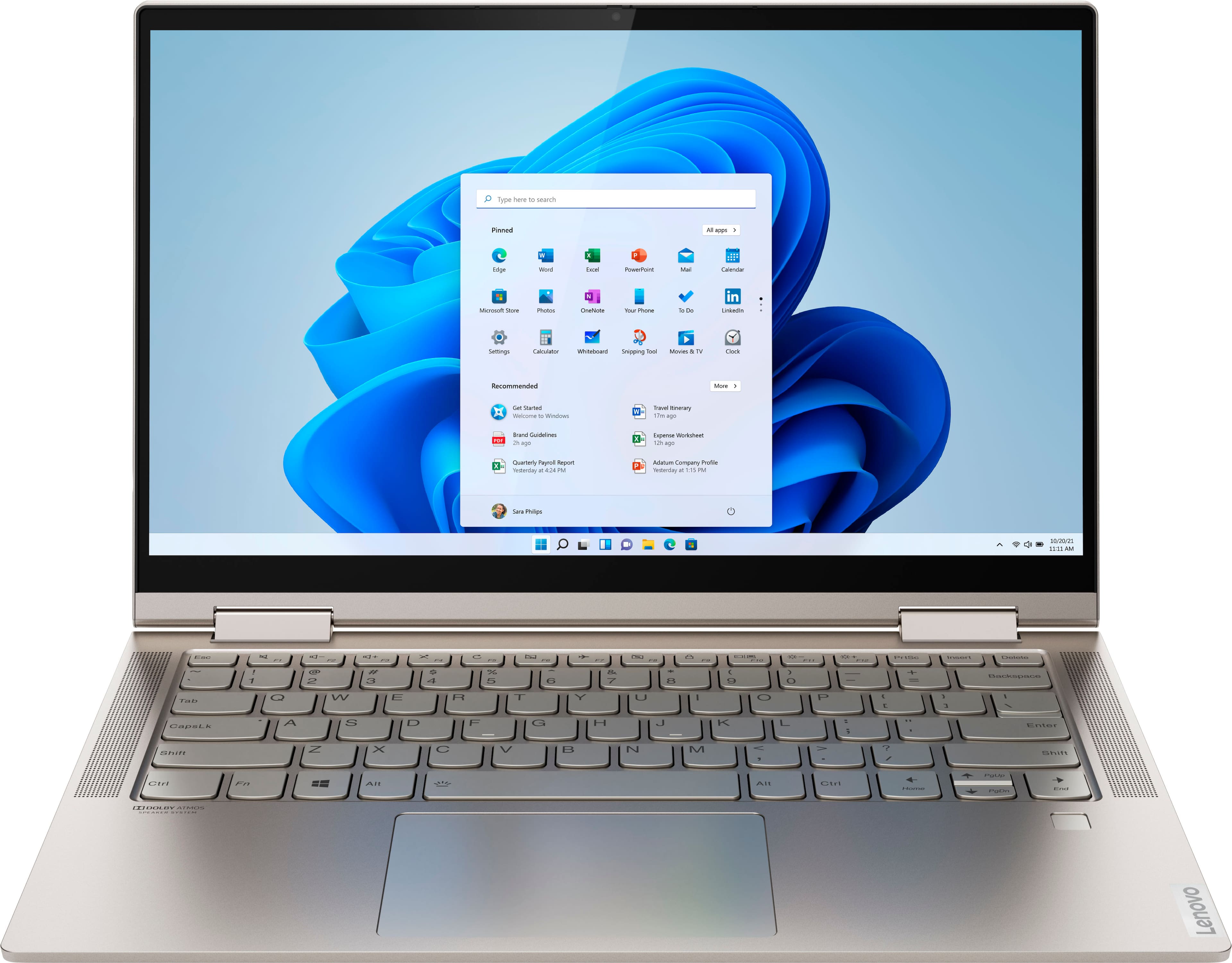
Customers admire the Yoga C740 2-in-1 laptop for its touchscreen capabilities, describing it as convenient and easy to use. They also appreciate its fast performance, light weight, and affordable price. While some users have concerns about the limited number of ports, fan noise, camera quality, overheating, and Wi-Fi connectivity, the overall positive feedback suggests that the Yoga C740 is a well-received product.
This summary was generated by AI based on customer reviews.
- Pros mentioned:Fast
Works Great!
||Posted . Owned for 10 months when reviewed.This reviewer received promo considerations or sweepstakes entry for writing a review.Works perfect for what I need it for! I'm a college student and the size is perfect for carrying on campus. Super fast and stores lots of assignments.
I would recommend this to a friend - Pros mentioned:Fast
Great for Note taking and on the go
||Posted . Owned for 2 weeks when reviewed.This reviewer received promo considerations or sweepstakes entry for writing a review.Really like this laptop. Got it primarily for note taking for work and my wife loves it. It's fast and light as well. The black friday price was such a deal
I would recommend this to a friend - Pros mentioned:Fast
Awesome laptop!
||Posted . Owned for 3 weeks when reviewed.This reviewer received promo considerations or sweepstakes entry for writing a review.I LOVE this laptop!! Super lightweight and compact! It has met or exceeded all my needs thus far!! Love the backlit keyboard for nighttime use! The speed is exceptional. Perfect for me!
I would recommend this to a friend - Pros mentioned:Fast
Good Laptop
||Posted . Owned for 3 weeks when reviewed.This reviewer received promo considerations or sweepstakes entry for writing a review.I really like the look of this laptop and it is superfast. Unfortunately was not appropiate for working at home, did not fulfill the requirements. Now I am thinking in buying this again.
I would recommend this to a friendBrand response from Lenovo Product Expert
Posted .Hey there! Thanks for choosing the Lenovo Yoga C740 Laptop. We are pleased to hear the value, performance, and features of the C740 meet your needs so well. We are sorry you weren't able to use it to work from home. We appreciate your loyalty to the Lenovo brand in considering using the Yoga C740 for personal use =)

Works great!
||Posted . Owned for 1 year when reviewed.This reviewer received promo considerations or sweepstakes entry for writing a review.Works great. Had to buy an aftermarket Wifi USB to get Wifi, but it was easier than getting a repair. Since everything else works so well, we didn’t want to go without it.
I would recommend this to a friend- Pros mentioned:Fast
Good laptop
||Posted . Owned for 11 months when reviewed.This reviewer received promo considerations or sweepstakes entry for writing a review.So far so good. I have my laptop for over a year now and still works great. Still fast, also I save a lot of stuff because I’m a crafter and still have storage. Love it!
I would recommend this to a friend - Pros mentioned:Light weight
Great product
||Posted . Owned for 2 weeks when reviewed.This reviewer received promo considerations or sweepstakes entry for writing a review.Great pc boots extremely fast. Very light and usable. USB c charging great because I dont always bring the charger cable it's useful to be able to charge with a usb cable even if it is slower.
I would recommend this to a friendBrand response from Lenovo Product Expert
Posted .Thank you for choosing the Lenovo Yoga C740-14. Combining heavyweight performance with lightweight portability, the Yoga C740-14 10th Gen Intel Core i5 processor enables longer battery life, high-speed connectivity and ultra-responsive multi-tasking performance in a sleek package. Featuring the vibrant color and clarity of a high-resolution display with narrow borders on all sides, the Yoga C740 offers a powerful entertainment experience on the go. To match the stunning visuals, the C740’s user-facing Dolby Atmos speaker system creates an unmatched audio experience in which sound flows above and around you. Featuring sandblasted premium aluminum, this 2-in-1 convertible laptop is all about the details—a color-matched keyboard, subtly rounded edges for comfortable holding, and smoother transitions when you flip from laptop mode into tablet and back. Work and play in style. Yoga is committed to protecting your privacy. Log in with your fingerprint; or slide the Yoga C740’s TrueBlock Privacy Shutter closed for true peace of mind when you’re not using the webcam.
- Pros mentioned:Touch screen
I have earlier modelk and got wife latest version!
||Posted . Owned for 3 weeks when reviewed.This reviewer received promo considerations or sweepstakes entry for writing a review.This laptop is a real step up for her as she was still using old Dell Satelite. She likes teh touch screen and ease of use...still getting used to newer formats (she was on Windows 7 before).
I would recommend this to a friendBrand response from Lenovo Product Expert
Posted .Once again, thank you for choosing the Lenovo Yoga C740-14 for your wife. This computer can continue running at its best by keeping the Windows 10 Operating System and all supporting BIOS files and drivers up to date. You can easily accomplish this by scanning the computer with the Lenovo Utility software available on this computer. Just type "Lenovo Vantage" in the Cortana Search window (if Lenovo Vantage is not installed on your device, you can download the APP and install it now). Select Lenovo Vantage from the list. In the window that opens, click on "Health and Support". In the expanded menu, select "Hardware Scan" In the window that opens, select "Run Quick Tests". This will scan your entire system for errors. Follow any directions that may pop up. If the problem continues after this scan, now click on "System Update". First select Windows update from the menu. Scan your system to be sure you have the latest version of Windows 10. Once that scan is complete, select "Additional Updates". This will scan your device to be sure there are no new BIOS/Driver updates needed. Follow any instructions that may pop up. If you ever need additional help with your Lenovo computer, we recommend you call Lenovo Tech Support at: 877-453-6686 for additional help.
- Cons mentioned:Fan noise
It covers all your bases
||Posted . Owned for 1 month when reviewed.This reviewer received promo considerations or sweepstakes entry for writing a review.The computer runs smoothly and without issue. The computer is able to run basic games with no lag issues and it doesnt overheat. However it does get a tad bit loud.
I would recommend this to a friendBrand response from Lenovo Product Expert
Posted .Thank you for choosing the lenovo Yoga C740-14. You can use Lenovo Q-Control to manually control fan performance: ( Fn + Q ) option to change the fan by undervolting the processor. If the issue continues, we recommend you call Lenovo Tech Support at: 877-453-6686.
- Pros mentioned:Touch screen
Excellent Laptop
||Posted . Owned for 3 weeks when reviewed.This reviewer received promo considerations or sweepstakes entry for writing a review.Purchased this and is an excellent choice for a laptop. Very clear picture , nice colors . Like the flip feature with the rotating screen . Would recommend. The LED keyboard is nice feature.
I would recommend this to a friendBrand response from Lenovo Product Expert
Posted .Once again, thank you for choosing the Lenovo Yoga C740-14. You can keep your computer running at its best by keeping the Windows 10 Operating System and all supporting BIOS files and drivers up to date. You can easily accomplish this by scanning the computer with the Lenovo Utility software available on this computer. Just type "Lenovo Vantage" in the Cortana Search window (if Lenovo Vantage is not installed on your device, you can download the APP and install it now). Select Lenovo Vantage from the list. In the window that opens, click on "Health and Support". In the expanded menu, select "Hardware Scan" In the window that opens, select "Run Quick Tests". This will scan your entire system for errors. Follow any directions that may pop up. If the problem continues after this scan, now click on "System Update". First select Windows update from the menu. Scan your system to be sure you have the latest version of Windows 10. Once that scan is complete, select "Additional Updates". This will scan your device to be sure there are no new BIOS/Driver updates needed. Follow any instructions that may pop up. If you ever need additional help with your Lenovo computer, we recommend you call Lenovo Tech Support at: 877-453-6686 for additional help.
- Pros mentioned:Battery life
Lenovo Laptop
||Posted . Owned for 3 weeks when reviewed.This reviewer received promo considerations or sweepstakes entry for writing a review.Great laptop at an affordable price. Runs quick and has great battery life. I'm also a fan of the fingerprint scanner to login as well as the tablet mode when you flip the screen over.
I would recommend this to a friend - Pros mentioned:Fast
Good Product
||Posted . Owned for 3 weeks when reviewed.This reviewer received promo considerations or sweepstakes entry for writing a review.Not really a computer guy, but it was easy to set-up and get running. Starts quickly with no hesitation or loading. Good for some that want a middle of the road laptop.
I would recommend this to a friendBrand response from Lenovo Product Expert
Posted .Combining heavyweight performance with lightweight portability, the Yoga C740-14 10th Gen Intel Core i5 processor enables longer battery life, high-speed connectivity and ultra-responsive multi-tasking performance in a sleek package. Featuring the vibrant color and clarity of a high-resolution display with narrow borders on all sides, the Yoga C740 offers a powerful entertainment experience on the go. To match the stunning visuals, the C740’s user-facing Dolby Atmos speaker system creates an unmatched audio experience in which sound flows above and around you. Featuring sandblasted premium aluminum, this 2-in-1 convertible laptop is all about the details—a color-matched keyboard, subtly rounded edges for comfortable holding, and smoother transitions when you flip from laptop mode into tablet and back. Work and play in style. Yoga is committed to protecting your privacy. Log in with your fingerprint; or slide the Yoga C740’s TrueBlock Privacy Shutter closed for true peace of mind when you’re not using the webcam.
- Pros mentioned:Price
Great laptop for the price
||Posted . Owned for 1 month when reviewed.This reviewer received promo considerations or sweepstakes entry for writing a review.I enjoy my Lenovo Yoga. Decently priced, I am a college student and this totally meets those needs. It does get hot when used for a long time and when charging.
I would recommend this to a friendBrand response from Lenovo Product Expert
Posted .Thank you for choosing the lenovo Yoga C740-14. It is normal for the Yoga C740-14 to feel warm to the touch when under heavy workloads and when the device is charging. You can use Lenovo Q-Control to manually control fan and system performance: ( Fn + Q ) option to change the fan by undervolting the processor. If the issue continues, we recommend you call Lenovo Tech Support at: 877-453-6686.
- Pros mentioned:Touch screen
The touch screen is responsive!
||Posted . Owned for 1 month when reviewed.This reviewer received promo considerations or sweepstakes entry for writing a review.I like the touchscreen feature which is exactly why i bought it. Overall not a super speedy computer but not slow by any means. Great for every day use and work.
I would recommend this to a friendBrand response from Lenovo Product Expert
Posted .The Lenovo Yoga C740-14 ships with the 10th. Generation, 4-Core/8-Thread Intel Core i5-10210U processor, with a base speed of 1.6GHz and a Turbo Boost Speed of up to 4.2GHz. This processor is supported by 8GB DDR4-2666MHz RAM and a 256GB NVMe TLC solid state hard drive. This configuration can handle many of today's most demanding programs. If you are experiencing slower than expected performance, be sure any software you installed is compatible with Windows 10. There is no need to install Microsoft Office software. The software is already part of the operating system, you just need to activate the software with a purchased product key. If you have installed a copy of Microsoft Office, this is conflicting with the existing copy on the system and this will slow your system down. If you have installed a 3rd party anti-virus program, be sure that Windows Defender is turned off and that the trial version of McAfee Anti-Virus software is uninstalled. There can only be one anti-virus program on the system. You may need to restore your system to original factory default settings if any of the programming errors have occurred. You can do that by typing "restore" in the Cortana search window. Just click on the magnifying glass icon at the bottom left of your Windows 10 Desktop. Click on "Reset This PC" Then click on "Get Started" and follow the on screen directions to restore to factory defaults. If the problem persists, we recommend you contact Lenovo Tech Support at: 877-453-6686.
- Pros mentioned:Fast
Perfect
||Posted . Owned for 3 weeks when reviewed.This reviewer received promo considerations or sweepstakes entry for writing a review.Great laptop and perfect size. Super lightweight and fast too. I bought it for my mom as a gift and she loves it. We have one of the other Yoga laptops and have loved it for 2 years!
I would recommend this to a friend - Pros mentioned:Battery life
Lap top tablet combos.
||Posted . Owned for 1 month when reviewed.This reviewer received promo considerations or sweepstakes entry for writing a review.I'm not use to my hands touching the touch pad and moving my cursor. After getting some major software in all has been fine. Battery life has been great.
I would recommend this to a friend - Cons mentioned:Fan noise
Great Computer
||Posted . Owned for 4 months when reviewed.This reviewer received promo considerations or sweepstakes entry for writing a review.Bought this computer for college online learning. Great computer!! The only downfall is the fan can be loud from time to time. Other then that no complaints.
I would recommend this to a friendBrand response from Lenovo Product Expert
Posted .Thank you for choosing the Lenovo Yoga C740-14. You can use Lenovo Q-Control to manually control fan performance: ( Fn + Q ) option to change the fan. If the issue continues, we recommend you call Lenovo Tech Support at: 877-453-6686.
Good Value
||Posted . Owned for 2 weeks when reviewed.This reviewer received promo considerations or sweepstakes entry for writing a review.I purchased my first Lenovo laptop (Ideapad) about a year ago and have been very happy with it. So when it came time to purchase a new laptop for our daughter, Lenovo was the brand I was looking for. The Yoga C740 is lightweight and pretty fast. The only "knock" on it is that the lid can be a little cumbersome/difficult to open. I know the hinges have to be tight, since it is a 2-in-1. Maybe put a little indentation in the lid and base so you can pry it open easier? Just a suggestion. Other than that, I think it's a good laptop for the price and I would recommend it to a friend.
I would recommend this to a friendBrand response from Lenovo Product Expert
Posted .Thank you for choosing the Lenovo Yoga C740-14 for your daughter. It is very easy to open the Yoga C740-14 lid, just place the computer on a flat surface, hold the the computer with one hand and simply slide the thumb of your other hand up the front of the lid to easily raise the lid.
- Pros mentioned:Price
Top Tier Computer
||Posted . Owned for 3 weeks when reviewed.This reviewer received promo considerations or sweepstakes entry for writing a review.Works perfectly! 10/10! The computer works perfectly. I love the fingerprint scanner, tablet mode, and the keyboard. It is so fast and for its price, one of the best on the market.
I would recommend this to a friend - Pros mentioned:Light weight
Good household laptop
||Posted . Owned for 1 month when reviewed.This reviewer received promo considerations or sweepstakes entry for writing a review.I was not looking for anything flashy. Not a gamer. Just email and Office. This has exactly what I need. Easy to set up. Light weight and slim. So far so good.
I would recommend this to a friendBrand response from Lenovo Product Expert
Posted .Thank you for choosing the Lenovo Yoga C740-14. Combining heavyweight performance with lightweight portability, the Yoga C740-14 10th Gen Intel Core i5 processor enables longer battery life, high-speed connectivity and ultra-responsive multi-tasking performance in a sleek package. Featuring the vibrant color and clarity of a high-resolution display with narrow borders on all sides, the Yoga C740 offers a powerful entertainment experience on the go. To match the stunning visuals, the C740’s user-facing Dolby Atmos speaker system creates an unmatched audio experience in which sound flows above and around you. Featuring sandblasted premium aluminum, this 2-in-1 convertible laptop is all about the details—a color-matched keyboard, subtly rounded edges for comfortable holding, and smoother transitions when you flip from laptop mode into tablet and back. Work and play in style. Yoga is committed to protecting your privacy. Log in with your fingerprint; or slide the Yoga C740’s TrueBlock Privacy Shutter closed for true peace of mind when you’re not using the webcam.