Customer Ratings & Reviews
- Model:
- 81C4000SUS
- SKU:
- 6301728
Rating by feature
- Battery Life
Rating 3.2 out of 5 stars
- Speed
Rating 3.8 out of 5 stars
- Display
Rating 4.3 out of 5 stars
Customers are saying
Customers frequently mention the Yoga C930's fast performance, lightweight design, and long battery life as positive aspects. The touch screen, speakers, and sound quality are also highly praised. On the downside, some customers express concerns about the laptop's limited number of ports, small storage capacity, and sharp edges.
This summary was generated by AI based on customer reviews.
Great laptop
||Posted .This reviewer received promo considerations or sweepstakes entry for writing a review.This is a great laptop at a great price, it is well worth the money
I would recommend this to a friendBrand response from Lenovo Product Expert
Posted .Thank you for choosing the Lenovo Yoga C930-14. Working hand-in-hand with Dolby, we created the word's first speakers that fit into a convertible hinge via a rotating sound bar, delivering powerful immersive sound in every mode. The Yoga C930's Rotating Sound Bar with Dolby Atmos Speaker System is truly revolutionary, as the audio sound will be just as amazing whatever mode you're in: tent, stand, tablet, or laptop. Dolby Atmos delivers breathtaking, three-dimensional audio that flows above and around you with depth and precision. Combining two sets of speakers - featuring powerful down-firing woofers, custom tweeters, and unique vibration buffers that reduce unwanted noise - your audio will sound bigger, deeper, and more accurate. It’s sound you can feel. Combine display clarity with the ultra vivid imaging of Dolby Vision. Experience brighter brights, darker blacks, and colors never before seen on standard displays—the true red of an English double-decker bus, or the sharp blue of a summer sky. By shifting components, we were able to edge the screen with razor-thin 4.95 mm vertical bezels that will make the absolute most of your visuals. For 2018, Lenovo retained its place for a second year as the best laptop vendor:
https://www.laptopmag.com/articles/laptop-brand-ratings
Acceptable and easy to handle.
||Posted .This reviewer received promo considerations or sweepstakes entry for writing a review.Seems to have a bit of a slow response for an 8th generation machine.
I would recommend this to a friendBrand response from Lenovo Product Expert
Posted .The Lenovo Yoga C930-14 ships with the powerful Quad-Core/Eight-Thread Intel Core i7-8550U processor, supported by 12GB DDR4-2400MHz RAM and a 256GB solid state hard drive. This configuration is blazing fast. Be sure any software you installed is compatible with Windows 10. There is no need to install Microsoft Office software. The software is already part of the operating system, you just need to activate the software with a purchased product key. If you have installed a copy of Microsoft Office, this is conflicting with the existing copy on the system and this will slow your system down. If you have installed a 3rd party anti-virus program, be sure that Windows Defender is turned off and that the trial version of McAfee Anti-Virus software is uninstalled. There can only be one anti-virus program on the system. You may need to restore your system to original factory default settings if any of the programing errors have occurred. You can do that by typing "restore" in the Cortana search window. Just click on the magnifying glass icon at the bottom left of your Windows 10 Desktop. Click on "Reset This PC" Then click on "Get Started" and follow the on screen directions to restore to factory defaults. If there are no incompatible programs installed on the computer, be sure you have the latest version of Windows 10 on the computer and that there are no pending updates waiting to be installed. Also, check to be sure all of the BIOS files and drivers supporting the Windows 10 operating system are up to date. You can easily check this by scanning the computer with the Lenovo Utility software installed on the computer. This system has Lenovo utilities installed to help maintain the health of the device and keep the operating system software up to date. Type "Lenovo Vantage" in the Cortana Search window (if Lenovo Vantage is not installed on your device, you can download the APP and install it now). Select Lenovo Vantage from the list. In the window that opens, click on "Health and Support". In the expanded menu, select "Hardware Scan" In the window that opens, select "Run Quick Tests". This will scan your entire system for errors. Follow any directions that may pop up. If the problem continues after this scan, now click on "System Update". First select Windows update from the menu. Scan your system to be sure you have the latest version of Windows 10. Once that scan is complete, select "Additional Updates". This will scan your device to be sure there are no new BIOS/Driver updates needed. Follow any instructions that may pop up. If the issue still continues after these updates, we recommend you call Lenovo Tech Support at: 877-453-6686 for additional help. For 2018, Lenovo retained its place for a second year as the best laptop vendor:
https://www.laptopmag.com/articles/laptop-brand-ratings
Great
||Posted . Owned for 1.5 years when reviewed.This reviewer received promo considerations or sweepstakes entry for writing a review.A year old and it’s done everything I wanted it to do
I would recommend this to a friendmotherboard dead after 2years
||Posted . Owned for 1 year when reviewed.This reviewer received promo considerations or sweepstakes entry for writing a review.I had the Lenovo Yoga C930 since 2019 and about 1 month ago after an update it started to dysfunctions, until it was no longer charging and no longer turning on. I brought the laptop to a repair store who said the motherboard who was no longer working. He is a specialist in repairing the motherboard and was hopeful until he explained it was not repairable. Also I am no longer able to access my data because bitlocker as been activated (i don't know how and not from me) and could not found the key recovery (not even in my Microsoft account). really loved the laptop but very disappointed by the brand especially after just 2 yrs.
No, I would not recommend this to a friendGood value
||Posted . Owned for 1 month when reviewed.This reviewer received promo considerations or sweepstakes entry for writing a review.Good value. Purchased for office use and is more than adequate.
I would recommend this to a friendBrand response from Lenovo Product Expert
Posted .The Lenovo Yoga C930-14 is designed to be equally stylish in every position, the Yoga C930 is crafted from premium aluminum with high-precision drills and polished twice for a luxurious feel. Not only will you have a sleek looking 2-in-1 laptop, you’ll also have a marvelous feat in engineering. Working hand-in-hand with Dolby, we created the word's first speakers that fit into a convertible hinge via a rotating sound bar, delivering powerful immersive sound in every mode. The Yoga C930's Rotating Sound Bar with Dolby Atmos Speaker System is truly revolutionary, as the audio sound will be just as amazing whatever mode you're in: tent, stand, tablet, or laptop. Dolby Atmos delivers breathtaking, three-dimensional audio that flows above and around you with depth and precision. Combining two sets of speakers - featuring powerful down-firing woofers, custom tweeters, and unique vibration buffers that reduce unwanted noise - your audio will sound bigger, deeper, and more accurate. It’s sound you can feel. Combine display clarity with the ultra vivid imaging of Dolby Vision. Experience brighter brights, darker blacks, and colors never before seen on standard displays—the true red of an English double-decker bus, or the sharp blue of a summer sky. By shifting components, we were able to edge the screen with razor-thin 4.95 mm vertical bezels that will make the absolute most of your visuals. For 2018, Lenovo retained its place for a second year as the best laptop vendor:
https://www.laptopmag.com/articles/laptop-brand-ratings
Sleek computer.
||Posted .This reviewer received promo considerations or sweepstakes entry for writing a review.Started out fast and within two weeks it seems a lot slower. Also it has two new C type USB ports which also charge the computer. I noticed only one works and the computer gets really hot when charging. I hope I don’t regret buying a Lenova. I don’t know enough to recommend to a friend.
No, I would not recommend this to a friendBrand response from Lenovo Product Expert
Posted .We are sorry to hear that you are having issues with your Yoga C930-14. Since the Yoga C930-14 was working properly, initially, then started slowing down, be sure any software you installed is compatible with Windows 10. There is no need to install Microsoft Office software. The software is already part of the operating system, you just need to activate the software with a purchased product key. If you have installed a copy of Microsoft Office, this is conflicting with the existing copy on the system and this will slow your system down. If you have installed a 3rd party anti-virus program, be sure that Windows Defender is turned off and that the trial version of McAfee Anti-Virus software is uninstalled. There can only be one anti-virus program on the system. You may need to restore your system to original factory default settings if any of the programing errors have occurred. You can do that by typing "restore" in the Cortana search window. Just click on the magnifying glass icon at the bottom left of your Windows 10 Desktop. Click on "Reset This PC" Then click on "Get Started" and follow the on screen directions to restore to factory defaults. If the problem persists, we recommend you contact Lenovo Tech Support at: 877-453-6686.
Great size computer, fits in just about anywhere!
||Posted .This reviewer received promo considerations or sweepstakes entry for writing a review.Great graphics and sound! The size makes it easy to take along.
I would recommend this to a friendBrand response from Lenovo Product Expert
Posted .Thank you for choosing the Lenovo Yoga C930-14. We are pleased to hear that the features and performance of the Yoga C930-14 meets your computing needs so well.
Great
||Posted .This reviewer received promo considerations or sweepstakes entry for writing a review.Luvin it ... Forgot how to use windows but relearning it easy
I would recommend this to a friendBrand response from Lenovo Product Expert
Posted .Thank you for choosing the Lenovo Yoga C930-14. With regard to learning your way around Windows 10, you may want to try YouTube.com (just type that address in your browser address window). There are hundreds for free instructional videos there about Windows 10. Just type Windows 10 Introduction in to the YouTube search window. You can watch free videos there that will show you the basics all the way up to tips and tricks videos and they're all free. For 2018, Lenovo retained its place for a second year as the best laptop vendor:
https://www.laptopmag.com/articles/laptop-brand-ratings
Good computer for the price.
||Posted .This reviewer received promo considerations or sweepstakes entry for writing a review.I was looking to upgrade my laptop. This laptop was perfect.
I would recommend this to a friendBrand response from Lenovo Product Expert
Posted .Thank you for choosing the Lenovo Yoga C930-14. We are pleased to hear that the features and performance of the Yoga C930-14 meets your computing needs so well. Working hand-in-hand with Dolby, we created the word's first speakers that fit into a convertible hinge via a rotating sound bar, delivering powerful immersive sound in every mode. The Yoga C930's Rotating Sound Bar with Dolby Atmos Speaker System is truly revolutionary, as the audio sound will be just as amazing whatever mode you're in: tent, stand, tablet, or laptop. Combine visual clarity with the ultra vivid imaging of Dolby Vision. Experience brighter brights, darker blacks, and colors never before seen on standard displays—the true red of an English double-decker bus, or the sharp blue of a summer sky. By shifting components, we were able to edge the screen with razor-thin 4.95 mm vertical bezels that will make the absolute most of your visuals. If you are looking for the latest ultra portable computing power, the Yoga C930-14 is an excellent choice. For 2018, Lenovo retained its place for a second year as the best laptop vendor:
https://www.laptopmag.com/articles/laptop-brand-ratings
Happy overall
||Posted . Owned for 3 weeks when reviewed.This reviewer received promo considerations or sweepstakes entry for writing a review.Not bad, no surprises, does the job. I would buy it again
I would recommend this to a friendBrand response from Lenovo Product Expert
Posted .The Yoga C930 is crafted from premium aluminum with high-precision drills and polished twice for a luxurious feel. Not only will you have a sleek looking 2-in-1 laptop, you’ll also have a marvelous feat in cutting edge engineering. Working hand-in-hand with Dolby, we created the word's first speakers that fit into a convertible hinge via a rotating sound bar, delivering powerful immersive sound in every mode. The Yoga C930's Rotating Sound Bar with Dolby Atmos Speaker System is truly revolutionary, as the audio sound will be just as amazing whatever mode you're in: tent, stand, tablet, or laptop. Dolby Atmos delivers breathtaking, three-dimensional audio that flows above and around you with depth and precision. Combining two sets of speakers - featuring powerful down-firing woofers, custom tweeters, and unique vibration buffers that reduce unwanted noise - your audio will sound bigger, deeper, and more accurate. It’s sound you can feel. Combine display clarity with the ultra vivid imaging of Dolby Vision. Experience brighter brights, darker blacks, and colors never before seen on standard displays—the true red of an English double-decker bus, or the sharp blue of a summer sky. By shifting components, we were able to edge the screen with razor-thin 4.95 mm vertical bezels that will make the absolute most of your visuals. The Yoga C930 offers 12GB of memory, 256GB SSD PCIe of super-fast storage, as well as 8th Generation Intel® Core™ i7 processing. So you'll have a system engineered for powerful responsiveness and speed in a razor-thin convertible.
Easy setup
||Posted . Owned for 1 month when reviewed.This reviewer received promo considerations or sweepstakes entry for writing a review.Good laptop for business use. User friendly, perfect size.
I would recommend this to a friendBrand response from Lenovo Product Expert
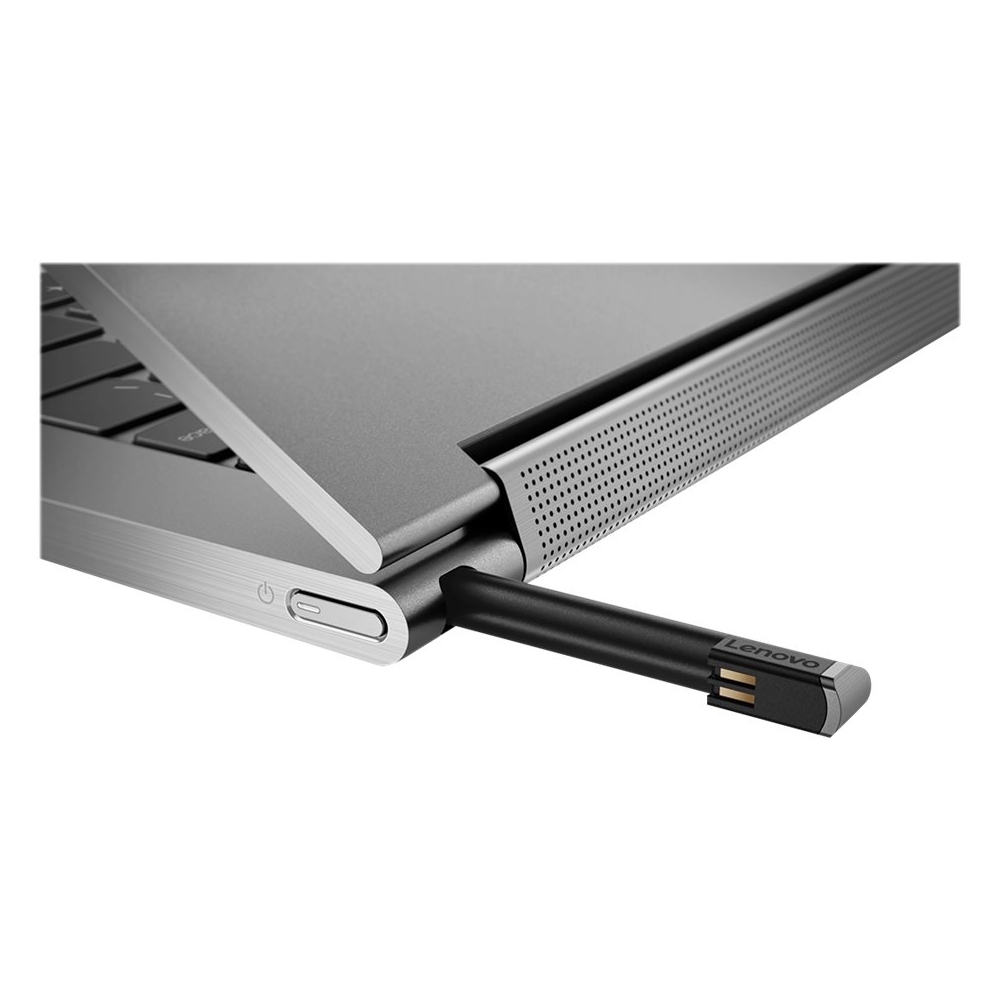
Posted .Thank you for choosing the Lenovo Yoga C930-14. The Yoga C930 offers 12GB of DDR4-2400MHz RAM, 256GB SSD PCIe of super-fast storage, as well as 8th Generation Intel Core i7 processing. So you'll have a system engineered for powerful responsiveness and speed in a razor-thin convertible. With a garaged pen (included) that fits flush into the chassis, you won't have to worry about looking for your pen when you need it. The Yoga C930 ensures you'll be able to capture your thoughts the moment they occur because it charges while in its compartment and is ready to go. With its 4,096 points of pressure sensitivity in the tip of the pen, it provides the natural feel of a pen-on-paper experience, with twice the accuracy of competitors' pens. Designed to be equally stylish in every position, the Yoga C930 is crafted from premium aluminum with high-precision drills and polished twice for a luxurious feel. Not only will you have a sleek looking 2-in-1 laptop, you’ll also have a marvelous feat in engineering. For 2018, Lenovo retained its place for a second year as the best laptop vendor:
https://www.laptopmag.com/articles/laptop-brand-ratings
Nice features
||Posted .This reviewer received promo considerations or sweepstakes entry for writing a review.Wish it was a bit lighter but it is a really nice laptop.
I would recommend this to a friendBrand response from Lenovo Product Expert
Posted .The Lenovo Yoga C930-14 ships with a 13.9" (screen size measured diagonally) screen and weighs just 3.04 lbs. An industry break-through, the Yoga C930 features superior sound bar, garage to store and charge your stylus pen, and improved hinge technology for a better designed laptop. Brighter display clarity and Dolby Vision bring your viewing experience to life. You'll want to be noticed with this ultra-light, stunningly sleek, and powerful 2-in-1 laptop. For 2018, Lenovo retained its place for a second year as the best laptop vendor:
https://www.laptopmag.com/articles/laptop-brand-ratings
It works fine for my daughter's coding program.
||Posted . Owned for 3 weeks when reviewed.This reviewer received promo considerations or sweepstakes entry for writing a review.Good for programming and coding. Works just fine.
I would recommend this to a friendBrand response from Lenovo Product Expert
Posted .Thank you for choosing the Lenovo Yoga C930-14 for your daughter. The ultra portable Yoga C930-14 packs the premium computing power to handle most any computing task. The Yoga C930-14 has it all. Working hand-in-hand with Dolby, we created the word's first speakers that fit into a convertible hinge via a rotating sound bar, delivering powerful immersive sound in every mode. The Yoga C930's Rotating Sound Bar with Dolby Atmos Speaker System is truly revolutionary, as the audio sound will be just as amazing whatever mode you're in: tent, stand, tablet, or laptop. Dolby Atmos delivers breathtaking, three-dimensional audio that flows above and around you with depth and precision. Combining two sets of speakers - featuring powerful down-firing woofers, custom tweeters, and unique vibration buffers that reduce unwanted noise - your audio will sound bigger, deeper, and more accurate. It’s sound you can feel. Combine the display clarity with the ultra vivid imaging of Dolby Vision. Experience brighter brights, darker blacks, and colors never before seen on standard displays—the true red of an English double-decker bus, or the sharp blue of a summer sky. By shifting components, we were able to edge the screen with razor-thin 4.95 mm vertical bezels that will make the absolute most of your visuals. For 2018, Lenovo retained its place for a second year as the best laptop vendor:
https://www.laptopmag.com/articles/laptop-brand-ratings
Frustrating
||Posted .This reviewer received promo considerations or sweepstakes entry for writing a review.I was super excited when I unboxed my new c930. Looked great, felt great..like an expensive car. My huge problem with this laptop is the wireless modem constantly loses signal which is making working on it a very frustrating experience...especially for someone who uses online apps as much as I do. Really, if I don’t find a solution soon, I will return, sell or trash it because it’s raising my blood pressure.
No, I would not recommend this to a friendBrand response from Lenovo Product Expert
Posted .We are sorry to hear that you are having an issue with your Lenovo Yoga C930-14. The Lenovo Yoga C930-14 uses the latest 5G 802.11AC frequency WiFi. If you are using an older b/g/n router, 802.11AC is backward compatible to the older b/g/n frequencies, but be sure your router has the latest firmware updates from the router manufacturer's web site. You can also update Windows 10 to the latest version and the supporting BIOS files and drivers by scanning the computer with the Lenovo Utility software on the device. This system has Lenovo utilities installed to help maintain the health of the device and keep the operating system software up to date. Type "Lenovo Vantage" in the Cortana Search window (if Lenovo Vantage is not installed on your device, you can download the APP and install it now). Select Lenovo Vantage from the list. In the window that opens, click on "Health and Support". In the expanded menu, select "Hardware Scan" In the window that opens, select "Run Quick Tests". This will scan your entire system for errors. Follow any directions that may pop up. If the problem continues after this scan, now click on "System Update". First select Windows update from the menu. Scan your system to be sure you have the latest version of Windows 10. Once that scan is complete, select "Additional Updates". This will scan your device to be sure there are no new BIOS/Driver updates needed. Follow any instructions that may pop up. If the issue still continues after these updates, we recommend you call Lenovo Tech Support at: 877-453-6686 for additional help. For 2018, Lenovo retained its place for a second year as the best laptop vendor:
https://www.laptopmag.com/articles/laptop-brand-ratings
Started strong then slow to run
||Posted .This reviewer received promo considerations or sweepstakes entry for writing a review.Did my research on looking to buy a new laptop to replace my old 8 year old Mac Book Pro. Saw that this was on sale so decided to grab it while I could. Day one, problems started. After to start up, went to black screen. So I had to restart it. Then once it was to the home screen it was very slow getting on the internet and doing tasks. Not going to waste money and time on a laptop that doesnt function well. I must have gotten a lemon.returning unit.
No, I would not recommend this to a friendBrand response from Lenovo Product Expert
Posted .We are sorry to hear that you are having issues with your Lenovo Yoga C930-14. This is a fast configuration, with the powerful Quad-Core/Eight-Thread Intel Core i7-8550U processor, supported by 12GB DDR4-2400MHz RAM. Be sure any software you installed is compatible with Windows 10. There is no need to install Microsoft Office software. The software is already part of the operating system, you just need to activate the software with a purchased product key. If you have installed a copy of Microsoft Office, this is conflicting with the existing copy on the system and this will slow your system down. If you have installed a 3rd party anti-virus program, be sure that Windows Defender is turned off and that the trial version of McAfee Anti-Virus software is uninstalled. There can only be one anti-virus program on the system. You may need to restore your system to original factory default settings if any of the programing errors have occurred. You can do that by typing "restore" in the Cortana search window. Just click on the magnifying glass icon at the bottom left of your Windows 10 Desktop. Click on "Reset This PC" Then click on "Get Started" and follow the on screen directions to restore to factory defaults. If the problem persists, we recommend you contact Lenovo Tech Support at: 877-453-6686. For 2018, Lenovo retained its place for a second year as the best laptop vendor:
https://www.laptopmag.com/articles/laptop-brand-ratings
Nice laptop, but video camera doesn't work
||Posted .This reviewer received promo considerations or sweepstakes entry for writing a review.It's my 3rd Yoga laptop in 5 years, I love the feel, size and functionality, but they all have various issues with components. In the past it was touch pad, then display, and now, for the model I just bought in early 2019 I cannot get the video camera working in any app, even after upgrades, diagnostics etc. I wish Lenovo address these issues as the laptop itself is great, but these device issues are ruining all benefits
No, I would not recommend this to a friendBrand response from Lenovo Product Expert
Posted .We are sorry to hear that you are having issues with the Web Cam on the Lenovo C930-14. This model ships with a privacy shutter on the web cam that is closed at the factory. It does not open automatically when you activate a web cam program, you need to manually open the shutter. There is a slide switch directly above the web cam. Slide this switch to the left to open the shutter, then back to the right to close the privacy shutter when you are done. Here is a link to the web site for the Yoga C930-14 with more information and close up pictures of the web cam and shutter. If you have more questions, we recommend you call Lenovo Tech Support at: 877-453-6686.
Fast but way too delicate.
||Posted .This reviewer received promo considerations or sweepstakes entry for writing a review.You can not leave it a long time charging it will ruin the memory card. It's faster than a regular compu, but way too delicate. I expected the computer too be sturdier. If you use a generic pen the speakers will sometimes turn off and you have to give it a restart. When I went to the Geek Squad with my one year protection plan they told me that my protection had expired two weeks earlier. I recommend that you buy at least a three year protection plan.
No, I would not recommend this to a friend- Pros mentioned:Fast

Nice Refresh
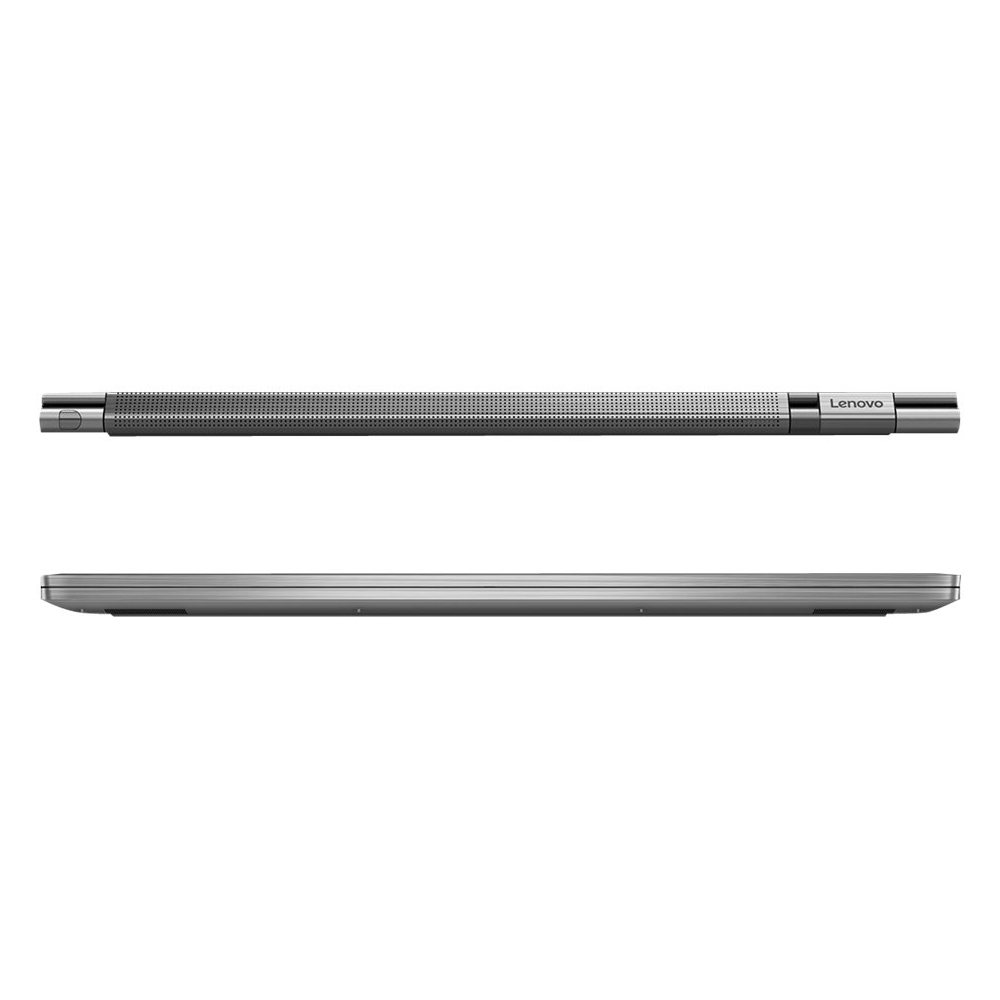
|Posted .This reviewer received promo considerations or sweepstakes entry for writing a review.Lenovo's new Yoga C930 is a big improvement over the 920 in my book. While the 920 was a competent notebook it was held back by its standby battery life. The C930 is a fairly major re-deisgn of the 900 series and a welcome one at that. Out of the gate, the most obvious change at first glance is the switch from the watch band hinge to a more chunky, block design which is actually housing a speaker. I was never a huge fan of the previous hinge so I am not sorry to see it go. The only thing I can say positive about it versus the new design is that it didn't have quite as much screen wobble. That said, the new hinge is well worth the trade-off as it houses the Dolby Atmos speaker. When I first heard about this I immediately suspected this was some marketing gimmick, but I am glad to report that my initial thoughts were wrong. The hinge speaker coupled with the two downward firing speakers has created one of the best sounding laptops I have heard to date. I would rank it right up there with the latest Macbook Pros. The great part is that the sound continues to be great whether you have it in a more traditional laptop mode, tent mode, or tablet mode. It really is a great design and I have to give kudos to Lenovo for that. The notebook also comes with a Dolby Atmos app pre-installed to allow for additional tuning of the speakers. Another plus, Netflix recognized the notebook as Atmos capable and will stream supported titles accordingly. The notebook also comes with the Windows Ink pen (which I believe is Wacom based) this go around and even has nifty storage at the rear of the notebook. The pen is very responsive and light. Only nitpick I have is that it is a tad short so big hands beware. The trackpad and keyboard appear to be largely unchanged from last year and are still top of their class. Key presses feel great and the trackpad is responsive to Windows gestures. Overall, this is what separates Lenovo from the rest of the Windows notebooks out there. This model comes equipped with 12GB RAM and a Intel Core i7-8550U quad-core, hyper-threaded processor. There isn't much to be said that probably isn't obvious. This notebook is fast. Real fast. I can't tell any difference with day-to-day work from my desktop machine. Speed should not be an issue for most tasks. The equipped Samsung NVME SSD is a PM961 part so it has super fast reads (3000MB/s) and pretty fast writes (1300MB/s). Overall a great, proven part and should keep things moving reliably. Lastly, the screen. Oh, the screen. This has been the single most confounding part of the notebook for me. Theoretically, it offers Dolby Vision HDR, but I can't find any actual proof it works beyond a Dolby Vision app pre-installed on the machine. It doesn't seem to do anything and Netflix doesn't acknowledge the capability so my ability to test it is basically void at this point. I can only take Lenovo's word that it exists and will perform. Aside from that, it is a good looking 1080p screen with excellent color reproduction and off-axis viewing. My biggest gripe is brightness. It just isn't very bright unless you crank it to max, but that is a quick way to kill battery life. My Dell XPS 13 is much better in this department. Overall, this is a solid machine with great speed, great sound, excellent keyboard/trackpad, and good screen. It offers a lightweight, attractive design with above average battery life (~9.5 hrs in my testing). There are few notebooks that can compete as a whole against the Lenovo C930. I think they finally nailed it.
I would recommend this to a friendBrand response from Lenovo Product Expert
Posted .This product is not yet available.

- Pros mentioned:Touch screen
Nearly Perfect
|Posted .This reviewer received promo considerations or sweepstakes entry for writing a review.This laptop is a real joy to use. I really only have one hardware complaint...Intel graphics. But even there, the Intel graphics seems to be a needed evil for the light weight and slim design. I am really in awe of how fast this laptop is. The eighth gen i7 is a fantastic processor. Add in the 12 GB of RAM and you have a smooth running machine. The screen is beautiful with some very rich vibrant colors. I thought I had one last beef, but changed my mind. With cell phones and the notches, people complain about the size of the "chin" on the phones. This laptop has very small bezel and a rather large chin. After playing with different setups; A-frame, tablet, L-frame I find that the chin gives you a place to hold it in tablet mode. It is high enough to have a attached keyboard in front of it. Really makes me see the chin as a necessity. The new hinge is a piece of art. No longer resembling a watch band, the hinge holds the speakers inside. Almost any configuration that you set the laptop in, you can have the speakers aimed at you. And the sound is phenomenal, especially for laptop speakers. The included Windows Ink pen is a nice touch with built in garage storage. From the brief testing I did, it only works with the Yoga. I have another Windows Ink laptop that did not recognize the pen. The location of the garage is kind of odd though. The garage is right behind where the power button is. Power is on the right side at the back corner. The garage is on the back side at the same corner. When I try to get the pen out...I hit the power button. So, I have one design complaint, but is more of an annoyance than anything. The keyboard and touch pad are very responsive and feel good to the touch. Backlit keyboards are a must for me anymore. The touchpad is very accurate. A couple of design considerations. There are two USB Type-C ports and a USB 3.1 Type-A port. Either one of the USB Type-C is used for charging, so you will lose one when charging. No HDMI port, a USB Type-C to HDMI cable works well (not included). It looks like you will need a USB hub if you want to attach keyboard and mouse. There is no SD card port. Unfortunately there is some bloatware. Bloat is no worse than any other new machine. I have never and will never play Candy Crush, please manufacturers stop preloading it. The added Lenovo software is nicely done and adds to the experience rather than be additional bloat. Lenovo has made a great laptop, with minor annoyances. A couple of tweaks and this could be a perfect laptop. I dropped a star for the couple minor annoyances, but this could very easily be a 5 star laptop for most users.
I would recommend this to a friendBrand response from Lenovo Product Expert
Posted .Lenovo has one of the cleanest preloads in the industry, with regard to preloaded software. You mention Candy Crush software, this is installed as part of the Windows 10 operating system, it is not controlled by the manufacturer.
Stay away from the Lenovo Yoga!
||Posted . Owned for 1 year when reviewed.This reviewer received promo considerations or sweepstakes entry for writing a review.I bought a Lenovo Yoga c930 after my Lenovo Think Pad kept having problems with the screen (although the Think Pad did have a hard outer casing which was good). Immediately, the Lenovo Yoga c930 did not work and had a flickering screen with error messages. I rushed back to Best Buy on my way out of town and they exchanged it, saying it was defective. After having the replacement Yoga one day, the outer casing was immediately dented in the airport security check without having any hard hits on any surfaces (definitely not sturdy like the Think Pad). Then, the replacement Yoga began having reoccurring problems such as the screen switching to Portrait Mode, making most of the screen not visible. (You fix this by going to Settings, Display, Display Orientation, Landscape). This happens every few months now. Also, the sound has stopped working twice for no reason. (To fix this, after checking to make sure that the volume is up and mute is off, go to Settings, Sound, under Output Manage Sound Devices disable Realtek Audio, Restart the Computer, Go back to output devices and enable Realtek Audio). It took me a long time and trying many audio fixes to finally figure this out. I strongly dislike my Lenovo Yoga! Buyer beware!
No, I would not recommend this to a friendBrand response from Lenovo Product Expert
Posted .We are sorry to hear that you are having issues with your Lenovo Yoga C930-14, model number 81C4000HUS. First, be sure any software you installed is compatible with Windows 10. There is no need to install Microsoft Office software. The software is already part of the operating system, you just need to activate the software with a purchased product key. If you have installed a copy of Microsoft Office, this is conflicting with the existing copy on the system and this will slow your system down. If you have installed a 3rd party anti-virus program, be sure that Windows Defender is turned off and that the trial version of McAfee Anti-Virus software is uninstalled. There can only be one anti-virus program on the system. You may need to restore your system to original factory default settings if any of the programming errors have occurred. You can do that by typing "restore" in the Cortana search window. Just click on the magnifying glass icon at the bottom left of your Windows 10 Desktop. Click on "Reset This PC" Then click on "Get Started" and follow the on screen directions to restore to factory defaults. If there is no incompatible software installed on the computer, then be sure you have the latest version of Windows 10 on your computer, then update all of the BIOS files and drivers up to that latest version of Windows 10. You can easily accomplish this by scanning the computer with the Lenovo Utility software available on this computer. This system has Lenovo utilities installed to help maintain the health of the device and keep the operating system software up to date. Type "Lenovo Vantage" in the Cortana Search window (if Lenovo Vantage is not installed on your device, you can download the APP and install it now). Select Lenovo Vantage from the list. In the window that opens, click on "Health and Support". In the expanded menu, select "Hardware Scan" In the window that opens, select "Run Quick Tests". This will scan your entire system for errors. Follow any directions that may pop up. If the problem continues after this scan, now click on "System Update". First select Windows update from the menu. Scan your system to be sure you have the latest version of Windows 10. Once that scan is complete, select "Additional Updates". This will scan your device to be sure there are no new BIOS/Driver updates needed. Follow any instructions that may pop up. If the issue still continues after these updates, we recommend you call Lenovo Tech Support at: 877-453-6686 for additional help.