Customer Ratings & Reviews
- Model:
- 81C4000SUS
- SKU:
- 6301728
Rating by feature
- Battery Life
Rating 3.2 out of 5 stars
- Speed
Rating 3.8 out of 5 stars
- Display
Rating 4.3 out of 5 stars
Customers are saying
Customers frequently mention the Yoga C930's fast performance, lightweight design, and long battery life as positive aspects. The touch screen, speakers, and sound quality are also highly praised. On the downside, some customers express concerns about the laptop's limited number of ports, small storage capacity, and sharp edges.
This summary was generated by AI based on customer reviews.
Defective camera ruined it for me
||Posted . Owned for 1 month when reviewed.This reviewer received promo considerations or sweepstakes entry for writing a review.I was initially very impressed with this computer. It seemed to be of sturdy construction, the keyboard was comfortable and true, and the 12 G of RAM handled lots of open apps without a problem. And then, after owing it for two months, the integrated camera stopped working. And no amount of driver swapping or BIOS updating (with Lenovo support) could fix it. So now I’m faced with having to pay the geek squad $100 and probably another 85 to send it to Kentucky and with having to do without this mission critical device for a few weeks. So, given this experience, one star is too much for this piece of junk.
No, I would not recommend this to a friendBrand response from Lenovo Product Expert
Posted .We are sorry to hear that you are having issues with the web cam on your Lenovo C930-14. First, be sure that the privacy shutter on the web cam did not inadvertently move to the closed position. If there is a red dot over the web cam lens, the privacy shutter is in the closed position. The slider to open the privacy shutter is above the web cam lens. Move the slider to the left to open. The red dot over the lens should disappear. If there is no red dot over the web cam lens, the second thing to check is that you have the latest version of Windows 10 on the computer, then check to be sure that the BIOS files and drivers are up to date for that version of Windows 10. You can easily accomplish this by scanning the computer with the Lenovo Utility software installed on the computer. This system has Lenovo utilities installed to help maintain the health of the device and keep the operating system software up to date. Type "Lenovo Vantage" in the Cortana Search window (if Lenovo Vantage is not installed on your device, you can download the APP and install it now). Select Lenovo Vantage from the list. In the window that opens, click on "Health and Support". In the expanded menu, select "Hardware Scan" In the window that opens, select "Run Quick Tests". This will scan your entire system for errors. Follow any directions that may pop up. If the problem continues after this scan, now click on "System Update". First select Windows update from the menu. Scan your system to be sure you have the latest version of Windows 10. Once that scan is complete, select "Additional Updates". This will scan your device to be sure there are no new BIOS/Driver updates needed. Follow any instructions that may pop up. Finally, if the issue still continues after these updates, we recommend you call Lenovo Tech Support at: 877-453-6686 for additional help.

Have yet to fully enjoy my laptop
||Posted . Owned for 3 months when reviewed.This reviewer received promo considerations or sweepstakes entry for writing a review.I wanted to allow some time owning this PC before I left a review to see if any problems arose along the way. I picked up this PC in December and have yet to enjoy more than 2 weeks before needing to send it out to Lenovo for repair. After sending it out twice to get repaired for the same issue, I am now just beside myself that I need to send it out again for the THIRD time. The ongoing issue is ‘The Intel(R) Wireless-AC 9260 160MHz adapter is experiencing driver-or hardware-related problems The first solution was to remove the device or drive obviously wasn’t a long term successful solution since I’ve sent it out twice after. Since owning the laptop I have yet to even unload pictures, music, etc to even customize it because I’m not confident to do so and lose any data. I was super excited to erase my old laptop and get rid of it, but I’m glad I haven’t bc I keep relying on it. It’s a beautifully sleek computer, but a nice door stop shouldn’t cost over $1,000
No, I would not recommend this to a friendBrand response from Lenovo Product Expert
Posted .We are sorry to hear that you are having issues with the WiFi connectivity of your Lenovo Yoga C930-14. Since replacing the WiFi chip within the Yoga C930-14 did not fix the issue, be sure you have the latest version of Windows 10 installed on the computer and that you have updated all of the BIOS files and drivers up to this latest version of Windows 10. You can easily accomplish this by scanning the computer with the Lenovo Utility software installed on the computer. This system has Lenovo utilities installed to help maintain the health of the device and keep the operating system software up to date. Type "Lenovo Vantage" in the Cortana Search window (if Lenovo Vantage is not installed on your device, you can download the APP and install it now). Select Lenovo Vantage from the list. In the window that opens, click on "Health and Support". In the expanded menu, select "Hardware Scan" In the window that opens, select "Run Quick Tests". This will scan your entire system for errors. Follow any directions that may pop up. If the problem continues after this scan, now click on "System Update". First select Windows update from the menu. Scan your system to be sure you have the latest version of Windows 10. Once that scan is complete, select "Additional Updates". This will scan your device to be sure there are no new BIOS/Driver updates needed. Follow any instructions that may pop up. If the issue still continues after these updates, we recommend you call Lenovo Tech Support at: 877-453-6686 for additional help.
- Pros mentioned:Lightweight

High End 2-in-1 with Stylus
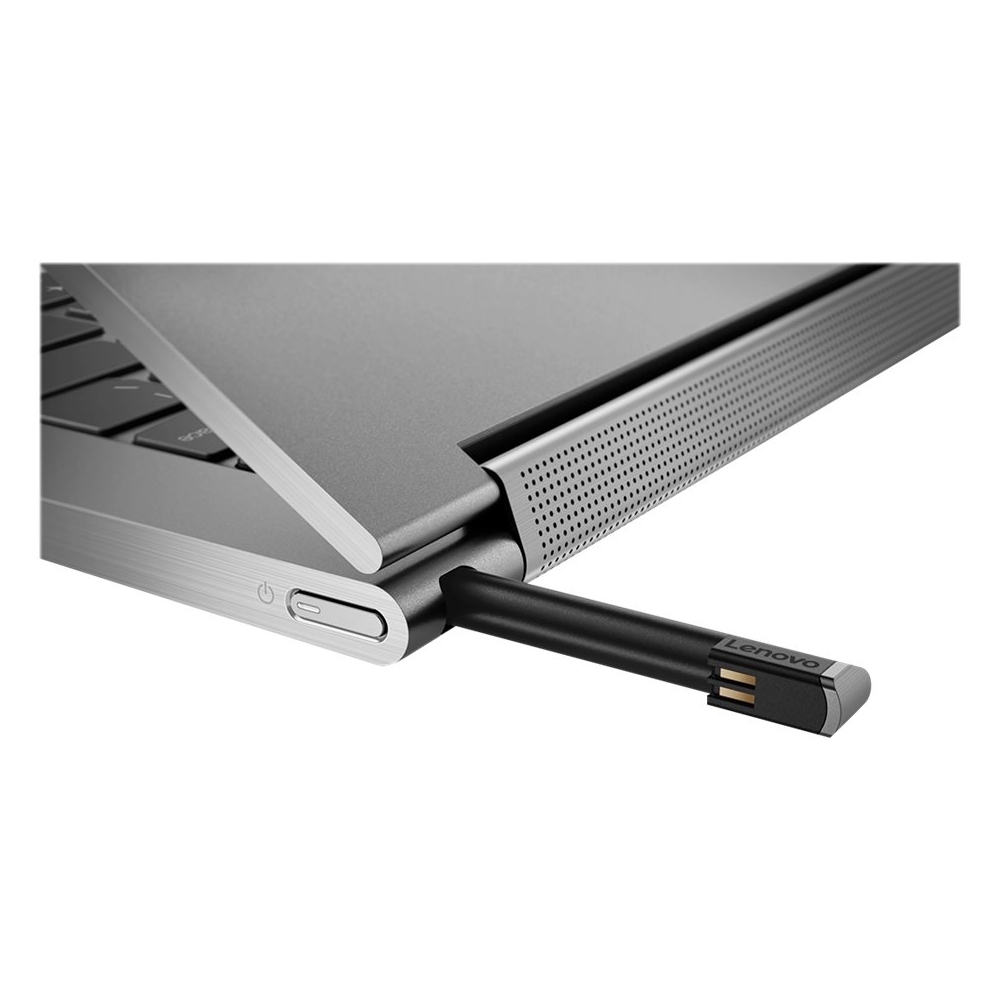
|Posted .This reviewer received promo considerations or sweepstakes entry for writing a review.In true Lenovo form, this C930 13.9" Touch Screen Laptop with an Intel Core i7 with 12 GB Memory and 256 GB SSD harddrive in Iron Gray, is a perfect addition for those on the go and in need of very robust laptop with perfect form factor. This Yoga's all aluminum case is premium craftsmanship through and through and don't forget your stylus, with it's garage built into the case, where it charges also. The full HD Screen is crisp and very responsive to my finger and stylus. Let's talk about the wow factor of this new Yoga design. It's rotating sound bar with integrated speakers in it's base gives this a high end audio profile, it has an incredible amount of bass with some well balanced upper spectrum response. I love that it is easy to unlock with it's finger print scanner built in next to the keyboard. The keyboard has good spacing and of course has the back-lit keys. This is quite a versatile unit with it's 2-in-1 options. This unit just screams high end. Lets move on to the specifications: It's processor is Intel's latest 8th generation Core i7, it is running on Microsoft's Windows 10, it's graphics is Intel's HD Graphics 620, this odel has 12GB DDR4 Ram, and it's has a 256GB Solid State Drive. This unit has a Full High Definition display at 1920 x 1080 which allows it's battery to boasts kup to a 14.5 hours of battery life. Of course battery life will vary upon use. It has 2 USB-C and one USB 3.1 ports as well as an Audio Combo jack. Lenovo includes a stylus, with a port on the case to store it and it has a finger print scanner. It also has a webcam shutter. Pros: Dolby Atoms Speaker System Great Form Factor Light Stylus with storage Fingerprint Scanner USB Type C Cons: No SD Card reader No Sleeve included Just a quick look at my pros and cons, reveals that if you are looking for current model of versatile laptop/tablet in 2-in-1 form factor, the Lenovo Yoga C930 is designed for you.
I would recommend this to a friend The worst computer. Don't buy Lenovo
||Posted . Owned for 1 month when reviewed.This reviewer received promo considerations or sweepstakes entry for writing a review.Extremely slow. Bad performance. Freezes constantly. Screen blacks out regularly for no reason. Very expensive. Not useful for school work or personal use. Very disappointed.
No, I would not recommend this to a friendBrand response from Lenovo Product Expert
Posted .It is possible, resetting the computer back to original factory settings may correct the issues you are having. If you can no longer boot the computer, this system is equipped with OneKey Recovery System. There is a very small pin hole on the back, left side of the device, right near the top the device, on the back. You will need a pin to push this reset button. Plug the device in. Let the battery charge for about 15 minutes. Push the reset button. The system should boot to a choice screen where you can choose "Restore To Factory Default". Select this. It will delete everything from the hard drive except the original factory install of the operating system. You will need to reinstall all programs and files after the reset. If you don't have copies of the files, try to make one before you restore by selecting "Boot to desktop" and trying to back up your files. Once you have restored the computer to original settings, be sure any software you installed is compatible with Windows 10. There is no need to install Microsoft Office software. The software is already part of the operating system, you just need to activate the software with a purchased product key. If you have installed a copy of Microsoft Office, this is conflicting with the existing copy on the system and this will slow your system down. If you have installed a 3rd party anti-virus program, be sure that Windows Defender is turned off and that the trial version of McAfee Anti-Virus software is uninstalled. There can only be one anti-virus program on the system. You may need to restore your system to original factory default settings if any of the programing errors have occurred. You can do that by typing "restore" in the Cortana search window. Just click on the magnifying glass icon at the bottom left of your Windows 10 Desktop. Click on "Reset This PC" Then click on "Get Started" and follow the on screen directions to restore to factory defaults. If the problem persists, we recommend you contact Lenovo Tech Support at: 877-453-6686.
- Pros mentioned:Touch screen
Sleek, solid, speaker hinge
|Posted .This reviewer received promo considerations or sweepstakes entry for writing a review.This is one solid laptop. I've been so used to tablets with keyboard covers that I've forgotten how nice it is to be able to have a nice hinge to be able to adjust to literally any angle. The speakers built into the hinge are an inspired design choice that ensures that you're getting quality audio, scratch that, dolby audio, no matter how you angle your screen. And what a screen! Bright, crisp, touch sensitive, with a pen input digitizer. I love the storage area for the pen, though I wish it had a little more heft to it. I'm sort of a mechanical keyboard snob, so while the chiclet keyboard does irk me in many ways, it's really not that bad to type on. At the very least, they don't do silly things with the layout. Overall, this really is a standout laptop. It has the guts to do the heavy lifting if you're a photoshop user, the SSD has more than ample storage for your programs, (unless you plan on running AAA 3D heavy games, which you shouldn't be on a machine like this). For media consumption, this is a dream come true. The sound output far surpasses the usual tinny sounding speakers of lesser laptops. I'm also glad that this has the usual complement of ports, including USB Type A slots as well as the USB Type C power delivery that is starting to catch on (thank goodness).
I would recommend this to a friend In for the third time in 8mo. for repairs
||Posted . Owned for 8 months when reviewed.This reviewer received promo considerations or sweepstakes entry for writing a review.I think I got a lemon. 2 new hard drives and now it's in for it's third repair in 8 months. It takes 4 weeks when they send it out to a center in KY for repair. I bought it for everyday business use and it's been undependable. So far, Best Buy will not replace the machine BUT they will keep repairing it until the one year warranty runs out.
No, I would not recommend this to a friendBrand response from Lenovo Product Expert
Posted .We are sorry to hear that you are having Issues with your Lenovo Yoga C930-14 solid state hard drive. We recommend you call Lenovo Tech Support for specific help with your issue at: 877-453-6686.
Poor battery life and bad power cord
||Posted . Owned for 1 year when reviewed.This reviewer received promo considerations or sweepstakes entry for writing a review.Giving this one star - very poor battery life and there is no warning it just shuts off. The other reason is it has constantly told me to plug the device in using proper power cord - otherwise slow to recharge - I am using the power cord that came with it. I know someone else that bought same model from best buy at same time and they receive similar message. Then Lenova trying to do an update push and when i accepted it all sends me notice that it cannot update using just battery. It was plugged in. And sometimes keyboard is slow to respond. Very frustrating as as spent so much money on this. And some
No, I would not recommend this to a friend- Cons mentioned:Lack of ports
Newest Yoga iteration is excellent
|Posted .This reviewer received promo considerations or sweepstakes entry for writing a review.This is another high-quality laptop from Lenovo. This newest iteration of the Yoga would be a great addition for almost anybody, including students, professionals, and even casual users. The laptop has a slim, minimal design and feels very light at just under three pounds. The screen has a very thin bezel area but does have an area for holding the Yoga while configured in tablet mode. The screen is full HD (1920x1080) and looks excellent in all of the various configurations. I did feel that the default brightness was not particularly bright in well-lit areas, which made me turn it up to 100% but at the expense of some battery life. The Yoga includes a Windows Ink stylus which is excellent for users that need to quickly take down some notes or use drawing applications. The stylus is housed in a built-in area in the back. This can be a little frustrating when trying to get the stylus out, as it makes it hard to get the stylus out in some laptop configurations and is located in a location where accidentally hitting the power button is a real possibility. I want to take moment to talk about the new hinge style because it is innovative and useful. The hinge is completely flexible and strong, as you would expect for a laptop that allows multiple configurations, but the fantastic part is the Dolby speakers that are built-in to the hinge. They sound amazing, not just for laptop speakers but for any speakers. Because the speakers are in the hinge, they will direct sound in the correct direction aiming at you no matter which configuration the laptop is using. I don't know if there are other Yoga-type laptops using this feature currently or not, as I have not seen it before, but I expect this feature to become standard because of the usefulness. The keyboard is backlit and felt good on my fingertips, and the touchpad worked well with accuracy. Battery life depends on how you are using the Yoga. With light use, I was able to get over ten hours on one charge. If you are using applications that are more processor-heavy, you are looking at about three hours. When the battery is very low it takes about two hours to fully charge. The Yoga includes some nice security features, such as a biometric fingerprint sensor that works better than many I have seen on other laptops and Windows Hello capability using the webcam. There is not a SD Card slot. As is common with these light, sleek laptops, there are not many ports: two USB C Thunderbolt 3 ports and one full-size USB 3.1 A port. Charging utilizes one of the USB C ports, so if you use other peripherals that require power or connections a USB hub is going to be a necessity for you. There is not a HDMI port. The Yoga comes with Windows 10 and some useful software that comes with Windows. Some other specs: Processor: Intel Core i7 Quad Core 1.99 Ghz 8th Generation Storage: 256GB SSD Memory: 12GB RAM Built-in Bluetooth and WiFi (2.4 and 5 Ghz) Overall I found the C930 Yoga to be a very nice, premium, multi-function laptop that will be an excellent laptop for almost any use. It feels like it is built with quality, looks good, sounds really good, and can be taken any place you need to take it for use for hours.
I would recommend this to a friend Lots of power in a small package
|Posted .This reviewer received promo considerations or sweepstakes entry for writing a review.I have been looking for something with a small footprint to use while traveling; without sacrificing too much in terms of performance and style. I typically use a tablet on the road but with more and more laptops offering a tablet mode it made sense to look into one to replace the tablet. Low and behold the Lenovo c930 series! Immediate selling points for me are the compact size, 12 GB of RAM and the Core i7 processor. The bonus here is the innovative Dolby Atmos sound bar the have worked into the hinge of this powerhouse! Since I am looking at this for travel, I will primarily use the c930 for streaming, emails, digital movies and video chat. What I like: - Powerful processor, applications load very fast with 12Gb of RAM and Solid State Drive - Dolby Atmos sound, deep bass (for a laptop) and clarity with voices - High resolution screen for HD viewing - Back-lit keyboard - On-board stylus housing - USB-C ports offer versatility for connections - Thin and lightweight - Does not generate heat while using in my lap - Solid rubberized footing prevents slipping on smooth surfaces - Built-in privacy slider for webcam (no need for a sticky note) What I don't like: - No SD card reader - Keyboard clicks are slightly louder than I would prefer As you can see my list of dislike is very limited, this 2 in 1 offers exactly what I was looking for and more. I've watched a few titles in Dolby Atmos via Netflix and it does perform well considering the size of the speaker bar and laptop itself. I wouldn't expect this to perform in the same manner as an actual Atmos system but for taking this on the road and streaming in the hotel room it packs a punch. I also purchased a sleeve to protect the c930 that also helps protect the keyboard face when I have the screen in tablet mode. Overall, for what I wanted in a 2 in 1 the c930 is extremely impressive and I am pleased with what Lenovo has delivered in a thin, lightweight package. It has certainly lightened my travel bag!
I would recommend this to a friendBest laptop/2-in-1 I've ever used!
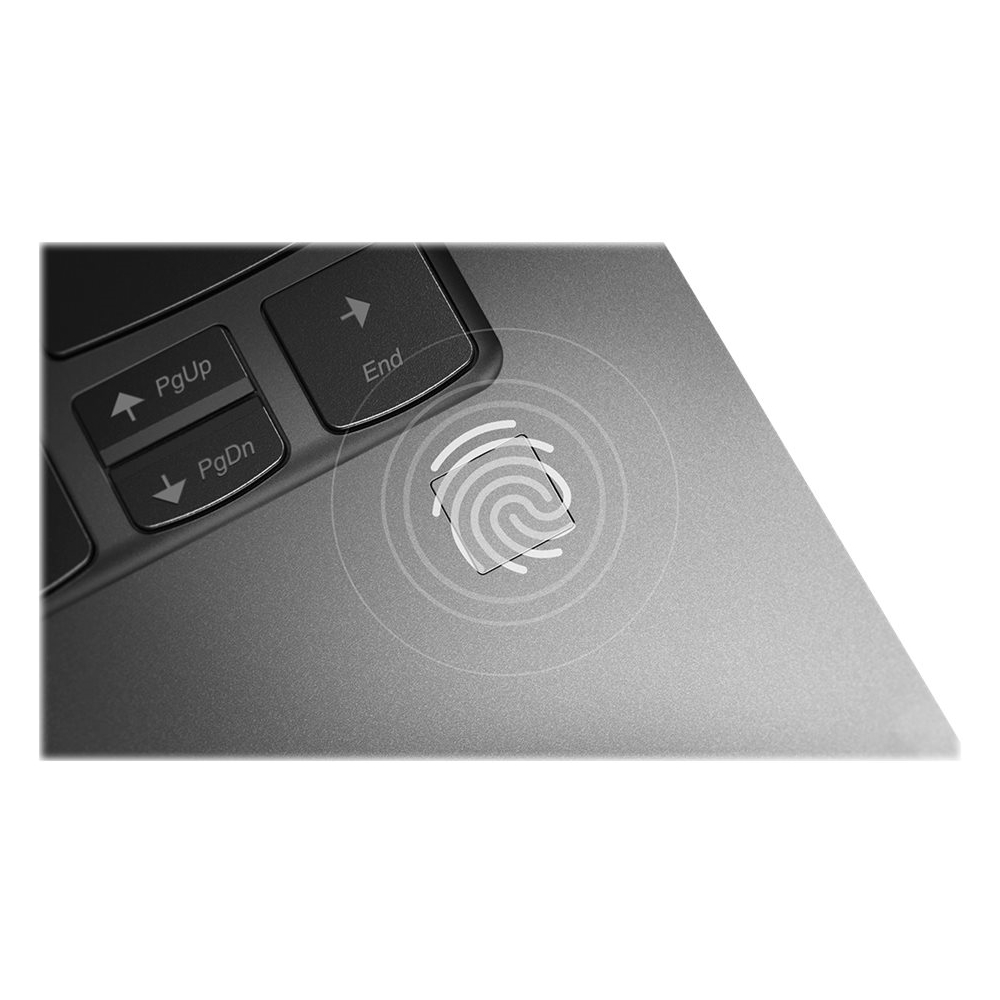
|Posted .This reviewer received promo considerations or sweepstakes entry for writing a review.I’ve owned quite a few laptops over the last several years, including some really good ones, in particular an HP X360 beauty. In addition, I’ve had all sorts of tablets, desktops, you name it, nearly. Without any hesitation, the Yoga C930 is the BEST laptop/2-in-1 I’ve ever owned or used. I have an HP All-in-1 desktop with an additional monitor at my desk, but I really needed a “complete” laptop/2-in-1 to supplement it for use away from my desk. I have a Samsung Chromebook Pro that is a delight to travel with – but, Chrome OS is limited compared to a Windows machine so mostly it’s used to surf the Web, check email, take notes, that sort of stuff, and it’s an excellent device for those things. The Yoga C930 is a dream come true. It’s a beauty in appearance (there’s options available in that area too) with its all metal case and double-polished finish, and its manufacture is high-end without doubt. This device shouts quality in every way. The Lenovo keyboard is superb for typing, keeping in the ThinkPad tradition; it’s backlit as well. The touchpad is at least as good as any I’ve used including Apple’s – smooth, precise with no hesitations. The fingerprint reader located to the lower right of the keyboard is faster than anything I’ve used before. It’s faster than a face scan with Windows Hello. I’ve never been able to sign in to a device as quickly and consistently. Of course, it boots up within a couple of seconds before using the fingerprint scanner, so it takes no time from hitting the power button and arriving at your desktop within just a few seconds afterward. I’m completely impressed with the speed and consistent performance of this. You can also use the fingerprint scanner for various online transactions where your identity must be verified. My C930 has the FHD screen (1920 x 1080) touchscreen LED-LCD, which is fine by me. With Dolby Vision HDR the screen is sharp, and colors are beautiful. You can get a 4k screen, but for most users you’d be doing yourselves a disservice since it will take more battery reserve to run it, and unless you must do a lot of video/photo work, you truly will never miss the 4k screen. Of course, the 13.9” screen has narrow bezels so you’re looking at mostly image when viewing the screen. By the way, that helps keep the width of the device narrower than in days of yore, so the footprint is smaller with more actual screen available. For me, the 14” category 2-in-1 is ideal – spacious screen, keyboard and touchpad while offering a device that’s very compact and portable. It only weighs 3 lbs. and is quite thin so carrying it around is not burdensome, particularly if you need all that the C930 offers. If you want to use the C930 as your primary device, it has 2 USB-C 3.1 full-function ports (PD & DP) that are both Thunderbolt 3 ports as well. This means you can connect to a DisplayPort (DP) monitor, or HDMI and others with a dongle. Of course, with pass-through charging you can hook up a powered Thunderbolt or USB-C dock to your C930 and it will charge during use all with one cable connecting your device to your dock without the C930 being plugged into a wall outlet. With the Thunderbolt capability, you can run various high-speed peripherals, or ordinary USB-C peripherals. You also have a powered USB-A 3.1 port for docks or other accessories having USB-A connectors. Being powered means you can charge other devices from the USB-A port or power unpowered devices (unpowered docks or any other accessory that needs power to operate). An ordinary USB port provides limited power for items plugged into it, but some accessories require more power to operate properly so a powered USB port is better. It comes with a 65w fast charger, so it doesn’t take very long at all to charge your C930. It uses one of the two USB-C ports for charging. When setting up the Yoga it wasn’t plugged in and yet about 6 hours later I had about 50% battery charge left (I say about, but it was somewhere between 50% & 60%). I was downloading updates to Windows and installing software, so I know during regular office use this thing, on battery only, will go at least 10 hours. Lenovo says 14 hours, which may be a typical manufacturer claim, but, frankly, they’re not far off (they claim 9 hours for the 4k version C930). In short, you don’t have to look for an external power source with the Yoga C930 unless you start early and work all day long into the evening. Usually, when setting up a device such as the C930, you're downloading updates, installing software and it is indexing all the new stuff for search purposes later. All this is one of the more intensive times of ownership when the device's CPU is running steadily and building up heat. This means the computer's fans are running steadily to keep it cool. I have to say that I did not notice the fans running at all during that time or since. I'm sure they run some (I've not even noticed the bottom of the C930 getting very warm while using it), but I say for the record that this is the quietest laptop/2-in-1 I've ever used as well. For those of you that have ever been distracted by the loud fan noise many laptops can make, you will appreciate the cooling efficiency of the Yoga C930 for it is quiet, very quiet! The C930 has a Wacom screen (digitizer with an active stylus/pen for navigating in Windows or writing on documents, doing artwork etc.), which in my opinion is the best tech available for pen and screen. The beauty of the Yoga C930 is that the stylus is carried in its own silo or “garage” in the laptop itself. It’s located on the extreme right rear of the base and you just push in on its flush-mounted end so that it pops out slightly, so you can pull it out. The size of the active stylus is somewhere between the size of a Galaxy Note 8 or Note 9 phone’s S-pen and the typical larger stylus/pen you see with Surface Pros and other computers/tablets using pens. It charges while in its silo so there’s nothing to keep up with like batteries for the stylus, and it will operate many hours without a charge. And, typical of Wacom, it is a smooth experience using the stylus on the screen and it has 4,096 levels of pressure sensitivity. Hand rejection is excellent. Yesterday I had a Word document open reading it and needed to make some changes/comments, so I just flipped the screen all the way back into tablet mode, pulled the stylus from its silo and started writing on the document – easy, simple and no extra thought involved. The stylus has two buttons with one being used to erase any errant marks or mistakes and the other can be used for different purposes. The sound from the C930 is the best I’ve ever heard from a laptop/2-in-1. Lenovo has built into the hinge a revolving sound “bar” so that the twin speakers inside the bar are pointed at you no matter what configuration you use the C930. In addition, there are two down-firing speakers located very near the front edge of the base. However, the speakers in the sound bar alone are very loud and clear. Frankly, this speaker setup is the very best I’ve ever experienced in a laptop/2-in-1 device for clarity and volume. It is clearer and louder than the Bang & Olufsen speaker arrangements in my HP All-in-1 desktop – no kidding. Did I say that the sound bar is a Dolby Atmos speaker system? Well, that certainly adds to the phenomenal sound you get with the Yoga C930! The other internal hardware is excellent. The Intel Core i7 is the 8th generation quad-core processor, 12 GB DDR4 RAM, and a 256 GB PCIe SSD – this thing is fast all the way around (it’s available with more RAM and larger SSD’s also). If your Wi-Fi is fast, downloading updates takes very little time compared to most other devices I’ve had (Wi-Fi is AC and it has Bluetooth 4.1 also). GPU is the integrated Intel HD 620, which is powerful enough to handle regular office or home use. If you need more graphics processing power, get an eGPU unit (external GPU to increase graphics handling power) to plug into one of the Thunderbolt ports and to your external monitor. If you really need bigtime graphics ability (big, modern gaming, serious/professional video/photo work, serious/professional CAD work and the like), then the eGPU unit running through one of the Thunderbolt ports will serve you well. But don't worry about the HD 620 for it will easily handle all the regular stuff you want to do such as viewing videos, lighter gaming. typical office work, etc. It also has a built-in HD webcam with stereo microphones (these are specifically long-range microphones, so it will pick up your conversation from across the room, or, if you’re talking very softly nearby, it will hear you with no problem). The webcam provides a Privacy Shutter you slide open to use or slide shut to guarantee privacy when not using the webcam. As I said earlier, this is an excellent laptop/2-in-1 or even desktop replacement for office or home. It’s the best I’ve used in every category but one – the screen is 16:9, which is typical of most and preferred if you watch a lot of videos, but I’ve come to appreciate the 4:3 aspect screens (a little taller and more narrow), which is actually a little better suited for document work but just not as nice for video viewing. This isn’t a make or break thing but more a matter of viewing preference. If you want a superb 2-in-1 for nearly every possible use situation (did I say the best I've ever used?), this is the one! You won’t be disappointed.
I would recommend this to a friendDecent but Craps Out Before a Year...
||Posted . Owned for 11 months when reviewed.This reviewer received promo considerations or sweepstakes entry for writing a review.The computer is nice in the beginning but I started having issues with it literally a month before I had it a year. I purchased in Sept of 2019 and now, not even 2 years later, the speakers don't work, the battery wont hold a charge more than 30 minutes, it wont recognize my charger, and the backlit keyboard just doesn't work. If I could get a refund I would. ALL IN ALL, DONT BUY UNLESS YOU GET A WARRANTEE.
No, I would not recommend this to a friendIt’s ok
||Posted . Owned for 4 months when reviewed.This reviewer received promo considerations or sweepstakes entry for writing a review.Not terrible. But for the price I just thought the Mac ecosystem would serve me better. Great design though.
I would recommend this to a friendBrand response from Lenovo Product Expert
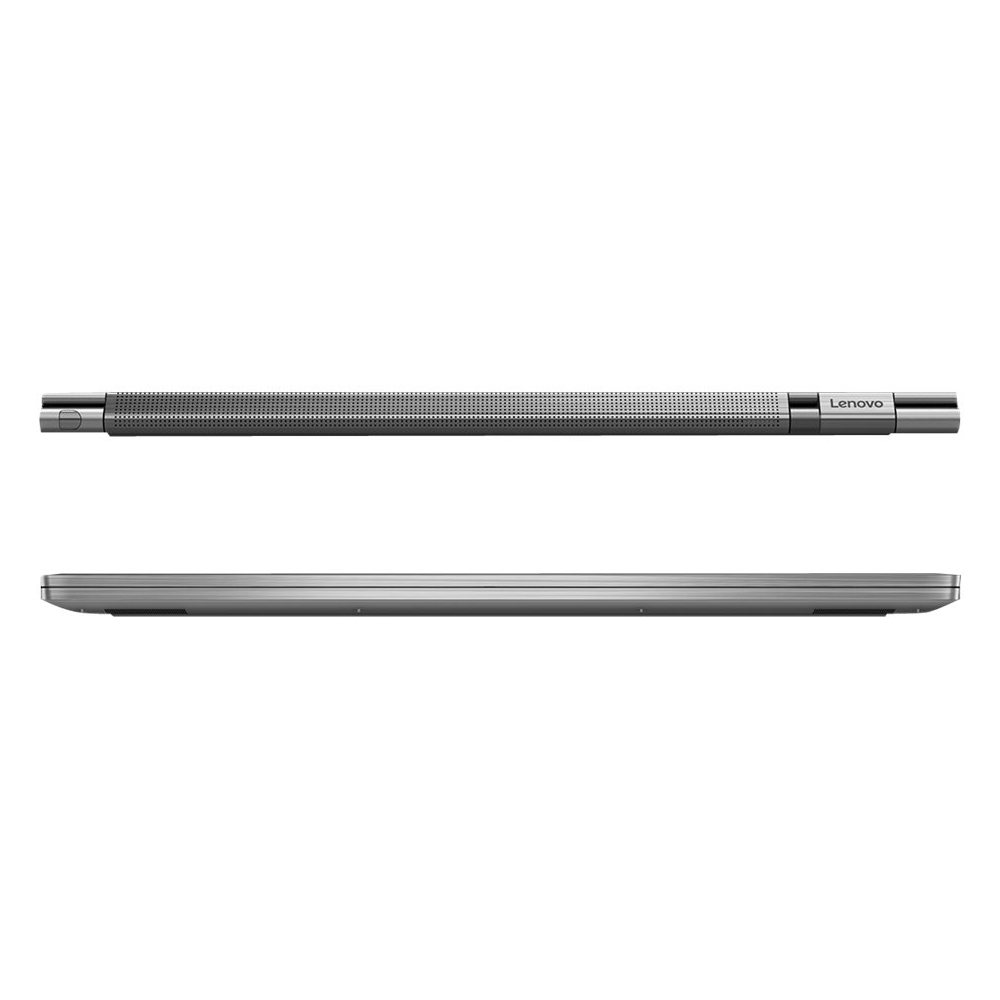
Posted .The Lenovo Yoga C930-14 ships with the Windows 10 Home 64-bit Operating System. The Yoga C930 offers 12GB of memory, 256GB SSD PCIe of super-fast storage, as well as 8th Generation Intel Core i7 processing. So you'll have a system engineered for powerful responsiveness and speed in a razor-thin convertible. Working hand-in-hand with Dolby, we created the word's first speakers that fit into a convertible hinge via a rotating sound bar, delivering powerful immersive sound in every mode. The Yoga C930's Rotating Sound Bar with Dolby Atmos Speaker System is truly revolutionary, as the audio sound will be just as amazing whatever mode you're in: tent, stand, tablet, or laptop. Dolby Atmos delivers breathtaking, three-dimensional audio that flows above and around you with depth and precision. Combining two sets of speakers - featuring powerful down-firing woofers, custom tweeters, and unique vibration buffers that reduce unwanted noise - your audio will sound bigger, deeper, and more accurate. It’s sound you can feel. Combine display clarity with the ultra vivid imaging of Dolby Vision. Experience brighter brights, darker blacks, and colors never before seen on standard displays—the true red of an English double-decker bus, or the sharp blue of a summer sky. By shifting components, we were able to edge the screen with razor-thin 4.95 mm vertical bezels that will make the absolute most of your visuals. We've heard from you that keeping track of a digital pen can be a pain. With a garaged pen (included) that fits flush into the chassis, you won't have to worry about looking for your pen when you need it. The Yoga C930 ensures you'll be able to capture your thoughts the moment they occur because it charges while in its compartment and is ready to go. With its 4,096 points of pressure sensitivity in the tip of the pen, it provides the natural feel of a pen-on-paper experience, with twice the accuracy of competitors' pens. Designed to be equally stylish in every position, the Yoga C930 is crafted from premium aluminum with high-precision drills and polished twice for a luxurious feel. Not only will you have a sleek looking 2-in-1 laptop, you’ll also have a marvelous feat in engineering.
not dependable
||Posted . Owned for 4 months when reviewed.This reviewer received promo considerations or sweepstakes entry for writing a review.Have had nothing but trouble with this computer after spending more than I intended to get what I thought would be a reliable product. The first one soon failed to connect to the internet and was replaced by a second one that shuts down in the middle of a project. Have taken it to Geek Squad and still will not work. Very disappointed as this is my daughter's college computer and it is failing her.
No, I would not recommend this to a friendBrand response from Lenovo Product Expert
Posted .We are sorry to hear that you are having issues with your Lenovo Yoga C930-14. Be sure any software you installed is compatible with Windows 10. There is no need to install Microsoft Office software. The software is already part of the operating system, you just need to activate the software with a purchased product key. If you have installed a copy of Microsoft Office, this is conflicting with the existing copy on the system and this will slow your system down. If you have installed a 3rd party anti-virus program, be sure that Windows Defender is turned off and that the trial version of McAfee Anti-Virus software is uninstalled. There can only be one anti-virus program on the system. You may need to restore your system to original factory default settings if any of the programming errors have occurred. You can do that by typing "restore" in the Cortana search window. Just click on the magnifying glass icon at the bottom left of your Windows 10 Desktop. Click on "Reset This PC" Then click on "Get Started" and follow the on screen directions to restore to factory defaults. If the problem persists, we recommend you contact Lenovo Tech Support at: 877-453-6686.
Not as represented
||Posted . Owned for 9 months when reviewed.This reviewer received promo considerations or sweepstakes entry for writing a review.Motherboard failed in less than 2 years. Purchased based on purported great reliability. Least reliable laptop I’ve owned out of 5. Battery life began to lessen after about 6 months even given proper charging practices. At 18 months had to be on charge at all times.
No, I would not recommend this to a friend1 year later and it shuts down after 5mins of use
||Posted . Owned for 1 year when reviewed.This reviewer received promo considerations or sweepstakes entry for writing a review.I am so disappointed with this laptop. It was a light-use laptop for me. I use it about twice a month. It had battery issues I noticed where it wasn't keeping a charge for as long as it claims. Now it can't even stay on. STAY AWAY from this laptop. I do not recommend it whatsoever.
No, I would not recommend this to a friendBrand response from Lenovo Product Expert
Posted .We are sorry to hear that you are having issues with your Lenovo Yoga C930-14. We recommend you call Lenovo Tech Support for help with your issue at: 877-453-6686.
Worked great for two months. Not so much not.
||Posted . Owned for 2 months when reviewed.This reviewer received promo considerations or sweepstakes entry for writing a review.Worked great for two months. All of a sudden the wireless card/adapter failed and now I’m trying to contact Lenovo for warranty repair. It’s a nightmare and I’m kicking myself for not buying a Mac. Lesson painfully learned.
No, I would not recommend this to a friendBrand response from Lenovo Product Expert
Posted .We are sorry to hear that you are having issues with WiFi on your Lenovo Yoga C930-14. We recommend you call Lenovo Tech Support for help with your issue at: 877-453-6686.
- Pros mentioned:Battery life
Let your creative mind flourish...
|Posted .This reviewer received promo considerations or sweepstakes entry for writing a review.There is so much to say about the new Lenovo - Yoga C930. It has a sleek metal body that compliments its quality construction and design. The price is a bit steep, but you really are getting what you pay for. It comes nestled in an elegant box that complements the quality of the machine. Not only is the Lenovo - Yoga C930 great for the productive individual, but it has also been great for school. Battery life has also been great. I am at school from 7:30am to five, and use it heavily for reading and editing. I'm able to go throughout my day with a full battery. It is a high quality HD display that emits great picture quality and amazing color displays. This makes for an amazing experience when using the Paint app, or any other creative software of your choosing. I use the 930 for editing purposes, and so far, it has been an amazing experience. This opens a world of creativity all at the hands of the user. Another thing, the sound quality is great! Another thing that I really love about the Lenovo - Yoga C930 is the security features that come equipped with it. I always see fellow students with their laptop cameras covered with a piece if paper. The C930 has a sliding cover to remedy that issue. Also, it comes equipped with a biometric sensor that allows the user to access their computer at the touch of the pad. I know a lot of people are skeptical about using their fingerprint for things like this, but there are also the standard pin number option and passwords. I haven't had any issues with the biometric sensor, and I'm hoping that I won't. I really like this feature. The only thing that I do not like about the Lenovo - Yoga C930 is the charger. It's a bit too bulky. Overall, the Lenovo - Yoga C930 is an amazing machine. You will truly enjoy it. I highly recommend it to anyone!
I would recommend this to a friend - Pros mentioned:Battery life
Great but where's my SD slot
|Posted .This reviewer received promo considerations or sweepstakes entry for writing a review.This is a pretty slick PC. With i7 and 12GB of memory it seems unnatural from what I’m used to, but it’s been awhile since I’ve been in the market for a laptop. I have a Dolby Atmos setup for our home theater. Saying you can create the same effect within a laptop seems a bit of a stretch. Don’t get me wrong, for as slim as this laptop is, the sound is pretty good and the Dolby app allows you to quickly tailor the sound if you choose. The screen on this isn’t 4K, but in reality, at this screen size, it’s going to be tough to say anyone can really tell. The pressure sensitive pen tracks accurately on the screen and the storage at the back is great. Resting your palm on the screen while using it doesn’t seem to cause any issues either. It seems odd that all the inputs are on one side of the laptop. A slot for an SD-card on the right side would be great, as there isn’t one at all. Visually from the outside, there’s available real estate to do it. Or get rid of the headphone jack and put one there. Yeah, I said it. In this day and age of Bluetooth, a headphone jack on a PC seems less critical even when compared to a smart phone. There’s some junkware, but it’s not swimming in it. Overall this is a quick and pretty portable laptop that you should be happy with. The windows experience in true tablet mode and enjoyable, compared to earlier days. Battery life is good and should last you through the day without issues and maybe even a couple if you’re just a moderate PC user. The figure print reader is a nice touch too to simplify logging in. Wasn’t sure how I’d feel about the screen size. I used to have a 17” desktop replacement. Then a 15”. I have to say it doesn’t feel too cramped at a touch under 14”. Besides, anything bigger would surely impact battery life and usability as a tablet. If I were doing media work, I’d probably prefer something bigger but I haven’t done any of that in some time.
I would recommend this to a friendBrand response from Lenovo Product Expert
Posted .The Yoga 930-14 has both Dolby Atmos and Dolby Vision to give the viewer as close to a cinema experience as possible on a 13.9" (measured diagonally) screen. The IPS screen resolution on this configuration is 1920x1080. The inputs on this device are on the side because this is a 2 in 1 device. This gives access to the ports in any mode, tablet or laptop, tent or stand mode. This model does not have an SD card slot. The Yoga 930-14 has one of the cleanest preloads in the industry, with regards to adware. The only adware Lenovo adds is a 30-trial of McAfee anti-virus software. Any other adware comes with Windows 10 which manufacturer's do not control.

Classy!
|Posted .This reviewer received promo considerations or sweepstakes entry for writing a review.Everything about this computer is elegant, starting from the unboxing (it lifts up out the box almost like it came with hydraulics). It came already charged, and thanks to Cortana stepping me thru, set up was a breeze. Of course I had to listen to the speakers first which is pretty amazing for a computer of this size. It converts from laptop to 'tablet' in no time flat or fold it halfway and you have a pyramid...perfect for reading recipes as you cook. The Yoga is very quick and responsive, going from one website to another with little to no lag. I've seen several other computers with the pen included, however this is the only one ive seen with its own parking space which they call a garage...good work, I won't be leaving it behind. The best thing about it is well two things, actually; it is super quiet and secondly it doesn't feel warm after spending long periods of time on my lap. If you're a student who doesn't have lots of room in the backpack or an older person who doesn't like carrying around a big bulky machine, this is the one for you!
I would recommend this to a friendBattery Sucks
||Posted . Owned for 1.5 years when reviewed.This reviewer received promo considerations or sweepstakes entry for writing a review.Lenovo needs to improve their products better. I bought 2 lenovo laptops and both of them died on me. I had to be without laptops for 2+ weeks and I am a student. Can you imagine the struggles?
No, I would not recommend this to a friend