Customer Ratings & Reviews
- Model:
- 81C4000SUS
- SKU:
- 6301728
Rating by feature
- Battery Life
Rating 3.2 out of 5 stars
- Speed
Rating 3.8 out of 5 stars
- Display
Rating 4.3 out of 5 stars
Customers are saying
Customers frequently mention the Yoga C930's fast performance, lightweight design, and long battery life as positive aspects. The touch screen, speakers, and sound quality are also highly praised. On the downside, some customers express concerns about the laptop's limited number of ports, small storage capacity, and sharp edges.
This summary was generated by AI based on customer reviews.
Terrible
||Posted . Owned for 3 weeks when reviewed.This reviewer received promo considerations or sweepstakes entry for writing a review.had for 15 days and already had problems with the laptop. had to return due to hardware problem.
No, I would not recommend this to a friendBrand response from Lenovo Product Expert
Posted .The Lenovo Yoga C930-14 has a 1-year manufacturer's warranty covering OEM hardware issues. You can call Lenovo Tech Support to activate a repair ticket at: 877-453-6686.

Not good
||Posted . Owned for 1.5 years when reviewed.This reviewer received promo considerations or sweepstakes entry for writing a review.Great laptop when it worked. Couple years into battery just died. Geek Squad replaced and now it still dies and the protection is over.
No, I would not recommend this to a friend- Pros mentioned:Lightweight

Powerful 2-1 with Great Sounding Speakers
|Posted .This reviewer received promo considerations or sweepstakes entry for writing a review.The Lenovo c930 is a powerful, well built 2-1 laptop with a unique sound bar that produces high quality audio. The laptop comes with a pen and has two Thunderbolt 3 ports. Other ports are minimal and the user may want to an external usb-c hub for additional ports. The laptop offers great flexibility since it can be used for productivity and casual use as a 3 pound laptop and also for gaming and virtual reality when connected to an egpu through one of the Thunderbolt 3 connections. I tried the c930 with two egpus, the Aorus GTX Gaming box and the Gigabyte RX580 Gaming Box. Performance of the egpus was excellent on the c930 and I was able to obtain results that were close to 90% of a desktop gpu. I mentioned that the laptop has a speaker bar. This is a unique feature in a laptop. While listening to Youtube and streaming music, the clarity was much better that other laptops that I have owned. If you want a very well built, versatile laptop with some unique features, the c930 is an excellent choice.
I would recommend this to a friend A sleek beauty and easy to use
|Posted .This reviewer received promo considerations or sweepstakes entry for writing a review.The yoga is very easy to use. The display is gorgeous. Displays hd very well. The speakers are much louder than any laptop I've ever had and very clear. The front facing speakers make videos and music better also. Fast browsing/loading time. The one issue I did have was the on screen keyboard in tablet mode. While playing an online Sudoku game it disappeared/became white space and would not reappear until I restarted. I might not have the issue again, but thought I should mention it. Nice physical keyboard, no complaints there. I'd say this item is well worth the price.
I would recommend this to a friendBrand response from Lenovo Product Expert
Posted .Thank you for choosing the Lenovo Yoga C930-14. With regard to the issue you mention with the onscreen keyboard, you can scan the computer for issues with operating software like the BIOS and drivers by using the Lenovo Utility software installed on this device. Updating the drivers on this device may correct the onscreen keyboard issue you had. This system has Lenovo utilities installed to help maintain the health of the device and keep the operating system software up to date. Type "Lenovo Vantage" in the Cortana Search window (if Lenovo Vantage is not installed on your device, you can download the APP and install it now). Select Lenovo Vantage from the list. In the window that opens, click on "Health and Support". In the expanded menu, select "Hardware Scan" In the window that opens, select "Run Quick Tests". This will scan your entire system for errors. Follow any directions that may pop up. If the problem continues after this scan, now click on "System Update". First select Windows update from the menu. Scan your system to be sure you have the latest version of Windows 10. Once that scan is complete, select "Additional Updates". This will scan your device to be sure there are no new BIOS/Driver updates needed. Follow any instructions that may pop up. If the issue still continues after these updates, we recommend you call Lenovo Tech Support at: 877-453-6686 for additional help.

A decent laptop, could have been great
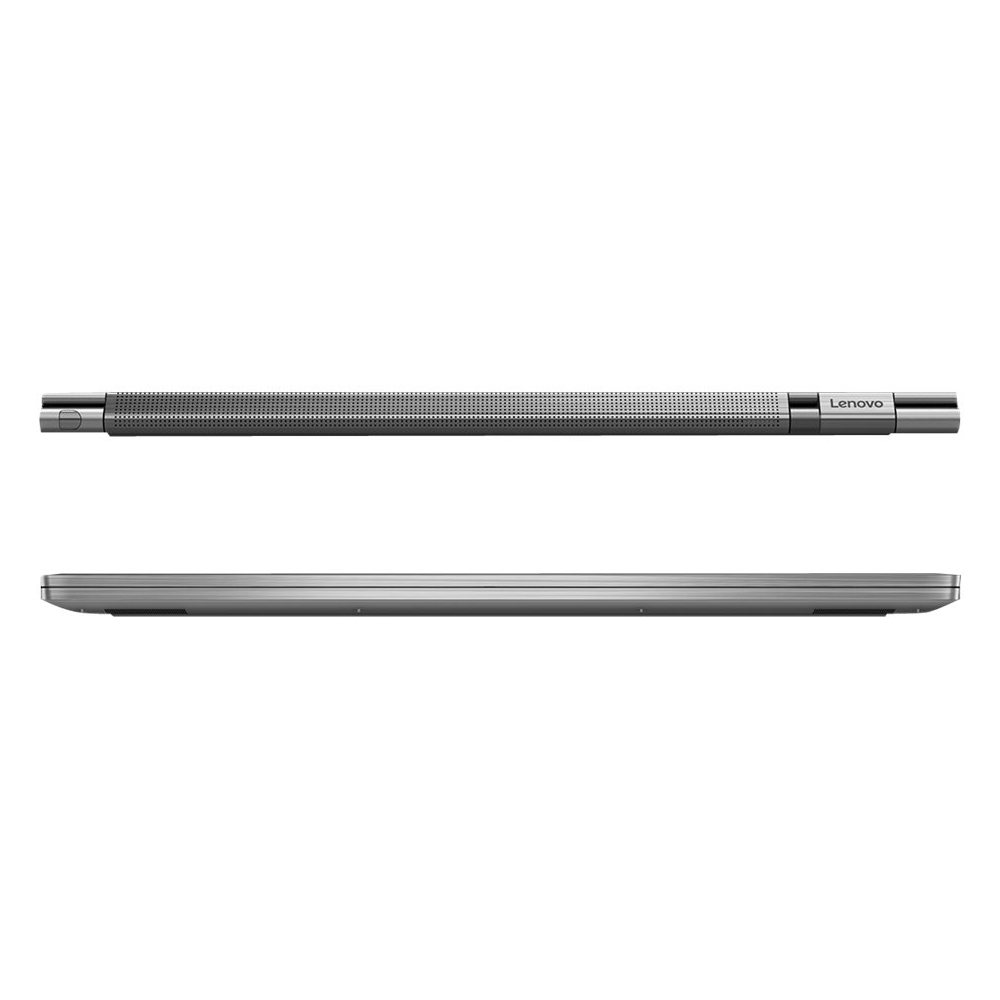
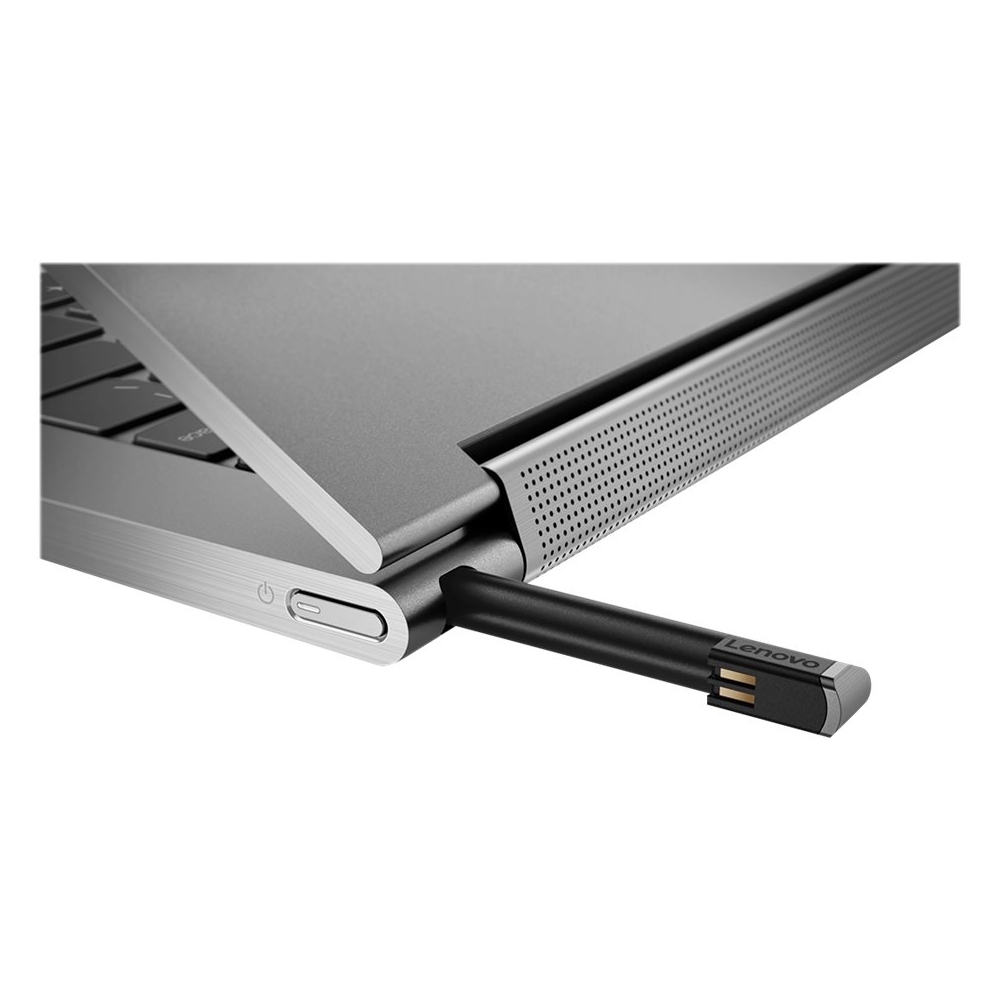
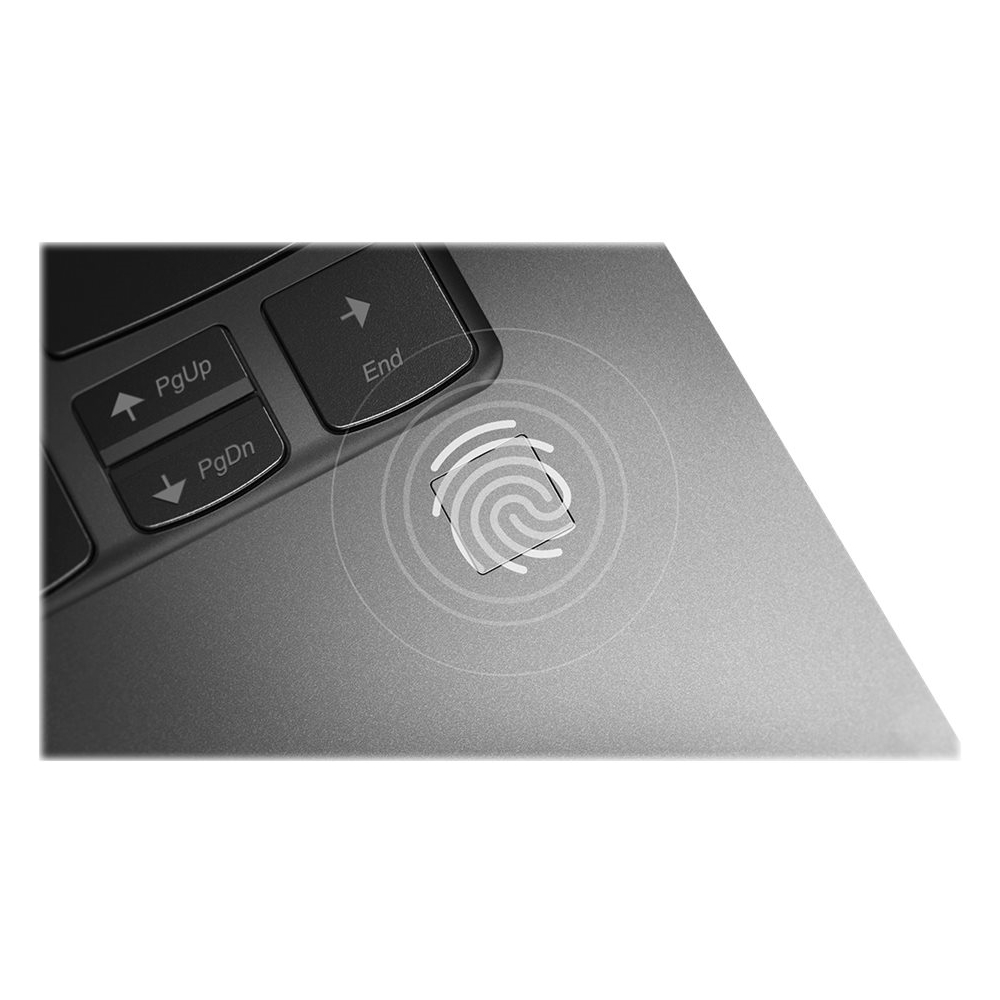
|Posted .This reviewer received promo considerations or sweepstakes entry for writing a review.There are some very nice aspects to the Lenovo Yoga C930 that make it feel like a premium product, but one critical keyboard flaw (as I see it) among some other issues bring this down to the level of mediocrity, for me. I think this laptop is worth 3.5 stars, but without fine-grained rating control, I’ve decided to round down to 3 stars, based on how I personally prioritize features. For people who prioritize speaker sound quality, this laptop is a great option. For those with productive typing in mind, especially when it comes to programming, scripting, web, and other types of development, I suggest looking at alternatives. ===[ Speakers / Display / Battery ]=== The speakers and audio quality steal the show. The soundbar in the display hinge generates crisp high frequencies, while the speakers in the bottom front edge (facing down through the bottom surface) provide the mid-to-low frequencies, combining to create a better sound profile and higher max volume than in any other laptop I’ve owned or used (I currently own eight, so this isn’t trivial). However, you must use this laptop in standard laptop orientation positioned directly in front of you to get the full benefit of this fantastic sound. In easel and tablet orientations, the sound bar projects away from the user, resulting in the higher frequencies being drowned out. There’s little to no isolation between the speakers and the keyboard/trackpad surface, which means even fairly low volume levels generate lots of vibration that can be felt when your hands are on deck. The display is rather mediocre. It’s not quite as vibrant or bright as those in other reasonably comparable laptops, and it fairs quite poorly in gradient tests where very visible banding can be seen, much more so than in my other laptops. The battery is great, lasting long and charging quickly. I streamed full-screen video for seven hours straight using midline battery/performance setting with brightness 3 ticks down from maximum, after which I had 20% charge remaining. ===[ Aesthetics / Design ]=== Not present are embellishments such as shiny chamfered edging around the touchpad, lit logo, multi-tone coloring, and the like. The more subtle design of this laptop is still elegant and attractive, which I prefer over the more flashy designs found in many (or even most) competing laptops I’ve seen. I’m particularly fond of the iron grey color scheme, which fits well with the overall design. The port selection is quite meager, with merely two Thunderbolt USB-C ports and a single USB-A port crammed into a single side (left), as well as a combo headphone/microphone jack. One of the USB-C ports will be occupied while charging the battery. There’s no HDMI port or SD card slot here. ===[ Keyboard / Trackpad / Pen ]=== This laptop’s keyboard does not have dedicated home, end, page up, and page down keys, with the former two being the most critical. I find having to use the Fn key as a modifier to access this functionality to be a huge impediment, turning otherwise single-key presses into very awkward two-key combos, and otherwise two-key combos (like Ctrl + Home) into even more awkward three-key combos. When writing, scripting, and programming, and web development, quick access to dedicated home and end keys are--in my opinion--very important, and I perform these tasks much less efficiently on this laptop than on most of my other laptops. Plenty of competing laptops at this size have these dedicated keys. Adding insult to this issue is that (at least on the outside) there appears to be plenty of extra space to accommodate a column of these keys, while still maintaining reasonably spacious side margins. The backlighting is lackluster, with lower maximum brightness and worse edge consistency than other laptops I own. The keys have great tactile feedback, with a very strong, snappy transition across the actuation point that feels very different from all other laptop keyboards I’ve used. The keyboard is well supported throughout, being highly resistant to dipping even with heavy key presses. The trackpad is very smooth and responsive, and I appreciate large how it is, making very liberal use of the surface area available. The included pen seems like more of a token than capital feature. It is quite thin, feeling much more like a stylus than pen, making its use uncomfortable beyond quick usage. It’s not great at recognizing screen touches, with many of my light strokes going unregistered. The buttons are so unobtrusive visually and tangibly that I have to make a conscious effort to locate them. The pen’s garage is located in the laptop’s rear, which is not very convenient. Inserting and removing the pen requires pushing the pen just past the garage’s deep recess, which can be somewhat challenging, especially with fingers on the large side and short nails. ===[ Camera / Microphones / Fingerprint Reader ]=== The camera quality is pretty standard, but works better than average in low-light conditions. The privacy screen is an interesting feature, but comes at the cost of not having Windows Hello support. The dual microphones are quite nice, picking my voice up with high volume, while doing a great job of filtering out loud background noise. Missing in most competing products I’ve seen, the fingerprint reader is a handy feature to have for quick Windows Hello logins. Unfortunately, I’ve had to press my finger into the reader twice, maybe one out of three times I’ve authenticated using it, which is far inferior to the one in my phone, for example. ===[ Performance ]=== The eighth generation Intel Core i7 8550U combined with the Samsung SSD and 12GB of RAM provides snappy, hiccup-free performance for the tasks this laptop is well suited for. With the integrated Intel UHD Graphics 620, this laptop isn’t suited for gaming, though it can handle the very light end of the spectrum. The cooling vents are placed in the rear, wedged tightly between the base’s edge and the display hinge/sound bar. Thermal throttling seems to kick in quickly in heavy load scenarios, but the fans remain fairly quiet.
I would recommend this to a friendBrand response from Lenovo Product Expert
Posted .The Yoga C930-14 has a standard 13.9" (screen size measured diagonally) QWERTY keyboard, without 10-key pad. This model of the C930-14 ships with an IPS, FHD (1920x1080) resolution screen, with a brightness level of 300 nits. Additionally, the Yoga C930 has Dolby Vision for an outstanding visual experience. This configuration ships with a powerful Quad-Core/Eight-Thread i7-8550U processor, with a base speed of 1.8GHz and a Turbo Boost speed of up to 4.0GHz, supported by 12GB of RAM and a 256GB solid state hard drive. This high performance configuration weighs just 3 lbs. and is 0.6" thin overall. If you are looking for a powerful, light weight multi-purpose device, the Yoga C930-14 would be a great choice.
- Pros mentioned:Lightweight
Excellent build quality, high end specs
|Posted .This reviewer received promo considerations or sweepstakes entry for writing a review.Lightweight and very fast laptop. Starts up in seconds due to the fast processor and ram. I thought I would miss the watchband hinge but the speaker hinge is so much better. The volume is pretty loud and helps when watching movies, which look great on the bright screen. It is nice that the pen now can be stored in the laptop but I do wish it was a little bigger like the active pen 2 but this doesn't require separate batteries. The minor upgrades over the previous yoga makes this a great buy. It has been getting a lot of use since it's so portable.
I would recommend this to a friend - Pros mentioned:Light
Wow- a home run for Lenova!!
Posted .This reviewer received promo considerations or sweepstakes entry for writing a review.Lightweight, thin, with a sound system that is really excellent. I could go on and on about just how great the C930 is but everyone knows that. Great product by Lenova, but the support is far from excellent. Called Lenova support and got a person that was hard to understand, did not know the product and suggested I return it or take it back to Best Buy. Would be nice if there were simple instructions like: the camera has a shutter that must be opened before using , or press Fn + space bar to adjust the keyboard lights. I strongly recommend this product but hope Lenova gets support to match their superb products.
I would recommend this to a friendBrand response from Lenovo Product Expert
Posted .Thank you for choosing the Lenovo Yoga C930-14. We are sorry to hear that you did not get the help you were looking for when you called Lenovo Customer Service. You can ask questions hear and we will do our best to get you answers quickly or you can call Lenovo Tech Support at: 877-453-6686.
- Pros mentioned:Touch screen
Audio Experience is phenomenal!!!!
Posted .This reviewer received promo considerations or sweepstakes entry for writing a review.Iv'e always been looking for a laptop that has a good speaker setup and I finally found it, this laptop is the replacement for my mid 2012 Macbook Pro and I could't be happier. The audio on this laptop is phenomenal, which is why i bought it, I like to watch movies, youtube, tv shows etc... on the go or laying down. Iv'e tried the MSI GS65 9SD and those speakers have nothing on this Dolby Atmos speaker setup, so if you are looking for a good laptop with a 1080p screen, good sound, backlight keyboard, solid construction and a wacom pen then this is the laptop to get. Heck the screen barely even flexes.... I LOVE THIS LAPTOP
I would recommend this to a friendBrand response from Lenovo Product Expert
Posted .Thank you for choosing the Lenovo Yoga C930-14. Working hand-in-hand with Dolby, we created the word's first speakers that fit into a convertible hinge via a rotating sound bar, delivering powerful immersive sound in every mode. The Yoga C930's Rotating Sound Bar with Dolby Atmos Speaker System is truly revolutionary, as the audio sound will be just as amazing whatever mode you're in: tent, stand, tablet, or laptop. Dolby Atmos delivers breathtaking, three-dimensional audio that flows above and around you with depth and precision. Combining two sets of speakers - featuring powerful down-firing woofers, custom tweeters, and unique vibration buffers that reduce unwanted noise - your audio will sound bigger, deeper, and more accurate. It’s sound you can feel. Combine display clarity with the ultra vivid imaging of Dolby Vision. Experience brighter brights, darker blacks, and colors never before seen on standard displays—the true red of an English double-decker bus, or the sharp blue of a summer sky. By shifting components, we were able to edge the screen with razor-thin 4.95 mm vertical bezels that will make the absolute most of your visuals. We've heard from you that keeping track of a digital pen can be a pain. With a garaged pen (included) that fits flush into the chassis, you won't have to worry about looking for your pen when you need it. The Yoga C930 ensures you'll be able to capture your thoughts the moment they occur because it charges while in its compartment and is ready to go. With its 4,096 points of pressure sensitivity in the tip of the pen, it provides the natural feel of a pen-on-paper experience, with twice the accuracy of competitors' pens. The Yoga C930 offers 12GB of DDR4-2400MHz RAM, 256GB SSD PCIe of super-fast storage, as well as 8th Generation Intel Core i7 processing. So you'll have a system engineered for powerful responsiveness and speed in a razor-thin convertible. Designed to be equally stylish in every position, the Yoga C930 is crafted from premium aluminum with high-precision drills and polished twice for a luxurious feel. Not only will you have a sleek looking 2-in-1 laptop, you’ll also have a marvelous feat in cutting edge engineering.
- Pros mentioned:Battery life
Excellent laptop
Posted .This reviewer received promo considerations or sweepstakes entry for writing a review.I purchased my c930 about 3 weeks ago. While technically this machine is a convertible ultra-book, it performs far better than my business class Dell. The SSD is lightning fast, as they all are, making boot time very short and especially when the fingerprint scanner is used when logging in to windows. Literally a 10 second boot from button push to desktop. 12GB of RAM is more than enough for anything I'll ever do. Although, I was a bit skeptical of the mobile series i7 processor, I couldn't be happier with it. Don't be fooled by the low base clock speed at 1.8 GHz. The turbo boost and Hyper-threading will not disappoint. Personally I will probably never use the stylus but it's nice to know it's neatly tucked into the back of the laptop if I ever need it. I didn't think I would use the touchscreen as much as I do, but I do use it from time to time in the wedge or tent configuration. Build quality on this computer is exceptional to say the least. It feels very sturdy even with the full motion hinge on the screen. Where most convertible screens would be shaky, this one is rock solid in any position. Oh and battery life, while subject to use and settings, is also great. If you dial everything down including the screen brightness a little. It will easily stream a couple movies before hitting 50%. While working as a stock trader, I can rely on this computer to last from market open til the closing bell with constant and multiple streaming stock charts going the whole time. If I have to list one complaint, I would say it is that I was promised a 4K display and 1 year of Office 365 with purchase at this price point and I did not receive either. The truth is, both are sold at a premium. However, I digress as that is more a complaint toward Best Buy and it's sub-par employees than it is with the laptop itself. Overall, I am incredibly impressed by this laptop and would recommend it to anyone looking for a premium workstation. I am very pleased with what my money bought.
I would recommend this to a friendBrand response from Lenovo Product Expert
Posted .Thank you for choosing the lenovo Yoga C930-14. We are pleased to hear that the features and performance of the Yoga C930-14 meets your computing needs so well.
Cool laptop!
Posted .This reviewer received promo considerations or sweepstakes entry for writing a review.Such a cool laptop, many feature. But the best features of all are that it can open all the way up flat, half way, you name it and the cool pen that comes along with the laptop and it’s secret little hole where it goes.
I would recommend this to a friend- Pros mentioned:FastCons mentioned:Sharp edges
Ok computer, turned in for thinkpad
Posted .This reviewer received promo considerations or sweepstakes entry for writing a review.The edges are randomly pointy so it makes placing forearms on uncomfortable, this was my first Lenovo laptop, and the keyboard layout was very uncomfortable coming from an HP, the keys also felt very mushy different than the model than the display model. Since I'm a student I type a lot and a cheap keyboard wasn't going to cut it. Overall I just wasn't satisfied with the computer, I ended up buying the Lenovo ThinkPad x1 carbon 6th gen and enjoy it much more. Pros are the computer was fast but did feel a little slower with only 12gb ram, the speakers were great, and the screen was good.
No, I would not recommend this to a friendBrand response from Lenovo Product Expert
Posted .The Lenovo Yoga C930-14 ships with a standard QWERTY keyboard. The Yoga C930-14 features superior sound bar, garage to store and charge your stylus pen, and improved hinge technology for a better designed laptop. The Yoga C930-14 is the ultra portable 2 in1 that works as hard as you do. This configuration of the Yoga 930-14 ships with the powerful, Quad-Core/Eight-Thread Intel Core i7-8550U processor, supported by 12GB DDR4-2400MHz RAM and a 256GB M.2 NVMe solid state hard drive. For 2018, Lenovo retained its place for a second year as the best laptop vendor:
https://www.laptopmag.com/articles/laptop-brand-ratings
- Pros mentioned:Light
One of my best laptops ever
Posted .This reviewer received promo considerations or sweepstakes entry for writing a review.I bought a Yoga laptop almost 3 years ago and it's still going strong. It's sleek and light and fits in my PC bag. Plus it's extremely fast. You won't believe how powerful the laptop is by just looking at its size and weight. I'm typing this note on the laptop. I came to this site to see if I could get a bigger Yoga, 17.3 inch screen size, if that's possible. The bigger HP laptop that I bought at the same time with my Yoga has begun to give creaking sound at the hinges, and the cover seems to be falling apart. I don't want to buy another HP laptop if possible.
I would recommend this to a friendBrand response from Lenovo Product Expert
Posted .Designed to be equally stylish in every position, the Yoga C930 is crafted from premium aluminum with high-precision drills and polished twice for a luxurious feel. Not only will you have a sleek looking 2-in-1 laptop, you’ll also have a marvelous feat in cutting edge computer engineering. The Yoga C930 offers 12GB of DDR4-2400MHz RAM, 256GB SSD PCIe of super-fast storage, as well as 8th Generation Intel Core i7 processing. So you'll have a system engineered for powerful responsiveness and speed in a razor-thin convertible. Combine display clarity with the ultra vivid imaging of Dolby Vision. Experience brighter brights, darker blacks, and colors never before seen on standard displays—the true red of an English double-decker bus, or the sharp blue of a summer sky. By shifting components, we were able to edge the screen with razor-thin 4.95 mm vertical bezels that will make the absolute most of your visuals. Working hand-in-hand with Dolby, we created the word's first speakers that fit into a convertible hinge via a rotating sound bar, delivering powerful immersive sound in every mode. The Yoga C930's Rotating Sound Bar with Dolby Atmos Speaker System is truly revolutionary, as the audio sound will be just as amazing whatever mode you're in: tent, stand, tablet, or laptop. Dolby Atmos delivers breathtaking, three-dimensional audio that flows above and around you with depth and precision. Combining two sets of speakers - featuring powerful down-firing woofers, custom tweeters, and unique vibration buffers that reduce unwanted noise - your audio will sound bigger, deeper, and more accurate. It’s sound you can feel. We've heard from you that keeping track of a digital pen can be a pain. With a garaged pen (included) that fits flush into the chassis, you won't have to worry about looking for your pen when you need it. The Yoga C930 ensures you'll be able to capture your thoughts the moment they occur because it charges while in its compartment and is ready to go. With its 4,096 points of pressure sensitivity in the tip of the pen, it provides the natural feel of a pen-on-paper experience, with twice the accuracy of competitors' pens.
Works as it should
Posted .This reviewer received promo considerations or sweepstakes entry for writing a review.Love this little laptop. It’s so light and can go just about everywhere with you. It serves it purpose for working from home.
I would recommend this to a friend- Pros mentioned:Lightweight
No Regrets
Posted .This reviewer received promo considerations or sweepstakes entry for writing a review.I was looking at the HP Spectre Folio but I'm not a fan of HP keyboards. I was also looking at the Lenovo Yoga 730 but even though I loved the slightly smaller form factor of the 730, it has horrible speakers. The C930 has a great soundbar and auxiliary speakers, great keyboard and trackpad, it's lightweight, and has great battery life. No regrets.
I would recommend this to a friendBrand response from Lenovo Product Expert
Posted .Thank you for choosing the Lenovo Yoga C930-14. We are pleased to hear that the features and performance of the Yoga C930-14 meets your computing needs so well.
Very satisfied with a few glitches
Posted .This reviewer received promo considerations or sweepstakes entry for writing a review.I love this laptop. Only had a few glitches which I solved by researching online. One glitch was thumbprint sign-on wouldn't work after sleep mode. The other is that wifi keeps periodically dropping...which may be due to my internet service, not computer.
I would recommend this to a friendBrand response from Lenovo Product Expert
Posted .Thank you for choosing the Lenovo Yoga C930-14. You can keep your Yoga C930-14 running at its best by scanning the computer regularly with the Lenovo Utility software installed on the computer. The Yoga C930-14 uses the latest 5G 802.11AC frequency WiFi. If you are using an older b/g/n frequency router, 802.11AC is backward compatible to the older frequencies, but be sure your router has the latest firmware updates available from the router manufacturer's web site. This system has Lenovo utilities installed to help maintain the health of the device and keep the operating system software up to date. Type "Lenovo Vantage" in the Cortana Search window (if Lenovo Vantage is not installed on your device, you can download the APP and install it now). Select Lenovo Vantage from the list. In the window that opens, click on "Health and Support". In the expanded menu, select "Hardware Scan" In the window that opens, select "Run Quick Tests". This will scan your entire system for errors. Follow any directions that may pop up. If the problem continues after this scan, now click on "System Update". First select Windows update from the menu. Scan your system to be sure you have the latest version of Windows 10. Once that scan is complete, select "Additional Updates". This will scan your device to be sure there are no new BIOS/Driver updates needed. Follow any instructions that may pop up. If the issue still continues after these updates, we recommend you call Lenovo Tech Support at: 877-453-6686 for additional help. For 2018, Lenovo retained its place for a second year as the best laptop vendor:
https://www.laptopmag.com/articles/laptop-brand-ratings
So far it is just amazing
Posted .This reviewer received promo considerations or sweepstakes entry for writing a review.Got this pc yesterday and I cannot be more pleased with it. First, I have owned two macbooks that were really good and then a terrible low power HP. I was considered going back to macs however the softwares I use are not compatible...So, I was stuck with them. I really did my research before getting a Lenovo. What sold me first was the 12 Gb RAM and 8th gen I7 for this price. Also, I was looking for a pc that would be very light and good for traveling. My experience so far has been amazing: 1- turns on super fast 2- the speakers are just GREAT!! 3- I like the keyboard 4- The design is really nice 5- The fingerprint recognition works well So far so good!
I would recommend this to a friendBrand response from Lenovo Product Expert
Posted .Thank you for choosing the Lenovo Yoga C930-14. We are pleased to hear that the value, features and performance of the Yoga C930-14 meets your computing needs so well.
Excellent laptop
Posted .This reviewer received promo considerations or sweepstakes entry for writing a review.I purchased this laptop back in February 2019 after deciding to return to school. I've had it for nearly a year now, and it has not once let me down. It's fast, light weight, very portable - basically everything a good laptop should be. Also has pretty good speakers. I wish the battery life was a little longer, but otherwise no complaints at all. Would definitely purchase again. Thanks again to Best Buy of Erie for the recommendation!
I would recommend this to a friendBrand response from Lenovo Product Expert
Posted .The Lenovo Yoga C930-14 ships with a 4CELL_60WH, Lithium Polymer Battery, with a battery life of up to 12 hours, depending on the work the device is performing. If you are getting substantially less battery life, be sure any software you installed is compatible with Windows 10. There is no need to install Microsoft Office software. The software is already part of the operating system, you just need to activate the software with a purchased product key. If you have installed a copy of Microsoft Office, this is conflicting with the existing copy on the system and this will slow your system down. If you have installed a 3rd party anti-virus program, be sure that Windows Defender is turned off and that the trial version of McAfee Anti-Virus software is uninstalled. There can only be one anti-virus program on the system. You may need to restore your system to original factory default settings if any of the programming errors have occurred. You can do that by typing "restore" in the Cortana search window. Just click on the magnifying glass icon at the bottom left of your Windows 10 Desktop. Click on "Reset This PC" Then click on "Get Started" and follow the on screen directions to restore to factory defaults. If there are no incompatible programs installed, To maximize battery life, first adjust your battery saver settings. Here is a link to instruction for doing this in Windows 10: https://www.digitalcitizen.life/how-use-configure-battery-saver-windows-10. Next, to maximize battery life, be sure there are no unwanted programs running in the background, draining the battery. Here is a link to some tips for finding out what is draining your battery:
https://www.laptopmag.com/articles/battery-saver-windows-10. Also, to maximize battery life, try changing your power management setting to a more conservative one. You can do this in the control panel, in the power management category on your system. Select a more conservative power management setting to extend battery life. Finally, if the battery life does not improve, a battery reset may help. Here is a link to instructions for reconditioning a non-removable battery, using the Battery Management Software installed on the computer. If you need further assistance, we recommend you call Lenovo Tech Support at: 877-453-6686. Here is the link: https://windowsreport.com/laptop-battery-not-charging-windows-10/
amazing sound, terrible connection
Posted .This reviewer received promo considerations or sweepstakes entry for writing a review.my girlfriend recommended this laptop to me as she has the 920 and she loves it. It's a really nice laptop and all, great screen, quick surfing the web and looks nice. On the other hand, this laptop keeps dropping wifi signal, this is a common issue because lenovo decided to cheap out and not ship these with intel wireless cards. I bought this laptop yesterday and had to go through over an hour trying to troubleshoot and fix the wifi issues with lenovo. The screen flickers, also a known issue and lenovo is deciding not to help it's customers with it. it literally flicks like an old monitor. It's a good laptop if you don't use wifi or use the screen. It does overheat sometimes but that's okay. The keyboard is good to type on, kind of cheap compared to thinkpads. a great plus is that fingerprints don't stick! In my opinion this is just a really overpriced sound bar lol I would get it again if they fixed the wifi connectivity and screen flickering issues.
I would recommend this to a friendBrand response from Lenovo Product Expert
Posted .We are sorry to hear that you are having so many issues with your Lenovo C930-14. We recommend you contact Lenovo Tech Support for help with all of the issues you are having at: 877-453-6686. For 2018, Lenovo retained its place for a second year as the best laptop vendor:
https://www.laptopmag.com/articles/laptop-brand-ratings
- Cons mentioned:Customer service
I wish it were possible to leave zero stars
Posted .This reviewer received promo considerations or sweepstakes entry for writing a review.DO NOT BUY ANY LENOVO PRODUCTS. I bought a Lenovo Yoga 720 and it IT BROKE IN LESS THAN A YEAR. I am in college so I need a computer at all times to take tests, write notes, and do my homework! I was told I had to pay $79 to upgrade my warranty so that someone would come to me to fix my computer. AFTER A MONTH OF WAITING, the technician they sent to fix it BROKE IT MORE AND FIXED NOTHING! The screen Lenovo sent was bad and I now have no working screen which makes my computer USELESS. I had to call and remind them to put in an order for a new screen because they didn’t do it the first time I called. Still, 2 weeks later, I haven’t gotten it. Their customer service department is useless as it does NOTHING to help rectify this every time I call. I am repeatedly told to wait for the parts and that they can’t loan a computer in the meantime, and they are unable to provide any update as to when they’ll be able to fix it. My grades are suffering, I can’t pay my bills because they’re all electronic, and after over a month I still have no computer. I am currently waiting to be contacted by a case manager, who can’t even be bothered to reach out for at least 3-5 days- another school week without a computer. The INCOMPETENCE and DISREGARD for customers shown by Lenovo is ABSOLUTELY OUTRAGEOUS. DO NOT PURCHASE ANY OF THEIR PRODUCTS UNLESS YOU WANT TO PAY FOR DISAPPOINTMENT..
No, I would not recommend this to a friendBrand response from Lenovo Product Expert
Posted .We are sorry to hear that you are having issues getting your Lenovo Yoga 720 Series computer repaired. We recommend you call Lenovo Tech Support for help with your specific issue at: 877-453-6686.
Very Nice Computer
Posted .This reviewer received promo considerations or sweepstakes entry for writing a review.Excellent Computer Beautiful design Aswell as practical Very Fast and for its kind. I'm pleased with my purchase I would definitely recommend it. Buy it.
I would recommend this to a friend