Customer Ratings & Reviews
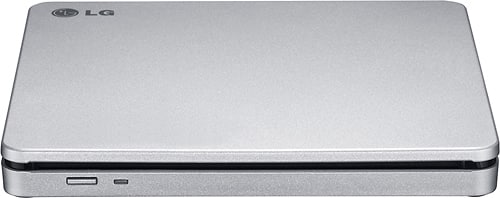
- Model:
- AP70NS50
- SKU:
- 1802033
Rating by feature
- Value
Rating 4.5 out of 5 stars
- Quality
Rating 4.6 out of 5 stars
- Ease of Use
Rating 4.6 out of 5 stars
Customers are saying
Customers commend the 8x External Double-Layer DVD±RW/CD-RW SuperMulti Blade Drive for its ease of use, performance, and broad compatibility. Its compact size, speed, design, and lightweight nature are also appreciated, along with its quiet operation. The DVD drive functionality receives positive feedback, while some customers express reservations about the software requirements.
This summary was generated by AI based on customer reviews.
Not made for regular television
||Posted . Owned for 1 week when reviewed.This reviewer received promo considerations or sweepstakes entry for writing a review.It wasn’t what I thought. I bought it for my tv. It’s acting made for a computer.
I would recommend this to a friendBrand response from LGAnswers
Posted .We are sorry to hear that your unit did not meet your needs/expectations. This is not the quality we expect from our products. We are continuously working to improve the quality of our products and anticipate market demands that drive customer satisfaction. If you ever have any questions please reach out to our support team on Facebook at @LGUSSupport and use #VOC in your first message to our social media support team.. To speak with an agent via phone, you can call 800.243.0000 We apologize for any inconvenience this caused. ^Venette

Inconvenienced
||Posted .This reviewer received promo considerations or sweepstakes entry for writing a review.Not able to load onto MAC. Drivers were for something else despite stating MAC compatible.
No, I would not recommend this to a friendBrand response from LGAnswers
Posted .We are sorry to hear that your unit did not meet your needs/expectations. This is not the quality we expect from our products. We are continuously working to improve the quality of our products and anticipate market demands that drive customer satisfaction. If you ever have any questions please reach out to our support team on Twitter via @LGUSSupport or on Facebook at https://www.facebook.com/LGUSA/. To speak with an agent via phone, you can call 800.243.0000 We apologize for any inconvenience this caused. ^Venette
Doesnt get detected,
||Posted .This reviewer received promo considerations or sweepstakes entry for writing a review.I add this drive many times to my mac book pro but it desnt matter what i do, my mac bro doesnt detect it, so its been useless.
No, I would not recommend this to a friendDidn’t last long
||Posted .This reviewer received promo considerations or sweepstakes entry for writing a review.I only had this a few months before my DVDs started getting stuck inside. Had to open the whole thing with a screwdriver.
No, I would not recommend this to a friendBrand response from LGAnswers
Posted .Let's see if we can get that taken care of for you. Reach out to a computer specialist by calling 800-243-0000 so we can look into this for you. ^CP
Not compatible with two of my computers
||Posted .This reviewer received promo considerations or sweepstakes entry for writing a review.I could not get this DVD player to sync up with either a notebook computer of mine or a notebook computer of my daughter
No, I would not recommend this to a friendNot what I was looking for
||Posted .This reviewer received promo considerations or sweepstakes entry for writing a review.Im sure it is good, just not what i was looking for unfortunately.
I would recommend this to a friendBrand response from LGAnswers
Posted .We are disappointed to see that you were not satisfied with your recent purchase and would like to learn more from you. However, we need to move to a platform that supports back-and-forth messaging. Please send us a private message on Facebook or Twitter using @LGUSSupport and use #VOC, and share your feedback with us. Thank you. ^Jennifer
Would not work with MacBook Pro
||Posted .This reviewer received promo considerations or sweepstakes entry for writing a review.would probably work great on another brand but didn't work with Mac Book Pro even though I was told it would upon purchasing.
No, I would not recommend this to a friendQuit working after a few uses
||Posted . Owned for 4 months when reviewed.This reviewer received promo considerations or sweepstakes entry for writing a review.It quit working after using it to rip a few cds into iTunes just out of warranty.
No, I would not recommend this to a friendI would not buy or recommend to anyone. Not even m
||Posted .This reviewer received promo considerations or sweepstakes entry for writing a review.Way too much money for this drive. It’s really really slow
No, I would not recommend this to a friendBrand response from LGAnswers
Posted .We are sorry to hear that your unit is not working as designed. We are continuously working to improve the quality of our products, availability while anticipating market demands that drive customer satisfaction. If the problem hasn't resolve, please reach out to our support team on Facebook at @LGUSSupport and use #VOC in your first message to our social media support team.. We apologize for any inconvenience this caused. ^Venette
It would not read my install disk
||Posted .This reviewer received promo considerations or sweepstakes entry for writing a review.I'm not pleased. The store salesperson said it would work like the apple drive. This drive would not read an install disk
No, I would not recommend this to a friendNo supported any longer by Apple
||Posted .This reviewer received promo considerations or sweepstakes entry for writing a review.Fine as a reader and to store data. But no software to copy a DVD for a MAC.
No, I would not recommend this to a friendDoes not work as Rep said
||Posted .This reviewer received promo considerations or sweepstakes entry for writing a review.This drive will not work with Apple products as advertised and recommended by staff mrmbrt
No, I would not recommend this to a friendDefect
||Posted . Owned for 1 month when reviewed.This reviewer received promo considerations or sweepstakes entry for writing a review.Had to send back for replacement. Would not eject
No, I would not recommend this to a friendBrand response from LGAnswers
Posted .This is unfortunate. Your feedback is appreciated and important in helping us to identify practices that drive customer satisfaction. We hope that you will consider LG for your product needs in the future. We apologize for any inconvenience this caused. ^Venette
Slow transfer
||Posted .This reviewer received promo considerations or sweepstakes entry for writing a review.Took forever to rip 1 cd to my computer. Plus the recording was not properly downloaded. Skipped songs.
No, I would not recommend this to a friendBrand response from LGAnswers
Posted .Hey Rob, thank you for your review it is very important to us. It is terrible to hear that the External DVD Drive took a while to rip one CD to your computer. I can understand how frustrating it may be for the recording to not properly download and skip songs. If there is anything we can do to help out in the near future feel free to reach out to us directly at 1(800)243-0000 via Facebook https://www.facebook.com/LGUSSupport or Twitter @LGUSSupport. ^TH
Something is wrong this is showing up on my charge
||Posted . Owned for 1 month when reviewed.This reviewer received promo considerations or sweepstakes entry for writing a review.Never got this and did not get when left store did someone charge to my sccount
No, I would not recommend this to a friendBrand response from LGAnswers
Posted .Please call BestBuy regarding this.^Venette
Can't judge
||Posted .This reviewer received promo considerations or sweepstakes entry for writing a review.I could never get the product to work on the Apple Computer.
No, I would not recommend this to a friendDoesn't play
||Posted .This reviewer received promo considerations or sweepstakes entry for writing a review.Keeps asking me to buy other products.the product doesn't play my movies.
No, I would not recommend this to a friendNecessary Computer Accessory!
Posted .This reviewer received promo considerations or sweepstakes entry for writing a review.Computer did not come with an internal CD drive. Drive states it will read CDs and write to DVDs. Will be helpful to use CDs to install software and to create DVDs for photos, files or backups.is USB A not USB C so an adapter or hub may be necessary for use with newer computers.
I would recommend this to a friendNot user friendly
||Posted . Owned for 1 month when reviewed.This reviewer received promo considerations or sweepstakes entry for writing a review.Not a user friendly product - I am returning it for a better product
No, I would not recommend this to a friendBrand response from LGAnswers
Posted .We hate to hear you feel that our disc drive is not user friendly, Shima. We would be happy to assist you with using your new disc drive. For proper assistance, please give our computer specialists a call at 800-243-0000. ^CP
Not good for mac
||Posted .This reviewer received promo considerations or sweepstakes entry for writing a review.I could not get it to work with my Mac. Returned it
No, I would not recommend this to a friend