Customer Ratings & Reviews

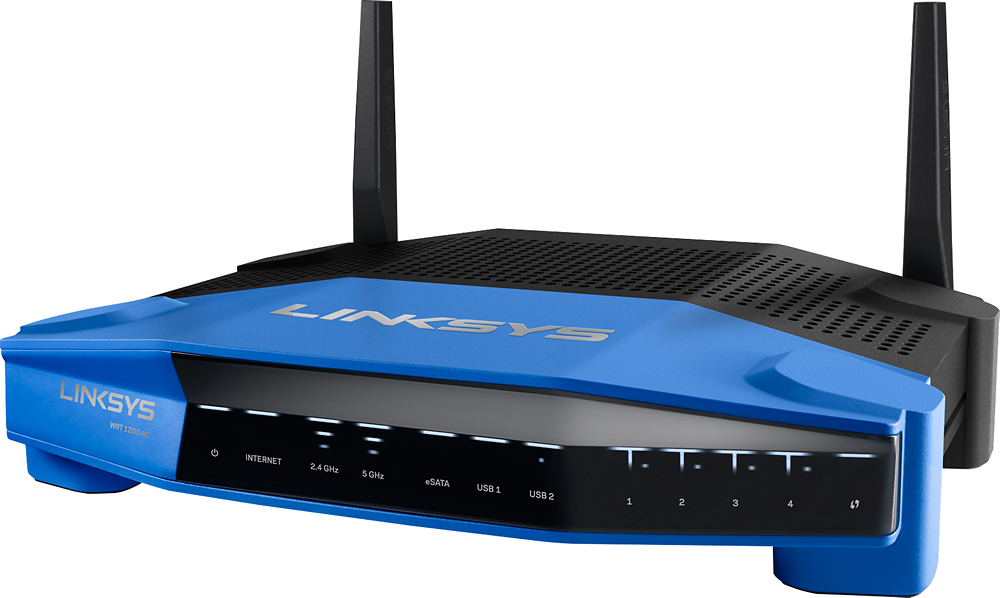

- Model:
- WRT1200AC
- SKU:
- 5263043
to a friend
Customers are saying
Customers are positive about the AC1200 Dual-Band Wi-Fi Router's ease of use, range, performance, and signal strength, with many praising its simple setup and strong, reliable connection. However, some customers reported occasional connection problems and found the router to be somewhat large. Positive feedback also highlighted the router's good coverage, price, and dual-band capabilities. A few users mentioned experiencing lag, though this was not a widespread concern.
This summary was generated by AI based on customer reviews.
Great router
||Posted .This reviewer received promo considerations or sweepstakes entry for writing a review.Excellent router with simple ans useful interface.
I would recommend this to a friendworks great
||Posted .This reviewer received promo considerations or sweepstakes entry for writing a review.have no problems with it. would recommend to freinds
I would recommend this to a friendGreat Product
||Posted .This reviewer received promo considerations or sweepstakes entry for writing a review.Very easy to install. Would recommend this product.
No, I would not recommend this to a friendwas on sale and a good buy
||Posted .This reviewer received promo considerations or sweepstakes entry for writing a review.Tried it out and liked it. worth the buy for me!!!
I would recommend this to a friendGreat product at a great price
||Posted .This reviewer received promo considerations or sweepstakes entry for writing a review.Excellent. Very simple to configure and many options.
I would recommend this to a friend- Pros mentioned:Range
Descent access point with a lot of features
Posted .This reviewer received promo considerations or sweepstakes entry for writing a review.PROS: + Good Build Quality + eSATA & USB 3 Ports + 4 Gigabit Ports + Fast dual core CPU + Descent range for only 2 antenna + Smart Wi-Fi Setup for console access virtually anywhere + Easy to use interface + Lots of extra features & customization + OpenWRT compatible + Dual Band (2.4Ghz & 5Ghz) CONS: - Expensive for what it does - Bridge or "Access Point" mode removes all extra features - Not as fast as cheaper routers which have more antennas - USB Drive speeds not very fast (i.e. NAS) Like many of us, I've owned countless access points over the years. Including the original Linksys WRT54 series that came out back in early 2000. I'm currently using a TP-Link C5 AC1200 Wireless Router, which has has comparable specs, except it has 6 antenna instead of the two here. Oh, and it costs about $100 less. OUT OF THE BOX & SETUP As is typical these days for access points, you don't get a whole lot. Just throw the antennas on the box and follow the quick setup guide. Which in this case, is pretty straight forward. You can either connect via LAN or Wireless and are given the option of using the Wizard or manual configuration. For most folks connecting to your modem, the wizard is the way to go. It's able to quickly identify your internet connection and help setup your Access Point names, passwords, etc. From there you, you call it a day and enjoy the internet. Although if you're buying this access point, you're interested in more than this. ADVANCED FEATURES If there's a feature that Access Points are pushing these days, this router has it all. You've got guess access points modes, tons of parental controls, FTP server, auto-update, etc. The two worth special mention here is the NAS (Network Area Storage) and Smart Wi-Fi. The NAS is very simple to setup. Simply connected my Seagate USB 3.0 drive to the USB port and you're done. Go to the NAS section in the setup interface to get the IP and connect from any system. You have other options such as setting permissions and such. Otherwise, it's ready to go. My main issue here was that it wasn't very fast. Speeds were limited to around 10Mb/s, give or two a few Mb. It didn't matter if I was on 2.4, 5Ghz, or connected via LAN. It just didn't want to go very fast. If speed isn't an issue, Smart Wi-Fi brings some nice added functionality. You basically create an account with Linksys and it allows you to remotely manage your device from anywhere with internet connectivity. This is particular useful if you want to access the files stored on your drive elsewhere. Quite handy. ACCESS POINT / BRIDGE MODE If you use the wizard, it'll actually automatically detect that you have an existing internet and set itself up so you've got internet. Although it's using DHCP, switches to a whole different subnet, etc. In other words, this isn't ideal. You can try to manually configure some settings to work around this, but it never worked right. You pretty much have to set it to Bridge mode. Which does work. I configured a static IP and my own DHCP/DNS servers took over. Everything good to go. However, it disables every single advanced features. No guest mode, USB storage, Smart Wi-Fi, all gone. For those of us doing this, jumping over to OpenWRT is clearly the best option. PERFORMANCE So how fast did it go. The best AC speeds on 5Ghz were around 35Mb/s average, with a few peaking at about 40Mb/s. And that's only a couple feet away. If I switched back to my TP-Link C5, it was easily about 5Mb/s faster, on average. And it was able to maintain a slightly better signal at further distances. Nothing drastic, but it was noticeable, and expected. There are quite a few more antenna's. Gigabit LAN speeds were right as expected, up to and right around 100MB/s, so nothing out of the ordinary there. Although that is with transferring files over the LAN. As previously noted, using the USB storage was considerably slower. CONCLUSION Overall, it's really not a bad access point. If you want a lot of features, functionality, and the ability to use OpenWRT, there aren't a lot of options. But if wireless speed is your top priority, there are other access points that cost considerably less, while still providing most of the important features folks are looking for.
No, I would not recommend this to a friendBrand response from Linksys Staff
Posted .Hi, omegafiler,
We appreciate the time you spent on this review and we would like to assist you in improving the performance of your router. We'd also like to ensure that the router is maximizing the features and the speed/bandwidth that your ISP is providing.
For further assistance, you may email us at LinksysCares@linksys.com, and please include the link of this review.
Regards,
Linksys Support
www.linksys.com/us/support
Didn't see an improvement
||Posted .This reviewer received promo considerations or sweepstakes entry for writing a review.Didn't see an improvement from the router I already had.
No, I would not recommend this to a friendBrand response from Linksys Staff
Posted .Hi. We appreciate your time for sharing this feedback. We’re sad to hear that the router didn’t quite meet your expectations. It might be possible that there is a configuration issue with the router. We recommend that you reset and configure the router again. Should you need further assistance, feel free to email us at LinksysCares@linksys.com. Please include your contact details and location in the email. We hope to hear from you the soonest.
Good for folks who still subscribe to cable
||Posted .This reviewer received promo considerations or sweepstakes entry for writing a review.I bought this router because my parents have cable service, and needed a router that would work in a house with metal lath. It still has had problems in the room where we all want it to work. That said, my parents have not complained about their internet access.
I would recommend this to a friendBrand response from Linksys Staff
Posted .Hi, slcrc,
There are workarounds that we can try to improve your Wi-Fi range. Setting a fixed channels for both frequency bands would help a lot in boosting the signal. For the 2.4 GHz wireless network, try channels 1, 6, 9 and 11, and channels 36, 40, 44 and 48 for the 5 GHz. Should you need a hand, send us an email at LinksysCares@linksys.com along with your contact information, the review title and the link to this post for reference.
We'd be more than happy to assist you.
Regards,
Jay
Linksys Support
Gets the job done
||Posted .This reviewer received promo considerations or sweepstakes entry for writing a review.Not the signal I was expecting but only overall ok
I would recommend this to a friendEasy set up
||Posted .This reviewer received promo considerations or sweepstakes entry for writing a review.Seems to be working well. We use rokus quite a bit.
I would recommend this to a friendRouter works as expected
||Posted .This reviewer received promo considerations or sweepstakes entry for writing a review.Router works as expected. It is difficult to review some aspects of wireless routers as many factors can affect their performance. However, I am of the opinion that something about the output strength of this router is lacking
I would recommend this to a friendNot the lowest, but...
||Posted .This reviewer received promo considerations or sweepstakes entry for writing a review.I thought this router would be a little faster than it is, having upgraded from a b-g-n Linksys. Should have returned it and gotten a faster one. I'm the only one using the Wi-Fi, so it should be faster.
No, I would not recommend this to a friendBrand response from Linksys Staff
Posted .Hi, Rickerd,
The router should provide the expected speed and coverage on your home network. Proper product placement and changing the wireless channel on both networks will help resolve slow connectivity issue.
Also, we would like to check your network setup and the devices involved. We'll endorse your case to our 2nd Level Support team so they can help you optimize the wireless settings on the router. Please email us your contact details at LinksysCares@linksys.com with the title and the link to this review.
Regards,
Kristine
Linksys Support
a learning process!
||Posted .This reviewer received promo considerations or sweepstakes entry for writing a review.not quite sure -----old router was netgear and it worked well. not sure if this Linksys is working right or if we are having problems with other new equipment,
I would recommend this to a friendBrand response from Linksys Staff
Posted .Hi, Pelia,
Our customer's satisfaction has always been our top priority. We'd be glad if you will reach out to us and share your experience so we can address any challenges you may have with the router. Email us at LinksysCares@linksys.com with your contact information and the link to this post.
We'd be more than happy to improve your Wi-Fi experience.
Regards,
Jay
Linksys Support
- Pros mentioned:Range
Ask before purchasing.
||Posted .This reviewer received promo considerations or sweepstakes entry for writing a review.Bought this Nd the range was decent. Returned for Asus router which was best move... Can't go wrong with the Asus.
No, I would not recommend this to a friendBrand response from Linksys Staff
Posted .Hi, SleekD,
Your feedback is valuable to us. Changing the router's wireless channel will help improve the router's wireless coverage. If you need help with your other Linksys devices, please don't hesitate to email us at LinksysCares@linksys.com so we can help.
Regards,
Kristine
Linksys Support
- Pros mentioned:Ease of use, Performance, Range
Better than expected
Posted .This reviewer received promo considerations or sweepstakes entry for writing a review.I replaced an aging dual band Asus router after nearly 7 years. I was able to replicate all port forwarding rules, static DNS entries, etc without any issues. The interface is not as intuitive but all needed functionality is there. Connectivity wise, no issues after nearly a week of use. My partner and I work from home which requires a dependable network connection for data calling (using MS Lync), VPN, etc. Not a glitch yet. Also stream music and video without any issues in our 2700 sq ft, 3 story home.
I would recommend this to a friend It ok for basic
||Posted .This reviewer received promo considerations or sweepstakes entry for writing a review.This product could be better for the price I wish I would of bought a package together. Instead of sea pater. It gives us some trouble.
No, I would not recommend this to a friendBrand response from Linksys Staff
Posted .Hi, WPK0422,
Thank you for reviewing this product. We can help you improve the performance of this router. Do you mind sharing the trouble that you are experiencing with it? Feel free to get in touch with us via email at LinksysCares@linksys.com and indicate your full name, phone number, location, and the link to this post. We'd be happy to assist you.
Regards,
Linksys Support
www.linksys.com
- Cons mentioned:Connection
Wireless Router
||Posted .This reviewer received promo considerations or sweepstakes entry for writing a review.I have to disconnect every 4 days. Wont do it again
No, I would not recommend this to a friendBrand response from Linksys Staff
Posted .Hi, Roberto,
Once the router is setup, there's no need for you to disconnect it. We would like to know more details about your challenges with the unit so we can help you get the router to work properly.
Please email us your contact information at LinksysCares@linksys.com so we can have one of our Escalation Engineers to contact you as soon as possible. Indicate the link to this review for our reference.
Regards,
Kristine
Linksys Support
- Cons mentioned:Connection
Kept dying throughout the day
||Posted .This reviewer received promo considerations or sweepstakes entry for writing a review.I purchased this router to replace an old one that didn't reach all the rooms in my house. Once I plugged this one in and turned off the old router, it only got worse. The range was half of what it was before, the connection was always flaky, and the router kept rebooting. If you want a new router, pick something else.
No, I would not recommend this to a friendBrand response from Linksys Staff
Posted .Hi, Chris,
Your experience with the router has caught our attention. It should provide you with an exceptional range and a stable connection. We can try checking the unit's firmware. Please email us your contact information at LinksysCares@linksys.com so that our Escalation Engineers can contact you as soon as possible and help you get the unit working flawlessly. Indicate the link to this review for our reference.
Regards,
Kristine
Linksys Support
If you like Linksys products this is for you.
||Posted .This reviewer received promo considerations or sweepstakes entry for writing a review.My TP Link router wouldn't power up anymore so I thought I'd give this Linksys a try. I thought I had some settings disabled, but it turned out to be the router that was slow. When I opened a web browser it takes at least 30 seconds or longer for the page to open, I had this router about 10 days and couldn't take it anymore. So I returned the Linksys and got the Netgear Night Hawk.
No, I would not recommend this to a friendBrand response from Linksys Staff
Posted .Hi, Mqntfit,
We regret to hear that you've already returned the WRT1200AC router. We could have tapped one of our Escalation Engineers to optimize the router's settings to achieve an excellent speed. Should you have any other Linksys device that you need assistance with, shoot us an email anytime at LinksysCares@linksys.com.
Regards,
Jay
Linksys Support
had lots of problems because software had not been
||Posted .This reviewer received promo considerations or sweepstakes entry for writing a review.like I said lots of problem when I first got it called them to fix it took 2-3 visit to get all problems fixed.
No, I would not recommend this to a friendBrand response from Linksys Staff
Posted .Hi, RonF,
We're glad that everything is all set with the router. If you happen to contact our Support team, we'd like to know the case number or email us at LinksysCares@linksys.com with your phone number and the link to this post so we can review what happened.
Regards,
Irish
Linksys Support