Customer Ratings & Reviews

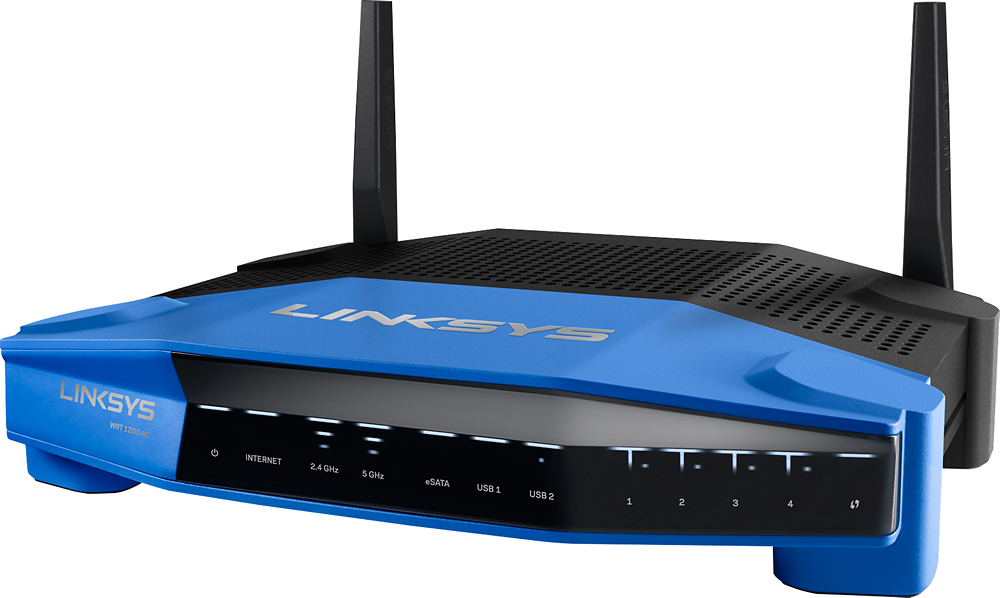

- Model:
- WRT1200AC
- SKU:
- 5263043
to a friend
Customers are saying
Customers are positive about the AC1200 Dual-Band Wi-Fi Router's ease of use, range, performance, and signal strength, with many praising its simple setup and strong, reliable connection. However, some customers reported occasional connection problems and found the router to be somewhat large. Positive feedback also highlighted the router's good coverage, price, and dual-band capabilities. A few users mentioned experiencing lag, though this was not a widespread concern.
This summary was generated by AI based on customer reviews.
Fast internet for business
||Posted .This reviewer received promo considerations or sweepstakes entry for writing a review.I have only had a problem with this device needing to be rebooted or restarted server all times.
I would recommend this to a friendBrand response from Linksys Staff
Posted .Hi, Griffey,
Thank you for taking the time to write this review. Constant reboot is certainly atypical of your device's model. It is an indication of a corrupted firmware for the same. We suggest updating the firmware and doing a hard reset afterward. You can download the updated file from this link, http://www.linksys.com/us/support-article?articleNum=156197 Should you need more help, let us know by emailing us at LinksysCares@linksys.com. Kindly include your contact information and the link to this post.
We look forward to hearing from you.
Regards,
Linksys Support
www.linksys.com
Drops wireless internet often
||Posted .This reviewer received promo considerations or sweepstakes entry for writing a review.The wireless output fails fairly often, but comes back on line after a while.
No, I would not recommend this to a friendBrand response from Linksys Staff
Posted .Hi, Rcrescitelli,
This is not the behaviour that your router should exhibit. A firmware upgrade/reflash followed by a re-configuration of the router's settings would address this setback. Please reach out to us so we can request our escalation engineers to walk you through the process. Send us an email at LinksysCares@linksys.com along with your contact information, the review title and the link to this post.
We'd be more than happy to get this sorted out.
Regards,
Jay
Linksys Support
Not as good I as had hoped.
||Posted .This reviewer received promo considerations or sweepstakes entry for writing a review.The radio is very under powered, Double NAT with this router is a B*#%h. No VPN with Iphone or Andriod what? What a joke. Who would sell such an item. I end up keeping it as repeater and buying Netgear and putting WRT firmware on it so I can have VPN for IOS on it. and many more features.
No, I would not recommend this to a friendBuy any other router
||Posted .This reviewer received promo considerations or sweepstakes entry for writing a review.I bought this to replace an ASUS router that the power button failed on and have had nothing, but problems since. This router has serious issues mostly the constantly disappearing 5 Ghz band, this can only be remedied by power cycling and it seems to work for 30 mins to 24 hours then it's back to the same. Since installing this router devices are having trouble connecting to the internet throughout the day despite indicating they are connected to the network. Other major issue is the web UI. It's unnecessarily complicated, Linksys/Cisco/Bellingham used to be better and its missing features that are commonly available on other models such as from Netgear and ASUS.
No, I would not recommend this to a friendBrand response from Linksys Staff
Posted .Hi, Cfe415,
We'll relay your feedback regarding the Linksys Smart Wi-Fi page to our Development team. Moreover, your experience with the 5 GHz network has caught our attention. We can resolve this issue by setting a fixed wireless channel. You may have it on channel 36, 40, 44 and 48.
Please email us your contact information at LinksysCares@linksys.com so that our Escalation Engineers can guide you through the process. Indicate the link to this review for our reference.
Regards,
Kristine
Linksys Support
Just ok
||Posted .This reviewer received promo considerations or sweepstakes entry for writing a review.So far this product has not been very good for us. Wifi signal works great sometimes and then not at all. Maybe we just got a bad one.
No, I would not recommend this to a friendBrand response from Linksys Staff
Posted .Hi, Cafinley,
Intermittent Wi-Fi signal is possibly caused by improper configuration of the router's settings or due to a faulty firmware. We recommend upgrading the firmware and optimizing the settings. Send us your contact details and the link to this post at LinksysCares@linksys.com and we'll have one of our Escalation Engineers walk you through the process.
Regards,
Jay
Linksys Support
- Pros mentioned:Signal strength
Great Router!
Posted .This reviewer received promo considerations or sweepstakes entry for writing a review.I've had two Linksys routers in the past, same ones for different places, and they have worked great. Was having issues with my current Netgear router and decided I needed an upgrade. Linksys has never let me down in the past and I will now probably exclusively buy Linksys for my networking needs in the future. This router exceeded my expectations. I have a two bedroom apartment and signal goes to the elevator, ~50ft away and through multiple walls. Setup was ridiculously easy and the app is pretty cool! I was able to get this on sale, but it is worth the price for something you will use every day. I have 50mbps internet and consistently get over 50mbps downloads over the 5ghz wifi channel. I have a xbox one, multiple PCs, multiple phones, apple TV and chromecast setup and the stream is great. Streamed a football game from my laptop to Chromecast with no issues last night. Couldn't be happier with the purchase.
I would recommend this to a friend Dropping calls
||Posted .This reviewer received promo considerations or sweepstakes entry for writing a review.Not overly happy. I returned it. The previous router I had worked better. Seemed like our phones were not picking up this router in certain areas of the house.
No, I would not recommend this to a friendUnreliable, drops connection every few days
||Posted .This reviewer received promo considerations or sweepstakes entry for writing a review.It's a good router with good performance and features, the networking performance is good. However, it is unreliable as about every 3-4 days, connection to the internet would drop and I have to reboot the router about to get the internet connection back up and running. Updating the firmware to the latest version didn't help, and made speeds slower than normal.
No, I would not recommend this to a friendBrand response from Linksys Staff
Posted .Hi Plow1,
The router’s connection shouldn’t drop every 3-4 days nor require frequent reboots. Why won't we have you assisted by our Escalation Engineers to get the router working properly? Please email us at LinksysCares@linksys.com with your contact details and the link to this review.
Regards,
Rechel
Linksys Support
Don't get a strong enough signal in house
||Posted .This reviewer received promo considerations or sweepstakes entry for writing a review.Router is in office at my house but signal won't reach to the living room where smart tv is and it's not very far distance between the 2 rooms.
No, I would not recommend this to a friendBrand response from Linksys Staff
Posted .Hi, Newman,
Your time for rating and reviewing this product is appreciated. With this router, your wireless network will have a strong signal.
Thick walls could cause wireless interference. If it is possible to relocate or reposition the router, that may help in improving the signal. Since the distance between your living room and the office isn't that far, then you can also try changing the wireless channel.
You can try our suggestions and contact us at LinksysCares@linksys.com should you need further assistance. We'd appreciate if you'll indicate your name, phone number, location, and the link to this post in your message.
Regards,
Linksys Support
- Pros mentioned:Range, Speed
Never know I needed a new router so bad
Posted .This reviewer received promo considerations or sweepstakes entry for writing a review.I only have DSL or dial-up as options where I live. So getting a fast router was not on the top of my list since I don't have that fast of internet to begin with. I knew I needed something, but it all worked with my old Linksys WRT54GS and 2 network switches. I have 2 gaming desktops(wired), gaming laptop(wired+Wi-Fi, moves around), 2 Dish receivers(wired), 3 smart phones, Smart Tv(wired), X-Box(wired + Wi-Fi, moves around) and 2 chromecasts to go 2 non smart TV's, and I also use Plex for my media server to stream outside my home network while on the road (I still have unlimited data thru Verizon I like to abuse). It all worked but just took a few seconds to connect if wanting to watch anything on Plex or transferring the files between computers. Then I got the Linksys WRT1200AC AC1200 for free from Linksys Friends and Family program and all I can say is wow. It has great reach on the WIFI and connecting to the network is fast and painless with no wait. I never realized how bad I needed a new router till now. Transfer speeds are great. Has 2.4 and 5 ghz so will connect o anything you have. This was the easiest router to hook up. With all the above hooked up and having Plex going outside my home network, I had nothing to do but go to the default IP address and it did all the work for me. I was worried I would would have to take my modem and reset it to get it off the wired bridge mode. Then redo my whole network, but 5 min after plugging it in, I was up with everything connected. Only thing I had to do was change my WiFi name and password. I could toss out speed and numbers and all that good stuff, but all that is out on the web to see. I wanted to give a more real world review with how happy I am with it, and how easy it is to set up and use. I have had it about 3 weeks and no issues as far as being kicked off or needing a restart.
I would recommend this to a friend returned!!!!
||Posted .This reviewer received promo considerations or sweepstakes entry for writing a review.I never had any issues with linksys products, but this router was a horrible experience,, I had issues with the wifi, the signal just falls for no reason,, restored to factory settings twice, but it didn't work,, returned next day,,,got a netgear router, worked good,,, right now i'm using a free sample from linksys and is working great, the MAX-STREAM MU-MIMO,,,
No, I would not recommend this to a friendBrand response from Linksys Staff
Posted .Hi, Jluis,
This is clearly not the experience we wanted you to have with the WRT1200AC router. We regret to hear that you've already returned the unit. We could have tapped one of our Escalation Engineers to tweak the wireless settings for an optimal Wi-Fi experience.
If you need a hand with your new Linksys Max-Stream router, don't hesitate to email us at LinksysCares@linksys.com, anytime. We'd be more than happy to lend a hand.
Regards,
Jay
Linksys Support
- Pros mentioned:Range, Speed
Very Impressed
Posted .This reviewer received promo considerations or sweepstakes entry for writing a review.I was debating on several models including the Linksys AC1900. I ended up getting this one because I use a Netgear Nighthawk Wi-Fi extender in the middle of my house so all I needed was good speed reaching the extender. Not only is it super fast and works with all my windows, apple, and android devices, I really don't even need my extender anymore. I can now reach the part of my house that used to give me trouble with my old Netgear N600 c3700. I will keep using my extender but it isn't necessary.
I would recommend this to a friend Poor
||Posted .This reviewer received promo considerations or sweepstakes entry for writing a review.Does not give me consistent, uninterrupted signal to all my network devices. Very disappointing.
No, I would not recommend this to a friendBrand response from Linksys Staff
Posted .Hi, BDCF,
Your feedback is important to us. Inconsistent internet connection is not the experience we wanted you to have with our Linksys WRT1900AC router. Let's sort this out. Do you happen to know if your router is running on the latest firmware version? To achieve stable connection, we recommend upgrading or reflashing your router's firmware, followed by resetting and reinstalling the it. Then for a much wider Wi-Fi coverage, try channels 1, 6, 9 and 11 for the 2.4 GHz wireless network, and channels 36, 40, 44 and 48 for the 5 GHz.
Should you need a hand, get in touch with us at LinksysCares@linksys.com, anytime. Please indicate your contact information and the link to this review for reference.
We'd be more than happy to assist you.
Regards,
Linksys Support
Not happy
||Posted .This reviewer received promo considerations or sweepstakes entry for writing a review.I was in the phone for hours and when I was told that it was connected it really wasn't
No, I would not recommend this to a friendBrand response from Linksys Staff
Posted .Hi Frankie,
This is not the kind of support experience that we want you to have. Rest assured that we’ll look into this and we would greatly appreciate the opportunity to make this right for you. Please email us your case number at LinksysCares@linksys.com with the title and link to this review.
Regards,
Rechel
Linksys Support
- Pros mentioned:Performance, Range, Speed
This router rocks!
Posted .This reviewer received promo considerations or sweepstakes entry for writing a review.****I received this router as a free sample from Linksys in exchange for my honest feedback***. Installation and setup was quick and easy. I got this as a replacement for my EA6300 Linksys router. I saw a 20% to 30% improvement in speed and range with the WRT1200AC over the EA6800. My home was built in the late 1800s and has the original plaster/lathe walls so wireless range has always been a challenge. I ran some tests with the EA6800, then ran the same tests with the WRT1200AC. Here are the results: My equipment is located in the upstairs rear bedroom. The test laptop was downstairs in the living room at the other end of the house. My DSL service is 12mb down and 1mb up. link strength, link quality, download speed, upload speed EA6800: 70%, 80%, 6.37 mb, 0.78 mb WRT1200: 88%, 100%, 7.8 mb, 0.95 mb and from outside in my backyard about 80 ft. away from the house: EA6800 46%, 100%, 1.10 mb, 0.51 mb WRT1200 74%, 100%, 8.36 mb, 0.96 mb The tests were done using speedtest.net in the 2.4 ghz band. I only have one device, a Samsung smart dvd player, that can access the 5 ghz band. Speed and reliability were greatly improved with the WRT1200. Everything was quicker and there were no dropouts or buffering when streaming movies. In all I am very satisfied with the performance and would recommend this router.
I would recommend this to a friend Is not the best
||Posted .This reviewer received promo considerations or sweepstakes entry for writing a review.This item do what is supposed to but is not the best not a long range!!
No, I would not recommend this to a friendBrand response from Linksys Staff
Posted .Hi, Pasito,
Tweaking the wireless channels depending on your network environment would help in boosting the range of your Wi-Fi network. For the 2.4 GHz band, try channels 1, 6, 9 and 11, and channels 36, 40, 44 and 48 for the 5 GHz. Should you need a hand, reach out to us at LinksysCares@linksys.com so we can tap one of our Escalation Engineers to assist you with the process. Please indicate your contact details and the link to this review for reference.
Regards,
Jay
Linksys Support
- Pros mentioned:Ease of use, Range, Speed
Bold Powerful Design
Posted .This reviewer received promo considerations or sweepstakes entry for writing a review.Regarding the following, I received a free sample from Linksys in exchange for my honest feedback... Upon opening the box, I found the WRT1200AC bold powerful design captivating. Moreover, the quick startup guide was extremely easy, allowing me to replace my existing router in minutes. Likewise, I found the on-screen list of Smart WiFi Tools and Router Settings invaluable. Specifically, the Network Map, allowed me to quickly and securely add all of my WiFi devices with a simple click of the WPS icon. Personalizing the appearance of each connected device, utilizing the wide-range of widgets, made my network map very impressive just to look at. Being able to see all the features at once and learning about each was fun. Also, I love the external USB ports which have now given me the capability to stream all my downloaded movies, photos, and music to both my living room and bedroom Home theater systems. Most importantly, all my connections appear very fast and seamless, such that I am no longer experiencing buffering, freezing, or lost connections. Additionally, the range reaches very far, I have given my neighbor several floors above guest access without any problem... Overall, I find the WRT1200AC to be best in class!
I would recommend this to a friend It has gone in and out since I bought it
||Posted .This reviewer received promo considerations or sweepstakes entry for writing a review.I have to refresh it all of the time to stay on line
No, I would not recommend this to a frienddoesn't work
||Posted .This reviewer received promo considerations or sweepstakes entry for writing a review.Since I purchased this product, it is not working. I thought it was my cable provider, but they came out (7 hrs) and I was on the phone with them 5 hrs. It wasn't my internet. I was told this new WIFI was the best, but it isn't. I should have kept my old one.
No, I would not recommend this to a friendBrand response from Linksys Staff
Posted .Hi WIFI,
Your feedback is of great value to us and definitely not the experience we want you to have with our product. Is this true for both wired and wireless connections? Perhaps the settings on the router was not properly configure with the modem. We suggest that you follow the steps on this link: http://www.linksys.com/us/support-article?articleNum=140177
For further assistance, please email us at LinksysCares@linksys.com with your contact details, location, and the link to this review for reference.
Regards,
Linksys Support
take it back, get a netgear
||Posted .This reviewer received promo considerations or sweepstakes entry for writing a review.I have been a longtime linksys customer and this was my third wireless router from them. I must have received a broken one because I spent weeks consistently troubleshooting problems when it would not hold a signal to my devices.
No, I would not recommend this to a friendBrand response from Linksys Staff
Posted .Hi, i11egalbeagle,
This is not the type of story we wanted to hear from a valued customer like you. There are few things that we can try to address this setback. Aside from doing a factory reset, we can reflash your router's firmware and optimize the wireless settings to achieve stability of the Wi-Fi connection. Please send us an email at LinksysCares@linksys.com so we can proceed in resolving this issue with the help of our Escalation Engineers. Don't forget to include your contact details, the title and the link to this review for reference.
We look forward to hearing from you soon.
Regards,
Jay
Linksys Support