Customer Ratings & Reviews


- Model:
- WRT1200AC
- SKU:
- 5263043
to a friend
Customers are saying
Customers are positive about the AC1200 Dual-Band Wi-Fi Router's ease of use, range, performance, and signal strength, with many praising its simple setup and strong, reliable connection. However, some customers reported occasional connection problems and found the router to be somewhat large. Positive feedback also highlighted the router's good coverage, price, and dual-band capabilities. A few users mentioned experiencing lag, though this was not a widespread concern.
This summary was generated by AI based on customer reviews.
nice router to have
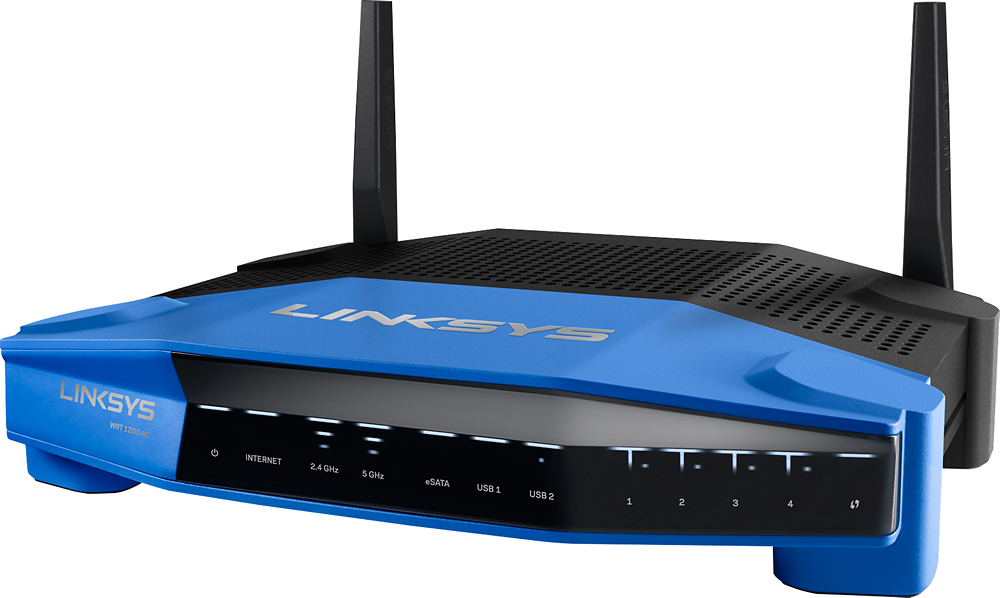
Posted .This reviewer received promo considerations or sweepstakes entry for writing a review.I received a WRT1200AC router free from Linksys in exchange for my honest review. The WRT1200AC is a beautiful router. With its blue face and two antennas I can’t help but think of a Transformer every time I see it. The setup instructions were incredibly easy. The router was up and running in no time using its default profile. You can change network names and passwords if you desire during the setup process. Linksys Smart Wi-Fi included great features. I love the wireless scheduler; it allows you to set a schedule for your router so the wireless turns off and on when you want it to. Parental controls is another great feature, allowing parents to restrict access to websites by specific network attached devices. The Network Map displays devices attached to your network. Under the Internet Usage button, you can see how much Internet bandwidth each device is using. I attached an external storage device to the router’s USB 3.0 port. Movies streamed flawlessly with no buffering. If you want to restrict access, you can, just click External Storage on the Linksys Smart Wi-Fi panel and select Folder Access. From there you can set up authorized users. Fantastic feature. The router also has a USB 2.0/eSATA port if you need it. The WRT1200AC gave great wireless coverage throughout my home streaming Netflix movies with no problem. All things considered it’s a pretty nice router to have.
I would recommend this to a friend- Pros mentioned:Ease of use, Signal strength
Great Product
Posted .This reviewer received promo considerations or sweepstakes entry for writing a review.In exchange for this review, i was given the Linksys 1200AC to use in my home. It is very easy to set up and use. I have a dead spot in my home that my previous router couldn't tackle, now I only have minor problems every now and then. It provides you with a pair of wifi signals as well as a guest log in with separate password.
I would recommend this to a friend - Pros mentioned:Signal strength
Easy Setup
Posted .This reviewer received promo considerations or sweepstakes entry for writing a review.I received a free sample from Linksys in exchange for my honest feedback. I've been using this router for the past two weeks. It was a breeze to setup and install. Anyone could set this up with no issues. I have the router located on the lower level of my home. I receive a strong signal everywhere in my home. I can even step outside on the patio and receive a signal. I've read reviews for other routers indicating that they had to reboot the router because their signal was lost. I have not had to reboot this router at all. Everything has been working wonderfully. I have two computers, two televisions, two cell phones, one laptop, and two blue ray disc players connected wirelessly to this router and everything works great. Regardless of the room the device is located in, I get the same speed for each of the devices connected. The one negative I'd mention is that the heat vents are located on the top of the device, making it susceptible to dust buildup. Previous versions of the Linksys routers had the heat vents located on the sides. Other than that, I'm extremely satisfied with the router and would recommend it.
I would recommend this to a friend - Pros mentioned:Ease of use
Fast and easy set-up
Posted .This reviewer received promo considerations or sweepstakes entry for writing a review.I wasn't really looking forward to decommissioning my old router due to the time usually required to get things set up the way I want them - but the old router was starting to have issues and needed to go. I did receive this router as a free sample from Linksys in exchange for my honest feedback, but would have purchased a Linksys router anyway. I found a window of time where no one in the family needed to be on WiFi and settled in to set the new router up... I plugged everything in to the router, put the disk in my PC and couldn't find a setup program on the disk. (this is the only thing I would consider a hickup in the whole set up process - and it was my fault, due to me not reading the setup instructions beforehand) I selected what I thought was the next best thing; 'setup instructions' and I was in immediately in and able to set everything up in less than 15 minutes. I also installed Smart WiFi on my phone and I'm able to access all of the settings there now instead of having to go to a browser on my PC. This was the easiest set up process I've ever been through with a router, and I'm extremely pleased with it.
I would recommend this to a friend - Pros mentioned:Ease of use, Range
Great router
Posted .This reviewer received promo considerations or sweepstakes entry for writing a review.This router is perfect for a small to intermediate family that has that streams a movies or games online. It is easy to set up and have great range. There is no lag from devices trying to fight for bandwidth between each other. I received a free sample from Linksys in exchange for my honest feedback.
I would recommend this to a friend - Pros mentioned:Ease of use, Signal strength
Great product
Posted .This reviewer received promo considerations or sweepstakes entry for writing a review.I received a free sample from Linksys in exchange for your honest feedback and i am very pleased with this product. It is easy to setup and use. Before I had dead spots around my house which anoyed my wife. Now i have a strong signal no matter where we go in the house. i highly recommend this product.
I would recommend this to a friend - Pros mentioned:Ease of use
Great Wireless Router
Posted .This reviewer received promo considerations or sweepstakes entry for writing a review.I have only used Linksys Wi-Fi wireless routers since setting up my home with wireless Internet connectivity. After using the WRT54g, the E3000 and now the AC1200, with the improvements and added features makes this a router worth owning. The setup is a breeze with the internal web interface. I am now able to configure the router from one central web interface. The native interface is such a great improvement over the separate interface that had to be loaded from a separate CD I received with the E3000. The are several new security features that are easy to configure. The interface now includes a convenient broadband Speed Tester, a troubleshooting help screen, and much needed parental controls. I am also able to configure the router with my Android smart phone using a free Smart Wi-Fi App. I am pleased to recommend this as the best router I have owned from Linksys. I was given a free sample from Linksys in exchange for my honest feedback
I would recommend this to a friend - Pros mentioned:Ease of use
Great Router, Highly Recommend
Posted .This reviewer received promo considerations or sweepstakes entry for writing a review.I am a big fan of Linksys routers all the way back to the WRT54G. But this one is much more advanced. I received a free sample from Linksys in exchange for my honest feedback from Linksys and I am grateful for the opportunity to use this product. With so many items connecting to your home network now it is nice to have a router that can not only handle all the traffic but also allow you to see who is on your network from anywhere. You can also set up a guest network, change the password remotely. The features go on and on. I have several items connected Desktop PC's, laptops, tablets, phones, Smart TV's, DirecTV, Blu-Ray players, Video game consoles, Security cameras, Alarm system, Appliances, thermostat, printer, the list goes on and on and this router can handle all of it with ease. I would definitely recommend this router as it can handle your current needs and those as you continue to add items in the future.
I would recommend this to a friend Amazing Router For the Price
Posted .This reviewer received promo considerations or sweepstakes entry for writing a review.FULL DISCLOSURE: I received this router free from Linksys for review purposes. There were no restrictions imposed by Linksys on the content of this review. When offered the opportunity to test drive the WRT1200AC (the 1200), I jumped at the chance based on the information I had seen over the last year or so on it's big brother the WRT1900AC (the 1900). The 1200 is essentially the same router with slightly less top end speed on the wireless AC side (867 vs 1300 Mhz). This may seem like a big difference on paper, but in usage it's hard to tell a difference. You might see a slightly faster file transfer time within your local wired and WiFi network, but unless you are transferring massive quantities of data it makes little difference. On the Internet side, very few of us are fortunate enough to have an upstream link anywhere near this fast, so your ISP speed will be the limiting factor on your downloads. The nice thing about the slightly less top end speed is that the 1200 comes with a much lower price tag than the 1900. As of this writing, we're talking about $100 USD less for the 1200, and that makes the current retail price $129 USD. That my friends is a very inexpensive price for a router with the features and performance of the 1200. My former router was from a competitor and was about 4 years old. While it was always rated at having very high range/distance capabilities on the WiFi side (and it was really good), the drawback was with the operating system firmware and a ridiculous amount of bugs that never got fixed. We're not talking nit-picky things but basic functionality like DNS. My hope for the 1200 was that it could come close to the WiFi range I had now, and that the firmware was shall we say a bit more robust. So, how did the 1200 do in testing? Spectacular is the first thing that came to mind as I compared signal levels between the 1200 and the competitor router at various location in and outside the home. All tests were done on the 2.4 and 5 Ghz bands using 802.11 N WiFi devices, using the same channels and under the same conditions (tested the routers one at a time and swapped them over quickly). The test locations were adjacent to the router (~3 ft away), one floor down (~40 ft away), outside adjacent to the home )~50 ft away), and at the edge of the property (~150 ft away). With the former router, the levels ranged from -34 to -80 dBm @ 2.4 Ghz, and -44 to -91 dBm @5 Ghz. With the 1200 router, the levels ranged from -30 to -71 dBm @ 2.4 Ghz, and -35 to -78 dBm @5 Ghz (lower signal levels are at the farthest test location and the more positive the dBm number the higher the signal strength). If you do the math, you can see that the 1200 has better signal strength at the 2.4 Mhz band and really shows its stuff on the 5 Ghz band compared to the former router. That's important as the 2.4 Ghz channels are filling up with lots of users and the 5 GHz band is much less crowded. The 1200 lets you take advantage of 5 GHz as long as your WiFi devices support 5 Ghz as well. The next step was to have a play with the new 802.11 AC feature the 1200 brings to the party. 802.11 AC WiFi devices are still fairly scarce, but if you have one to play with, my oh my it's fast. I tested with a laptop that has 802.11 AC capabilities and was wowed when I saw the WiFi link connection indicate we were locked in at 867 Mhz. That's almost a GB connection through the air. Remember when we were all excited about a 54 MHz connection when 802.11 G came out? So, does the extra bandwidth make that big of a difference in normal work? Really, no for a single user. File transfers within the local network (to a PC on a 1 GB wired connection) were noticeably faster, but honestly I had a 300 MHz connection on 802.11 N on the former router and was nowhere near saturating the available bandwidth. But it sure is cool seeing that 867 Mhz connection speed pop up. Seriously, the extra bandwidth would be a huge benefit to those of you that have multiple users and many WiFi devices competing for the same available shared bandwidth. Just keep in mind that the ISP speed will be your main restriction when you start sucking down loads of streaming content from the Internet. If you're still with me at this point, it's time to talk about the features of the 1200 and the configuration stuff. Linksys has done their homework and has made the router configuration process easy enough for most anyone to use, but they have also kept things agreeable for the tech heads among us (guilty) that like to jump in and set things up without the hand holding. That's a fine line to travel, and I think they have done a great job in this area. I found the feature set of the standard firmware to be very complete with what is needed for a home WiFi router. The usual features found on most routers are all here along with a few options that are seen less frequently. I like the ability to do an Internet speed test within the router as well as the OpenVPN capability. The network map is also a nice touch and helpful if you have a lot of WiFi devices on your network and want to see which devices are online and the amount of bandwidth each is using at that time. The help function within the configuration screens is adequate, but is not context sensitive or presented on the same page with the configuration item. Think of a separate help file you have to search through, and that's what you have here. The one feature my former router has that the 1200 does not have (at least that I have found) is a data usage counter. With the unfortunate increase of "data caps" used by the big ISP's, it's nice to have a counter in the router that gives you this data from your side of the ISP connection. The limits and overage charges will be based on the counts from the ISP's data usage meter, but having one in the router helps you keep them honest if you get dinged for hitting the data usage caps. As far as wired ports go, having 1 Gb network ports on the switch side is a nice feature since 1Gb NICs are pretty standard these days on PCs. I also appreciate having the USB3 and eSATA ports available for a storage drive, but don't ever plan to use them. Why add this extra load on a router making it act as a poor man's NAS (network attached storage) when an actual NAS box suitable for home use is relatively inexpensive? My original intent was to load the open source "OpenWRT" firmware in the 1200 and get my geek on by tweaking and hacking away. After seeing and using the standard firmware for a few weeks now, I've decided to leave things as they are for now. While I am happy that Linksys makes using a third-party firmware in the 1200 an easy proposition, I just can't think of any other features I need at the moment to send me down that path. Knowing I have that option is important to me, and I would not buy a router at this point that did not give it to me. Along the same lines, the hardware is hacker friendly with a serial port header on the board for those inclined to dig really deep. So what do I not like about the 1200 and what problems have I had with it so far? The list is short, but the biggest gripe I have is with the lack of a proper users guide in PDF format. The CD-ROM shipped in the box has a skimpy "getting started" type doc for those that don't know how to connect things up and get started commissioning the router. It's useful for the non-techie crowd, but that's about it. The web site only has the same skimpy doc if you look there. The only source of information I have located is the Help screen within the router's operator interface. I get the not killing trees stuff, but how hard would it be to put this same data in a PDF for old-school types like me that like having proper documentation in a portable format. I also wish the 1200 had a proper data usage meter as mentioned earlier. The other thing that has me concerned is the "Smart Wi-Fi" remote access feature. I've found no details on how this is implemented, but my suspicion is that the router may have a link back to a Linksys server and you access your router via their server. While this makes remote access easy for non-techies, it opens a port to the Internet that I would prefer not to have open. Personally, I'd prefer to VPN to a machine inside my network then access the router configuration from inside. Take this with a grain of salt as I my be totally wrong on how this works, but I sure would like to confirm I can close the port and disable the feature if it does work this way. Overall, I'm very impressed with the WRT1200AC and would recommend it to others that want a high performance home WiFi router for a really low price. I'm giving it 5 stars based on the performance and price. I'd take back a half star for the lack of a proper users guide if I could, but I'm not going to knock off a full star for that. Nice job on this one Linksys.
I would recommend this to a friend- Pros mentioned:Range, Signal strength
Easy setup and great range
Posted .This reviewer received promo considerations or sweepstakes entry for writing a review.* I received a free sample from Linksys in exchange for my honest feedback* Router was easy to set up and had no problem adding all of my devices. Range is excellent and signal is reliable. I am really happy with the performance of this router.
I would recommend this to a friend Just Wow
Posted .This reviewer received promo considerations or sweepstakes entry for writing a review.The sheer size of this router when you first pull it out of the box tells you it’s a workhorse… and it doesn't disappoint. THE PROS: This router has so many advanced features that they’re simply too many to list, let alone go into the details of each one. Here are some of the pros that stood out the most: The setup and installation was a breeze as it is usual to Linksys products. I found the administrative tools easy and user-friendly. I set this router up with the same network name and password as I was using before. Once the settings were configured, all of my devices connected to the network without any problems (as expected). The router has dual auto-balancing 5GHz bands, each rated 2166, totaling 4333 plus a single band/radio for 2.4GHz 802.11n support for previous devices; this allows the router to intelligently assign each new request for a 5GHz device to the least busy of the two radios. This doubles the throughput of the wireless side. Four gigabit wired Ethernet ports allow you to plug in double the amount of devices as previous routers, doubling your device capacity right out of the box, which for me was a huge plus since I had to use a switch to accommodate additional plugged in devices. With 4x4 Multiuser Multi-Input Multi-Output support, it also has 8 antennas, 4 of which support both 2.4GHz and 5GHz bands (the other 4 only 5GHz) giving you up to 4x throughput on Mu-MiMo capable devices, which can have from 1x1 (1 transmit + 1 receive) up to 4x4 antennas, all sending and receiving simultaneously without needing to wait "in line" for each device. The range of this router is absolutely superb. I get full signal coverage even in the farthest corners of my house (My house is roughly 4,800 sq ft) All of the kinks from the first Mu-MiMo router from Linksys (EA8500), this one has all the kinks worked out and just works flawlessly, immediately giving me more than 4x throughput - especially useful for steaming HD (or 4x UHD) video without any artifacts or signal loss. THE CONS: For the first time when testing a router, I was so overwhelmed with the pros of this router that the cons were hard to find. For some people the size of the router will be a con… it is HUGE compared to most other consumer routers. Although I personally like the look, it definitely stands out. It is about the size of a laptop and twice as thick with 8 antennae coming out of it. It will be noticed unless you hide it inside a cabinet or something. MU-MIMO is still a fairly new technology that some devices may not have caught up with just yet. Getting this router now will definitely future-proof your home, but a few devices may not yet be able to take full advantage of the best features this router offers. THE VERDICT: This is a solid router with the latest technology available. It is a good way to future-proof your home or small office. The router is a bit pricier compared to others, but it offers so many features and reliable connections that if you have the money, getting it is a no-brainer. Disclaimer: I received this product for free for review purposes. I have reviewed many items I've received for free and I've always done my best to be objective and highlight the cons as much as the pros.
I would recommend this to a friend- Pros mentioned:Ease of use, Performance
Great router
Posted .This reviewer received promo considerations or sweepstakes entry for writing a review.Linksys has been on a roll lately in producing easy to use products that simply work. The AC1200 was easy to set up and provides rock solid performance. Although I received this free from Linksys the fact is that it is a great router.
I would recommend this to a friend - Pros mentioned:Speed
Speed limit has been raised
Posted .This reviewer received promo considerations or sweepstakes entry for writing a review.After looking over this item I called Linksys as I had a few questions. After getting the reply i was looking for I was set to buy it. I was then asked If I wanted to sample a unit. I agreed and I advised the company I would give a honest review. I have a older laptop with 802.11G I wanted to go to the Faster A/C speed. I've read that the dongle should have a USB 3.0 port for the max speed but figured anything would be faster then the G I was using. Installed the newest software, Rebooted the LapTop and inserted the dongle. After a few quick changes to the settings, I was connected. Wow so much faster then the older unit i had. I'm so happy I made the move to the new A/C speed. It's just like swapping out your old hard drive for a SSD drive. Jaw dropping fast.
I would recommend this to a friend - Pros mentioned:Signal strength
Best Extender of my WIFI Signal
Posted .This reviewer received promo considerations or sweepstakes entry for writing a review.I received this product last week from Linksys for my review. I have used a couple of signal extenders in the past with not much success. The setup was simple and I had to move the unit only once to find an optimal place for the extender. The cell phone app works well on placing the extender unit. I had to adjust the placement of the extender because I did not place it where the app showed me to place it. Since the extender has been in the optimal location it has been excellent. My router is located on the other end of the house and it dropped signal a few times a day. Since I have placed the extender my signal has been great and consistent all day long. I would recommend this product!
I would recommend this to a friend - Pros mentioned:Ease of use, Performance
Great Product
Posted .This reviewer received promo considerations or sweepstakes entry for writing a review.I received this router free in exchange for an honest review. This WRT1200AC router is a superior product. The ease of setup is astounding and the product functions flawlessly. A great product.
I would recommend this to a friend Reliable, strong signal amplifier, dual band A+++
Posted .This reviewer received promo considerations or sweepstakes entry for writing a review.I will start this review by simply stating the following. The Setup: This LINKSYS RE6700 AC1200 amplifier is definitely a huge improvement over the previous models in the fine line of LINKSYS products, it's ridiculously easy to set up (No CD needed) All you need to do is unpack this unit from the box, plug it to your wall outlet and give a solid 2-3 minutes boot up time, after that, you simply log into this LINKSYS RE6700 AC1200 amplifier by entering the printed/provided login information and password (look for it on the device itself or the box it came in). It's that easy. After you do that, it will take you to the GUI (interface) and all you have to do is just provide your current-existing network (Wi-fi) credentials and boom, the new network shows up in your devices with an (EXT) name after whatever the name of your current network is. But you can also change it during the set up and name it whatever you choose it to be, and that's it, you are done and ready to surf the internet with this amplifier that provides dual band for newer and older devices (2.4Ghz- most devices use this band) and of course the amazing blazing fast 5Ghz band that if you're near your router or this LINKSYS amplifier it will provide you with a blazing speedy internet connection to browse, watch videos, or do whatever you want with that speed. I timed how long it took me to set up this device and the result for me was between 5 -6 solid minutes (booting up and configuring the network) and testing it of course. Stability/Price: The reason I'm giving it a 4 star though is because I did have to reset this device since the initial connection and set up took place at least once, for some reason it dropped my connection altogether, but then i realized my router was about 35ft away from it, and the doors were closed and my walls are very thick, so maybe that was on me, but either way, I've left my door open since that time and no drops have occurred since then, I've also push it's capacity by testing it for a up to 12 hrs with the doors closed and it doesn't drops the connection, maybe it was just a hiccup, maybe it was my router, but I'm skeptical, and if I do see at least another 3-5 drops I will definitely review my rating. The other reason I also awarded this device a 4 star rating was because of the price tag, while it's not the most expensive out there, I believe these should be more affordable, they are so helpful for every dead spot in the house that I understand why it has to be priced at the current price out there, but just a personal point of view. Range/Devices: Anyways, I've tested this with my iPad, Droid tablet, iPhone, etc, and the range is significantly expanded and consistently delivering 5 solid bars of signal throughout my 3,600sqf 2 story property, this is impressive for such a small device, and the added bonus on this device?, the outlet it has in the front saves me from using another ugly power extension, this is why I also gave it a 4 star, this is so helpful, thank you LINKSYS for thinking about that small but very important detail. On my desktop and laptop which are currently using Windows 7 and Windows 10 OS, the speeds are being delivered on point! no complaints from me there. Overall I thin this is well built device, it's solid, and I definitely see it has features not found in other current extenders and it's great alternative if you don't want to use another router as an AP (access point) or repeater. This is well worth the money but still, it'd be nice if they were a bit lower in price. Please also note I received this device sample free of cost from LINKSYS in exchange for my unbiased honest feedback. Thank you, have a great day.
I would recommend this to a friend- Pros mentioned:Speed
Easy setup and great coverage!!!!
Posted .This reviewer received promo considerations or sweepstakes entry for writing a review.I got this item a week ago so I'm still trying out the engine on it. It was very easy to set up!! I've got DSL here at home which isn't supper fast but I could tell the difference between this one and my Cisco. Things seem to be quicker when going from page to page and down loads also. I live in a very small town and the cable is actually worse than DSL!! So any boost in strength is a big plus!! I've got my iPhone, printer, 2 laptops, enternet speakers, tablet, 2 wifi blue ray players all on it and it's not even slowed down!! Now my cisco one would bog down. Very pleased with this product!! I'll post another update in a couple months on its progress.
I would recommend this to a friend - Pros mentioned:Ease of use
Yes It IS Smart!
Posted .This reviewer received promo considerations or sweepstakes entry for writing a review.****I received this router as a free sample from Linksys in exchange for my honest feedback***. Nice product! Easy to install. Clear instructions except for one step in the quick start guide: plugging in the computer-->router cable wasn't mentioned even if it was not included with the router. I figured it out fairly quickly, but it would of made the installation quicker. Online setup was easy and smooth @ the Linksys Smart Wi-Fi website, http://linksyssmartwifi.com. Nice looking unit, very sturdy. (Only concern I have is coincidently my internet seems slower than before, not sure if this has to do with the router or my internet provider.)
I would recommend this to a friendBrand response from Linksys Staff
Posted .Hi, bookiej,
Your feedback is important to us, and thank you for taking the time to share your experience. We'll take note of your feedback about the setup process and we'll share it to our Development Team. By the way, we're just curious about the speed that you're getting using the new Linksys WRT1200AC router and we would like to get this taken care of. We recommend to check first the speed coming from your ISP for further isolation. Then to ensure maximum performance of your router, we can reflash the firmware, followed by doing a factory reset and reinstallation. We would also suggest to modify the channels for both frequencies for an optimum wireless coverage. Please try channels 1, 6, 9 and 11 for the 2.4 GHz wireless network, and channels 36, 40, 44 and 48 for the 5 GHz. Should you need further assistance, get in touch with us at LinksysCares@linksys.com along with your contact details and the link to this review for reference. We would be more than willing to help you out.
Regards,
Linksys Support
www.linksys.com
- Pros mentioned:Ease of use
Linksys AC1200 Wireless-AC USB Adapter WUSB6300
Posted .This reviewer received promo considerations or sweepstakes entry for writing a review.Installation was very easy. Insert CD, then when prompted, plug in adapter to any USB port. Once connected, an LED light on top of the adapter stays on. The other LED light is for a Power/Status LED and flashes when there is wireless activity. In terms of performance, I was very impressed with the speed of the wireless adapter. I don't have any numbers to provide, but believe me, it is noticeable. I've tested it out for a few days and the connection has yet to drop. In interest of full disclosure, I received a free sample from Linksys in exchange for my honest feedback.
I would recommend this to a friend - Pros mentioned:Ease of use, Performance
Great Signal and easy setup
Posted .This reviewer received promo considerations or sweepstakes entry for writing a review.It was very easy to setup and use. I like the network map feature so you can see who is on your network. It works very well so far.
I would recommend this to a friend