Customer Ratings & Reviews
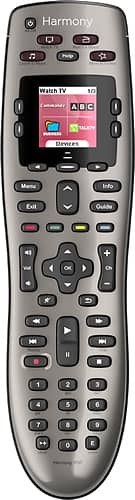

- Model:
- 915-000159/915-000160
- |
- SKU:
- 9837565
Customer reviews
Rating 4.4 out of 5 stars with 7679 reviews
(7,679 customer reviews)Rating by feature
- Value4.3
Rating 4.3 out of 5 stars
- Quality4.6
Rating 4.6 out of 5 stars
- Ease of Use4.2
Rating 4.2 out of 5 stars
Customers are saying
Customers are satisfied with the Harmony 650 8-Device Universal Remote's ease of use, compatibility, and price. Many appreciate the setup process and customization options, along with features like the backlight and macro programming capabilities. However, some users point to areas needing improvement, such as battery life and button size. Concerns were also raised regarding the remote's responsiveness.
This summary was generated by AI based on customer reviews.
Rated 2 out of 5 stars
Basic Remote
||Posted .This reviewer received promo considerations or sweepstakes entry for writing a review.Has good basic functions but not anywhere close to other remotes in this product line. Really doesnt offer much more than standard cable remote. Better to spend more to get more!
No, I would not recommend this to a friend- Cons mentioned:Battery life
Rated 1 out of 5 stars
battery hog
||Posted .This reviewer received promo considerations or sweepstakes entry for writing a review.This is my second Harmony. Needs batteries every few days. This was not the situation with my first harmony that was rechargeable.
No, I would not recommend this to a friend Rated 2 out of 5 stars
Buttons Too Small
||Posted .This reviewer received promo considerations or sweepstakes entry for writing a review.If you can't find them in the dark and without looking, they are worthless. Also, not all most used functions do not show on a basic programming effort...such as skip features.
No, I would not recommend this to a friendRated 2 out of 5 stars
Eh
||Posted .This reviewer received promo considerations or sweepstakes entry for writing a review.Just as the title says. This remote is very eh. Has issues from time to time navigating properly. Constantly brings up the help dialogue to ask if you're having issues.
No, I would not recommend this to a friendRated 1 out of 5 stars
Had to return the remote
||Posted .This reviewer received promo considerations or sweepstakes entry for writing a review.When I connected the remote to the software - installed from the Logitech Web site, the software said the serial number was invalid, and that I should contact Logitech Customer Service. I contacted that office, and the rep said the unit was out of date and that I needed to return it to the seller (Best Buy, in this case). I have returned it, and I'm assuming that there aren't any "valid" items available from Best Buy. I'll have to try another source. I never did get to any sort of installation phase.
No, I would not recommend this to a friendRated 2 out of 5 stars
This control is confusing
||Posted .This reviewer received promo considerations or sweepstakes entry for writing a review.Either we were not told of the features or we didn't listen very well. We still have to use the TV control in order to get on the internet which defeats the purpose of this all-in-one control
No, I would not recommend this to a friendRated 1 out of 5 stars
I really wanted to love it
||Posted .This reviewer received promo considerations or sweepstakes entry for writing a review.I really wanted to love this remote, unfortunately it kept disconnecting from our television. I connected the remote as per instructions to our Panasonic 4K tv, which worked...until it didn't, I mean literally within three days it stopped working. Very frustrating finally took it back, I don't have time to be connecting this remote to the computer every other day...just annoying, took back.
No, I would not recommend this to a friendRated 2 out of 5 stars
Product quit working after out of warranty.
||Posted .This reviewer received promo considerations or sweepstakes entry for writing a review.Not happy with this remote. One month out of warranty the keys quit working. I had to buy another remote and bought a different one.
No, I would not recommend this to a friendRated 2 out of 5 stars
Not easy to work.
||Posted .This reviewer received promo considerations or sweepstakes entry for writing a review.Need to register online and then figure out the instructions. After all that I couldn't get it to work. Worst part is no 800 number to call for help.
No, I would not recommend this to a friendRated 1 out of 5 stars
Very poor product. Messes up all the time.
||Posted .This reviewer received promo considerations or sweepstakes entry for writing a review.This is the second one we received. The first one quit working completely so had to be replaced. When it was taken back we told them how much trouble we had with it and was told they were aware of the problems but still continue to sell them and would not give us a different one. We purchased a 2 year additional waurenty on the product .
No, I would not recommend this to a friendRated 2 out of 5 stars
Harmony remotes are not as good as they used to be
||Posted .This reviewer received promo considerations or sweepstakes entry for writing a review.Had to buy a 2nd remote after my rewind button stopped working. At times my old remote reset itself and I had to shut off the Assistant each time.
No, I would not recommend this to a friendRated 2 out of 5 stars
Works Ok
||Posted .This reviewer received promo considerations or sweepstakes entry for writing a review.This remote is a bit complicated to understand. Not real happy with it. I find I have to go back to some of the devise specific remotes to do certain functions.
No, I would not recommend this to a friendRated 2 out of 5 stars
Too difficult to rogrsm
||Posted .This reviewer received promo considerations or sweepstakes entry for writing a review.Just bought the Bose cinemate 120 . I was trying to use the remote to do all of my entertainment products however this product was just too difficult program
No, I would not recommend this to a friendRated 2 out of 5 stars
Not all inclusive remote
||Posted .This reviewer received promo considerations or sweepstakes entry for writing a review.Overpriced. Needs to be programmed with your computer. Remote does not work for all features of the TV. So I still need my original remote. I may take mine back.
No, I would not recommend this to a friend- Cons mentioned:Battery life
Rated 3 out of 5 stars
Difficult to Fix Problems
Posted .This reviewer received promo considerations or sweepstakes entry for writing a review.I use the remote in my living room to control a TV, Roku, and external speaker with only a single setup. I stream Netflix, Hulu, Amazon Prime, and videos from my Plex server through the Roku and I don't have a DVR or cable box. The TV's volume is kept to zero so it does not conflict with the external speaker's output. Under normal circumstances the remote works well. I can select the single setup I created named "Roku" which sends the two signals to power on the TV and speaker. The remote's "OK" and "Back" buttons navigate through the Roku's menu and the volume buttons control the external speaker. I programmed a function button to switch to live TV for weather or local news and the remote's channel +/- buttons switches stations. Another function button switches back to the HDMI input connected to my Roku. Problems happen whenever a device does not get its power signal and the remote ends up out of synch with the entertainment system. It may be that only the TV has been turned on, or only the speaker. It then becomes necessary to rectify the situation and send the power signal again to only one of the devices. There is no way to simply start over by turning all of the devices off because of the inherent problem with many devices that are not created to understand distinct "on" and "off" signals. To rectify this possibility the remote throws up a troubleshooting option every time a setup is initiated. The menu is a series of text questions asking if device "A" is currently "off" with a prompt for "yes" and "no". If you tell the remote that the device is "off" it will send the power signal to that device again. It then asks the question again for device "B", etc. Generally this works but it's not the best experience. The text is small and the wording requires active reading. Another way to fix such a condition is to enter "device" mode which switches the remote out of universal mode into a single device mode. Entering device mode is a two step process. First, enter device mode, second, select the device you want to control. After that you can navigate the tiny screen for the power toggle option of the selected device. When all the devices are properly powered, you must exit device mode and go back to universal mode. The remote has a tendency to unexpectedly reset itself to "everything is off" mode. This can happen if the remote drops or randomly if the battery runs low. In the "everything is off" mode none of the remote's device buttons work and the only available choices are the setups. Selecting the setup will then turn all the devices off while the remote thinks that all of the devices are on. Clicking the remote's "power off" button will turn on all devices while the remote thinks that all devices are off, thus being a complete inverse between the remote and the entertainment system. The solution I use when the remote thinks everything is off, is to block the remote signal with my shirt and press the setup button. Since the 2xAA batteries last about a month, the synch issue happens often enough. There is no battery indicator so it is not always clear with happened. While I have have become familiar with the remote, my wife has not. She is constantly handing it to me to fix something. Getting my in-laws, parents, baby sitters, or guests to operate the remote is an impossibility. Programming the remote requires software installed on a computer and a USB cable. Setup is backwards and very reminiscent of the early days of such device configurations. While the remote is functional, a lot should have been done on the UI to get this to be easier to operate. Also, the configuration software should be scraped and rewritten, and in 2015+ everything should be wireless. On the plus side, the remote has lasted the 2 years I have had it. It works with my Roku. Many of the issues I have is inherent to the ageing protocols of such entertainment devices and not the remote itself. I just wish they came up with a better way to fix the common out-of-sync issue.
I would recommend this to a friend Rated 2 out of 5 stars
Didn't work
||Posted .This reviewer received promo considerations or sweepstakes entry for writing a review.I couldn't get this controller to work for anything more than my TV and even then the functions were minimal. Ended up taking it back.
No, I would not recommend this to a friendRated 2 out of 5 stars
difficult to setup
||Posted .This reviewer received promo considerations or sweepstakes entry for writing a review.it is not what i expected. Did not know i had to have a computer to setup and customizing it was not that easy. I would not recommend
No, I would not recommend this to a friendRated 2 out of 5 stars
Remote started locking up, not controlling items.
||Posted .This reviewer received promo considerations or sweepstakes entry for writing a review.Taking remote back to store. Locks up and does not control items. Tried pulling batteries, worked for a short time, then went back to unresponsive.
No, I would not recommend this to a friendRated 1 out of 5 stars
Couldn't get it programmed
||Posted .This reviewer received promo considerations or sweepstakes entry for writing a review.I couldn't get the remote programmed. For some reason the My Remote software wouldn't load from Logitech's website. Contacted Logitech several times but still couldn't solve the problem. The other concern is that I couldn't find a learning function so that I could at least program the remote manually. Also, the five devices limit was too limited for my system. Could be a decent remote but I never got it working so I ended up returning it for a refund.
No, I would not recommend this to a friendRated 2 out of 5 stars
Can't figure it out
||Posted .This reviewer received promo considerations or sweepstakes entry for writing a review.I have an Apple computer and wanted to use remote with Amazon fire. Instructions were confusing and the remote did not work.
No, I would not recommend this to a friend