Customer Ratings & Reviews
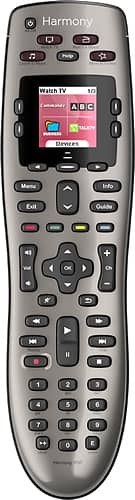

- Model:
- 915-000159/915-000160
- |
- SKU:
- 9837565
Customer reviews
Rating 4.4 out of 5 stars with 7679 reviews
(7,679 customer reviews)Rating by feature
- Value4.3
Rating 4.3 out of 5 stars
- Quality4.6
Rating 4.6 out of 5 stars
- Ease of Use4.2
Rating 4.2 out of 5 stars
Customers are saying
Customers are satisfied with the Harmony 650 8-Device Universal Remote's ease of use, compatibility, and price. Many appreciate the setup process and customization options, along with features like the backlight and macro programming capabilities. However, some users point to areas needing improvement, such as battery life and button size. Concerns were also raised regarding the remote's responsiveness.
This summary was generated by AI based on customer reviews.
- Pros mentioned:Ease of use
Rated 5 out of 5 stars
Must for your Home Theatre
Posted .This reviewer received promo considerations or sweepstakes entry for writing a review.Excellent product. Easy to use with one button full function. Set Up took less than 10 minutes and works awesome. If you have more than 2 devices in your Home Theatre this is a must especially for the price.
I would recommend this to a friend Rated 5 out of 5 stars
Easy set up universal remote
Posted .This reviewer received promo considerations or sweepstakes entry for writing a review.This is a great universal remote. It was very easy to set-up; just plug it to your computer and follow the instructions. I love that you can put icons for your favorite channels instead of just the channel number showing on the remote screen. One thing I did not like about the remote was the numeric key pad placement. The bottom numbers, especially "0" was hard to press when using one hand to change channels. But it is not really a big deal. I would definitely recommend this remote.
I would recommend this to a friend- Pros mentioned:Ease of use
Rated 4 out of 5 stars
Frustrating at first, but after some time.....
Posted .This reviewer received promo considerations or sweepstakes entry for writing a review.Setting this up and getting all the original buttons from your old remote take some trial and error. But once it's set up its great. Just be patient.
I would recommend this to a friend - Cons mentioned:Battery life
Rated 4 out of 5 stars
Good but sometimes a pain!
Posted .This reviewer received promo considerations or sweepstakes entry for writing a review.Love the remote, but make sure it has new batteries or else in my case the tv will come on for no reason!
I would recommend this to a friend - Pros mentioned:Price
Rated 4 out of 5 stars
It works
Posted .This reviewer received promo considerations or sweepstakes entry for writing a review.I needed something inexpensive to control it all and this did the trick. The hardest part is finding the model numbers on items you don't move often
I would recommend this to a friend Rated 5 out of 5 stars
Great remote if you don't have too many devices
Posted .This reviewer received promo considerations or sweepstakes entry for writing a review.Having a Comcast cable box, I thought I was stuck with multiple remotes forever until I found this device. Just plug it into a computer attached to the internet and the wizard walks you through the setup process. The buttons are laid out in a very logical fashion. Some buttons allow programming for functions specific to your devices. Their database seems to be very comprehensive; at least I can say it knew of and programmed my devices. I would like a little more flexibility in the programming process for finer control of some power on/off functionality but that is the only criticism I have for my setup. I haven't once had to revert to the original remotes since I programmed this device.
I would recommend this to a friendRated 3 out of 5 stars
Not Quite as Versatile as older Logitech Remotes
Posted .This reviewer received promo considerations or sweepstakes entry for writing a review.I bought this to replace a Harmony 628 remote that had stopped working. I also own a Harmony 659 remote which still works. I like the form factor on the new remote and I like the color screen. However, in all other respects it seems to be inferior to the older model Harmony remotes. You set up the Harmony 650 with a new type of apparently web based software (MyHarmony) which I find less user friendly than the older Logitech Harmony software (which is still available) used to set up older Harmony remotes. You can apparently still use the old Logitech Harmony software with the Harmony 650 remote. However, if you do, it supports fewer devices and fewer activities than if you use the MyHarmony software. This brings me to my biggest disappointment with the Harmony 650 versus my existing Harmony 659. Even with the MyHarmony software, it supports a maximum of 8 devices. I have my Harmony 659 set up to support 10 devices and multiple activities. Don't get me wrong, the Harmony 650 is still perfectly functional. However, I cannot use it for all the devices and activities I can with my Harmony 659. I'm not sure why Logitech elected to "dumb down" the Harmony 650 (and I assume the Harmony 700) compared to older Harmony remotes; but, I am disappointed that they elected to do so.
I would recommend this to a friendRated 5 out of 5 stars
Harmony 650 nice Remote
Posted .This reviewer received promo considerations or sweepstakes entry for writing a review.I 1st purchased the harmony 650 took me a little while to undestand it but its a great remote all you do i download logitect software enter your devices, tv, sound, dvd, gamebox etc and it programs the remote for you you can also set used or un-used buttons to your satisfaction example i have sourround sound box so when in tv move i programmed the volume buttons to the sound box not the tv so you dont have to switch modes , i did this in dvd mode also then color buttons most remotes have i programmed them to switch between hdmi2,2 etc, cable / satelite recorded shows... anyway this remote is just fantastic
I would recommend this to a friend- Pros mentioned:Setup
Rated 2 out of 5 stars
Only controls 5 devices, Not 8.
Posted .This reviewer received promo considerations or sweepstakes entry for writing a review.I will be returning this remote for a couple of reasons. The biggest being that it only controls 5 devices not the 8 that the bestbuy website and sign in the store said it would. This makes it useless to me. It doesn't have a physical input button. It will show up on the lcd but for my stereo receiver it's on page 9. So I have to go to the device and scroll through 9 pages to change the input if I want to do something outside of the macros. Placement of devices on the lcd screen are inconsistent and keep moving on me. Sometimes my tv is the first option sometimes it's on page 2. Setup was easy and pretty straight forward but I didn't like that I had to create a logitech account to program it. As others have mentioned the whole thing feels really cheap and flimsy for an 80 dollar remote control. Beyond that it does work pretty well, at least in the few days I've had it. It was nice to get rid of 3 remotes and a keyboard I was using and replace them with one remote.
No, I would not recommend this to a friend - Pros mentioned:Ease of use
Rated 5 out of 5 stars
Great buy!
Posted .This reviewer received promo considerations or sweepstakes entry for writing a review.I got this on black Friday and I love it. Only $49 and well worth it! If everything doesn't turn on all you do is push the help button and it fixes it.
I would recommend this to a friend Rated 3 out of 5 stars
Crippled Remote, but May Be Enough for You
Posted .This reviewer received promo considerations or sweepstakes entry for writing a review.Summary: If it works for your setup, it's a huge step up over a standard universal remote. Be careful though, if you have a somewhat complex setup this may not be the remote for you. Controlling Devices: This remote is great if you only have five devices and want something cheap. This was an intentional decision by Logitech to cripple their cheapest remote to encourage you to upgrade. Five devices is very easy to exceed. We have three Logitech Harmony remotes (650, 900, One) in our house and the 650 only controls enough devices for one of those locations. Hardware: The screen is not a touch screen and only lists four things. It also washes out in direct sunlight. The buttons are logically located and all are backlit. The coating on the back of the remote is nice. Programming: Web interface only. This is good and bad. The web interface is much simpler and faster than the old software, but does not seem to be as powerful when you run into problems. The old software was powerful, but poorly written and littered your computer with mandatory program files. Breaking the 5 device limit: For our simple living room setup with 4 devices (blu-ray player, receiver, TV, Tivo), this remote works great. My wife's father has this remote and 7 devices, yet I was able to setup activities using every device. The two extra devices still must be controlled using their remotes, but the TV and receivers will automatically switch to the correct inputs. Since he doesn't use the VCR or CD changer very often, it's not a big deal, but it's still frustrating to have a remote that could control those devices, but doesn't due solely to a marketing decision.
I would recommend this to a friend- Pros mentioned:Ease of use
Rated 5 out of 5 stars
Best universal I've ever had
Posted .This reviewer received promo considerations or sweepstakes entry for writing a review.Have had this remote for a year and couldn't be happier. Easy to setup or change with the MyHarmony app. Can be configured for just about any AV setup. Buy it.
I would recommend this to a friend - Pros mentioned:Ease of use
Rated 5 out of 5 stars
Buy it!
Posted .This reviewer received promo considerations or sweepstakes entry for writing a review.Great product. Simple and fun to set up (really!). If you think you need to reduce to one remote don't hesitate to buy. Wish I had done it long ago.
I would recommend this to a friend - Pros mentioned:Ease of use
Rated 5 out of 5 stars
Fast Setup, Great Product
Posted .This reviewer received promo considerations or sweepstakes entry for writing a review.Purchased this remote as a Christmas Gift for my husband. He was very unsure about it. The setup was very fast and user friendly. Now he will not let anyone else touch his remote. Great Product.
I would recommend this to a friend Rated 4 out of 5 stars
Works well
Posted .This reviewer received promo considerations or sweepstakes entry for writing a review.This is my first universal remote and it's very convenient & easy to use. There's only a couple of things I do not like about it. #1- the iPod control is way to difficult to use with my pioneer 1019 & that is the only time I pull out a different remote to use. #2- it switches to standby without my prompting it & then to turn it on I have to aim it away from everything. Otherwise I recommend it for a home with the equal amount of electronics.
I would recommend this to a friendRated 2 out of 5 stars
Loose battery connections? Seriously?
Posted .This reviewer received promo considerations or sweepstakes entry for writing a review.This is my second Logitech Harmony remote purchase. My first purchase was the xbox remote from Harmony. It was great for a few months then the buttons (the hard buttons) started requiring more and more pressure to activate until they stopped working. So I started using 2 remotes again. The Logitech to turn on all my devices and then my FREE remote that came with my cable box to navigate the menu. You'd think the $100 remote would have a better longevity. However I am in love with the idea of having 1 remote that controls everything so I saw this one on Black Friday for $40 so I picked it up. I was pleasantly surprised. The build quality just 'felt' better. I was able to just hook up to my computer and set up the remote with the activities I had for my old remote so the set up was a breeze. After a few days of trying it I noticed sometimes I wouldn't be able to control anything.....like the remote had reset itself. So I would have to hit my activity (watch cable) while pointing the remote to the ground, just so that I could get back to my activity screen. Come to find out if you tap the remote, or really just move it, the batteries lose their connection effectively resetting the remote. If you do a search online for 'logitech 650 battery connection ' you'll find other users with this issue. I was HOPING it would be something more serious like a firmware issue but seriously logitech? Battery connections? I have put in a claim with logitech, lets see what hey send me. Big dissapointment. Some folks get around this by shoving foam or paper under the battery cover to keep the batteries down, but I just tried that and still had an occurrence of a bad battery connection.
No, I would not recommend this to a friendRated 1 out of 5 stars
Rich look, Poor life
Posted .This reviewer received promo considerations or sweepstakes entry for writing a review.This product seemed to be rated highly and Best Buy was having a sale, so I picked one up. It worked fine from for about a year, then it just stopped. Every time I would press any button, it would restart itself. I wrote Harmony about this and they offered a "Safe Mode restart solution." That didn't work. Then they gave up and said it was only under a 1 year warranty. In my opinion, any product that only works for a year is of extremely poor quality. So, Buyer Beware! If you buy this, be prepared for it to fail.
No, I would not recommend this to a friend- Pros mentioned:Ease of use
Rated 2 out of 5 stars
Great when it works.
Posted .This reviewer received promo considerations or sweepstakes entry for writing a review.I have gone through 3 of these remotes in 8 months. In my opinion this remote has a design flaw with the battery compartment. The batteries come lose in the compartment . When this occurs you have to go through the set up routine, this is very aggravating, especially if it happens constantly. Other than this major flaw, I found it easy to set up and use. Best Buy did not give me any problems returning and exchanging it, but I have moved up to the 700 model which comes with rechargeable batteries, the customer reviews dont talk about the battery problems encountered with this remote. Having one remote that can do it all is really nice and you wont want to go back to multiple remotes. Wish me luck.
No, I would not recommend this to a friend Rated 5 out of 5 stars
Great remote for less than $100
Posted .This reviewer received promo considerations or sweepstakes entry for writing a review.I bought this 650 to replace my old 520 which I've had since 2004. The 520 was still working ok except several keys would no longer function. The old 520 would handle up to 12 devices! This 650 is limited to 5 devices, but the buttons are much easier to press and more reliable. It was easy to log into my Harmony acct and switch the remotes, bringing over all my devices to the new remote. Fortunately I had exactly 5 devices so the new 650 took all the info. I like the color screen of the 650 and the automatic screen turn-on when the remote is lifted. No complaints. I highly recommend this remote if you have 5 or fewer devices to connect.
I would recommend this to a friend- Pros mentioned:Ease of use
Rated 5 out of 5 stars
Great remote
Posted .This reviewer received promo considerations or sweepstakes entry for writing a review.Only one complaint about remote--number pad is too far toward the bottom of the unit making it a little difficult to use with one hand. Otherwise it works well and was very easy to set up.
I would recommend this to a friend