Customer Ratings & Reviews
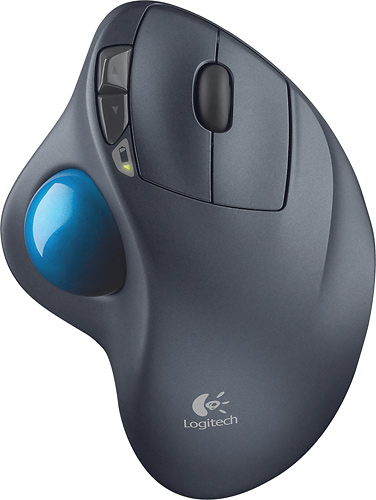
- Model:
- 910-001799
- |
- SKU:
- 1260761
Customer reviews
Rating 4.7 out of 5 stars with 6320 reviews
(6,320 customer reviews)Rating by feature
- Value4.6
Rating 4.6 out of 5 stars
- Quality4.7
Rating 4.7 out of 5 stars
- Ease of Use4.7
Rating 4.7 out of 5 stars
Customers are saying
Customers are impressed with the M570 Wireless Trackball Mouse's ease of use, wireless functionality, and ergonomic design. Many appreciate the trackball feature and report positive experiences with battery life and the mouse's size. While some users mention needing space and potential button issues, the overall feedback highlights the product's ease of use and comfort. The responsiveness and accuracy are also frequently praised.
This summary was generated by AI based on customer reviews.
Rated 4 out of 5 stars
Comfortable mouse
||Posted . Owned for 6 months when reviewed.This reviewer received promo considerations or sweepstakes entry for writing a review.It took a little bit to get used to, but I liked it once I did. It felt comfortable. Unfortunately, it didn't get along with my very old Mac so it had to go back.
I would recommend this to a friendRated 5 out of 5 stars
Easy to use!
||Posted . Owned for 3 weeks when reviewed.This reviewer received promo considerations or sweepstakes entry for writing a review.This helps with my wrists and comfortable! I have noticed the pain when I am on the computer a lot is minimized.
I would recommend this to a friendRated 5 out of 5 stars
Great wireless mouse
||Posted .This reviewer received promo considerations or sweepstakes entry for writing a review.M570 is a wonderful mouse . I got so used to this when I use regular mouse it feels like i need to do so much work to move it around.
I would recommend this to a friendRated 5 out of 5 stars
Buy this.
||Posted . Owned for 3 weeks when reviewed.This reviewer received promo considerations or sweepstakes entry for writing a review.My third purchase of this trackball. Switches break after 3 years and are hard to replace
I would recommend this to a friendRated 4 out of 5 stars
Nice alternative style for a mouse
||Posted . Owned for 1 month when reviewed.This reviewer received promo considerations or sweepstakes entry for writing a review.Takes a little getting used to but is nice to not worry about any surface. Lower rating because ball needs to be cleaned about daily. I must have a greasy thumb.
I would recommend this to a friendRated 5 out of 5 stars
Great mouse
||Posted .This reviewer received promo considerations or sweepstakes entry for writing a review.I've been waiting for my wired Logitech trackball mouse to die. Finally it did. This was the replacement. It set up easy and has worked without fail.
I would recommend this to a friendRated 5 out of 5 stars
Great Mouse
||Posted .This reviewer received promo considerations or sweepstakes entry for writing a review.I really enjoy the features of this mouse. I got tired of chasing my old mouse off of the mouse pad and have enjoyed the functionality of the mouse.
I would recommend this to a friendRated 5 out of 5 stars
Great mouse
||Posted . Owned for 1 month when reviewed.This reviewer received promo considerations or sweepstakes entry for writing a review.This is a bit too get use to. But using it all day it is very comfortable after you get use to it
I would recommend this to a friendRated 5 out of 5 stars
Updated model
||Posted . Owned for 1 month when reviewed.This reviewer received promo considerations or sweepstakes entry for writing a review.I had an earlier version and loved it so when I needed a new mouse bought this and am so glad. Love the feel.
I would recommend this to a friendRated 5 out of 5 stars
I love it!
||Posted .This reviewer received promo considerations or sweepstakes entry for writing a review.I love this trackball. It is perfect for those of us who hate touchpads, but don't have a lot of room for a standard mouse!
I would recommend this to a friendRated 4 out of 5 stars
Good but not the best
||Posted . Owned for more than 2 years when reviewed.This reviewer received promo considerations or sweepstakes entry for writing a review.it works good but after a while, ball start getting stuck and need frequent cleaning to make it move smooth. Aside from that I love this item. Been using for 2 years now.
I would recommend this to a friendRated 5 out of 5 stars
I like this mouse a lot
||Posted .This reviewer received promo considerations or sweepstakes entry for writing a review.Had one just like this before, unfortunately I dropped it off the couch arm and it broke so had to by a new one...favorite mouse!!!
I would recommend this to a friendRated 5 out of 5 stars
Great!
||Posted . Owned for 3 weeks when reviewed.This reviewer received promo considerations or sweepstakes entry for writing a review.Got this for husband and he loves it! Says it great for his work! Comfortable and great value!
I would recommend this to a friendRated 5 out of 5 stars
Works well
||Posted .This reviewer received promo considerations or sweepstakes entry for writing a review.I bought this for work, and it’s worked great. Only problem is I can’t load the software to control the sensitivity.
I would recommend this to a friendRated 5 out of 5 stars
love the mouse
||Posted .This reviewer received promo considerations or sweepstakes entry for writing a review.this is the very best mouse I ever own my had don't hurt any more and if you play games this is great i high suggest you buy one
I would recommend this to a friendRated 5 out of 5 stars
Perfect for me
||Posted .This reviewer received promo considerations or sweepstakes entry for writing a review.I bought this one to replace my last one that died after 4 years. Love it. Fits my hand. Wrist does not get tired.
I would recommend this to a friendRated 5 out of 5 stars
Nice mouse!
||Posted . Owned for less than 1 week when reviewed.This reviewer received promo considerations or sweepstakes entry for writing a review.Don’t waste your money on expensive apple mouse. Using it with Mac and it works like a charm.
I would recommend this to a friend- Pros mentioned:Battery life, Ergonomics
Rated 5 out of 5 stars
Long review about trackballs and this m570
Posted .This reviewer received promo considerations or sweepstakes entry for writing a review.For anyone who uses a computer of virtually any kind, my highest recommendation is Logitech Trackman m570, the newest thumb controlled trackball. Mice have been the prevalent input device for computers. Now with laptops out-pacing desktops, touchpads are becoming the dominant device. In my opinion we are going from bad (mouse) to worse (touchpad). I first started using a trackball a year or so after using a mouse (early 90s). Over the years both mice and trackballs kept improving, becoming more comfortable, more accurate, and less error prone. One of the biggest improvements to the mouse was an optical sensor which replaced the ball (yes, mice used to have a ball on the bottom of them). This greatly increased the life from a year or so to several years. However trackballs continued to improve as well, going from the some-what clumsy finger driven (arcade game style big ball in middle design) to fast and efficient thumb driven. Then getting more and more comfortable and ergonomic, optical, and now laser driven. Now more then ever before I believe a good quality thumb driven trackball is essential to anyone who uses a computer for more then 20 minutes at a time. With the majority of work being shifted to laptops / notebooks / netbooks this is even more important. The lack of efficiency, ergonomics, comfort and speed of touchpads are self evident. Look at your hand on a touchpad and see if that is a normal position for your hand and fingers to be in. Combine this awkward and dangerous artificial position with longterm use, and besides high probability of strain, productivity efficiency is at a minimum. Since laptops are moved around, and on different surfaces often, a mouse is not always even an improvement (or possible). Here are some of the strength a trackball provides: - Small footprint (set it down, that's it, no moving, dragging, or slding required) - Lap, couch, floor, edge of laptop case, etc. No problem (flat surface or even space is not required) - Substantially decreased exposure to RSS (Repetitive Strain Syndrome) + Only thumb and occasionally fingers move leaving hand, arm, wrist & elbow relaxed - Relaxed fit, smooth operation, efficient to use + from small screens to more then 6 large screens - Easy to carry, micro leave-in receiver battery lasts over a year - Can be used for hours without cramping - Looks and feels amazing Okay, that list could keep on going, and once you start using a trackball (for more then a week) I'm positive you will wonder how you lived without (and never want to be without it again)! So if you are willing to try and see if it is as great as I am saying it is, then here are two import things to know (What kind to get, and How to make the switch): 1. What kind to get (and what kind not to get) and why. There are almost as many kinds of trackballs as there are mice. The thumb driven trackballs are the most accurate, easiest to become effeiciant on, and have the best ergonics for prolonged use. There are only two thumb driven trackballs to consider, and Logitech makes them both. They are: A - The new Logitech Trackball m570 - Portable / mobile use - Has USB micro leave-in receiver - Included AA Battery lasts up to 18 months - Works up to 30 ft away - Here are the main advantages over the older optical corded one: + This one is much more precise + Reception is incredible, even on a desktop + Accuracy and acceleration is executed perfectly (meaning I can travel long distances faster & when moving slowly it is pixal accurate, both at the same time) + The design is more comfortable B - The older Logitech Trackman (corded version) - I would only consider this one if money is a HUGE factor! + m570 is far superior in every way (movement, accuracy, front & back buttons, etc.). - Corded for desktop use (no batteries) - No batteries, no troubleshooting, always works if plugged in - Costs less - 4.5 Stars out of 5 from Amazon.com with over 715 reviews! - After using the above m570 on my desktop for a few days: + I no longer recommend this trackball. + I leave it here because it is the 2nd best trackball available 2. How to make the switch from a mouse / touchpad successfully - Plug in new trackball. - Install the software if you want the advanced acceleration and customizable buttons (the software is not required otherwise) - Adjust sensitivity as needed. You may be returning to adjust it some more once you use it more. - VERY IMPORTANT. Unplug your old mouse, and put it in an different room (yes seriously), you will not learn how to use a trackball by using a mouse! Really that's all it takes. Just start using it. It will seem slow, awkward maybe even a bit frustrating at first. After an hour or so, it should start to feel more natural, and the cursor will start to go where you need it on the first try. After a day or two, you will reach the speed and efficiency you had with a mouse, and would have already passed that of a touch pad. After a week, well, congratulations! Welcome to the world of efficiency like you've never felt before. I have yet to recommend these two trackballs and have someone tell me after a week of use, that they went back to a mouse. I've never had it happen! Once you hit this landmark, you will never want to use a mouse again. Really it's that great of an experience. However, don't worry, no matter how long you go without using a mouse, if you ever need to use one again (on someone else's computer, for example) you will be just a good as ever. Similar to riding a bike, you will always have the skill and capability to be efficient on a mouse. On that note, I have yet to see anyone that is efficient on a touchpad, and what do the majority of laptop users go with? You guessed it, the touchpad. For my full review see: "double u" "double u" "double u" "dot" "G" "o" "o" "dot" "g" "l" "forward slash" "mIRIo" goo.gl/mIRIo
I would recommend this to a friend Rated 5 out of 5 stars
Good trackball mouse
||Posted . Owned for 7 months when reviewed.This reviewer received promo considerations or sweepstakes entry for writing a review.Good trackball mouse by Logitech. Needs cleaned once in a while so trackball moves freely. Plug and play USB.
I would recommend this to a friendRated 5 out of 5 stars
Great Trackball!
||Posted .This reviewer received promo considerations or sweepstakes entry for writing a review.I have a stand-up desk that shakes with the slightest movement of a regular mouse. I switched to this trackball and no more shaking.
I would recommend this to a friend