Customer Ratings & Reviews
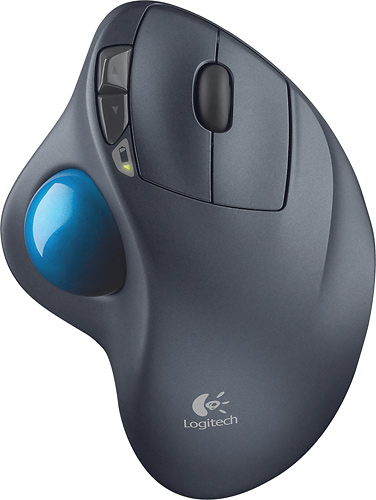
- Model:
- 910-001799
- |
- SKU:
- 1260761
Customer reviews
Rating 4.7 out of 5 stars with 6320 reviews
(6,320 customer reviews)Rating by feature
- Value4.6
Rating 4.6 out of 5 stars
- Quality4.7
Rating 4.7 out of 5 stars
- Ease of Use4.7
Rating 4.7 out of 5 stars
Customers are saying
Customers are impressed with the M570 Wireless Trackball Mouse's ease of use, wireless functionality, and ergonomic design. Many appreciate the trackball feature and report positive experiences with battery life and the mouse's size. While some users mention needing space and potential button issues, the overall feedback highlights the product's ease of use and comfort. The responsiveness and accuracy are also frequently praised.
This summary was generated by AI based on customer reviews.
Rated 3 out of 5 stars
It works nothing special
||Posted .This reviewer received promo considerations or sweepstakes entry for writing a review.It simply does what it’s supposed to do and replace a mouse.
No, I would not recommend this to a friendRated 3 out of 5 stars
Good but not for me
||Posted .This reviewer received promo considerations or sweepstakes entry for writing a review.Purchased but was not functional for me so I returned it and got something else
No, I would not recommend this to a friendRated 2 out of 5 stars
Big, isn't ALWAYS better, ta dig? LoL
||Posted .This reviewer received promo considerations or sweepstakes entry for writing a review.This thing wasn't for me. It was too big and really awkward. I didn't appreciate the ball getting jammed up. It was also pricey. I guess it comes down to personal preference. I didn't them at all, very disappointing.
No, I would not recommend this to a friendRated 3 out of 5 stars
Pretty good wireless mouse
||Posted .This reviewer received promo considerations or sweepstakes entry for writing a review.Takes a little getting used to if you've used other wireless mouses.
I would recommend this to a friendRated 3 out of 5 stars
avearage
||Posted .This reviewer received promo considerations or sweepstakes entry for writing a review.personally prefer the track ball on right side therefore average rating !
I would recommend this to a friendRated 2 out of 5 stars
Ball gets stuck
||Posted . Owned for 1 month when reviewed.This reviewer received promo considerations or sweepstakes entry for writing a review.I bought this 2 months ago and would not buy one again. I tried to clean the ball because it doesn't move a smoothed as when I first bought it. It took me about 30 minutes to this to find no dirt or anything inside so I just threw it away.
No, I would not recommend this to a friendBrand response from Logitech
Posted .Hi antillon, thank you for your feedback! You may prefer the high performance Ergo Plus model. For support with the M570, please refer to: https://support.logi.com/hc/en-us/articles/360024155174 - Will, Logitech.
Rated 3 out of 5 stars
It's Okay
||Posted .This reviewer received promo considerations or sweepstakes entry for writing a review.It's pretty good, but it gets dirty easy. It then starts sticking.
No, I would not recommend this to a friendRated 3 out of 5 stars
Works well. Little flimsy.
||Posted .This reviewer received promo considerations or sweepstakes entry for writing a review.Works well as expected. The build quality is just OK, plastic and flimsy.
I would recommend this to a friendRated 2 out of 5 stars
Wish it worked longer
||Posted . Owned for 11 months when reviewed.This reviewer received promo considerations or sweepstakes entry for writing a review.I've gone through like 3 of these and they all break down within a few months?? GREAT until then, but one day they just stop working and it keeps happening pretty consistently every 6 months of use or so.
No, I would not recommend this to a friend- Pros mentioned:Ease of use
Rated 1 out of 5 stars
Super mouse
||Posted .This reviewer received promo considerations or sweepstakes entry for writing a review.I bought it because of my arthritis. My Primary Care Physician told me when I went to see her. I immediately went to the store and bought it. I love it and is a very good product which I recommend for those like me has arthritis in your hands.
I would recommend this to a friend Rated 3 out of 5 stars
good
||Posted .This reviewer received promo considerations or sweepstakes entry for writing a review.see it online, order and pickup at the store. It's convinient.
I would recommend this to a friendRated 3 out of 5 stars
Good multifunction mouse
||Posted .This reviewer received promo considerations or sweepstakes entry for writing a review.Good idea and would work well for someone with a larger hand.
I would recommend this to a friendRated 3 out of 5 stars
Good if you are lacking space for the mouse
||Posted .This reviewer received promo considerations or sweepstakes entry for writing a review.This trackball mouse is really useful if you are lacking space on your desk.
I would recommend this to a friendRated 3 out of 5 stars
Does the job.
||Posted .This reviewer received promo considerations or sweepstakes entry for writing a review.It does what I wanted, for the price it's good. I'm satisfied.
I would recommend this to a friendRated 3 out of 5 stars
Not for small hands
||Posted .This reviewer received promo considerations or sweepstakes entry for writing a review.Too large for small hands and strange angle to get used to on the wrist.
I would recommend this to a friendRated 3 out of 5 stars
Was not good for me
||Posted .This reviewer received promo considerations or sweepstakes entry for writing a review.I didn't care for the angle of the unit and had to return it.
No, I would not recommend this to a friendRated 1 out of 5 stars
Doesn't Last
||Posted . Owned for 4 months when reviewed.This reviewer received promo considerations or sweepstakes entry for writing a review.I bought this in Jan-2020 and by May-2020 the left mouse button is faulty. There is a reason why the price dropped on this. Even though it is a Logitech brand, it's not the Logitech quality one expects. Look at how many posts and requests there are on forums requesting information on how to clean or replace the mouse buttons on this model. After four months of use, the left button now triggers a double click when only single clicking, and other inconsistencies in left click operations. This is annoying at times, and very dangerous at other times especially when performing certain drag and drop operations. You get what you pay for.
No, I would not recommend this to a friendBrand response from Logitech
Posted .Hello BiggerPicture, thank you for your feedback!
I am sorry to hear about the trouble with your mouse. Logitech has higher expectations, as this M570 includes a 3-year warranty to back it up.
For support, please refer to: https://support.logi.com/hc/en-us/articles/360024155174
If you like the M570, check out the MX Ergo Plus. It is our top of the line, trackball model, with the highest performance and materials.
Thank you for taking the time to let us know about your experience!
Rated 3 out of 5 stars
Trackball
||Posted .This reviewer received promo considerations or sweepstakes entry for writing a review.I am really not a fan of it but my boys both love using it!
I would recommend this to a friendRated 3 out of 5 stars
It’s good if you’re right handed.
||Posted .This reviewer received promo considerations or sweepstakes entry for writing a review.It takes a little getting use to but all good.....
I would recommend this to a friendRated 3 out of 5 stars
Nice roller ball mouse.
||Posted .This reviewer received promo considerations or sweepstakes entry for writing a review.Had to return it back to store for a refund. It just quit working.
No, I would not recommend this to a friend