Customer Ratings & Reviews
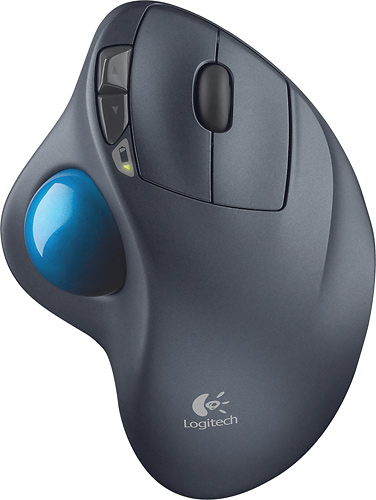
- Model:
- 910-001799
- |
- SKU:
- 1260761
Customer reviews
Rating 4.7 out of 5 stars with 6320 reviews
(6,320 customer reviews)Rating by feature
- Value4.6
Rating 4.6 out of 5 stars
- Quality4.7
Rating 4.7 out of 5 stars
- Ease of Use4.7
Rating 4.7 out of 5 stars
Customers are saying
Customers are impressed with the M570 Wireless Trackball Mouse's ease of use, wireless functionality, and ergonomic design. Many appreciate the trackball feature and report positive experiences with battery life and the mouse's size. While some users mention needing space and potential button issues, the overall feedback highlights the product's ease of use and comfort. The responsiveness and accuracy are also frequently praised.
This summary was generated by AI based on customer reviews.
Rated 1 out of 5 stars
tracking issues
||Posted .This reviewer received promo considerations or sweepstakes entry for writing a review.I can not use the trackball reliably. Each time I use it, it either jumps pointer around the screen, or does not move pointer at all. it is very unreliable and I have to mess with it frequently to get it to work properly.
No, I would not recommend this to a friendRated 1 out of 5 stars
Stopped working 44 days after purchased
||Posted . Owned for 1 month when reviewed.This reviewer received promo considerations or sweepstakes entry for writing a review.Super frustrated. It is just out of the return date and it just spazzes out and scrolls up and down out of control. Tried new batteries and turning off and on. Don’t buy!!!!
No, I would not recommend this to a friendBrand response from Logitech
Posted .Hello, we are sorry to hear about your issue with the M570. Please visit us for warranty support at: https://support.logi.com/hc/en-us
- Pros mentioned:Trackball, Wireless
Rated 5 out of 5 stars
THIS DOES HAVE HORIZONTAL SCROLLING!!
Posted .This reviewer received promo considerations or sweepstakes entry for writing a review.I read MANY reviews on this product before I purchased it and it appears that most people do not know that the horizontal scrolling feature IS BUILT IN! All you have to do is press the center scroll wheel and a 4-way cursor will appear after a second or two. Then all you have to do is move the trackball in ANY DIRECTION and it will go where you want it to go. When you are finished, simply predd the scroll button and the 4-way cursor will disappear. Prior to purchasing this, I was using an old wireless laser mouse that made my hand and wrist hurt. This trackball is worlds better than an old Microsoft Wired Trackball I had about 6 years ago and the wireless convenience is terrific! I tried all kinds of mice before I bought this trackball and a couple were pretty good, but did not fit my hand as well as this trackball does. This is an unbeatable product for the money and I do not miss the zoom buttons on my old laser mouse, as my keyboard has them.
I would recommend this to a friend - Pros mentioned:Battery life, Ergonomics
Rated 5 out of 5 stars
Great with a Mac or a PC
Posted .This reviewer received promo considerations or sweepstakes entry for writing a review.I have a MacBook air with OSX Lion and am using this mouse primarily with Google Sketchup Pro software and Adobe Photoshop CS3. I originally tried an Apple Magic Mouse, but found the lack of center click unacceptable for Sketchup. (I later found that you can add it to software, but the lack of control wheel made 'zooming' difficult). My favorite feature, besides the long battery life and easy connectivity (Once software is installed) is the two little programable buttons to the left of the left mouse button. I was able to program these (through the logitech software) to move back and forth between full-screen windows in lion, effectively replacing the three-finger-swipe motion. Switching between programs and desktops is now super easy as I don't have to switch between my touchpad and wireless mouse. (A problem with previous mice since Lion came out.) The ergonomics are great as well. Anyone with carpal tunnel should own this unit! Side note: I also love it for first person shooters due to the fact that I never have to lift the mouse up to re-center. You can also turn around quickly by spinning the ball golden-tee style! The only negative comment I have about it is the little USB transmitter that comes with it. I was worried that I'd lose it when not connected to the computer. Upon opening the battery cover I discovered a tiny home for the transmitter! I don't dislike it (as much) anymore. LOVE THIS MOUSE!!!
I would recommend this to a friend Rated 1 out of 5 stars
I don’t like it
||Posted . Owned for less than 1 week when reviewed.This reviewer received promo considerations or sweepstakes entry for writing a review.It’s really hard to work on this mouse specially you need to move with your finger the rollers it’s going to give me a really hard time I’m not recommending this .
No, I would not recommend this to a friend- Pros mentioned:Ease of use
Rated 5 out of 5 stars
Don't be afraid to try it
Posted .This reviewer received promo considerations or sweepstakes entry for writing a review.I was converted to thumb wheels by a friend about 8 years ago. I never liked the body style of the MS versions and have always used the Logitech ones (at home and work). Also, while I have tried several (finger) track balls over the years, I've never been able to get use to them. The thumb wheel design works extremely well. WHAT'S IMPROVED: - The rubber feet on the bottom are much better. They really stick the mouse to your desk surface much better. It also appears they will be more durable from their look (guessing so far). With the older design I had problems with the rubber feet peeling off after a year or two of use - The hole under the ball is a little larger with a nice beveled soft edge to it. Occasionally you need to pop the ball out and wipe it down with alcohol as well as the little holder pegs inside the hole and the transparent laser cover. Just take a pen or pencil and press through the hole to pop the ball out. - The fwd/back buttons are nice (don't really care). I need to see if those are customizable in the drivers. IF YOU'VE NEVER TRIED A THUMBWHEEL: - It took me a weekend to become use to thumb wheels. At first, it's probably going to feel very akward like you have no control over the mouse pointer (drunk driver). Hang in there through - the payoff is big. - The payoff is that your wrist and hand will never become tired and the comfort of using this if far greater than using a mouse. I can also work faster with a thumbwheel in most situations (no idea how to explain it - it feels like I have more control). - Unlink a mouse, you can sit this on a couch cushin next to you while on the couch to get away from laptop touchpads. GAMING - First Person shooters are a total wash (at least for me). On my gaming desktop I also keep a normal mouse plugged in for FPS's. - Third person games work AMAZINGLY well (like World of Warcraft). I *LOVE* 3rd person games with a thumb wheel. If you're a WoW addict your wrist will bow down and thank you for using a thumbwheel. In 3rd person games I actually feel as though I have more and faster control than with a mouse. You can play for hours with no wrist strain - Any other type of game feels so much better with a thumb wheel.
I would recommend this to a friend - Pros mentioned:Wireless
Rated 5 out of 5 stars
An excellent take on an old accessory
Posted .This reviewer received promo considerations or sweepstakes entry for writing a review.I was looking for a mouse that resulted in the least amount of wrist/hand fatigue. The rollerball idea seemed like a good one, since it minimizes wrist movement. What I found after purchasing this trackball, is that you actually have finer mouse pointer control by using your thumb to move the pointer rather than your entire hand. What's great about this product, is that you don't have to give up the normal mouse buttons you may have become accustomed to, such as left/right click buttons with clickable scrollwheel between them, as well as forward/backward buttons. It's quite a versatile mouse for the price, and it's wireless, so no fumbling with a clumsy cord. And, yes, it does reduce fatigue. I highly recommend this mouse.
I would recommend this to a friend Rated 1 out of 5 stars
Loved the concept but
||Posted .This reviewer received promo considerations or sweepstakes entry for writing a review.Product worked efficiently at first but the ball started sticking then the cursor stopped tracking with the ball, eventually just a pain to work with.
No, I would not recommend this to a friendRated 1 out of 5 stars
It's not durable
||Posted .This reviewer received promo considerations or sweepstakes entry for writing a review.Stopped working after 2 weeks drippee literally a few drops of drink on it wipe it off right away and now the clicker is not working and the computer locks up.
No, I would not recommend this to a friendRated 1 out of 5 stars
There are better options
||Posted . Owned for 10 months when reviewed.This reviewer received promo considerations or sweepstakes entry for writing a review.The trackball is made out of a material that becomes very sleek and it is hard to use the mouse.
No, I would not recommend this to a friendRated 1 out of 5 stars
Broke after 2wks of use
||Posted .This reviewer received promo considerations or sweepstakes entry for writing a review.My son bought this for gaming and general laptop use. The roller ball fell out after the 1st week and the whole thing died the following week.
No, I would not recommend this to a friendRated 1 out of 5 stars
I Never Manage To Get It To Work
||Posted .This reviewer received promo considerations or sweepstakes entry for writing a review.After I was connected to my computer. The mouse would move and stick; then the cursor would move on it's own. So I will stick to my corded mouse.
No, I would not recommend this to a friend- Pros mentioned:Battery life, Ergonomics
Rated 5 out of 5 stars
I love it! I'm using it right now!
Posted .This reviewer received promo considerations or sweepstakes entry for writing a review.I have 2 of these, one for each notebook. I upgraded from the Logitech wired trackballs and am glad I did. These trackballs fit the hand very comfortably. Trackballs in general are more ergonomic than mice. You move the cursor with your thumb, while using your index finger and middle finger to click like on a regular mouse. I have a lot less wrist strain when using one of these. The wireless range seems to be decent, I've used it across the room (8-12 ft away) when I have my laptop hooked up to the TV. The Logitech trackballs are pretty rugged, mine have been dropped numerous times without damage. It also lasts for weeks, if not months- on a single AA battery. The only downside- and this is for ALL trackballs- wired or wireless- is that they require regular cleaning. Unlike an ordinary garden variety laser mouse, the trackball will accumulate dead skin particles under the ball that must be cleaned out. Sorry, sounds gross but that's just the nature of the beast. Pop out the ball, use a q-tip and some alcohol, and clean the 3 white nylon bearings that sit under the ball. Dry thoroughly with a clean cotton cloth. After that is done, use a TINY BIT of lubricant (WD-40) on the end of a q-tip and gently lubricate the 3 bearings. Let it penetrate, then clean off with a piece of cotton cloth. Pop the ball back in and you're done. This will be required about once a month or so. I love these trackballs, and I hope Logitech continues to make them, as they seem to be the only manufacturer who offers them anymore.
I would recommend this to a friend Rated 1 out of 5 stars
Headache
||Posted . Owned for 1 month when reviewed.This reviewer received promo considerations or sweepstakes entry for writing a review.Wouldn’t stay connected to my MacBook, also, the clicker would pop out when trying to right click
No, I would not recommend this to a friendBrand response from Logitech
Posted .Hi Mekhei, I'm sorry that your experience with the M570 was not very good. Logitech recently launched the M575 it an upgrade to the M570 and no offers Bluetooth, this should help with the connectivity issue you were experiencing. Logitech does offer a 3 year limited hardware warranty on the M570. You can visit us at support.logi.com to file a warranty on the M570 if you desire. Thanks for being a Logitech customer. Kristi from Logitech
- Pros mentioned:Battery life
Rated 5 out of 5 stars
Great designer tool
Posted .This reviewer received promo considerations or sweepstakes entry for writing a review.This is an incredible product, the battery lasts a long time, in 3 years it has only required a battery change, it is very comfortable and it took away the problem of moving my hand all over the table... eliminating the pain of the metacarpal tunnel. I am a designer and with the movement of the sphere I can be as precise as I want. I don't think I'll be replacing it for a long time.
I would recommend this to a friend - Pros mentioned:Ease of use, Ergonomics, Wireless
Rated 5 out of 5 stars
Probably the best mouse on the market
Posted .This reviewer received promo considerations or sweepstakes entry for writing a review.I've been using a Logitech trackball mouse for quite a few years now but with the purchase of this one I finally went wireless. It is ergonomically designed with your hand resting comfortably on the controls for ease of use and I now sometimes find myself with my hand (and mouse) resting in my lap while surfing the 'Net. You can also connect your laptop to your flat screen TV via HDMI and watch Amazon Prime while controlling the computer from across the room.
I would recommend this to a friend Rated 1 out of 5 stars
Doesn't work right
||Posted .This reviewer received promo considerations or sweepstakes entry for writing a review.This mouse wouldn't work right could not get it in the right spot always went somewhere else or wouldn't move at all taking back to store
No, I would not recommend this to a friendRated 5 out of 5 stars
Great mouse if you dont mind trying something new
Posted .This reviewer received promo considerations or sweepstakes entry for writing a review.I have been having problems with my hands for a few years now due to working on computers all day. Figured I would try a trackball from the reviews I read. I wasn't sure initially how I would take the switch, but it wasn't too bad right off the bat. I have only been using it a few days and seems to work well for me minus the size. I can get very accurate swipes for the most part other then when I get a slight twitch in my thumb from how my hands are from non ergonomic working over the years. Deff nicer than dragging a mouse all over my desk all day. Only qualm I have is the size of it. I have fairly big hands and think they should have some diff size frames. It is not bad as is, but I think a bigger base might work better for my hand size, Right now it cuts at the back of my palm and feels a little sharp for my liking of the angle of the cut off. I am still trying to find the sweet spot for this also. Some people reccomended adding a angled base or something to it to make it more natural feeling. Another thing might be wise from logitech. Maybe constructing the base to angle the mouse clockwise and having the ball be more upright and buttons like vertical.
I would recommend this to a friend- Pros mentioned:Battery life, Ease of use
Rated 3 out of 5 stars
Looking for pain relief
Posted .This reviewer received promo considerations or sweepstakes entry for writing a review.I researched and ultimately purchased this Logitech Trackball Mouse in an attempt to relieve tension and pain in my elbow from excessive mouse use on the computer. I found the mouse to be very easy to set up and connect to my computer, I appreciate the on/off switch allowing me to conserve battery when not in use. I found the thumb trackball difficult to get used to, although I improved with use I have not found it ideal for detailed work, it is difficult to move the thumb when having the mouse key held for selecting text in a drag/drop fashion. It is useful and seems to help my elbow pain when I use it regularly, I however have found a vertical mouse which operatesmuch more closely to a standard mouse but relieves the pressure in my elbow so I tend to use that as my primary and this now as my backup.
No, I would not recommend this to a friend Rated 1 out of 5 stars
not everything included
||Posted . Owned for 7 months when reviewed.This reviewer received promo considerations or sweepstakes entry for writing a review.I bought it and the dongle was not included and Best Buy would not replace. No happy
No, I would not recommend this to a friendBrand response from Logitech
Posted .Hi! The dongle is usually located in the battery compartment on the bottom of the mouse.