Customer Ratings & Reviews
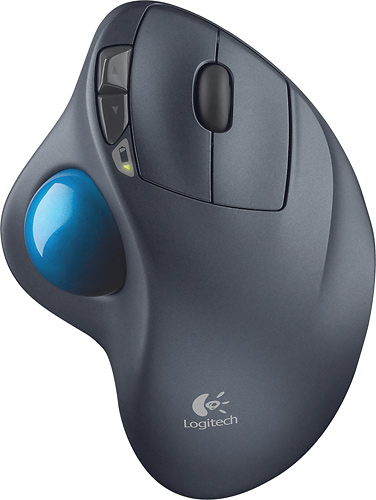
- Model:
- 910-001799
- |
- SKU:
- 1260761
Customer reviews
Rating 4.7 out of 5 stars with 6320 reviews
(6,320 customer reviews)Rating by feature
- Value4.6
Rating 4.6 out of 5 stars
- Quality4.7
Rating 4.7 out of 5 stars
- Ease of Use4.7
Rating 4.7 out of 5 stars
Customers are saying
Customers are impressed with the M570 Wireless Trackball Mouse's ease of use, wireless functionality, and ergonomic design. Many appreciate the trackball feature and report positive experiences with battery life and the mouse's size. While some users mention needing space and potential button issues, the overall feedback highlights the product's ease of use and comfort. The responsiveness and accuracy are also frequently praised.
This summary was generated by AI based on customer reviews.
Rated 1 out of 5 stars
Didn't work well
||Posted .This reviewer received promo considerations or sweepstakes entry for writing a review.I ended up returning the product because it stop working
No, I would not recommend this to a friendRated 1 out of 5 stars
This is bad
||Posted .This reviewer received promo considerations or sweepstakes entry for writing a review.Don't buy from Best Buy. They have a false advertising items
No, I would not recommend this to a friendRated 1 out of 5 stars
Suddenly stopped working from 2 weeks
||Posted .This reviewer received promo considerations or sweepstakes entry for writing a review.All of a sudden it stopped working from last 2 weeks.
No, I would not recommend this to a friendRated 1 out of 5 stars
Terrible mouse
||Posted .This reviewer received promo considerations or sweepstakes entry for writing a review.I hated this mouse so much that I gave it away within a week.
No, I would not recommend this to a friendRated 1 out of 5 stars
Logitech - M570 Wireless Trackball Mouse - Gray/Bl
||Posted .This reviewer received promo considerations or sweepstakes entry for writing a review.Mouse works when it want to which is annoying to me.
No, I would not recommend this to a friend- Pros mentioned:Battery life
Rated 5 out of 5 stars
The Best Logitech trackball ever!
Posted .This reviewer received promo considerations or sweepstakes entry for writing a review.Trackballs are great for people who have wrist pain with the normal mouse, and for use on the couch or small table where you may not have room for a mouse pad and regular mouse. It will take just a few hours to get used to it if you have used a mouse your whole life, but it is well worth it to stick with it. You will never turn back to a normal mouse after using the benefits of a wireless trackball. It is super comfortable to use for hours with no pain. Before I bought this Logitech M570 wireless trackball, I used the Logitech Marble Mouse USB for years. The new M570 is much more comfortable to use in the hand, and has the added benefits of the scroll wheel and front/back buttons for moving around websites easier. The main differences between the two, are the Marble Mouse USB has the center wheel trackball that you use with your index finger and has no scroll wheel for scrolling down web pages, and this new M570 uses the thumb wheel for more accurate cursor movement with the added scroll wheel and front/back buttons for navigating websites better. The unifying wireless USB reciever on the M570 is GREAT. it has a very long wireless range, and also allows you to use the logitech unifying keyboard with the same USB plug, so you don't need to use up two USB ports for trackball/keyboard. I keep the USB wireless receiver plugged in all the time because its so tiny. The blue trackball is a little smaller than the older versions, but I got used to it right away. The ball was a little stiffer to turn, but I used a little Pledge furniture polish and a cotton cloth to smooth out the ball, so it turns easier and faster with no more stiffness. This brings the ball movement back to the nice smooth feel of the old trackballs. This runs on a single AA battery, and it seems to last forever. No need to worry about running out of power.
I would recommend this to a friend - Pros mentioned:Ergonomics
Rated 4 out of 5 stars
Good product, but shares a common problem...
Posted .This reviewer received promo considerations or sweepstakes entry for writing a review.The switch in this device is poorly manufactured. It is not a problem with logitech for the most part though. In fact the overall design of this product exceeded my expectations. The problem is with the metal contact inside the actual switch that is soldered onto the pcb that closes a circuit sending the signal that registers as a left click or right click etc. I found in the one I purchased, the metal contact was oxidized with a bluish grey (silver I assume) oxide which interferes with the switches ability to open and close as it is intended. Instead what happens is even though you currently have the button pressed down it will randomly release the click and sometimes re click causing ghost clicks or unintended double clicks as well as interfere with , selecting text, etc. If you are within the return policy of the store you bought it at, simply return it for a new one though you may experience the same problem after a while, given time for the contact to oxadize again if it hasn't already from sitting on the shelf. Option 2 would be to use the warranty if it still applies. Once again you may have the same problem again, especially if your replacement contains the same make and model of switch as the one that failed. The third option is to fix it yourself. Keep in mind this will void any remaining warranty you have on the device. Do a search for ghost click oxidize contact or something similar and there are a few different ways you will come up with to fix this yourself. I wouldn't say don't buy this product because of this problem because I don't know if logitech has addressed the issue and rereleased the product with a better switch or not or even if they are addressing it at all. Unfortunately the choice in components is often made by a manufacturer based on upfront cost rather than reliability and performance.
I would recommend this to a friend - Pros mentioned:Ease of use
Rated 4 out of 5 stars
Takes some getting used to
Posted .This reviewer received promo considerations or sweepstakes entry for writing a review.I just bought my 1st laptop ever and I quickly determined that the trackpad was difficult for me to use on the laptop. I kept sliding over it and difficult to right click etc. so I disabled it and bought a mouse. Then I learned that I have limited room to use the mouse as it needs a hard surface. I found this as an alternative so I can now just move my thumb if I am using the laptop in bed or on the couch. Took some getting used to however. I still want to move the mouse out of habit. After a few days of using it constantly I was able to adapt.
I would recommend this to a friend - Pros mentioned:Ease of use
Rated 4 out of 5 stars
Excellent for use with laptop pc
Posted .This reviewer received promo considerations or sweepstakes entry for writing a review.I didn't like the touch pad on my Dell laptop so I decided to use a trackball. This unit rests stably on the arm of my easy chair and allows me to operate the laptop easily. It was easy to install it and the unifying software from logitech. I have now owned it for about 9 months and have recently purchased a Logitech wireless keyboard and mouse for use with my desktop PC. I found that if I desired I could also connect these devices to my laptop with the unifying software. I have also connected the trackball to the desktop PC from time to time
I would recommend this to a friend - Pros mentioned:Battery life
Rated 5 out of 5 stars
if you like trackballs, should love this
Posted .This reviewer received promo considerations or sweepstakes entry for writing a review.I have wanted one of these since before they made them! i have used trackballs and "ergo" keyboards for at least a decade and love them. find myself clumsy with regular mice and keyboards. i have used the similar wired version and the wireless version is just as good. It worked out of the box with no software (had none actually) on windows 7. range is great! i have a cheap Logitech mouse and its range was less than 10 feet when i tried it with laptop connected to HDTV about...well 10 feet away! Could need a new battery but its not that old or used that much. Software can be downloaded to custom program the extra keys (great for video editing). The only slight issue i have is it sometimes seems to lag, possibly due to power conservation/waking up? I have only had it a few weeks so i cannot judge this but, battery supposed to last like a 18 months! The lag is fairly rare and not too big a deal unless maybe your gaming and the price could be a little better but i am a bit cheap and its not best buy i shop around, and its about the same price or higher everywhere i found it. If you don't have a trackball and want to try one i don't think you will be disappointed, if you use them already i think you will love this.
I would recommend this to a friend - Pros mentioned:Wireless
Rated 5 out of 5 stars
Great update to the Trackman, keep old trackball.
Posted .This reviewer received promo considerations or sweepstakes entry for writing a review.Just purchased this to replace my aging Trackman Wheel that was having issues staying connected. Overall, this is a great update to the cordless Trackman Wheel design with the addition of the on/off switch and the two additional buttons. The new wireless usb adapter is similar to the now standard mini wireless dongles, not the very large unit included with the previous model with it's 3ft usb cable. With the mouse powered on and the usb wireless adapter plugged in, pairing was instantaneous. My only nitpick about this new version is the new blue trackball. It doesn't feel nearly as smooth as the previous models' red trackball. It was very stiff feeling. So as a test, I swapped it with the red one from the old and not only did it fit flawlessly, it also both feels and tracks much better than the newer blue one. Pros: same overall design two additional buttons on/off switch much improved and now smaller and truly wireless adapter Cons: new blue trackball isn't nearly as smooth If you're upgrading, or replacing an older Logitech Trackman(corded or cordless, shouldn't matter), hang on to the previous model's trackball to use with this and you'll be much happier!
I would recommend this to a friend - Pros mentioned:Ergonomics
Rated 5 out of 5 stars
Great trackball for the money
Posted .This reviewer received promo considerations or sweepstakes entry for writing a review.Logitech trackball is a good fit ergonomically and at a great price
I would recommend this to a friend - Pros mentioned:Trackball, Wireless
Rated 5 out of 5 stars
Excellent Track Ball!
Posted .This reviewer received promo considerations or sweepstakes entry for writing a review.I have always liked Logitech products and this is one of it's best! I was using a Microsoft USB Trackball before, but both I and my husband had a tough time keeping traction with our thumbs. I got it mostly because, at the time, Logitech didn't have a five button trackball, so I was THRILLED to find this model! Not only does the wireless make it very easy to use anywhere, but the move-ability of the trackball solved our traction problem. The five buttons make maneuvering web pages so much easier, and it also is excellent to use in my online mmorpg game. Fits my hand comfortably and keeps my wrist supported. I highly recommend this for anyone that loves using a trackball.
I would recommend this to a friend - Pros mentioned:Ease of use
Rated 5 out of 5 stars
great experience
Posted .This reviewer received promo considerations or sweepstakes entry for writing a review.this is my first trackball. Wasn't sure what I was getting, but I sure am glad I bought it. The trackball works great and already I'm getting used to it after using it for just an hour. I have a Mac and had to go online to download the logitech control center. After installation and a restart, I was able to customize the buttons any way I wanted. It has a good solid feel and everything is very responsive. If you are looking to replace your mouse, this is the product to look for.
I would recommend this to a friend - Pros mentioned:Ease of use, Trackball, Wireless
Rated 5 out of 5 stars
Works on my system!
Posted .This reviewer received promo considerations or sweepstakes entry for writing a review.This mouse is simply great. I needed a mouse that had a ball and worked on Ubuntu. This one does and flawlessly. It self sinks so you do not need to install any software or pair it. Simply one of the best mouses I have ever used!
I would recommend this to a friend - Pros mentioned:Trackball
Rated 5 out of 5 stars
Excellent
Posted .This reviewer received promo considerations or sweepstakes entry for writing a review.This mouse is excellent! Never thought i could use a trackball mouse but i will never go back to a laser mouse. Trackball gets sticky every so often, i just flip the whole mouse upside down and spin the ball real hard. Seems to fix the problem or I rub a little spray silicone on the white wheels inside the housing.
I would recommend this to a friend - Pros mentioned:Battery life, Ease of use
Rated 5 out of 5 stars
Excellent Track Ball
Posted .This reviewer received promo considerations or sweepstakes entry for writing a review.I have always been a BIG Logitech fan. I own quite a few gaming Laser mice from them. So I decided to get this one for the laptop. I am running VIsta Home Premium on a Toshiba Satellite. Using only Window drivers at first this mouse performs wonderfully. The ability to rest it on the armrest of my couch is awesome. If you have never used a track ball, go for this one. Logitech made this one quite smooth and the contour/feel to this one is quite nice (I have average size hands). Install the Logitech drivers and you have options to customize this mouse. It also have an off/on switch at the bottom which will help conserve battery life. I think the price overall could be a tad cheaper but I had a gift card so I only paid 25, which I think is more reasonable.
I would recommend this to a friend - Pros mentioned:Ease of use
Rated 5 out of 5 stars
Good Trackball, Great HTPC Mouse
Posted .This reviewer received promo considerations or sweepstakes entry for writing a review.This mouse is the third trackball that I've tried out. I got it for my HTPC (Home Theater PC) because I was tired of using a normal mouse on my recliner arm. I've found that it's a lot more pleasant to use and it can be used from many different angles and positions... even vertical! This is the third trackball that I've tried out. I like this one a lot better than the others I used for a few reasons: - The trackball is moved by the thumb instead of the fingers. This requires a lot less overall movement from the hand to move the pointer across the screen - There is a mouse wheel (the other two didn't have one) - There are a lot of buttons. I found it frustrating not having the little buttons that can be used for going back and forward when browsing the web. This mouse has them - The track ball doesn't fall out if you pick up and tilt the mouse - If the ball is spun quickly, to move the mouse pointer a far distance in a short amount of time, it does not skip. The other trackball mice I had couldn't seem to keep up with how fast I was spinning the ball. The pointer would get stuck.
I would recommend this to a friend - Pros mentioned:Ease of use
Rated 5 out of 5 stars
Best option for a mouse
Posted .This reviewer received promo considerations or sweepstakes entry for writing a review.This is the only Track ball that I like. With the thumb action it feels natural (like a mouse). PLUS it does not scratch your desk's top like a mouse can. I have purchased 4 units for different PC and Notebooks. I like the k750 solar keyboard (both can share same USB Unifying receiver)
I would recommend this to a friend - Pros mentioned:Ease of use, Ergonomics
Rated 5 out of 5 stars
Perfect for limited desk space
Posted .This reviewer received promo considerations or sweepstakes entry for writing a review.I have a smaller desk and as such limited desk space. It is very frustrating to need to lift and replace a traditional mouse to get my cursor in the right spot. This mouse is stationary and you just rotate the ball with your thumb. I am glad the design has been updated to include forward / back buttons as well. Additionally, I have damage to my right arm that causes the arm to shake uncontrollably at time. Not hard, mind you, just enough to make traditional mice unreliable. With this mouse, I can typically still manipulate the track ball, remove my thumb from the trackball , and then I am free to click / double-click without having to worry that the cursor is going to move.
I would recommend this to a friend