Customer Ratings & Reviews
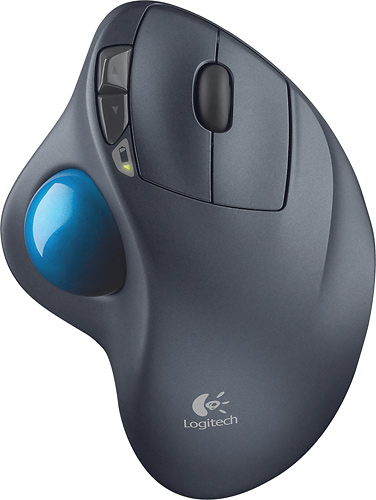
- Model:
- 910-001799
- |
- SKU:
- 1260761
Customer reviews
Rating 4.7 out of 5 stars with 6320 reviews
(6,320 customer reviews)Rating by feature
- Value4.6
Rating 4.6 out of 5 stars
- Quality4.7
Rating 4.7 out of 5 stars
- Ease of Use4.7
Rating 4.7 out of 5 stars
Customers are saying
Customers are impressed with the M570 Wireless Trackball Mouse's ease of use, wireless functionality, and ergonomic design. Many appreciate the trackball feature and report positive experiences with battery life and the mouse's size. While some users mention needing space and potential button issues, the overall feedback highlights the product's ease of use and comfort. The responsiveness and accuracy are also frequently praised.
This summary was generated by AI based on customer reviews.
- Pros mentioned:Battery life
Rated 5 out of 5 stars
A great mouse for all
Posted .This reviewer received promo considerations or sweepstakes entry for writing a review.This mouse is a great mouse for people who don't have enough desk space to keep a laser mouse, it is amazingly smooth, and it doesn't need to have its battery replaced for over a year. Truly a work of art. From gamers to businesspeople, this mouse is truly wonderful.
I would recommend this to a friend - Pros mentioned:Ergonomics
Rated 5 out of 5 stars
excellent trackball!
Posted .This reviewer received promo considerations or sweepstakes entry for writing a review.i am a first time trackball user. never touched one before an i went to my local best buy to buy a mouse and when i saw this tackball i fell in love. i brought it home and thought i would have to get drivers but it was just a plug and play mouse! i thought the price was a little high. it took me 10 minutes of use to get my hand position just right. it has non slip pads on the bottom which help because sometimes i tried to move it like a mouse. it came with a battery so there was no need to buy one. i test the range of it by going all the way across the room from my computer and into the next room i dont know what the range is exactly but it was far enough. if the trackball gets dirty it pops right out and when you put it back in it doesnt feel loose at all. it has a very comfortable design with ridges that arent very noticeable but help to keep your fingers in place. there are buttons by the left clicky thing and they are for forward and back but with a download from the logitech website you can program them. the ball moves smoothly in my opinion and the scroll wheel is nice. one downside is that it doesnt have the left/right scroll buttons like my other logitech mouse does. it is a very good product.
I would recommend this to a friend - Pros mentioned:Ease of use
Rated 5 out of 5 stars
Logitech to the rescue!
Posted .This reviewer received promo considerations or sweepstakes entry for writing a review.I have problems with regular mice making my arm hurt because I work at a desk all day - I bought this mouse via work and it's the best ever!! And BONUS: None of my workmates like the rollerball - thumb style so no one will ever want my mouse!!
I would recommend this to a friend - Pros mentioned:Battery life
Rated 5 out of 5 stars
Surprisingly good value
Posted .This reviewer received promo considerations or sweepstakes entry for writing a review.Although at first glance, taking it out of the box, this trackball feels like a cheap, poorly made, lightweight plastic replica of the REAL Trackman Marble. However, I found the unit to actually be a well made and durable little monster of a deal. Costing a bit more than the wired Marble (at ~ $60USD), I took a chance that the personal reviews I had read about it being lightweight and dropping signal regularly were more from user error and opinion than actual design flaws. Logitech, historically, makes a faily decent product, so I was hoping that it really couldn't be all that bad. Besides, we (of the trackballing genre) have waited too daggone long for a wireless version for them to just put out JUNK!!. Thankfully, I was right to doubt such reviews, and this little unit is right on the money. Is it smaller than the original? Yes, but not in such a way as to make it cumbersome or unpleasant to the touch. In fact, some would argue that the original is too big for most hands. Is it lighter? HELL YES!!! In fact, on first using the thing, I kept knocking it off of the bed, onto the floor. In fact, I sat on it a few times, stepped on it once or twice, and mistakenly kicked it across the room on more occassions than I care to mention, that is, until I got used to having it around and the fact that the thing is light as a feather, comparitively speaking. That said, again, the new wireless version is durable. Only once did the ball fall out, even with all of the abuse that I've put it through. It never loses signal or skips (I use it approx. 15ft from the computer), and though it is not bluetooth (2.4GHz), I do not get signal interference at all. Mind you, I haven't taken it for a spin on a good 1st person shooter yet. I've had the unit since Xmas and use it daily, but so far, the batteries (cheap ones included) have held up well. All in all, I don't think you'd be disappointed.
I would recommend this to a friend - Pros mentioned:Ergonomics, Wireless
Rated 5 out of 5 stars
Very comfortable&easy to use.
Posted .This reviewer received promo considerations or sweepstakes entry for writing a review.Great mouse for the price.Comfortable&easy to use.Wireless clears up wiring.
I would recommend this to a friend - Pros mentioned:Ergonomics, Trackball
Rated 5 out of 5 stars
What a Trackball...
Posted .This reviewer received promo considerations or sweepstakes entry for writing a review.This is a dream come true for my wrist. I can't use a normal mouse due to wrist issues. Truth be told, when I found this, I bought 2 because things break. Haven't broken yet Clean the mouse if you notice it getting "stuttery" and it works like new again. The only Trackball I will ever need
I would recommend this to a friend - Pros mentioned:Battery life, Ease of use
Rated 5 out of 5 stars
Excellent product that is not ridiculously expensi
Posted .This reviewer received promo considerations or sweepstakes entry for writing a review.I wanted an inexpensive but high quality wireless ergo mouse, and that's exactly what this is. I've been using it for several months now after buying it in person from my local Best Buy. It's not a battery hog. I never remember to turn it off before I leave my office, and it's still functioning great. The plug and play design is intuitive and takes mere seconds to install.
I would recommend this to a friend - Pros mentioned:Ease of use
Rated 5 out of 5 stars
A Great Product!
Posted .This reviewer received promo considerations or sweepstakes entry for writing a review.Even though I've only had this mouse for one day I absolutely love it! I am using this for my laptop and I honestly wasn't sure if I should go with a normal mouse or try something like this. It was really easy to install just plug it in and it just works haha. For the first 30 minutes of using this mouse it felt a little weird since this is the first time I've ever used a mouse like this but you'll get use to it. The feel of it in your hand is very comfortable. It's really easy to use, I actually like this a lot more than a normal mouse because I don't have to move my arm or anything, but that's just me. I also like how when you aren't using the mouse you can plug in the USB receiver into the bottom of the mouse where the battery goes so you won't lose it. THANK YOU Logitech! Just buy it... you'll love it
I would recommend this to a friend Rated 4 out of 5 stars
Finally a trackball refresher
Posted .This reviewer received promo considerations or sweepstakes entry for writing a review.Overall I'm happy with the new trackball. It could have been done better but it's nice to finally see a new one and have best buy actually carry wireless versions of it. The pointing accuracy of the mouse is good. The track ball movement is nice and smooth. The grips on the bottom of the mouse are sturdy to prevent the mouse from slipping around on you. The wheel feels smooth as well. The additions of the forward and backward buttons (can be programmed as well) are fairly convenient. And the mini USB receiver is a major improvement over the old clunky wireless receiver for the last model. The bad: The mouse is slightly smaller than the old trackball. It's barely noticeable and I'm sure for some people with smaller hands than mine, it will be great, but the new one doesn't fit my hand quite as nicely. I'm left with my fingers arched slightly more, but it still feels comfortable. The wheel does not have 4 way scrolling. They went with another RF receiver instead of bluetooth. Bluetooth woud've drained the battery more but it would've been so much nicer since a lot of notebooks these days have built in bluetooth receivers which would have prevented the need for an additional receiver pluged into a USB port. Overall though it's a great replacement to the old trackball, and as an avid lifelong trackball user I'm very happy for the upgrade.
I would recommend this to a friendRated 5 out of 5 stars
Awesome Wireless Trackball
Posted .This reviewer received promo considerations or sweepstakes entry for writing a review.I absolutely cannot handle working with corded mice, nor do I like the wireless standard mouse with an infrared sensor. I found the Logitech Trackball mouse about 5 years ago, and paid top dollar to get it, as it was always out of stock. I have since found it to be tedious to remember to take my mouse with me to and from work, so I purchased another one so I can keep one at home and one at work because I love it so much.
I would recommend this to a friend- Pros mentioned:Wireless
Rated 5 out of 5 stars
insanely comfortable
Posted .This reviewer received promo considerations or sweepstakes entry for writing a review.This is my second one. My first one broke in my luggage on a business trip, and i didn't blink before I dropped $50 to buy a new one. I use mine with a laptop. Laptops are inherently not ergonomic - they are sitting on top of a desk, which is too high to type and use a mouse, or they are sitting lower, which hurts your neck. Plus my hands are huge, so most mice just fit under my fingers. After a decade of small mice and high typing... wrist problems. I looked for a large mouse, found a massive track ball, hated for a week then loved it but couldn't live without the scroll wheel. YOU NEVER REALIZE HOW MUCH YOU USE THE SCROLL WHEEL UNTIL YOU DON'T HAVE IT. I returned it, and found this one. It was more expensive, but had 4 buttons instead of 2, had the scroll wheel, and was wireless as a bonus. If you thought your laptop was portable before, try using your mouse on a couch arm rest while your laptop is connected to your TV.
I would recommend this to a friend - Pros mentioned:Ergonomics
Rated 5 out of 5 stars
A worthy replacement for the wired version
Posted .This reviewer received promo considerations or sweepstakes entry for writing a review.I purchased this to replace a wired trackman wheel that I had been using for about 10 years. Every thing is in the same place and orientation as it was on the wired version except this version is slightly smaller by approx. 1/4 inch in length. I have large hands and yet this still fits my hand comfortably. In the 10 days I have owned this so far I have noticed no ghost clicks or stutters in its operation. It works as well as the wired version did for me when I first bought it. I detest using a regular mouse and I have tried several different trackballs over the years and this design is the best out there everything is right where you would expect it to be and easily actuated. the only thing that ever took getting used to is tracking with my thimb instead of either my wrist or index finger. I use this trackball for productivity work as well as surfing the web and gaming it is the best overall pointing device I have found. I am using a windows Vista 64 machine and it synced right up and worked within about 15 seconds of me plugging in the reciever into my USB 2.0 slot. The downloadable software is a nice but not necessary thing for this trackball. It does allow for some remapping of the functions of the buttons on the Trackball. Overall I would tell anyone that is tired of using a regular mouse because of the discomfort associated with one to get this trackball and relax and enjoy using your computer again.
I would recommend this to a friend - Pros mentioned:Battery life
Rated 5 out of 5 stars
Very nice device and great design
Posted .This reviewer received promo considerations or sweepstakes entry for writing a review.The Logitech M570 Wireless Trackball is a great mice. I have bought this mice over a month ago and still running on the same battery which is a single AA battery. You have to go the Logitech web site to down load the software and install it. Once install away you go. The bottons on the mice is programable from the software you install. I found out I like what they are program for, which the lower botton is for scrolling back on web pages. The upper botton is program for scrolling up on web pages (not sure about that one, havent seen to many web sites that have you scrolling down on pages, unless you are some law firm). On the underneath bottom side there is the on/off switch and the door to where the battery is. Inside the compartment there is a small slot where you can store the Logitech® Unifying receiver. If you are like me I also got a Logitech wireless keyboard too. I aloud the keyboard receiver to see the Logitech M570 mice while still having my old mice still pluged in, going through the software step by step using my old mice the program saw both Logitech devices and on the one Unifying receiver I chose. Then I took the mice reciever out along with my old mice and everything was working GREAT, both devices was on the one receiver. I took the mice receiver, just tuck it away right next to the battery. You dont have to worry about cross talk with the devices with others. I own 2 Logitech keyboard and 3 Logitech mice none interfer with each other.
I would recommend this to a friend Rated 4 out of 5 stars
Worth the extra
Posted .This reviewer received promo considerations or sweepstakes entry for writing a review.I bought this product because I use a similar trackball at work. I have to be honest in saying that I was a little unhappy with the price, but I will say that it was money well spent. I love my laptop except the trackpad. It is not clearly marked and can be little touchy at times. The solution was this remote trackpad. It has great range and is as responsive as anyone could ask. I have even used it as a remote control of sorts when watching Netflix streaming to my TV using the laptop as a receiving device and hooking that into my TV. I have no complaints about this wireless trackball.
I would recommend this to a friend- Pros mentioned:Ease of use
Rated 5 out of 5 stars
Works well, right out of the box.
Posted .This reviewer received promo considerations or sweepstakes entry for writing a review.I bought this to replace some older, broken wireless mice. This product worked well on my Windows 7 PC with very little effort. Windows found and installed the drivers. I think all I had to do was click "Okay" once in a while. Overall, I think this device is 1) excellent build quality, 2) a great value and, 3) very easy to use. My only complaint, and it is a small one, is that when I installed a Logitech Wireless Headset a few days later, I could not find a way to have the Logitech Universal receiver (the tiny fob that stays plugged into a USB port) work for both the trackball and the headset. I have two tiny fobs now plugged into 2 of my 3 USB ports. It's a small complaint that I can definitely live with.
I would recommend this to a friend - Pros mentioned:Battery life, Ease of use
Rated 5 out of 5 stars
It is Perfect
Posted .This reviewer received promo considerations or sweepstakes entry for writing a review.This is the best Wireless mouse for anyone who hates to move there mouse al around. It is so easy to do most any task even games. I like it because it work so well with win 7. I have had this since Christmas and I would not trade it for any other. I used to have a Logitech ball mouse that quit after a year. I am hiping this one that is a bluetooth wil outlast al others.
I would recommend this to a friend - Pros mentioned:Battery life
Rated 5 out of 5 stars
Serious long term relationship
Posted .This reviewer received promo considerations or sweepstakes entry for writing a review.I have used the logitech M570 exclusively for the last 8 or 9 years. My trusty M570 got me through my undergrad and was with me for a year or so into my first career. However it met an untimely demise when it got to meet coffee for the first time. Needless to say, they didnt get along. I have since replaced it with another M570 that has worked faithfully for the last 5 years. I purchased a second one to use at home as my time is split between the home and office. The Unifying receiver is very useful for this because it will work with my cordless keyboard and M570 at work and the combo that I have at home. After years the paint on the mouse is no longer matte but glossy where it is broken in. I almost wear it like a badge of honor. Also on a regular basis, I do take it apart to clean the buttons as it can attract the crusties. I dont see purchasing another model trackball anytime soon
I would recommend this to a friend - Pros mentioned:Ease of use, Wireless
Rated 5 out of 5 stars
I love this mouse
Posted .This reviewer received promo considerations or sweepstakes entry for writing a review.I bought this because I wanted a wireless trackball, and I kept hearing good things about it. I ended up buying it, and I love it. Works perfectly and, in my opinion, is way better than any wireless non trackball mouse. I highly recommend this product. (Plus, it can be paired up with other wireless logitech devices so it only uses 1 usb port)
I would recommend this to a friend - Pros mentioned:Ease of use, Wireless
Rated 5 out of 5 stars
Only mouse device I use
Posted .This reviewer received promo considerations or sweepstakes entry for writing a review.I have one of these at work, on our desktop, and keep one in the laptop bag. Is great for my carpel tunnel. Some others at work don't like it because you move the mouse with your thumb and click with your first three fingers. But I prefer that to the other track balls. The wireless works great.
I would recommend this to a friend - Pros mentioned:Ease of use
Rated 5 out of 5 stars
Comfort, ease of use
Posted .This reviewer received promo considerations or sweepstakes entry for writing a review.I like the comfort of this product and ease of use with scrolling and clicking on items of interest.
I would recommend this to a friend