Customer Ratings & Reviews


- Model:
- 910-005987
- |
- SKU:
- 6424893
Customer reviews
Rating 4.8 out of 5 stars with 1324 reviews
(1,324 customer reviews)Rating by feature
- Value4.5
Rating 4.5 out of 5 stars
- Quality4.8
Rating 4.8 out of 5 stars
- Ease of Use4.8
Rating 4.8 out of 5 stars
Customers are saying
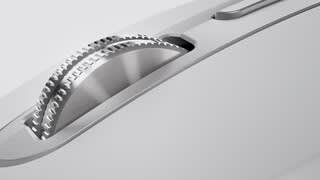
Customers recognize the MX Anywhere 3 mouse's ease of use, excellent battery life, and superb scroll wheel as significant advantages. Many appreciate its compact size and Bluetooth connectivity, while some find the price point to be a drawback. A few users noted that the side buttons could be improved, and some found the click sound louder than expected.
This summary was generated by AI based on customer reviews.
Rated 1 out of 5 stars
Bad scrolling
Posted .This reviewer received promo considerations or sweepstakes entry for writing a review.Biggest piece of JUNK I've ever used. Scrolling is terrible. If I could give it zero stars I would.
This review is from Logitech - MX Anywhere 3 Wireless Bluetooth Fast Scrolling Mouse with Customizable Buttons - Wireless - Pale Gray
No, I would not recommend this to a friendBrand response from Logitech
Posted .We're sorry about the experience you've had with the product. Try cleaning the scroll wheel with compressed air, make sure the wheel moves and is not physically stuck and scroll/gesture settings in the Logitech Options+ software are selected correctly:
Rated 1 out of 5 stars
Does not stay on!
Posted .This reviewer received promo considerations or sweepstakes entry for writing a review.Kept turning itself off every few minutes on full charge.
This review is from Logitech - MX Anywhere 3 Wireless Bluetooth Fast Scrolling Mouse with Customizable Buttons - Wireless - Rose
No, I would not recommend this to a friendBrand response from Logitech
Posted .That's unexpected! If possible, try with a different USB charging cable or cradle and connect to a different power source and charge the device fully and check if the issue still persists.
Rated 2 out of 5 stars
Downgrade from the MX Anywhere 2S
Posted .This reviewer received promo considerations or sweepstakes entry for writing a review.Downgrade from the MX Anywhere 2S. Pros: USB-C Cons: Lack of horizontal scrolling (tilting the wheel) which took away additional customizability
No, I would not recommend this to a friendBrand response from Logitech
Posted .Hello John,
The MX Anywhere 3 features the MagSpeed adaptive scroll-wheel with SmartShift. You can still scroll horizontally with your MX Anywhere 3.
This is done with a two-button combination: Press and hold one of the side buttons and scroll with the wheel simultaneously. NOTE: The horizontal scroll is ON by default in your Logitech Options software. You can customize this feature in the Point & Scroll tab in Logitech Options. I have attached a link to the support page for the MX Anywhere 3 for your reference. Please visit the Logitech support page for further support with your Logitech products.
Best regards,
John at Logitech
https://support.logi.com/hc/en-us/articles/360053831734-Getting-Started-MX-Anywhere-3
Rated 1 out of 5 stars
Waste of money
Posted .This reviewer received promo considerations or sweepstakes entry for writing a review.Not worth your time. Didn't even last a year and stopped working. Refuses to charge.
No, I would not recommend this to a friendBrand response from Logitech
Posted .Hello Gemstone,
I am sorry that the MX Anywhere 3 is not charging. I recommend you update the firmware on the Logitech website, and if the problem persists, feel free to contact Logitech's customer support for personalized assistance. Logitech appreciates your product review. - Leo from Logitech