Customer Ratings & Reviews






- Model:
- 920-012274
- SKU:
- 10982503
Rating by feature
- Value
Rating 4.5 out of 5 stars
- Quality
Rating 4.9 out of 5 stars
- Ease of Use
Rating 4.8 out of 5 stars
to a friend

Excellent hardware that improves productivity.
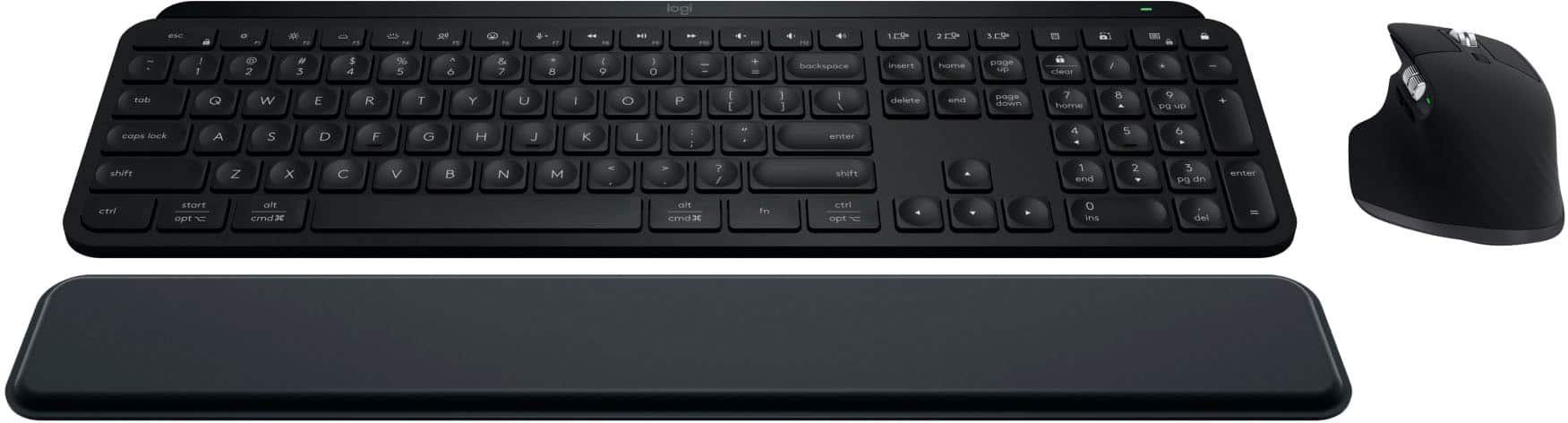
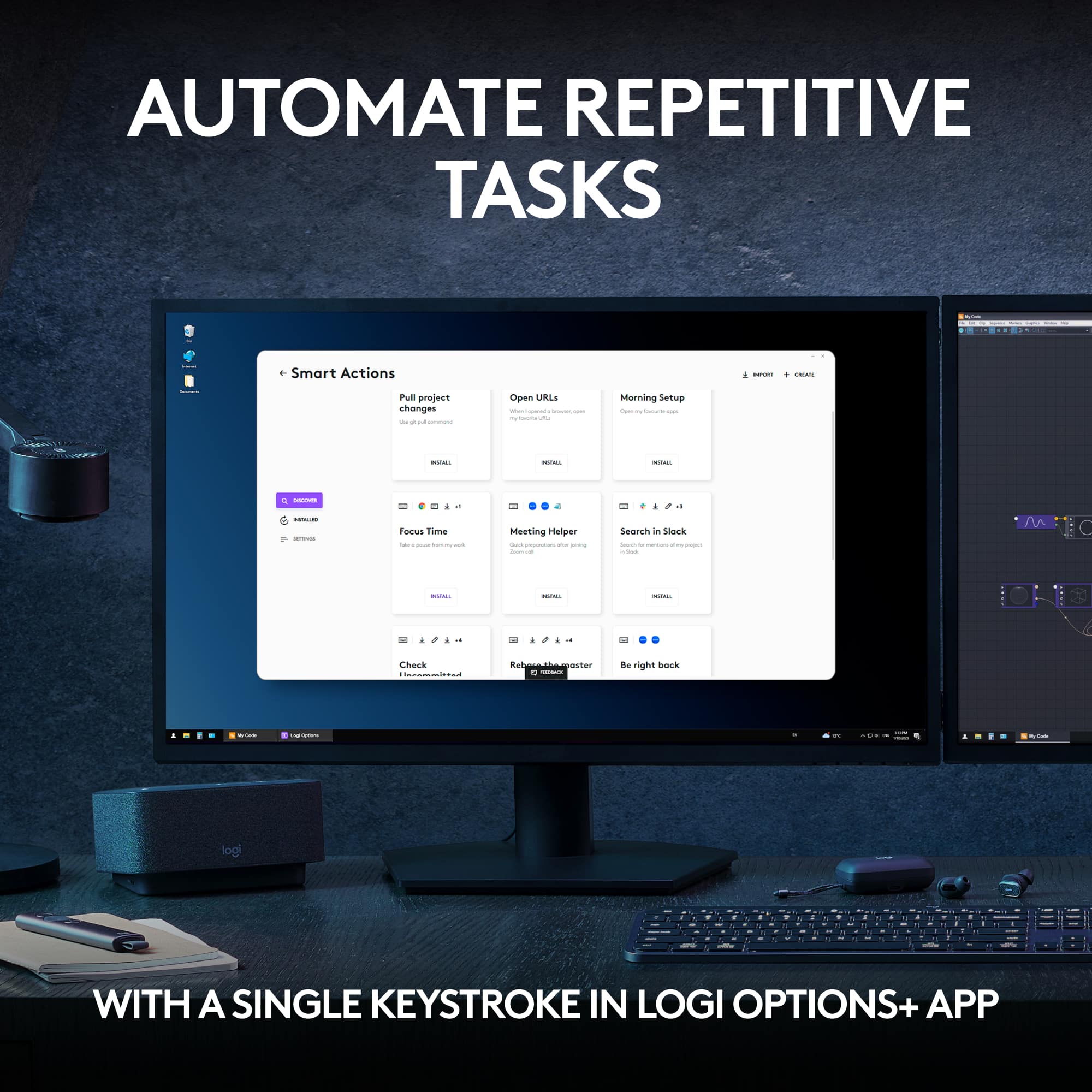
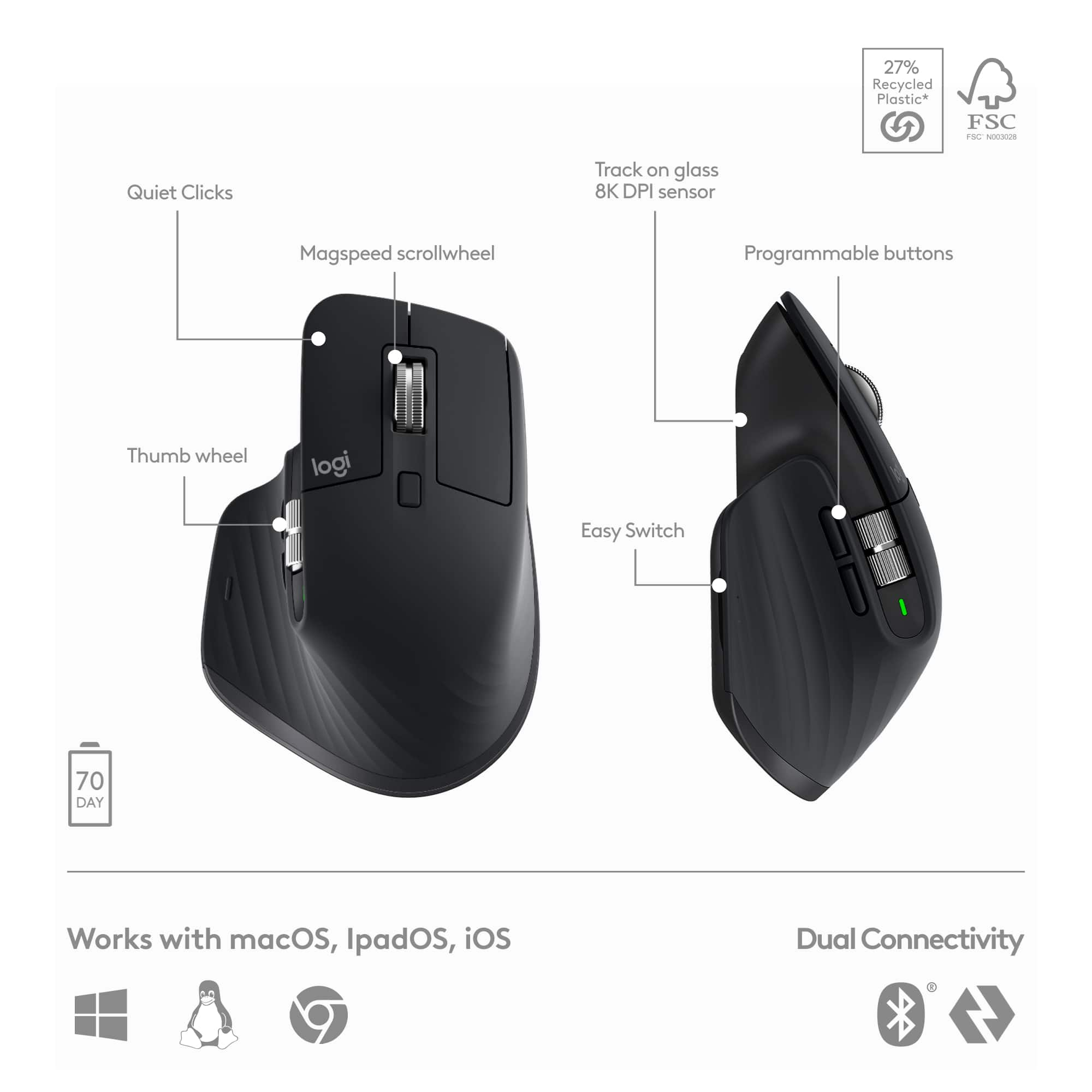
|Posted .This reviewer received promo considerations or sweepstakes entry for writing a review.The MX Master 3S mouse is ergonomic and top-of-the-line. It has 7 programmable buttons, including a scroll wheel on top and one on the side. There's also a gesture button below the thumb rest. It connects wirelessly via Bluetooth or Logi Bolt dongle and can be paired with up to 3 devices. It has an 8,000 DPI Darkfield sensor that works on any surface, a rechargeable battery that lasts up to 70 days and can be charged via USB-C. My favorite feature has to be the magspeed scrolling. You can choose between free scrolling (it scrolls freely depending on how hard you scroll down) or regular scrolling that most are used to. The free scrolling is a game changer in my opinion. You can customize the mouse with Logi Options+ software where you can assign shortcuts, macros, commands, or actions to any button or wheel. You can also use Logi Flow to move files and your pointer between multiple devices that have this software. This is extremely useful nowadays. MX Keys is a slim, sturdy keyboard with 108 keys, including a number pad and media keys. It has low-profile concave keys that offer a clean and quiet typing experience. The keyboard features adaptive backlighting and can connect wirelessly via Bluetooth or Logi Bolt dongle. It has an impressive battery life of up to 10 days with the backlight on and can be recharged via USB-C. You can personalize the keys and functions with Logi Options+ software and use Logi Flow to move your cursor and files seamlessly between devices. The device is light and sleek and the build quality is superb (which is expected from Logitech as I have never had a poorly made Logitech device). You can also program macros to the F keys to perform work functions that you do over and over using the aforementioned Logi Options+ software. All of these features make this, hands down, one of the most productive pieces of hardware for the working person.
I would recommend this to a friendStylish PC Peripherals Look and Perform Great
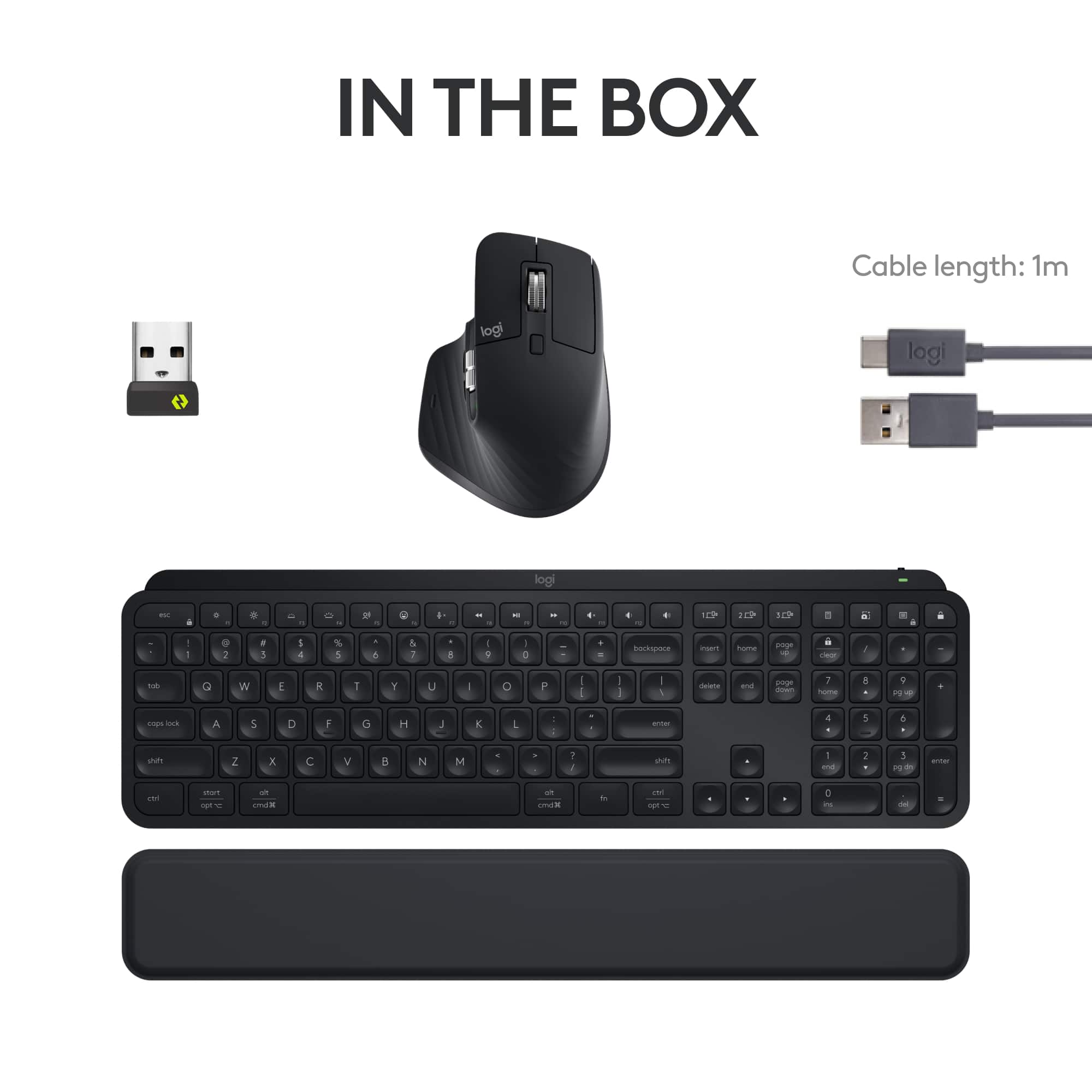
|Posted .This reviewer received promo considerations or sweepstakes entry for writing a review.I have a history with Logitech MX mice. Some of my favorite mice of the last twenty years are the Logitech MX 1000 and the Logitech Performance Mouse MX. I wore those mice out over thousands of hours. Getting my hands on the MX Master 3S has felt like the best trip down memory lane, ever. Both the MX Master 3S Mouse and the MX Key S Keyboard look and perform great. After a week with the MX Keys S Combo, I feel I can easily recommend the package to productivity users or any PC user who wants stylish peripherals that work and look great. Experience: Inside the box, you get the keyboard, the mouse, a wrist rest for the keyboard, a USB-C to USB-A cable, and the Bolt Unifying USB receiver. Initial impressions are that this package looks great. They’re stylish. They make a good impression on a desk. I really like their sleek, minimalist design. And yet, everything I want, including some keys and features I didn’t even know I wanted, are here. After plugging the Logitech Bolt Receiver into my Windows 11 PC, I received a pop-up notification prompting me to install Logi Options+. I get the impression that Logitech is trying to keep gaming hardware and productivity hardware separate, but it feels a bit ridiculous to have GHUB on my computer and Logi Options+ when both pieces of Logitech software perform similar roles. But, having said that, Logi Options+ is my favorite of the two apps. It’s much simpler and way more intuitive to use. I love this mouse. It looks impressive on a desk. It performs well. I had a smooth glide on cloth and hard mouse mats. It fits my hand great. I love the weight. I love the button layout. Not only can you customize mouse buttons, but you can customize them for specific applications within the Logi Options+ app. Gesture controls are built into the mouse. They're also customizable. It's taken me a bit to get used to them, but now, I can't imagine my day without them. Pressing the thumb rest while moving the mouse up, down, left, or right triggers a variety of customizable key presses. There is no DPI toggle. Instead, you get a toggle for the scroll wheel, a horizontal scroll wheel, and back and forward buttons above the thumb rest. The MX Master 3 and the MX Master 3S are very similar mice. The MX Master 3S utilizes the Bolt receiver whereas the MX Master 3 relied on the Logitech Unifying Receiver. Both receivers are tiny USB-A dongles that allow you to easily connect your devices with your Windows PC. The Bolt Receiver utilizes some Bluetooth security features and performs like Bluetooth in terms of latency. If you are wanting a gaming mouse, this may not have the response time you are seeking. But, if you’re like me and enjoy strategy games or work with photoshop and other productivity applications, I think you’ll find this a very enjoyable experience. I like it so much I’m ordering another Bolt Receiver to keep on my gaming PC. Then, I can just switch between computers with the press of a button. But, again, this is a trip down memory lane for me. I like this form factor because it reminds me of my favorite mice of the last twenty years. Your mileage may vary. If you like lighter, smaller mice, or have a smaller hand, this may not be the mouse for you. Battery life has been good. You can easily get several days of battery life. In the last week, I have only had to charge it once. Out of the box, my keyboard and mouse were at 45% charge. It took around an hour to get both devices back to 100%. I have been on a mechanical keyboard kick for the last few years. I’ve been surprised by how much I like the MX Key S. It looks like a polished laptop keyboard in a desktop keyboard form factor. Keys are comfortable. I rarely found myself mistyping or duplicating key presses. That’s probably due in part to the key travel. Over the last week, I have found myself using every one of the function keys. And just like the mouse, the function keys are highly customizable within the Logi Options+ app. The entire experience has been super easy and intuitive. I appreciate the dictation, screen snip, and emoji keys way more than I thought I would. Plus, with the ability to pair with three devices, I can easily use these devices on my Surface, my desktop, and my Chromebook with the press of a button. It all works great. The software is intuitive and easy to use. This combo has worked well with my Chromebook, Galaxy Tablet, and my iPad. My only complaint, I wish I could run Logi Options+ from my Chromebook. Currently, the full software features are only available on Windows and MAC OS. Conclusion: I really like this package. I wish the latency on the mouse were a bit better. If the latency were a tad better, this would be my perfect mouse. As it is, it’s a very good mouse that is a must for productivity users and good for gamers. The keyboard performs and looks great. I’m very happy with this mouse and keyboard combo and I think it’s very easy to recommend. 5/5
I would recommend this to a friendComfortable and Versatile
|Posted .This reviewer received promo considerations or sweepstakes entry for writing a review.This combo is essentially a bundle of the excellent MX Keys keyboard and the also-excellent MX Master 3S mouse in one box with a single Bolt wireless adapter. The new Bolt connectivity is more secure than the previous Unifying adapter. Both are a worthwhile upgrade from their processors and a comfortable and versatile complement to any desktop or laptop computer’s desk. Pros: * Overall: A great match for Mac, Windows and Mobile Device use. * Keyboard: Comfortable key spacing and key travel. * Keyboard: Long battery life even with backlighting on. * Keyboard: Enough heft to stay put on your desk. * Mouse: Comfortable fit. * Mouse: Back/Forward buttons moved to an easier-to-reach location. * Cons: * Overall: Switching between connections is not linked for keyboard and mouse (not as a group). * Mouse: Didn’t track as well on my white textured melamine table top. * Mouse: Firmware Update tool wouldn’t find it in either Bluetooth or Bolt connection mode. Separately, the MX Keys keyboard and MX Master 3S mouse are excellent products in their own right. Each is a worthy upgrade from their prior models and each is comfortable to use and versatile in their abilities to connect to and control just about anything you’d want; Mac, Windows, iOS, iPadOS, etc… There are tons of reviews on the keyboard and mouse separately. The short review is that MX Keys keys are spaced right, have the right travel and have good backlighting. There are useful shortcut keys that can not only be assigned by OS but also by the application you’re using. Battery life with the backlighting on is really good, and amazing with the backlighting off. The MX Master 3S mouse is even more comfortable (at least for me) than the prior 2S. The top and side scroll wheels are slightly redesigned and are now even more satisfying and accurate to spin. The back/forward buttons that previously flanked the side scroll wheel are now much more accessible below the wheel. Both the keyboard and mouse can pair to your devices via standard Bluetooth but also now use the Bolt adapter rather than the prior Unifying adapter. One adapter is included in the box for the pair of keyboard and mouse. Both also now charge by USB-C rather than MicroUSB. Charging is fast, easy and compatible with the growing popularity of USB-C. Both the keyboard and mouse have the ability to pair with up to 3 different devices and easily switch between them. The keyboard is a tad easier to swap with discrete buttons integrated into the top of the keyboard whereas the mouse’s switch is a single toggle button on the underside. It’s worth noting that only one Bolt adapter comes in the box so if you do want to pair with multiple devices, at least two of them must either be by standard Bluetooth or your’ll have to buy more Bolt adapters. Unless I missed something, while I appreciate the ability to pair with and switch between multiple devices, the switching is not linked between the mouse and keyboard. You have to switch the mouse and keyboard separately. For example, I have a Mac, a Windows PC and an iPad on my desk (for software development and testing). I can easily pair the keyboard and mouse to each of the 3 devices so I don’t have to have 3 separate mice and keyboards, which I appreciate. However; switching amongst the 3 devices is a symphony of keypresses on both the keyboard and mouse. One other small issue is that the Mouse advertises that it works on any surface, even glass. I have a computer desk that is white textured melamine and another that is wood grain.. the mouse tracks fine on the wood grain desk but is not as smooth on the white melamine desk. Nothing that a mouse pad can’t cure, but it’s something to be aware of. The provided Logi Options+ software for Mac and Windows is really easy to use and allows you to customize nearly any aspect of the keyboard and mouse in one utility. You can check battery levels, update firmware and assign shortcut keys among other things. I was unable to get the firmware update for the mouse to connect to the mouse by either the Bolt or standard Bluetooth connections, but that could be a temporary issue that will be fixed in a future update of the Logi Options+ app. Overall, this bundle of the MX Keys keyboard and the MX Master 3S mouse is a great addition to any desk. Both are comfortable to use for long sessions and supremely customizable.
I would recommend this to a friendTwo of my favorite devices in one package
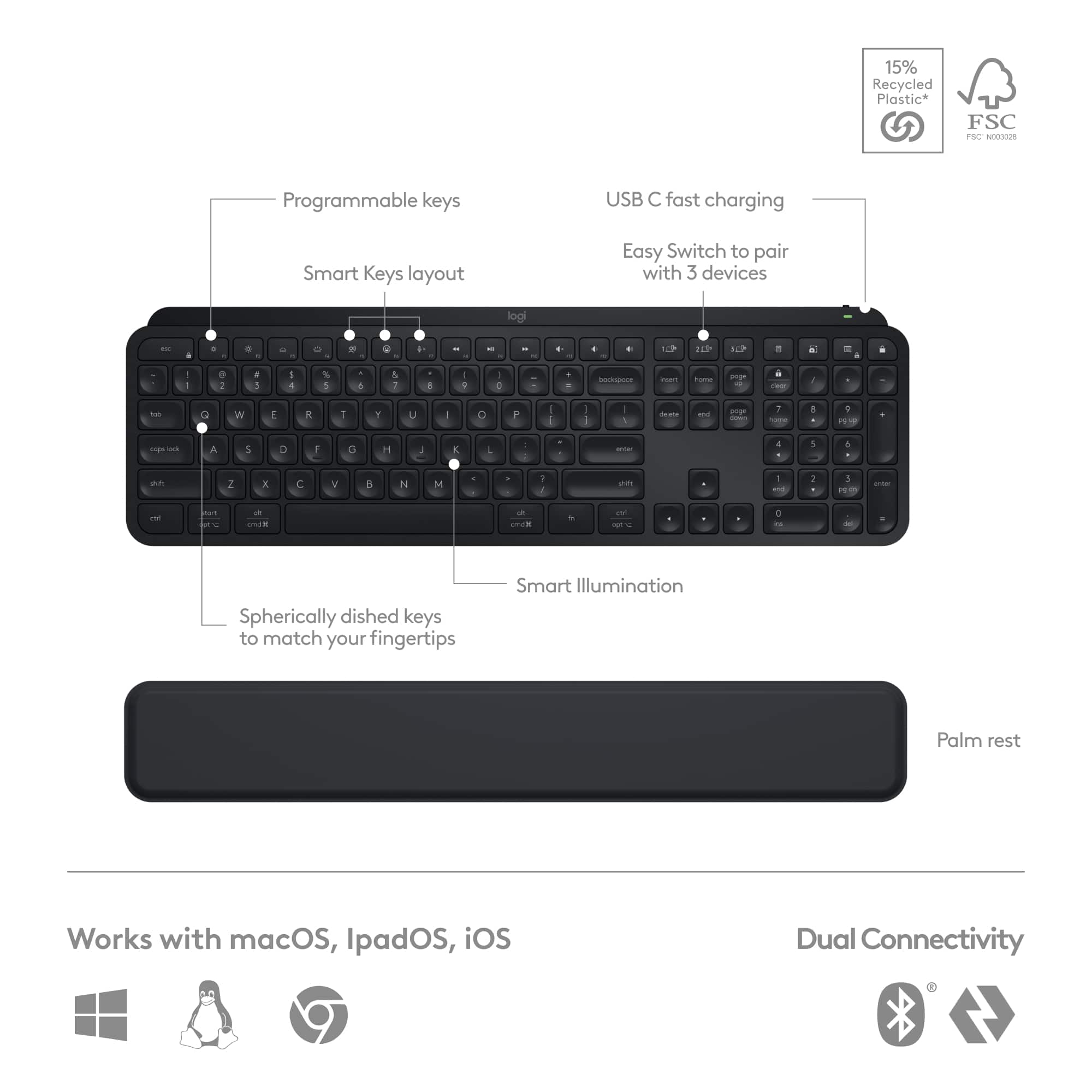
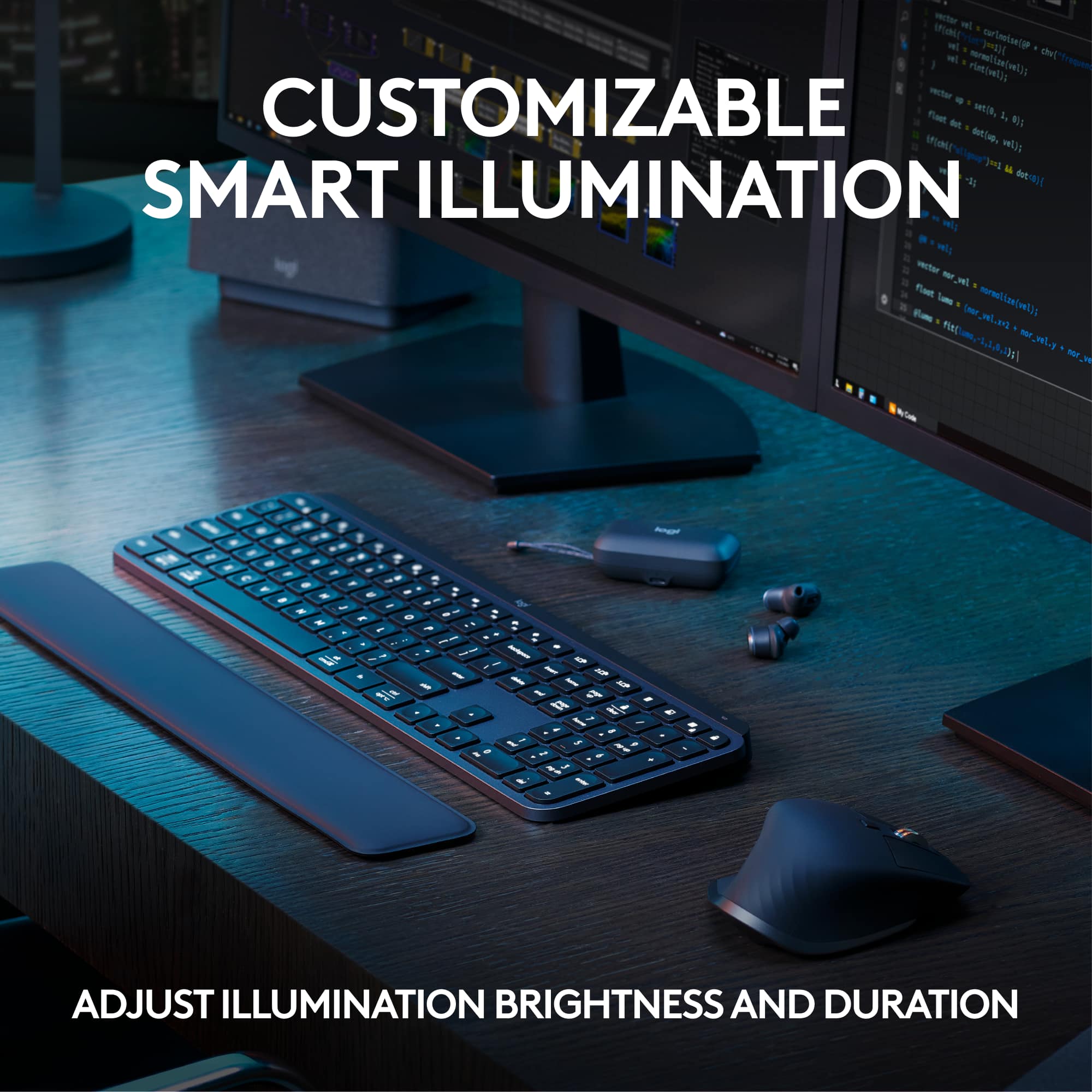
|Posted .This reviewer received promo considerations or sweepstakes entry for writing a review.## What's new in the "S" version of MX Keys? The original Logitech MX Keys is one of my favorite keyboards. I couldn't find any information from Logitech on what specifically is new in the "S" version of this keyboard, but I found that the top row now has a dictation, mic mute and emoji shortcut. The Logitech Options+ software also gives a few more backlighting options: allowing you to set the delay up to 30 minutes until the lights go out (at the expense of battery life) and the ability to turn automatic brightness off. ## Design This combo sets gives you two of Logitech's best input devices: the MX Keys keyboard and the MX Master 3S mouse, as well as a nice palm rest. The keys on the MX Keys keyboard are not “clicky” like you would find on a mechanical keyboard. Instead, the keys provide nice, tactile feedback when typing without feeling “squishy”. The keyboard has some weight to it and feels solid. This particular model is black and dark gray, and features keys for both Mac and Windows systems. The MS Master 3S mouse is ergonomically designed, with a contoured shape that allows your hand (including your thumb) to rest comfortably on it. It features both vertical and horizontal metal scroll wheels. ## Features Wireless: It's important to note that this keyboard combo set uses the new Logi Bolt connector, which cannot be paired with older devices that use Logitech's "Unifying Receiver." Buying these as a combo saves you the hassle of having to pair both the keyboard and mouse to one Logi Bolt receiver, as they come pre-paired. Keyboard backlighting: The backlighting on the keyboard does a great job of lighting up as your hand approaches the keyboard, so you can still see the keys in low-light situations before you press the key. The lights automatically turn off when your hands are away after a sure period to preserve battery life, however, I noticed it lighting up on its own when I'm in the hallway and walk by my office, so it may be draining the battery more than necessary. Still, I find I only need to charge the keyboard about once every one or two weeks. Multiple machine support: There are 3 dedicated buttons for switching between devices located in the top row of the keyboard. For example, you can hit the “1” button to use your main computer (connected via the Logi Bolt receiver), then tap the “2” button to switch to your Bluetooth-paired iPad, for example. USB-C Recharging: Both the keyboard and the mouse can be recharged with a standard USB-C cable. ## Performance The MX Keys keyboard is technically a membrane keyboard, meaning it may not be ideal for gaming. For word processing and coding, it's a joy to type on, as each provides tactile feedback and is very comfortable to type on and use. The MX Master 3S mouse is very accurate and works on a variety of surfaces, even on my couch cushions when I'm working from the living room. I also like that there is a button located directly beneath the vertical scroll button that lets you place it into "high speed" mode, allowing you to scroll much more quickly (but with less precision). With the backlight feature enabled, the MX Keys keyboard can last up to 10 days of use before needing a recharge. With the backlight off, this extends to 5 months between charges. ## Summary Overall, the Logitech MX Keys keyboard is one of my favorite keyboards for coding, word processing and emailing. The ability to easily switch between devices and the addition of the backlighting makes the MX Keys are very versatile and comfortable keyboard to use. The MX Master 3S mouse is also a joy to use as it provides a comfortable grip, both vertical and horizontal scroll wheels and the ability to "speed scroll". I like this combo set as you can use one Logi Bolt dongle for both devices as they're already paired to the same receiver. Just remember that the Logi Bolt receiver cannot be used with older Logitech devices using the "Unifying Receiver".
I would recommend this to a friendGreat, versatile, and quiet
|Posted .This reviewer received promo considerations or sweepstakes entry for writing a review.This Logitech MX Keys S combo package is a MX Master 3S mouse and MX Keys keyboard. They are both cordless and connect to a through a small USB dongle, or by Bluetooth (BT). The dongle is the newer Logi Bolt receiver. Both can be linked to 3 different computers by BT. Or, just move the dongle as needed and your good to go with plug and play. I tried BT and the dongle on several computers with and without the Logitech Options + software and had no issues with either device working. As these are full size items, they aren’t light, but aren’t meant to be, they are full sized devices. In the box, you get the two devices and the charging cable. Both use USB-C for charging. Depending on what is activated, the devices can last from days to months. Both have built in batteries. The mouse is great for larger hands. The top scroll wheel can change from click to smooth with the touch of the button just behind it. In addition to the scroll wheel and 2 buttons there is a thumb scroll (volume by default) and a forward and back button just below it The Master 3S feels good in your hands and glides easily. Response is good and never had any tracking issues. It has up to 8000 DPI. There is just a small green led light for status on the mouse. It tracked on desktops and mousepads with no issues. The Keyboard is pretty silent and has a good feel. Compared to the mechanical version it’s more quiet, and the layout is a little different. Comfortable for typing for long sessions. Presses are solid, you know when the key is registering. The keys are more recessed, and the keyboard has single tilt angle. The keys are responsive. The backlighting is good and can be adjusted in the Options + software. As your hands approach the keyboard, the lights will come on and brighten. Stop typing and they will fade away. Lighting makes seeing the keys easy. It’s not to bright is great in low light or dark settings. The top row of keys are functions or double for media controls and other functions. The wrist rest is comfortable and feels like gel under your wrists. It can slightly change your typing angle and is comfortable. Being a full sized keyboard, spacing is nice and having a number pad is always a plus for entering in digits fast. The Options + software lets you customize the devices as you see fit. All of the buttons can be changed, macros assigned, different settings depending on the program you are using, and changing the lighting. It’s versatile and keeps getting better. Make sure you update to the latest version when using this set. You can log in and setup an account to cut and paste between computers with the mouse and keyboard. Overall, this is another great Mouse and Keyboard combo. Whether for business, internet surfing, or gaming, you can customize them to meet your needs without worry of running out of battery. A good option for quiet responsive backlit typing. Devices worked just as well in BT as with the dongle.
I would recommend this to a friendFantastic Full size keyboard and mouse
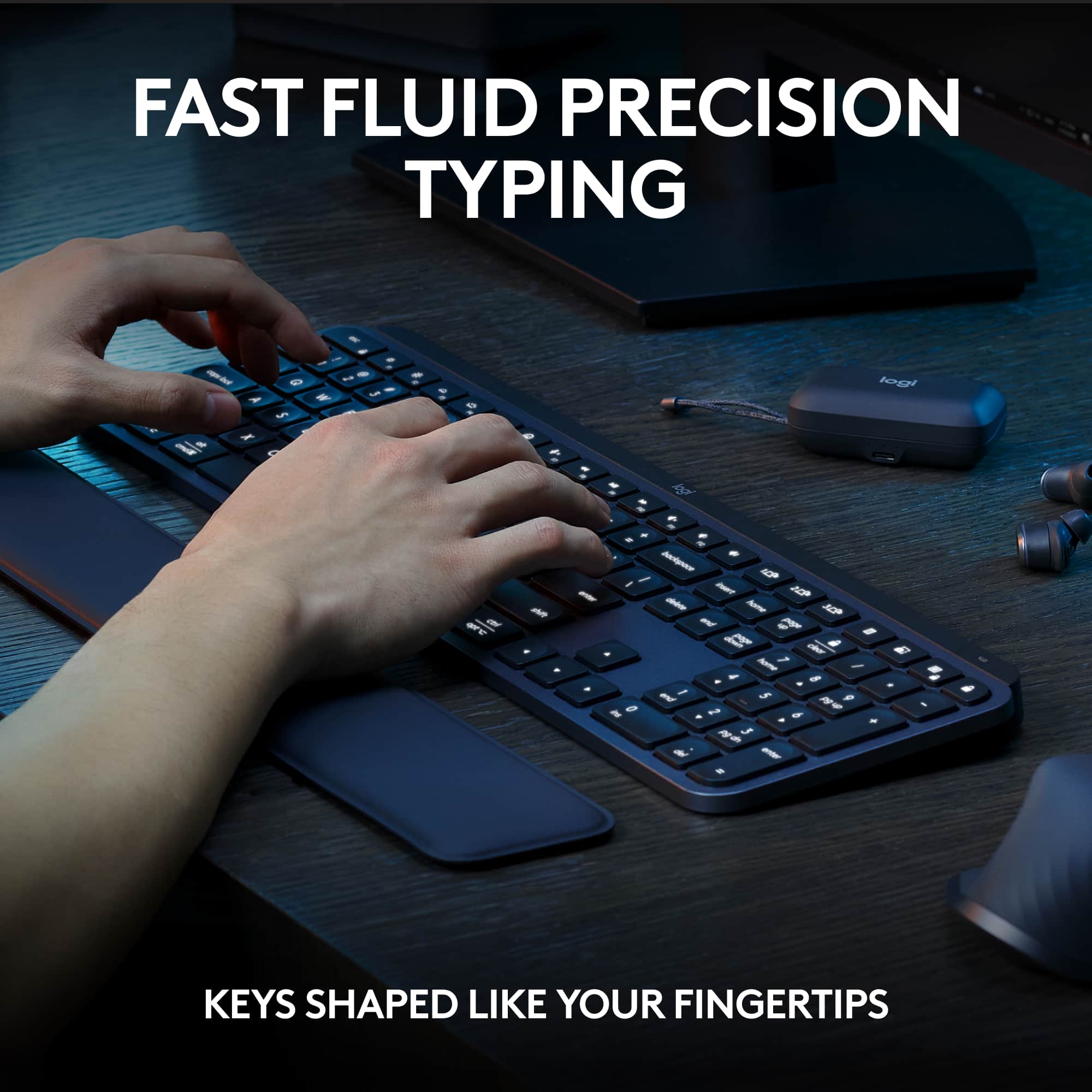
|Posted .This reviewer received promo considerations or sweepstakes entry for writing a review.If you are looking for a replacement keyboard and mouse combo that you help you get the job done, then look no further than the Logitech MX Keys S combo package. You can purchase the mouse, keyboard separately, but I feel the combo package is a good deal especially when it is on sale. I have been using Logitech products for many years and some items are hits and others are misses, but this is for sure a hit. First let’s talk about the keyboard. According to Logitech’s claims, it provides a “fluid typing experience” with laptop similar round shaped indentions on the keys that cradle your fingers as you type. The keys themselves are very stable and if you try to wobble them back and forth, they do not move much at all. Each keystroke is short, firm, and quiet. Unfortunately, the keyboard is not height adjustable, but the overall angle is good enough for me. Also, the keyboard does have some real weight to it and it will not move around on you as you type. The included palm rest mat is just squishy enough, but also firm and it helps to reduce a bit of typing fatigue. The keyboard also has a backlight on it that will adjust to the ambient light in the room, according to Logitech, but you must install the Logi Options+ app to set that and also other advanced settings. I did not install the app since I put this on my work computer and our security policies do no allow software like this. The keyboard will turn off the backlight after a few seconds, and then pop right back on when it detects your hands near it, I find that a great feature. Battery life is rated to be about 10 days with lights on the keyboard or up to 5 months w/o lighting on. You can flip the power button to turn off the keyboard when not in use to extend that time. Charging is accomplished via a USB A to USB C cable that is included and this works for both the keyboard and the mouse. I haven’t had enough time with the keyboard to substantiate the battery life claims, but in the 5 days that I have had it, I have used it a lot and it is still running. Mouse is rated at 70 days of use, and I have the MX Master 2S mouse and I find that I have to charge it about every two months and I think this battery claim will most likely be accurate. Speaking of the mouse, wow, the MX Master series is by far my favorite non-gaming mouse that there is. It’s hefty though but it doesn’t feel heavy, it glides nicely on my mouse pad and the buttons are placed in the perfect spots. The only feature I don’t really use is the horizontal scrolling wheel, I just can’t get used to using it. Under the mouse is the power toggle and switching button so you can pair this guy up with three different devices, via Bluetooth or the Logi Bolt system. The keyboard does have the same ability to connect to three devises as well and it has dedicated buttons for this above the Insert / Home buttons. The Logi bolt system is the next evolution of the way Logitech is connecting their devices and this is not backwards compatible with the Unify receivers, I found that to be disappointing, but not a deal breaker. Overall, this is a great mouse and keyboard set up for the office or your home PC and I love nearly everything about it and I am sure you will too.
I would recommend this to a friendWorth Every Penny
||Posted . Owned for 3 weeks when reviewed.This reviewer received promo considerations or sweepstakes entry for writing a review.I've been using the Logitech MX Master 3 mouse and MX Keys keyboard combo for a few years now, and this is my second set for another office room setup. The mouse is super comfortable to hold, with a scroll wheel that feels smooth and precise, and customizable buttons that actually make a difference in daily use. The keyboard is just as impressive: low-profile keys that feel great to type on, smart backlighting that turns on when your hands get close, and the same ability to switch between devices. Both connect easily via Bluetooth or the included receiver, and the battery life is awesome — I barely have to think about charging. Yes, it’s a bit on the pricey side, but if you spend a lot of time working at a computer, this combo is totally worth the investment. It looks great, feels great, and just makes getting stuff done a lot more enjoyable.
I would recommend this to a friendBrand response from Logitech
Posted .Thank you so much for taking the time to share your experience. We're thrilled to hear that the product is working well for you and meeting your expectations. Your feedback helps us continue to improve and innovate. We truly appreciate your support of Logitech.

Work Saving Combo
|Posted .This reviewer received promo considerations or sweepstakes entry for writing a review.The MX Keys Combo really makes me feel more efficient and effective when I am doing every day work and hobby task on my computers. I spend a lot of time working in office applications and being able to have specific mouse/keyboard functions available per application makes life so much easier. Being able to configure specific mouse buttons that change per application makes working on spreadsheets and presentations and documents much smoother. The ability to work across a work laptop and a home computer at the same time using a single keyboard and mouse makes working from home much less complicated. Mouse: The mouse is the true superstar of this combo. It is slightly larger than I prefer but the thumb rest and textured finish make it easy to grip and use. The mouse has the standard buttons but it also includes a button on the thumb rest as well as a second horizontal scroll wheel. You can adjust the speed of the horizontal wheel as well as select between smooth or click scrolling on the main wheel. When configured with the Options + software you can optimize the mouse functionality to the specific apps you use as well as set the mouse DPI up to 8000. Logitech has preconfigured mouse settings for most apps but you can easily change them to meet your specific needs. The mouse buttons are quiet and have a solid engagement when pressed. The gesture button on the thumb rest is smaller and not as easily located but still manageable. This button allows you to press and gesture to select a configurable function. Keyboard: The keyboard is a low-profile full-size keyboard with silent membrane keys. The keys have a slight cupping which makes finding the home keys and typing relatively easy. Because the keyboard is so flat and thin and does not have any slant adjustment it can take some time to get used to. The included foam palm rest definitely helps overcome the lower positioning issues. I was using a standard MX mechanical keyboard prior to this so it has taken some time to adjust. The keyboard uses Logitech’s smart illumination which means it lights up when it senses your hand. I found this feature to be somewhat inconsistent and you cannot turn the lighting on permanently. Luckily via the Options + software you can adjust the length of time the keys are illuminated. This cuts down on the keyboard battery life but it also keeps the keys from blinking on and off every time I stop to think for a moment. The maximum time you can set to stay illuminated is 30 minutes but if you go that long you need to watch the battery indicator of the keyboard closely. The keyboard has a fairly standard key layout including brightness and media controls. You can use the Options + software to configure the Function buttons. Because it has membrane keys it is very quiet which really helps if you like to type during video conferences. Both the keyboard and the mouse can pair with up to three computers using the Logi Bolt dongle or Bluetooth. The keyboard has three dedicated buttons for switching and the mouse has one button on the bottom. I found that pairing the keyboard and the mouse was straight forward and once paired they didn’t suffer any connectivity issues. Both device’s batteries are charged by using the provided USB-A to USB-C cable. Note that both devices only communicate wirelessly – the USB ports are only for powering/charging the devices. The keyboard battery should last about 10 days using the default lighting and the mouse should last 70 days between charges.
I would recommend this to a friendQuiet, Precise, Ergonomic & Performant
|Posted .This reviewer received promo considerations or sweepstakes entry for writing a review.A great combo to get stuff done!! The keyboard is a full size keyboard with number pad. It is nicely designed and provides the right amount of feedback while being pretty quite. The keys are backlit. It has Function keys which also doubles up as media keys. Tip: By default the media keys are active but you can toggle the behavior (Esc + Fn) so that function keys (f1, f2 etc.) are active without the need of pressing "Fn" key. The height of the keyboard is just right and the keys are very responsive. The palm rest allows right amount of support so that you don't feel tired even after a full day of coding/documenting. The mouse also has all the same qualities as of the keyboard. It is nicely designed, has scroll wheels for both horizontal as well as vertical scrolling. There are buttons for back and forward as well as a gestures button. All these buttons as well as a number of keyboard keys are customizable using the "Logi Options+" app. The "Logi Options+" app is quite intuitive and provides loads of customization options. Both mouse and the keyboard can pair with up to 3 devices using bluetooth or logi bolt receiver. I really like the fact that one single bolt receiver connects both the mouse and the keyboard. This means you save one USB port for other things. I connect these with my work laptop using the bolt receiver and personal laptop via bluetooth. The switch between two laptops is seamless and quite fast and easy. Overall, I am very happy with this combo set and I highly recommend it for people who do a lot of typing and multitasking (either on a single device or multiple).
I would recommend this to a friendQuintessential Keyboard + Mouse Combo
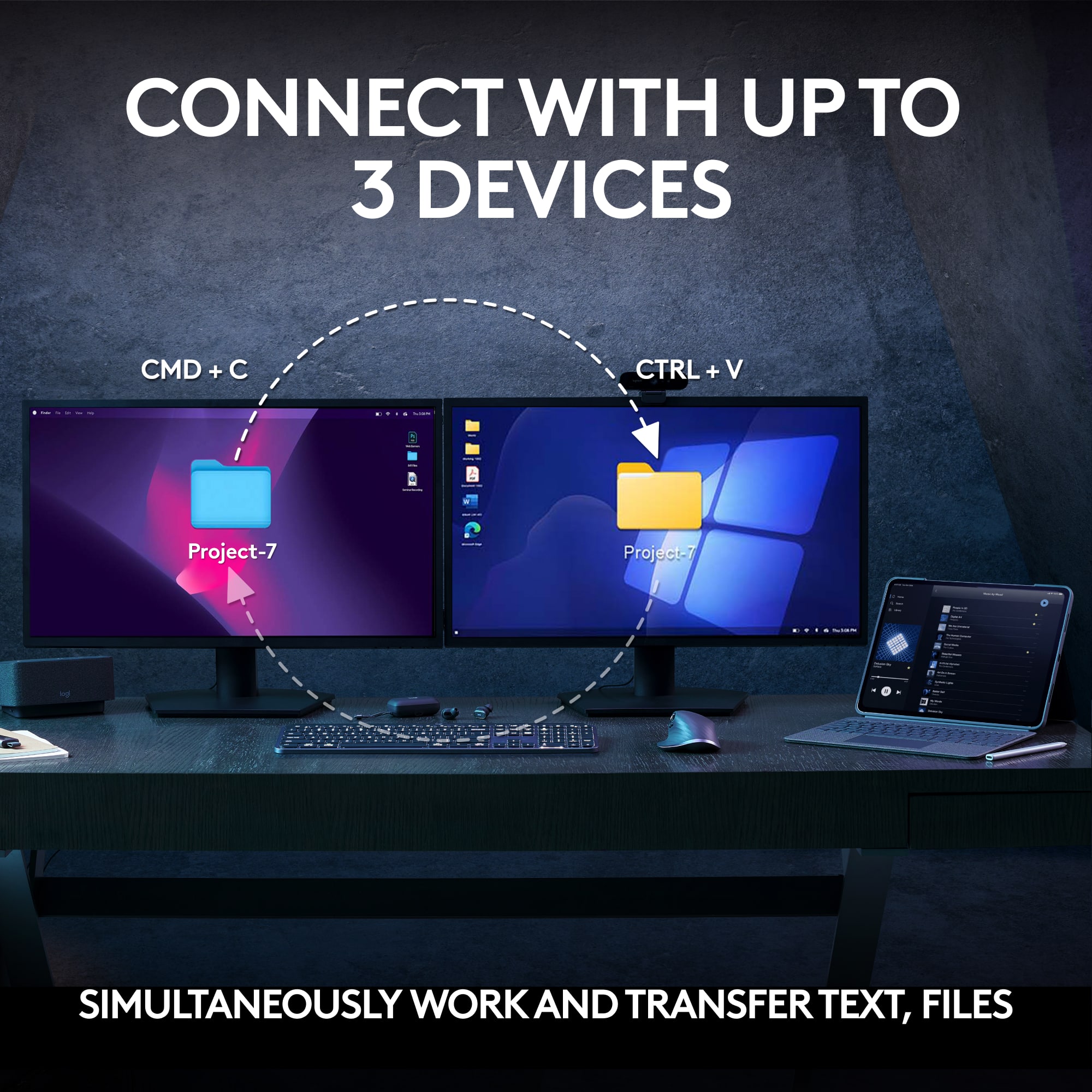
|Posted .This reviewer received promo considerations or sweepstakes entry for writing a review.I've used various Logitech MX products for work over the years and was excited to see this excellent package that combines the excellent MX Master mouse and MX Keys keyboard. I've used both in the past, but not the "S" variants which are designed for quieter clicks and key presses. If you are a serious business or creative user who wants the best that Logitech has to offer in one simple package, this is hard to resist. ===MX Master 3S Mouse=== - Incredibly comfortable. Logitech nailed the design of their MX Master mouse and this 3S variant is just as comfortable and easy to hold as previous generations. The ergonomic shape and thumb rest really make this mouse easy to use for hours on end. - Mouse clicks are incredibly quiet, which is great for working in an office near co-workers or even at home in a quieter environment. - I love the "Flow" feature. After installing the Options+ program on two computers and ensuring that both are on the same network, this mouse has essentially combined both of my machines into one dual-monitor setup. Just like if you had two displays side-by-side, if you move the cursor through the right side of one screen to the other, the cursor passes over to the other computer on the opposite side. You can even copy text and files on one machine, move the cursor over to the other machine, and paste them. There is a slight delay when pasting, especially with large files, but it's so much more convenient than emailing or swapping an external drive. - I also like the different scrolling modes used by the "MagSpeed" scroll wheel. You can choose from either ratchet (a slight "click" feedback while scrolling) or freespin, which allows you to spin the wheel as fast as you want, and it will keep scrolling until you stop it. Freespin is perfect for when I need to scroll through 300-page reports. - The mouse seems to work on practically any surface. I've tried a wooden desk and even a clear glass desk - both worked flawlessly. - Long battery life, and I love how it is rechargeable via USB-C. So you don't have to worry about having spare batteries lying around. - The forward/back buttons near the thumb area seem just a bit too small. On several occasions, I've accidentally hit the "forward" button when I meant to hit "back." Not a huge deal - I'm sure I will get used to it. ===MX Keys S=== - Solid, premium build quality. The keyboard is quite hefty (probably over two pounds). Keys are very sturdy and quiet with no wobble. The aluminum finish of the keyboard with easily blend in with many high-end computers and monitors. - Tons of dedicated shortcut buttons, including those for window management, screen brightness, calculator, and even emojis. I also like how you can "lock" the function keys to either the shortcut buttons or actual function keys (F1, F2, etc.) rather than having to hold down an "Fn" button to access the shortcuts. - The keyboard's backlighting is beautiful and very functional. It automatically adjusts to lighting conditions and can be further customized in the Options+ app. - My one gripe is that the keyboard has no feet to adjust its angle, so it will stay mostly flat on your desk. This gives a sleek look, but for me, causes some discomfort after a few of hours of typing. Luckily, this is mostly alleviated by the included palm wrest, which is very soft and comfortable and provides just enough elevation for my wrists and palms. - Battery life is also great. Logitech claims up to 10 days when using backlighting, or 5 months with backlighting turned off. It is also rechargeable via USB-C. ===OTHER THOUGHTS=== - You will definitely want to install the Options+ tool to manage both of these devices. Setup is easy enough, but for some reason, the program didn't recognize the MX Keys keyboard. I had to enter a special "token" or "key" provided by Logitech into a secret menu of the program in order for Options+ to finally detect the keyboard. I suspect this will be fixed in a software update. ===OVERALL=== This is nearly the perfect keyboard + mouse combination for those who are serious about productivity. I'm glad to see Logitech combine these excellent products into one simple package. Yes, it's absolutely on the premium side of your typical keyboard + mouse combo packs, but in my book, it's worth every penny. I can't imagine using any other mouse or keyboard for hours on end, day after day. They are just so comfortable, so easy to use, and have so many features that streamline day-to-day tasks. Definitely recommended.
I would recommend this to a friendBest keyboard and mouse ever
||Posted .This reviewer received promo considerations or sweepstakes entry for writing a review.Really fantastic keyboard! Good feel, love the light for night work and satisfying key movement. Little pricey but well worth it and very customizable and Bluetooth or dongle compatible. The mouse….. the perfect accessory for a MacBook Pro. Whether Mac or windows the gestures and extra buttons plus the scroll wheel is next level. I wish I could buy a second pair for the office but for now my home office is where it will stay. 5 stars even at 185$
I would recommend this to a friendBrand response from Logitech
Posted .Your enthusiasm for the Logitech MX Keys S keyboard and its accompanying mouse is truly infectious! It's fantastic to hear you're so thoroughly impressed with the keyboard's tactile feedback, the essential backlighting for night work, and the satisfying key travel, and we appreciate your perspective that its extensive customization and versatile connectivity make it a worthwhile investment. Furthermore, your high praise for the mouse as the "perfect accessory" for your MacBook Pro, highlighting its next-level gestures, extra buttons, and innovative scroll wheel, is incredibly valuable. It sounds like a truly transformative tool for your home office setup, and we're delighted that both products are exceeding your expectations, leading to such a positive experience.
The Perfect Keyboard & Mouse Combo for Professiona
||Posted . Owned for 1 month when reviewed.This reviewer received promo considerations or sweepstakes entry for writing a review.This combo set is worth every penny. The MX Keys S keyboard feels premium, with keys that are quiet but responsive—typing is smooth and effortless. The backlighting is smart and only activates when my hands are near, which saves battery. Paired with the included wireless mouse, it’s the ultimate setup for productivity. I love that I can connect to multiple devices and switch between them with just a button press. The build quality is solid, and the keyboard’s low profile makes it comfortable for long typing sessions. If you’re looking for a high-quality combo for both home and office, this one delivers. It’s sleek, reliable, and makes working feel easier.
I would recommend this to a friendBrand response from Logitech
Posted .Thanks for the fantastic review. We're thrilled to hear the MX Keys S Combo is delivering the premium feel, smart features, and seamless multi-device connectivity you were looking for. It's designed to elevate productivity and comfort—glad it's making a difference in your workflow.
High Quality Keyboard & Mouse Combo
||Posted . Owned for 1 year when reviewed.This reviewer received promo considerations or sweepstakes entry for writing a review.I've owned a few Logitech combos in the past and this one is by far my favorite. The padded wrist pad is a nice addition and the mouse is so comfortable in the hand. I love the scroll wheel with how quickly it can go up and down a long webpage. The keyboard has a good weight and the keys don't make that loud clicky noise you get from cheaper keyboards. The keyboard is backlit, and it turns on when your fingers get close to the keys. I love this feature, especially in a dark or dimly lit room. The charge is adequate and needs to be plugged in every couple of months to get a full charge and that is my one and only gripe with the combo. I really wish it had wireless charging so I could charge it using a wireless charging mouse pad, but otherwise it's an excellent product. I recommended this combo to my sister and she recently picked it up and is also very happy with the purchase. It is a little on the expensive side, but sometimes you get what you pay for and this combo didn't disappoint.
I would recommend this to a friendBrand response from Logitech
Posted .That's absolutely fantastic to hear! We're thrilled that the Logitech MX Keys S Combo is your favorite among the Logitech combos you've owned, and that you're enjoying its comfortable design, excellent scroll wheel, quiet keys, and particularly the smart backlighting feature. We appreciate your honest feedback regarding wireless charging, and it's wonderful to know you've recommended it to your sister who is also happy with her purchase!
Just do it. You won't regret it.
||Posted .This reviewer received promo considerations or sweepstakes entry for writing a review.I just bought the new Logitech MX Master 3S combo pack with keyboard and mouse, and I am so satisfied with my purchase. It feels outstanding to type on this new keyboard and feels so smooth to navigate on this new mouse. It is amazing to viscerally feel this new system complement my workflow. Wow! It’s like the keyboard and mouse are extensions of my body. What an awesome system! I can already tell that this is going to make my work so much more fun. I can perceive the usefulness out of this combo package and it’s easy to distinguish the ergonomics created in this design. Some other reviews say that it’s too expensive, however, in my opinion, it’s well worth the price for the quality and precision. If a tool helps make my workflow faster, easier, and enjoyable, it’s a valuable investment that will return many folds and pay for itself in the long term with the work it allows me to accomplish. Let me dive into the keyboard. The keyboard feels solid—heavy enough to stay planted on my desk, yet light enough to feel sophisticated and modern. The thin profile of the keyboard makes it fun and easy to use. The small indentions on each key allow me to feel what I’m typing and make less mistakes when I type quickly. Best of all, the keyboard is backlit! I love that I can see the keys in low-light or in complete darkness. I like dimming the lights when I’m working to give my office a more relaxed atmosphere. I love that the keys are not loud when I type. I can use this around others and not be a distraction during meetings, or when I’m just on my game, concentrating, focused on the task at hand. This keyboard really makes work more fun and enjoyable. Let me talk about the mouse. The mouse is just as amazing. It’s ergonomic design really helps my hand and wrist while I’m on the computer for hours at a time. The size is perfect for my hand. What I most love are the dual scrolling wheels on the mouse. The top scrolling wheel allows me to switch between two modes—one normal mode when I can scroll down a page at a slow to regular speed, and a fast mode where I can quickly scroll to the bottom of a spreadsheet or webpage. The side scrolling wheel is a game-changer. I love that I can now use the mouse to scroll horizontally. I used to hold down the ALT button to scroll horizontally when I was using spreadsheets or designing in Photoshop or InDesign. Now, I can quickly and easily scroll up and down or left to right all from my mouse. Lastly, the silent click feature is exactly what I needed. Just like the silence of the keyboard, it doesn’t cause any loud distracting noises. I work very quickly, and I love that I can facilitate my workflow with the contemporary features. Now regarding the palm rest, it is a lot thinner than I imagined; however, contrary to a lot of the reviews, I really like it a lot and believe it’s another design that was created with intention focused on the user. Most palm rests are so thick that they don’t work well when typing on a scissor keyboard. Thicker palm rests work well when typing on a keyboard that has bigger keys and a steeper angle—keyboards with a larger footprint. But this Logitech palm rest matches the size of this scissor keyboard extremely well. They were made for each other. Could it have a little more cushion? Possibly, but it would undoubtedly compromise the ergonomic match to the size and angle of this keyboard. It’s a great combo. I give this purchase a 5/5 because it’s amazing. I researched keyboards for about 3 weeks before making this purchase. The price is much more expensive than other keyboard and mouse combos, but it is undeniably worth the money. As they say, you get what you pay for—and the quality of these devices warrants the price without question. It will be difficult to ever buy another keyboard or mouse combo again after using the Logitech MX Master 3S combo pack. If you’re on the fence about this purchase, just do it. You won’t regret it.
I would recommend this to a friendBrand response from Logitech
Posted .Wow—thank you for such a thoughtful and passionate review of the Logitech MX Keys S Combo! We’re absolutely thrilled to know it’s enhancing your workflow and bringing joy to your daily routine. Your detailed insights and enthusiasm truly mean the world to us.
Exactly what I was looking for
||Posted . Owned for 8 months when reviewed.This reviewer received promo considerations or sweepstakes entry for writing a review.This combo is fantastic! My work bought this exact combo for me at my request, and I forgot it one day at the office when I was planning on working from home, and upon realizing my mistake in the morning, I immediately went out and bought this combo so I could permanently have it at home. The mouse and keyboard are better than my old corsair k95 platnum keyboard and logitech 604 lightspeed. Everything from the battery life to the latency on these products is amazing. The keyboard is 'ok' for gaming, my hands miss the wasd keys once in a while since I'm used to having the slight indentations of the corsair keyboard, and the mouse is primarily designed for productivity work, so plan on getting a different mouse for gaming. It's also awesome that I can wirelessly and quickly switch between my personal m1 macbook pro, my work m3 macbook pro, and my desktop gaming pc with both my keyboard and mouse. My only minor complaint about the mouse is that the button to switch computers is on the bottom. The complaint pales in comparison to the massive success that this mouse and keyboard combo has been for me. In short, this is an awesome combo, and if you're lucky enough to find it on sale, you should absolutely get one if you think it'll work for you. As for the palm rest, it doesn't necessarily work for me, but it's nice that it's included.
I would recommend this to a friendBrand response from Logitech
Posted .We're thrilled to hear that you're so impressed with the Logitech MX Keys S Combo! Your positive feedback about its performance, versatility, and ease of use is truly appreciated. We're glad it's enhancing your productivity and overall computing experience. Thank you for choosing Logitech!
Executive Level Combo With Max Functionality
|Posted .This reviewer received promo considerations or sweepstakes entry for writing a review.The MX Keys S and MX Master mouse make a fantastic first impression. The keyboard boasts a sleek brushed metal frame with a substantial weight that prevents it from sliding around. It also includes a comfortable free-floating hand rest. One standout feature is its low profile, measuring 17 inches by 0.6 inches in height at the rear, making it easy to fit into any laptop bag. Both the keyboard and mouse are wireless and can be charged using a standard USB-C cable. The MX Master mouse maintains its tried and true form factor, and I found it to be an upgrade over the original version that I've been using for years. Both the keyboard and mouse offer full customization, with 17 different custom keys for the keyboard and 6 for the mouse. Additionally, they can be configured with application-specific profiles, allowing for a complete transformation of settings. One area for improvement is the ability to create on-the-fly profiles and switch between them using a shortcut. This feature would be especially useful when needing multiple profiles per application, particularly for websites with specific shortcut setups. Setting up and installing the devices was a breeze. The Logi Options+ software is incredibly user-friendly. Logitech has been the gold standard for keyboards and mice for decades, and their expertise is evident.
I would recommend this to a friendBest wireless keyboard & mouse combo
||Posted . Owned for 3 months when reviewed.This reviewer received promo considerations or sweepstakes entry for writing a review.A little expensive for what it is but clearly a step up from lower models in the Logitech lineup. I like the shallow keys which are quiet and light up in the dark. Makes working early in the morning/late nights a little more bearable. Mouse is solid as well, and has the perfect size in my opinion. Ability to connect multiple devices is also a nice touch as I have both my work laptop and personal PC and this eliminates clutter on my desk.
I would recommend this to a friendBrand response from Logitech
Posted .Thank you for your feedback! We're glad to hear that you appreciate the quiet, illuminated keys and the convenience of connecting multiple devices. Your satisfaction is important to us, and we hope the MX Keys S Combo continues to enhance your work experience!
Sleek and Functional
||Posted . Owned for 2 weeks when reviewed.This reviewer received promo considerations or sweepstakes entry for writing a review.The Logitech MX Keys S Combo is a powerhouse for productivity. Here’s why I love it: Elegant Design: The brushed-aluminum finish looks great in my workspace. Comfortable Typing: The low-profile keys are a joy to type on, minimizing errors. Smart Illumination: Backlit keys adjust to ambient light. Precision Mouse: The Magspeed scroll wheel is a game-changer. Multi-Device Magic: Seamlessly switch between devices. Long Battery Life: No more constant charging. Highly recommended for professionals and multitaskers!
I would recommend this to a friendBrand response from Logitech
Posted .Thanks for your glowing review of the MX Keys S Combo! We're thrilled to hear that the elegant design, comfortable typing experience, smart illumination, precision mouse, multi-device functionality, and long battery life are exceeding your expectations.
Best keyboard I have ever used
||Posted . Owned for 5 months when reviewed.This reviewer received promo considerations or sweepstakes entry for writing a review.Love the rechargable batteries, keys light up, mouse is very ergonomic and fits comfortably in-hand, and keys are quiet and feel like laptop keys. Overall, it is an expensive keyboard, but the quality definitely matches the price! I would highly recommend this over other keyboards!
I would recommend this to a friendBrand response from Logitech
Posted .Thanks so much for your fantastic feedback! We're thrilled to hear you're loving the MX Keys S Combo—especially the comfort, lighting, and quiet keys. Your recommendation means a lot!
Amazing New Keyboard And Mouse
|Posted .This reviewer received promo considerations or sweepstakes entry for writing a review.Logitech has been making wireless devices for a long time and the basic functionality of a keyboard and mouse is guaranteed. And while I was skeptical about them releasing a new (and pricey) combo targeted to business consumers, I think their attention to details here makes this a desirable purchase. The keyboard and mouse are both rechargeable - that's the new normal. Their specs indicate that both should last for "months" on a full charge - even lasting a couple months would be great but there is always the risk of downtime if one of the devices is at the end of a charge. For my current working setup, there would be downtime if I suddenly needed AA batteries and had none in the house. So...not a fault, but a caveat. The keyboard is solid and heavy. The keystrokes feel more like laptop keystrokes than what I consider to be standard keyboard keystrokes. But on this keyboard, the keystrokes are extremely fluid and noticeably more quiet than any keyboard I have ever used. So this keyboard is immediately comfortable to use and the noise reduction would be welcome to nearby coworkers (I am VERY heavy-handed). These can be connected to devices by Bluetooth or by the included "logi bolt" (dongle receiver). You can switch between three devices simply after some initial intuitive setup. It is interesting that Logitech is emphasizing these as input devices for phones (I am not phone-centered for any long form input but I understand how these could be very useful for people who live and die by their phone). But it's this new mouse that makes this combo an incredible business investment. I have been using Logitech's M720 Triathlon for a long time now and have loved it. The new Logitech MX Master 3S here makes my beloved older mouse seem almost quaint. The left and right mouse buttons are ultra-quiet here and the scroll wheel transitions beautifully between very tactile single line movement and lightening-fast scrolling with a spin (Logitech claims you can scroll 1000 lines per second - I can't verify that figure but the scrolling is absurdly fast). But there are two additional features of this mouse that make it business savvy. The MX Master 3S has a (programmable) thumb wheel whose default programming is for horizontal scrolling - anyone who has ever navigated a mammoth spreadsheet should immediately understand the utility of this feature. And the thumb "rest" is also a button that you can press to bring up all of your open applications (very smart). Logitech has chosen excellent defaults for the buttons which can be changed within specific applications using their software - astounding! As advertised, the mouse is extremely responsive on all surfaces, even slick or shiny surfaces. I have only two odd gripes with this system. There is a wrist rest included with the combo that I would normally welcome, but this one is thin to the point of being worthless. And the tiny USB "logi bolt" receiver can't be stored in either the keyboard or mouse when not in use (in recent Logitech battery operated mice, you could store your little USB receiver inside the mouse next to the battery). This is pricey but beautiful and useful - an excellent business investment.
I would recommend this to a friend