Early Black Friday DealsNew Doorbusters every Friday.Shop now

Main Content

Customer Ratings & Reviews

Your price for this item is $199.99

Customer reviews

Rating 4.8 out of 5 stars with 504 reviews

Rating Filter

Rating by feature

  • Value

    Rating 4.5 out of 5 stars

  • Quality

    Rating 4.9 out of 5 stars

  • Ease of Use

    Rating 4.8 out of 5 stars

Pros mentioned filter

Cons mentioned filter

96%would recommend to a friend

Customers are saying

Customers often highlight the keyboard's excellent key feel and the impressive battery life of both the keyboard and mouse. The ease of use and customizable features are also frequently praised, along with the innovative scroll wheel. However, some users express minor concerns about the palm rest's comfort and thickness. A few customers also mention the product's high price point as a potential drawback.

This summary was generated by AI based on customer reviews.

The vast majority of our reviews come from verified purchases. Reviews from customers may include My Best Buy members, employees, and Tech Insider Network members (as tagged). Select reviewers may receive discounted products, promotional considerations or entries into drawings for honest, helpful reviews.
Page 2 Showing 21-40 of 504 reviews
  • Pros mentioned:
    Keyboard quality

    Rated 5 out of 5 stars

    Best keyboard around!

    |
    |
    Posted . Owned for 1 month when reviewed.
    This reviewer received promo considerations or sweepstakes entry for writing a review.

    Love this keyboard! Lice the feel, sound and responsiveness. Love not having to have multiple keyboards across devices!

    I would recommend this to a friend
    • Brand response from Logitech
      Posted .

      Logitech loves you're rocking the MX Keys S Combo! Sounds like the feel, sound, and responsiveness are hitting all the right notes. Easy switching between devices is a game-changer, especially for multitaskers!

  • Pros mentioned:
    Battery life

    Rated 5 out of 5 stars

    Excellent keyboard

    |
    |
    Posted . Owned for 1 month when reviewed.
    This reviewer received promo considerations or sweepstakes entry for writing a review.

    Great silent keyboards grip over a long distance. battery lasts a long time

    I would recommend this to a friend
    • Brand response from Logitech
      Posted .

      We're thrilled to hear that you're loving the Logitech MX Keys S! Your feedback on its quiet keys, long battery life, and comfortable typing experience is fantastic. It's great to know it's exceeding your expectations.

  • Pros mentioned:
    Keyboard quality

    Rated 5 out of 5 stars

    Awesome keyboard & mouse!

    |
    |
    Posted . Owned for 1 month when reviewed.
    This reviewer received promo considerations or sweepstakes entry for writing a review.

    This keyboard and mouse combo just makes you feel more productive. You can feel the difference literally at the tip of your fingers!

    I would recommend this to a friend
    • Brand response from Logitech
      Posted .

      We're thrilled to hear how much you love the feel and productivity boost from the MX Keys S Combo! The comfortable keys and supportive palm rest can really make a difference in your typing experience. Thanks for letting us know!

  • Pros mentioned:
    Keyboard quality

    Rated 5 out of 5 stars

    Get it

    |
    |
    Posted . Owned for 10 months when reviewed.
    This reviewer received promo considerations or sweepstakes entry for writing a review.

    Best mouse and keyboard set. They’re both really quiet and have nice tactile feel.

    I would recommend this to a friend
    • Brand response from Logitech
      Posted .

      Hey! Thank you so much for the review. The Logitech MX Keys S is a great choice for a quiet and tactile keyboard.

  • Pros mentioned:
    Keyboard quality

    Rated 5 out of 5 stars

    excellent product

    |
    |
    Posted . Owned for 2 months when reviewed.
    This reviewer received promo considerations or sweepstakes entry for writing a review.

    online game and this mouse is the best…excellent product

    I would recommend this to a friend
    • Brand response from Logitech
      Posted .

      Hey! We are please to hear this review. The Logitech MX Keys S Combo is a strong contender for the title of best wireless keyboard and mouse combo, particularly for productivity-focused users who value comfort, features, and multi-device compatibility.

  • Pros mentioned:
    Ease of use

    Rated 5 out of 5 stars

    Quick easy setup

    |
    |
    Posted . Owned for 1 month when reviewed.
    This reviewer received promo considerations or sweepstakes entry for writing a review.

    Super easy to setup and switch back and forth between devices.

    I would recommend this to a friend
    • Brand response from Logitech
      Posted .

      Thank you for taking the time to share your feedback. Your satisfaction is our top priority, and we're delighted to know that our products have made your workflow more efficient and enjoyable.

  • Rated 5 out of 5 stars

    Nice!

    |
    |
    Posted . Owned for 1 week when reviewed.
    This reviewer received promo considerations or sweepstakes entry for writing a review.

    The keyboard and mouse combo is absolutely fantastic! The typing experience is smooth and responsive, with just the right amount of tactile feedback. The keys are well-spaced and comfortable, making long typing sessions a breeze. The mouse is equally impressive, with precise tracking and customizable buttons for enhanced productivity. The sleek design adds a touch of elegance to my workspace. Overall, this keyboard and mouse duo has exceeded my expectations and greatly improved my workflow. Highly recommended!

    I would recommend this to a friend
  • Pros mentioned:
    Keyboard quality

    Rated 5 out of 5 stars

    Great keyboard

    |
    |
    Posted . Owned for 1 week when reviewed.
    This reviewer received promo considerations or sweepstakes entry for writing a review.

    Love the keyboard and how it feels. Typing noise was to a minimum and works really well.

    I would recommend this to a friend
  • Rated 5 out of 5 stars

    Logitech Keys

    |
    |
    Posted . Owned for 5 months when reviewed.
    This reviewer received promo considerations or sweepstakes entry for writing a review.

    5 months use. Best keyboard and mouse, I’ve bought

    I would recommend this to a friend
    • Brand response from Logitech
      Posted .

      It's wonderful to know the MX Keys S Combo has stood the test of time! We're pleased it's still your favorite after 5 months of use. We appreciate your feedback! Logitech

  • Rated 5 out of 5 stars

    Sleek and Enhanced Keyboard Mouse bundle

    |
    |
    Posted . Owned for 1 week when reviewed.
    This reviewer received promo considerations or sweepstakes entry for writing a review.

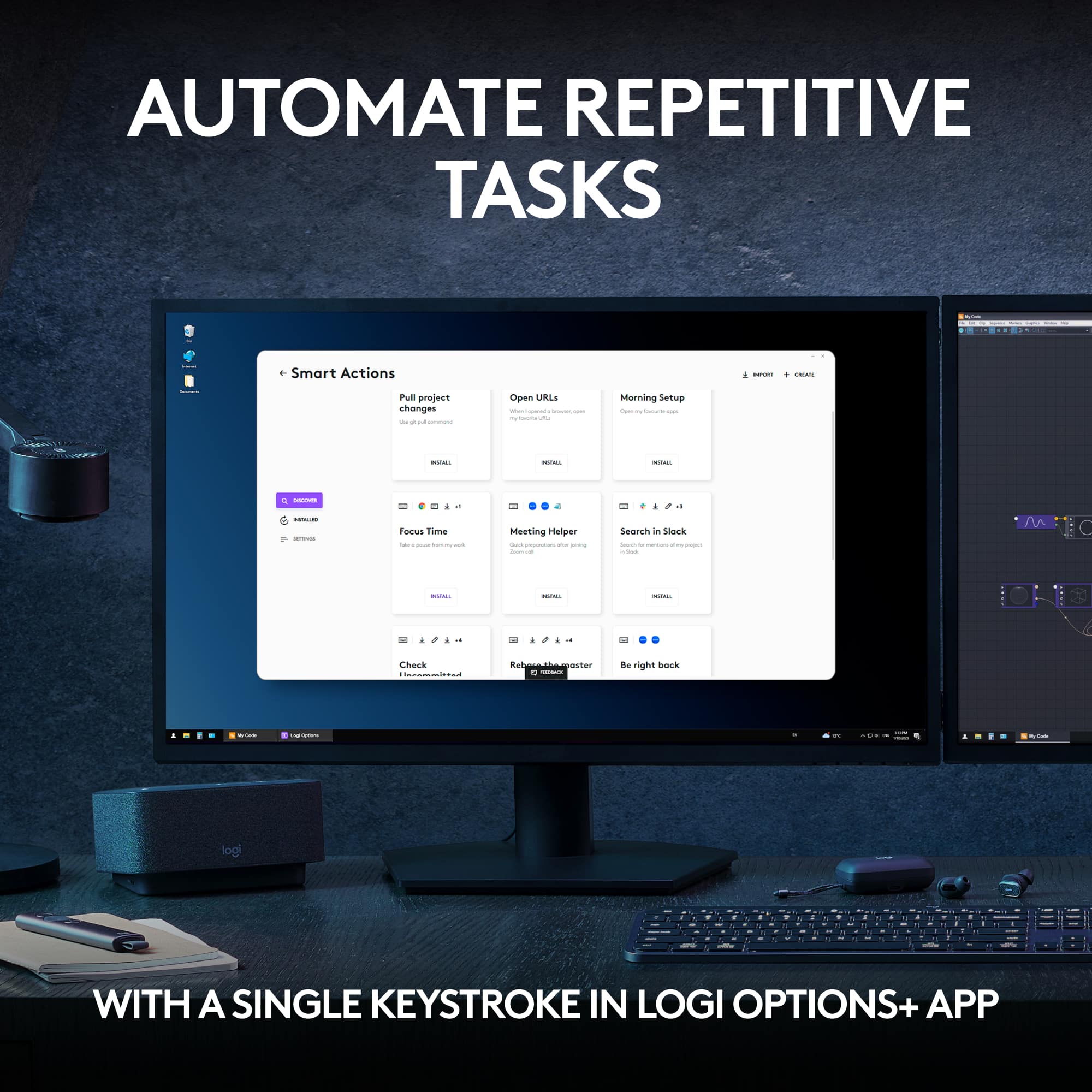
    This is one the best bundle for the price! Sleek and classy upgrade. The software is smooth and responsiveness is great. One of the most popular features is the ability to smart actions and logi Options+ and fits within the good budget!

    I would recommend this to a friend
    • Brand response from Logitech
      Posted .

      Thank you for your kind words about the Logitech - MX Keys S! We're delighted to hear you're enjoying its sleek design, efficient software, and customizable features.

  • Rated 5 out of 5 stars

    Awesome Logitech MX keyboard & mouse

    |
    |
    Posted . Owned for less than 1 week when reviewed.
    This reviewer received promo considerations or sweepstakes entry for writing a review.

    Wow! Great customer service. This keyword mouse kit was marked wrong on the shelf. The management team did right and sold me this for the shelf price. The is hands down the best keyboard and mouse!

    I would recommend this to a friend
    • Brand response from Logitech
      Posted .

      Thank you for your positive feedback on the MX Keys S Combo Advanced Full-size Wireless Scissor Keyboard and Mouse Bundle. We're delighted to hear that you were impressed with the customer service you received and the quality of the keyboard and mouse. Your satisfaction is our top priority, and we appreciate you taking the time to share your experience.

  • Rated 5 out of 5 stars

    The Best Keyboard and Mouse Combo!!

    |
    |
    Posted . Owned for 3 weeks when reviewed.
    This reviewer received promo considerations or sweepstakes entry for writing a review.

    A great keyboard and mouse combo! Very responsive keys on the keyboard, everything you need and nothing you don't! And the new Master 3S mouse is even better! Excellent feel and super functional.

    I would recommend this to a friend
    • Brand response from Logitech
      Posted .

      We're absolutely thrilled to hear that you're loving the Logitech MX Keys S Combo! It's fantastic to know that the keyboard and mouse are meeting your expectations and providing you with an excellent user experience.

      We're especially glad that you appreciate the responsiveness of the keys and the functionality of the MX Master 3S mouse.

      Thank you for your amazing review. We're so glad you're enjoying your new combo.

  • Pros mentioned:
    Battery life, Connectivity, Keyboard quality
    Cons mentioned:
    Palm rest
    Tech Insider Network Member

    Rated 5 out of 5 stars

    Logitech Creates Another Superior Product

    |
    Tech Insider Network Member
    Posted .
    This reviewer received promo considerations or sweepstakes entry for writing a review.

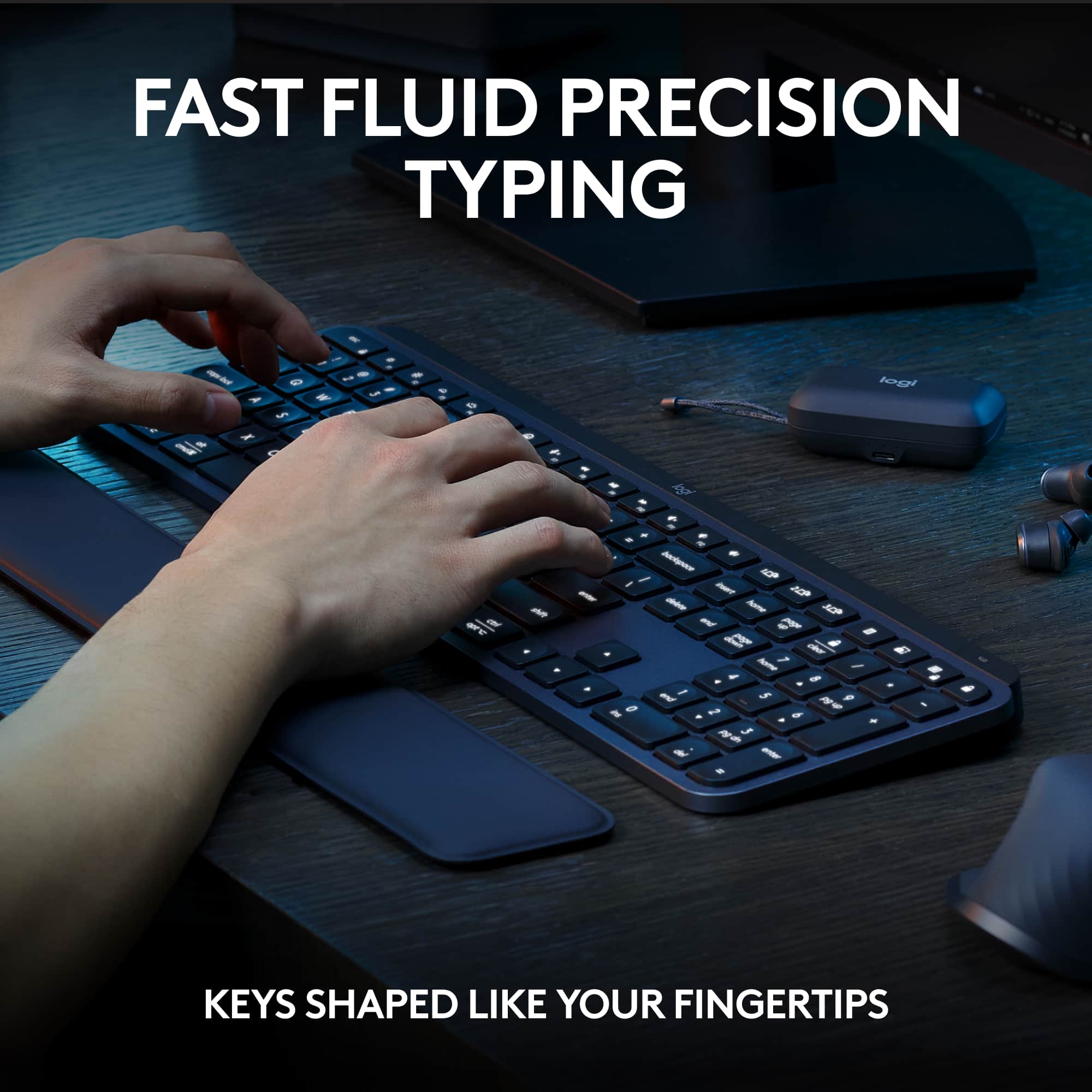
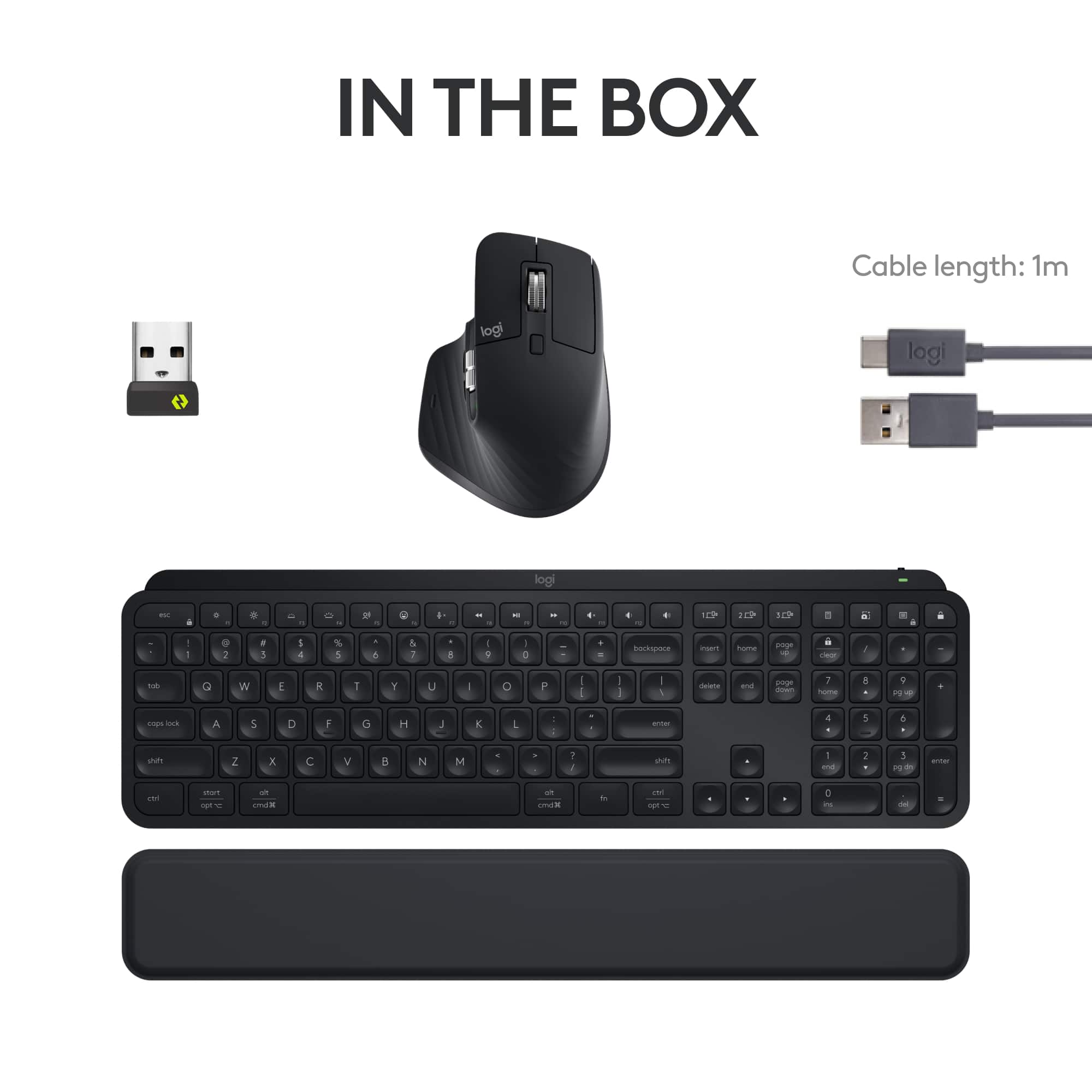
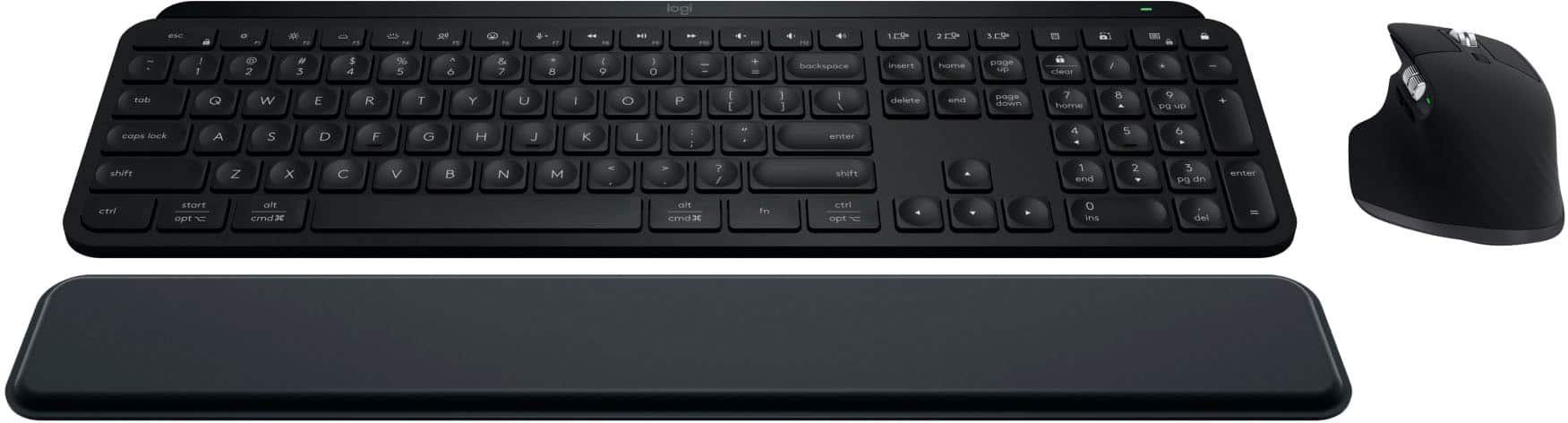
    Logitech's MX Keys Keyboard/Mouse combo is just what I need for a simple but multi-function system in my workspace. The package includes the keyboard, palm rest, mouse, USB-to-USB-C charging cable, unifying receiver (USB dongle), and paperwork. The keyboard/mouse combo comes with a manufacturer's 1-year warranty. PROS: ----------- * Keyboard: Extremely solid feel as a whole. * Keyboard: Stick rubber feet on the bottom keep it in place easily. * Keyboard: Has a larger laptop feel with the keys. Spacing is good. I am having to get used to this keyboard compared to my other Logitech K520 "multimedia" keyboard where there is more movement with the keys. The keys are more sensitive, so it's something to get used to for muscle memory. * Keyboard: The full-size keyboard may be useful for accountants/users that need the number pad on the right side to be independent from the letter keys. * Keyboard: The palm pad is quite comfortable and can be adjusted to any position since it is not connected to the keyboard. * Keyboard/Mouse: Each device can be connected either by the unifying receiver (USB dongle) OR via Bluetooth (BT). I typically use the receiver; however, I'm giving BT a try, and so far, it hasn't disappointed. This does free up a USB port as well. So far, no issues. * Keyboard/Mouse: You must download the Logi Options+ to get the full ability to personalize how you want your keyboard and mouse to operate. This is the first mouse I have used that had the side wheel which is great for scrolling things left/right when they don't fit on the screen horizontally. I didn't like the direction I had spin that wheel to move the screen, so Logi Options+ allows this to be inverted. You can make each button on the mouse do nearly any function you'd like. * Keyboard/Mouse: Has the ability to BT to 3 different devices. The keyboard has some keys you can press to select a different device, and the mouse has a button on the bottom that can be used to switch between the 3 as well. * Keyboard/Mouse: Both have the ability to be turned off in order to save battery power. * Keyboard/Mouse: I only use on Windows 11, but this keyboard can work on multiple OS's: Windows, macOS, most Linux4 devices, iOS, and Android. * Mouse: Has a great rubbery feel that keeps the mouse in place in your palm. * Mouse: I typically use a basic Logitech Mouse (M310), but getting used to this one isn't proving to be too difficult. I am getting used to the different shape and functionality, but overall, the switch has been positive. * Mouse: Movement is pretty precise with Logi Options+ helping me get the most out of my movements. * Mouse: There is barely any noise when pressing the mouse buttons. You can feel it, but barely hear it. The same applies with the main wheel. * Mouse: Logitech claims this mouse is outfitted with the most accurate sensor ever. Movement between my 3 side-by-side-by-side monitors is made pretty easy with this mouse. * Mouse: This mouse tracks well on practically any surface, so you may not need that mouse pad anymore. CONS: ----------- * Even though the pad is extremely comfortable, I like for my pad to be connected or part of the keyboard itself usually. This is something I believe I will simply need to get used to. I don't like having to adjust it when it shifts even though it does have a good rubber bottom which helps keep it in place. * The USB-C cable was provided but no wall charger to plug it into. It looks like Logitech expects the user to already have one OR plug into your PC to charge (which takes away from it being wireless). At some point, it has to be wired in order to charge, but if a USB-C port isn't available, a wall charger would be handy. * Keyboard: The keyboard height is fixed. It does not have pullout "feet" on the bottom. Instead, it has a raised platform as part of the keyboard itself. For me, this is not a huge deal; however, for someone that wants a flatter feel or more raised feel, this keyboard will only provide one angle. For what it is, it is pretty comfortable to me. OTHER OBSERVATIONS: ----------- * Keyboard/Mouse: When charging, there is a green LED on each device that has a breathing light sequence to indicate it is charging. When complete, the breathing sequence will stop. * Keyboard: Note that this is a back-lit keyboard; however, if you use the lit keys, your battery will deplete much sooner than if you don't use any backlit keys. Logitech claims the keyboard will last 10 days with backlit keys turned ON but up to 5 months with backlit keys turned OFF. * Mouse: Logitech claims up to 70 days on a full charge & 3 hours from a 1-minute charge. * Mouse: In addition to the buttons you can see, there is also a thumb button which I discovered in the Logi Options+ program which can show all applications and what screen they are located on. This was pretty cool to watch and is quite different from the basic ALT-TAB key sequence you can use to see all open windows. With this mouse function, it shows the same thing but on all 3 windows but only shows the programs active on those windows. That's a pretty neat feature. CONCLUSION: ===================== Overall, this combo set is quite unique and really expands what you can do with your mouse and keyboard. There are more functions this set can do like with setting up the function keys on the keyboard along with some other options on the Logi Options+ app. If you want versatility, this combo keyboard & mouse set provides that. If not used to an odd-shaped mouse and "laptop style" keys, it may take some getting used to, but so far, the experience has been positive. Great job once again, Logitech!

    I would recommend this to a friend
  • Rated 5 out of 5 stars

    Awesome.

    |
    |
    Posted . Owned for less than 1 week when reviewed.
    This reviewer received promo considerations or sweepstakes entry for writing a review.

    Awesome! Is the word that comes to mind when I think of this product. It surpassed my expectations.

    I would recommend this to a friend
  • Rated 5 out of 5 stars

    Can’t go wrong with Logi

    |
    |
    Posted . Owned for 1 month when reviewed.
    This reviewer received promo considerations or sweepstakes entry for writing a review.

    A little pricey, but a great product love the fact that you used rechargeable. Easy to set up.

    I would recommend this to a friend
  • Rated 5 out of 5 stars

    Amazing combo, would recommend!

    |
    |
    Posted . Owned for 1 month when reviewed.
    This reviewer received promo considerations or sweepstakes entry for writing a review.

    This combo has absolutely changed the way I work. It has made programming a lot more fun and fast.

    I would recommend this to a friend
  • Pros mentioned:
    Battery life, Keyboard quality, Scroll wheel
    Tech Insider Network Member

    Rated 5 out of 5 stars

    OUTSTANDING KEYBOARD AND MOUSE!

    |
    Tech Insider Network Member
    Posted .
    This reviewer received promo considerations or sweepstakes entry for writing a review.

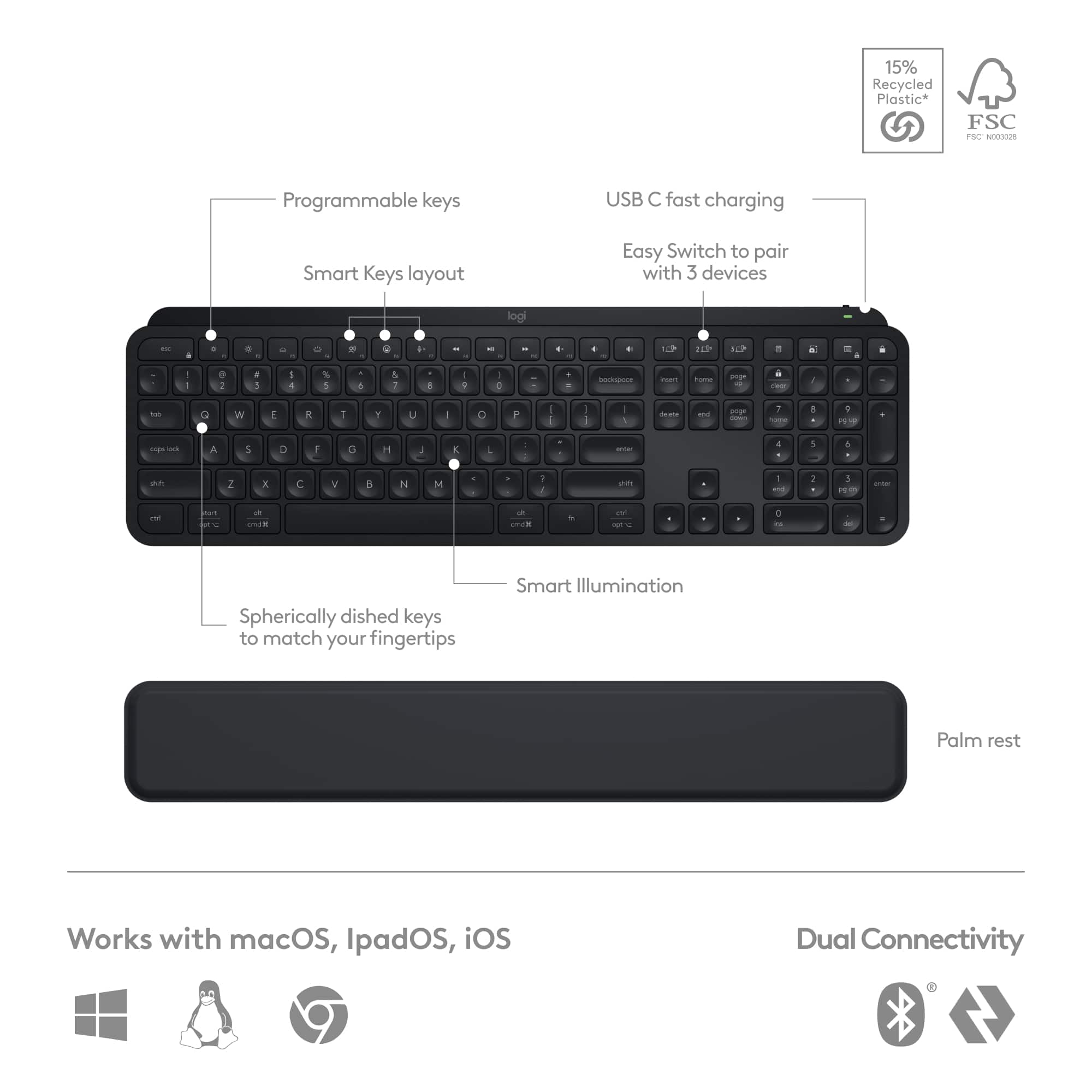
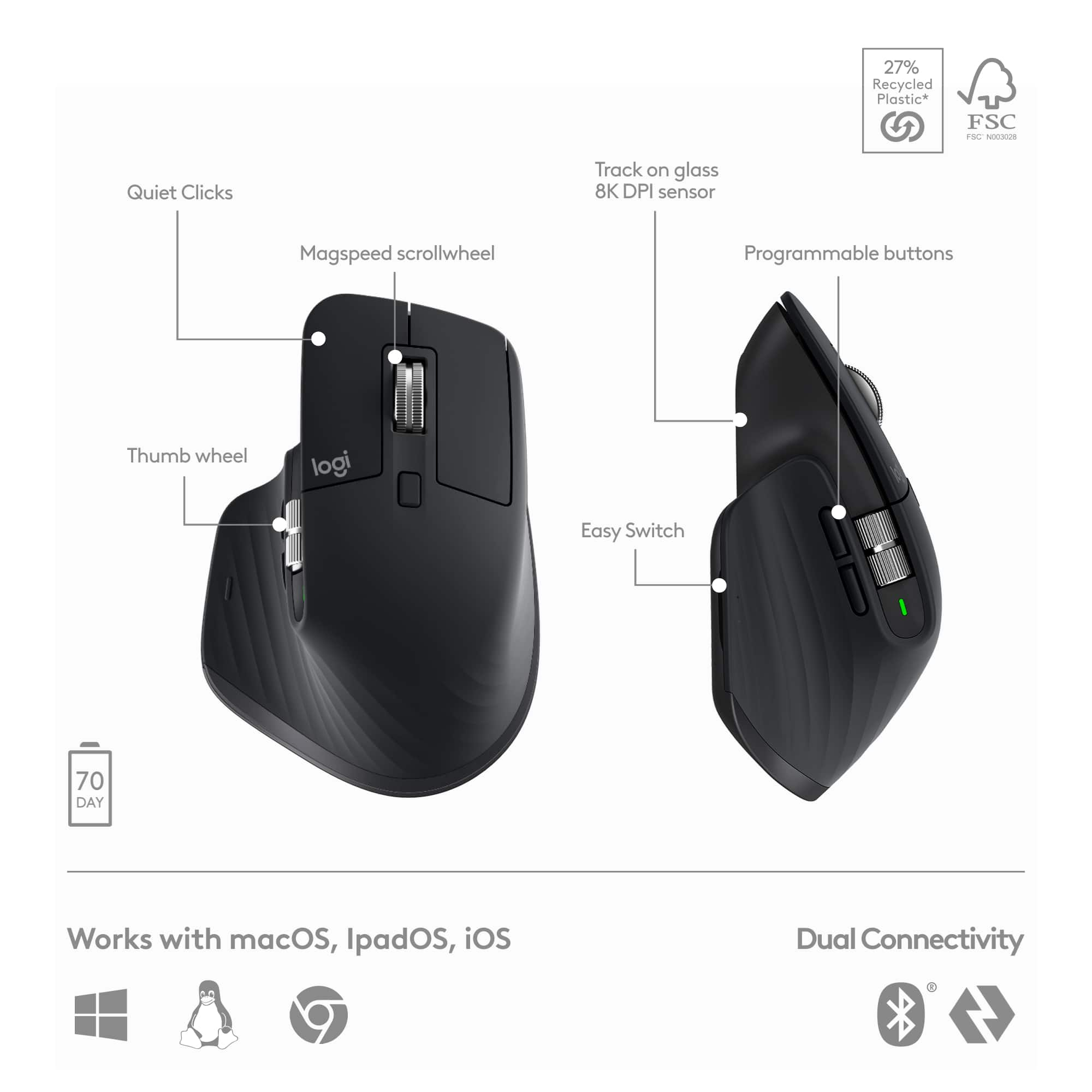
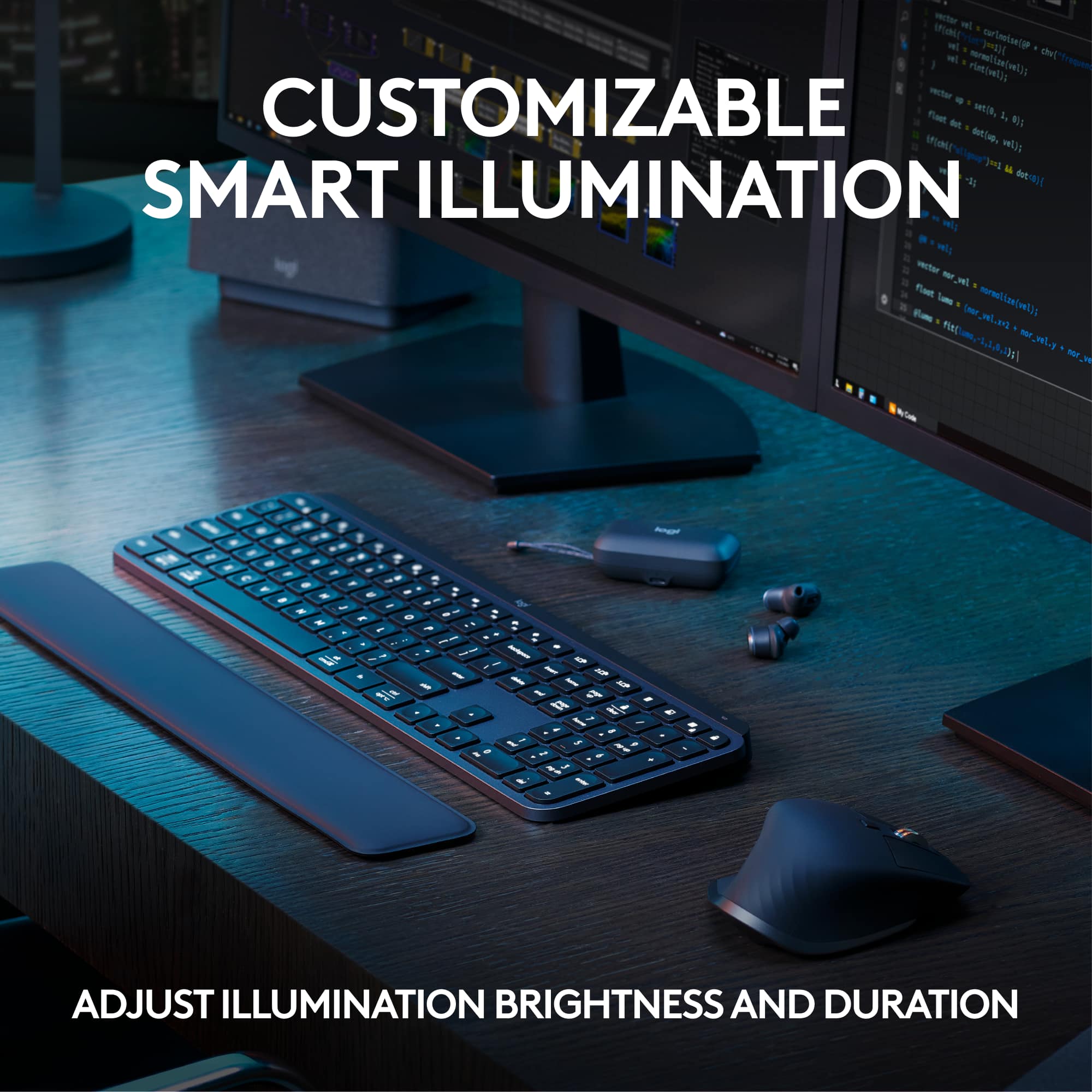
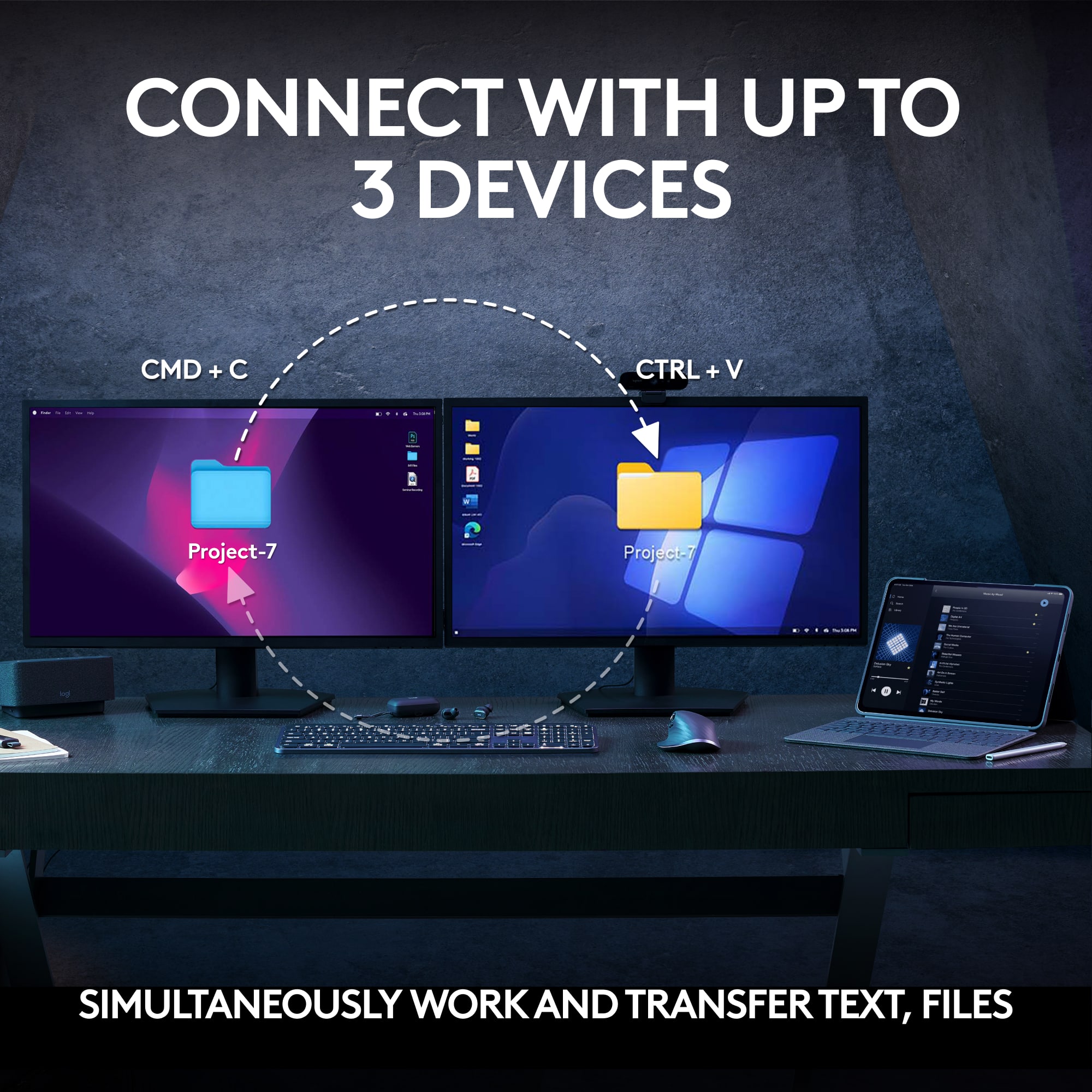
    The Logitech MX Keys S Combo is my new favorite for desktop productivity, with high performance and the capability for incredible customization. The Combo is packaged in a small box containing: • MX Master 3S wireless mouse • MX Keys S wireless keyboard • MX Palm Rest • Logi Bolt USB-A wireless receiver (1 receiver) • USB-A to USB-C charging cable (1 cable to share among devices) The only documentation included in the box are instructions for removal of the batteries for recycling disposal. Both the mouse and keyboard can communicate with the PC via either the Logi Bolt receiver dongle, or LE Bluetooth. Devices using the USB dongle connect via Security Mode 1 – Security Level 4 which is also called Secure Connections Only mode. When using LE Bluetooth the connection is Security Mode 1 – Security Level 3. A single Logi Bolt receiver supports connections with up to six compatible devices. I installed my mouse and keyboard using the Logi Bolt dongle. The interior of the product box provides a graphic depiction for connecting the devices with either Bluetooth or Logi Bolt. There is also a sticker adhered to the bottom of the mouse with the same graphic setup instructions. Installing, configuring and customizing the mouse and keyboard are through the Logi Options+ application which must be downloaded from the Logitech website. The installation of Logi Options+ offers the option to create or login to a Logitech account, which will serve to backup all device settings and customizations to the cloud servers. Setting up both the mouse and keyboard and customizing both is incredibly quick and easy. The setup process is fully guided, step-by-step, and the customization selections are numerous yet straightforward and intuitive. Both peripherals can be paired with up to three PCs using Logi Options+. Logitech aptly calls this feature “Easy Switch”. The MX Keys S keyboard has three dedicated keys in the top row for quickly toggling between multiple computers. The MX Master 3S mouse has a button with illuminated indicators for 1, 2 or 3 to toggle between paired computers. The mouse also features “Logi Flow” which allows dragging the mouse cursor between computers. This is not the same as dragging the cursor across multiple screens on the same computer; this is dragging between different computers. When using Logi Flow, the MX Keys S keyboard also follows the mouse to the selected computer. Once I associated Logi Options+ with my Logitech account, I selected the option to backup all devices to the cloud, which will facilitate restoration of those customization settings if necessary in the future. Of course, the mouse or keyboard can also be reset to factory default settings at any time. Each of the mouse buttons and scroll wheels are highly customizable. Logi Options+ offers a vast range of selections which are easily assignable and modifiable. These include app-specific customizations which I am finding particularly useful for productivity applications like MS Office and creativity applications like Adobe Creative Cloud. The physical characteristics of the MX Master 3S are also very impressive. The build appears to be very high quality and very solid. Hand contact surfaces are covered in a rubber-like material that has a high coefficient of friction for great, non-slip grip and excellent control. There are a total of six buttons and two knurled scroll wheels, one of which is on the side of the mouse body. The main, top wheel is selectable between ratcheting operation or smooth, free-wheeling operation, using the rectangular button immediately to the rear of the scroll wheel. The MX Master 3S has an 8,000 DPI sensor that provides extraordinarily accurate and fast tracking, and of course the pointer speed is user selectable, as are the scrolling speeds of the electromagnetic scroll wheels which can scroll at 1,000 lines per second. The comprehensive feature-set and customization settings make the MX Master 3S an extremely capable and user-friendly mouse. The mouse shape is dedicated to right-hand dominant users. It is sculpted to conform to the user’s hand with a thumb notch with buttons and side mounted scroll wheel. The mouse body is large and lends itself to a full-hand, full-palm grip; not just a fingertip grip. However, I am a left-handed user, and this mouse shape is clearly not designed to accommodate my left hand. There are a few left-handed mice available, but this is not one of them. Southpaws often need to accommodate using devices, tools, instruments, etc. that are designed for use by right-handed users. If you are wondering why I am using this right-handed mouse, the answer is quite simply that it is probably the most full-featured, smooth and accurate mouse I have ever used. I really appreciate the level of available customization, and the Easy Switch and Logi Flow capabilities. The MX Keys S keyboard shares the virtue of extraordinary customization capabilities. Almost the entire top row of keys is fully customizable. Backlighting duration and intensity can be manually adjusted or can automatically adjust the brightness level to the ambient light level. Unlike most other keyboards which activate backlighting only based on key depression, the MX Keys S, in addition to responding to a key press, also has proximity sensors that activate the backlighting when hands are detected approaching the keyboard. I genuinely like that feature, but have found that sometimes it appears to be inconsistent. The scissor-switch keys have relatively short travel, excellent rebound and are very quiet. The top of each key is concave (scalloped) which provides an excellent tactile “feel” when typing. The keys are extremely responsive and provide a truly outstanding typing experience. In fact, it is probably the most comfortable keyboard that I have used. The MX Keys S is a Full Size keyboard, which includes a numeric keypad (numpad), as well as a full complement of function keys and operations keys. I genuinely appreciate having a numpad when working on Excel spreadsheets and in AutoCAD and other applications with lots of numeric data entry. My chief complaint with compact keyboards is the lack of a numpad and the sometimes unusual arrangement of other functions on combination keys. The MX Keys S is built like a tank! It is solid and rigid with none of the annoying flexing many other keyboards suffer from. Evidently there is a continuous steel plate comprising the internal frame of the keyboard which not only makes it rigid, but also provides some weight that contributes to this keyboard being extremely stable. Between the weight and the six large oblong rubber feet on the bottom, the keyboard stays in place and does not slide around a desktop while working. The MX Keys S does not have the usual flimsy, fold-out prop legs. The prop on the rear of this keyboard is a solid, continuous block which is therefore non-adjustable. I measured the lift at approximately 3/8” (1cm). The slight incline angle seems perfect to me and feels great. Despite being a full size, stout keyboard, its dimensions are very compact. It measures approximately 16 7/8” x 5 1/8” x ¼” thick (43cm x 13cm x 5mm), and it weighs a respectable 28.7 ounces (816 grams). The size and weight of the MX Keys S is outstanding when a desktop is crowded, and also works very comfortably when you choose to use it on your lap. Both the mouse and keyboard are powered by USB rechargeable internal batteries. Logitech claims that the mouse will operate for up to 70 days on a full charge (and 3 hours from a 1 minute top-off charge), and the keyboard will operate for up to 10 days (or 5 months with backlighting switched off). I cannot imagine using any keyboard without backlighting activated. In the few days of very heavy usage (appx. 14 hours/day) thus far, the mouse battery level remains at the same 60% as when I received it, and the keyboard has declined from 50% to 45%. That rate of battery consumption for the keyboard is better than advertised. The MX Palm Rest is simply very nice. It measures 16 7/8” x 2 1/8” x ¼” thick (43cm x 66mm x 5mm). By being the same width and “height” as the keyboard, the position of your wrist remains neutral when using the palm rest, and it provides the support and comfort that is desired. It is covered in a soft vinyl and has just enough padding. It too is very rigid, and it also has a steel plate inside (as I confirmed with a strong magnet). The Logitech MX Keys S wireless keyboard, MX Master 3S wireless mouse and MX Palm Rest are an excellent set of accessories. The MX Keys S is a rock-solid, comfortable and responsive keyboard. The MX Master 3S mouse is a smooth operating, nicely made comfortable to use mouse with high precision tracking and performance. The MX Palm Rest is quite simply a nicely made, very comfortable palm rest that really makes lengthy keyboarding sessions much more comfortable. The Logi Options+ software is absolutely outstanding with a terrific user interface and more features than I can list in this small writing space. The MX Keys S Combo is an assemblage of an incredible keyboard and mouse with a nice palm rest. They are absolutely my new favorites, and they really enhance the experience of typing and mousing. The only suggestion that I would offer to Logitech is to please produce a left-handed version of the MX Master 3S mouse for me!

    I would recommend this to a friend
  • Pros mentioned:
    Battery life, Keyboard quality, Scroll wheel
    Cons mentioned:
    Palm rest
    Tech Insider Network Member

    Rated 5 out of 5 stars

    Stylish, innovative, and hard to beat

    |
    Tech Insider Network Member
    Posted .
    This reviewer received promo considerations or sweepstakes entry for writing a review.

    I really like Logitech accessories. They are reasonably priced with quality construction and feel. The MX Keys S Combo is no different, offering a nice mouse and keyboard combination that lives up to its Master Series billing. Unboxing the MX Keys S Combo was fairly straightforward. The packaging consisted of a decently weighted cardboard box slid into a thin, decorative cardboard wrapper. There was no additional padding or foam protecting the packaged items, and I’m not sure there needed to be. My box had a noticeable bump on one end, making me a little concerned about the condition of the contents, but the box seemed to provide adequate cushioning for any minor accidents during transport. Inside, everything is neatly, individually wrapped and packed. The keyboard has some welcome weight, giving you a sense of worth as you initially handle it. The mouse is lightweight but feels very well put together. The only surprise during unboxing was the palm rest. I think I just expected it to be a bit thicker. It might be about a quarter of an inch thick or so, and the padding is not quite as resistant as I expected. I charged my keyboard and mouse prior to use. They probably have enough charge for use out of the box, but I just wanted to start the slate on a full charge so I can get a feel for battery life. I chose to pair the devices using Bluetooth rather than the provided Logi bolt. I have Windows 11, and pairing both the keyboard and the mouse couldn’t have been easier. I didn’t even have to enter the Bluetooth menu. As soon as I powered on the devices, I was prompted by Windows to connect them – easy-peasy. Post installation, I was prompted to install Logi Options+. This went off without a hitch, from an installation perspective. The software was able to detect the MX Master 3S mouse and MX Keys S keyboard without issue. Logi Options+ allows operational customization of specific accessories. It can also be used to update firmware, view a tour of a specific device, or review current settings. As for the options this software affords the mouse, it allows button settings for specific apps – a cool feature for those using Office or web browsers with add-ons. For the keyboard, you can disable certain keys, enable function keys by default, change shortcut keys, change backlighting settings, and best of all configure the keyboard for specific applications. This is all fantastic stuff, but the ability to configure the shortcut keys specific to installed applications on your PC is phenomenal. This means you have an unlimited number of configuration possibilities. There are 17 configurable keys on the MX Keys S, and you can configure the layout differently for each and every application on your PC. I find this most useful when using my development apps and graphics editors. How do the devices feel/operate? In addition to the standard mouse setup (2-button optical), the mouse has 2 scroll mechanisms, a forward/back button set, and a bottom facing thumb button. It is completely decked out and customizable. The MX Master 3S also comes with the option of setting DPI detection to 8K, providing unparalleled precision. If that wasn’t enough, the scroll wheel… Let me just say this is literally the Rolls-Royce of scroll wheels. It’s smooth, precise, and has a heavy but controlled feel. The secondary wheel feels similar and is positioned as a horizontal scroll mechanism. I set my secondary wheel to zoom, giving me great usability when developing graphics or presentations. Lastly, you can assign the MX Master 3S mouse to multiple devices (up to 3), spanning the visual space across devices with a multi-monitor setup. This works quite well, and it’s great for those using multiple devices in a single desk space. The MX Keys S keyboard has been an enjoyable addition as well. This isn’t my first experience with an MX Keys keyboard, so I wasn’t surprised, but I was definitely satisfied and even more appreciative of the overall experience this keyboard provides me as a user. The tactile feel of the keys, the precision and responsiveness as I type, the multi-device support, the compact but weighted design, the presence detection as I place my hands near the keys, the well but perfectly lit back-lighting… it’s all there, and it’s very well executed. Throw in the palm rest and feel the additional comfort it affords as you type to your heart’s content. I was a little concerned about the height and perceived lack of support the palm rest appeared to provide, but I was wrong in my visual assessment. It works as expected, and is comfortable for extended periods. Based on my experience, I would encourage would-be purchasers to not only consider the MX Keys S Combo but push it to the top of your list. The keyboard and mouse are elegant, functionally fantastic, and feature leading edge technology. It is a definite can’t miss in my opinion. Throw in the unquestionable customization ability added using the Logi Options+ software, and you have nothing short of a can’t miss option for those in the market.

    I would recommend this to a friend
  • Pros mentioned:
    Battery life, Connectivity, Keyboard quality
    Tech Insider Network Member

    Rated 5 out of 5 stars

    Excellent hardware that improves productivity.

    |
    Tech Insider Network Member
    Posted .
    This reviewer received promo considerations or sweepstakes entry for writing a review.

    The MX Master 3S mouse is ergonomic and top-of-the-line. It has 7 programmable buttons, including a scroll wheel on top and one on the side. There's also a gesture button below the thumb rest. It connects wirelessly via Bluetooth or Logi Bolt dongle and can be paired with up to 3 devices. It has an 8,000 DPI Darkfield sensor that works on any surface, a rechargeable battery that lasts up to 70 days and can be charged via USB-C. My favorite feature has to be the magspeed scrolling. You can choose between free scrolling (it scrolls freely depending on how hard you scroll down) or regular scrolling that most are used to. The free scrolling is a game changer in my opinion. You can customize the mouse with Logi Options+ software where you can assign shortcuts, macros, commands, or actions to any button or wheel. You can also use Logi Flow to move files and your pointer between multiple devices that have this software. This is extremely useful nowadays. MX Keys is a slim, sturdy keyboard with 108 keys, including a number pad and media keys. It has low-profile concave keys that offer a clean and quiet typing experience. The keyboard features adaptive backlighting and can connect wirelessly via Bluetooth or Logi Bolt dongle. It has an impressive battery life of up to 10 days with the backlight on and can be recharged via USB-C. You can personalize the keys and functions with Logi Options+ software and use Logi Flow to move your cursor and files seamlessly between devices. The device is light and sleek and the build quality is superb (which is expected from Logitech as I have never had a poorly made Logitech device). You can also program macros to the F keys to perform work functions that you do over and over using the aforementioned Logi Options+ software. All of these features make this, hands down, one of the most productive pieces of hardware for the working person.

    I would recommend this to a friend
  • Pros mentioned:
    Battery life, Ease of use, Keyboard quality
    Tech Insider Network Member

    Rated 5 out of 5 stars

    Stylish PC Peripherals Look and Perform Great

    |
    Tech Insider Network Member
    Posted .
    This reviewer received promo considerations or sweepstakes entry for writing a review.

    I have a history with Logitech MX mice. Some of my favorite mice of the last twenty years are the Logitech MX 1000 and the Logitech Performance Mouse MX. I wore those mice out over thousands of hours. Getting my hands on the MX Master 3S has felt like the best trip down memory lane, ever. Both the MX Master 3S Mouse and the MX Key S Keyboard look and perform great. After a week with the MX Keys S Combo, I feel I can easily recommend the package to productivity users or any PC user who wants stylish peripherals that work and look great. Experience: Inside the box, you get the keyboard, the mouse, a wrist rest for the keyboard, a USB-C to USB-A cable, and the Bolt Unifying USB receiver. Initial impressions are that this package looks great. They’re stylish. They make a good impression on a desk. I really like their sleek, minimalist design. And yet, everything I want, including some keys and features I didn’t even know I wanted, are here. After plugging the Logitech Bolt Receiver into my Windows 11 PC, I received a pop-up notification prompting me to install Logi Options+. I get the impression that Logitech is trying to keep gaming hardware and productivity hardware separate, but it feels a bit ridiculous to have GHUB on my computer and Logi Options+ when both pieces of Logitech software perform similar roles. But, having said that, Logi Options+ is my favorite of the two apps. It’s much simpler and way more intuitive to use. I love this mouse. It looks impressive on a desk. It performs well. I had a smooth glide on cloth and hard mouse mats. It fits my hand great. I love the weight. I love the button layout. Not only can you customize mouse buttons, but you can customize them for specific applications within the Logi Options+ app. Gesture controls are built into the mouse. They're also customizable. It's taken me a bit to get used to them, but now, I can't imagine my day without them. Pressing the thumb rest while moving the mouse up, down, left, or right triggers a variety of customizable key presses. There is no DPI toggle. Instead, you get a toggle for the scroll wheel, a horizontal scroll wheel, and back and forward buttons above the thumb rest. The MX Master 3 and the MX Master 3S are very similar mice. The MX Master 3S utilizes the Bolt receiver whereas the MX Master 3 relied on the Logitech Unifying Receiver. Both receivers are tiny USB-A dongles that allow you to easily connect your devices with your Windows PC. The Bolt Receiver utilizes some Bluetooth security features and performs like Bluetooth in terms of latency. If you are wanting a gaming mouse, this may not have the response time you are seeking. But, if you’re like me and enjoy strategy games or work with photoshop and other productivity applications, I think you’ll find this a very enjoyable experience. I like it so much I’m ordering another Bolt Receiver to keep on my gaming PC. Then, I can just switch between computers with the press of a button. But, again, this is a trip down memory lane for me. I like this form factor because it reminds me of my favorite mice of the last twenty years. Your mileage may vary. If you like lighter, smaller mice, or have a smaller hand, this may not be the mouse for you. Battery life has been good. You can easily get several days of battery life. In the last week, I have only had to charge it once. Out of the box, my keyboard and mouse were at 45% charge. It took around an hour to get both devices back to 100%. I have been on a mechanical keyboard kick for the last few years. I’ve been surprised by how much I like the MX Key S. It looks like a polished laptop keyboard in a desktop keyboard form factor. Keys are comfortable. I rarely found myself mistyping or duplicating key presses. That’s probably due in part to the key travel. Over the last week, I have found myself using every one of the function keys. And just like the mouse, the function keys are highly customizable within the Logi Options+ app. The entire experience has been super easy and intuitive. I appreciate the dictation, screen snip, and emoji keys way more than I thought I would. Plus, with the ability to pair with three devices, I can easily use these devices on my Surface, my desktop, and my Chromebook with the press of a button. It all works great. The software is intuitive and easy to use. This combo has worked well with my Chromebook, Galaxy Tablet, and my iPad. My only complaint, I wish I could run Logi Options+ from my Chromebook. Currently, the full software features are only available on Windows and MAC OS. Conclusion: I really like this package. I wish the latency on the mouse were a bit better. If the latency were a tad better, this would be my perfect mouse. As it is, it’s a very good mouse that is a must for productivity users and good for gamers. The keyboard performs and looks great. I’m very happy with this mouse and keyboard combo and I think it’s very easy to recommend. 5/5

    I would recommend this to a friend
Sponsored