Customer Ratings & Reviews
- Model:
- 910-005131
- SKU:
- 5870706
Rating by feature
- Value
Rating 4.5 out of 5 stars
- Quality
Rating 4.8 out of 5 stars
- Ease of Use
Rating 4.8 out of 5 stars
Customers are saying
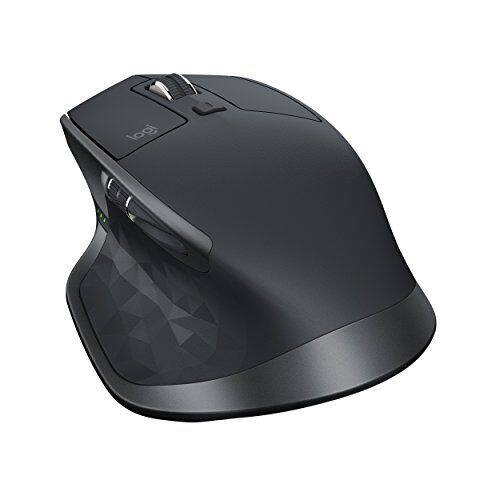
Customers are positive about the MX Master 2S Wireless Laser Mouse's battery life, comfort, and scroll wheel, with many praising its exceptional performance in these areas. They also appreciate the mouse's size and surface compatibility, finding it well-suited for various hand sizes and surfaces. While some find the price a bit high, the overall feedback highlights the mouse's precision and responsiveness. A few users noted concerns about the weight and software, but these were less frequent than positive comments.
This summary was generated by AI based on customer reviews.
Best Mouse Ever
||Posted . Owned for 3 weeks when reviewed.This reviewer received promo considerations or sweepstakes entry for writing a review.Have used the MX series mouse for over 10 years. They are very easy to use, ergonomic, functional, etc. A bit big for travel, so use a MS Arc for that, but otherwise really like these.
I would recommend this to a friendVersatile and smooth.
||Posted . Owned for 1 month when reviewed.This reviewer received promo considerations or sweepstakes entry for writing a review.This is a great mouse. Works well doing precision graphics on illustrator and having the thumb wheel is nice for moving around pages. Being able to recharge with a usb cable is a bonus.
I would recommend this to a friendsupermouse!
||Posted .This reviewer received promo considerations or sweepstakes entry for writing a review.saw this mouse demoed at Adobe's MAX design conference, immediately came home and bought one. Between the Logitech Craft keyboard and this mouse, doing micro adjustments efficiently is so slick!
I would recommend this to a friendIts a mouse
||Posted .This reviewer received promo considerations or sweepstakes entry for writing a review.Has more buttons than I know what to do with. Just like the way it feels in my hand. Bought 2 one for the laptop and one for the desktop. Wish it ran on batteries like the old MX it replaced.
I would recommend this to a friendA grip that changes everything!
||Posted . Owned for 1 month when reviewed.This reviewer received promo considerations or sweepstakes entry for writing a review.This is an awesome mouse. It is easily programmable and allows you to multi task and and do shortcuts in the fly. It will change the way you edit, at least it did for me. GameChanger!
I would recommend this to a friendaccurate and comfortable mouse
||Posted . Owned for 2 months when reviewed.This reviewer received promo considerations or sweepstakes entry for writing a review.Replaced my failed old MX mouse. The shape has sharper edges than the old MX and the speed adaptive scroll is sensitive and activates with faster scrolling. Overall still a great mouse
I would recommend this to a friendLove this mouse
||Posted .This reviewer received promo considerations or sweepstakes entry for writing a review.This mouse has been great, I have larger hands and it feels very natural and comfortable. I mostly use it with a Mac and have had no problems. Tracks very well on many different surfaces!
I would recommend this to a friendgreat mouse
||Posted .This reviewer received promo considerations or sweepstakes entry for writing a review.has one short coming has a wired bump at the area that would be under your index finger which annoyed me enough to return it. other than that the mouse was great comes with software for button mapping dpi setting and i like the look it was plenty responsive to play heroes of the storm that bump is what killed it for me though.
I would recommend this to a friendVery Good Mouse Bluetooth is Not Perfect
||Posted . Owned for 1 year when reviewed.This reviewer received promo considerations or sweepstakes entry for writing a review.Very good mouse. Used USB receiver a lot, tried Bluetooth, but got frequent disconnect The matte finish wears out in six months of heavy use
I would recommend this to a friendExcellent
||Posted . Owned for 3 weeks when reviewed.This reviewer received promo considerations or sweepstakes entry for writing a review.This is one of the best mice ever made by any company ever! I love the button right there for my thumb depressed down for easy access to any application like configured to it
I would recommend this to a friendLove this mouse
||Posted . Owned for 3 weeks when reviewed.This reviewer received promo considerations or sweepstakes entry for writing a review.Bought this specifically for my laptop, but when I found out it can pair with three different computers and about the Flow capability, it made me get rid of the one for my computer
I would recommend this to a friendBest mouse on the market
||Posted .This reviewer received promo considerations or sweepstakes entry for writing a review.The MX Master is one of the best mice on the market. Build quality is great, feel is great and so is the responsiveness of the mouse. This mouse is coveted as the best mouse for productivity you can get.
I would recommend this to a friendThe best!
||Posted . Owned for 1.5 years when reviewed.This reviewer received promo considerations or sweepstakes entry for writing a review.Best mouse on the market bar none. Think the MX Master 3 is coming out soon or already out, so may want that, but if you can get this at a good sale price, still an awesome buy!
I would recommend this to a friend- Pros mentioned:Comfortable
Great mouse
||Posted .This reviewer received promo considerations or sweepstakes entry for writing a review.Feels great, not too small. Great for all day use!
I would recommend this to a friend Logitech did a great job with their successor Mx
||Posted .This reviewer received promo considerations or sweepstakes entry for writing a review.it works flawlessly. While there is a minor delay using the new "flow" feature, I don't expect to use it as often. Overall, Logitech did a great job with their successor to the Master MX.
I would recommend this to a friendSpreadsheet Master
||Posted . Owned for 2 months when reviewed.This reviewer received promo considerations or sweepstakes entry for writing a review.If your looking for a mouse to do spreadsheets with, this is the one to get! With the ergonomic shape, the programable buttons and the thumb wheel... it’s the perfect companion!
I would recommend this to a friendAwesome Workstation Mouse
||Posted .This reviewer received promo considerations or sweepstakes entry for writing a review.This is my first REAL mouse purchase and I could not be happier. The programmable keys make my video and photo editing so much faster and I can use the flow technology to switch between my PC and MAC.
I would recommend this to a friendAwesome Mouse
||Posted .This reviewer received promo considerations or sweepstakes entry for writing a review.I love this mouse greatly. Extremely accurate and precise, and very easy to switch between different devices. Logitech Flow is a very nice feature to have available. Excellent ergonomically
I would recommend this to a friendLove it.
||Posted . Owned for 9 months when reviewed.This reviewer received promo considerations or sweepstakes entry for writing a review.It is the best desktop mouse. Period. /the review - demands BestBuy - must be longer. It is the best desktop mouse. Period. It is the best desktop mouse. Period.
I would recommend this to a friend- Pros mentioned:Battery life, Customizable, Multi-device

Go with the FLOW
|Posted .This reviewer received promo considerations or sweepstakes entry for writing a review.With the MX Master 2S, Logitech has created the mouse function I have been waiting for: the ability to operate 2 or 3 computers simultaneously – even a mix of Apple and PC devices. They call this ability FLOW, and it enables me to use a single mouse to move seamlessly among my iMac, desktop PC, and laptop PC. I am a graphic designer and do my primary design tasks on an iMac, using Adobe Creative Cloud. I can’t afford to put the Adobe software on more than one computer, and, for my own purposes, the iMac is sufficient. However, I have clients who need me to provide them with files in Publisher, and Publisher is not available for OS systems (the rest of the Microsoft Office package is, but Publisher is specifically excluded). In addition, Microsoft Word has more bells and whistles in its PC version than the OS version, and sometimes I need those extra features. So, I ended up using a combination of Dropbox, email, and thumb drives to move things back and forth among my iMac and my PC computers. Now, I can create an asset on the iMac, copy the asset, move the cursor onto the PC screen, paste the asset where it needs to go, and proceed with my work on the PC. The MX Master 2S comes without any instructions, but the Logitech website has all the information you need in a user-friendly format, for use onscreen or via a downloadable PDF. All 3 of my computers are on the same Wi-Fi network, so no changes needed there. I used Bluetooth to connect the MX Master 2S to my iMac and the desktop PC, and the USB dongle to connect the MX Master 2S to my laptop, pairing the MX Master 2S to each computer with the “1, 2, 3” button on the bottom of the mouse. No hiccups in that process. I then downloaded the Logitech Options software onto all 3 computers and activated the FLOW function, again with no hiccups. The first time I used the MX Master 2S, I set the bottom button to “1” for the iMac. From then on, I have been able to move the MX Master 2S among the 3 computers just by moving the cursor to the edge of one screen and onto the next. If all the MX Master 2S did was provide me with an inter-computer cut and paste service, that would be enough for me. However, it also provides me with a great multi-function, HIGHLY customizable mouse and – very important to me – it eliminates the need to switch the mouse I am using dozens of times a day. That is not a laziness issue – it is an ease of function and efficiency issue. The iMac mouse and a PC mouse differ in feel, touch, scrolling style, and other ways, so each time I have to switch between them there is a lag time while I mentally and physically adjust to the device. That means wasted time and wasted energy, and I need to conserve both. After I got all the buttons and wheels of the MX Master 2S adjusted to suit me (you don’t have to do that – your choice), I had an awkward day while I got accustomed to it. Now, it is just an extension of my brain and hand. The MX Master 2S’s battery life is excellent, and the 3 green lights on its left side (easy to see, but not distracting) let you know the battery level. And, because the charging cable is on the front, you can use it while it’s recharging. The 4,000 dpi Darkfield sensor really does work on all surfaces, and the scrolling action is the smoothest and most responsive I have ever encountered. I did one more thing to make my work life easier: I got the Logitech K380 Multi-Device Bluetooth Keyboard. It, too, operates all 3 of my computers, and it feels exactly like the keyboard that came with my iMac, while having those function keys that are specific to a PC. That means that it, too, conserves the time and energy I was wasting every time I made the mental and physical jump between two computers. Having just one keyboard and one mouse is a very worthwhile change for me.
I would recommend this to a friend