Customer Ratings & Reviews
- Model:
- 910-005131
- SKU:
- 5870706
Rating by feature
- Value
Rating 4.5 out of 5 stars
- Quality
Rating 4.8 out of 5 stars
- Ease of Use
Rating 4.8 out of 5 stars
Customers are saying
Customers are positive about the MX Master 2S Wireless Laser Mouse's battery life, comfort, and scroll wheel, with many praising its exceptional performance in these areas. They also appreciate the mouse's size and surface compatibility, finding it well-suited for various hand sizes and surfaces. While some find the price a bit high, the overall feedback highlights the mouse's precision and responsiveness. A few users noted concerns about the weight and software, but these were less frequent than positive comments.
This summary was generated by AI based on customer reviews.
Purchase for my daughter
||Posted . Owned for 1.5 years when reviewed.This reviewer received promo considerations or sweepstakes entry for writing a review.Great mouse for me. But daughter prefer to use the pad.
I would recommend this to a friendGood mice
||Posted . Owned for 1 month when reviewed.This reviewer received promo considerations or sweepstakes entry for writing a review.My boys like it. They want to use it everyday for class works
I would recommend this to a friendI see why it's a high rated mouse
||Posted .This reviewer received promo considerations or sweepstakes entry for writing a review.The right thumb rest area was not as comfortable as I thought it would be.
I would recommend this to a friendintermittent loss of connection
||Posted .This reviewer received promo considerations or sweepstakes entry for writing a review.Design and ergonomics of this mouse is very good. Battery life is also very good. However, it occasionally looses the connection with my computer. This happens regardless of the wireless connection type, either the RF dongle or the bluetooth. Tested it with a different computer, same issue happens.
No, I would not recommend this to a friendMouse
||Posted .This reviewer received promo considerations or sweepstakes entry for writing a review.Great mouse for laptop. Easy set up. Compatible with my laptop
I would recommend this to a friendPractical mouse
||Posted . Owned for 3 weeks when reviewed.This reviewer received promo considerations or sweepstakes entry for writing a review.I works well at my office, good range and smooth movement.
I would recommend this to a friendSleek
||Posted .This reviewer received promo considerations or sweepstakes entry for writing a review.Son enjoys the wireless feature for his laptop nice product
I would recommend this to a friendGood, but just can't get the feel of it
||Posted .This reviewer received promo considerations or sweepstakes entry for writing a review.I think it might be related to the size of the mouse, but I just can't seem to feel comfortable with this device yet. It has been about a month now that I've had it. I've tried adjusting the tracking speed and other adjustments. I'm sure it will come. However, it is taking a while.
I would recommend this to a friendGreat Mouse
||Posted .This reviewer received promo considerations or sweepstakes entry for writing a review....just have to remember how you program the buttons.
I would recommend this to a friendactually like it
||Posted .This reviewer received promo considerations or sweepstakes entry for writing a review.fits my hand better than others. countdown of required letter
I would recommend this to a friendabsolute essential
||Posted .This reviewer received promo considerations or sweepstakes entry for writing a review.for any computer or laptop in my opinion, functions fine
I would recommend this to a friendHad a trac ball!
||Posted .This reviewer received promo considerations or sweepstakes entry for writing a review.Great replacement for the trac ball mouse i had for a year.
I would recommend this to a friendGreat product.
||Posted .This reviewer received promo considerations or sweepstakes entry for writing a review.The mouse perfrms well and was a great price. Happy
I would recommend this to a friendI used to love
||Posted .This reviewer received promo considerations or sweepstakes entry for writing a review.So I bought a larger mouse cause my apple trackpad or magic mouse seemed to be causing issues with arthritis...stinks getting older, so I tried this mouse. It was larger and had a better feeling ergonomically. One can even program it so its functional to how you need it to be. Anyhow, 48 days later, 3 days past last day to return, the thing has been glitchy! I cleaned my table, I brought out the old mousepad, I had put paper down and my mouse cursor is catchy! I read a few reviews and this seems to be common with a Mac, so steer clear unless there is an update or something! Sucks scrambling around to find your cursor or see it freeze up than jump. Again, I used to love, but not so much, especially after throwing down $100
No, I would not recommend this to a friendGreat mouse
||Posted .This reviewer received promo considerations or sweepstakes entry for writing a review.Easy to set up. Great ergonomic mouse for the price.
I would recommend this to a friendGreat
||Posted .This reviewer received promo considerations or sweepstakes entry for writing a review.Great product and price. I just want these points.
I would recommend this to a friend- Pros mentioned:Battery life, Customizable

Very customizable mouse best used w/more than 1 PC
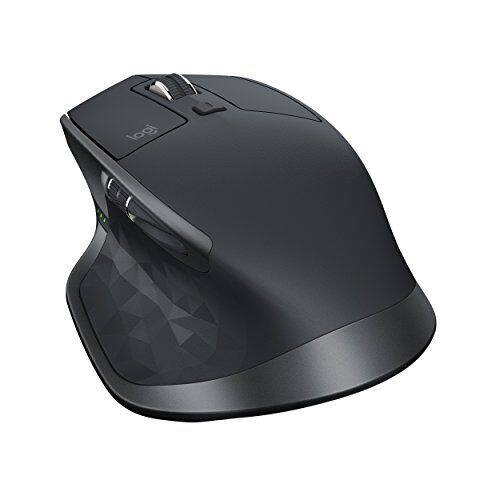
|Posted .This reviewer received promo considerations or sweepstakes entry for writing a review.This mouse looks and feels like the MX Master mouse that preceded it- it's also ergonomic for right-handed users only. The color of the mouse is now dark gray as opposed to the black of the previous model. Like the previous MX Master, it will work on virtually any surface, including glass, which is not what many other mice out there can do. Every button on the mouse except for the left and right-click buttons are reassignable, giving you 5 customizable buttons to work with when used with the Logitech Options software. You can also customize your buttons for specific applications if you want. Buttons can be assigned to predefined actions in the software or even your own keystroke combination. With Options, you can adjust the settings of almost anything you can think of: -scroll sensitivity -reverse left/right click -select scroll wheel modes between smooth scrolling, click-to-click, or adaptive scrolling (automatically switches between smooth and click-to-click based on how hard you scroll) -mouse sensitivity -and more...! It will also pair and *memorize* up to 3 different devices, which you can pair using Logitech's unifying usb adapter OR bluetooth. Differences between the previous generation MX Master: -longer battery life: Logitech claims up to 70 days after a full charge, compared to 40 days with the MX Master. That amounts to 75% better battery life. -better mouse sensitivity: the dpi sensitivity can now be adjusted from 200 to 4000 dpi in increments of 50 dpi as opposed to the MX Master which was only from 400 to 1600 dpi in increments of 200 dpi. Like the MX Master, it ships out of the box with the 1000 dpi mouse sensitivity. -Flow: If you actively use more than one computer simultaneously, enabling the Flow feature through the Logitech Options software will allow you to use the mouse across both computers like they are a multi-monitor setup. You can even copy and paste anything (files, text, graphics) from one computer to the other like you were working on the same computer. It's virtually seamless. There's 3 things that you should know about Flow though: -you cannot 'move' files from one computer to another; only copy. So if you want to 'move' files, you'll need to copy and paste first, then delete the original files. -you can't drag files or programs from one computer to another. -the edges of the screen that is adjacent to your other computer's edge feels too sensitive to me. At times I'd try to click the Windows/Start button on one PC only to lose my cursor to the other PC's side. It takes some getting used to. I love this mouse more than the MX Master because of how easy it was with Flow to move files from one computer to another. I can see myself using Flow to transfer files instead of using a flash drive now. It's simple, faster than USB1/2/3, and intuitive. If you don't need any of the differences I highlighted in this review between the MX Master 2S and the MX Master, then I *HIGHLY* recommend getting the previous generation MX Master while it's on sale for under $70 especially if you don't intend on using it with more than one computer at the same time.
I would recommend this to a friend Great mouse but unnecessary "upgrade"
||Posted . Owned for 9 months when reviewed.This reviewer received promo considerations or sweepstakes entry for writing a review.Coming from the original MX Master I was expecting great things. Instead you get a non replaceable battery, and pretty much the same experience in a shinier exterior. I don't care for the scroll wheel either.
No, I would not recommend this to a friendIt’s a mouse!
||Posted . Owned for 1 month when reviewed.This reviewer received promo considerations or sweepstakes entry for writing a review.This replaced a Microsoft mouse that had a nice low profile to it. This device requires a lot of surface space for optimal use. I would probably go back to the MSFT mouse as my surface space is limited.
No, I would not recommend this to a friend- Pros mentioned:Battery life
Powerful Mouse options app
|Posted .This reviewer received promo considerations or sweepstakes entry for writing a review.The Logitech MX Master 2S is a wireless mouse that is a bit pricier but its features set makes it a joy to use for extended time. In addition to being a comfortable mouse with a sensor that works on all surfaces, its Logitech Flow feature lets you copy and paste documents, images, and text from one computer to another, speeding your workflow. The mouse features a stunning 4,000 dpi darkfield sensor that works on all surfaces even clear glass. I used the options control panel for the Logitech mouse to hone in on my perfet settings which produced a mouse that tracked quickly, precisely and smoothly over any surface. The mouse wakes from sleep instantly and gives you a visual battery level via 3 green LEDs on the left side. Speaking of battery life, supposedly you get 70 days but unable to test that but so far using continuously for about 7 days, 4-6 hours a day and all 3 LED still lit. There is a micro-USB port on the front of the mouse to plug in the included USB cable, which lets you recharge while using it. The mouse is connectable by Bluetooth or via USB nano receiver. I connected via the USB nano receiver. The mouse features seven buttons (left, right, center, back, forward, gesture, and scroll mode shift) and two scroll wheels, and they work the same way. Each of the buttons is adjustable for functions including left click, volume control, brightness control, and zoom, among others. You can click the gesture button under your thumb, hold it, and move the mouse up, down, left, or right for additional commands. You can switch the default via the Logitech Options app. I found using the mouse became second nature after tweaking the Logitech Options control panel to adjust the scrolling and mouse behavior to settings that suited me. A button on the bottom of the mouse lets you pair with and switch between a combination of up to three Bluetooth computers or Logitech USB receivers. But when it comes to using the mouse on multiple computers it is smart to install the free Logitech Options software. You install the software on each machine, then set up the Logitech Flow feature. Once installed, you'll be able to switch control between the computers just by moving the cursor between the screens, as long as all devices are on the same Wi-Fi network. Just like if you had two or more displays connected side by side to one PC, if you move the cursor through the right side of one screen to the other, the cursor control will pass to the PC or Mac to the right. Again, as long as all computers are connected on the same network, you can copy text or files from one machine, move the cursor over to another, and paste them. File transfer can take some time if the size is large but much quicker than using a USB drive, relaying over a network drive or emailing it to yourself. The Logitech MX Master 2S is the perfect mouse for anyone who uses multiple computers on the same desk. It is comfortable to use all day, is responsive, seems to have a long battery life with quick charge ability. Connectivity is a snap. The Logitech Flow is a killer app and enables you to become more productive as you copy and paste from one computer to another on the fly.
I would recommend this to a friend