Customer Ratings & Reviews
- Model:
- 910-005131
- SKU:
- 5870706
Rating by feature
- Value
Rating 4.5 out of 5 stars
- Quality
Rating 4.8 out of 5 stars
- Ease of Use
Rating 4.8 out of 5 stars
Customers are saying
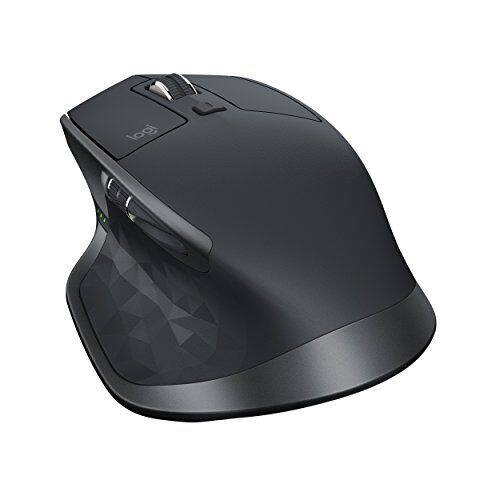
Customers are positive about the MX Master 2S Wireless Laser Mouse's battery life, comfort, and scroll wheel, with many praising its exceptional performance in these areas. They also appreciate the mouse's size and surface compatibility, finding it well-suited for various hand sizes and surfaces. While some find the price a bit high, the overall feedback highlights the mouse's precision and responsiveness. A few users noted concerns about the weight and software, but these were less frequent than positive comments.
This summary was generated by AI based on customer reviews.
- Pros mentioned:Customizable, Multi-device

Nice features, poor software and haptic design
|Posted .This reviewer received promo considerations or sweepstakes entry for writing a review.This mouse includes some nice features, but the poorly designed configuration software and unfortunate haptic design choices prevented any notion of a premium mouse experience for me. [ Pros ] - Easily switch between three paired devices. - Thumb rest doubles as a gesture button which adds increased custom button binding flexibility. - Quickly and easily switch between smooth and notched mouse wheel operation. - USB charging cable is unobtrusive, allowing the mouse to be used while charging. - Includes a small receiver, handy for use on a desktop PC that doesn’t have Bluetooth functionality. [ Cons ] - The Logitech Options software, which is used to configure this mouse (at least on Windows), is absolutely terrible. Application-specific custom button bindings often abruptly stopped working for me, which was usually fixed by giving the Options window focus, but this didn’t always work. There is apparently no macro support for button bindings. The Flow feature did not work for me across wired/wireless LAN barrier; my two laptops connected via WiFi were able to work with each other, but my wired desktop--connected via Ethernet to the same router--could not join the mix (tested on two different WiFi routers). - Haptically abusive design. My thumb is constantly aware of the polygonal texturing of the thumb rest. My pinky and ring fingers are constantly aware of the harsh material transition on the right side of the mouse. When using the horizontal scroll wheel, my thumb always rubs against the abrasive, sharply shaped forward and backward buttons. - Gesture button is awkward to use, requiring significant pressure to activate, and far mouse travel to trigger gestures, with the distance/sensitivity apparently not configurable. - The USB cable is apparently for charging only, and cannot be used as a data connection for non-wireless use. - The shape and size of the back and forward buttons makes their use a bit awkward, and may require some concentration to insure pressing of the intended button. - Non-adjustable weight. - No physical adjustment of the DPI setting. [ Conclusion ] I'm probably more sensitive to haptic design issues than the average person. It may be that most users will find this mouse completely comfortable to use. However, because of the problems I experienced with the configuration software (Logitech Options), I wouldn't recommend this mouse to a friend.
No, I would not recommend this to a friend - Pros mentioned:Multi-device
Good For Some, Not For Others
|Posted .This reviewer received promo considerations or sweepstakes entry for writing a review.There isn’t much to review when it comes to mice. It’s a pointing device and there’s only so much you can do with it. The MX Master 2S is the follow-up to the original MX Master. As far designs go, there’s nothing visually different. In fact, I daresay it’s identical. The only differences between the two are the accent colors. The original MX Master has a gold accent on the black color model. The 2S now has a silver accent. Internally, and according to Logitech themselves, there’s a better tracking sensor that’s capable of up to 2000dpi, up from 1600dpi of the original. It’s also supposed to have longer battery times -- 70 days of operating time for the 2S and 40 days in the original. Connecting the mouse to any device is simple enough. The 2S and its original are capable of connecting using Logitech’s wireless dongle or through Bluetooth, should your device have this feature. If you’re using the mouse for what it is, then using the Logitech “Options” software is unnecessary. Installing it only allows you to remap buttons to different functions and to customize the mouse performance according to your preference. Having used the mouse in different scenarios, there are some pros and cons. On the plus side, I find its ability to dual connect via Logitech’s wireless receiver and Bluetooth to be convenient. The receiver is good for when you have a standard fare computer with a USB port. But some computers, ultra-portable ones especially, are now lacking this now. So being able to connect to a device that doesn’t have a USB port via Bluetooth makes the mouse more versatile than your typical/average wireless mouse. It also can connect to up to 3 different devices and switch to any of them. This is done by pressing the profile button located on the bottom of the mouse. The thumb wheel functions like a side scroller but only when the Option software is installed. Lastly, the mouse wheel has two scrolling modes -- smooth and clicky. Standard mouse wheels are the clicky type. But when you need to scroll through a long list, a smooth scroller can be a lifesaver, allowing you to scroll effortlessly through several pages instead of crawling. The downside to this mouse is perhaps the gesture button. By itself, it works as an easy shortcut to all opened windows. And this is okay. But any multi-button mouse can do this same function with some playing around. The gesture button requires you to press on the button and moving the mouse in one of four directions (up, down, left, right). I personally find this to be too much trouble to do. Another bad side to this mouse is how it is unfit for gaming. On the gaming side, your mileage will vary. Some games will do just fine with the mouse. But you may find using this mouse with some other games to be lacking. Overall, the mouse is excellent when used in a computing environment (ie. office apps). I especially like the mouse being able to connect either through Bluetooth or the receiver. My only concern is the asking price. While I do end up recommending it, I suggest getting it when it’s not at MSRP.
I would recommend this to a friend - Pros mentioned:Comfortable
Excellent Wireless Mouse
|Posted .This reviewer received promo considerations or sweepstakes entry for writing a review.I stopped using wireless mice several years back due to short battery life, DPI tracking, and lag during gaming. I recently switched to the Logi MX Master 2S and I am pleasantly surprised that those past issues have been solved. I have always liked Logi (Logitech) mice and have used them for years in various wireless and wired forms. They are well built and very comfortable to use. The MX Master 2S is no exception. It feels solid, has a nice weight, and very comfortable in my hand. The wireless response is lag-free over the unifying receiver and the tracking is much improved due to the updated Darkfield sensor. The only thing I am uncertain of is the battery life long term. The rechargeable batteries are sealed in the unit so I'll keep my fingers crossed that they have a good life span. Overall solid mouse and, frankly, the only wireless mouse I would recommend for desktop use.
I would recommend this to a friend - Pros mentioned:Multi-device
A great desktop Mouse
|Posted .This reviewer received promo considerations or sweepstakes entry for writing a review.First off I could not get this mouse to recognised byall the various computers. Some with Win 10 worked others did not. Some with Win 7 worked other did not. Generally speaking the newer the computer the better the chance, but I still got a 8yr old Dell XPS to work where a newer Dell XPS would not. Go figure. But on the computer I did get it working on it was a real joy to use. It slid more effortlessly than my MS Arc (one of my favorite Mice). It's ability to connect to multiple devices via BT and their dongle is most convenient. But the ability to move from one computer to another via the selector on the bottom is very convenient (when your using multiple computers, like I do). I'd prefer to use BT over their dongle, given a choice. I tried this mouse on 8 computers and it was recognised on 5 of the 8. The center scroll wheel has some weight to it, once moving it seems to pick up momentum (maybe electronice may be wheel) anyway I like it The programable buttons are an added plus, I programmed them to return to my home page and to open my email, with a single click (on multiple computers). Really cool, I'm sure that there are many other uses I'd not considered. The mouse is pretty big, not problem fro a desktop, but I doubt I'd want to travel with it (with many smaller options). But it's been getting harder and harder to find a BT mouse that youd want to use on your desk day after day, and this one I would. So many BT mice are too small to use all day long. In this respect the MX Master 2S IS A CLEAR WINNER. If I'd not had connectivity problems with several computers I'd have given it 5 stars, but I had to deduct one star because I could not use BT on all my computers that supported BT.
I would recommend this to a friend Uncomfortable
||Posted .This reviewer received promo considerations or sweepstakes entry for writing a review.I had to return this. I don't know if my hands were too small or what but it kept getting cramped up to the point that I was dreading using it. Purchased the Microsoft Arc mouse instead.
I would recommend this to a friendAn already great product, made just a little bette
|Posted .This reviewer received promo considerations or sweepstakes entry for writing a review.As far as I can tell, there are 3 types of mouse buyers out there. The first, which represents the majority of users, can mouse with just about any piece of plastic that is put in front of them. They are frugal, they are not picky, and they tend to not see value in paying more for something that has marginally more features than the bargain-basement devices. They are categorized in this sense as not requiring a ton of precision nor low response times when using input devices, specifically keyboards and mice. The second buyer is the polar opposite from the first: they require both high precision and low response times to their devices. It is a specific bunch of people, but we see this most in the PC gaming world where these two things (precision and response time) are high on the requirements list. They also tend to like flashy, sometimes colorful devices. The third buyer is where I fall. I’m not all that picky when it comes to input lag (although if it’s really bad I’ll move on to something else), but precision is extremely important. These are highly productive individuals, who stew over mouse and keyboard purchases because of concerns about comfort over long periods of use, or even just for the pure aesthetic of the thing. But this all begs the question, of the 6.3 billion wireless mice available in the market, why would anyone pick Logitech? Even if you fall into the third category, certainly you’re not aching to spend extra money on a mouse that just isn’t all that nice. Right? Well, perhaps the MX Master 2S is a little different than you’re average mouse. Maybe it’s the Logitech Flow software that allows you to use the mouse simultaneously on two separate computers, and copy and paste between them. Or maybe you like the scroll wheel that smart selects between a click-scroll to a hyper scroll based upon the speed that it is traveling. Maybe you want a mouse that looks a little like a futuristic space ship and conforms perfectly to your hand, or one that has numerous programmable buttons that can be customized at the app level as you see fit. All these things, plus fast charging and a battery that lasts 2 months...yeah, maybe this is the right mouse for you. Aside from the high price tag, this device is an all-around great mouse. I previously had the MX Master, which is essentially the same without the Flow technology. Mouse movement is clean and buttery, as expected, scrolling is amazing. There are only a few improvements over the previous iteration of the MX Master, but for those who have used it–they are already well aware of just how great it is. I found the Flow technology to be a little buggy if you’re firewall settings aren’t wide open...so users who want to bring this device into a corporate environment to use multiple machines may run into some technical difficulties there. Fortunately Logitech support provides the firewall adjustments on their support page, but might be difficult to get your corporate IT team to make those exceptions for you. Otherwise–Flow works very well, albeit there being a slight lag when passing from screen to screen. Not a deal-breaker by any stretch, but still something to get used to. All of the other features are strictly repeat customers from the last version. It’s a great mouse, has great features, the thing is just really great. And of course, aesthetically speaking, this mouse is a must have for a sleek home office setup. It comes in three colors, I prefer the graphite which has a matte black body and graphite (maybe “space gray”??) accents. So considering my “3 types of mouse buyers” comments above: the first mouse buyer won’t find the value in this. At $99, the price seems steep–and I’ll agree that’s a pretty big pill to swallow on a mouse. But, if you spend a lot of time at your computer, it would behoove you to spend a little extra money on the creature comforts. This isn’t limited to mice: quality keyboards and desk chairs are just as important. The second mouse buyer may be willing to spend $100 on a high-end gaming mouse, but maybe not on a wireless one. The accuracy on the MX Master is great, but still not up to par with some of the more capable gaming mice available on the market. Even using this as a corded mouse (via the micro-USB connection) on the front might make it a good multi-tasking device for light gamers. The third mouse buyer is obviously where this device is aimed, and justifiably so. That said, if you already own an earlier MX Master, the upgrade may not be worth it to you–unless you are really into the Flow software that is available. However, if you own an MX Master now and do decide to upgrade, you can expect to be equally as impressed with the latest generation device. This is a pretty open-and-shut case. Logitech already makes a great product in the MX Master, and the latest version is just as good (if not better) at doing all the things we expect a mouse to do. The only real problem is the price tag, which seems a little bit steep even for those who like to spend a little extra on the creature comforts. If you’re in the market, it might make sense to try to find the older MX Master which will be at least a little cheaper with a very similar feature set.
I would recommend this to a friendVery comfortable. Flow works well.
|Posted .This reviewer received promo considerations or sweepstakes entry for writing a review.This mouse is comfortable, have high sensitivity, and the Flow is simple to use and it works well. It has a higher curve and angle making it more ergonomic and easier on your wrist. It is a bit noisy, especially the rachet scroll wheel. The two side buttons are hard to press and the gesture button takes some getting used to. Good: -Ergonomic -Flow -Bluetooth or USB -Simple to switch between devices Bad: -Noisy -Side buttons are awkwardly placed I’ve been using gaming mice as my daily driver for graphic work for years, with the wireless Logitech G602 as my current mouse, so I’ll be comparing some of the features based on that. For the most part, it performs on par if you’re using it for daily activities. It won’t have the accuracy of a gaming mouse, which I noticed when I’m trying to click on small icons in Photoshop, but if you’re coming from a regular mouse, then this would likely be an improvement all around. The MX Master s2 looks the same as the previous model. It has a higher curve for the palm and slightly more angled so your wrist sits at about 45 degrees. I have small hands so it didn’t quite fit in my palm as well, but everything is still within a comfortable reach. Prolonged use is more comfortable than my gaming mice and didn’t gave me wrist pain as much. The only negative here is the placement of the two side buttons behind the thumb scroll. They’re small and oddly shaped and I find it hard to press the right one. Speaking of buttons, all the buttons can be customized. At first I was concerned that I wouldn’t have enough customizable buttons like I do with my G602 (8 total), something I used a lot between multiple graphic applications, but I was able to program most of them into the gesture and side buttons on the s2. It’s not as easy to use but it does work. I can customize based on individual application and the mouse switches on the fly. The thumbwheel is good for panning if you’re working on wide documents, but I didn’t get much use from it so I used it for volume control. The gesture button takes some getting used to. The L/R buttons are a bit stiff and the mouse can be loud, especially with the SmartShift enabled. The braking from smooth scrolling to rachet is a loud click. The best feature of the s2 is Flow. What this does is it lets you move from one computer to another seamlessly like you would if they were a multiple monitor setup as well as copy and paste from one to another. I have a multiple monitor desktop connected with the USB receiver and my laptop with bluetooth and transitioning between the two is effortless. There’s a slight delay as it snaps from one to the other but nothing to complain about. Setting it up was very simple. Instal Logitech Options, and it will detect each computer on the network. This will likely be my main mouse for the time being. I find it more comfortable to use and the customizable buttons are sufficient for daily needs.
I would recommend this to a friendterrible product
||Posted . Owned for 3 months when reviewed.This reviewer received promo considerations or sweepstakes entry for writing a review.when you dial the cursor over your desired target it moves everytime.too hard to control.
I would recommend this to a friendstopped connecting bluetooth
||Posted .This reviewer received promo considerations or sweepstakes entry for writing a review.such a waste of money , stopped connecting to macbook bluetooth. Please do not buy
No, I would not recommend this to a friendMighty Mouse
|Posted .This reviewer received promo considerations or sweepstakes entry for writing a review.This mouse is fantastic. What more can you ask for than both BT and Unifying Receiver? It works with Windows, Mac, Android and Chrome OS. Flow only works with Mac and Windows. Flow is a nice addition to the mouse. It is essentially Synergy for Logitech Mice and I am assuming keyboard as well. The mouse is very comfortable. The only issue I have had, I keep inadvertently hitting the back page button. Page forward and back are in a somewhat odd location. They feel like they are too far back above the thumb rest for my grip and I have to look to find them. There is also a side scrolling wheel above the thumb rest, positioned in front of the fwd/back buttons. I think putting the fwd and back buttons on either side of this wheel would have been a better design. For now I changed the settings so the wheel acts as forward and back. The settings do not carry over from Windows to Chrome OS. i do not have a Mac to test on. I am not docking the button position. Like any new mouse, it just takes some getting use to. The glide of the mouse on any surface is fantastic. It feels like it is floating across my mouse pad. Best comparison would be how a air hockey paddle glides on a air hockey table. Just smooth. Logitech Options has almost any pre-programmed options you might want for the buttons. The one drawback I have found. This is only a right handed mouse, Sorry to the lefties of the world. Buy one, and if they make a left handed grip in the future, buy one for each hand. You won't regret it. At least buying one you won't regret, two would actually be silly. Highly recommended for any righty with a full sized mouse need. This ain't no small mouse.
I would recommend this to a friendNot good
||Posted . Owned for 1 month when reviewed.This reviewer received promo considerations or sweepstakes entry for writing a review.It is jittery and its responsiveness is laggy. Not very good.
No, I would not recommend this to a friendPointer lag issues
||Posted .This reviewer received promo considerations or sweepstakes entry for writing a review.Had to return it due to intolerable pointer lag issues.
No, I would not recommend this to a friendBig mouse with big features
|Posted .This reviewer received promo considerations or sweepstakes entry for writing a review.Logitech - MX Master 2S Wireless Laser Mouse - Graphite There no doubt Logitech has a great mouse here. As their flagship mouse it is big in a lot of ways. Starting with your hand. This is a very large mouse so be sure you have held it and it is comfortable to you. For me it was fine but it will take a bit more time to be completely comfortable using it. I used the mouse for my office work and at home mostly for PC gaming. It worked just fine and I will say in tracking it felt very good. As you expect for a top of the line product like this the buttons felt solid as did the scroll wheel. Just expect to take a little time learning to use the left side buttons as they're very close to each other. The Logitech Options software was very easy to install and use. I highly recommend you do use the software to get the full feature set this mouse supports. Other features that need to be mentioned is the 70 day battery life, and quick charge function. Logitech claims you can get all day use with just three minutes of charging. That might be why the micro USB cable it comes with is not long enough for much more than using it for charging. Another touted feature is the ability to use this single mouse to control up to three computers at the sametime. You can copy and paste and drag and drop files between computers. This might be useful in some cases but since this doesn’t also give you keyboard support I am not sure how often this would be needed. One feature I will be using is the Bluetooth support. That opens up being able to use the mouse with any Bluetooth devices like tablets and even your phone. Since it also comes with a separate receiver the Bluetooth support is a nice feature to have available. Overall I have mixed feelings about this mouse. It seems to do everything well but I don’t think it needed to be so big. This is probably not a mouse you want to travel with. And that's too bad because with this battery life, connection options and build quality it would make a perfect all purpose mouse. As just a mouse I would easy give it 5 stars. But the size makes me take a star away and I hate to do that because if you're not a traveler and the fit works for you this is a very nice addition to a professional or gaming workstation.
I would recommend this to a friendABSOLUTELY Awesome Mouse for Productivity
|Posted .This reviewer received promo considerations or sweepstakes entry for writing a review.This is a must have mouse for all who are content creators and productivity junkies. The mouse fills the palm of your hand and just feels solid. Battery life seems good. It advertises over 70 hours on the website. The aesthetics are just beautiful. The software Logitech Options is great and works well. You have absolute control to remap buttons and make them do what you want. It is definitely an upgrade over the Logitech Setpoint and Unifying Software. Logitech Options combines the two so you don't need them anymore. This mouse does NOT work with the old SetPoint software and it will tell you to download the new program. The only complaint I have is the placement of the back and forward button. They are placed behind the horizontal scroll wheel which is perfectly placed. You have to make an awkward motion to reach them and you press the wrong one sometimes. Overall this mouse is a MUST BUY for anyone who is in the market for one. It has a higher DPI. If you currently own the Master MX, this is not a real upgrade-worthy purchase. Go out and buy this!!!!!
I would recommend this to a friendImpressive software for a very good mouse
|Posted .This reviewer received promo considerations or sweepstakes entry for writing a review.First thing first; this is not a gaming mouse like G602 or G502. There is no on mouse dpi control button;(can do using accompanied software). Not very grand on count of buttons to help you in RPG games either. But they are not claiming it either. It is for pro users who uses multiple machines and need flexibility to use the same hardware across machines. This even comes with logi's universal receiver so if you already have one; you can use that with this mouse as well. It can support three machines at the same time; and can be connected via Bluetooth as well. I have it connected to my PC with the receiver and with my galaxy book using Bluetooth. Using the included flow app; I can use this mouse across machines without having a KVM switch; and its seamless. So you do not press any key or make any change. You just drag the mouse pointer to one end of screen and it make the next machine owner of mouse. Do it in reverse and you are back to your original machine. Very Impressive. If you have used extended monitors in windows; its just like that; but on different machines. I wanted this feature since ages; and now we have it. YAY Its a right handed mouse; and for people with palm grip. I use palm grip and my fav. is G602. This mouse is slightly bigger than that but is still comfortable to hold. I have a G502 as well; whose grip I prefer least; so this should give you an idea. Apart from middle scroll, it also has a scroll wheel on side; which I customized to use as a volume rocker; and now I watch netflix from my bed on my PC; and can use this as a remote. Another Yay. Is is on a little expensive side and it as it is not really for gamer; I am not sure what the target audience is; but if you are looking for a large mouse with great productivity features; this is the one. Love the innovation in mouse. (Finally after so many years).
I would recommend this to a friend- Pros mentioned:Multi-device, Scroll wheel
Great wireless mouse
Posted .This reviewer received promo considerations or sweepstakes entry for writing a review.This is my new favorite mouse. It comfortably fits my larger hand very well - it may actually be too large if you have small hands. The scroll wheel is weighted nicely and can be set to spin freely for fast scrolling or to have notched rotation. The side scroll wheel is nice for when you use it. A few nit picks - the forward/back buttons on the side a a bit too far back to comfortably use. The main buttons are perhaps a bit on the loud side. Big fan of the Logitech Flow functionality - using a second USB receiver the mouse tracks across multiple computers as if they were just multiple screens on the same PC.
I would recommend this to a friend - Pros mentioned:Comfortable
Excellent Mouse
|Posted .This reviewer received promo considerations or sweepstakes entry for writing a review.It connects through the unifying usb or bluetooth. multiple buttons for shortcuts, free range scroll, can use it for hours. the only thing i dont like is the buttons on the side between my thumb and first finger. i had to make it to where they dont have any function because they were always getting pressed and id had to keep restarting whatever i was working on. Overall, i would say its almost the perfect mouse and i would definitely recommend it to anyone.
I would recommend this to a friend - Pros mentioned:Comfortable
It's about time
|Posted .This reviewer received promo considerations or sweepstakes entry for writing a review.I love this mouse. Very comfortable to use and really works anywhere I want it to. The buttons feel nice. The Flow technology is really cool to be able to mouse from computer to computer without switching any buttons. My only problem with that is you have to download Logitech Options on each computer to get that feature and be hooked up to the same WIFI. I had to hunt this down and wasn't directed on the box to do so.
I would recommend this to a friend So nice, I want to pick up another one
|Posted .This reviewer received promo considerations or sweepstakes entry for writing a review.First off, Logitech hardware is great (minus a bad batch of K350 keyboards that I had the displeasure of working with) - so I was setting the bar high for this mouse. This thing has a great feel & is cross-platform; I used this mouse & the "Options" software on both Windows 10 & the Mac successfully. The only down-side was getting "Flow" to work on a major corporate network. I am a techie, so getting around roadblocks is typically a no-brainer; even opening the TCP & UDP ports as per their website, didn't allow for discovery or negotiation. Perhaps I'll revisit, but for now - not a deal breaker. The thumb roller is perfect -- on the Mac, I use it for volume up/down - and on Windows I use it to slide left/right. All in all, this mouse makes me want to buy another to have at home vs work.
I would recommend this to a friend- Pros mentioned:Multi-device
Great mouse
|Posted .This reviewer received promo considerations or sweepstakes entry for writing a review.I have the MX master that came out before this and this mouse just improves everything that made the other one great and they added this feature where you can use it on two devices at the same time.
I would recommend this to a friend