Customer Ratings & Reviews

- Model:
- PY9-00001
- |
- SKU:
- 4533300
Customer reviews
Rating 4.5 out of 5 stars with 4727 reviews
(4,727 customer reviews)Rating by feature
- Value4.6
Rating 4.6 out of 5 stars
- Quality4.4
Rating 4.4 out of 5 stars
- Ease of Use4.6
Rating 4.6 out of 5 stars
Customers are saying
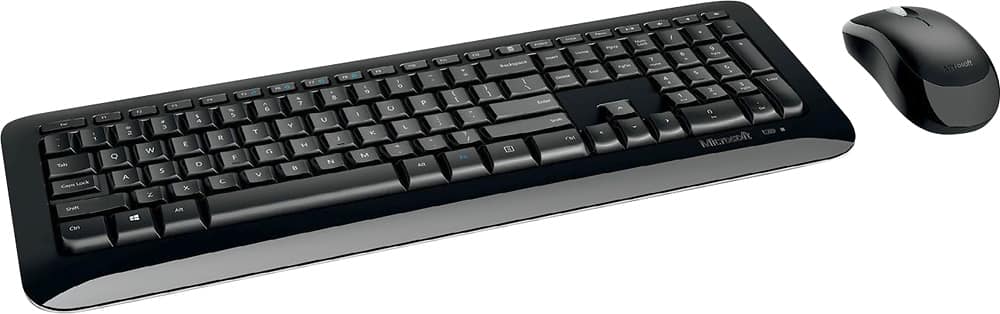
Customers highly value the Desktop 850 Full-size Wireless Keyboard and Mouse Bundle for its wireless convenience, budget-friendly price, and user-friendly design. Many appreciate the ease of use and installation, as well as the overall functionality and durability of the product. While some users have expressed concerns about the lack of a caps lock indicator and minor issues with the mouse, the overall positive feedback suggests that this product meets the needs and expectations of a wide range of users.
This summary was generated by AI based on customer reviews.
- Pros mentioned:Wireless
Rated 3 out of 5 stars
Basic - But For The Most Part Good
||Posted .This reviewer received promo considerations or sweepstakes entry for writing a review.It's just your basic wireless keyboard which works fine for me. For consistent reliability, make sure that the keyboard is in close proximity to the receiver with no obstructions. Otherwise, the communication between the two is intermittent. If you want a wider range of functionality without issues, you'll probably pay more.
I would recommend this to a friend Rated 3 out of 5 stars
A Good Value On A "Natural" KB
||Posted .This reviewer received promo considerations or sweepstakes entry for writing a review.The good news is it works more or less flawlessly on 95% of the software I use every day. The fit and finish are good, the keyboard feels very good with a nice positive resistance and not too much noise and the wrist rest is spot on. The issues are very few and all centered around user programmable features. Simply stated, Logitech's format is not 100% compatible with the Microsoft base. This is not their fault, the base code is copywrite protected and forces Logitech to "work around" it. The bottom line is that many programs can't recognize the "translated" code and this becomes most apparent when attempting to add yet another layer of translation via use programmable keys on both the mouse and keyboard. All in all, this is very nicely designed and executed product that I would recommend to anyone looking for a good value on a "natural" style keyboard.
I would recommend this to a friendRated 3 out of 5 stars
Ok, Logitech is better
||Posted . Owned for 1 year when reviewed.This reviewer received promo considerations or sweepstakes entry for writing a review.It’s okay, but the mouse is really hard on batteries, probably have to change every month
No, I would not recommend this to a friend- Pros mentioned:Price, Wireless
Rated 3 out of 5 stars
Where did the Caps Lock Light go ?
||Posted . Owned for 1 month when reviewed.This reviewer received promo considerations or sweepstakes entry for writing a review.I am not getting younger. This set was obtained at an amazingly low price. the "wireless" works great: the Mouse does everything I ask of it. I am a LITTLE disappointed that the letters on the Keyboard are so THIN, I have a little problem reading them. But I am VERY Disappointed that the Caps Lock Light is missing. Many passwords are case sensitive, and I get kicked out so many times, because the CAPS LOCK is on, and I don't know it.
No, I would not recommend this to a friend - Pros mentioned:Easy to useCons mentioned:Caps lock indicator
Rated 3 out of 5 stars
Decent For The Money
||Posted . Owned for 1 month when reviewed.This reviewer received promo considerations or sweepstakes entry for writing a review.Works well for really inexpensive wireless equipment which is what I was looking for. Could use a caps lock light. Mouse didn't work with my old mouse pad so had to get a new one. Good for the occasional user though.
I would recommend this to a friend - Pros mentioned:PriceCons mentioned:Mouse
Rated 3 out of 5 stars
Low Quality for Low Price
||Posted . Owned for 3 weeks when reviewed.This reviewer received promo considerations or sweepstakes entry for writing a review.Keys weren’t sensitive which led to some typos if you’re in a rush. The keyboard length is too long which takes up more space. The mouse isn’t sliding smoothly. It is too wide and bulky for small hands. I would not recommend this product. One good thing is that the price is fair for this quality.
No, I would not recommend this to a friend Rated 3 out of 5 stars
Decent but Not Durable
||Posted .This reviewer received promo considerations or sweepstakes entry for writing a review.it worked fine at first and the wireless connection was stable. However, after a few months the keyboard started to feel sticky — some keys get stuck easily. I tried cleaning it with a bit of water and it shorted out completely. Overall, not very durable and not worth replacing with the same model.
No, I would not recommend this to a friend- Pros mentioned:Price
Rated 3 out of 5 stars
It does the job BUT...
||Posted .This reviewer received promo considerations or sweepstakes entry for writing a review.Ok, the main reason I was in the market for a new keyboard is because most keyboards I use have INS/HOME/PGUP/DELETE/END/PGDN keys grouped together above the arrow keys. My old keyboard didn't have that setup and it drove me crazy because I kept hitting the wrong keys. The Microsoft Wireless 850 keyboard has the standard key placement and the price was right so I purchased it. WHAT I DONT LIKE......The function keys are sunken so you cannot just feel for them, you have to look. Doesn't sound like a big problem until you go to hit one and you literally have to look! Not only are they sunken, they're not spaced as most keyboards have with F1-F4 then F5-F8 etc. ALSO, the "blue" F keys are not programmable. There's NO information about what a particular icon means, just push them and find out but OH the blue FN control key to access the blue F keys is ONLY ON THE RIGHT SIDE! Most keyboards have that key on BOTH sides OR the left side. Keyboards just have standards that just cannot be changed! Like I said it serves it purpose but if I had it to do all over again I wouldn't buy it.
No, I would not recommend this to a friend - Cons mentioned:Caps lock indicator, Mouse
Rated 3 out of 5 stars
Just okay, not great
||Posted . Owned for 3 weeks when reviewed.This reviewer received promo considerations or sweepstakes entry for writing a review.The contour of keyboard is great. When turning on caps lock, no light to indicate it is on or off. Same with num lock. The mouse is too big and I cannot go back by pushing roller to left or right. Makes for more steps that I would like not to have to make.
No, I would not recommend this to a friend - Pros mentioned:Durable, Wireless
Rated 3 out of 5 stars
It's ok!
||Posted .This reviewer received promo considerations or sweepstakes entry for writing a review.First day of usage I noticed a slight intermittent lag on the mouse which isn't as bothersome until you get used to it. No problems with the keyboard. It has been in use for about 2-3 months now and haven't had any major problems. It gets the job done!
I would recommend this to a friend - Pros mentioned:Easy to use, Wireless
Rated 3 out of 5 stars
Keyboard
||Posted . Owned for 2 weeks when reviewed.This reviewer received promo considerations or sweepstakes entry for writing a review.Like the wireless capability. Easy to use and set up. No back light but you get what you pay for. Mouse is bonus.
I would recommend this to a friend - Pros mentioned:Price
Rated 3 out of 5 stars
Pretty Good
||Posted .This reviewer received promo considerations or sweepstakes entry for writing a review.Overall I like the size and feel of the keyboard and mouse. I was replacing an older set which had some delays and would miss letters when I typed. Probably a disconnect from the wireless connection intermittently. This new set is better, but I still miss letters from time to time when typing. It is a little frustrating when you type a longer message and you have to go back and correct from time to time. While my desktop module is next to my desk, it seems to work better when you have line of sight between the dongle and the keyboard. The mouse is sometimes delayed or slow to respond. Overall, it is better than the last set I had (different brand) and you can't beat the price. I would say the delays or omissions while annoying at times are still within acceptable limits.
I would recommend this to a friend - Cons mentioned:Indicator light
Rated 3 out of 5 stars
no caps lock indicator light
||Posted .This reviewer received promo considerations or sweepstakes entry for writing a review.I chose this keyboard because the layout of the keys was identical to the keyboard I use at work even though the CPU I bought for home use came with its own keyboard. Much to my surprise, and dismay, there is no indicator light on the keyboard to tell me I still have Caps Lock on. And also, I am always hitting the zero key in the calculator section when I really want to hit the right cursor because the sections of the various keys are closer together than I am used to at work. Otherwise, the keyboard is fine. But I wish Microsoft would have spent a bit more on including indicator light and lengthened the keyboard another inch or so to match keyboards used in the office. (There is also no number lock light but I always have Number Lock turned on, so that is not a problem for me.
I would recommend this to a friend - Cons mentioned:Indicator light
Rated 3 out of 5 stars
Could use improvement
||Posted .This reviewer received promo considerations or sweepstakes entry for writing a review.Of all of the wireless keyboards I have used, this one received the least amount of wireless interference. There were, however some improvements needed. There are no indicator lights for the various lock keys (number, cap, scroll), which while not a deal-breaker, can be quite annoying. The one I am reviewing had several keys DOA. Best buy had no problem taking it back, at which time I purchased a different, less expensive model. I will review that one separately. My experience was negative, but don't let that sway you, the connection reliability was certainly a big plus with this model.
I would recommend this to a friend - Pros mentioned:Works well
Rated 3 out of 5 stars
Microsoft desktop 850 keyboard and mouse
||Posted . Owned for 8 months when reviewed.This reviewer received promo considerations or sweepstakes entry for writing a review.The mouse works good, but the keyboard has a glitch where it misses the first letter when I start typing. It can be frustrating at times.
No, I would not recommend this to a friend - Pros mentioned:Price, Wireless
Rated 3 out of 5 stars
Decent Wireless Keyboard and Mouse
||Posted .This reviewer received promo considerations or sweepstakes entry for writing a review.Bought to use with my work laptop at home so that I didn't keep hitting the large touchpad. Works fine and no issues. Good price as well.
I would recommend this to a friend - Pros mentioned:WirelessCons mentioned:Indicator light
Rated 3 out of 5 stars
Okay product
||Posted .This reviewer received promo considerations or sweepstakes entry for writing a review.I like the wireless keyboard and mouse, but there isn’t a indication light for caps lock
No, I would not recommend this to a friend - Pros mentioned:Price
Rated 3 out of 5 stars
It's a nice keyboard for the price point.
||Posted . Owned for 1 year when reviewed.This reviewer received promo considerations or sweepstakes entry for writing a review.It's a nice keyboard for the price point. I didn't realize it didn't have a cap lock indicator on the keyboard. So when entering a password I don't know if it's stuck on cap lock mode or not which can be frustrating.
No, I would not recommend this to a friend - Cons mentioned:Caps lock indicator
Rated 3 out of 5 stars
Wish I had researched keyboard purchase b4 buying
||Posted .This reviewer received promo considerations or sweepstakes entry for writing a review.It is adequate to our requirements. Would prefer feature the one I replaced had, that being a light indicating that the caps were on, aside from that it serves the purpose it was bought for. It was a fair price and coincidentally was price matched which resulted in a credit on purchase price, it was featured online at Best Buy Website for an amount less than I paid, result being a refund to match that price. Always a welcome situation.
I would recommend this to a friend Rated 3 out of 5 stars
Decent keyboard, but not durable.
||Posted . Owned for 9 months when reviewed.This reviewer received promo considerations or sweepstakes entry for writing a review.Needed a keyboard for telework. I should have spent a bit more for better quality, in the months I have used it several keys have lost their text. I have a Logitech keyboard at the office that looks brand new after 2 years. Otherwise the buttons are good in tactile feel and the battery life is very good.
No, I would not recommend this to a friend