Customer Ratings & Reviews
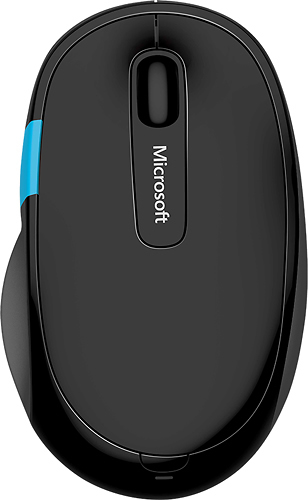
- Model:
- H3S-00003
- |
- SKU:
- 9322046
Customer reviews
Rating 4.4 out of 5 stars with 1488 reviews
(1,488 customer reviews)Rating by feature
- Value4.3
Rating 4.3 out of 5 stars
- Quality4.3
Rating 4.3 out of 5 stars
- Ease of Use4.4
Rating 4.4 out of 5 stars
Customers are saying
Customers express satisfaction with the Sculpt Comfort Wireless Optical Mouse's Bluetooth connectivity, ease of use, and comfortable size and weight. Many appreciate its long battery life and responsive tracking. However, some users reported issues with the scroll wheel, experiencing unexpected activation or malfunction. A few also noted occasional lag, though this was not a widespread concern.
This summary was generated by AI based on customer reviews.
Rated 5 out of 5 stars
Great for Windows 10
||Posted .This reviewer received promo considerations or sweepstakes entry for writing a review.I purchased this mouse for my Windows tablet. It is just the size I needed. It works well with the OS. The Windows button on the side is lovely. It lets you scroll every direction. It being blue adds to the mouse as a whole. Would differently buy another if I ever get another machine.
I would recommend this to a friendRated 4 out of 5 stars
Good for laptops
||Posted .This reviewer received promo considerations or sweepstakes entry for writing a review.The only issue I have had with this mouse is that out of the box I experienced periodic disconnects. I have since traced this to the battery coming loose and the inclusion of a piece of tape has cured the problem.
I would recommend this to a friend- Pros mentioned:Bluetooth
Rated 4 out of 5 stars
Great Mouse!
||Posted .This reviewer received promo considerations or sweepstakes entry for writing a review.Great wireless mouse that easily connects to my tablet. Easy to use and fits in my bag so I can carry it with me wherever I go!
I would recommend this to a friend - Pros mentioned:Bluetooth
Rated 5 out of 5 stars
Great Bluetooth Mouse!
||Posted . Owned for more than 2 years when reviewed.This reviewer received promo considerations or sweepstakes entry for writing a review.I mainly got this since my Surface Laptop has limited ports and didn't want a USB slot to be taken just because of the mouse. Unfortunately most wireless mice use some other protocol and require a USB key to be put in. This Bluetooth mouse doesn't require any of that and can easily be setup with any device. It quickly paired and I didn't have any issues with it after that.. My only gripe is that it's a bit heavy to travel with (perhaps because it requires 2 AA batteries).
I would recommend this to a friend Rated 5 out of 5 stars
Great mouse for Windows 8
||Posted .This reviewer received promo considerations or sweepstakes entry for writing a review.I just wanted this mouse for the ability to go to the start screen and switch apps without reaching for the keyboard or screen. I have a 13.? inch Windows 8.1 tablet and if I detach the keyboard and prop it up on the couch, table or bed while watching TV, I can click away browsing the web and cutting and pasting between programs and apps while laid back just using this mouse. After a week or so, Windows Update installed the additional software which lets me attach custom functions or keystrokes to the swipe pad and middle click button. This took the mouse from nice to great! I have a 7 button mouse on my desktop and always wished I could go forward and backward in web pages & file explorer on my tablet. Now I can swipe down to go back and up to go forward. That's all I could think to program so far, but there is a long list of functions to choose from and even a button combo if the list doesn't have what you need. I look forward to taking some time and setting it up with other programs. The only annoying thing was that in the chrome setting, there was no selection for "Browser Forward," which was available in file explorer and Firefox. To save some of you some time, to do browser forward in chrome, go to button combination and input ALT+Right Arrow. Now you don't have to spend as much time as I did trying different button combos and doing weird things in chrome looking for that function. That's it for my review, but another FYI: I learned the following frequently used commands for my desktop's keyboard and mouse that have extra buttons: -Excel- CTRL+TAB = Next Workbook (add shift for previous) CTRL+Page UP/Down = Next/Prev Worksheet Shift+F2 = Add/Edit Comment -Windows- Windows+1-0 = the first 10 programs on your taskbar, whether open or pinned CTRL+TAB = Next Tab (add shift for previous). Work in anything with a tab; web browsers, dialog/settings boxes, etc. Hopefully you already know ALT+F4. If not, try it now. KIDDING! It will close whatever window is in focus! Just like clicking the 'X' in the red box at the top left corner, or shuts down windows if the desktop was clicked/touched.
I would recommend this to a friend- Pros mentioned:Bluetooth
Rated 5 out of 5 stars
Excellent Mouse for the price
||Posted .This reviewer received promo considerations or sweepstakes entry for writing a review.I purchased this to use with my laptop. I had previously been using a smaller Microsoft laptop sized mouse that didn't have as many features and had the micro USB adapter. I was looking for a bigger mouse, one that was also Bluetooth enabled to free up my USB slot, and one that offered more features and button controls.This mouse had all of these features and was also on sale at the time that I made my purchase. This mouse has been a wonderful upgrade from the previous one that I had been using. I would definitely recommend this mouse to anyone looking for a better full-featured mouse.
I would recommend this to a friend - Pros mentioned:Bluetooth
Rated 5 out of 5 stars
Great Bluetooth mouse
||Posted .This reviewer received promo considerations or sweepstakes entry for writing a review.What I like best about this is it is Bluetooth. Newer laptops have Bluetooth built in, so this mouse requires no dongle or other USB connector to work. You simply have to have Bluetooth enabled on your laptop, and once you turn the mouse on, the computer will find it and sync with it. From there, it always works when you turn on the mouse. It's a Microsoft mouse with a Windows button, so it works best in a Windows environment. If you're not a right handed mouse user, it's not the mouse for you. But with the ability to program all the buttons, including the touch sensitive, it's a great external mouse!
I would recommend this to a friend - Pros mentioned:Bluetooth, Comfortable
Rated 5 out of 5 stars
Comfort and Quality
||Posted . Owned for 3 weeks when reviewed.This reviewer received promo considerations or sweepstakes entry for writing a review.Love the comfort and ease of this wireless mouse. Very easy to connect and works perfectly
I would recommend this to a friend - Pros mentioned:Bluetooth
Rated 5 out of 5 stars
A Great Mouse
||Posted . Owned for 1 month when reviewed.This reviewer received promo considerations or sweepstakes entry for writing a review.I was reluctant in purchasing a new mouse and I’ve grown used to my old mouse with my old laptop. But when I purchased a new laptop I had to get a new mouse. I was fortunate to strike gold with this mouse. Its movement is very easy and ergonomically designed very well (very easy on my hand). It’s Bluetooth-connected opening up a USB port on my new laptop (which is great). I definitely recommend it.
I would recommend this to a friend - Pros mentioned:Bluetooth, Price
Rated 4 out of 5 stars
Functional mouse
||Posted .This reviewer received promo considerations or sweepstakes entry for writing a review.Bought this Bluetooth mouse to free up a USB port on my laptop, works well and reasonably priced
I would recommend this to a friend - Pros mentioned:Bluetooth, Comfortable
Rated 3 out of 5 stars
Nice mouse when it stays connected
||Posted .This reviewer received promo considerations or sweepstakes entry for writing a review.This mouse is very comfortable.. especially for someone with a larger hand. However, It gets annoying when the mouse loses connection via Bluetooth and you have to delete the device from your Bluetooth devices, then pair it again. This issue does not keep me from returning it because it happens every once in awhile. A big plus to this being a Bluetooth mouse is it doesn't take up one of your USB slots.
No, I would not recommend this to a friend - Pros mentioned:Bluetooth, Comfortable
Rated 5 out of 5 stars
just what i needed
||Posted . Owned for 4 months when reviewed.This reviewer received promo considerations or sweepstakes entry for writing a review.Love this mouse really comfortable to use. love that its bluetooth connects real easy no issues at all
I would recommend this to a friend - Pros mentioned:Comfortable
Rated 4 out of 5 stars
Works well but glitchy at times
||Posted .This reviewer received promo considerations or sweepstakes entry for writing a review.This mouse is comfortable and easy to use. I like the 4 way scrolling and speed scrolling features. The start menu access feature is nice too. Every now and then, the mouse becomes unresponsive for no particular reason. A simple turn off and on of the mouse resolves the issue. Not a big deal, but can be an annoyance. I don't know if it is a Mouse issue or a Windows 10 issue. Overall, it"s a mouse and does what a mouse does.
I would recommend this to a friend Rated 5 out of 5 stars
Good product
||Posted . Owned for 3 months when reviewed.This reviewer received promo considerations or sweepstakes entry for writing a review.Very happy with purchase. It doesn’t hurt me little finger and good for carpal tunnel
I would recommend this to a friendRated 4 out of 5 stars
Great Bluetooth mouse
||Posted .This reviewer received promo considerations or sweepstakes entry for writing a review.Only reason I didn't give it 5 stars is because the software would not work from the mouse when connecting. I had to download the drive from the support page. Other than that, very good mouse
I would recommend this to a friendRated 5 out of 5 stars
Great mouse for a Windows 8.1 or later HTCP
||Posted .This reviewer received promo considerations or sweepstakes entry for writing a review.I'm using this with a Windows 8.1-based home theater PC. The ability to access the "Start" icon with just a button click, as well as the ability to scroll with a drag across the Windows button, is amazing.
I would recommend this to a friend- Pros mentioned:Bluetooth, Compatibility
Rated 5 out of 5 stars
Very nice construction
||Posted .This reviewer received promo considerations or sweepstakes entry for writing a review.This Blue tooth mouse is very well constructed and should give many years of service. It works great on my laptop as well as my Galaxy Tab S3.
I would recommend this to a friend - Pros mentioned:Price
Rated 3 out of 5 stars
Just ok
||Posted .This reviewer received promo considerations or sweepstakes entry for writing a review.Product works ok, glitches from time to time. But works well for the price category that it falls under.
I would recommend this to a friend - Pros mentioned:Bluetooth
Rated 5 out of 5 stars
Great Bluetooth mouse
||Posted .This reviewer received promo considerations or sweepstakes entry for writing a review.If you need a Bluetooth mouse, this is a great one. Pros - Connection is good for a Bluetooth mouse. Rarely drops off (It does drop off from time to time though. You just need to switch it off and back on to reconnect) - It has nice features with customizable buttons (you need to install MS software) - Fits well in my small hands - Bluetooth, so you don't need an USB dongle (as long as your computer has built-in bluetooth) Cons - Right-hand only - If you're willing to live with an USB dongle, the 2.4GHz wireless devices are cheaper and more reliable.
I would recommend this to a friend Rated 4 out of 5 stars
A great office mouse...
||Posted .This reviewer received promo considerations or sweepstakes entry for writing a review.This mouse makes working with spreadsheets or even just plain internet browsing way easy. It is very ergonomic as well. Only issue is that the Bluetooth connection gets disconnected a few times.
I would recommend this to a friend