Customer Ratings & Reviews
- Model:
- H3S-00003
- SKU:
- 9322046
Rating by feature
- Value
Rating 4.3 out of 5 stars
- Quality
Rating 4.3 out of 5 stars
- Ease of Use
Rating 4.4 out of 5 stars
Customers are saying
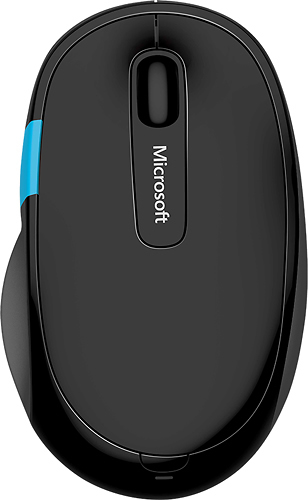
Customers express satisfaction with the Sculpt Comfort Wireless Optical Mouse's Bluetooth connectivity, ease of use, and comfortable size and weight. Many appreciate its long battery life and responsive tracking. However, some users reported issues with the scroll wheel, experiencing unexpected activation or malfunction. A few also noted occasional lag, though this was not a widespread concern.
This summary was generated by AI based on customer reviews.
great mouse!!
Posted .This reviewer received promo considerations or sweepstakes entry for writing a review.Mouse works flawlessly! Has several programmable buttons and a cool touch feature. It's small and portable and the battery life isn't too bad.
I would recommend this to a friendnice touch
Posted .This reviewer received promo considerations or sweepstakes entry for writing a review.I have a comparatively small hand, but this one works well for me. it is kind of tricky at first because it doesn't have a receiver like the other wireless mouse, but it pairs with bluetooth. Initially I wanted to use it on a desktop but forgot it doesn't have bluetooth. It was a disappointment, but I switched to use it to my other computer and use it well now.
I would recommend this to a friend- Pros mentioned:Bluetooth
Perfect for Surface Pros
Posted .This reviewer received promo considerations or sweepstakes entry for writing a review.Works great with my Surface Pro 3. Love that it is bluetooth.
I would recommend this to a friend - Cons mentioned:Windows button
Great mouse but poor customization
Posted .This reviewer received promo considerations or sweepstakes entry for writing a review.I bought this in a bundle with the sculpt keyboard about six months ago. The mouse is for the most part comfortable, but not very customizable. The windows button on the side is touch enabled but there's a lack of what you can do with it and not conveniently located. It's definitely worth the $20 it's priced at according to this review, but if you've got some extra money to spend I'd go with one of Logitech's MX series.
I would recommend this to a friendBrand response from MicrosoftOutreachTeam
Posted .Hi there,
Thanks for reaching out. Microsoft has a great support resource for the Sculpt Comfort Wireless Optical Mouse where you can find information on the default buttons and wheel assignments for your mouse. You can access the accessories support here: https://support.microsoft.com/en-us/hub/4338553/pc-accessories-help.
Best,
Heather
Microsoft Customer Care
Great mouse
Posted .This reviewer received promo considerations or sweepstakes entry for writing a review.What I like the most about this noise is that I can go left and right on excel sheet much faster than before
I would recommend this to a friendLove This Mouse!
Posted .This reviewer received promo considerations or sweepstakes entry for writing a review.I love this mouse for a variety of reasons. It feels really good, lightweight, and you can program macros and execute them with one button. If you want more from your mouse without having one of those 50 button gaming mice then this is a good alternative.
I would recommend this to a friendI love this Mouse
Posted .This reviewer received promo considerations or sweepstakes entry for writing a review.Others have noted that with Windows 8 and 8.1, the Bluetooth connectivity would go in and out. I've had that same experience, but the problem is not with the mouse but with how Windows Bluetooth is configured by default. There is a setting in Device Manager, under Bluetooth, under the Intel hardware adapter, on the power management tab that allows for a correction of the problem. Simply uncheck the box labeled "Allow the computer to turn off This device to save power" and your intermittent connection problems will go away. It might cost you a bit of battery time, but really not very much, and it's worth it. If you don't make this change the mouse is almost useless because if it sits idle for a few minutes, windows will turn off Bluetooth and - no more mouse.
I would recommend this to a friend- Pros mentioned:Bluetooth
Good for what is needed.
Posted .This reviewer received promo considerations or sweepstakes entry for writing a review.I purchased this because of need and price. My computer needed a Bluetooth mouse and as I looked at options and this one seemed to fit. I like it with the exception of where the quick button is. Because of the size of the mouse it isn't easy to quickly push the shortcut button. Other than that, I enjoy it. Had one issue of connectivity, but it was fixed quickly.
I would recommend this to a friend - Pros mentioned:Bluetooth
Does the job
Posted .This reviewer received promo considerations or sweepstakes entry for writing a review.I was looking for a functional bluetooth mouse so I wouldn't have to use an extra usb slot on my MacBook pro. It works as it should although I haven't found a use for the windows button. I like having the left and right built into the scroll wheel as I had a hard time finding a bluetooth mouse with over 6 buttons. I had a razer brand mouse before that was nice but stopped working on me so I choose this one
I would recommend this to a friend seems like a great mouse
Posted .This reviewer received promo considerations or sweepstakes entry for writing a review.I knew this mouse was bluetooth and just assumed my pc was too, but wasn't. so didn't actually get to use it but for the sale price I paid it felt like a great mouse.
I would recommend this to a friendWould love to give it 5 stars
Posted .This reviewer received promo considerations or sweepstakes entry for writing a review.I actually really like this mouse and I have had it for a couple of years. The only reason I did not give 5 stars is because of the side buttons and other functions - I am left handed therefore the bulk of my hand lays over the Windows side function - it is very sensitive and constantly switching back to windows when that is not what I wanted. There must also be a back and forward web page function because the mouse constantly switches back to the last web page without me doing anything (on purpose). I am convinced it is because of the left handed issue. I have learned to carefully move the mouse away if I am typing into a web page and using the keyboard to navigate but that makes for a diminished mouse experience. I have found that when I have connectivity issues that fresh batteries does the trick. Overall I really like the product but Microsoft needs to consider us lefties when placing the feature buttons.
I would recommend this to a friendtoo flat
Posted .This reviewer received promo considerations or sweepstakes entry for writing a review.I have to return this mouse, once this mouse is too flat, that cannot fit well to my hand and working style. Feels pretty uncomfortable. But good buttons and construction
No, I would not recommend this to a friend- Pros mentioned:Comfortable
TLDR: It died after six months.
Posted .This reviewer received promo considerations or sweepstakes entry for writing a review.It doesn't have a dongle compartment and that's unfortunate. The dongle is so long and so awkward. They really missed an opportunity to help the consumer protect their devices. You see, Microsoft forces you to buy a new keyboard/mouse if you lose/break the dongle because they're specifically keyed for each device to avoid "confusion" with other devices. Guys, this dongle is so long and so easy to break, and who hasn't lost a dongle before?.. Wait. Maybe they didn't miss an opportunity? Perhaps, this was intentional oversight to force customers into unnecessarily buying new devices. PSSH. I digress.. The touch tab is cool. It's definitely easier to take screenshots using the touch tab instead of having to awkwarding press all those pesky keys at once. Also, the mouse itself is pretty comfortable and has a nice weight to it, not too heavy or light. Given all this and despite the missing dongle compartment, it could be said that I was satisfied with my purchse. I may have even been happy.. The most unfortanute thing is that I was satisfied and possibly happy. I was. Now I am not. Now I am unhapy. I am unhappy because this mouse decided it did not want to work for me after six months of what I thought was a mostly blissful relationship, and it didn't even have the decency to provide two weeks' notice. Rude. Rude and inconsiderate. I will not purchase this product again.
No, I would not recommend this to a friend - Pros mentioned:Bluetooth
4 Star Wireless Mouse
Posted .This reviewer received promo considerations or sweepstakes entry for writing a review.Excellent wireless mouse - good weight! Not flimsy like other brands. Uses bluetooth so does not require a dongle.
I would recommend this to a friend Great Mouse
Posted .This reviewer received promo considerations or sweepstakes entry for writing a review.this is a very good mouse. I use it for travel to save on USB ports on my Surface Pro.
I would recommend this to a friendLags
Posted .This reviewer received promo considerations or sweepstakes entry for writing a review.Fits well, but suffers from significant lag when moving mouse. Using with Surface 7+. Lag not attributed to any issues. When I switch to other mice, all show no lag. Its constructed well and is larger than my microsoft mobile 3600. The 3600 has no lag issues. My suggestion is there are plenty of other mice to consider at same or better price point.
No, I would not recommend this to a friendGreat
Posted .This reviewer received promo considerations or sweepstakes entry for writing a review.this is great product so far as i am using this like this
I would recommend this to a friend- Pros mentioned:Bluetooth
Great Bluetooth mouse!
Posted .This reviewer received promo considerations or sweepstakes entry for writing a review.Great Bluetooth mouse! But I like the most is that it doesn't need a wireless transceiver ( USB plug ). Foley, as well as a windows button where the thumb is on the mouse! Got it on sale, couldn't be happier.
I would recommend this to a friend It Gets the Job Done
Posted .This reviewer received promo considerations or sweepstakes entry for writing a review.It's a good mouse. The bluetooth connection drops every now and then, but it's a minor issue. The blue button is gimmicky, but not as much if used regularly. If you're looking for a good, ergonomic mouse at a decent price, you can't go wrong with this one.
I would recommend this to a friend- Pros mentioned:Compatibility
so far so good
Posted .This reviewer received promo considerations or sweepstakes entry for writing a review.have used this mouse for months after purchasing. Everything is perfect with my surface pro 3.
I would recommend this to a friend