Customer Ratings & Reviews

- Model:
- 8WV-00001
- |
- SKU:
- 10148499
Customer reviews
Rating 4.5 out of 5 stars with 736 reviews
(736 customer reviews)Rating by feature
- Value4.2
Rating 4.2 out of 5 stars
- Quality4.6
Rating 4.6 out of 5 stars
- Ease of Use4.6
Rating 4.6 out of 5 stars
to a friend
Customers are saying
Customers find value in the Surface Slim Pen (2nd Edition)'s ease of use, overall performance, and lightweight design. Compatibility and accuracy are also appreciated, along with its comfortable feel and full-size pen experience. However, some customers have expressed concerns about the lack of an included charger and the product's high price.
This summary was generated by AI based on customer reviews.
Rated 3 out of 5 stars
Needs charger
||Posted . Owned for 2 weeks when reviewed.This reviewer received promo considerations or sweepstakes entry for writing a review.I like the pen if I could use it. I don’t like you have to buy the charger separately and no one mentioned this…. Now I’ve got a pen I’ve never used
This review is from Microsoft - Surface Slim Pen (2nd Edition) - Matte Black
No, I would not recommend this to a friendRated 5 out of 5 stars
Surface pen
||Posted . Owned for 3 weeks when reviewed.This reviewer received promo considerations or sweepstakes entry for writing a review.This pen is great. It's smooth and reacts to my every move.
This review is from Microsoft - Surface Slim Pen (2nd Edition) - Matte Black
I would recommend this to a friendRated 3 out of 5 stars
Good product but easy to lose
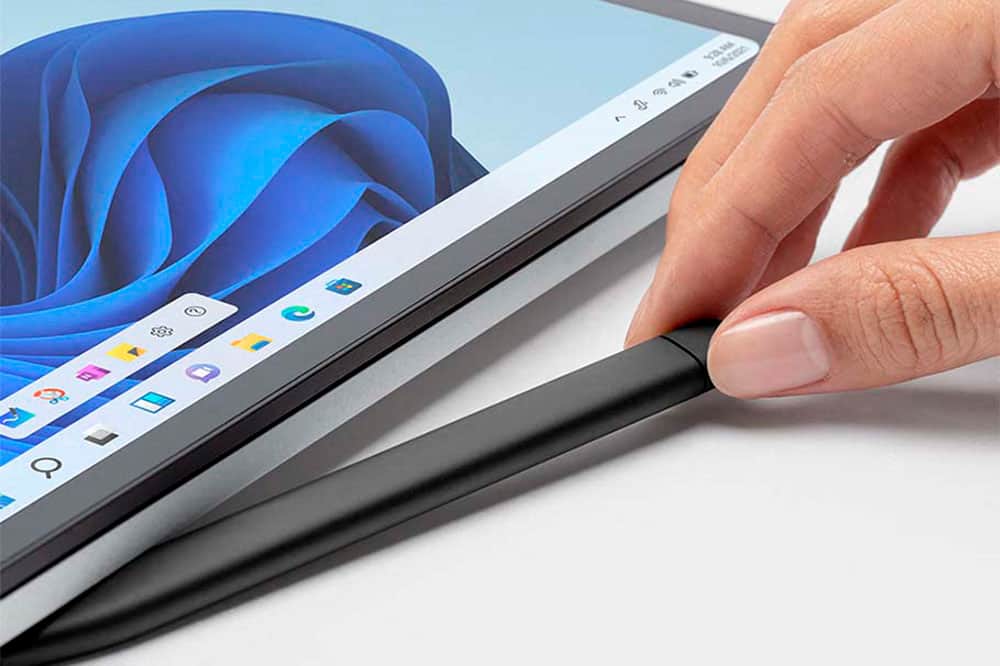
||Posted .This reviewer received promo considerations or sweepstakes entry for writing a review.Good product. I feel like it may be a bit expensive for the features it has but overall good product. I already did lose it. I would recommend if compatible with your surface that you use the keyboard that can charge and hold it. I didn’t and it was easily misplaced with the charger if it disconnected or fell into furniture cracks. No tracking option either to find in case it gets lost
This review is from Microsoft - Surface Slim Pen (2nd Edition) - Matte Black
I would recommend this to a friendRated 5 out of 5 stars
Worth it
||Posted .This reviewer received promo considerations or sweepstakes entry for writing a review.Great product I love using it for taking sermon notes!
This review is from Microsoft - Surface Slim Pen (2nd Edition) - Matte Black
I would recommend this to a friendRated 5 out of 5 stars
Surface slim pen
||Posted . Owned for 1 month when reviewed.This reviewer received promo considerations or sweepstakes entry for writing a review.Love this pen bought it as a back up but now use it as my main pen good quality and feels nice in your hand
This review is from Microsoft - Surface Slim Pen (2nd Edition) - Matte Black
I would recommend this to a friendRated 5 out of 5 stars
Microsoft Slim Pen
||Posted . Owned for 1 month when reviewed.This reviewer received promo considerations or sweepstakes entry for writing a review.Nice and compact. It works great. Get one for your surface today.
This review is from Microsoft - Surface Slim Pen (2nd Edition) - Matte Black
I would recommend this to a friendRated 5 out of 5 stars
Great Device
||Posted . Owned for 1 year when reviewed.This reviewer received promo considerations or sweepstakes entry for writing a review.Love using the Slim Pen 2 with the Surface Pro 8. I never used the other pens prior so I can't compare with other pens but this pen is pretty nice and comfortable to use for the shape that it has. I like the pressure sensitivity that is has on some programs and the buttons it has.
This review is from Microsoft - Surface Slim Pen (2nd Edition) - Matte Black
I would recommend this to a friendRated 5 out of 5 stars
Perfect
||Posted .This reviewer received promo considerations or sweepstakes entry for writing a review.Great weight and better feel than the first pen. There is a more comfortable grip having two flat sides to this pen.
This review is from Microsoft - Surface Slim Pen (2nd Edition) - Matte Black
I would recommend this to a friendRated 4 out of 5 stars
Valuable Addition
||Posted . Owned for 3 weeks when reviewed.This reviewer received promo considerations or sweepstakes entry for writing a review.Lightweight on the pen. Additionally, the point feels very comfortable when it makes contact with the Surface Pro. The only downside would be its wide-ish shape, but you get used to it pretty quickly.
This review is from Microsoft - Surface Slim Pen (2nd Edition) - Matte Black
I would recommend this to a friendRated 5 out of 5 stars
Works
||Posted .This reviewer received promo considerations or sweepstakes entry for writing a review.It's great! I wish it could work on other tablets otherwise it gets the job done
This review is from Microsoft - Surface Slim Pen (2nd Edition) - Matte Black
I would recommend this to a friendRated 5 out of 5 stars
Works very well.
||Posted .This reviewer received promo considerations or sweepstakes entry for writing a review.Works very well with the surface pro. Nice design. Very comfortable.
This review is from Microsoft - Surface Slim Pen (2nd Edition) - Matte Black
I would recommend this to a friendRated 3 out of 5 stars
No charger and weird shape
||Posted . Owned for 3 weeks when reviewed.This reviewer received promo considerations or sweepstakes entry for writing a review.I don't like the shape feels weird and its not as smooth as it could be while drawing, so far only used it in paint so I could be wrong but I'm still learning how to use it so maybe it will get better as I get used to it plus it didn't come with a charger and I had to buy it separately, it should really come with the charger
This review is from Microsoft - Surface Slim Pen (2nd Edition) - Matte Black
No, I would not recommend this to a friendRated 5 out of 5 stars
Very nice product
||Posted . Owned for 3 months when reviewed.This reviewer received promo considerations or sweepstakes entry for writing a review.I love the size and capability of this new pen, it feels real good in my hand and makes working easy
This review is from Microsoft - Surface Slim Pen (2nd Edition) - Matte Black
I would recommend this to a friendRated 5 out of 5 stars
5 Stars
||Posted .This reviewer received promo considerations or sweepstakes entry for writing a review.Great pencil works perfectly. Highly recommended for Microsoft Surface.
This review is from Microsoft - Surface Slim Pen (2nd Edition) - Matte Black
I would recommend this to a friendRated 4 out of 5 stars
Great except tip stopped working
||Posted .This reviewer received promo considerations or sweepstakes entry for writing a review.Tip stopped responding to screen after about 6 months
This review is from Microsoft - Surface Slim Pen (2nd Edition) - Matte Black
I would recommend this to a friendRated 5 out of 5 stars
Great!
||Posted .This reviewer received promo considerations or sweepstakes entry for writing a review.Love how smooth this pen works. It works well with my surface pro as well as my hp 360 laptop
This review is from Microsoft - Surface Slim Pen (2nd Edition) - Matte Black
I would recommend this to a friendRated 5 out of 5 stars
black pencil
||Posted . Owned for 3 weeks when reviewed.This reviewer received promo considerations or sweepstakes entry for writing a review.one of my best purchase, easy to use, lightweight, elegant
This review is from Microsoft - Surface Slim Pen (2nd Edition) - Matte Black
I would recommend this to a friendRated 4 out of 5 stars
Great Pen
||Posted . Owned for 1 week when reviewed.This reviewer received promo considerations or sweepstakes entry for writing a review.This pen feels wonderful against the surface pro. It is easy to pair and writes very smoothly.
This review is from Microsoft - Surface Slim Pen (2nd Edition) - Matte Black
I would recommend this to a friendRated 5 out of 5 stars
Great pen
||Posted . Owned for 3 weeks when reviewed.This reviewer received promo considerations or sweepstakes entry for writing a review.Great "pen" for my new surface tablet / computer.
This review is from Microsoft - Surface Slim Pen (2nd Edition) - Matte Black
I would recommend this to a friendRated 5 out of 5 stars
Open box is great
||Posted .This reviewer received promo considerations or sweepstakes entry for writing a review.Works very nice, bought open boxed but looks good as new
This review is from Microsoft - Surface Slim Pen (2nd Edition) - Matte Black
I would recommend this to a friend