Customer Ratings & Reviews
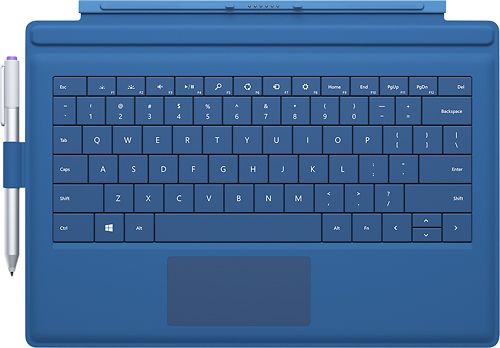
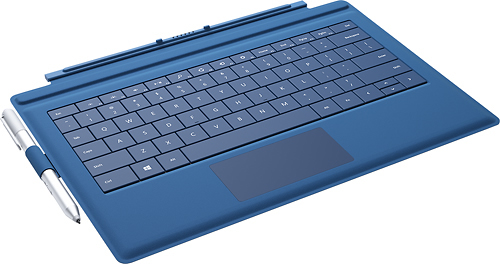
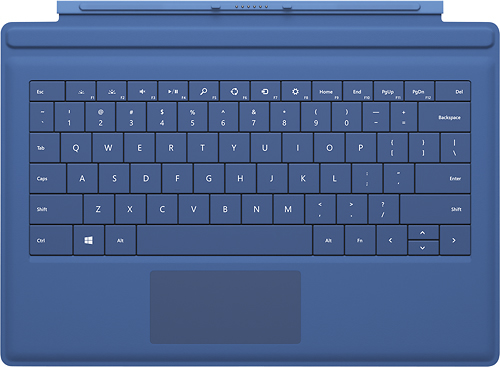
- Model:
- RD2-00107
- |
- SKU:
- 6729158
Customer reviews
Rating 4.6 out of 5 stars with 3447 reviews
(3,447 customer reviews)to a friend
Customers are saying
Customers regard the Type Cover for Surface Pro 3 keyboard favorably, praising its high-quality feel, ease of use, and lightweight design. Many appreciate its protective qualities and the variety of colors available. However, some customers find the price to be a drawback. A common criticism focuses on the pen holder's functionality.
This summary was generated by AI based on customer reviews.
- Pros mentioned:Keyboard qualityCons mentioned:Pen holder
Rated 4 out of 5 stars
Good Keyboard but Not so good Pen Holder
||Posted .This reviewer received promo considerations or sweepstakes entry for writing a review.Small in size the keyboard works great however the touch pen holder which came with it was useless. First it was not attached to the keyboard and you have to attach it using the sticky tape and it was not sticky enough hold it for long. Second the holder was so tight that the pen was not going through it.
This review is from Microsoft - Type Cover for Surface Pro 3 - Blue
I would recommend this to a friend - Pros mentioned:WeightCons mentioned:Price
Rated 4 out of 5 stars
Good overall but...
||Posted .This reviewer received promo considerations or sweepstakes entry for writing a review.Pros: Responsive, lightweight and protective. Cons: Price. Why it wasn't included with the Surface, I don't understand, as It's a necessity. The backing material will get dirty, no matter how well you take care of it. Over time it will become very ugly. This can't be helped, due to design of the Surface class, but if you have big hands, using the keyboard can be uncomfortable.
This review is from Microsoft - Surface Pro 3 Type Cover - Red
I would recommend this to a friend - Pros mentioned:Ease of use, Keyboard quality
Rated 4 out of 5 stars
almost perfect! except for one thing
||Posted .This reviewer received promo considerations or sweepstakes entry for writing a review.This type cover is almost the perfect keyboard for portability, the keys feel great the backlit keyboard is helps at night and the way it snaps to the Surface Pro it has an incline angle that is comfortable for extensive hours of typing. The only thing that still needs improvement is the trackpad, is way more responsive than previous generations but it's still not quite there.
I would recommend this to a friend - Pros mentioned:Ease of use, Keyboard quality
Rated 5 out of 5 stars
Great keyboard for MS Pro3
||Posted .This reviewer received promo considerations or sweepstakes entry for writing a review.Bought this keyboard for my 12-yr old son to use with his Pro3 tablet. He loves it! Feels like he has the most compact computer. Uses it to search the internet. Keys feel great, backlight makes it easy to find keyes in the dark. Makes typing and searching much faster than using the touch screen.
I would recommend this to a friend - Pros mentioned:Ease of use, Keyboard quality
Rated 5 out of 5 stars
Great keyboard
||Posted .This reviewer received promo considerations or sweepstakes entry for writing a review.This Surface Pro keyboard is great! It fits the Surface Pro 3 perfectly and is very easy to use. The keyboad is backlit which helps when you are typing in a dark room or airplane. This is a must have for any Surface Pro user. The keyboard also does a nice job of covering the screen when it is closed.
This review is from Microsoft - Type Cover for Surface Pro 3 - Blue
I would recommend this to a friend - Pros mentioned:Ease of use, Keyboard quality
Rated 5 out of 5 stars
Like the new type cover
||Posted .This reviewer received promo considerations or sweepstakes entry for writing a review.The new type cover works well and is easy to type on. Transitioning from a laptop, I've had no problems adapting. The ability to angle the cover using the secondary magnet is nice and makes typing even more comfortable, though it can be a bit noisier depending on the surface you are typing on.
This review is from Microsoft - Type Cover for Surface Pro 3 - Black
I would recommend this to a friend - Pros mentioned:Color, Ease of useCons mentioned:Price
Rated 4 out of 5 stars
Good
||Posted .This reviewer received promo considerations or sweepstakes entry for writing a review.Good and easy to use ,I like it ,nice colors ,however it is expensive
This review is from Microsoft - Type Cover for Surface Pro 3 - Purple
I would recommend this to a friend - Pros mentioned:Protection
Rated 5 out of 5 stars
Nice tactile touch feel to the keys
||Posted .This reviewer received promo considerations or sweepstakes entry for writing a review.The cover is sized right to fit the Surface Pro 3 and doubles as a form of protection, when closed. It does add some, but not too much weight. I combined the type cover keyboard with a MoKo Rotatory Detachable Type / Touch Keyboard Cover Companion Sleeve Case (removing the detachable sleeve).
This review is from Microsoft - Type Cover for Surface Pro 3 - Black
I would recommend this to a friend - Pros mentioned:Keyboard quality, Weight
Rated 5 out of 5 stars
Graduation gift
||Posted .This reviewer received promo considerations or sweepstakes entry for writing a review.I purchased this and the Microsoft Surface Pro 3 as a graduation gift for my son, who will be going away to college in the Fall. The keyboard is light and the keys look to be standard size, but my son hasn't put the item to use yet because the Surface Pro 3 doesn't ship until the end of August 2014.
This review is from Microsoft - Type Cover for Surface Pro 3 - Blue
I would recommend this to a friend - Pros mentioned:Ease of use, Keyboard quality
Rated 4 out of 5 stars
Handy for working on spreadsheets and letters
||Posted .This reviewer received promo considerations or sweepstakes entry for writing a review.The detachable keyboard is really handy for working on spreadsheets and formal letters, things that you like to have access to the full screen to work on. Doubles as a good screen protector. Easy to attach. Just make sure you need the keyboard 'cause if you don't need it you have to find a place to put it while you use the surface pro 3's on screen keyboard.
This review is from Microsoft - Type Cover for Surface Pro 3 - Blue
I would recommend this to a friend - Pros mentioned:Ease of use, Keyboard quality
Rated 4 out of 5 stars
Compact and flexible
||Posted .This reviewer received promo considerations or sweepstakes entry for writing a review.After watching several YouTube video I decided to buy a Surface Pro 3 and well this keyboard is the natural choice. I had my reservations but I'm glad I got it. Work very well and is a lot more flexible to use than I ever thought it was going to be. Stability was also a concern but hasn't been a problem at all. Great design and more portable than my laptop.
This review is from Microsoft - Type Cover for Surface Pro 3 - Blue
I would recommend this to a friend - Pros mentioned:Keyboard qualityCons mentioned:Price
Rated 5 out of 5 stars
Extremely light & thin with great build quality!
||Posted .This reviewer received promo considerations or sweepstakes entry for writing a review.Pros: Very well made and fairly good keyboard feel for the overall thinness and light weight. Cons: Fairly pricey compared to other blue tooth keyboards. Keyboard feel doesn't come close to the best laptop keyboards and the touch pads on most laptops is much better in regards to accuracy.
This review is from Microsoft - Type Cover for Surface Pro 3 - Black
I would recommend this to a friend - Pros mentioned:Ease of use, Keyboard quality
Rated 5 out of 5 stars
Ultrathin Keyboard
||Posted .This reviewer received promo considerations or sweepstakes entry for writing a review.The light, ultrathin keyboard is a great addition to the Surface Pro 3 because it provides protection and performance whether you're at home, at work or on the go. It also doubles as a screen-protecting case and sits at an incline on flat surfaces for a comfortable typing experience.
This review is from Microsoft - Type Cover for Surface Pro 3 - Blue
I would recommend this to a friend - Pros mentioned:Ease of use, Keyboard quality
Rated 5 out of 5 stars
Great Keyboard
||Posted .This reviewer received promo considerations or sweepstakes entry for writing a review.This is a great keyboard. It's not amazing; it won't blow your mind. But this is a quality mechanical keyboard. Typing on it is natural and required no 'learning curve' by which I mean I did not have to get used to it. I love the magnetic snapping making it easy to attach and detach.
This review is from Microsoft - Type Cover for Surface Pro 3 - Black
I would recommend this to a friend - Pros mentioned:Keyboard qualityCons mentioned:Price
Rated 5 out of 5 stars
Its a Keyboard for Surface Pro 3
||Posted .This reviewer received promo considerations or sweepstakes entry for writing a review.Its a keyboard and it makes things much easier when you have to type of any large documents on the Surface Pro. I would recommend going with this keyboard vs the other aftermarket ones. The price is a bit higher then aftermarket but the quality is there.
This review is from Microsoft - Type Cover for Surface Pro 3 - Purple
I would recommend this to a friend - Pros mentioned:Keyboard quality, Protection
Rated 5 out of 5 stars
protection and performance
||Posted .This reviewer received promo considerations or sweepstakes entry for writing a review.Complement your Surface Pro 3 by adding protection and performance whether you're at home, at work or on the go. The ultrathin keyboard doubles as a screen-protecting case and sits at an incline on flat surfaces for a comfortable typing experience.
This review is from Microsoft - Type Cover for Surface Pro 3 - Purple
I would recommend this to a friend - Pros mentioned:Keyboard qualityCons mentioned:Pen holder
Rated 4 out of 5 stars
Good Keyboard
||Posted .This reviewer received promo considerations or sweepstakes entry for writing a review.The keyboard works great. I don't like the tab for the pen. It's difficult to get the pen in and out of. The tab also only sticks to the cover with something similar to double sided tape. So after a couple of times trying to use the pen, the tab just pulled off. Maybe, if you find a better place to stick it, you will have better luck.
This review is from Microsoft - Type Cover for Surface Pro 3 - Purple
I would recommend this to a friend - Pros mentioned:Keyboard quality
Rated 3 out of 5 stars
Not great, not terrible
||Posted .This reviewer received promo considerations or sweepstakes entry for writing a review.I got this keyboard just after my Surface Pro 3 was delivered. I've been working with it for several weeks now, and these are my observations: Pros: ~ Small size, particularly in thickness, is nice for keeping the overall size and weight of the Surface system down. ~ Official keyboard appears to be one of the better options available at this time. ~ It's fairly responsive and has a good feel under the fingers. Cons: ~ The touchpad is pretty bad. I've gotten to the point that I just use an external mouse 90% of the time -- but that takes up your one USB slot. It doesn't scroll well, although it performs better if you push it the other direction first (e.g., to scroll down, scroll up briefly, then down). ~ It's pretty flimsy, owing to its small size and weight. ~ The layout is a little different than other keyboards I use (e.g., there's only one Ctrl key, on the left). That takes a little getting used to.
This review is from Microsoft - Type Cover for Surface Pro 3 - Black
I would recommend this to a friend - Pros mentioned:Color, Keyboard quality
Rated 5 out of 5 stars
A must have for the Surface
||Posted .This reviewer received promo considerations or sweepstakes entry for writing a review.If you're getting a Surface, you have to get a keyboard. The Type Cover is great (would not recommend the Touch Cover). Red is a nice color. This Type Cover is a big improvement over previous ones, but that's largely just because of the size change with the new Surface
This review is from Microsoft - Surface Pro 3 Type Cover - Red
I would recommend this to a friend - Pros mentioned:Keyboard quality
Rated 5 out of 5 stars
Royal Type Cover
||Posted .This reviewer received promo considerations or sweepstakes entry for writing a review.I purchased purple color version, as it is a darker color, so you don't immediately see stains, and it gives an extra "royal' touch to the velvet like material and the whole setup in general. Keyboard typing is perfect: light, fast, accurate. Backlighting is nice. Touchpad works fine. Clicking the cover to the screen is a snap, and you can do it in two ways. I clean the keys and the cover material weekly with disinfectant wipes to keep it nice looking, and to prevent fat from your skin from building up.over time. layout of keyboard could be more functional: I'd prefer to have screen brightness control and volume control, instead of charms function buttons (F5 - F8). Overall it functions very well and have no complaints.
This review is from Microsoft - Type Cover for Surface Pro 3 - Purple
I would recommend this to a friend