Customer Ratings & Reviews







- Model:
- GA01331-US
- SKU:
- 6450820
Rating by feature
- Value
Rating 4.7 out of 5 stars
- Quality
Rating 4.7 out of 5 stars
- Ease of Use
Rating 4.6 out of 5 stars
Customers are saying
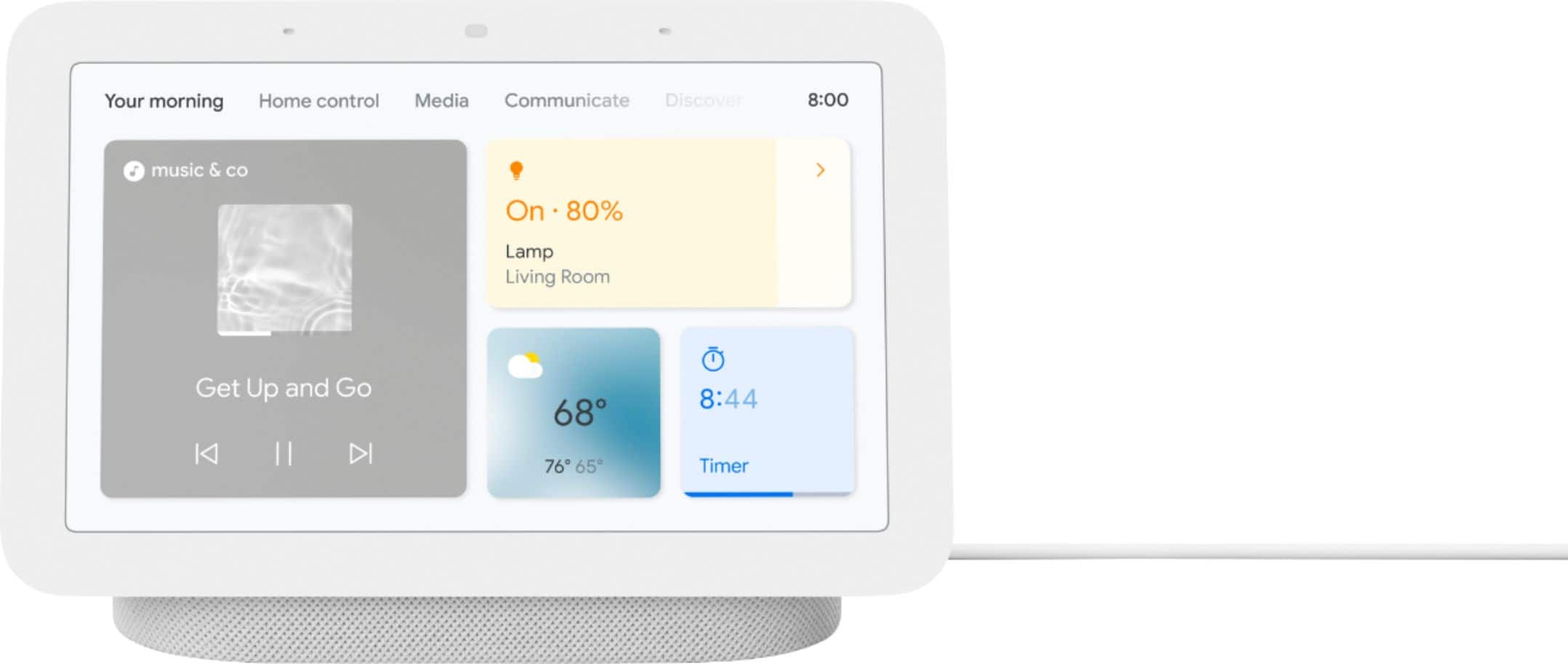
Customers appreciate the Nest Hub 2nd Gen for its ease of use, sound quality, and ideal screen size, especially for bedside use. The Google Assistant integration, reasonable price, and sleep tracking capabilities are also well-received. However, some customers have noted the absence of a camera and occasional sluggishness in responsiveness. Additionally, a few users mentioned compatibility issues with certain devices.
This summary was generated by AI based on customer reviews.
brittle display, buggy after a year
||Posted . Owned for 9 months when reviewed.This reviewer received promo considerations or sweepstakes entry for writing a review.worked well for over a year. now it's buggy. display cracks easily so make sure to keep it in a good place.
I would recommend this to a friendBrand response from Nest Support
Posted .Hi Pbmc, thanks for sharing a review about the Nest Hub (2nd gen). We’re sorry to learn it only worked well for over a year, and this is not the kind of experience we want you to have. Nest has long been focused on delivering quality products to our customers. That means obsessing over the details and ensuring products last a long time. We’re also focused on giving our customers value for the price. That said, we’d like to hear more about your concerns and learn how we can help you best. Please visit us anytime for assistance here: https://support.google.com/googlenest/gethelp

Updated to death
||Posted . Owned for 3 weeks when reviewed.This reviewer received promo considerations or sweepstakes entry for writing a review.Every single time this thing updates it takes features away. Google is going to get rid of it at this rate soon. I would not recommend today, I would have a few years ago. Ideally they start to revert some of these changes and I can change my review.
No, I would not recommend this to a friendBrand response from Nest Support
Posted .Hello drecker2, we appreciate you sharing your review on your Nest Hub(2nd gen). We're sorry to hear that your experience has been less than ideal when it comes to updating your device. Please know that your feedback here helps us understand the needs and preferences of our customers and rest assured that we'll relay them to the right team for improvements that we may provide in the future. If you need any assistance with your Nest Hub or have additional questions, feel free to contact us on our Google Help page here: https://support.google.com/googlenest/gethelp
- Cons mentioned:Compatibility
works well with google products
||Posted . Owned for 3 weeks when reviewed.This reviewer received promo considerations or sweepstakes entry for writing a review.works well with google products but not as friendly with other apps
I would recommend this to a friend - Pros mentioned:Ease of use
nest hub
||Posted .This reviewer received promo considerations or sweepstakes entry for writing a review.Google is always quality at its best no doubt and also ease to use
I would recommend this to a friend Useful regardless of your choice of assistant
||Posted . Owned for 3 weeks when reviewed.This reviewer received promo considerations or sweepstakes entry for writing a review.While the Amazon Echo 8 has more features including the ability to make video calls, the Nest Hub 7 does not bombard you with ads and needless stuff. I have both and while Alexa is my everyday assistant, having the Nest Hub is convenient for displaying my automation dashboard, viewing my next cameras, and filing in the holes that the Echo Show 8 leaves.
I would recommend this to a friendReliable and helpful
||Posted .This reviewer received promo considerations or sweepstakes entry for writing a review.This is my third Nest Hub 7" purchased within a year. I have one in the kitchen, another one in the home office and this last one for the bedroom. I like it available close by when I need it and having to see the response on screen over just listening to it.
I would recommend this to a friendOk device
||Posted . Owned for 3 weeks when reviewed.This reviewer received promo considerations or sweepstakes entry for writing a review.Its okay . It is a small screen but worth the price
I would recommend this to a friendBrand response from Nest Support
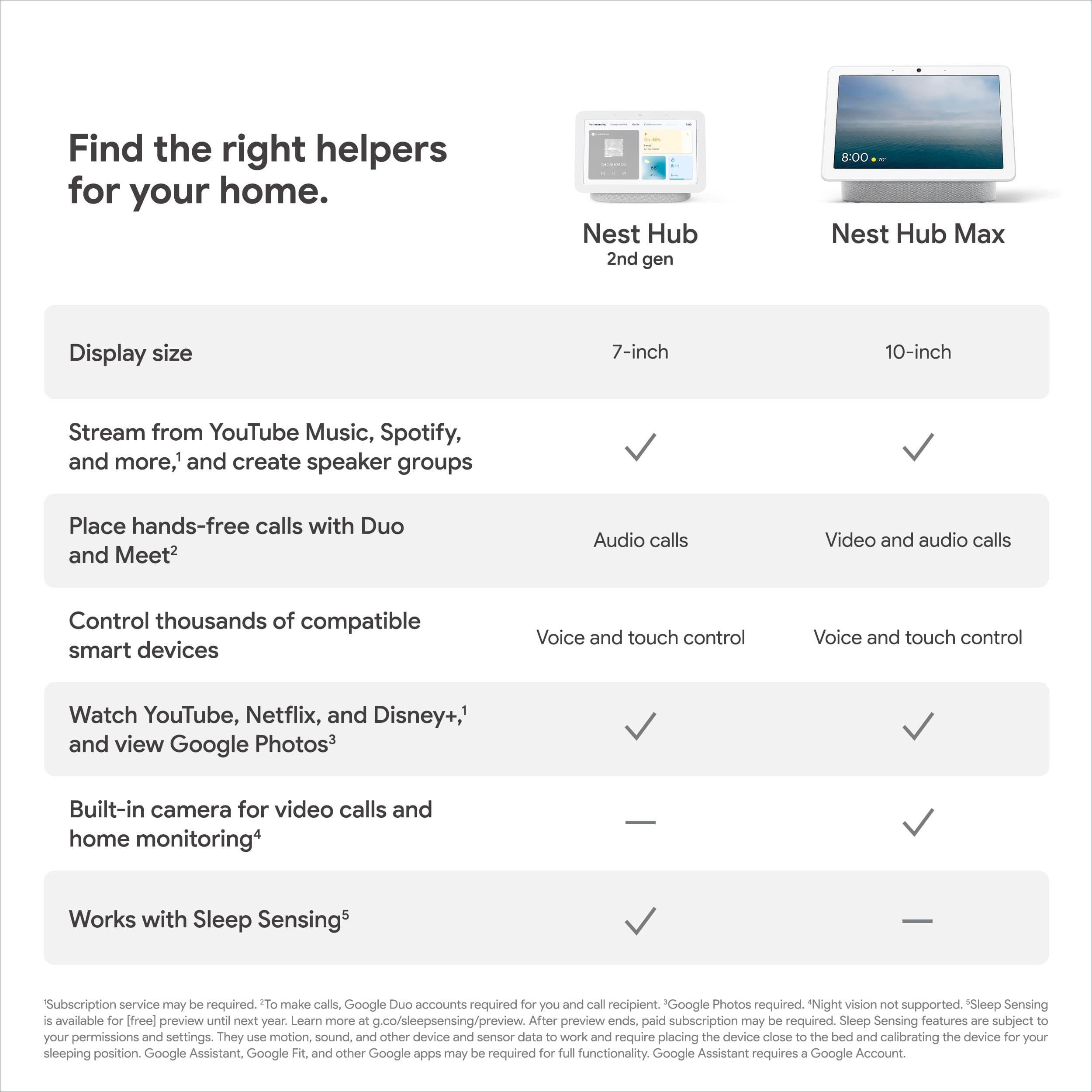
Posted .Hello there, Izzy. Thank you for choosing Nest Hub (2nd gen). We appreciate your feedback about the screen size and have taken note of it. For a bigger screen you might be interested in checking out the Nest Hub Max that comes with a 10" HD touchscreen. If you are in need of any assistance, please feel free to reach us on our 'Contact Us' page by visiting the Google Nest Help site here: https://support.google.com/googlenest/gethelp
Small screen, poor assistant support
||Posted . Owned for 2 months when reviewed.This reviewer received promo considerations or sweepstakes entry for writing a review.The screen is very small so it's basically a digital clock and weather display. The google assistant support on it is awful. The same voice command works on the phone but not on the hub.
No, I would not recommend this to a friendBrand response from Nest Support
Posted .Hello there, PeterY. Thanks for sharing your feedback on the Nest Hub (2nd Gen). We appreciate you taking the time to express your concerns. We understand that size might not matter for everyone. If you're looking for a larger display for consuming video content, browsing the web, or playing games, other Nest products like the Nest Hub Max. We're sorry for the inconsistency you've experienced with Google Assistant on the Nest Hub (2nd Gen). It is unexpected that the same voice command wouldn't work on your devices. You can try to troubleshoot your device by ensuring both your phone and Nest Hub are connected to the same Wi-Fi network. You also need to check if the device software is up to date. If these steps don't resolve the issue, we recommend reaching out to our dedicated team of specialists on the Google Help Center here: https://support.google.com/googlenest/gethelp
Love this product when I get ready in the mornings
||Posted . Owned for 3 weeks when reviewed.This reviewer received promo considerations or sweepstakes entry for writing a review.Sometimes it glitches. Not as easy as it seems. Overall I like it a lot.
I would recommend this to a friendWorthless purchase
||Posted . Owned for 3 weeks when reviewed.This reviewer received promo considerations or sweepstakes entry for writing a review.Not worth the effort of setting it up on Google Home. It's only good if you buy additional items to make full use of the unit.
No, I would not recommend this to a friendBrand response from Nest Support
Posted .Hi Zippy, thanks for sharing your feedback. We regret to hear that Nest Hub (2nd gen) didn’t meet your needs. Your feedback is important to us as it will greatly help us improve our products and services. If you have any questions or need assistance, our support team is always here to help. You can contact us anytime using this link: https://support.google.com/googlenest/gethelp
Its good
||Posted . Owned for 1 month when reviewed.This reviewer received promo considerations or sweepstakes entry for writing a review.Helps me controm smarthoke appliances well, not the fastest but that is not mainly what its for
I would recommend this to a friendBrand response from Nest Support
Posted .Hi Ivory, we’re glad to hear that the Nest Hub (2nd gen) helps you control your smart home devices well. But it’s unfortunate that its performance has not exceeded your expectations.
A range issue or wireless interference can affect the performance of your display. Sometimes it may pass the connection test during setup, but will struggle to stay connected if it’s just a bit too far away. You can try these simple steps below that might help:
- Check your Wi-Fi network for possible congestion. Relieving some of your connected devices may help free up some bandwidth space.
- Check the distance between the Nest display and your router. Ensure that it is within a line of sight from your router.
- Check for wireless interference with other Wi-Fi hotspots or appliances and devices nearby.
- Restart Nest display and router to refresh the connection.
For more help, feel free to contact us anytime by visiting: https://support.google.com/googlenest/gethelp
EXCELLENT
||Posted . Owned for 3 weeks when reviewed.This reviewer received promo considerations or sweepstakes entry for writing a review.I bought the Nest Hub 3 weeks ago and is flawless! I love the clock display and also it gets ready when I get close to with the display. I haven't tried all the functions yet, but so far I like it. I am planning to buy another Nest Hub for my mom.
I would recommend this to a friend- Cons mentioned:Response time
Returned it
||Posted . Owned for 3 weeks when reviewed.This reviewer received promo considerations or sweepstakes entry for writing a review.Everyday there was a new issue and features not available. Couldn't do it anymore when it would ignore commands and features were removed. Nest community forum was full of similar complaints. Sadly I returned it.
No, I would not recommend this to a friendBrand response from Nest Support
Posted .Hi there, thanks for the feedback you shared about your experience with using the Nest Hub (2nd gen), and we’re sorry to hear it’s an inconvenience for you. We can imagine how difficult it could have been for you, and we understand that you have returned it. If you find yourself wanting to try the Nest display some time again in the future, please know that our dedicated team of specialists is always ready to help you with your support needs here: https://support.google.com/googlenest/gethelp
- Cons mentioned:Camera
Not for me
||Posted . Owned for 3 weeks when reviewed.This reviewer received promo considerations or sweepstakes entry for writing a review.I bought this originally thinking it has a camera. It doesn't not. No point in buying.
No, I would not recommend this to a friendBrand response from Google Nest Support
Posted .Hey there, M1ghtyMac. We’re sorry the Nest Hub (2nd gen) wasn’t the right fit for you. We appreciate any feedback you may have. When you get a moment, here’s a survey: https://google.qualtrics.com/jfe/form/SV_2aStd8wsbcLGvwG
- Pros mentioned:Google assistant
Good
||Posted . Owned for 2 weeks when reviewed.This reviewer received promo considerations or sweepstakes entry for writing a review.It works great ,as per experience till mow it is pretty cool
No, I would not recommend this to a friend Awesome edition!
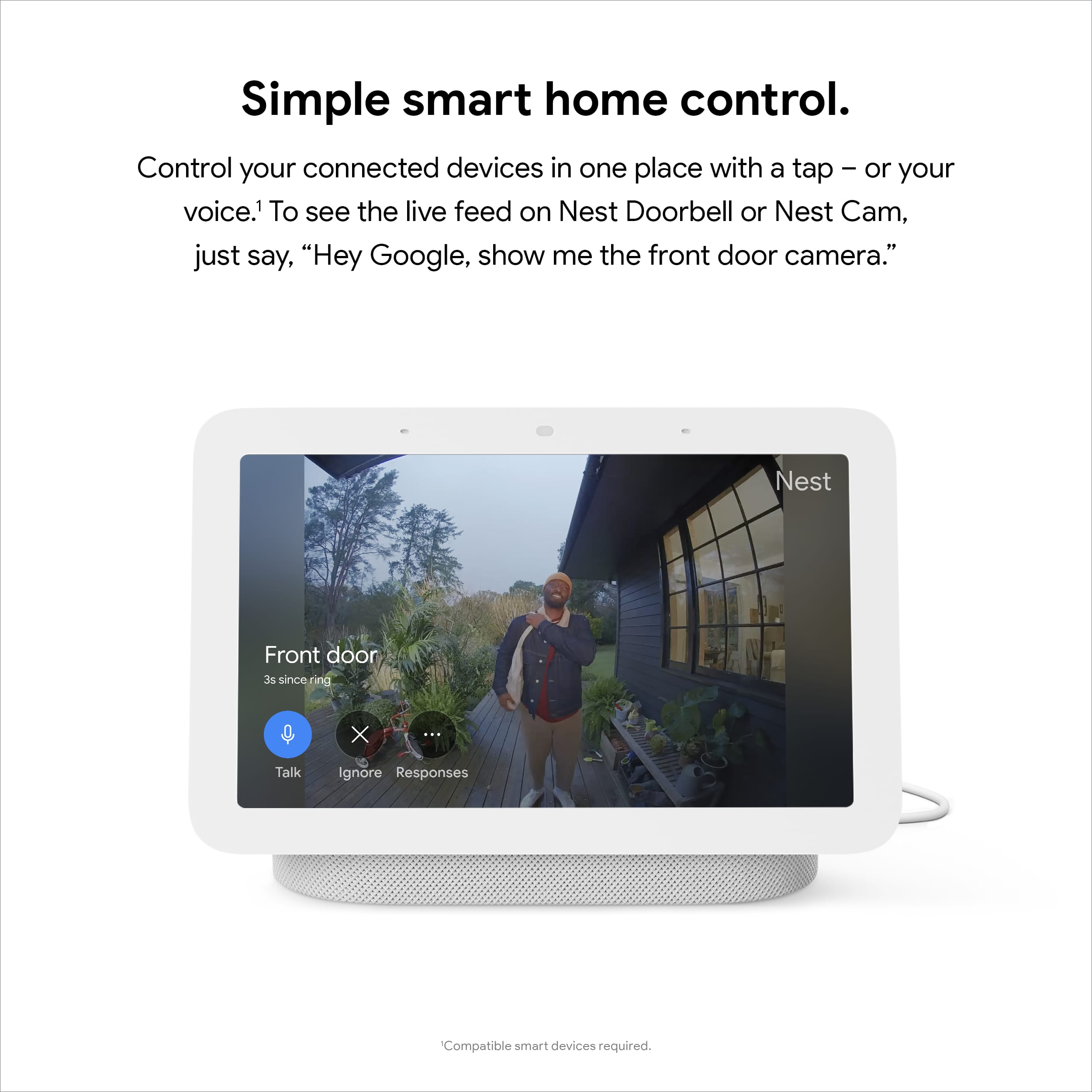
||Posted . Owned for 2 weeks when reviewed.This reviewer received promo considerations or sweepstakes entry for writing a review.This is awesome purchase, especially for my father in addition to cameras so that he doesn't have to always look at his phone, but he can look at the nest to view who's outside of who's at the door. I absolutely love it and he does too
I would recommend this to a friendbroke after 2 years
||Posted . Owned for 1.5 years when reviewed.This reviewer received promo considerations or sweepstakes entry for writing a review.broke after 2 years, google no help, i am left with a bricked smart clock
No, I would not recommend this to a friendBrand response from Nest Support
Posted .Hello there, Angelo. Thanks for leaving feedback about the Nest Hub (2nd gen). We’re sorry to hear you had trouble, and that we’ve fallen short on your support needs. We’re hoping you can give us another opportunity to help you with your concern. Please share with us your recent case reference so we can continue our investigation, here: https://support.google.com/googlenest/gethelp
Good product
||Posted . Owned for 2 weeks when reviewed.This reviewer received promo considerations or sweepstakes entry for writing a review.Interesting hub. Problems at the moment to conect the apps but my mother likes it.
I would recommend this to a friendBrand response from Nest Support
Posted .Hi there, thanks for sharing your insights with us. Though we're glad to hear that your mother likes Nest Hub (2nd Gen), we're sorry if you're experiencing any issues with the built-in features.
To better isolate the issue, we recommend trying out the following to see if the issue may be related to factors other than your Nest Hub (2nd Gen):
- Check for connectivity issues, such as possible congestion in your Wi-Fi network. Removing some of your connected devices can help free up some bandwidth space. You may then check to see if you will still experience the same connectivity issue.
- You might also want to check for possible interferences. There could be signal interference due to traffic on your Wi-Fi network, on your neighbors' Wi-Fi networks, or from other sources like microwaves, baby monitors, or even the thick walls of your home. Placing your Nest Hub (2nd Gen) in a straight line of sight with your Wi-Fi router may help improve the signal strength.
- Lastly, we recommend resetting Nest Hub (2nd Gen) to see if it might be helpful in fixing the issue. To reset, follow the steps here: https://support.google.com/googlenest/answer/7073477
If none of the steps provided prove to be helpful, please consider contacting our support team for further help here: https://support.google.com/googlenest/gethelp
- Pros mentioned:Ease of use
Google Hub
||Posted . Owned for less than 1 week when reviewed.This reviewer received promo considerations or sweepstakes entry for writing a review.I think it is good, lots of features and very helpful.
I would recommend this to a friend Alexa is better choice
||Posted .This reviewer received promo considerations or sweepstakes entry for writing a review.Just returned snd got alexa echo show 10.........display looks nice but no video call option
No, I would not recommend this to a friendBrand response from Nest Support
Posted .Hello Nick, thanks for posting your review on Nest Hub(2nd gen). We're sorry to hear that your experience with the device didn't meet your expectations when it comes to video calls and that you had to return it. If you decide to give Google Nest another go, we recommend you to check the Google Nest Hub Max which also has the option of video calling. For additional inquiries you can contact us anytime on our Google Help page here: https://support.google.com/googlenest/gethelp